AWS Architecture Blog
Unlock efficient model deployment: Simplified Inference Operator setup on Amazon SageMaker HyperPod
Amazon SageMaker HyperPod offers an end-to-end experience supporting the full lifecycle of AI development—from interactive experimentation and training to inference and post-training workflows. The SageMaker HyperPod Inference Operator is a Kubernetes controller that manages the deployment and lifecycle of models on HyperPod clusters, offering flexible deployment interfaces (kubectl, Python SDK, SageMaker Studio UI, or HyperPod CLI), advanced autoscaling with dynamic resource allocation, and comprehensive observability that tracks critical metrics like time-to-first-token, latency, and GPU utilization.
Deploying inference workloads on Kubernetes-native infrastructure has traditionally required AI teams to navigate a maze of Helm charts, IAM role configurations, dependency management, and manual upgrades — often taking hours before a single model can serve predictions. Today, we’re announcing the Amazon SageMaker HyperPod Inference Operator as a native EKS add-on, enabling one-click installation and managed upgrades directly from the SageMaker console. This eliminates the need for manual Helm charts, complex IAM configuration tweaks, and downtime during upgrades.
In this post, we walk through the new installation experience, demonstrate three deployment methods (console, CLI, and Terraform), and show how features like multi-instance-type deployment and native node affinity give you fine-grained control over inference scheduling
Simplified installation experience
The new installation experience addresses three key customer scenarios with streamlined workflows:
New HyperPod clusters: Automatic installation
When creating new HyperPod clusters through the SageMaker console’s Quick Setup or Custom Setup workflows, the Inference Operator along with necessary dependencies is now installed through EKS add-on automatically as part of the cluster creation process. This eliminates the need for post-deployment configuration and ensures your cluster is ready for model deployments immediately upon creation along with one click upgrades.
Existing clusters: One-click installation
For existing HyperPod clusters, customers can install the Inference Operator with a single click through the SageMaker console. The installation automatically:
- Creates required IAM roles with appropriate trust relationships and permissions
- Sets up S3 buckets for TLS certificate storage
- Configures VPC endpoints for secure S3 access
- Installs dependency add-ons (cert-manager, S3 CSI driver, FSx CSI driver, metrics-server)
- Deploys the Inference Operator as an EKS add-on
Managed upgrades and lifecycle
The EKS add-on integration provides standardized version management with one-click upgrades through the AWS console or CLI. This ensures customers can easily adopt new features and security updates without complex manual procedures.
The below prerequisite resources are needed to be setup before installing the Inference operator add-on. These prerequisites will be setup if SageMaker AI console is used to setup Inference operator. However, if EKS cli or console is used, these prerequisites will need to be created manually and passed to the add-on through configuration parameters. We discuss these approaches in Installation Methods.
List of prerequisites
- EKS add-ons (S3 Mountpoint csi driver add-on, FsX add-on, Cert Manager add-on, Metrics server add-on)
- IAM roles (Inference operator execution role, ALB role, KEDA role, Optional JumpStart Gated models role)
- Infrastructure (S3 bucket to manage TLS certificates, OIDC association on the cluster,
For more information refer to this trouble shooting guide.
Installation methods
Method 1: Install SageMaker HyperPod Inference Add-on through SageMaker UI (Recommended)
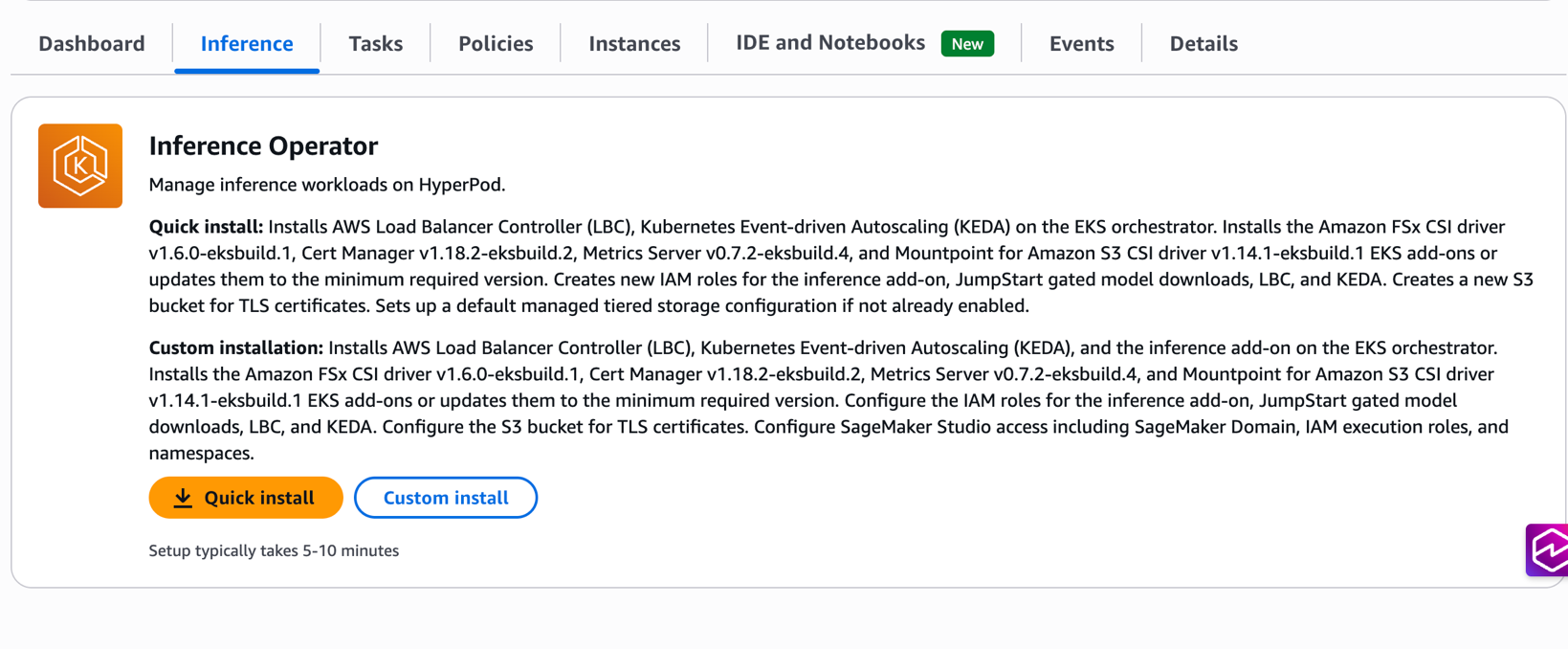
The SageMaker console provides the most streamlined experience with two installation options:
Quick install: Automatically creates all required resources with optimized defaults, including IAM roles, S3 buckets, and dependency add-ons. This option is ideal for getting started quickly with minimal configuration decisions.
Custom install: Provides flexibility to specify existing resources or customize configurations while maintaining the one-click experience. Customers can choose to reuse existing IAM roles, S3 buckets, or dependency add-ons based on their organizational requirements.
Prerequisites
- An existing Amazon SageMaker HyperPod cluster with EKS orchestration
- IAM permissions for EKS cluster administration
- kubectl configured for cluster access
Installation steps
- Navigate to the SageMaker Console: Go to HyperPod Clusters → Cluster Management
- Select Your Cluster: Choose the cluster where you want to install the Inference Operator
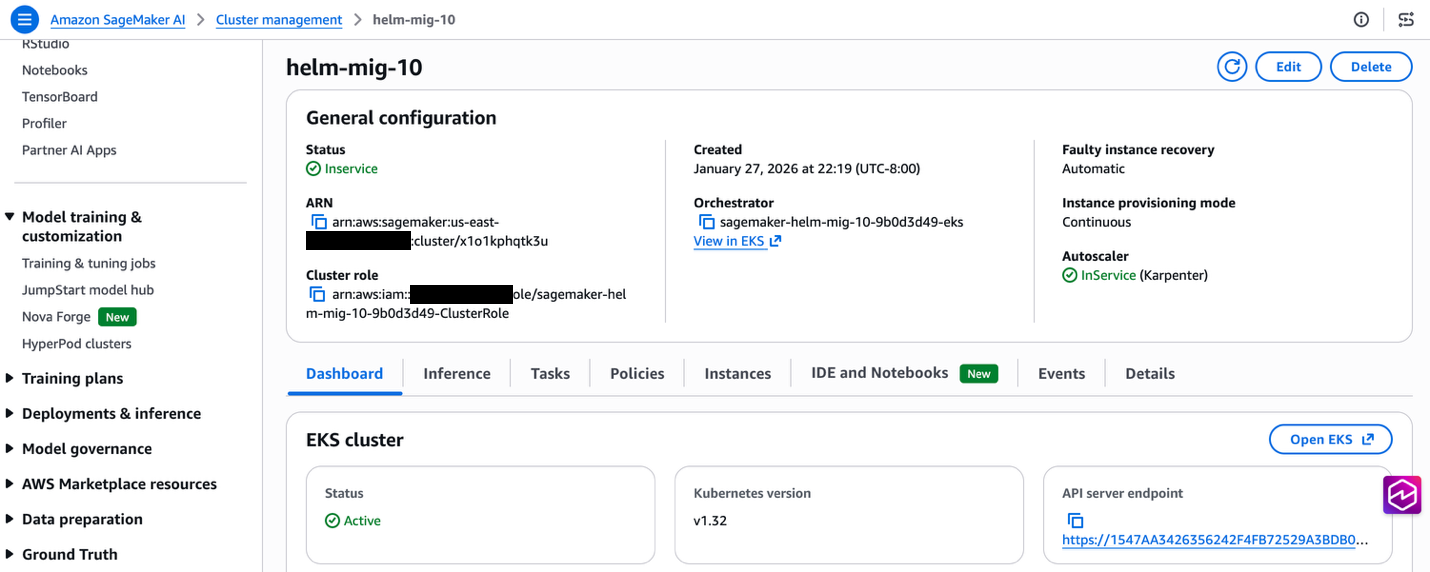
- Choose Installation Type: Navigate to Inference tab. Select Quick Install for automated setup or Custom Install for configuration flexibility
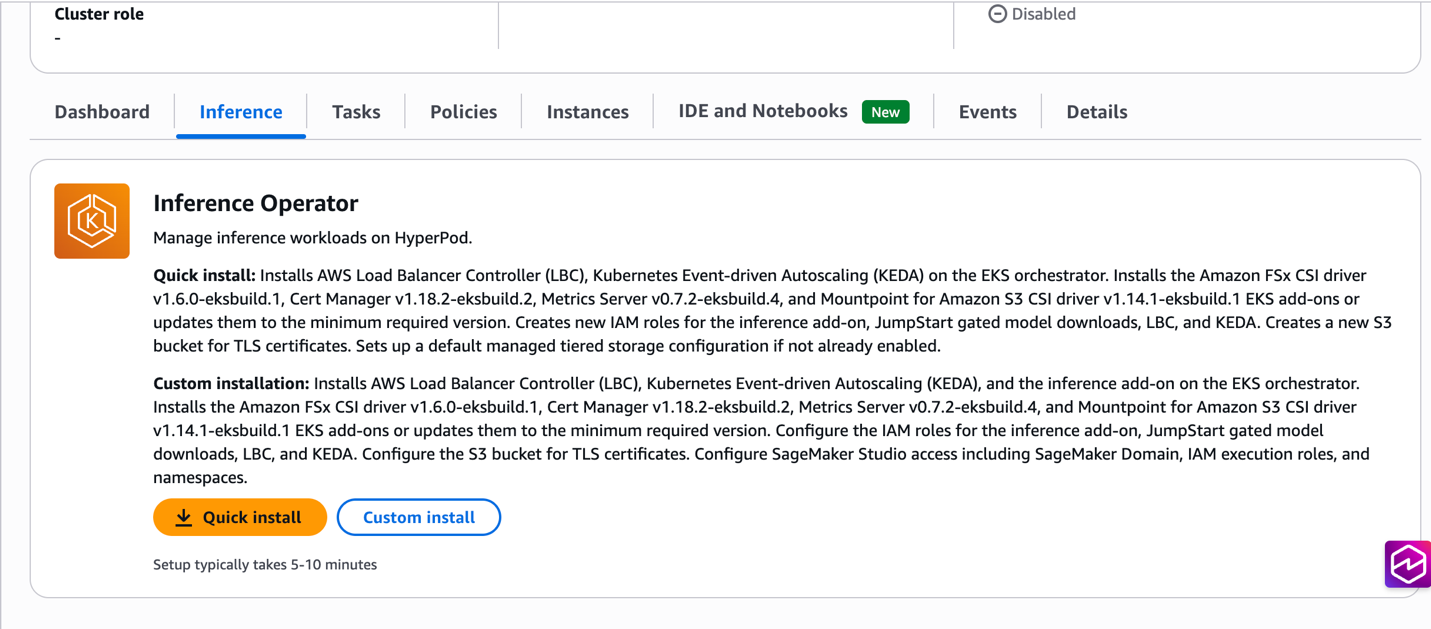
- Configure Options: If choosing Custom Install, specify existing resources or customize settings as needed
- Install: Choose Install to begin the automated installation process
- Verify: Check the installation status through the console, or by running
kubectl get pods -n hyperpod-inference-system, or by checking the add-on status withaws eks describe-addon --cluster-name CLUSTER-NAME --addon-name amazon-sagemaker-hyperpod-inference --region REGION
After the add-on is successfully installed, you can deploy models using the Model deployments document or navigate to Deploying Your First Model section below.
Method 2: Install SageMaker HyperPod Inference add-on through EKS APIs
For customers preferring command-line workflows, the Inference Operator can be installed directly using the EKS CLI. Note that all prerequisite resources (IAM roles, S3 buckets, VPC endpoints) and dependency add-ons must be created manually before installing the Inference Operator add-on. For detailed setup instructions, see the installation guide.
aws eks create-addon \
  --cluster-name my-hyperpod-cluster \
  --addon-name amazon-sagemaker-hyperpod-inference \
  --addon-version v1.0.0-eksbuild.1 \
  --configuration-values '{
    "executionRoleArn": "arn:aws:iam::ACCOUNT-ID:role/SageMakerHyperPodInference-inference-role",
    "tlsCertificateS3Bucket": "hyperpod-tls-certificate-bucket",
    "hyperpodClusterArn": "arn:aws:sagemaker:REGION:ACCOUNT-ID:cluster/CLUSTER-ID",
    "alb": {
      "serviceAccount": {
        "create": true,
        "roleArn": "arn:aws:iam::ACCOUNT-ID:role/alb-controller-role"
      }
    },
    "keda": {
      "auth": {
        "aws": {
          "irsa": {
            "roleArn": "arn:aws:iam::ACCOUNT-ID:role/keda-operator-role"
          }
        }
      }
    }
  }' \
  --region us-west-2
Method 3: Install SageMaker HyperPod Inference add-on through Terraform deployment
Organizations utilizing Terraform for Infrastructure as Code (IaC) can deploy HyperPod clusters using the provided modules in the awesome-distributed-training GitHub repository.
To enable the HyperPod inference operator, set the create_hyperpod_inference_operator_module variable to true within your custom.tfvars file, as shown below:
kubernetes_version    = "1.33"
eks_cluster_name      = "tf-eks-cluster"
hyperpod_cluster_name = "tf-hp-cluster"
resource_name_prefix  = "tf-eks-test"
aws_region            = "us-east-1"

instance_groups = [
    {
        name                      = "accelerated-instance-group-1"
        instance_type             = "ml.g5.8xlarge",
        instance_count            = 2,
        availability_zone_id      = "use1-az2",
        ebs_volume_size_in_gb     = 100,
        threads_per_core          = 1,
        enable_stress_check       = false,
        enable_connectivity_check = false,
        lifecycle_script          = "on_create.sh"
    }
]

create_hyperpod_inference_operator_module = true
In addition to the HyperPod inference operator add-on, the Terraform modules also support the task governance, training operator, and observability add-ons as well. Check out the documentation for enabling optional add-ons for more details.
Dependency management
The HyperPod inference operator includes several additional dependencies, which are enabled by default but can be toggled off if they already exist on your EKS cluster:
| Dependency | Module/Variable | Toggle to Disable |
| cert-manager | Installed via the HyperPod module | enable_cert_manager = false |
| Amazon FSx for Lustre CSI | Installed via FSx module | create_fsx_module = false |
| Mountpoint for Amazon S3 CSI | Bundled with Inference Operator Module | enable_s3_csi_driver = false |
| AWS Load Balancer Controller | Bundled with Inference Operator EKS add-on | enable_alb_controller = false |
| KEDA Operator | Bundled with Inference Operator EKS add-on | enable_keda = false |
Key benefits
Faster time to value
Teams can now deploy their first inference endpoint within minutes of cluster creation, compared to the previous multi-hour setup process. This acceleration enables faster experimentation and reduces the barrier to adoption for new teams.
Reduced complexity
The new installation experience eliminates the need to manually create and configure multiple AWS resources. Previously, customers needed to create IAM roles, policies, S3 buckets, VPC endpoints, and install multiple Kubernetes operators. Now, a single action handles all these requirements automatically.
Consistent configuration
Automated resource creation ensures consistent, secure configurations across environments. The installation process follows AWS best practices for IAM permissions, network security, and resource naming conventions.
Simplified upgrades
EKS Add-on integration provides standardized upgrade paths with rollback capabilities. Customers can confidently adopt new features and security updates through the familiar AWS console or CLI interfaces.
Advanced features integration
The simplified installation experience seamlessly integrates with advanced HyperPod inference capabilities:
Managed tiered KV cache
During installation, customers can optionally enable managed tiered KV cache with intelligent memory allocation based on instance types. This feature can reduce inference latency by up to 40% for long-context workloads while optimizing memory utilization across the cluster.
Intelligent routing
The installation automatically configures intelligent routing capabilities with multiple strategies (prefix-aware, KV-aware, round-robin) to maximize cache efficiency and minimize inference latency based on workload characteristics.
Observability integration
Built-in integration with HyperPod Observability provides immediate visibility into inference metrics, cache performance, and routing efficiency through Amazon Managed Grafana dashboards.
Deploying your first model
Once the add-on is installed, you can deploy models using the InferenceEndpointConfig or JumpStart models custom resources. Here’s an example configuration for deploying a Llama model:
apiVersion: inference.sagemaker.aws.amazon.com/v1
kind: JumpStartModel
metadata:
  name: deepseek-test-endpoint
spec:
  model:
    modelId: "deepseek-llm-r1-distill-qwen-1-5b"
  sageMakerEndpoint:
    name: deepseek-test-endpoint
  server:
    instanceType: "ml.g5.8xlarge"
New features
Multi-Instance Type Deployment HyperPod Inference supports multi-instance type deployment, enhancing deployment reliability and resource utilization. You can specify a prioritized list of instance types in your deployment configuration, and the system automatically selects from available alternatives when your preferred instance type lacks capacity. The Kubernetes scheduler evaluates instance types in priority order using node affinity rules based scheduling, seamlessly placing workloads on the highest-priority available instance type. In the example below, when deploying a model from S3, ml.p4d.24xlarge has the highest priority and will be selected first if memory capacity is available. If ml.p4d.24xlarge is unavailable, the scheduler automatically falls back to ml.g5.24xlarge, and finally to ml.g5.8xlarge as the last resort.
apiVersion: inference.sagemaker.aws.amazon.com/v1
kind: InferenceEndpointConfig
metadata:
  name: lmcache-test-1
  namespace: default
spec:
  replicas: 13
  modelName: Llama-3.1-8B-Instruct
  instanceTypes: ["ml.p4d.24xlarge","ml.g5.24xlarge","ml.g5.8xlarge"]
This is implemented using Kubernetes node affinity rules with requiredDuringSchedulingIgnoredDuringExecution to restrict scheduling to the specified instance types, and preferredDuringSchedulingIgnoredDuringExecution with descending weights to enforce priority ordering.
Node affinity
For scenarios requiring more granular scheduling control — such as excluding spot instances, preferring specific availability zones, or targeting nodes with custom labels — HyperPod Inference exposes Kubernetes’ native nodeAffinity directly in the InferenceEndpointConfig spec. This gives you the full expressiveness of Kubernetes scheduling primitives.
apiVersion: inference.sagemaker.aws.amazon.com/v1
kind: InferenceEndpointConfig
metadata:
  name: lmcache-test-1
  namespace: default
spec:
  replicas: 15
  modelName: Llama-3.1-8B-Instruct
  nodeAffinity:
    preferredDuringSchedulingIgnoredDuringExecution:
    - weight: 100
      preference:
        matchExpressions:
        - key: node.kubernetes.io/instanceType
          operator: In
          values: ["ml.g5.4xlarge"]
  worker:
    resources:
      limits:
        nvidia.com/gpu: "1"
      requests:
        cpu: "6"
        memory: 30Gi
        nvidia.com/gpu: "1"
Clean up
To clean up your environment after completing this walkthrough, follow these steps to remove the deployed models and uninstall the Inference Operator add-on from your HyperPod cluster.
Removing Inference Operator add-on
Through the SageMaker console:
- Navigate to SageMaker Console → HyperPod Clusters → Cluster Management
- Select your cluster and go to the Inference tab
- Choose Remove to uninstall the Inference Operator add-on and associated resources
Alternatively, using the AWS CLI:
aws eks delete-addon \
--cluster-name <my-hyperpod-cluster> \
--addon-name amazon-sagemaker-hyperpod-inference \
--region <region>
Delete the deployed models
# Delete JumpStartModel deployment
kubectl delete jumpstartmodel <model-name> -n <namespace>

# Or for InferenceEndpointConfig deployment
kubectl delete inferenceendpointconfig <endpoint-name> -n <namespace>
Migration path for existing users
Automated migration script is hosted in public GitHub that transitions the HyperPod Inference Operator from Helm to EKS add-on with built-in rollback capabilities if add-on installation fails. Backup files are stored in /tmp/hyperpod-migration-backup-<timestamp>/ for manual rollback if needed.
Key features
- Auto-Discovery: Derives configuration from existing Helm deployment (roles, buckets, dependencies)
- Safe Migration: Scales down Helm deployments before add-on installation, validates prerequisites
- Dependency Handling: Migrates S3/FSx CSI drivers, cert-manager, and metrics-server to add-ons
- Rollback Support: Preserves original resources and restores on failure
IAM Roles created
- Execution Role (Inference Operator + S3 TLS access)
- JumpStart Gated Model Role
- ALB Controller Role
- KEDA Operator Role
Examples for running the script
# to follow step by step guide
./helm_to_addon.sh --cluster-name <my-cluster> --region us-east-1

# no prompts needed except for initiating rollback in case of failure
./helm_to_addon.sh --cluster-name <my-cluster> --region us-east-1 --auto-approve

# To skip the dependencies FSX, S3, Metricsserver, cert manager migration from Inference operator helm to respective add-ons
./helm_to_addon.sh --cluster-name my-cluster —region us-east-1 --skip-dependencies-migration
Migration flow
- Validate existing Helm installation
- Auto-derive configuration and create new IAM roles
- Tag resources (ALBs, ACM certs, S3 objects) with
CreatedBy: HyperPodInference - Install dependency add-ons (S3, FSx, cert-manager) if dependent CRDs don’t exist
- Scale down Helm deployments for ALB, KEDA and Inference operator
- Install Inference Operator add-on with
OVERWRITEflag - Clean up old Helm resources
- Migrate Helm-installed dependencies that are installed through Inference operator main chart to add-ons. To skip this step provide
--skip-dependenciesflag.
Benefits
- Simplified management through EKS console/APIs
- Automated updates via EKS add-on mechanisms
- Native EKS integration
- Zero downtime migration with rollback safety
Conclusion
The streamlined Inference Operator installation experience for Amazon SageMaker HyperPod eliminates infrastructure complexity and accelerates time to value for machine learning teams. With one-click installation, automated resource management, and seamless upgrade capabilities, teams can focus on deploying and optimizing their inference workloads rather than managing underlying infrastructure.
The EKS Add-on integration provides enterprise-grade lifecycle management while maintaining the flexibility to customize configurations for specific organizational requirements. Combined with advanced features like managed tiered KV cache and intelligent routing, this simplified installation experience makes high-performance inference deployment accessible to teams of all sizes.
Get started today by creating a new HyperPod cluster with the Inference Operator pre-installed, or add it to your existing clusters with a single click through the SageMaker console. For detailed add-on installation instructions and configuration options see this guide and for troubleshooting see this guide.