AWS Big Data Blog
AI-powered cost optimization agent for Amazon Kinesis Data Streams
Customers have been using Amazon Kinesis Data Streams to stream data from myriad sources to generate real-time insights at all scales. Organizations have loved using On-demand Advantage to grow data streaming in a cost-effective manner. On-demand Advantage is an account-level setting that unlocks additional capabilities and a different pricing structure for on-demand streams in an AWS Region. However, customers with existing streaming workloads on On-demand Standard and Provisioned modes have struggled to get accurate estimates of the cost impact to switch to On-demand Advantage. As accounts grow to tens or hundreds of streams, manually reviewing Amazon CloudWatch metrics for each stream and comparing pricing across Provisioned, On-demand Standard, and On-demand Advantage becomes impractical. Teams often stay on their current mode due to the uncertainty, leaving potential savings unquantified.
In this post, we show you how to deploy an AI-powered agent built on Amazon Bedrock. The agent automatically analyzes every Kinesis Data Stream in your account to evaluate the most fitting mode to stream in. It tells you exactly which streams to move to On-demand and whether your account’s usage qualifies for On-demand Advantage pricing, all on a daily or weekly schedule with zero manual intervention. As we showed in Kinesis On-demand Advantage saves 60%+ on streaming costs, choosing the right mode can save over 60 percent on streaming costs. This agent automates that analysis for you.
What is the Kinesis Mode Optimizer Agent?
The Kinesis Mode Optimizer Agent is an open source, serverless solution that uses Amazon Bedrock AgentCore, a platform to build, connect, and optimize agents at scale, with any framework or model. The agent autonomously analyzes your Kinesis Data Streams usage. It collects 7 days of Amazon CloudWatch metrics for every stream in the Region and discovers Enhanced Fan-Out (EFO) consumers. It then computes a three-way cost comparison (On-demand Standard, On-demand Advantage, Provisioned) and generates per-stream recommendations along with an account-level On-demand Advantage assessment.
The agent strongly prefers on-demand modes for their operational simplicity (automatic scaling, no capacity planning, and no throttling risk).
Results are stored as both a visual HTML report and machine-readable JSON in Amazon Simple Storage Service (Amazon S3).
Architecture
The solution uses the following architecture:
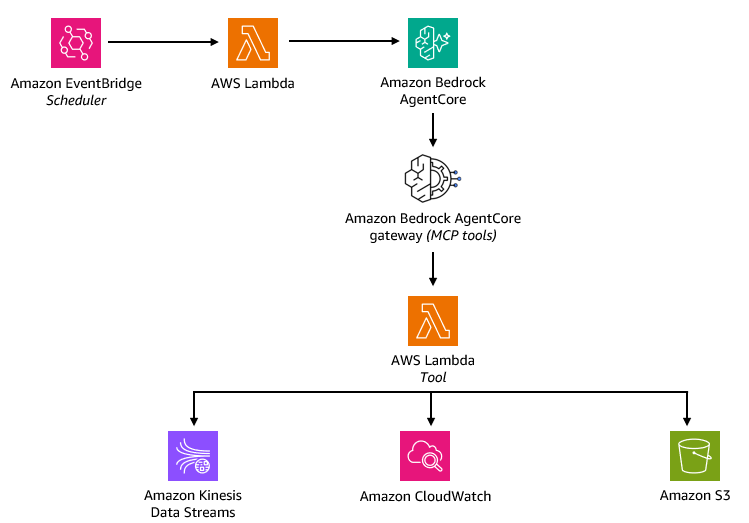
Figure 1: Architecture of the Kinesis Mode Optimizer Agent
The architecture flow includes the following steps:
- Amazon EventBridge Schedule triggers the Scheduler Lambda, an AWS Lambda function, on your configured cadence (daily, weekly, or custom cron).
- Scheduler Lambda invokes the Amazon Bedrock AgentCore harness with the instruction to analyze streams and generate a report.
- Amazon Bedrock AgentCore Gateway, a capability of Amazon Bedrock AgentCore powered by Claude Sonnet, interprets the request and routes it to the appropriate Model Context Protocol (MCP) tools exposed by the Tool Lambda.
- Tool Lambda performs the heavy lifting, fanning out to three downstream services:
- Kinesis Data Streams – Lists streams in the Region, describes each stream (shard count, mode, retention), and discovers Enhanced Fan-Out consumers per stream.
- CloudWatch – Pulls 7 days of metrics per stream (IncomingBytes, OutgoingBytes, throttle events) and computes three-way cost comparison.
- Amazon S3 – Generates per-stream recommendations and an account-level Advantage assessment, then stores the final HTML and JSON reports.
- Amazon Bedrock AgentCore harness summarizes the findings and returns them to the caller.
The entire stack is deployed using AWS Cloud Development Kit (AWS CDK) with a single cdk deploy command.
Prerequisites
Before you begin, verify that you have the following:
- AWS CDK –
npm install -g aws-cdk. - Python 3.12+.
- aws-cdk-lib >= 2.251.0 – for AgentCore L2 constructs.
- AWS Command Line Interface (AWS CLI) configured with credentials that have permissions to deploy the required resources.
- Amazon Bedrock model access – verify you have access to Claude Sonnet 4.5 (or your chosen model) in the target Region. Check in the Amazon Bedrock console under Model access.
Walkthrough
In the following sections, you deploy the Kinesis Data Streams Mode Optimizer Agent and test it against your Kinesis streams.
Step 1: Clone the repository
Step 2: Install CDK dependencies
Step 3: Set your target Region
The stack deploys to whatever Region is set in AWS_DEFAULT_REGION. Set it before running any CDK commands:
Step 4: Bootstrap CDK (first time per account/Region)
Step 5: Deploy
Optionally customize the schedule and bucket name:
Step 6: Test the agent
You can test the agent with the AWS CLI:
Step 7: View reports
Reports are stored in Amazon S3 at:
The HTML report presents an account-region-level analysis on all streams and whether On-demand Advantage is a good fit. For more details, customers can check the expert view.
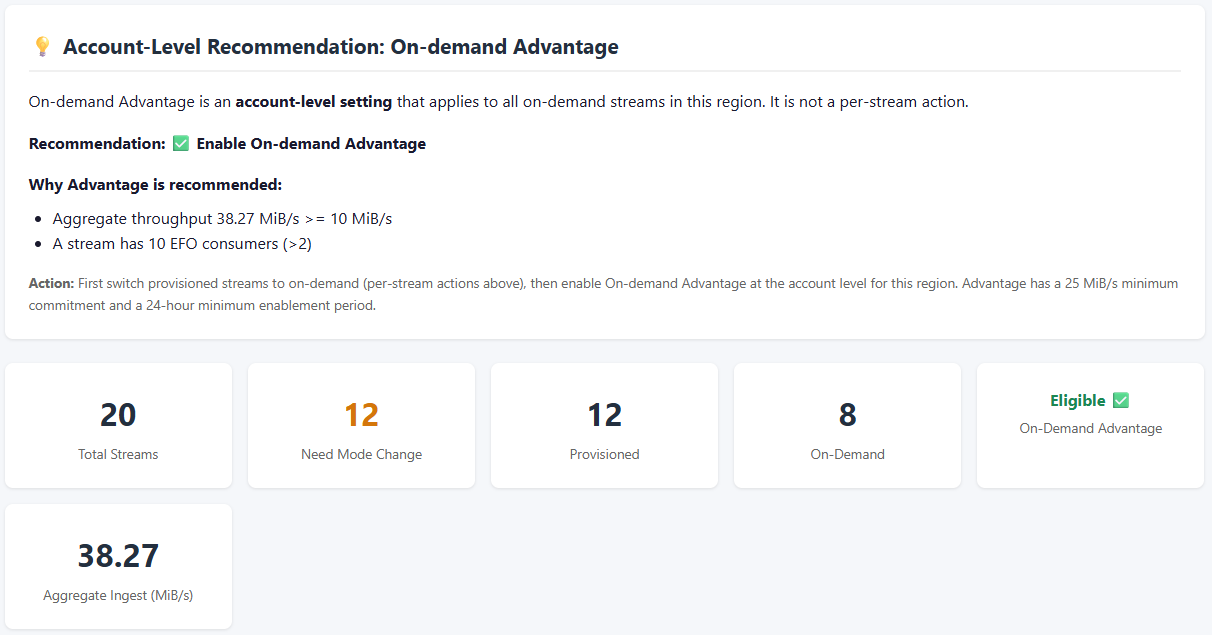
Figure 2: Sample HTML report with the per-stream action table
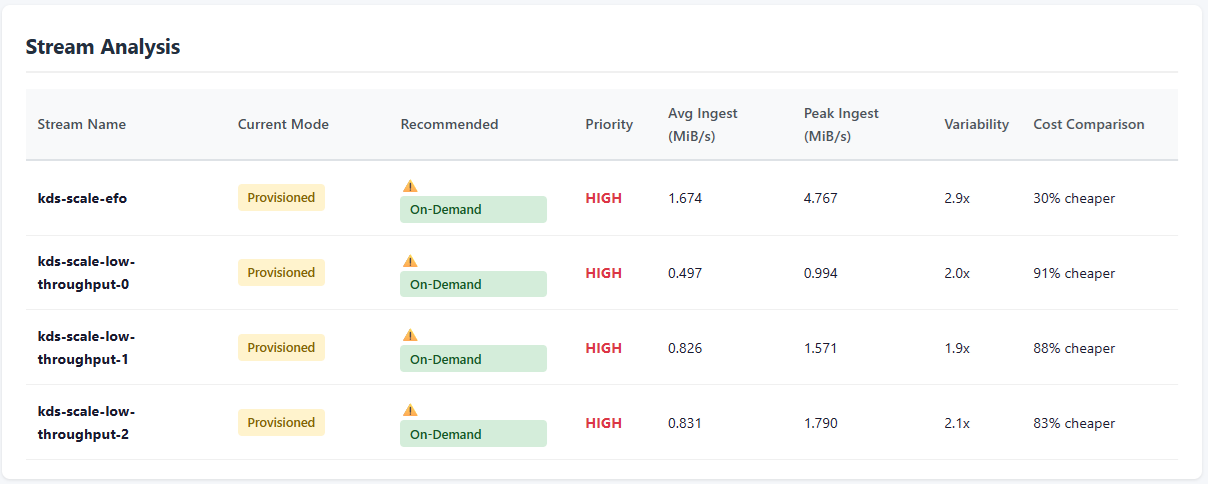
Figure 3: Expert view showing more details
Multi-Region deployment
The agent is Region-specific. When deployed to a Region, it analyzes only the streams in that Region. To cover multiple Regions, change the environment variable and repeat the deployment:
Each deployment is independent, with its own agent, Amazon S3 bucket, and schedule.
Clean up
To remove the stack from a Region:
Note: The Amazon S3 bucket has a RemovalPolicy.RETAIN setting and isn’t deleted with the stack. Delete it manually if you no longer need the reports.
Conclusion
In this post, you deployed an AI-powered agent that autonomously analyzes your Amazon Kinesis Data Streams usage for cost savings potential at the account-region level. The agent alleviates the manual effort of reviewing CloudWatch metrics across dozens or hundreds of streams and produces actionable, cost-aware recommendations on a recurring schedule.
By shifting from manual capacity reviews to autonomous, scheduled optimization, you gain three key benefits. First, you gain clarity on which workloads benefit the most from cost savings of On-demand Advantage. Second, you alleviate throttling risk by catching undersized streams before they impact performance. Third, you free your team from repetitive operational work. All of this is achievable with a single cdk deploy.
To get started, clone the sample-kinesis-optimizer-agent repository and deploy it to your account today.