AWS Big Data Blog
Auto-optimize your Amazon OpenSearch Service vector database
AWS recently announced the general availability of auto-optimize for the Amazon OpenSearch Service vector engine. This feature streamlines vector index optimization by automatically evaluating configuration trade-offs across search quality, speed, and cost savings. You can then run a vector ingestion pipeline to build an optimized index on your desired collection or domain. Previously, optimizing index configurations—including algorithm, compression, and engine settings—required experts and weeks of testing. This process must be repeated because optimizations are unique to specific data characteristics and requirements. You can now auto-optimize vector databases in under an hour without managing infrastructure and acquiring expertise in index tuning.
In this post, we discuss how the auto-optimize feature works, its benefits, and share examples of auto-optimized results.
Overview of vector search and vector indexes
Vector search is a technique that improves search quality and is a cornerstone of generative AI applications. It involves using a type of AI model to convert content into numerical encodings (vectors), enabling content matching by semantic similarity instead of just keywords. You build vector databases by ingesting vectors into OpenSearch to build indexes that enable searches across billions of vectors in milliseconds.
Benefits of optimizing vector indexes and how it works
The OpenSearch vector engine provides a variety of index configurations that help you make favorable trade-offs between search quality (recall), speed (latency), and cost (RAM requirements). There isn’t a universally optimal configuration. Experts must evaluate combinations of index settings such as Hierarchal Navigable Small Worlds (HNSW) algorithm parameters (such as m or ef_construction), quantization techniques (such as scalar, binary, or product), and engine parameters (such as memory-optimized, disk-optimized, or warm-cold storage). The difference between configurations could be a 10% or more difference in search quality, hundreds of milliseconds in search latency, or up to three times in cost savings. For large-scale deployments, cost-optimizations can make or break your budget.
The following figure is a conceptual illustration of trade-offs between index configurations.
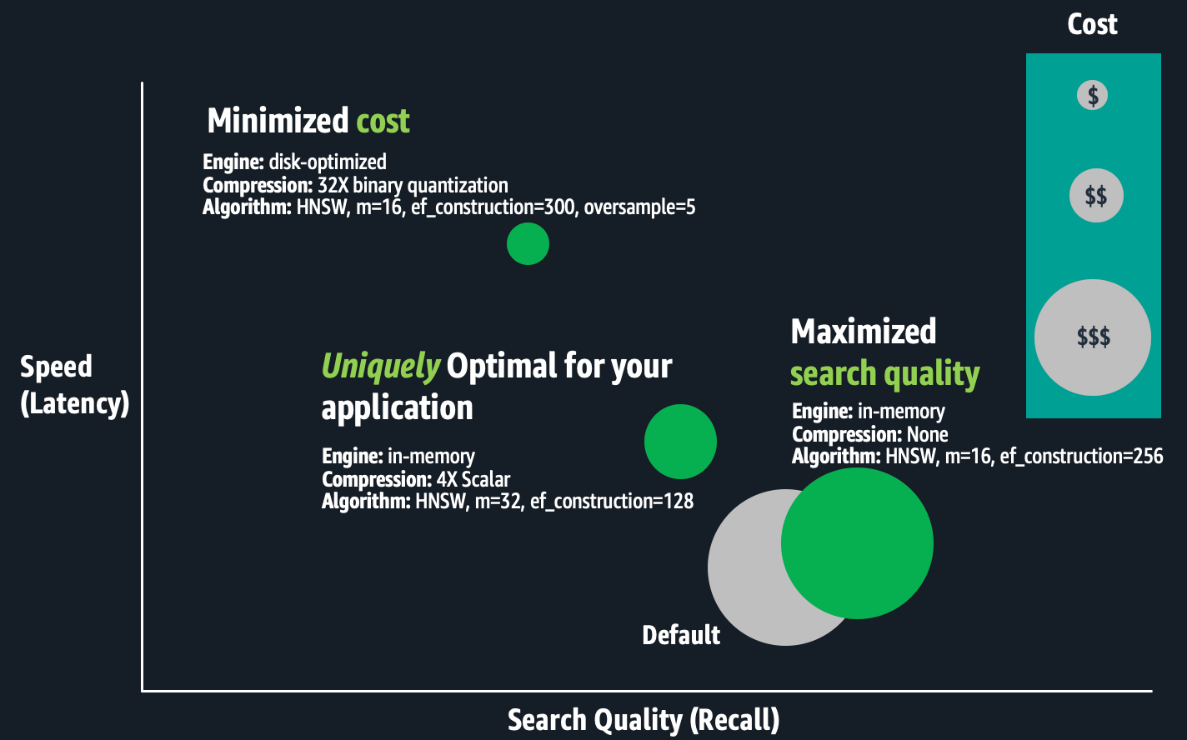
Optimizing vector indexes is time-consuming. Experts must build an index; evaluate its speed, quality, and cost; and make appropriate configuration adjustments before repeating this process. Running these experiments at scale can take weeks because building and evaluating large-scale index requires substantial compute power, resulting in hours to days of processing for just one index. Optimizations are unique to specific business requirements and each dataset, and trade-off decisions are subjective. The best trade-offs depend on the use case, such as search for an internal wiki or an e-commerce site. Therefore, this process must be repeated for each index. Lastly, if your application data changes continuously, your vector search quality might degrade, requiring you to rebuild and re-optimize your vector indexes regularly.
Solution overview
With auto-optimize, you can run jobs to produce optimization recommendations, consisting of reports that detail performance measurements and explanations of the recommended configurations. You can configure auto-optimize jobs by simply providing your application’s acceptable search latency and quality requirements. Expertise in k-NN algorithms, quantization techniques, and engine settings aren’t required. It avoids the one-size-fits-all limitations of solutions based on a few pre-configured deployment types, offering a tailored fit for your workloads. It automates the manual labor previously described. You simply run serverless, auto-optimize jobs at a flat rate per job. These jobs don’t consume your collection or domain resources. OpenSearch Service manages a separate multi-tenant warm pool of servers, and parallelizes index evaluations across secure, single-tenant workers to deliver results quickly. Auto-optimize is also integrated with vector ingestion pipelines, so you can quickly build an optimized vector index on a collection or domain from an Amazon Simple Storage Service (Amazon S3) data source.
The following screenshot illustrates how to configure an auto-optimize job on the OpenSearch Service console.
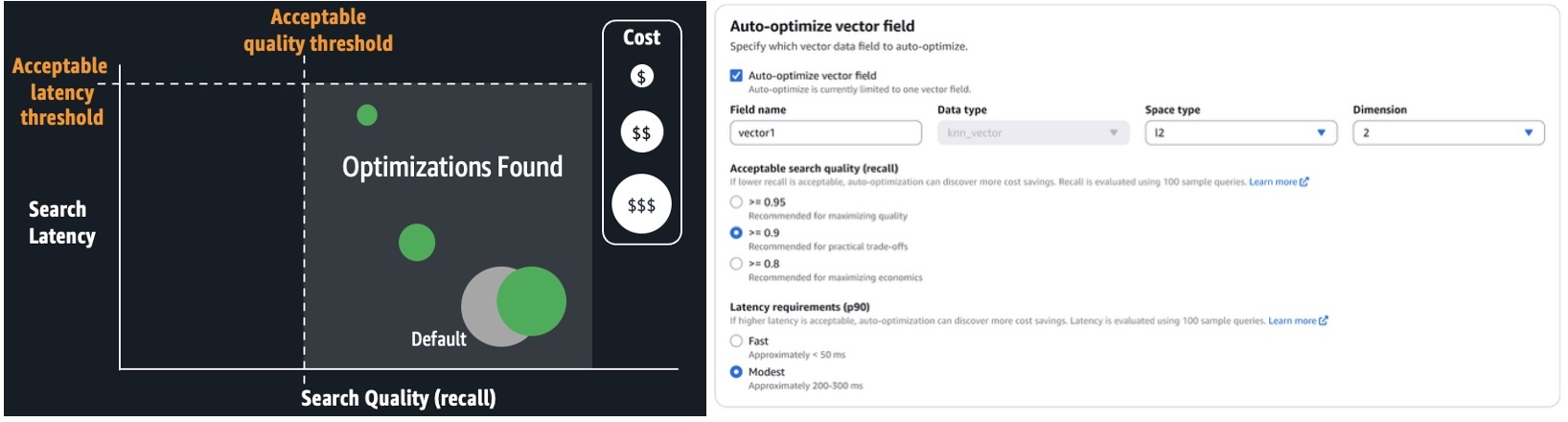
When the job is complete (typically, within 30–60 minutes for million-plus-size datasets), you can review the recommendations and reports, as shown in the following screenshot.
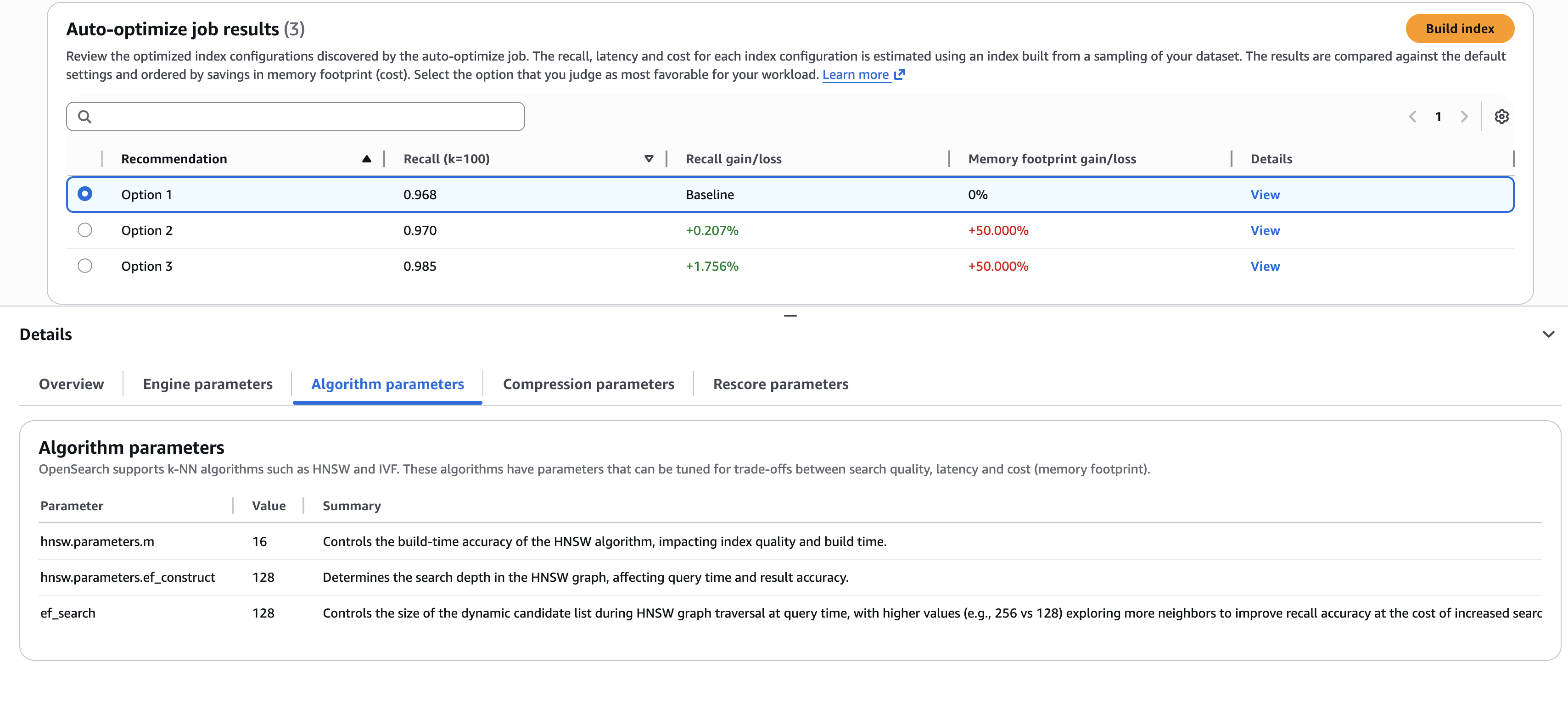
The screenshot illustrates an example where you need to choose the best trade-offs. Do you select the first option, which delivers the highest cost savings (through lower memory requirements)? Or do you select the third option, which delivers a 1.76% search quality improvement, but at higher cost? If you want to understand the details of the configurations used to deliver these results, you can view the sub-tabs on the Details pane, such as the Algorithm parameters tab shown in the preceding screenshot.
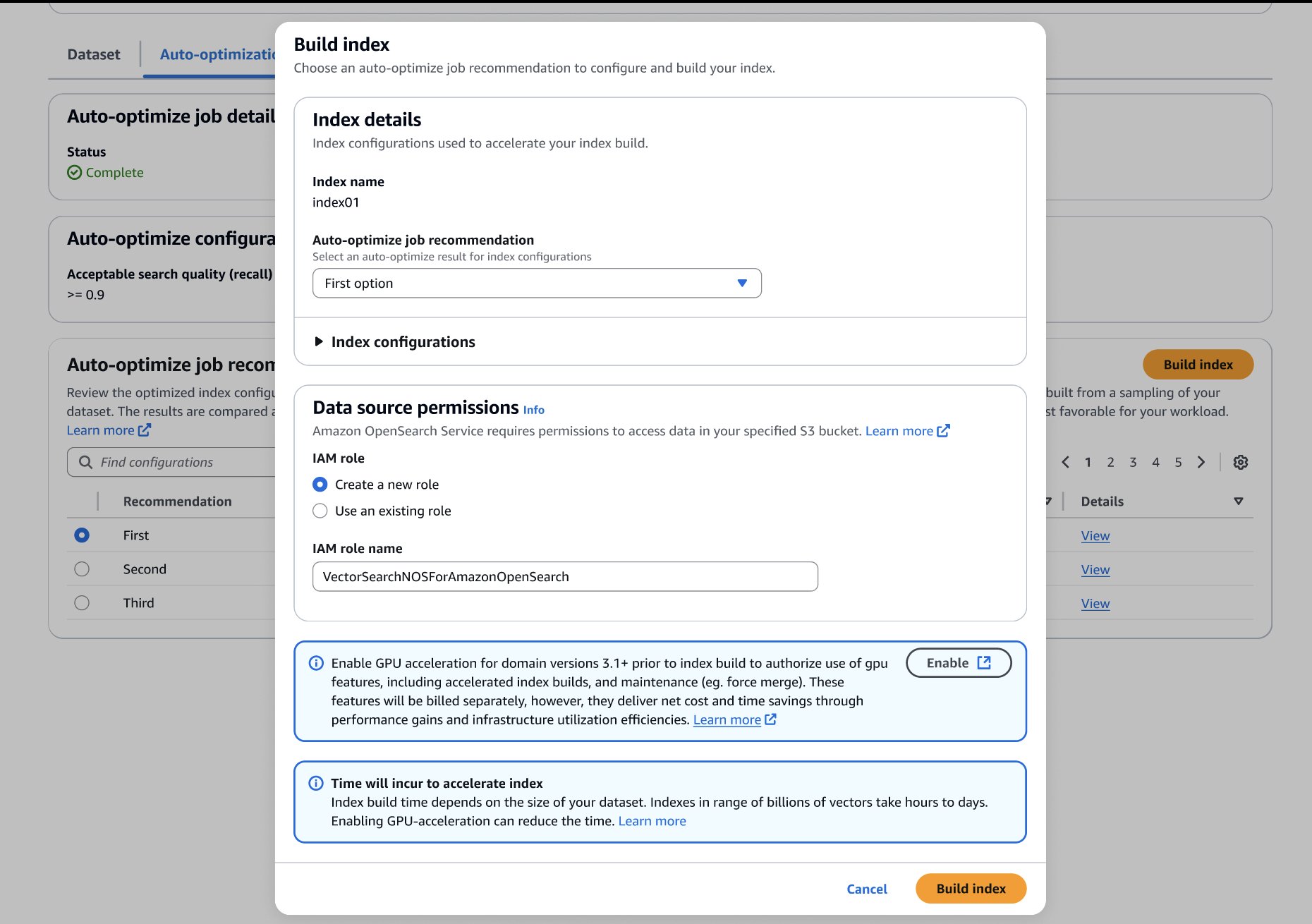
After you’ve made your choice, you can build your optimized index on your target OpenSearch Service domain or collection, as shown in the following screenshot. If you’re building the index on a collection or a domain running OpenSearch 3.1+, you can enable GPU-acceleration to increase the build speed up to 10 times faster at a quarter of the indexing cost.
Auto-optimize results
The following table presents a few examples of auto-optimize results. To quantify the value of running auto-optimize, we present gains compared to default settings. The estimated RAM requirements are based on standard domain sizing estimates:
Required RAM = 1.1 x (bytes per dimension x dimensions + hnsw.parameters.m x 8) x vector count
We estimate cost savings by comparing the minimal infrastructure (has just enough RAM) to host an index with the default compared to optimized settings.
| Dataset | Auto-Optimize Job Configurations | Recommended Changes to Defaults |
Required RAM) (% reduced) |
Estimated Cost Savings (Required data nodes for default configuration vs. optimized) |
Recall (% gain) |
| msmarco-distilbert-base-tas-b: 10M 384D vectors generated from MSMARCO v1 | Acceptable recall >= 0.95 Modest latency (Approximately 200-300 ms) | More supporting indexing and search memory (ef_search=256, ef_constructon=128)Use Lucene engineDisk optimized mode with 5X oversampling4X compression (4-bit binary quantization) |
5.6 GB (-69.4%) |
Less 75% (3 x r8g.mediumsearch vs. 3 x r8g.xlarge.search) |
0.995(+2.6%) |
| all-mpnet-base-v2: 1M 768D vectors generated from MSMARCO v2.1 | Acceptable recall >= 0.95 Modest latency (Approximately 200–300 ms) | Denser HNSW Graph (m=32)More supporting indexing and search memory (ef_search=256, ef_constructon=128)Disk optimized mode with 3X oversampling8X compression (4-bit binary quantization) |
0.7GB (-80.9%) |
Less 50.7% (t3.small.search vs. t3.medium.search) |
0.999 (+0.9%) |
| Cohere Embed V3: 113M 1024D vectors generated from MSMARCO v2.1 | Acceptable recall >= 0.95 Fast latency (Approximately <= 50 ms) | Denser HNSW Graph (m=32)More supporting indexing and search memory (ef_search=256, ef_constructon=128)Use Lucene engine4X compression (uint8-scalar quantization) |
159GB (-69.7%) |
Less 50.7% (6 x r8g.4xlarge.search vs. 6 x r8g.8xlarge.search) |
0.997 (+8.4%) |
Conclusion
You can start building auto-optimized vector databases on the Vector ingestion page of the OpenSearch Service console. Use this feature with GPU-accelerated vector indexes to build optimized, billion-scale vector databases within hours.
Auto-optimize is available for OpenSearch Service vector collections and OpenSearch 2.17+ domains in the US East (N. Virginia, Ohio), US West (Oregon), Asia Pacific (Mumbai, Singapore, Sydney, Tokyo), and Europe (Frankfurt, Ireland, Stockholm) AWS Regions.