AWS Big Data Blog
Build AWS Glue Data Quality pipeline using Terraform
AWS Glue Data Quality is a feature of AWS Glue that helps maintain trust in your data and support better decision-making and analytics across your organization. It allows users to define, monitor, and enforce data quality rules across their data lakes and data pipelines. With AWS Glue Data Quality, you can automatically detect anomalies, validate data against predefined rules, and generate quality scores for your datasets. This feature provides flexibility in how you validate your data – you can incorporate quality checks into your ETL processes for transformation-time validation, or validate data directly against cataloged tables for ongoing data lake monitoring. By leveraging machine learning, it can also suggest data quality rules based on your data patterns.
You can use Terraform, an open source Infrastructure as Code (IaC) tool developed by HashiCorp, to deploy AWS Glue Data Quality pipelines.
It allows developers and operations teams to define, provision, and manage cloud infrastructure using a declarative language. With Terraform, you can version, share, and reuse your infrastructure code across multiple cloud providers and services. Its powerful state management and planning capabilities enable teams to collaborate efficiently and maintain consistent infrastructure across different environments.
Using Terraform to deploy AWS Glue Data Quality pipeline enables IaC best practices to ensure consistent, version controlled and repeatable deployments across multiple environments, while fostering collaboration and reducing errors due to manual configuration.
In this post, we explore two complementary methods for implementing AWS Glue Data Quality using Terraform:
- ETL-based Data Quality – Validates data during ETL (Extract, Transform, Load) job execution, generating detailed quality metrics and row-level validation outputs
- Catalog-based Data Quality – Validates data directly against Glue Data Catalog tables without requiring ETL execution, ideal for monitoring data at rest
Solution overview
This post demonstrates how to implement AWS Glue Data Quality pipelines using Terraform using two complementary approaches mentioned above to ensure comprehensive data quality across your data lake.
We’ll use the NYC yellow taxi trip data, a real-world public dataset, to illustrate data quality validation and monitoring capabilities. The pipeline ingests parquet-formatted taxi trip data from Amazon Simple Storage Service (Amazon S3) and applies comprehensive data quality rules that validate data completeness, accuracy, and consistency across various trip attributes.
Method 1: ETL-based Data Quality
ETL-based Data Quality validates data during Extract, Transform, Load (ETL) job execution. This approach is ideal for:
- Validating data as it moves through transformation pipelines
- Applying quality checks during data processing workflows
- Generating row-level validation outputs alongside transformed data
The pipeline generates two key outputs:
- Data Quality Results – Detailed quality metrics and rule evaluation outcomes stored in the dqresults/ folder, providing insights into data quality trends and anomalies
- Row-Level Validation – Individual records with their corresponding quality check results written to the processed/ folder, enabling granular analysis of data quality issues
Method 2: Catalog-based Data Quality
Catalog-based Data Quality validates data quality rules directly against AWS Glue Data Catalog tables without requiring ETL job execution. This approach is ideal for:
- Validating data at rest in the data lake
- Running scheduled data quality checks independent of ETL pipelines
- Monitoring data quality across multiple tables in a database
Architecture overview
The following diagram illustrates how both approaches work together to provide comprehensive data quality validation:
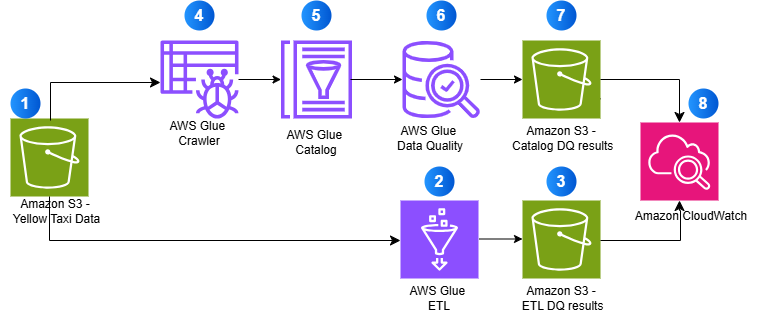
- Source data stored in Amazon S3 (Yellow Taxi Data)
- AWS Glue ETL processes data with quality checks
- ETL validation results are stored in S3
- AWS Glue Crawler discovers schema
- Metadata is stored in AWS Glue Catalog
- AWS Glue Data Quality validates catalog tables
- Catalog validation results are stored in S3
- Amazon CloudWatch monitors all operations
By using AWS Glue’s serverless ETL capabilities and Terraform’s infrastructure-as-code approach, this solution provides a scalable, maintainable, and automated framework for ensuring data quality in your analytics pipeline.
Prerequisites:
- An AWS account with AWS CLI installed and configured
- HashiCorp Terraform installed and configured
Solution Implementation
Complete the following steps to build AWS Glue Data Quality pipeline using Terraform:
Clone the Repository
This post includes a GitHub repository that generates the following resources when deployed. To clone the repository, run the following command in your terminal:
Core Infrastructure:
- Amazon S3 bucket:
glue-data-quality-{AWS AccountID}-{env}with AES256 encryption - Sample NYC taxi dataset (
sample-data.parquet) automatically uploaded to thedata/folder - AWS Identity and Access Management (IAM) role:
aws-glue-data-quality-role-{env}with Glue execution permissions and S3 read/write access - CloudWatch dashboard:
glue-data-quality-{env}for monitoring job execution and data quality metrics - CloudWatch Log Groups for job logging with configurable retention
ETL-Based Data Quality Resources:
- AWS Glue ETL job:
data-quality-pipelinewith 8 comprehensive validation rules - Python script:
GlueDataQualityDynamicRules.pystored inglue-scripts/folder - Results storage in
dqresults/folder with detailed rule outcomes - Row-level validation outputs in
processed/folder - Optional scheduled triggers for automated execution
- CloudWatch alarm:
etl-glue-data-quality-failure-{env}for monitoring job failures
Catalog-Based Data Quality Resources (Optional – when catalog_dq_enabled = true):
- Glue Database:
{catalog_database_name}for catalog table management - Glue Crawler:
{job_name}-catalog-crawlerfor automatic schema discovery from S3 data - Crawler schedule trigger for automated execution (default: daily at 4 AM)
- Glue Catalog Tables automatically discovered and created by the crawler
- Catalog Data Quality job:
{job_name}-catalogwith 7 catalog-specific validation rules - Python script:
CatalogDataQuality.pyfor catalog validation - Results storage in
catalog-dq-results/folder partitioned by table name - Catalog DQ schedule trigger for automated validation (default: daily at 6 AM)
- CloudWatch alarm:
catalog-glue-data-quality-failure-{env}for monitoring catalog job failures - Enhanced CloudWatch dashboard widgets for crawler status and catalog metrics
Review the Glue Data Quality Job Script
Review the Glue Data Quality job script GlueDataQualityDynamicRules.py located in the folder scripts, which has the following rules:
Brief explanation of rules for NY Taxi data is as follows:
| Rule Type | Condition | Description |
| CustomSql | “select vendorid from primary where passenger_count > 0” with threshold > 0.9 | Checks if at least 90% of rides have at least one passenger |
| Mean | “trip_distance” < 150 | Ensures the average trip distance is less than 150 miles |
| Sum | “total_amount” between 1000 and 100000 | Verifies that total revenue from all trips falls within this range |
| RowCount | between 1000 and 1000000 | Checks if the dataset has between 1,000 and 1 million records |
| Completeness | “fare_amount” > 0.9 | Ensures over 90% of records have a fare amount |
| DistinctValuesCount | “ratecodeid” between 3 and 10 | Verifies rate codes fall between 3-10 unique values |
| DistinctValuesCount | “pulocationid” > 100 | Checks if there are over 100 unique pickup locations |
| ColumnCount | 19 | Validates that dataset has exactly 19 columns |
These rules together ensure data quality by validating volume, completeness, reasonable values and proper structure of the taxi trip data.
Configure Terraform Variables
Before deploying the infrastructure, configure your Terraform variables in the terraform.tfvars file located in the examples directory. This configuration determines which features will be deployed – ETL-based Data Quality only, or both ETL-based and Catalog-based Data Quality.
Basic Configuration
The solution uses default values for most settings, but you can customize the following in your terraform.tfvars file:
- AWS Region – The AWS region where resources will be deployed
- Environment – Environment identifier (such as, “dev”, “prod”) used in resource naming
- Job Name – Name for the Glue job (default:
data-quality-pipeline)
Enable Catalog-Based Data Quality
By default, the solution deploys only ETL-based Data Quality. To enable Catalog-based Data Quality validation, add the following configuration to your terraform.tfvars file:
Configuration Notes:
- catalog_dq_enabled – Set to true to enable Catalog-based validation alongside ETL-based validation,which will deploy both ETL and Catalog validation
- catalog_database_name – Name of the Glue database that will be created for catalog tables
- s3_data_paths – S3 folders containing parquet data that the Glue Crawler will discover
- catalog_table_names – Leave empty to validate all tables, or specify specific table names
- catalog_dq_rules – Define validation rules specific to catalog tables (can differ from ETL rules)
- catalog_enable_schedule – Set to true to enable automatic scheduled execution
- Schedule expressions – Use cron format for automated execution (crawler runs before DQ job)
Once you’ve configured your variables, save the terraform.tfvars file and proceed to the next step.
Set Up AWS CLI Authentication
Before you can interact with AWS services using the command line, you need to set up and authenticate the AWS CLI. This section guides you through the process of configuring your AWS CLI and verifying your authentication. Follow these steps to ensure you have the necessary permissions to access AWS resources.
- Open your terminal or command prompt.
- Set up authentication in the AWS CLI. You need administrator permissions to set up this environment.
- To test if your AWS CLI is working and you’re authenticated, run the following command:
The output should look similar to the following:
Deploy with Terraform
Follow these steps to deploy your infrastructure using Terraform. This process will initialize your working directory, review planned changes, and apply your infrastructure configuration to AWS.
To deploy with Terraform, navigate to the examples folder by running the following command in your CLI from inside the repository
Run the following bash commands:
Initializes a Terraform working directory, downloads required provider plugins, and sets up the backend for storing state.
On success you will receive output Terraform has been successfully initialized!
Creates an execution plan, shows what changes Terraform will make to your infrastructure. This command doesn’t make any changes.
Deploys infrastructure and code to the AWS Account. By default, it asks for confirmation before making any changes. Use ‘terraform apply -auto-approve’ to skip the confirmation step.
When prompted with ‘Do you want to perform these actions?’, type ‘yes’ and press Enter to confirm and allow Terraform to execute the described actions.
Upon successful execution, the system will display ‘Apply complete!’ message.
Run the AWS Glue Data Quality Pipeline
After deploying the infrastructure with Terraform, you can validate data quality using two methods – ETL-based and Catalog-based. Each method serves different use cases and can be run independently or together.
Method 1: Run the ETL-Based Data Quality Job
ETL-based data quality validates data during the transformation process, making it ideal for catching issues early in your data pipeline.
Steps to execute:
- Navigate to the AWS Glue Console and select ETL Jobs from the left navigation panel
- Locate and select the job named
data-quality-pipeline

- Choose Run to start the job execution

- Monitor the job status – it typically completes in 2-3 minutes
- Review the results:
- Once completed, click on the Data Quality tab to review the validation results.
The following screenshot shows the results.
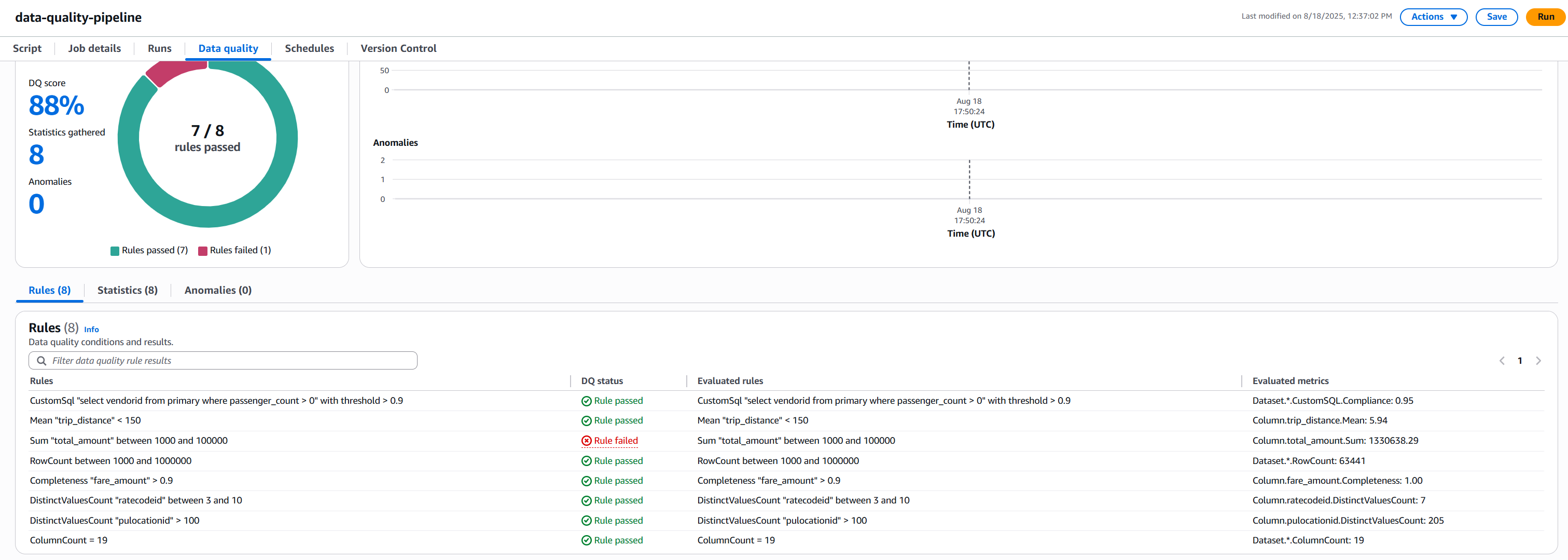
- Understanding AWS Glue Data Quality Results: NYC Taxi Data Example.
Rule Results Summary
- We had 8 total rules
- 7 rules passed
- 1 rule failed
Rule Rule Condition Status Pass/Fail Reason Passenger Count Check At least 90% of rides should have at least one passenger Passed 95% of rides had passengers, exceeding 90% threshold Trip Distance Average trip < 150 miles Passed Average was 5.94 miles, well below 150-mile limit Row Count Between 1,000 and 1,000,000 records Passed 63,441 records fell within required range Fare Amount Completeness 90% of records should have fare amounts Passed 100% completeness exceeded 90% requirement Rate Code Variety Between 3-10 different rate codes Passed 7 unique codes fell within acceptable range Pickup Locations More than 100 different pickup locations Passed 205 locations exceeded minimum requirement Column Count Exactly 19 columns Passed Exact match at 19 columns Total Amount Range Sum of all fares between $1,000 and $100,000 Failed Total of $130,638.29 exceeded maximum limit - Check the S3 bucket for detailed outputs:
- Data Quality metrics:
s3://glue-data-quality-{AccountID}-{env}/dqresults/ - Row-level validation:
s3://glue-data-quality-{AccountID}-{env}/processed/
- Data Quality metrics:
- Once completed, click on the Data Quality tab to review the validation results.
The job processes the NYC taxi data and applies all 8 validation rules during the ETL execution. You’ll see a quality score along with detailed metrics for each rule.
Method 2: Run the Catalog-Based Data Quality Pipeline
Catalog-based data quality validates data at rest in your data lake, independent of ETL processing. This method requires the Glue Crawler to first discover and catalog your data.
- Run the Glue Crawler (first-time setup or when schema changes):
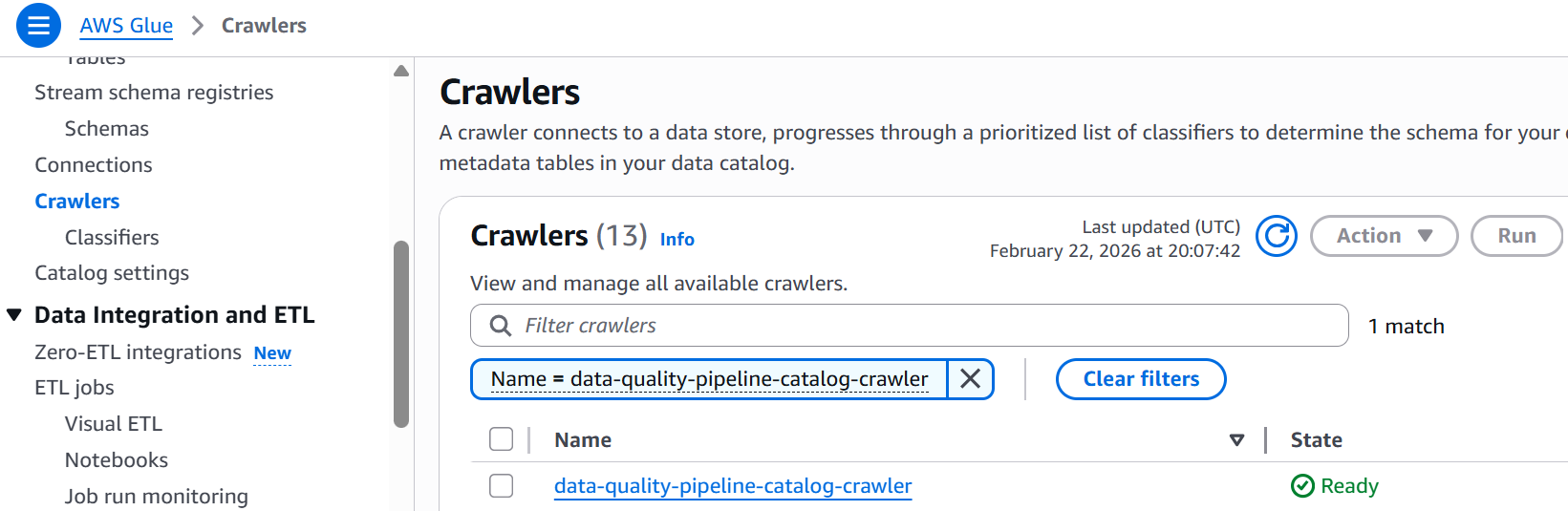
- Navigate to AWS Glue Console and select Crawlers
- Locate
data-quality-pipeline-catalog-crawler
- Select
data-quality-pipeline-catalog-crawlercheckbox and click Run and wait for completion (1-2 minutes) - Verify the table was created in your Glue database

- Run the Catalog Data Quality Job:
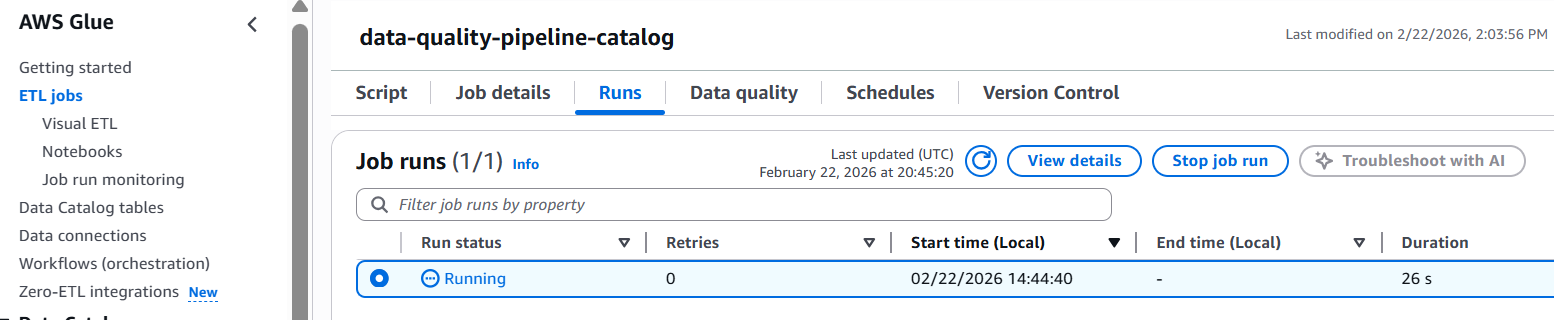
- Navigate to the AWS Glue Console and select ETL Jobs from the left navigation panel
- Select the job named
data-quality-pipeline-catalog

- Click Run job to execute the validation
- Monitor the job status until completion
- Review the results:
- Once completed, click on the Data Quality tab to review the validation results.
The following screenshot shows the results.
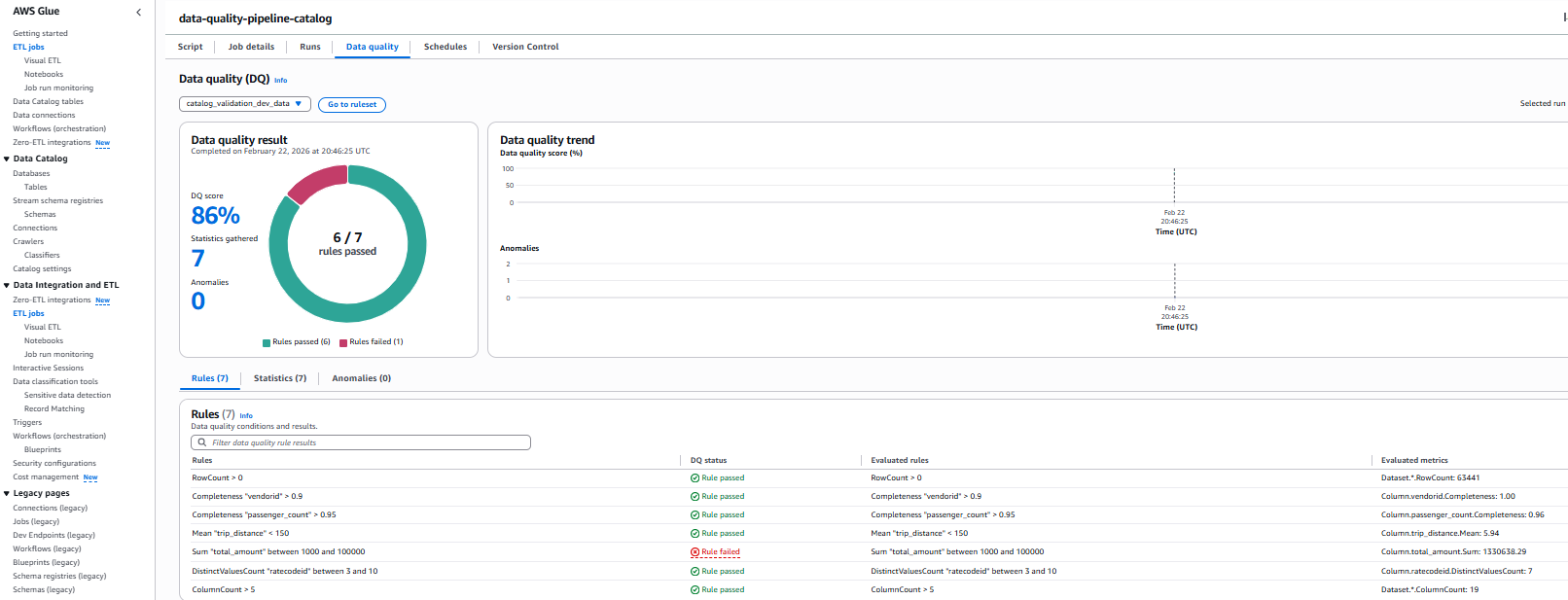
Rule Results Summary
- We had 7 total rules
- 6 rules passed
- 1 rule failed
Rule Rule Condition Status Pass/Fail Reason Row Count Row count should be greater than zero Passed 63441 rows present in the source data file Completeness “vendorid” 90% of records should have vendorid Passed 100% completeness exceeded 90% requirement Completeness “passenger_count” 95% of records should have vendorid Passed 96% completeness exceeded 95% requirement Mean “trip_distance” Mean “trip_distance” < 150 Passed trip_distance.Mean: 5.94 which is less than threshold 150 Sum “total_amount” Sum “total_amount” between 1000 and 100000 Failed total_amount.Sum: 1330638.29 which does not satisfy condition Distinct vale count “ratecodeid” DistinctValuesCount “ratecodeid” between 3 and 10 Passed ratecodeid.DistinctValuesCount: 7, satisfies condition Column Count Greater than 5 columns Passed ColumnCount: 19, satisfies condition - Check the S3 bucket for detailed outputs
s3://glue-data-quality-{AccountID}-{env}/catalog-dq-results/
- Once completed, click on the Data Quality tab to review the validation results.
Catalog vs ETL Data Quality Comparison
| Feature | ETL Data Quality | Catalog Data Quality |
| Execution Context | Validates data during ETL job processing | Validates data against catalog tables at rest |
| Data Source | Reads directly from S3 files (parquet format) | Queries Glue Data Catalog tables |
| Results Location | s3://…/dqresults/ | s3://…/catalog-dq-results/ |
| Primary Use Case | Validate data quality during transformation pipelines | Monitor data lake quality independent of ETL workflows |
| Execution Trigger | Runs as part of Glue ETL job execution | Runs independently as scheduled Data Quality job |
| Scheduling | Configured via Glue job schedule or on-demand | Configured via Data Quality job schedule or on-demand |
| Table Discovery | Manual – requires explicit S3 path configuration | Automatic – Glue Crawler discovers schema and creates tables |
| Schema Management | Defined in ETL job script | Managed by Glue Data Catalog |
| Output Format | Data Quality metrics + row-level validation outputs | Data Quality metrics only |
| Best For | Catching issues early in data pipelines | Ongoing monitoring of data at rest in data lakes |
| Dependencies | Requires ETL job execution | Requires Glue Crawler to run first |
| CloudWatch Integration | Job-level metrics and logs | Data Quality-specific metrics and logs |
Monitoring and Troubleshooting
Both data quality methods automatically send metrics and logs to Amazon CloudWatch. You can set up alarms to notify you when quality scores drop below acceptable thresholds.
Clean up
To avoid incurring unnecessary AWS charges, make sure to delete all resources created during this tutorial. Ensure you have backed up any important data before running these commands, as this will permanently delete the resources and their associated data. To destroy all resources created as part of this blog, run following command in your terminal:
Conclusion
In this blog post, we demonstrated how to build and deploy a scalable data quality pipeline using AWS Glue Data Quality and Terraform. The solution implements two validation methods:
- ETL-based Data Quality – Integrated validation during ETL job execution for transformation pipeline quality assurance
- Catalog-based Data Quality – Independent validation against Glue Data Catalog tables for data lake quality monitoring
By implementing data quality checks on NYC taxi trip data, we showed how organizations can automate their data validation processes and maintain data integrity at scale. The combination of AWS Glue’s serverless architecture and Terraform’s infrastructure-as-code capabilities provides a powerful framework for implementing reproducible, version-controlled data quality solutions. This approach not only helps teams catch data issues early but also enables them to maintain consistent data quality standards across different environments. Whether you’re dealing with small datasets or processing massive amounts of data, this solution can be adapted to meet your organization’s specific data quality requirements. As data quality continues to be a crucial aspect of successful data initiatives, implementing automated quality checks using AWS Glue Data Quality and Terraform sets a strong foundation for reliable data analytics and decision-making.
To learn more about AWS Glue Data Quality, refer to the following: