AWS Big Data Blog
How to set up an air-gapped VPC for Amazon SageMaker Unified Studio
Organizations are finding significant value using an integrated experience for all your data and AI with Amazon SageMaker Unified Studio. However, many organizations require strict network control to meet security and regulatory compliance requirements like HIPAA or FedRAMP for their data and AI initiatives, while maintaining operational efficiency.
In this post, we explore scenarios where customers need more control over their network infrastructure when building their unified data and analytics strategic layer. We’ll show how you can bring your own Amazon Virtual Private Cloud (Amazon VPC) and set up Amazon SageMaker Unified Studio for strict network control.
Solution overview
The solution covers complete technical know-how of a fully private network architecture using Amazon VPC with no public internet exposure. The approach leverages AWS PrivateLink through VPC endpoints to provide a secure communication between SageMaker Unified Studio and essential AWS services entirely over the AWS backbone network.
The architecture consists of three core components: a custom VPC named airgapped with multiple private subnets distributed across at least three Availability Zones for high availability, a comprehensive set of VPC interface and gateway endpoints for service connectivity, and the SageMaker Unified Studio domain configured to operate exclusively within this isolated environment. This design helps ensure that sensitive data never traverses the public internet while maintaining full functionality for data cataloging, query execution, and machine learning workflows.
By implementing this air-gapped configuration, organizations gain granular control over network traffic, simplified compliance auditing, and the ability to integrate SageMaker Unified Studio with existing private data sources through controlled network pathways. The solution supports both immediate operational needs and long-term scalability through careful IP address planning and modular endpoint architecture.
Prerequisites
The set up requires you to have an existing VPC (for this post, we’ll refer to the name as airgapped but in reality, it refers to the VPC you would like to securely set up SageMaker Unified Studio). If you don’t have an existing VPC, you can follow SageMaker Unified Studio domain quick create administrator guide to get started.
The high level steps to create a VPC meeting minimum requirements for SageMaker Unified Studio are as follows:
- In the AWS Management Console, navigate to the VPC console.
- Choose Create VPC.
- Select the VPC and more radio button.
- For Name tag auto-generation, enter airgapped or a name of your choice.
- Keep the default values for IPv4 CIDR block, IPv6 CIDR block, Tenancy, NAT gateways, VPC endpoints, and DNS options.
- Select 3 for Number of Availability Zones (AZs).
- Select 0 for Number of public subnets.
- Choose Create VPC.
This produces the following VPC resource map:
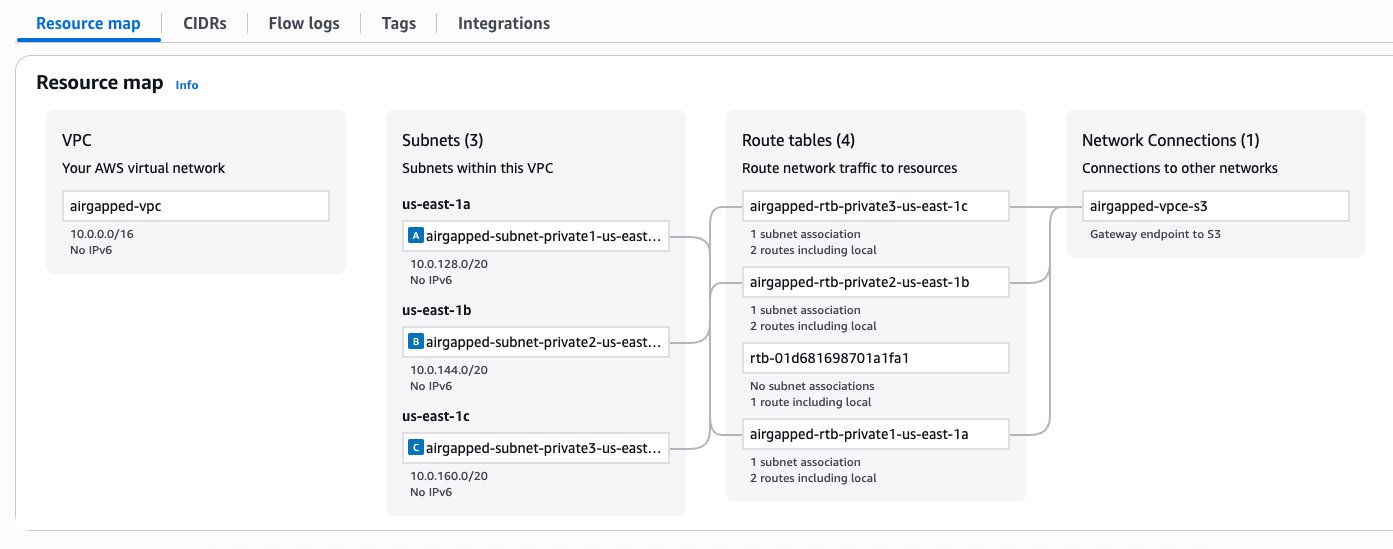
Figure 1 – VPC configuration
Set up SageMaker Unified Studio
Now, we will set up SageMaker Unified Studio in an existing VPC, named airgapped-vpc.
- Navigate to the SageMaker console, choose Domains in the navigation pane.
- Choose Create Domain.
- For How do you want to set up your domain?, select Quick set up.
- Expand the Quick set up settings
- Provide a name for your domain, such as airgapped-domain.
- For Virtual private cloud (VPC), select airgapped-vpc.
- For subnets, select a minimum of two private subnets.
- Choose Continue.
- Enter an email address to create a user in AWS IAM Identity Center.
- Choose Create domain.
- Once the domain is created, choose Open unified studio or use SageMaker Unified Studio URL under Domain details to access SageMaker Unified Studio.
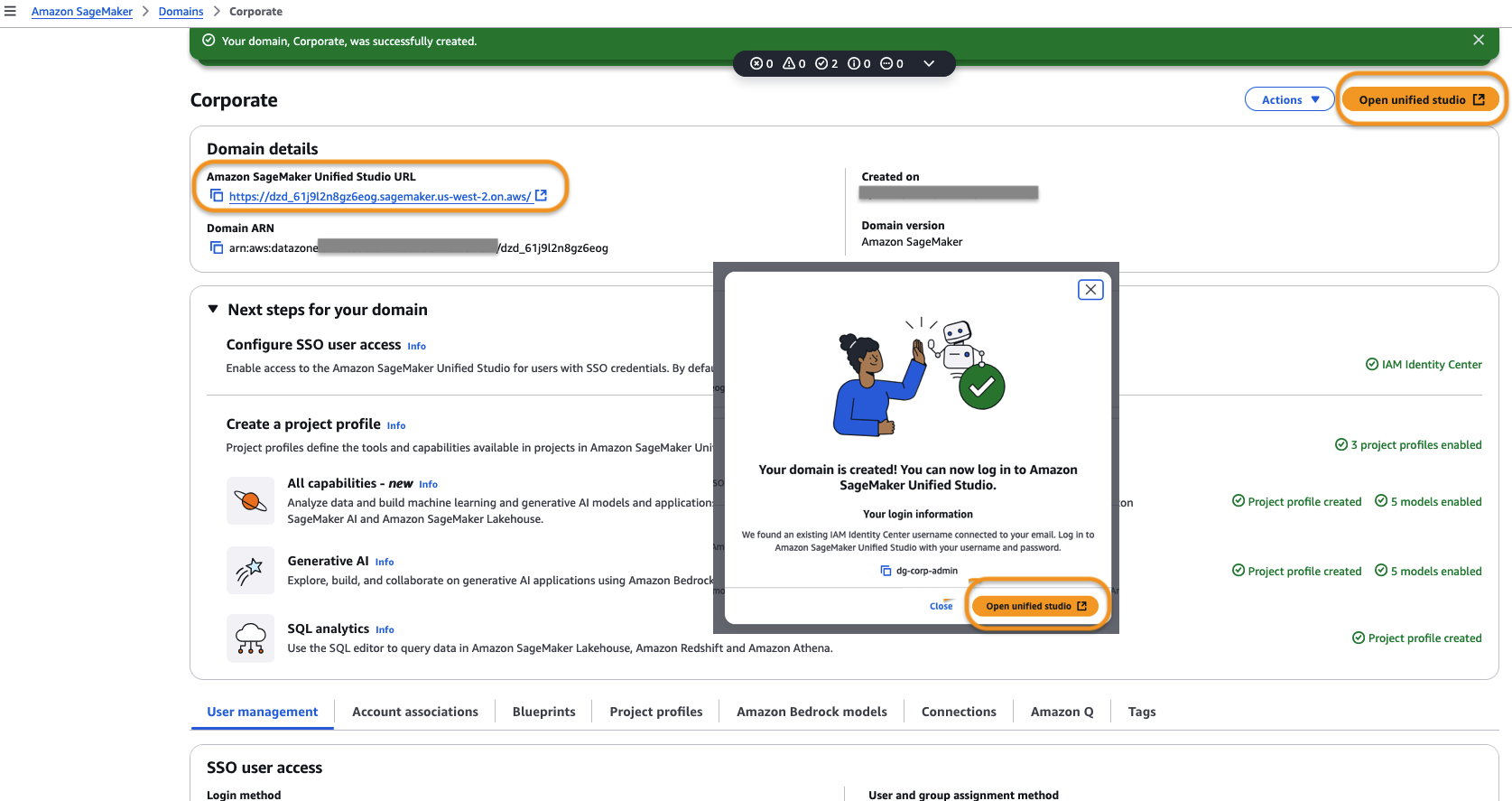
Figure 2 – Amazon SageMaker Unified Studio URL Welcome Page
- After logging in to SageMaker Unified Studio, create a project using the guided wizard.
- Once the project is created, we need to add the necessary VPC endpoints to allow traffic from the project to communicate to AWS services.
- S3 Gateway VPC endpoint was already selected as part of VPC creation step 5 in prerequisites and thus created by default. Now we must add two more VPC endpoints for Amazon DataZone and AWS Security Token Service as illustrated in following step.
These are the minimum set of VPC endpoints to allow using the tooling within SageMaker Unified Studio. For a list of other mandatory and non-mandatory VPC endpoints refer to the tables in the latter part of this post.
Create an interface endpoint
To create an interface endpoint, complete following steps:
- Go to the SageMaker Unified Studio Project details page and copy the Project ID.
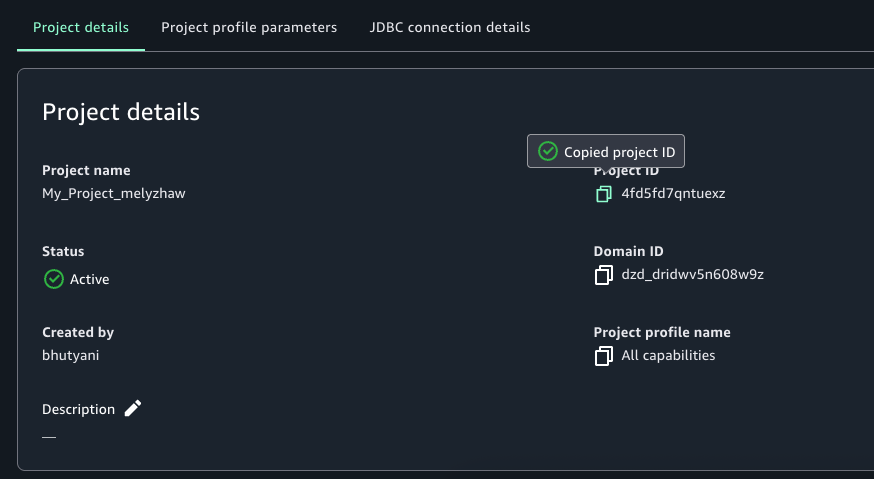 Figure 3 – SageMaker Unifed Studio Project Details Page
 - Go to the VPC console and choose Endpoints.
- Choose Create Endpoint.
- Enter a name for the endpoint, for example, DataZone endpoint for SageMaker Unified Studio.
- For AWS Services, enter DataZone.
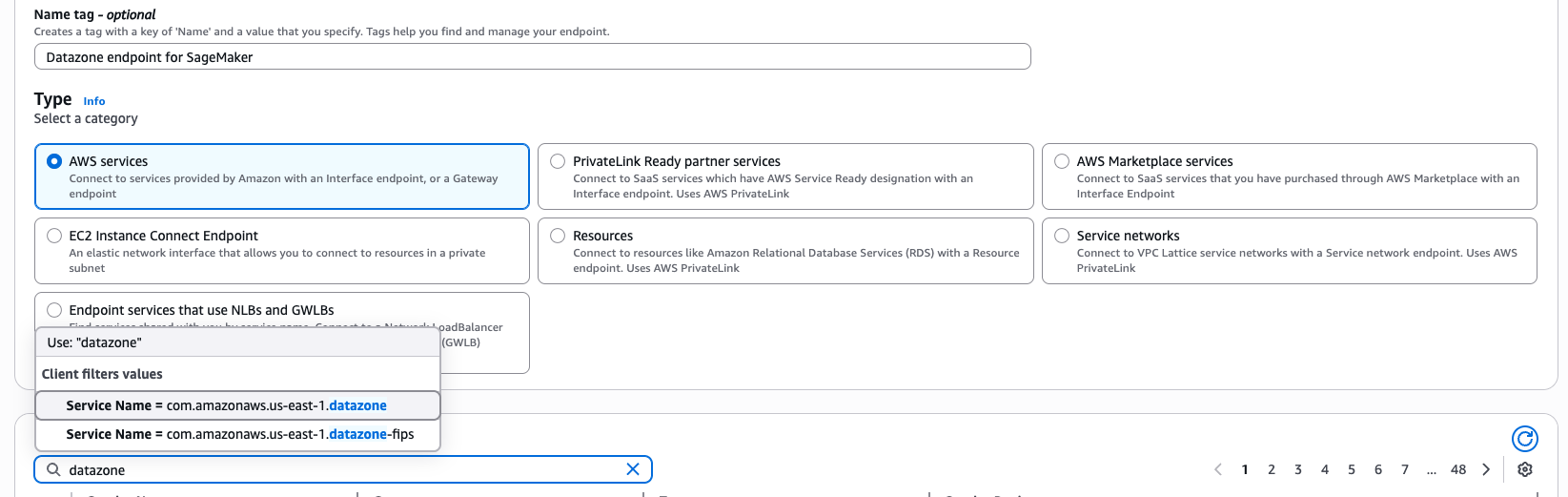
Figure 4 – Interface Endpoint creation wizard for AWS Service datazone
- Select Service Name = com.amazonaws.us-east-1.datazone from the available options.
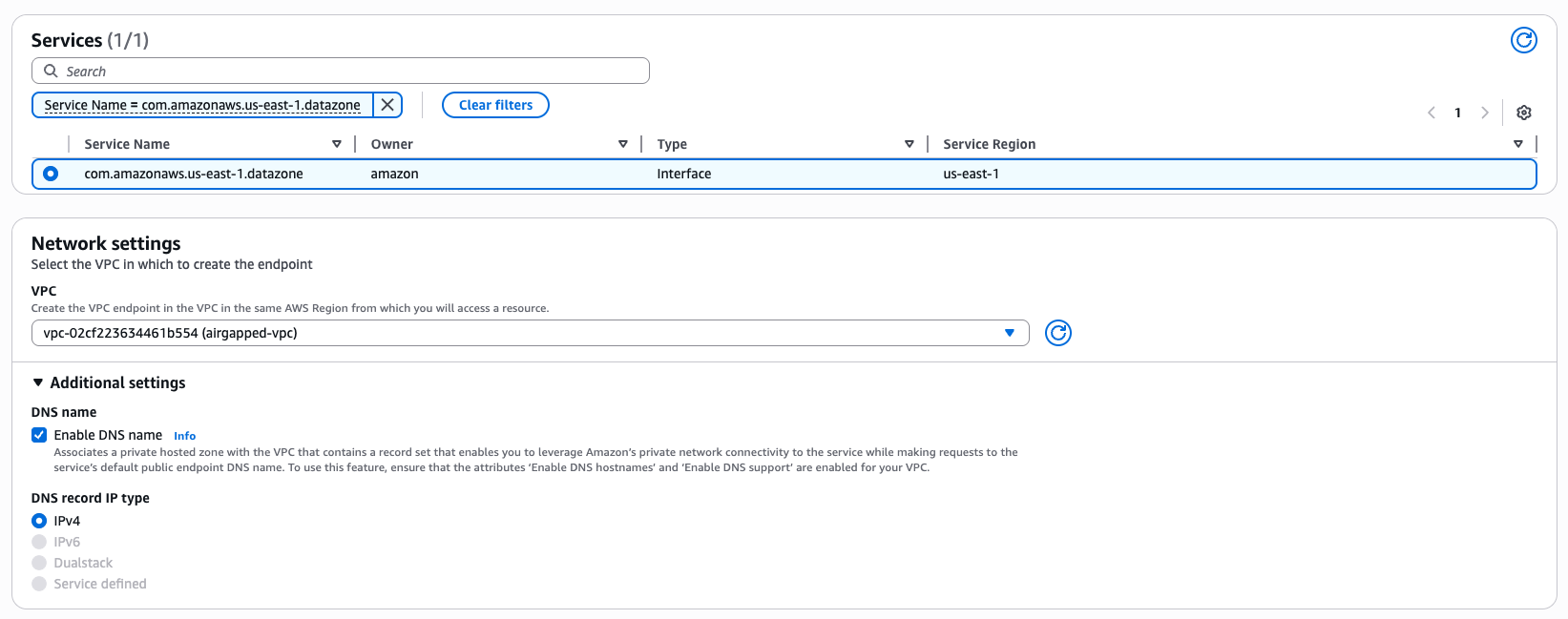
Figure 5 – Interface Endpoint creation wizard network settings
- Select the subnets in the airgapped-vpc that you created earlier.
- Filter the Security Groups by pasting the copied Project ID.
- Select the security group with Group Name datazone-<project-id>-dev.
- Choose Create Endpoint.
- Repeat the same steps to create a VPC endpoint for AWS STS.
- Once the VPC endpoints are created, validate connectivity in the SageMaker project by running a SQL query or using a Jupyterlab notebook.
For a successful domain and project which does not get into any service level usage, the mandatory VPC endpoints to be created are: S3 Gateway, DataZone, and STS interface endpoints. For other service usage dependent operations like authentication, data preview and working with compute, you would require other mandatory service specific endpoints explained later in this post.
Best practices for VPC set up for various use cases
When setting up SageMaker Unified Studio domain and project profiles, you need to specify the VPC network, subnets, and security groups. Here are some best practices around IP allocation, usage volume and expected growth to consider for different use cases within enterprises.
Production and enterprise use cases
If your organization require strict network control to meet security and compliance requirements for data and AI initiatives, consider following best practices in your production environment.
- Use the bring-your-own (BYO) VPC approach to comply with company-specific networking and security requirements.
- Implement private networking using VPC endpoints to keep traffic within the AWS backbone.
- Use at least two private subnets across different Availability Zones.
- Enable DNS hostnames and DNS Support.
- Disable auto-assign public IP on subnets.
- Plan IP capacity for at least 5 years. A prescriptive guidance for SageMaker Unified Studio is shared in VPC and Networking details section later in this post. Consider the following:
- Number of users
- Number of apps per user
- Number of unique instance types per user
- Average number of training instances
- Expected growth percentage
Testing and non-production use cases
For development, testing, non-prod environment where use cases don’t have stringent security and compliance requirements, use automated setup for quick experiments. Use sample CloudFormation github templates as part of the SageMaker Unified Studio express set up, to automate domain and project creation. However, this includes an Internet Gateway which may not be suitable for security-sensitive environments.
Private networking use cases
VPCs with private subnets require essential service endpoints to allow client resources like Amazon EC2 instances to securely access AWS services. The traffic between your VPC and AWS services remains within AWS network avoiding public internet exposure.
- Implement all mandatory VPC endpoints for core services (SageMaker, DataZone, Glue, and more).
- Add optional endpoints based on specific service needs, like IPv4 endpoints, dual-stack endpoints, and FIPS endpoints to programmatically connect to an AWS service.
- Work with network administrators for:
- Preinstalling needed resources through secure channels like private subnets and self-referencing inbound rules in security groups to enable limited access.
- Allowlisting only necessary external connections like NAT gateway IP and bastion host access in firewall rules.
- Setting up appropriate proxy configurations if required.
External data source access use cases
Consider the following when working with external systems like third-party SaaS platforms, on-premises databases, partner APIs, legacy systems, or external vendors.
- Consult with network administrators for appropriate connection methods.
- Consider AWS PrivateLink integration where available.
- Implement appropriate security measures for non-AWS data your source documents.
- For High Availability:
- Deploy across at least three different Availability Zones (at least two for AWS Regions with only two AZs).
- Verify there’s a minimum of three free IPs per subnet.
- Consider larger CIDR blocks (/16 recommended) for future scalability.
VPC and networking details
In this section, we provide details of each networking aspect starting with choice of VPCs, network connectivity details for integrated services to work, the basis of VPC and subnet requirements, and finally the VPC endpoints required for private service access.
VPC
At a high level, you have two options to supply VPCs and subnets:
- Bring-your-own (BYO) VPC. This is typically the case for most customers, as most have company specific networking and security requirements to reuse an existing VPC, or to create a VPC that are compliant with those requirements.
- Create VPC with the SageMaker quick set up template. When creating a SageMaker Unified Studio domain (DataZone V2 domain in CloudFormation) through the automated quick set up, you will be shown a Quick create stack wizard in CloudFormation which creates VPCs and subnets used to configure your domain.
Note: The quick create stack using template URL is not intended for production use. The template creates an Internet Gateway, which is not allowed in many enterprise settings. This is only appropriate if you are either trying out SageMaker Unified Studio or, running SageMaker Unified Studio for use cases that don’t have stringent security requirements.If you choose this option, you start with SageMaker console, navigate to domains and click Create domain button, followed by Create VPC button. You will navigate to CloudFormation and click on Create stack button to create a sample VPC named SageMakerUnifiedStudio-VPC with just one-click for trying out SageMaker Unified Studio.

Figure 6 – Create VPC button in SageMaker Unified Studio Create Domain Wizard
Cost estimation for recommended VPC set up
The exact cost depends on the configuration of your VPC. For more complex networking set ups (multi-VPC), you may need to use additional networking components such as a Transit Gateway, Network Firewall, and VPC Lattice. These components may incur charges, and cost depends on usage and AWS Region. Interface VPC endpoints are charged per availability zone. They also have a fixed and a variable component in the pricing structure. Use the AWS Pricing Calculator for a detailed estimate.
Network Connectivity
With regards to connectivity to the underlying AWS services integrated within SageMaker Unified Studio, there are two ways to enable connectivity (these are not Studio specific, these are standard ways to enable network connectivity within a VPC). This is an important security consideration that depends on your organization’s security policies.
- Through the public Internet. Your traffic will traverse over the public Internet through an Internet Gateway in your VPC.
- Your VPC must have an Internet Gateway attached to it.
- Your public subnet must have a NAT Gateway. In addition, your public subnet’s route table must have a default route (
0.0.0.0for IPv4) to the Internet Gateway. This route is what makes the subnet public. - Your private subnets must have a default route to the public subnet’s NAT Gateway.
- Through the AWS backbone. Your traffic will remain within the private AWS backbone through PrivateLink (by provisioning Interface and Gateway endpoints for the necessary AWS services in each Availability Zone).
- A list of all the AWS services integrated into Studio and the VPC endpoints required can be found in section VPC Endpoints covered later in this post.
- For non-AWS resources, certain external providers of these services may offer PrivateLink integration. Check with each provider’s documentation and your network administrator to understand the most suitable way to connect to these external providers.
In a private networking scenario, you will need to consider whether you need connectivity to non-AWS resources in a way that’s compliant with your organization’s security policies. A few examples include the following:
- If you need to download software in your remote IDE host (for example, command line programs, such as Ping and Traceroute)
- If you have code that connects to external APIs.
- If you use software (such as JupyterLab or Code Editor extensions) that rely on external APIs.
- If you depend on software dependencies hosted in the public domain (such as Maven, PyPi, npm)
- If you need cross-Region access to certain resources (such as access to S3 buckets in a different Region)
- If you need functionality whose underlying AWS services do not have VPC endpoints in all Regions or any Region.
- Amazon Q (powers Q and code suggestions)
- SQL Workbench (powers Query Editor)
- IAM (powers Glue connections)
If you need to connect to data sources outside of AWS (such as Snowflake, Microsoft SQL Server, Google BigQuery)
Enterprise network administrators must also complete either of the following prerequisites to handle private networking scenarios:
- Preinstall needed resources through secure channels if possible. An example would be to customize your SageMaker AI image by installing dependencies, after they are code scanned, vetted technically and legally by your organization.
- If AWS PrivateLink integration is not available for external providers, allowlist network connections to these external sources. Allow firewall egress rules, directly or indirectly, through a proxy in your organization’s network. Check with your network administrator to understand the most appropriate option for your organization.
VPC Requirements
When setting up a new SageMaker Unified Studio Domain, it’s necessary to supply a VPC. It’s important to note that these VPC requirements are a union of all the requirements from the respective compute services integrated into Studio, some of which are reinforced by validation checks during the corresponding blueprint’s deployment. If these requirements that have validation checks are not fulfilled, the resource(s) contained in that blueprint may fail to create on project creation (on-create), or when creating the compute resource (on-demand). This section will present a summary of these requirements, as well as relevant documentation links from which they originate.
Subnet requirements for specific compute in a VPC
This section lists the compute services integrated in SageMaker Unified Studio that require VPC/subnets when provisioning the respective compute resources.
Compute Connections
Other Services
Requirements
- Number of subnets: At least two private subnets. This requirement comes from Redshift Serverless.
- Availability zones (AZs): At least two different AZs (for Regions with two AZs, two subnets are sufficient). This requirement comes from Redshift Serverless. For workgroups with Enhanced VPC Routing (EVR), you need three AZs.
- Free IPs per subnet: At least three Ips per subnet. This requirement comes from Redshift Serverless without EVR. For detailed IP addresses requirement with EVR enabled workgroups, refer to Serverless usage considerations. Three is a minimum and may not be enough for your needs. For example, EMR cluster creation will fail if no subnets with enough IPs are found in the VPC. We recommend doing a forward-looking capacity planning exercise based on your use cases (for example, growth rate, users, compute needs) to project at least 5 years into the future. This helps to determine how many IPs are needed by the team using Studio and other services that use this VPC and come up with a ceiling for the CIDR block size.
- Private or public subnets: We enforce that at least three private subnets be supplied, and recommend that only private subnets are chosen, with a few nuances. This requirement comes from SageMaker AI domain. A new SageMaker AI domain, when set up with
VpcOnlymode, requires that all subnets in the VPC be private. This is the default networking mode in the Tooling blueprint. If you choose to usePublicInternetOnlymode, this restriction does not apply, you may choose public subnets from your VPC. To change the mode, modify the Tooling Blueprint parametersagemakerDomainNetworkType. - Enable DNS hostname and DNS Support: Both must be enabled. This requirement comes from EMR. Without these VPC settings,
enableDnsHostnameandenableDnsSupport, connecting to the EMR Cluster using the private DNS name through the Livy Endpoint will fail. SSL Verification, which can only be done when connecting using the DNS name, not the IP. - Auto assign public IP: Disable. We recommend that this EC2 subnet setting (
mapPublicIpOnLaunch) be disabled when using private subnets, because public IPs come at a cost and are a scarce resource in the total addressable IPv4 space.
VPC endpoints
If you choose to run SageMaker Unified Studio without public internet access, VPC endpoints are required for all services SageMaker Unified Studio needs to access. These endpoints provide secure, private connectivity between your VPC and AWS services without traversing the public internet. The following table lists the required endpoints, their types, and what each is used for.
Some endpoints may not show up directly in your browser’s network tab. The reason is that some of these services (such as CloudWatch) are transitively invoked by other services.
Mandatory endpoints
The following are required endpoints for SageMaker Unified Studio and supporting services to function properly. Gateway endpoints can be used where available, you can use interface endpoints for all other AWS services.
| AWS service | Endpoint | Type | Purpose |
| Glue | Interface | For Data Catalog and metadata management | |
| STS | Interface | Required for assuming IAM roles | |
| S3 | Gateway | Required for datasets, Git backups, notebooks, and Git sync | |
| SageMaker | Interface | Required for calling SageMaker APIs | |
| Interface | For invoking deployed inference endpoints | ||
| DataZone | Interface | For data catalog and governance | |
| Secrets Manager | Interface | To securely access secrets | |
| SSM | Interface | For secure command execution | |
| Interface | Enables live SSM sessions | ||
| KMS | Interface | For decrypting data (volumes, S3, secrets) | |
| EC2 | Interface | For subnet and ENI management | |
| Interface | Required for SSM messaging | ||
| Athena | Interface | Required to run SQL queries | |
| Amazon Q | Interface | Used by SageMaker Notebooks for enhanced productivity |
Optional Endpoints
Only create these if the corresponding service is used in your environment.
| AWS service | Endpoint | Type | Purpose |
| EMR | Interface | Serverless Spark/Hive jobs | |
| Interface | Required for Livy job submission (EMR Serverless) | ||
| Interface | Classic EMR (EC2-based) | ||
| Interface | EMR on EKS workloads | ||
| Redshift | Interface | For provisioned Redshift clusters | |
| Interface | For Redshift Serverless | ||
| Interface | Required for running SQL against Redshift | ||
| Amazon Bedrock | Interface | Invoke Bedrock models at runtime | |
| Interface | For Bedrock knowledge agents | ||
| Interface | For running knowledge agent workloads | ||
| CloudWatch | Interface | Application and notebook logs | |
| RDS | Interface | Connect to Amazon RDS and Aurora | |
| CodeCommit | Interface | Git integration with CodeCommit | |
| Interface | Alternative endpoint for CodeCommit | ||
| CodeConnections and CodeStar | Interface | GitHub and GitLab repo integration | |
| Interface | Alias of CodeConnections |
Clean up
AWS resources provisioned in your AWS accounts may incur costs based on the resources consumed. Make sure you do not leave any unintended resources provisioned. If you created a VPC and subsequent resources as part of this post, make sure you delete them.
The following service resources provisioned during this blog post need to be deleted:
- IAM Identity Center users and groups.
- Resources provisioned within your project using tooling configuration and blueprints within your domain.
- The airgapped VPC.
Conclusion
In this post, we walked through the process of using your own existing VPC when creating domains and projects in SageMaker Unified Studio. This approach benefits customers by giving them greater control over their network infrastructure while using the comprehensive data, analytics, and AI/ML capabilities of Amazon SageMaker. We also explored the critical role of VPC endpoints in this set up. You now understand when these become necessary components of your architecture, particularly in scenarios requiring enhanced security, compliance with data residency requirements, or improved network performance.
While using a custom VPC requires more initial set up than the Quick Create option, it provides the flexibility and control many organizations need for their data science and analytics workflows. This approach provides a mechanism for your SageMaker environment to integrate with your existing infrastructure and adheres to your organization’s networking policies. Custom VPC configurations are a powerful tool in your arsenal for building secure, compliant, and efficient data science environments.
To learn more, visit Amazon SageMaker Unified Studio – Administrator Guide and User Guide.