AWS Big Data Blog
Introducing Amazon MSK Express Broker power for Kiro
Developers working with Amazon Managed Streaming for Apache Kafka (Amazon MSK) regularly need to make decisions that require deep operational context—choosing the right instance type, diagnosing consumer lag, or planning for a traffic spike. Answering these questions means piecing together documentation, metrics, and operational know-how.
What if your IDE could guide you through that workflow with built-in domain expertise and tooling? Kiro is an AI-powered agentic IDE that lets you describe what you need in natural language. Whether it’s infrastructure configuration or operational troubleshooting, Kiro guides you through the solution.
In this post, we’ll show you how to use Kiro powers, a new capability that equips Kiro with contextual knowledge and tooling. You can simplify your MSK cluster management, from initial setup to diagnosing common issues, all through natural language conversations.
Challenges operating your MSK Express broker cluster
Amazon MSK Express Brokers are a fully managed offering where AWS handles much of the underlying infrastructure. However, platform teams still need to correctly size clusters based on throughput requirements. They also need to understand the right Amazon CloudWatch metrics during performance issues and investigate when CPU usage or replication lag is higher than expected. MSK best practices documentation spans multiple AWS guides. This makes it time-consuming to find relevant information during production incidents. New team members face a learning curve with MSK operations and can repeat common sizing and configuration mistakes.
Although Express Brokers simplify infrastructure management, you still face operational challenges that require deep Kafka expertise across three areas:
- Cluster creation and sizing: You must still select the right instance type, configure networking, and choose authentication methods. These decisions impact cost and performance from day one.
- Observability and troubleshooting: Effective operations require correlating broker, partition, and client metrics. Troubleshooting lag or replication issues still requires a solid understanding of Express Brokers’ architecture.
- Capacity management: You must monitor CPU usage, understand per-broker throughput limits, and scale before hitting throttling thresholds.
These challenges mean that setting up an MSK cluster, analyzing slow-running clients, or investigating high-CPU load requires pulling together documentation, configuration details, CLI tooling, and operational know-how, which is often spread across multiple sources. Kiro powers address these challenges by bringing best practices, guided workflows, and tooling directly into your IDE, reducing the expertise barrier and the time spent context-switching between documentation, consoles, and the CLI.
Kiro powers
Kiro powers is a feature that combines best practices, specialized context, and tool integrations into a single capability. You can install powers with one click in the Kiro IDE or add them from a public GitHub URL. Each Power combines the following components:
- Model Context Protocol (MCP) servers give your Kiro agent direct access to your infrastructure. The AWS MSK MCP server, for example, exposes tools to create clusters, monitor health, and optimize configurations.
- Steering files provide persistent knowledge and workflow guides that Kiro loads based on the user’s task, such as monitoring best practices or troubleshooting workflows.
- Optional hooks run automated actions when IDE events occur, such as validating configurations before deployment.
The key advantage of Kiro powers is that they load context dynamically based on the user’s task. Instead of configuring every MCP server upfront and re-providing context in each conversation, powers activate the right tools and knowledge on demand. This keeps your agent’s context focused and relevant. In the next section, we look at how these components work together specifically for MSK Express Broker operations.
The MSK Express broker power
The MSK Express broker power packages the AWS MSK MCP server with targeted streaming operations guidance, giving your Kiro agent expertise for MSK Express Broker operations and cluster management. You can use it to build Kafka-based streaming applications through Kiro while maintaining Express broker best practices throughout the development lifecycle.
For cluster operations, you can create Express broker clusters, monitor health metrics, and manage configurations through natural language. You can retrieve cluster metadata, check broker endpoints, and verify replication status. The Power also supports operational monitoring. You can track CPU utilization, throughput limits, partition distribution, and AWS Identity and Access Management (IAM) connection metrics.
To see how this works in practice, here’s what happens when you interact with the Power: When you ask Kiro to create an MSK cluster, the Power recommends appropriate instance sizes based on your throughput requirements. When you’re troubleshooting, it knows to check LeaderCount before diving into network metrics. When you’re troubleshooting authentication failures, it recommends client settings like reconnect.backoff.ms and group.instance.id to resolve connection churn and rebalancing issues against Express broker limits. Use cases include:
- Cluster sizing and creation: Describe your throughput requirements (for example, “50 MBps ingress with 3x fan-out”) and the Power calculates the right instance type and broker count, then walks through cluster creation.
- Proactive health monitoring: Ask Kiro to review your cluster. It checks CPU against the 60% threshold, compares throughput to instance limits, and flags partition imbalances and throughput bottlenecks before they become incidents.
- Incident troubleshooting: Consumer lag spiking? The Power checks the relevant metrics, identifies the root cause (like skewed partition leadership), and guides you through resolution.
- Capacity planning: Preparing for a traffic spike? The Power analyzes current utilization against instance limits and recommends whether to scale up or add brokers.
The MSK Express broker power brings together documentation, metrics, and operational context so your Kiro agent can correlate findings and help identify root causes specific to your infrastructure.
Getting started with the MSK Express broker power
Starting with Kiro powers takes only a few clicks in the Kiro IDE. You can install from the built-in marketplace or import from a public GitHub URL. Kiro packages all components and makes them available to the Kiro agent.
To set up the MSK Express broker power, follow these steps:
- Choose the Powers icon in the Kiro sidebar
- In the AVAILABLE panel, scroll down to Build and Operate MSK Express Broker
- Choose Install
- The power now appears in the INSTALLED panel.
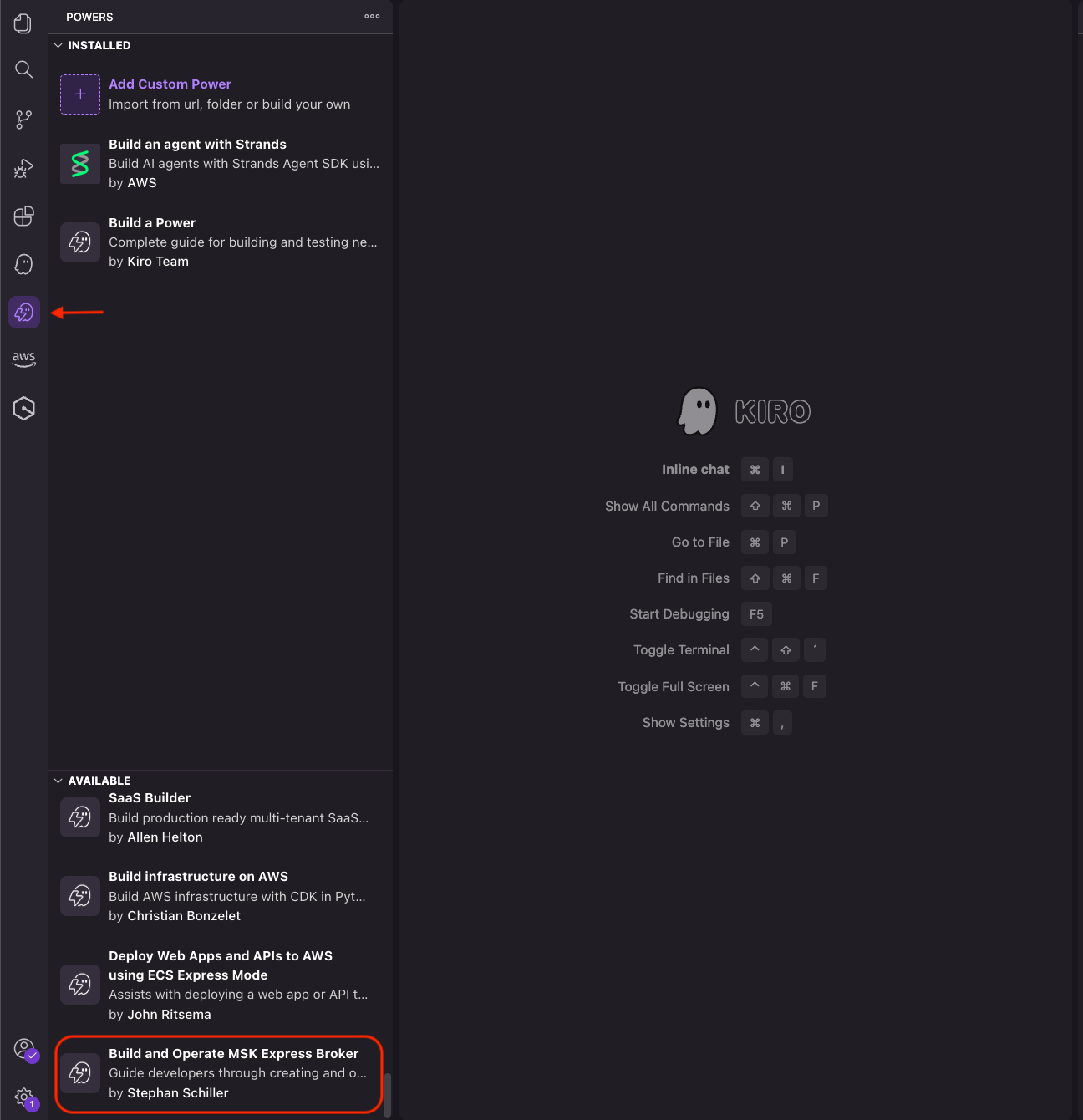
You can also visit the Kiro powers marketplace to explore other powers.
Conclusion
The MSK Express broker power streamlines Kafka operations by combining Model Context Protocol (MCP) servers with operational guidance. With natural language interactions, you can create clusters, monitor health, optimize configurations, and troubleshoot issues without reviewing extensive documentation.
Install the MSK Express broker power in your Kiro IDE and learn more about Kiro and available Kiro powers.