AWS Big Data Blog
Lowering AWS KMS decrypt API costs in EMR Spark jobs
Modern organizations processing vast amounts of data on Amazon EMR with Apache Spark face a growing cost challenge. As the number of encrypted Amazon Simple Storage Service (Amazon S3) objects grows, AWS Key Management Service (AWS KMS) decrypt API calls multiply rapidly, driving up operational costs. Consider a retail organization processing hundreds of terabytes of customer transaction data daily in S3 encrypted with AWS KMS. Each Spark task accessing an encrypted S3 object triggers an AWS KMS decrypt API call. At scale, these calls accumulate into significant and often unexpected cost increases. This is especially true for workloads that require key auditability and cannot switch to S3 Bucket Keys. S3 Bucket Keys reduce AWS KMS request costs by decreasing the number of calls from S3 to AWS KMS. However, S3 Bucket Keys limit per-object key auditability in AWS CloudTrail, which might not meet the compliance requirements of some organizations.
This post introduces practical techniques to reduce AWS KMS decrypt costs. You can reduce API call volume and lower costs without compromising encryption. It covers three techniques: optimizing file formats (including Apache Iceberg), aggregating data, and using AWS Glue Data Catalog partition indexes.
Optimization techniques
The following sections describe three techniques you can apply independently or together to reduce the number of AWS KMS decrypt API calls.
Use data aggregation
Data aggregation reduces redundant AWS KMS decrypt API calls by consolidating smaller files into larger blocks. When Spark reads many small files from S3, each file triggers its own decrypt call. By combining multiple small files into fewer, larger files, you can reduce the total number of AWS KMS API invocations. This technique is effective for read-heavy workloads that involve numerous small files stored on S3.
You can use AWS CloudTrail to monitor changes in API call frequency and validate the effectiveness of data aggregation in reducing costs.
Step 1: Benchmark baseline performance
Before applying optimizations, establish baseline metrics to quantify improvements.
The following figure shows the number of AWS KMS Decrypt API calls captured in AWS CloudTrail. Use these baseline metrics to compare against optimized results in subsequent steps.
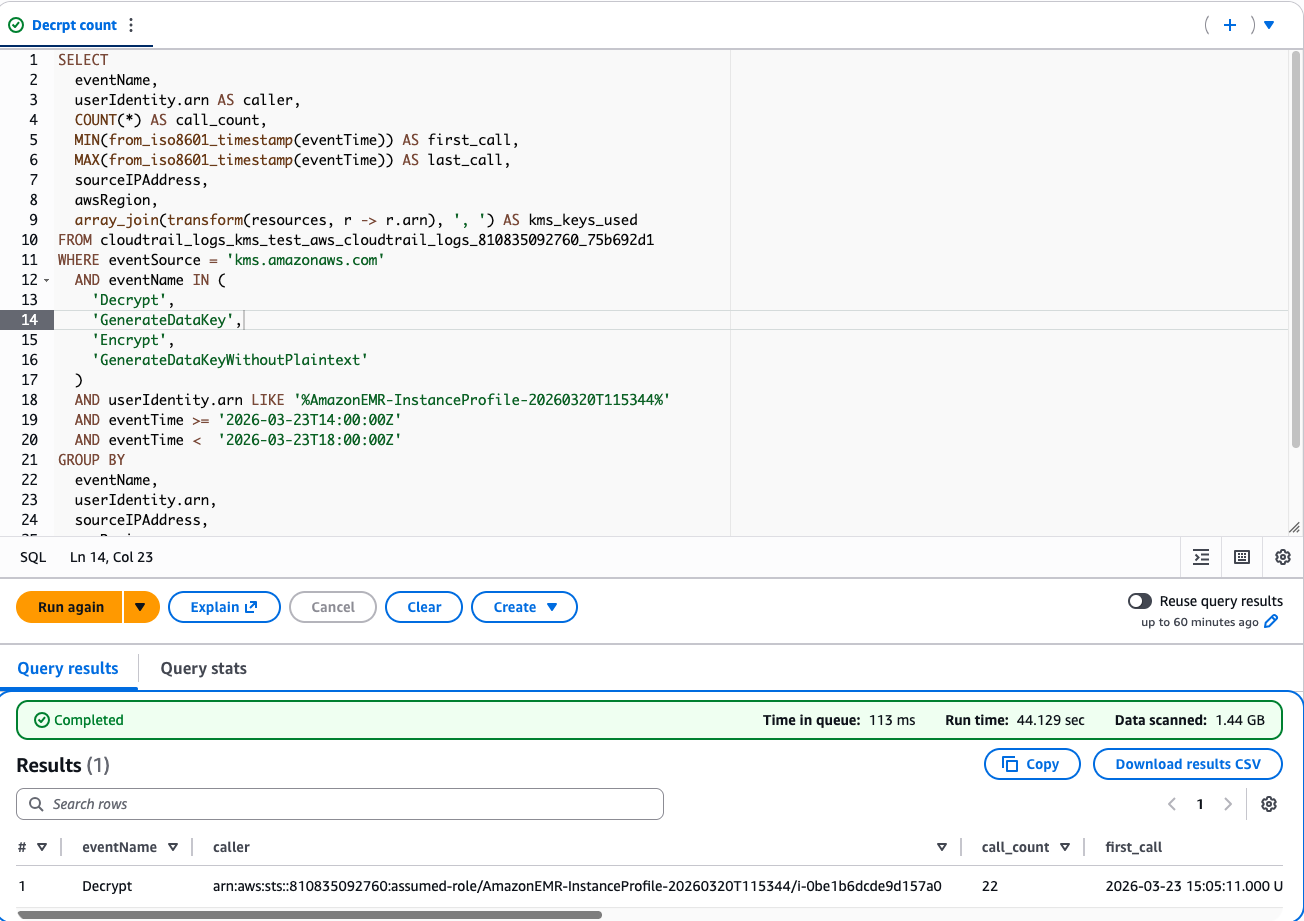
AWS CloudTrail log showing baseline AWS KMS Decrypt API call count
Step 2: Aggregate files using Spark
Consolidating smaller files into fewer, larger files stored in S3 minimizes redundant decrypt API calls.
Step 3: Rerun the job with optimized files
Read the aggregated data created in Step 2 and compare the AWS KMS Decrypt API call count against the baseline metrics from Step 1.
The following figure shows the AWS CloudTrail logs after reading the aggregated data.

AWS CloudTrail logs in Amazon Athena showing AWS KMS Decrypt API call count after data aggregation
CloudTrail metrics comparison
Track the number of API calls and observe the direct impact of data aggregation on reducing AWS KMS decrypt API calls for the same amount of data.
The following figure compares the AWS KMS Decrypt API call count before and after data aggregation for the same dataset.

AWS KMS Decrypt API call comparison before and after data aggregation
Aggregating small files into fewer large files reduces decrypt calls and shortens load time.
Optimize file formats and compression
Selecting appropriate file formats and applying compression minimizes the amount of data read from S3 and the number of AWS KMS decrypt operations.
Columnar formats (Parquet/ORC)
Columnar file formats like Parquet and ORC let Spark read only the required columns for analysis, which improves performance for analytical queries. For example, you can convert raw CSV data to Parquet to benefit from better I/O efficiency and query optimization.
Iceberg format
Apache Iceberg is a modern table format designed for large-scale analytic datasets. It supports schema evolution, snapshot isolation, and time travel, making it an excellent choice for data lakes on S3. When used with PySpark, Apache Iceberg simplifies data management by automatically optimizing file layouts, handling partitions, and integrating with Spark catalogs.
The following PySpark example uses Iceberg with Amazon EMR and S3:
Compression
Using compression reduces data size and speeds up reads and writes between S3 and Spark. Note: ZSTD is the recommended and default compression codec for Iceberg, offering better compression ratios. For this demonstration, we use Snappy to illustrate the concept.
Compression not only minimizes I/O and network overhead but also accelerates job execution in distributed Spark environments.
CloudTrail comparison on API calls
The following figure shows the reduction in AWS KMS Decrypt API calls when using optimized file formats with compression.
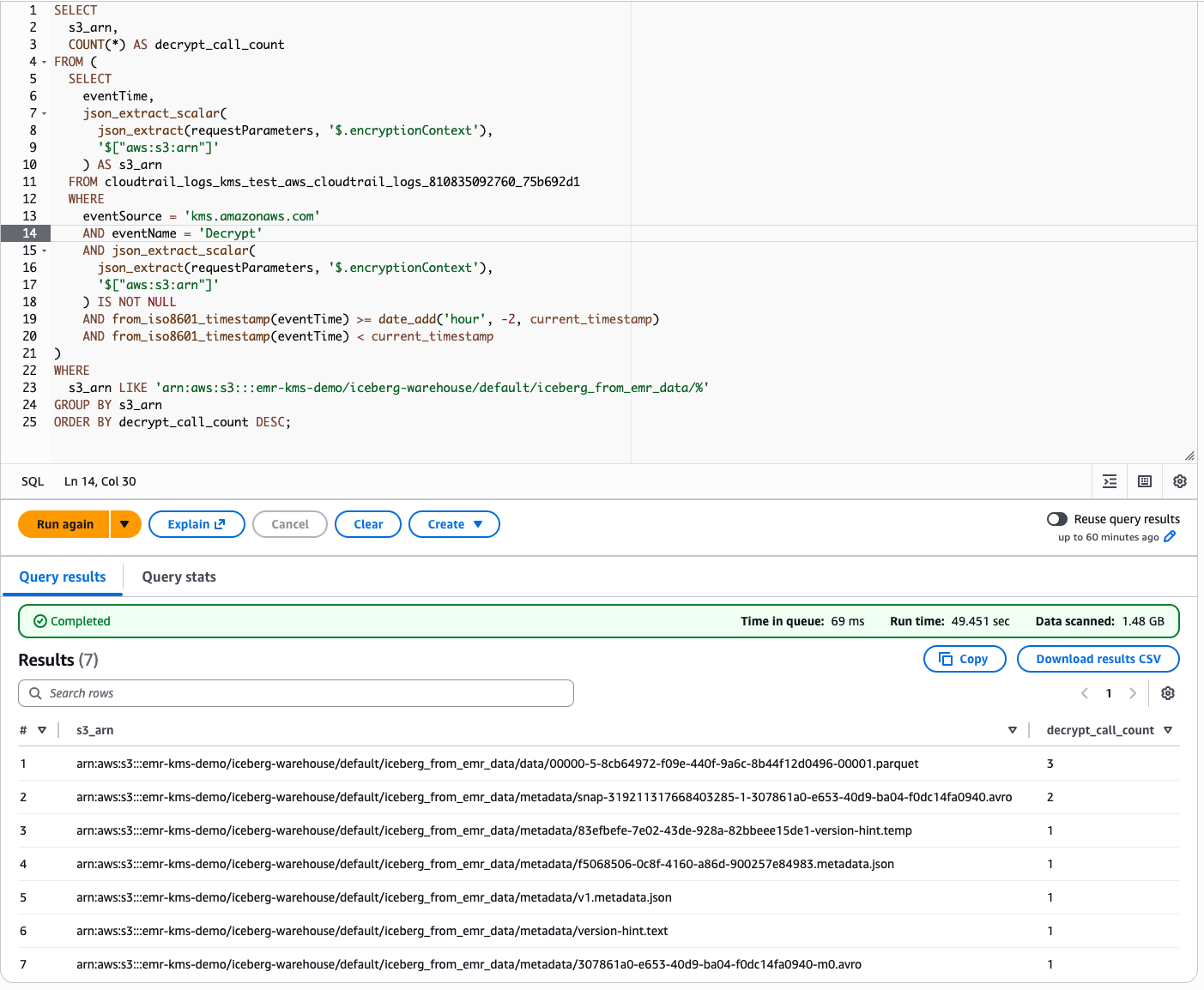
AWS KMS Decrypt API calls on optimized file formats with compression
The following table illustrates the reduction in AWS KMS decrypt calls when moving from raw, uncompressed CSV data to optimized Parquet files with compression enabled.
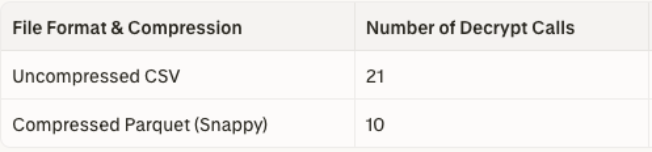
AWS KMS Decrypt API call comparison for CSV and compressed Parquet with Snappy
AWS Glue Data Catalog partition index
Partitioning data helps Spark jobs retrieve subsets of relevant data, reducing scan ranges, and decrypt operations. Using AWS Glue Data Catalog partition indexes reduces scanning overhead and the number of AWS KMS API calls.
Without a partition index, when Spark queries a partitioned table, AWS Glue Data Catalog returns all partitions by calling the GetPartitions API. Spark then reads every S3 object across all returned partitions. Because each S3 object is individually encrypted, Spark must call the AWS KMS Decrypt API once per object. More objects mean more decrypt calls and higher costs. With a partition index, AWS Glue performs server-side partition filtering, returning only matching partitions.
Step 1: Baseline query without partition index
Using an Amazon EMR Spark job:
Then check CloudTrail for the kms:Decrypt call count.
The following figure shows the AWS KMS Decrypt API call count when running the baseline query without a partition index. Spark scans all partitions, resulting in a higher number of decrypt calls.
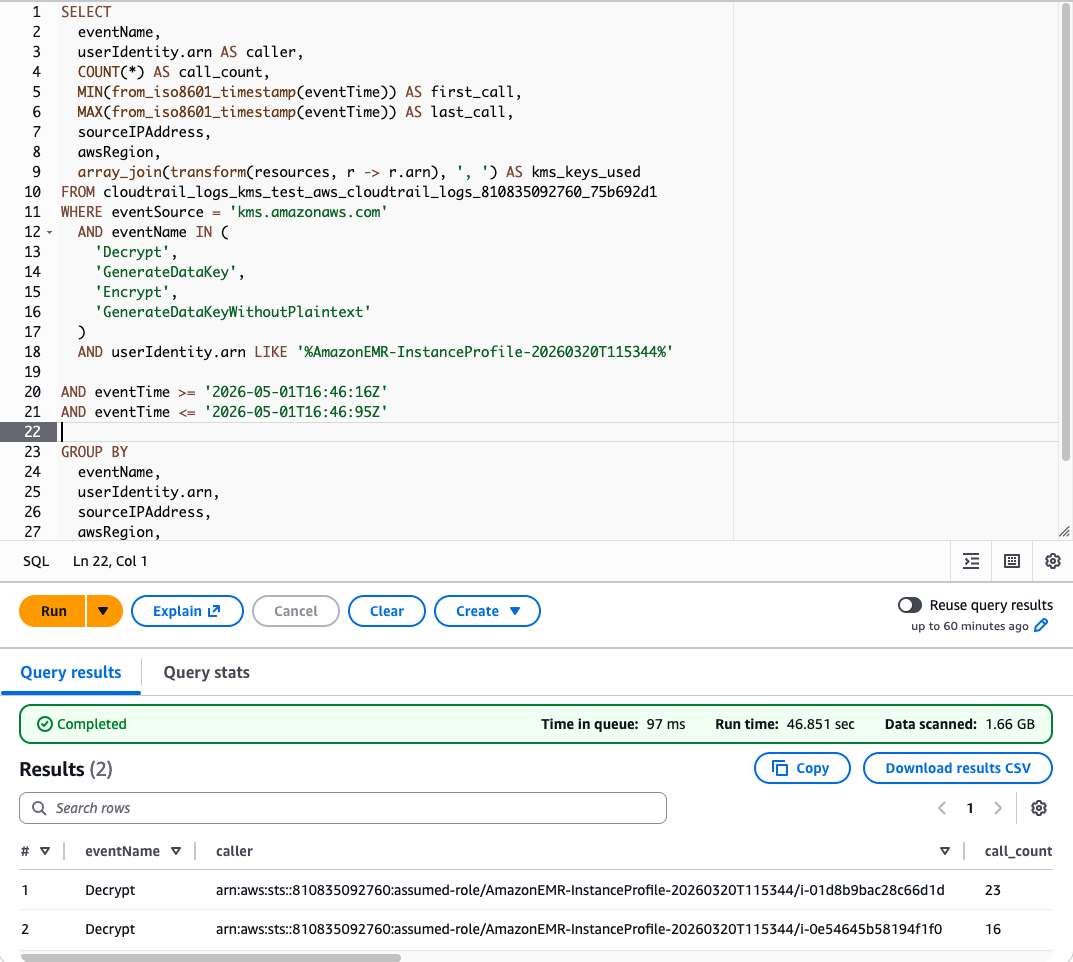
AWS KMS Decrypt API call count without a partition index
Step 2: Add partition index and rerun the baseline query from Step 1
In the AWS Management Console or through the AWS Command Line Interface (AWS CLI), create partition indexes and rerun the same baseline query from Step 1. Create partition indexes on the year and month columns. Then check CloudTrail for the kms:Decrypt call count.
The following figure shows the AWS KMS Decrypt API call count after adding a partition index. With the partition index, AWS Glue filters partitions server-side, resulting in fewer S3 objects read and fewer decrypt calls.
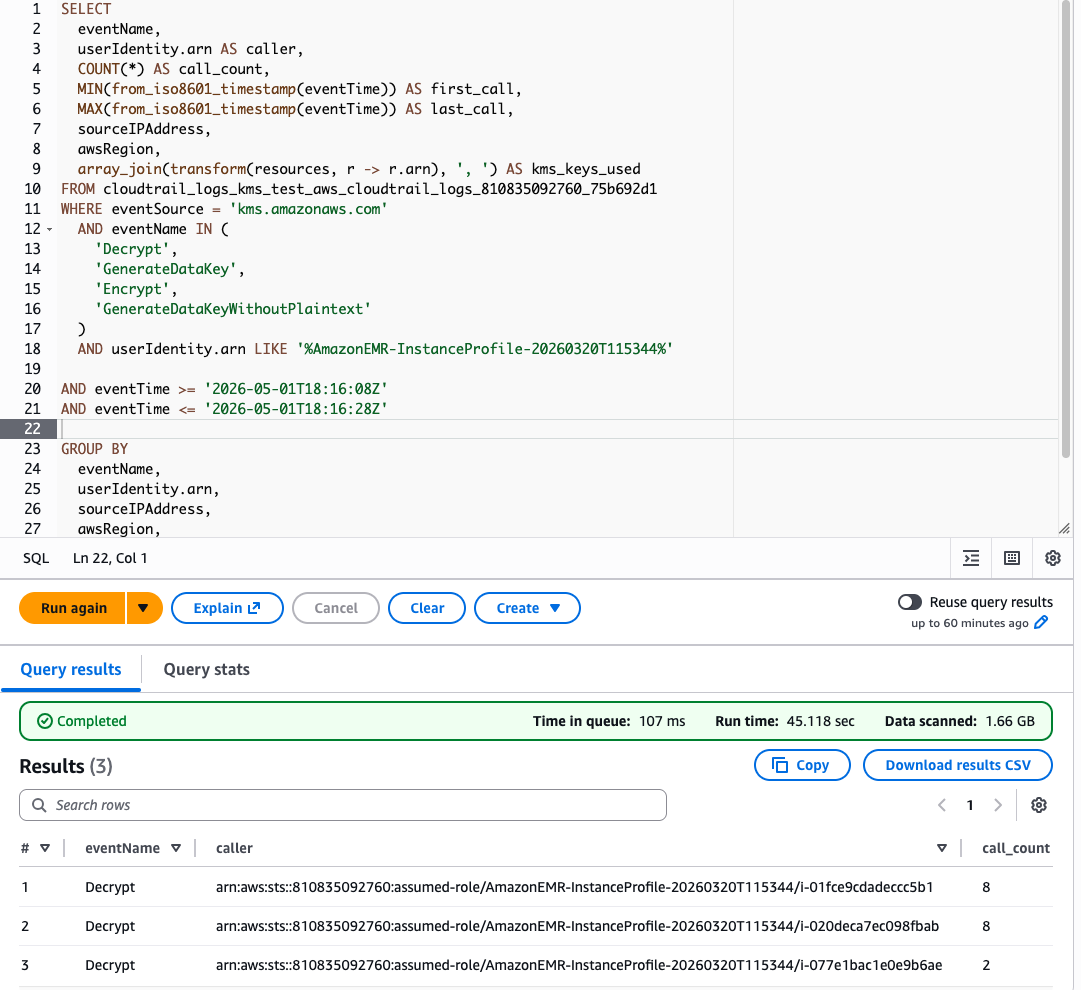
AWS KMS Decrypt API call count with a partition index
Conclusion
Optimizing EMR Spark jobs ensures cost-effective and efficient processing of encrypted data at scale. S3 Bucket Keys is the most effective way to reduce AWS KMS Decrypt API calls. The techniques covered in this post are additional optimizations that you can use together with S3 Bucket Keys for further cost reduction. You can also use them independently when S3 Bucket Keys cannot be used because of per-object auditability requirements in CloudTrail. Start implementing these strategies today to improve your Spark workload efficiency and achieve cost savings.
We welcome your feedback. If you have questions or suggestions about this post, leave a comment below.