AWS Big Data Blog
Multi-statement transactions for Apache Iceberg tables in Amazon Redshift
Data pipelines often change a table in several steps, such as first upserting the day’s sales and then removing canceled orders. Amazon Redshift now supports multi-statement transactions for Apache Iceberg tables so you can run several data manipulation language (DML) statements against one Iceberg table inside a single BEGIN … COMMIT. Amazon Redshift publishes them as one Iceberg snapshot. Readers in other sessions and engines see the table before the batch commit or after it. A failed or rolled-back transaction leaves nothing to undo. Multi-statement transactions are available in Amazon Redshift with Patch 206 and later.
Multi-statement transactions extend existing Iceberg support in Amazon Redshift, which you can use to create Iceberg tables and write to them with INSERT, modify rows with DELETE, UPDATE, and MERGE, store materialized views as Iceberg tables, and commit concurrent writes that don’t overlap. Until now, though, each write committed on its own, one statement at a time.
In this post, we explain why one commit per statement makes multi-step pipelines fragile and how Amazon Redshift commits multiple statements as one snapshot. We also cover what you can run in a transaction, what concurrent readers and writers see, and how multi-statement transactions perform.
The challenge of one commit per statement
Consider a retailer whose finance team tracks daily revenue. During the day, some point-of-sale (POS) values are corrected, such as a price fix, and others are voided, such as a canceled order. Dashboards and downstream jobs read revenue from one Iceberg table, sales (sale_id, store_id, sale_date, amount), in the external schema iceberg_schema. Each night, the POS system delivers the day’s batch as two staging Iceberg tables. pos_sales holds new and corrected sales, one row per sale_id, and pos_voids lists voided sales. A job applies the batch in two statements:
Because each statement commits on its own, the state between them is public. Until the DELETE commits, every reader sees revenue that includes the voided sales. If the DELETE fails, for example because the query is canceled, the table stays that way. If a check after the job finds the batch wrong, both changes are already public, so you must work out which statements landed and write SQL to undo them. Each commit also costs time as it writes new table metadata to Amazon Simple Storage Service (Amazon S3) and updates the catalog. A job of N statements pays the catalog update N times.
How Amazon Redshift commits multiple statements as one snapshot
To make the batch atomic, wrap the same statements in BEGIN and COMMIT. No new syntax is needed, and the job can audit the result before it commits:
Here’s what happens in this transaction:
- Each statement builds on the previous statement’s uncommitted metadata, so the transaction accumulates one pending snapshot.
- Reads of
salesinside the transaction, by the same name, see that pending snapshot. The auditSELECTchecks the batch while no other session or engine can see it. - At
COMMIT, Amazon Redshift publishes the whole batch as one snapshot with one catalog update, instead of one per statement. Readers in other sessions and engines see the table before the batch or after it, never in between. - If a statement fails or the job issues
ROLLBACK, nothing is published. The table stays as it was beforeBEGIN, with nothing to undo.
This transaction is a session-scoped form of the write-audit-publish pattern in plain SQL. The job’s orchestrator, such as your application or an Apache Airflow task, commits only if day_total matches the control total from the POS system and negative_rows is zero. Otherwise it issues ROLLBACK, and readers keep seeing the last verified version of sales while the team investigates the batch.
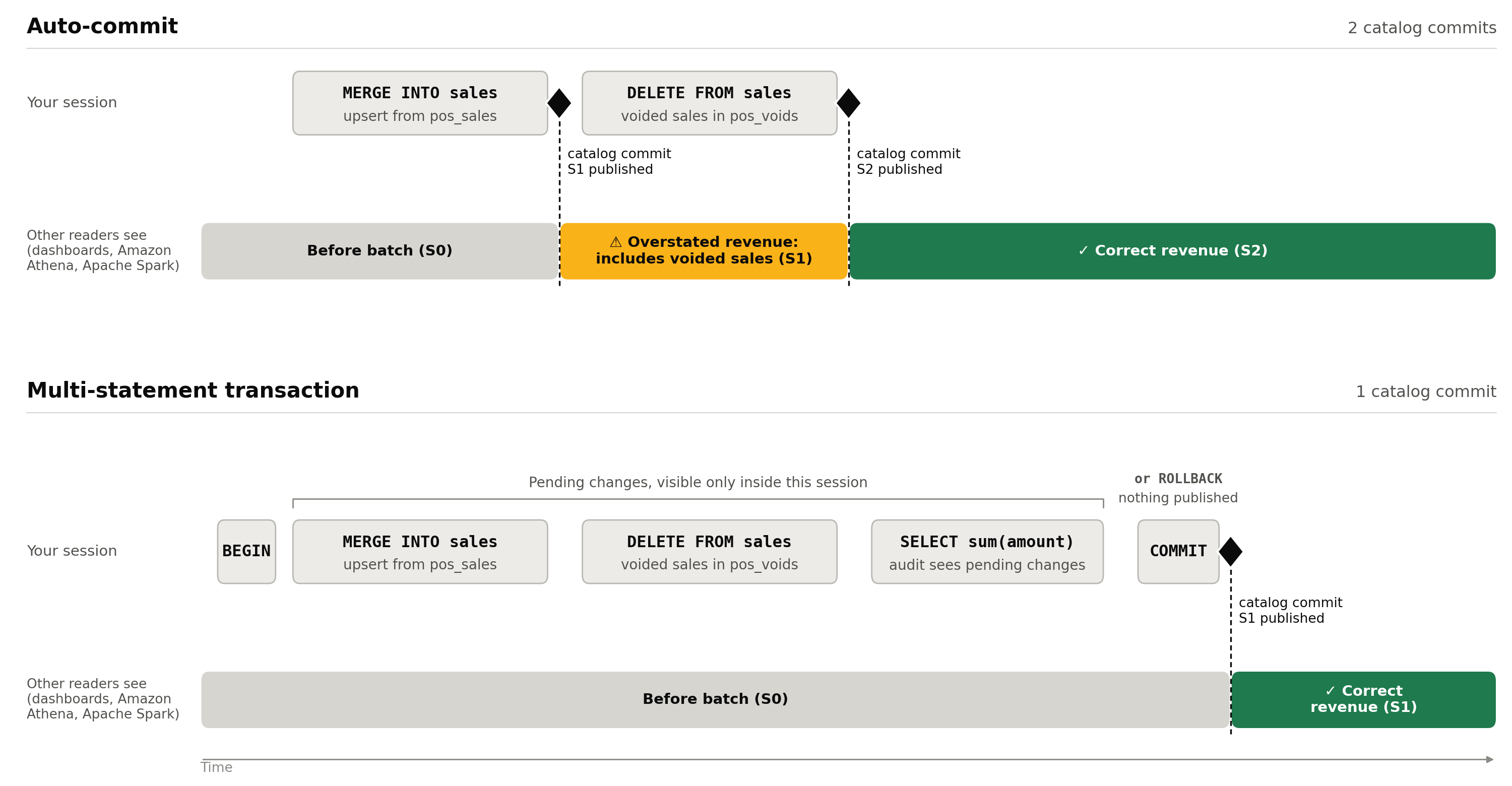
Figure 1: What other readers see with auto-commit and with a multi-statement transaction
What you can run inside a transaction
Iceberg DML is accepted in an explicit transaction block, in a multi-statement command string, and in prepared statements, including those sent through the Amazon Redshift JDBC driver.
All writes in a transaction must go to the same Iceberg table. The table can be in the AWS Glue Data Catalog or Amazon S3 Tables, and you can reference it through an external schema or the auto-mounted awsdatacatalog catalog. Refer to the table by the same name throughout the transaction. Amazon Redshift identifies a table by how you reference it. If you reference one physical table through two external schemas, or through an external schema and awsdatacatalog, it counts as two tables. A write through the second name is rejected.
| Statement inside the transaction | Behavior |
| Reads of Iceberg, Redshift managed storage (RMS), and external tables, across databases | Allowed |
INSERT, UPDATE, DELETE, MERGE against one Iceberg table |
Allowed. Published as one snapshot at COMMIT |
REFRESH MATERIALIZED VIEW on one Iceberg materialized view |
Allowed. The view is the transaction’s write target |
| Reads of the Iceberg table you are writing, by the same name | Allowed. Sees your uncommitted changes |
| A write to a second Iceberg table | Rejected |
Any other write, before or after the Iceberg writes: RMS or temporary table DML, COPY, UNLOAD, GRANT, REVOKE, ANALYZE, or other data definition language (DDL) |
Rejected |
DDL on an Iceberg table: CREATE TABLE, CREATE TABLE AS, ALTER TABLE, CREATE MATERIALIZED VIEW, DROP TABLE, DROP MATERIALIZED VIEW |
Rejected |
| An Iceberg write inside a stored procedure | Rejected |
A rejected statement fails and aborts the transaction, so nothing that ran before it is published.
The nightly job fits these rules: it reads the Iceberg tables pos_sales and pos_voids and writes only sales. If the job also clears processed rows from a staging table, do that after COMMIT. Inside the transaction, it would be a write to a second Iceberg table.
Note: This changes behavior for existing workloads. A single Iceberg DDL statement inside BEGIN … COMMIT used to succeed and is now rejected. Run Iceberg DDL as a standalone statement.
Cleaning up orphan files
Intermediate files written by a transaction that doesn’t commit aren’t referenced by any snapshot and become orphan files. For Amazon S3 Tables, unreferenced file removal is enabled by default for table buckets. For tables in the AWS Glue Data Catalog, enable the orphan file deletion table optimizer. It removes only files created after you enable it, so enable it before you start using multi-statement transactions.
Concurrent readers and writers
A multi-statement transaction gives you three guarantees:
- Atomic publishing: Other sessions and engines see none of your changes until
COMMIT, and then see all of them in one snapshot. - Read your own writes: Reads of the Iceberg table you are writing include your uncommitted changes, as long as you use the same name.
- Repeatable reads of each table: The first read of an Iceberg table fixes its version for the rest of the transaction. Later reads of that table return the same data, even if other sessions commit to it in the meantime.
Each table’s version is fixed at its first read, not when the transaction begins. An Iceberg table that you first read later in the transaction can include changes that other sessions committed after the transaction started. For example, suppose the nightly job reads sales and then looks up store details in an Iceberg stores table. The lookup includes changes that another session committed to stores in between:
RMS tables follow their own snapshot, taken at the transaction’s first statement and not coordinated with the Iceberg catalog.
Performance
To measure the performance impact, we compared committing each statement on its own against batching the same statements into multi-statement transactions. We report results relative to single-statement commits.
Setup: An Iceberg table registered in the AWS Glue Data Catalog in the US East (N. Virginia) Region (us-east-1), written from a single Amazon Redshift provisioned cluster. Throughput tests run one session per writer over a fixed window. Each writer runs its transactions back to back. A transaction whose commit fails is rolled back and not counted. Results vary with statement size, partitioning, and contention.
Latency
We first measured the case that batching is meant to help: many small statements, where commits rather than data movement dominate the run time. Each configuration runs the same 500 small statements against one table, and only the number of statements per commit changes.
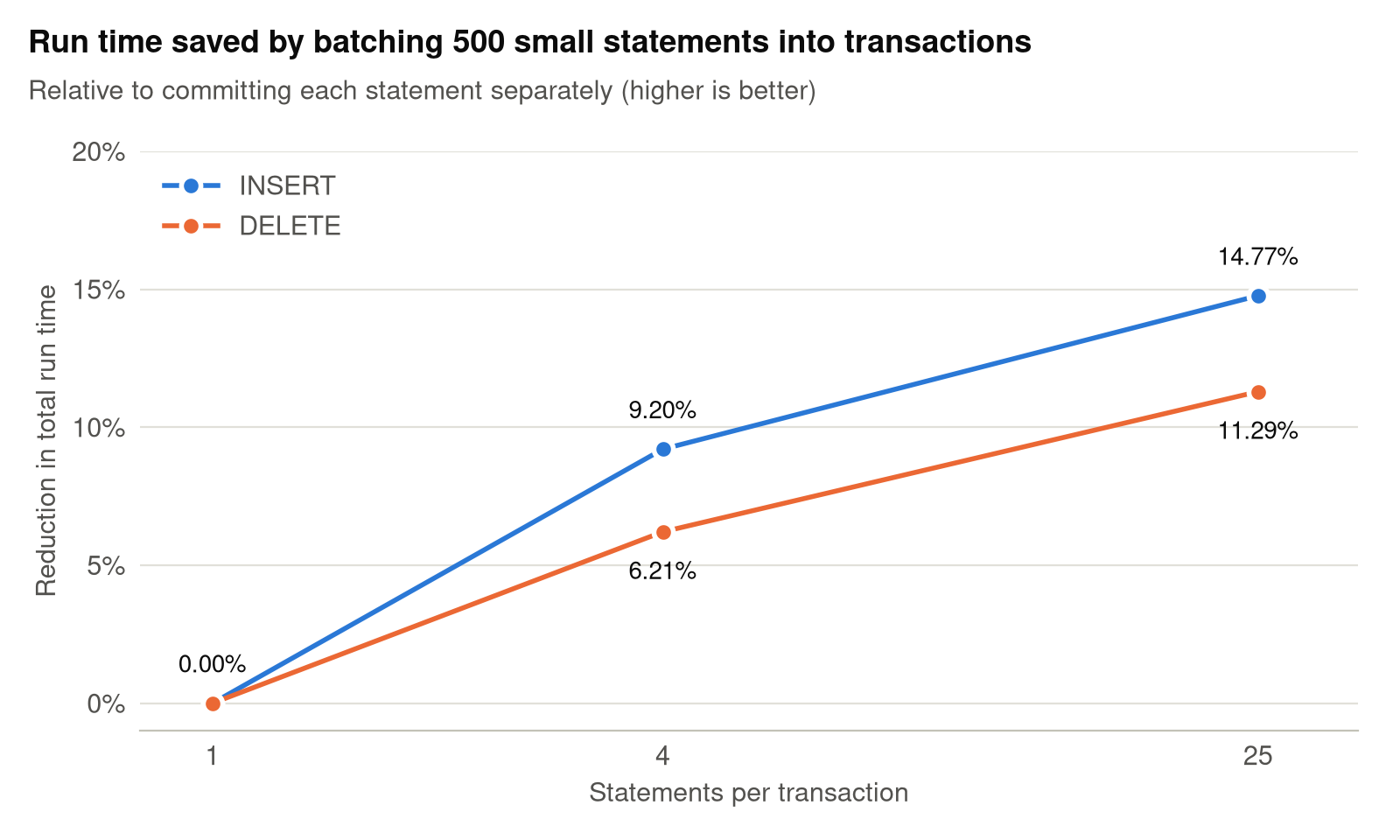
Figure 2: Reduction in total run time for 500 small statements, relative to committing each statement separately
As Figure 2 shows, batching 25 statements per commit reduced total run time by 14.77% for INSERT and 11.29% for DELETE, compared to committing each statement separately. More than half of that gain already arrives at 4 statements per commit (9.20% and 6.21%). The gain comes from paying one catalog commit per transaction instead of one per statement, and from less per-statement transaction overhead.
However, when each statement already does heavy data work, the time saved by combining commits is too small to notice. Batching statements into one transaction doesn’t make the job meaningfully faster.
Throughput
With multi-statement transactions, a single catalog commit can carry the changes from several statements, which raises write throughput. To measure this, we ran an increasing number of concurrent writers against one table, comparing auto-commit single-statement INSERTs with transactions of four INSERTs. Figure 3 shows committed statements per second, normalized to a single auto-commit writer.
These results were measured with conflict resolution, which applies to every multi-statement transaction. Another writer can commit to the same table while your transaction is open. If the two sets of changes don’t overlap, Amazon Redshift rebases your transaction onto the latest table version and commits it as one snapshot, without re-running any of its statements. Only a genuine conflict, where both writes changed the same data, fails the COMMIT. In that case, retry the transaction from your application.
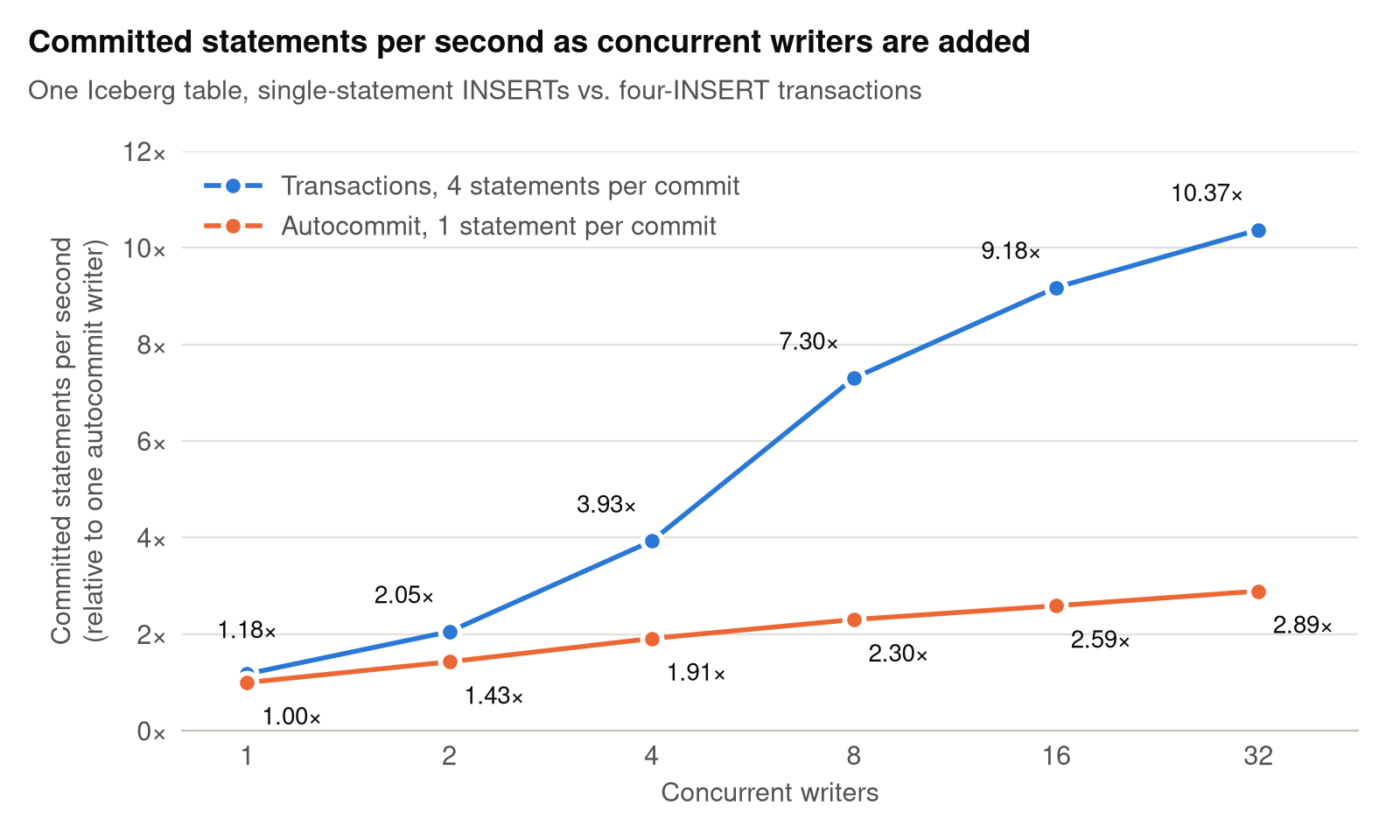
Figure 3: Committed statements per second as concurrent writers are added, normalized to a single auto-commit writer
The advantage grows with concurrency. With one writer, transactions commit 1.18× as many statements as auto-commit. As writers are added, the number of catalog commits per second levels off for both configurations, but each transaction commit carries four statements instead of one. At 32 concurrent writers, auto-commit reaches 2.89× the single-writer rate and transactions reach 10.37×. That is 3.59 times as many committed statements in the same window.
Conclusion
Multi-step writes are the normal shape of a data pipeline. Until now, each step against an Iceberg table was visible on its own and you could undo it only by hand. With multi-statement transactions, Amazon Redshift publishes a group of DML statements against one Iceberg table as a single atomic snapshot. Readers never see a half-applied change, and a failure leaves nothing to undo. The pipeline also pays one catalog commit instead of one per statement. To get started, upgrade to Patch 206 or later.
To learn more about Iceberg support in Amazon Redshift, see the following resources:
- Getting started with Apache Iceberg write support in Amazon Redshift – Part 1 and Part 2.
- Resolving concurrent write conflicts for Apache Iceberg tables in Amazon Redshift.
- Materialize once, query anywhere: Introducing Iceberg materialized views in Amazon Redshift.
- Referencing Iceberg tables in Amazon Redshift.