AWS Big Data Blog
NaranjaX manages multiple Amazon MSK Serverless clusters in different accounts from their IDP using AWS RAM and Route 53
NaranjaX is a leading fintech platform that aims to simplify and improve the daily financial lives of millions of people in Argentina. Through its digital ecosystem, NaranjaX offers a complete suite of financial products and services, including payments, collections, financing, savings, and protection products.
NaranjaX needed to evolve from their REST-based architecture to an event-driven architecture using Amazon Managed Streaming for Apache Kafka (Amazon MSK) Serverless. In a multi-account environment, MSK Serverless clusters resolve DNS names within their hosting account. AWS published a cross-account connectivity pattern that centralizes clusters in a single account. This is an effective approach for many organizations. NaranjaX required additional flexibility to distribute clusters across accounts while avoiding centralized quota dependencies.
NaranjaX addressed this requirement by developing an approach that uses AWS Resource Access Manager (AWS RAM) and Amazon Route 53 Resolver. In this post, we show you how to expand Amazon MSK Serverless adoption across multiple accounts while maintaining scalability, availability, and reduced operational overhead.
Solution overview
NaranjaX’s solution supports cross-account MSK Serverless deployment through a centralized networking architecture that combines shared virtual private cloud (VPC) resources and DNS resolution capabilities. The solution uses a central AWS account that hosts shared private subnets and Route 53 resolver endpoints, so that MSK Serverless clusters in different accounts can communicate across account boundaries.
The architecture consists of three main components:
- A central VPC with private subnets that are shared across accounts using AWS RAM.
- Route 53 resolver endpoints and rules that resolve DNS across accounts for MSK Serverless clusters.
- Network security configurations that control communication between components.
When an application team creates an MSK Serverless cluster in their account, they can associate it with the shared VPC subnets. The Route 53 resolver rules handle DNS resolution for the cluster’s domain names, while security groups manage access control. This design supports direct connectivity between MSK Serverless clusters and applications across different AWS accounts.
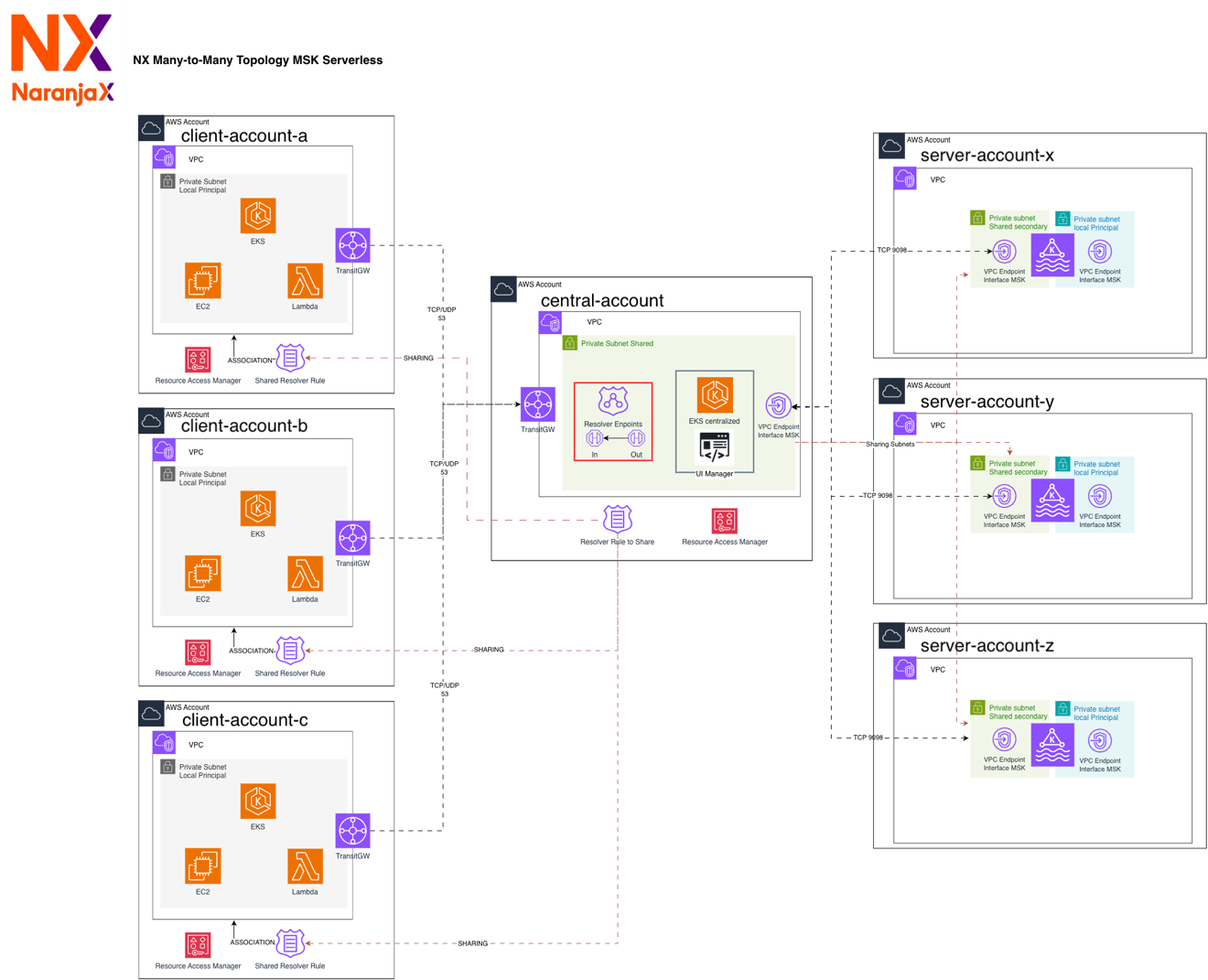
Figure 1: Cross-account architecture with a central networking account sharing subnets and Route 53 resolver endpoints
Implementation requirements and configuration
This section walks you through the steps to configure cross-account MSK Serverless connectivity using shared VPC subnets and Route 53 resolver rules. Before you begin, make sure you have the prerequisites in place.
Prerequisites
Before implementing this solution, confirm the following:
- AWS RAM is enabled in your AWS Organization. For instructions, see Enabling resource sharing within AWS Organizations.
- Amazon MSK supports shared subnets. When you create an MSK Serverless cluster in any account, you can associate the shared VPC as one of the up to five VPCs supported by the service.
- You have a multi-account environment with at least one central networking account and one or more application accounts.
- You have permissions to create VPCs, subnets, Route 53 resolver endpoints, and AWS RAM resource shares in the central account.
Step 1: Share subnets with AWS RAM in a central account
First, create a VPC with private subnets in your central networking account. These subnets are the resources you will share through AWS RAM. For details, see Creating a VPC in the Amazon VPC User Guide.
Next, create a resource share for those subnets in AWS RAM. Select the subnets you created and specify the target accounts.
Finally, specify the principals (account IDs) authorized to use the shared subnets. These are the accounts where you will create your Amazon MSK Serverless clusters.
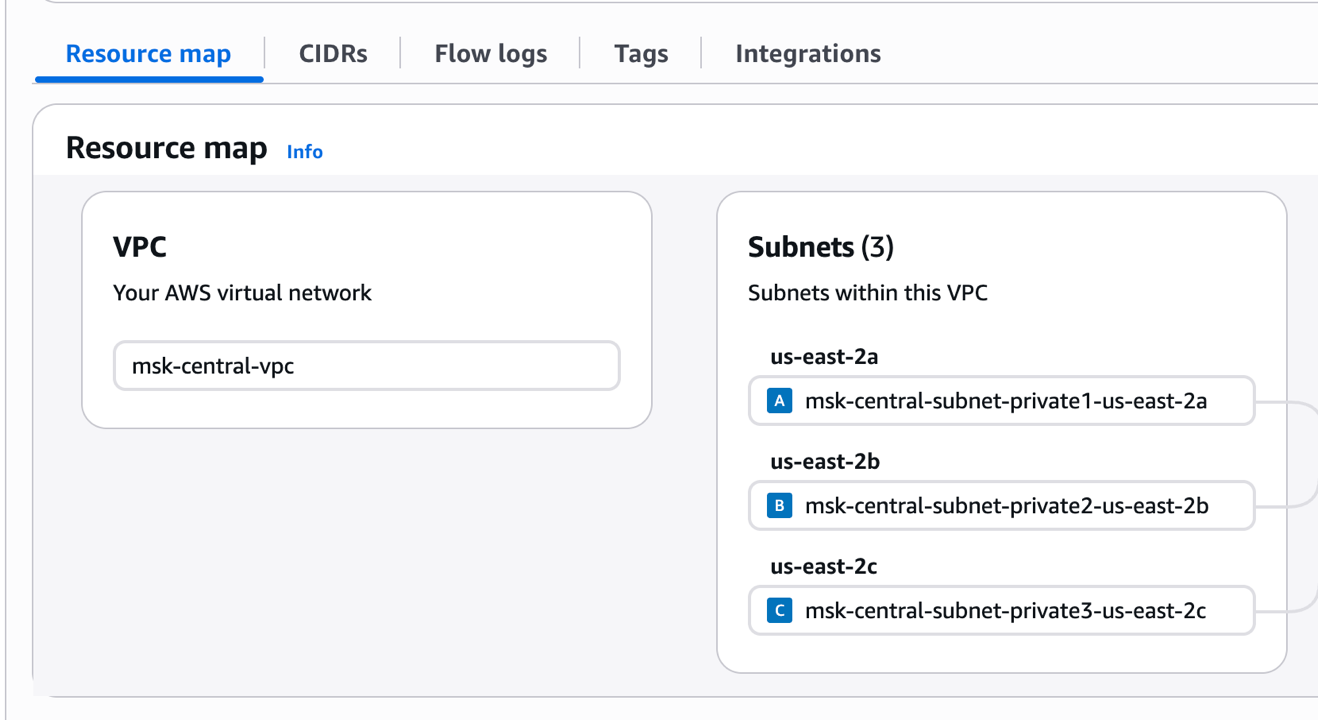
Figure 2: Creating a resource share for the private subnets in AWS RAM
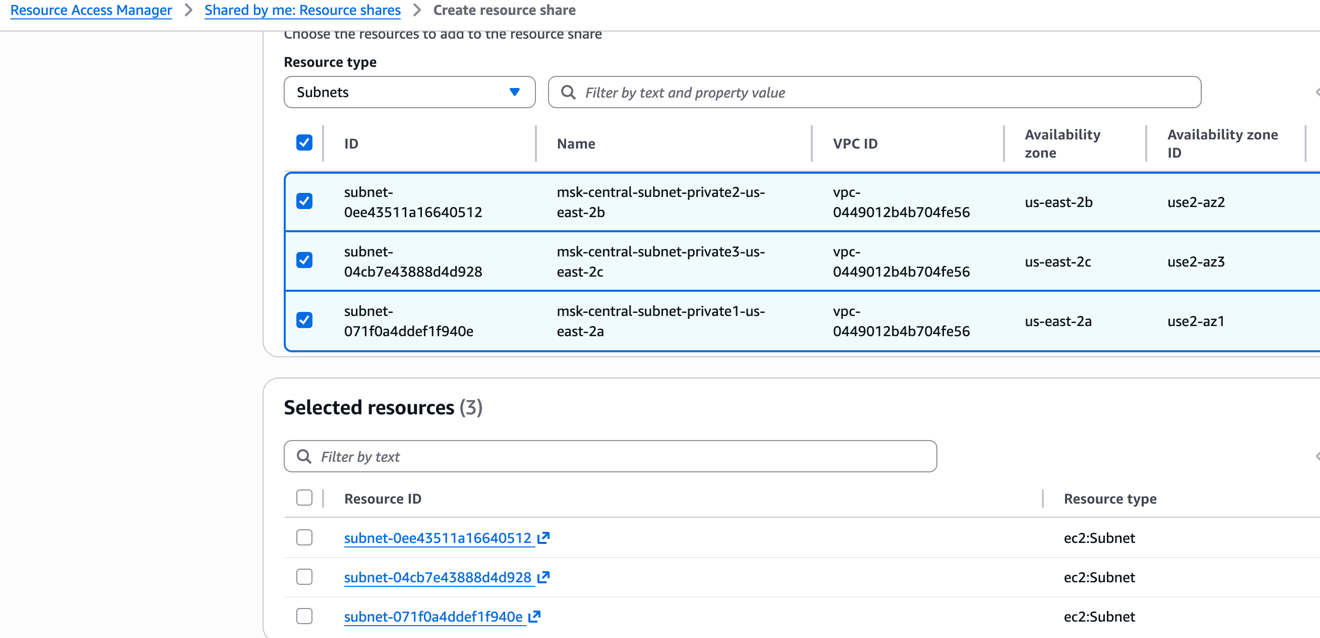
Figure 3: Specifying the target accounts for the resource share
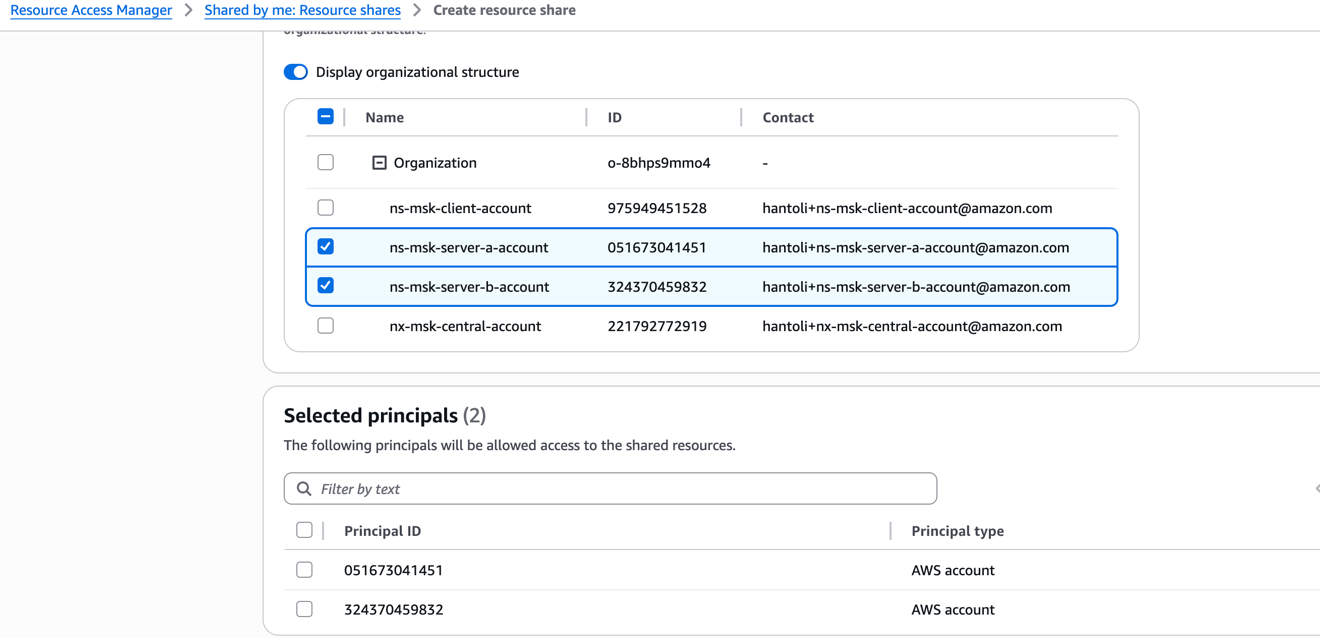
Figure 4: Confirming the principals authorized to use the shared subnets
Step 2: Configure Amazon Route 53 Resolver rules
In your central account, create a Route 53 Resolver rule for the domain *.kafka-serverless.<Region>.amazonaws.com. Don’t associate this rule with any VPC at this point.
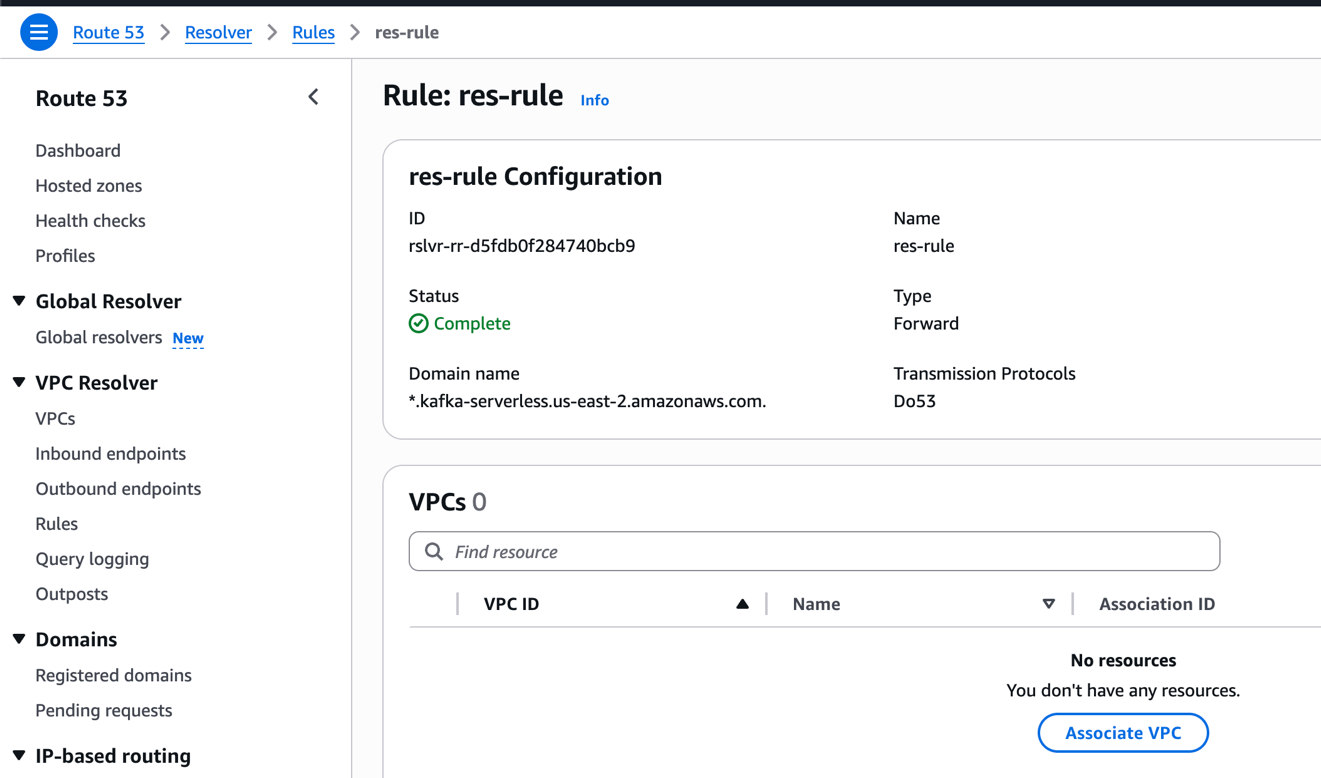
Figure 5: Route 53 Resolver rule for the kafka-serverless domain
Configure this as a forward rule for the kafka-serverless subdomain. Set up an outbound endpoint in the central account and point the target IP addresses to the inbound endpoint in the same account.
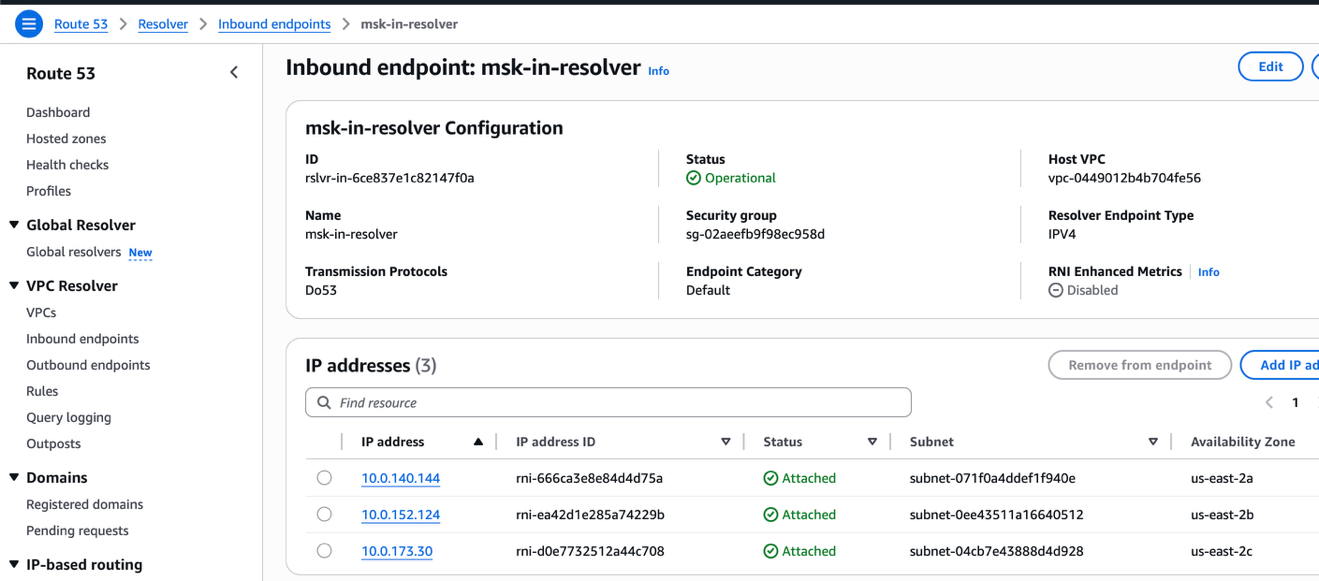
Figure 6: Forward rule configuration with outbound and inbound resolver endpoints
Share the resolver rule with your application accounts using AWS RAM so they can resolve the DNS names of their MSK Serverless clusters.
Make sure the central VPC has both inbound and outbound resolver endpoints configured to support cross-account DNS resolution.
Step 3: Configure network security groups
Configure security groups in each consuming account to allow inbound and outbound traffic on port 53 (DNS resolution) and port 9098 (Kafka IAM authentication). This supports both name resolution and secure connectivity to your MSK Serverless brokers across account boundaries.
Step 4: Enable and test many-to-many connectivity
With the networking infrastructure in place, you can now create MSK Serverless clusters in any of your application accounts. To do this, create an MSK Serverless cluster in your application account and associate it with the shared VPC subnets from the central account. The Route 53 resolver rules automatically handle DNS resolution for the cluster endpoints, and the security groups you configured control access. This eliminates the restriction of hosting all clusters in a single account.
You have flexibility in how you configure DNS resolution for your clients. For example, in a client account, you can associate the shared resolver rule with a VPC directly, or you can use the inbound endpoint IP addresses from the central account as custom DNS servers. Configure these either in per-connection scripts or in DHCP option sets for a separate VPC.
To verify connectivity, use the dig command from an instance in a client account VPC to test DNS resolution of MSK Serverless bootstrap strings across different accounts. The following example uses the +short flag for clarity:
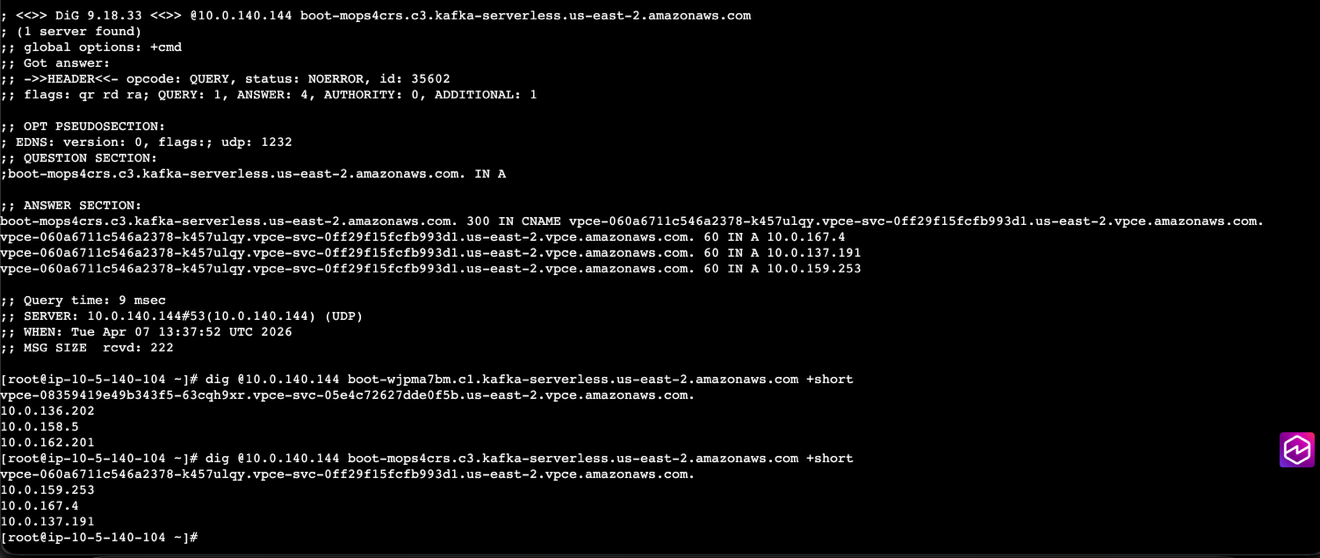
Figure 7: The dig command resolving MSK Serverless bootstrap strings across accounts
The output shows that two MSK Serverless clusters (bootstrap strings starting with boot-*) in different accounts and VPCs resolve to the actual IP addresses of the three brokers listening for connections.
This confirms that the architecture supports scalable, consistent cross-account communication for event-driven workloads.
Key benefits
NaranjaX’s implementation of MSK Serverless as its integration backbone delivered measurable advantages across 15+ application teams and over 40 AWS accounts, transforming application development and operations.
Scalability with optimized cost
With MSK Serverless, teams can scale workloads automatically without managing broker capacity. Combined with AWS RAM and Route 53, the architecture supports growth across over 40 accounts while maintaining cost efficiency. By removing the need for dedicated Kafka operations staff and self-managed clusters, NaranjaX reduced infrastructure management costs by approximately 40 percent compared to their previous self-managed Kafka deployment.
Simplified governance and security
Centralized DNS management and VPC sharing keep configurations standardized across all accounts. IAM-based access control, integrated with KATHU, provides clear visibility into topic ownership and consumer access, reducing security review cycles from days to hours.
Faster developer onboarding through IDP integration
By integrating Kafka control-plane operations directly into their internal developer platform (IDP), teams can provision clusters and topics through Terraform modules or a graphical interface. This reduced onboarding time for new teams adopting event-driven architecture from weeks to less than one day.
Reduced operational overhead
Application teams can focus on delivering business features rather than managing Kafka infrastructure. Central operations handle DNS, networking, and resource sharing, while MSK Serverless abstracts broker administration. This reduced operational tickets related to Kafka by over 70 percent and freed the platform team to focus on higher-value initiatives.
Next steps
NaranjaX is evaluating extending this solution by incorporating automatic topic replication across accounts using MSK Replicator, so that certain topics can be exposed as Enterprise Topics in a central hub for global consumption. This will further simplify the architecture, improve data resiliency, and enhance visibility across event domains.
Conclusion
Through this architecture, NaranjaX successfully implemented a many-to-many connectivity model for Amazon MSK Serverless across more than 20 AWS accounts. By using AWS RAM and Amazon Route 53 Resolver, the organization achieved a scalable, secure, and centralized network topology that accelerates the adoption of event-driven architecture without operational bottlenecks. This approach complements the cross-account connectivity pattern published by Tamer Soliman, and provides additional flexibility for organizations that require distributed Kafka clusters in large-scale multi-account environments. To get started, see the Amazon MSK documentation and try this approach in your own multi-account environment.