AWS Big Data Blog
Optimizing Flink’s join operations on Amazon EMR with Alluxio
When you’re working with data analysis, you often face the challenge of effectively correlating real-time data with historical data to gain actionable insights. This becomes particularly critical when you’re dealing with scenarios like e-commerce order processing, where your real-time decisions can significantly impact business outcomes. The complexity arises when you need to combine streaming data with static reference information to create a comprehensive analytical framework that supports both your immediate operational needs and strategic planning
To tackle this challenge, you can employ stream processing technologies that handle continuous data flows while seamlessly integrating live data streams with static dimension tables. These solutions enable you to perform detailed analysis and aggregation of data, giving you a comprehensive view that combines the immediacy of real-time data with the depth of historical context. Apache Flink has emerged as a leading stream computing platform that offers robust capabilities for joining real-time and offline data sources through its extensive connector ecosystem and SQL API.
In this post, we show you how to implement real-time data correlation using Apache Flink to join streaming order data with historical customer and product information, enabling you to make informed decisions based on comprehensive, up-to-date analytics.
We also introduce an optimized solution to automatically load Hive dimension table data into Alluxio Universal Flash Storage (UFS) through the Alluxio cache layer. This enables Flink to perform temporal joins on changing data, accurately reflecting the content of a table at specific points in time.
Solution architecture
When it comes to joining Flink SQL tables with stream tables, the lookup join is a go-to method. This approach is particularly effective when you need to correlate streaming data with static or slowly changing data. In Flink, you can use connectors like the Flink Hive SQL connector or the FileSystem connector to archive the scenario.
The following architecture shows general approach which we describe ahead:
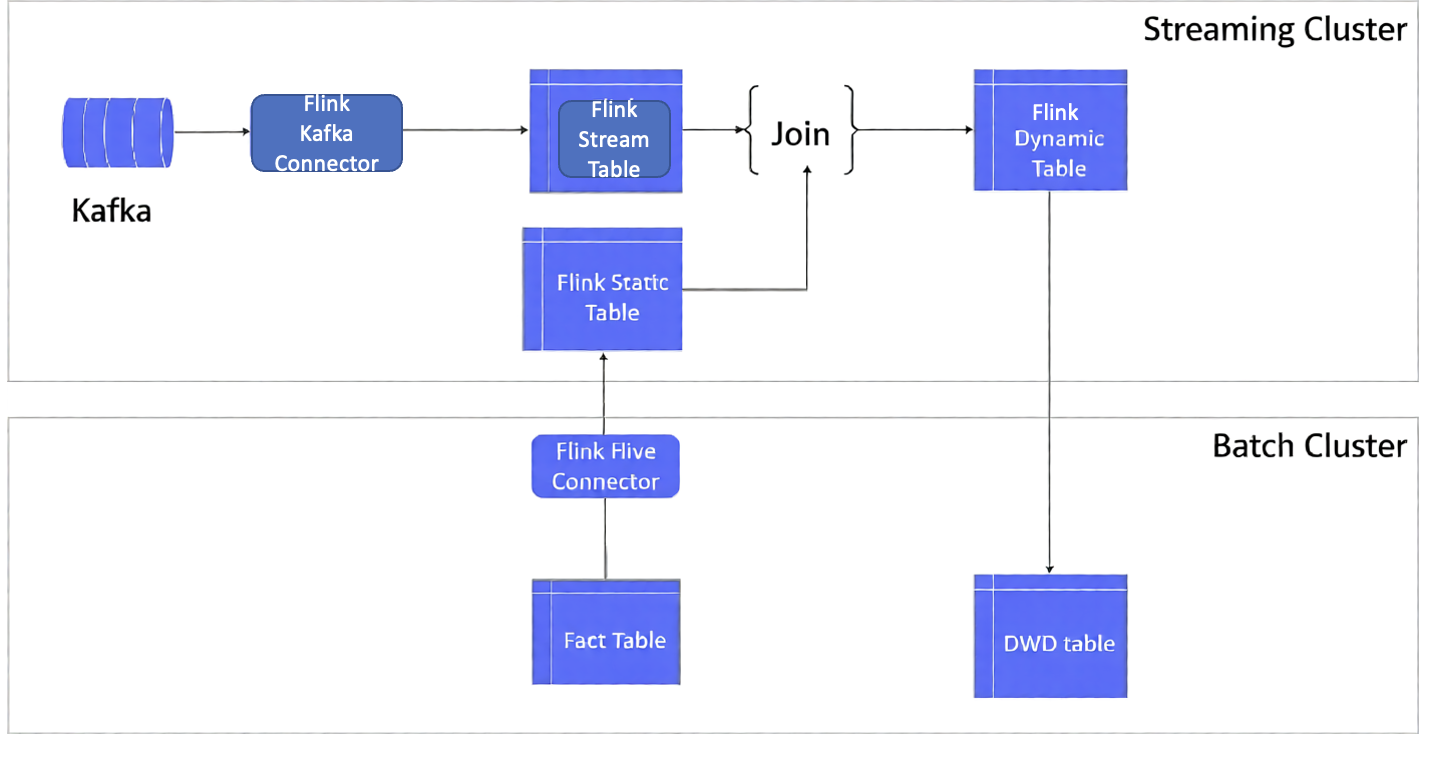
Here’s how we do this:
- We use offline data to construct a Flink table. This data could be from an offline Hive database table or from files stored in a system like Amazon S3. Concurrently, we can create a stream table from the data flowing in through a Kafka message stream
- Use a batch cluster for offline data processing. In this example, we use an Amazon EMR cluster which creates a fact table in it. It also provides a Detail Wide Data (DWD) table which has been used as a Flink dynamic table to perform consequence processing after a lookup join
- It is typically located in the middle layer of a data warehouse, between the raw data contained in the Operational Data Store (ODS) and the highly aggregated data found in the Data Warehouse (DW), or Data Mart (DM).
- The primary purpose of the DWD layer is to support complex data analysis and reporting needs by providing a detailed and comprehensive data view.
- Both the fact table and DWD table are hive tables on Hadoop
- Use a streaming cluster for the real-time processing. In this example, we use an Amazon EMR cluster to stream event ingestion and analyze it using Flink, using Flink Kafka connector and Hive connector to join the streaming event data and statics dimension data (fact table)
One of the key challenges encountered with this approach is related to the management of the lookup dimension table data. Initially, when the Flink application is started, this data is stored in the task manager’s state. However, during subsequent operations like continuous queries or window aggregations, the dimension table data isn’t automatically refreshed. This means that the operator must either restart the Flink application periodically or manually refresh the dimension table data in the temporary table. This step is crucial to ensure that the join operations and aggregations are always performed with the most current dimension data.
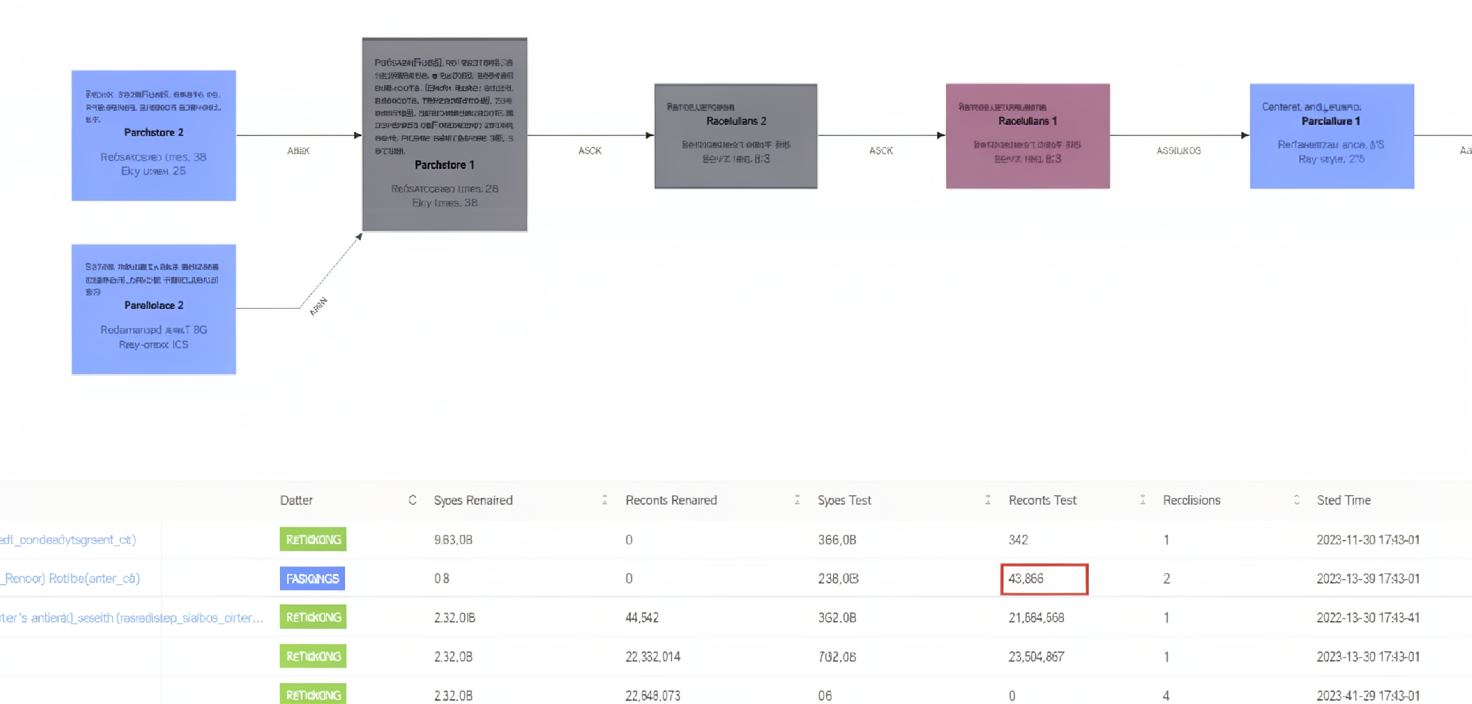
Another significant challenge with this approach is needing to pull the entire dimension table data and perform a cold start each time. This becomes particularly problematic when dealing with a large volume of dimension table data. For instance, when handling tables with tens of millions of registered users or tens of thousands of product SKU attributes, this process generates substantial input/output (IO) overhead. Consequently, it leads to performance bottlenecks, impacting the efficiency of the system.
Flink’s checkpointing mechanism processes the data and stores checkpoint snapshots of all the states during continuous queries or window aggregations, resulting in state snapshots data bloat.
Optimizing the solution
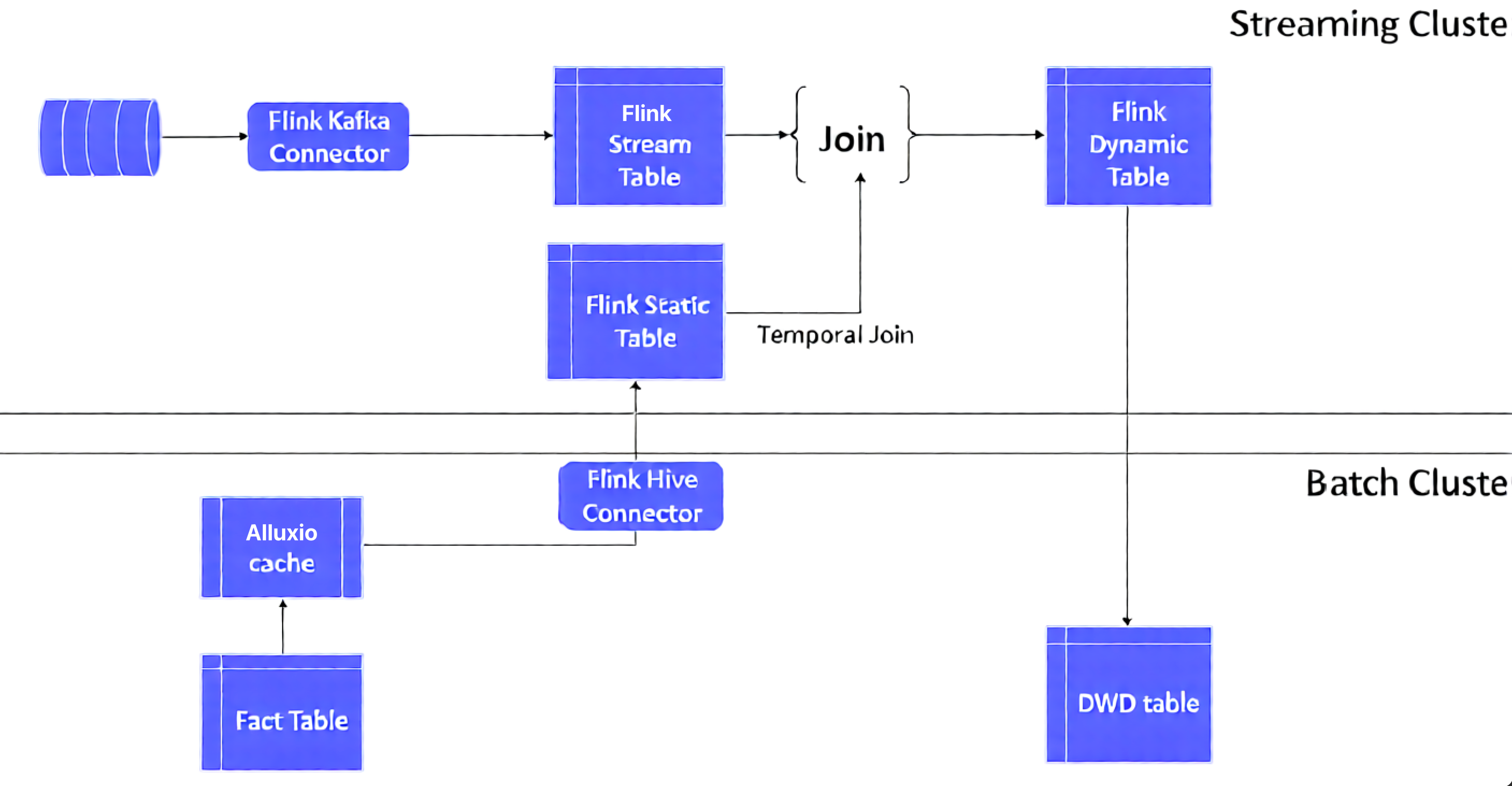
This post includes an optimized solution to address the aforementioned challenges, by automatically loading Hive dimension table data into the Alluxio UFS via the Alluxio cache layer. We join this data with Flink’s temporal joins to create a view on a changing table. This view reflects the content of a table at a specific point in time
Alluxio is a distributed cache engine for big data technology stacks. It provides a unified UFS that can connect to the underlying Amazon S3 and HDFS data. Alluxio UFS read and write operations warm up the distributed storage layers on S3 and HDFS and thus significantly increase throughput and reducing network overhead. Deeply integrated with upper level computing engines such as Hive, Spark, and Trino, Alluxio is an excellent cache accelerator for offline dimension data.
Additionally, we utilize Flink’s temporal table function to pass a time parameter. This function returns a view of the temporal table at the specified time. By doing so, when the main table of the real-time dynamic table is correlated with the temporal table, it can be associated with a specific historical version of the dimension data
Solution implementation details
For this post, we use “user behavior” log data in Kafka as real-time stream fact table data, and user information data on Hive as offline dimension table data. A demo with Alluxio + Flink temporal join is used to verify the Flink join optimized solution.
Real-time fact tables
For this demonstration, we utilize user behavior JSON data simulated by the open-source component json-data-generator. We write the data to Amazon Managed Kafka (Amazon MSK) in real-time. Using the Flink Kafka Connector, we convert this stream into a Flink stream table for continuous queries. This served as our fact table data for real-time joins.
A sample of the user behavior simulation data in JSON format is as follows:
It includes user behavior information such as operation time, login system, user signature, behavioral activities, and service objects, locations, and related text fields. We create a fact table in Flink SQL with the main fields as follows:
Caching dimension tables with Alluxio
Amazon EMR provides solid integration with Alluxio. You can use the Amazon EMR bootstrap startup script to automatically deploy Alluxio components and start the Alluxio master and worker processes when an Amazon EMR cluster is created. For detailed installation and deployment steps, refer to the article Integrating Alluxio on Amazon EMR.
In an Amazon EMR cluster that integrates Alluxio, you may use Alluxio to create a cache table for the Hive offline dimension table as follows:
As shown in the previous section, the Alluxio table location alluxio://ip-xxx-xx:19998/s3/customer points to the S3 path where the Hive dimension table is located; writing to the customer dimension table is automatically synchronized to the Alluxio cache.
After creating the Alluxio Hive offline dimension table, you can view the details of the Alluxio cache table by connecting to the Hive metadata through the Hive catalog in Flink SQL:
As shown in the preceding code, the location path of the dimension table is the UFS cache path Uniform Resource Identifier (URI). When the business program reads and writes the dimension table, Alluxio automatically updates the customer dimension table data in the cache and asynchronously writes it to the Alluxio backend storage path of the S3 table to achieve table data synchronization in the data lake.
Flink temporal table join
Flink temporal table is also a type of dynamic table. Each record in the temporal table is correlated with one or more time fields. When we join the fact table and the dimension table, we usually need to obtain real-time dimension table data for the lookup join. Thus, when creating or joining a table, we usually need to use the proctime() function to specify the time field of the fact table. When we join the tables, we use the syntax of FOR SYSTEM_TIME AS OF to specify the time version of the fact table that corresponds to the time of the lookup dimension table.
For this post, the customer information is a changing dimension table in the Hive offline table, whereas the customer behavior is the fact table in Kafka. We specified the time field with proctime() in the Flink Kafka source table. Then when joining the Flink Hive table, we used FOR SYSTEM_TIME AS OF to specify the time field of the lookup Kafka source table to allow us to realize the Flink temporal table join operation
As shown in the following code, a fact table of user behavior is created through the Kafka Connector in Flink SQL. The ts field refers to the timestamp when the temporal table is joined:
The Flink offline dimension table and the streaming real-time table are joined as follows:
When the fact table logevent_source joins the lookup dimension table, the proctime function ensures real-time joins by obtaining the latest dimension table version. This dimension data, cached in Alluxio, delivers significantly better read performance than direct S3 access.
At the same time, the dimension table data is already cached in Alluxio; the read performance is much better than offline data read on S3.
The comparison test shows that Alluxio cache brings a clear performance advantage by switching the S3 and Alluxio paths of the customer dimension table through Hive
You can easily switch the local and cache location paths with alter table in hive cli:
You can also select the Task Manager log from the Flink dashboard for a split test.
The performance of the fact table load was doubled through the implementation of optimized data processing techniques.
- Before caching (S3 path read): 5s load time
- After caching (Alluxio read): 2s load time
The timeline on JobManager clearly shows the difference in execution duration under Alluxio and S3 paths.
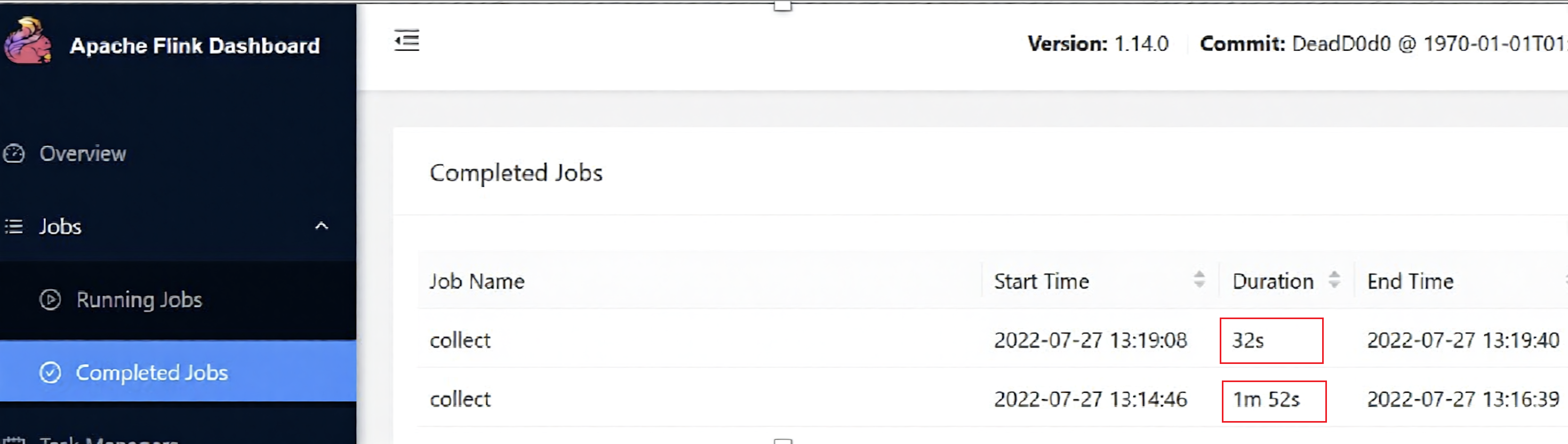
For single task query ,we accelerate by more than 1 times using this solution. The overall job performance improvement is even more visible.
Other optimalizations to consider
Implementing a continuous join requires pulling dimension data every time. Does it lead to Flink’s checkpoint state bloat that can cause Flink TaskManager RocksDB to explode or memory overflow.
In Flink, the state comes with a TTL mechanism. You can set a TTL expiration policy to trigger Flink to clean up expired state data. Flink SQL can be set using the hint method.
Flink Table/Streaming API is similar:
Restart the lookup join after the configuration. As you can see from the Flink TM log, after TTL expires, it triggers clean-up and re-pull the Hive dimension table data:
In addition, you can reduce the number of checkpoint snapshots by configuring Flink state retention and thereby reduce the amount of space taken up by state at the time of snapshot.
After the configuration, you can see that in the S3 checkpoint path, the Flink job automatically cleans up historical snapshots and keeps the most recent 5 snapshots, thus ensuring that checkpoint snapshots do not accumulate.
Summary
Customers implementing Flink streaming framework to join dimension and real-time fact tables frequently encounter performance challenges. In this post, we presented an optimized solution that uses Alluxio’s caching capabilities to automatically load Hive dimension table data into the UFS cache. By integrating with Flink temporal table joins, dimension tables are transformed into time-versioned views, effectively addressing performance bottlenecks in traditional implementations.