AWS Big Data Blog
Scale down Kinesis Data Streams on-demand capacity with ODA warm throughput
Customers have been using Amazon Kinesis Data Streams to stream data at any scale. Some use On-demand Standard to let the service manage capacity, while others with predictable traffic patterns use On-demand Advantage and warm throughput to ensure streams can handle instant throughput increases. Streaming workloads rarely run at peak volume all the time: flash sales end, batch migrations complete, and telemetry bursts subside. However, manual intervention is often required to scale back down after the burst subsides. Amazon Kinesis Data Streams now supports scaling down ingest capacity for on-demand Advantage streams with warm throughput, which optimizes downstream compute costs and performance by removing excess capacity. You configure this by turning on On-demand Advantage mode (ODA) and setting a new warm throughput value that is equal to or smaller than the existing amount.
With this launch, you can now proactively reduce write throughput capacity, optimizing costs while maintaining performance and giving you more control over your stream’s provisioning.
In this post, we explore the warm throughput scale-down capability. We cover the challenge it addresses, how it works, how to monitor stream behavior with Amazon CloudWatch metrics, and best practices for using it effectively.
The challenge: Excess capacity after traffic spikes
Amazon Kinesis Data Streams on-demand mode automatically scales to handle increases in data throughput. When your stream experiences a traffic spike, Kinesis Data Streams splits shards to accommodate the higher volume. This automatic scaling helps your applications keep pace with data during surges.
However, many real-world workloads experience transient bursts that don’t represent sustained throughput needs. Consider a retail platform that processes a flash sale event, a healthcare system that ingests a large batch of patient records during a migration window, or an Internet of Things (IoT) fleet that transmits a high-volume firmware update telemetry burst. In each scenario, the stream scales up to accommodate the spike, but the elevated capacity remains long after the burst has subsided. Although Kinesis on-demand Advantage doesn’t charge for the elevated capacity, your consuming applications may see a higher cost and lower performance.
Consider a Kinesis data stream running with 100 MB/s ingest throughput that requires 100 shards. A traffic spike of an additional 50 MB/s forces on-demand mode to scale streams to 150 shards. The spike subsides within minutes, but those 150 shards remain.
If your AWS Lambda consumer uses a parallelization factor of 2, you go from 200 concurrent invocations (2 × 100 shards) to 300 (2 × 150 shards). This is a 50 percent jump in concurrent Lambda execution, even though ingest throughput has returned to 100 MB/s. Those extra 100 AWS Lambda invocations consume compute, count against your concurrent execution quota, and add cost while processing data with small batch sizes.
Kinesis Client Library (KCL) consumers incur operational overhead. KCL tracks one lease per shard in Amazon DynamoDB, so 50 additional shards mean 50 more leases to scan, renew, and checkpoint every heartbeat cycle. The result is more Amazon DynamoDB overhead for lease management and reduced consumption performance overall.
Before this launch, you had limited options to address this excess capacity:
- Switch to provisioned mode to manually set shard count, losing the benefits of automatic scaling.
- Accept the higher capacity and associated costs until the stream self-adjusted.
These approaches either introduced operational overhead or resulted in paying for capacity that exceeded your workload’s actual requirements.
The solution: Warm throughput scale-down
With on-demand capacity reduction, you can now set a lower or equal warm throughput value on your on-demand stream to trigger a capacity reduction. The stream adjusts to the requested capacity or the amount needed to support peak data ingest usage within the last hour, whichever is higher. This safeguard helps your stream retain sufficient capacity for current traffic while releasing the excess you no longer need.
This capability is available at no additional cost for all on-demand streams that have On-demand Advantage mode turned on.
How it works
Warm throughput provides bidirectional capacity management for on-demand streams:
- Scale up (existing capability): If you forecast an upcoming traffic event, you can configure warm throughput to a higher value to prepare the stream in advance so that capacity is available when data arrives without throttling.
- Scale down (new capability): If a transient burst has caused the stream to scale significantly beyond its steady-state needs, you can trigger a scale-down by setting warm throughput to a lower value.
When you set a warm throughput value that is equal to or lower than the current value on an on-demand stream, Kinesis Data Streams evaluates the request against your stream’s recent traffic. The resulting capacity is the greater of:
- The warm throughput value you requested.
- The capacity needed to support peak data ingest usage within the last hour.
This mechanism prevents you from accidentally reducing capacity below what your current workload demands. If data traffic increases after a scale-down has completed, on-demand mode can still expand stream ingest capacity through reactive scaling to avoid rate limiting.
Getting started
Prerequisites
To follow along, you need the following:
- An existing Kinesis data stream in on-demand mode.
- On-demand Advantage mode turned on.
- AWS Command Line Interface (AWS CLI) installed and configured.
- AWS Identity and Access Management (IAM) permissions for kinesis:UpdateStreamMode.
To trigger a scale-down, set a lower warm throughput value on your on-demand stream using the AWS CLI:
Monitoring stream behavior with Amazon CloudWatch
To observe the effects of a scale-down operation and understand your stream’s capacity and shard count, Amazon CloudWatch provides several key metrics. Monitoring these metrics helps you make informed decisions about when and how much to scale down.
Key metrics to monitor
The following table summarizes the CloudWatch metrics most relevant to warm throughput scale-down:
| Metric | Namespace | Description |
IncomingBytes |
AWS/Kinesis | Total bytes ingested per period. Use the Sum statistic to see aggregate throughput across all shards. |
IncomingRecords |
AWS/Kinesis | Total records ingested per period. Helps identify traffic patterns and burst frequency. |
WriteProvisionedThroughputExceeded |
AWS/Kinesis | Number of records rejected because of throttling. A non-zero value after scale-down indicates capacity is set too low. |
Observing shard count behavior during scale-down
To track shard count changes resulting from a scale-down, use the DescribeStreamSummary API, which returns the OpenShardCount field in its response. Note that OpenShardCount is not a CloudWatch metric. It’s available through the API and is also displayed on the Kinesis Data Streams console. You can poll this value periodically or build a custom CloudWatch metric using an AWS Lambda function to track shard count over time.
Here is how you can expect the stream to behave:
- Before the burst: Your stream operates at steady-state with a baseline shard count appropriate for your normal traffic. For example, a stream handling 20 MiB/s of write throughput might have approximately 67 open shards.
- During the burst: As traffic spikes, Kinesis Data Streams automatically splits shards to accommodate the increased load. The
OpenShardCountrises, andIncomingBytesincreases correspondingly. - After the burst (before scale-down): Traffic returns to baseline, but the
OpenShardCountremains elevated because the stream retains capacity for up to double the recently observed peak. - After triggering scale-down: After you set a lower warm throughput, the
OpenShardCountdecreases as Kinesis Data Streams merges shards to match the requested capacity (subject to the one-hour peak safeguard). You can observe this transition by polling DescribeStreamSummary or on the Kinesis console.
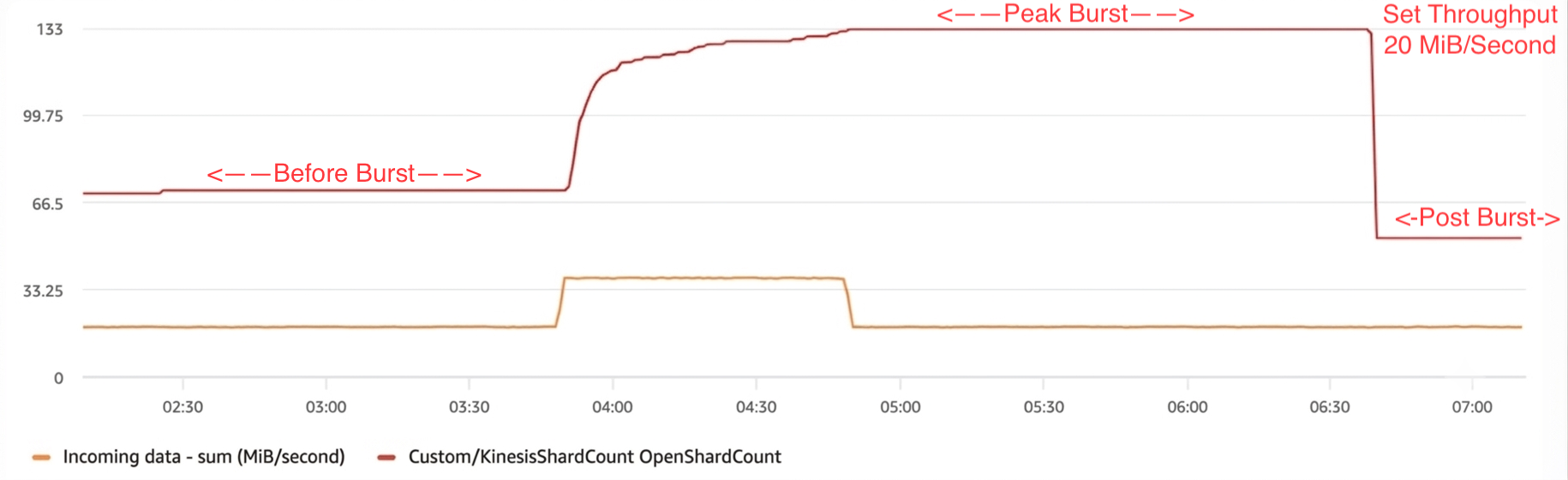
Figure 1: Amazon Kinesis Data Streams shard count over time during a scale-down event, showing the incoming-data spike and the resulting change in shard count
Best practices
When using warm throughput scale-down, consider the following recommendations:
- Analyze traffic patterns before scaling down. Review at least 24 hours of
IncomingBytesandIncomingRecordsCloudWatch metrics to understand your baseline throughput before setting a lower warm throughput value. This helps you avoid setting capacity below your actual steady-state needs. - Set warm throughput above your observed steady-state peak. Because on-demand streams accommodate up to double the observed peak, set your target warm throughput at or above your typical peak rather than your average. This maintains headroom for normal traffic variability without throttling.
- Monitor throttling after scale-down. Watch
WriteProvisionedThroughputExceededclosely in the hours following a scale-down. If throttling occurs, increase the warm throughput value. The stream will automatically scale back up, but proactive monitoring reduces the duration of any impact. - Use scale-down after known transient events. The feature is most effective when you can identify that a traffic spike was temporary, for example, after a planned batch migration, marketing event, or scheduled data backfill. Avoid scaling down during periods of uncertain or growing traffic.
- Use the one-hour safeguard. The system won’t reduce capacity below what’s needed to serve peak ingest from the last hour. If you’re unsure about the right target, you can set a low warm throughput value and rely on this safeguard to prevent under-provisioning for active traffic.
Conclusion
Amazon Kinesis Data Streams now supports scaling down ingest capacity with warm throughput, giving you elastic control over On-demand Advantage stream capacity. With this capability, you can release excess capacity after transient traffic bursts, improving cost efficiency while maintaining the automatic scaling benefits of on-demand mode.
To get started, turn on On-demand Advantage mode for your stream and use the warm throughput setting to manage capacity. Track shard count with DescribeStreamSummary to observe capacity changes and confirm your stream keeps appropriate headroom for your workload. Try warm throughput scale-down today in the Amazon Kinesis console, and to learn more, see Amazon Kinesis Data Streams on-demand capacity mode in the Developer Guide.