AWS Contact Center
Amazon SES features for Protective Markings
Introduction
Government agencies and regulated organizations are required to apply protective markings to outbound email as a compliance and security control. A common approach is to add a custom X-Protective-Marking header, but Amazon Simple Email Service (Amazon SES) does not include custom headers in its DomainKeys Identified Mail (DKIM) signature. This means the marking can be silently modified or stripped by intermediaries without detection. The result is a security gap: the marking is present, but its integrity cannot be verified by the recipient. An alternative approach is to apply the protective marking to the Subject line, which is included in DKIM by Amazon SES and is therefore secure. More specifically, DKIM signing in Amazon SES covers a fixed set of standard headers (such as From, To, and Subject) and does not extend to custom X- headers.
This post explains why X-header-based protective markings can be insecure in Amazon SES, then shows how to implement secure, DKIM-protected Subject-based markings using SES templated emails and AWS Identity and Access Management (IAM) policy-based access control. Although we’ve use the Australian Government Email Protective Marking Standard as the example implementation, the approach is not specific to this scheme. The same pattern applies to other governments’ email classification frameworks, such as New Zealand’s Protective Security Requirements (PSR), the United Kingdom’s Government Security Classifications Policy (GSCP), the United States’ Controlled Unclassified Information (CUI) program, Canada’s Treasury Board Policy on Government Security, and NATO’s classification markings: place the marking in the Subject line so that DKIM signs it, and use IAM to control which markings each sender can apply. To adopt a different scheme, create one template per marking level and follow that scheme’s Subject-line convention.
Overview
What is an SES templated email?
Amazon SES allows you to create reusable email templates that combine the following elements:
- Static content (protective markings, formatting, footers)
- Dynamic variables (subject, message content)
- Consistent formatting (text and HTML versions)
When sending an email, you follow these steps:
- Choose the template name.
- Provide variable values.
- SES renders and sends the email.
Applying templates to protective markings
For the use case of protective markings, follow these steps:
- Create one SES email template per protective marking level.
- Apply protective markings to the Subject line within the template structure.
- Implement IAM policy restrictions limiting users, roles, and groups to specific protection levels.
- In the email sending process, choose the appropriate template name and provide the email data.
- SES applies the protective marking automatically.
Solution architecture
The solution uses one SES template per classification level, as shown in the following approach.
Template-based approach
The following diagram shows the template-based approach at a high level.
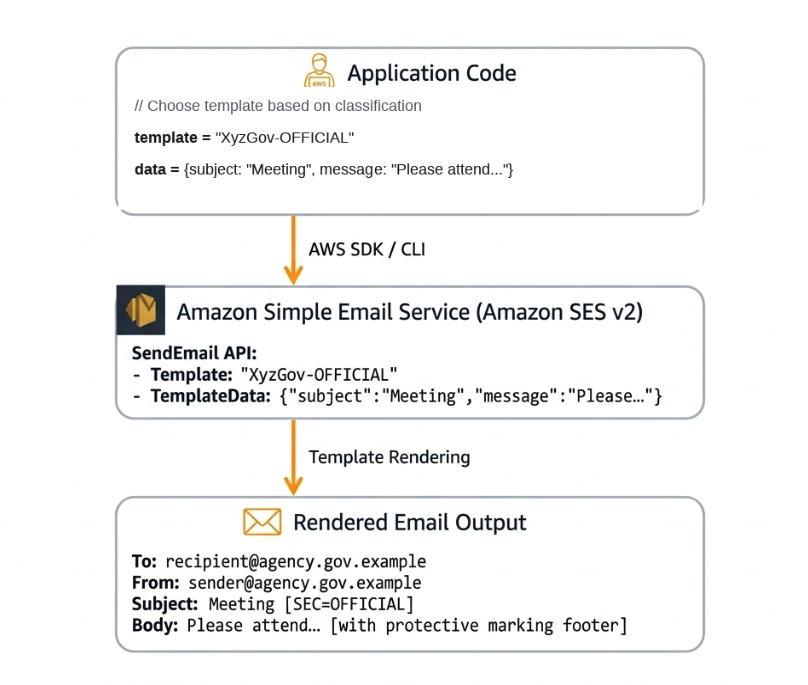
Template mapping example
The following table maps each template name to its protective marking and the resulting Subject format.
| Template name | Protective marking | Subject format | |
|---|---|---|---|
| 1 | XyzGov-UNOFFICIAL | [SEC=UNOFFICIAL] | {{subject}} [SEC=UNOFFICIAL] |
| 2 | XyzGov-OFFICIAL | [SEC=OFFICIAL] | {{subject}} [SEC=OFFICIAL] |
| 3 | XyzGov-OFFICIAL-Sensitive | [SEC=OFFICIAL:Sensitive] | {{subject}} [SEC=OFFICIAL:Sensitive] |
| 4 | XyzGov-PROTECTED | [SEC=PROTECTED] | {{subject}} [SEC=PROTECTED] |
Architecture
The following sections walk through the end-to-end send architecture and the IAM access-control model that supports it.
SES templated email architecture
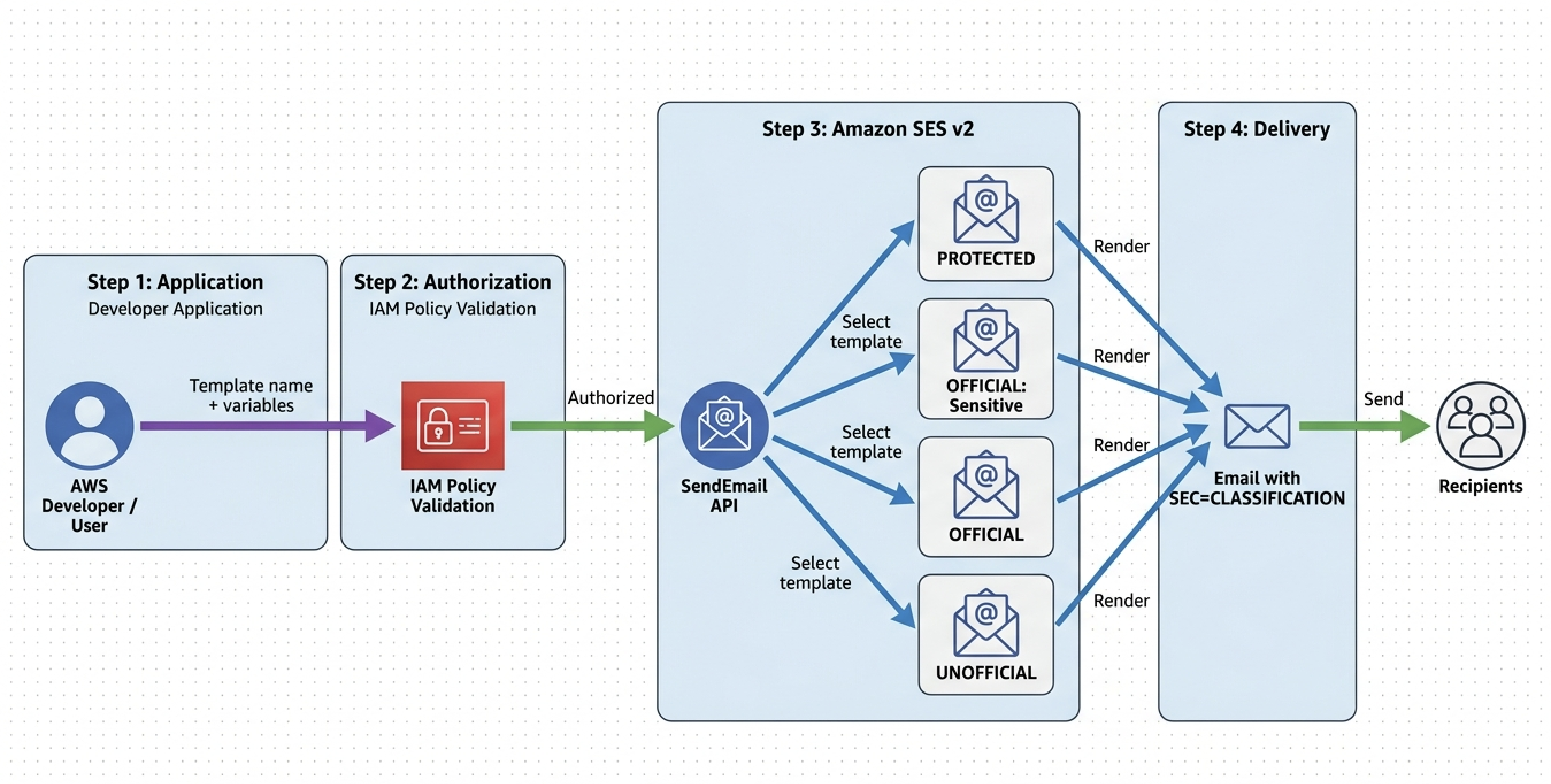
The following diagram shows the complete flow:
- Application code chooses a template and provides template data.
- IAM policy authorizes the request.
- SES applies the specified template.
- The template is rendered with the protective marking.
- The email is sent to recipients with the classification in the Subject line.
IAM policy-based access control workflow
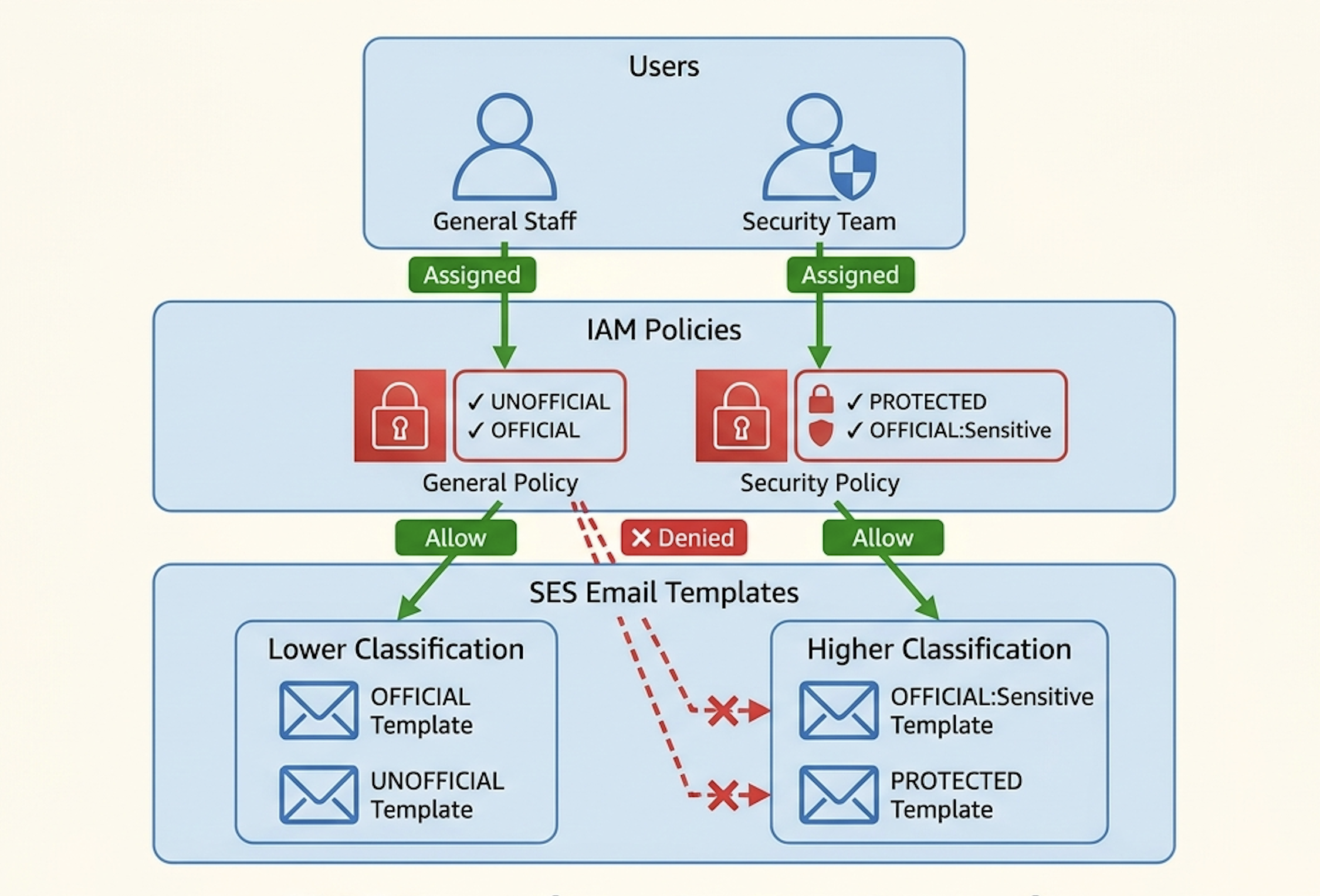
The following diagram demonstrates IAM policy enforcement across two user groups:
- General staff: Restricted to UNOFFICIAL and OFFICIAL templates only.
- Security team: Restricted to PROTECTED and OFFICIAL:Sensitive templates.
Cross-access attempts are denied by IAM policies, so each user group can only send emails using their authorized templates.
The following identity-based policy enforces this model for the general-staff group, who may send only UNOFFICIAL and OFFICIAL. Attach it to the relevant IAM user, group, or role, and replace the placeholders with your Region, account ID, approved template names, and verified sending identity:
{
  "Version": "2012-10-17",
  "Statement": [
    {
      "Sid": "AllowTemplatedSendApprovedTemplatesOnly",
      "Effect": "Allow",
      "Action": "ses:SendTemplatedEmail",
      "Resource": [
        "arn:aws:ses:<region>:<account-id>:template/XyzGov-UNOFFICIAL",
        "arn:aws:ses:<region>:<account-id>:template/XyzGov-OFFICIAL",
        "arn:aws:ses:<region>:<account-id>:identity/<your-verified-identity>"
      ]
    },
    {
      "Sid": "DenyEveryNonTemplatedOrBulkSend",
      "Effect": "Deny",
      "Action": [
        "ses:SendEmail",
        "ses:SendRawEmail",
        "ses:SendBulkEmail",
        "ses:SendBulkTemplatedEmail"
      ],
      "Resource": "*"
    },
    {
      "Sid": "DenyTemplatedSendToUnapprovedTemplates",
      "Effect": "Deny",
      "Action": "ses:SendTemplatedEmail",
      "NotResource": [
        "arn:aws:ses:<region>:<account-id>:template/XyzGov-UNOFFICIAL",
        "arn:aws:ses:<region>:<account-id>:template/XyzGov-OFFICIAL",
        "arn:aws:ses:<region>:<account-id>:identity/<your-verified-identity>"
      ]
    }
  ]
}
How this policy works:
SES authorizes each send by its content type: templated sends map to ses:SendTemplatedEmail, while simple, raw, and bulk sends map to ses:SendEmail, ses:SendRawEmail, and ses:SendBulkTemplatedEmail. This mapping is identical for the SES v1 and SES v2 SendEmail APIs, so a caller cannot bypass the restriction by switching API version.
The Allow grants only ses:SendTemplatedEmail, and only for the approved templates. The verified identity ARN is also required, because SES authorizes a send against both the template and the sending identity, so omitting the identity denies every send. Naming a specific identity also restricts the From address; use identity/* to allow any verified identity in the account.
The first Deny blocks all non-templated and bulk sends outright, and the second Deny (NotResource) blocks ses:SendTemplatedEmail for any template other than the approved ones.
Because an explicit Deny always overrides an Allow, these Deny statements keep the restriction intact even if the same principal also has a broader SES policy, such as AmazonSesFullAccess, attached.
To also permit bulk sends of the approved templates, remove ses:SendBulkTemplatedEmail from the first Deny and add it to the Allow alongside ses:SendTemplatedEmail, keeping the same approved-template resources.
Template structure
Each template is built from a Subject template, a text body template, and an HTML body template, described in the following sections.
Template components
Each SES email template consists of three parts, described in the following sections.
1. Subject template
The Subject template combines a variable with the static protective marking:
{{subject}} [SEC=CLASSIFICATION]
{{subject}} = Variable (provided at send time)
[SEC=CLASSIFICATION] = Static protective marking
2. Text body template
The text body template renders the message followed by handling instructions:
{{message}}

---
This email is marked: CLASSIFICATION
Handling instructions...
3. HTML body template
The HTML body template renders the same content with formatting:
<html>
<body>
  <p>{{message}}</p>
  <hr>
  <p><small>
    This email is marked: <strong>CLASSIFICATION</strong><br>
    Handling instructions...
  </small></p>
</body>
</html>
Template variables
All templates use exactly two variables, described in the following table.
| Variable | Type | Purpose | Example | |
|---|---|---|---|---|
| 1 | subject | String | Email subject line | “Budget Meeting” |
| 2 | message | String | Email body content | “Please review the attached report…” |
SES v2 API reference
The following sections describe the two SES v2 API actions used to send templated emails with protective markings.
API: SendEmail
Purpose: Send email using a template.
Endpoint: POST /v2/email/outbound-emails
CLI command:
aws sesv2 send-email \
  --from-email-address "sender@agency.gov.example" \
  --destination "ToAddresses=recipient@agency.gov.example" \
  --content 'Template={TemplateName=XyzGov-OFFICIAL,TemplateData="{\"subject\":\"Budget Meeting\",\"message\":\"Please attend the meeting.\"}"}' \
  --region us-east-1
Response:
{
  "MessageId": "0100019c7050516e-0bacaf58-e9cb-4e13-a317-c5d0b21db035-000000"
}
Use case: Primary API for sending emails with protective markings.
API: SendBulkEmail
Purpose: Send emails to multiple recipients using templates.
Endpoint: POST /v2/email/outbound-bulk-emails
CLI command:
aws sesv2 send-bulk-email \
  --from-email-address "sender@agency.gov.example" \
  --default-content 'Template={TemplateName=XyzGov-OFFICIAL}' \
  --bulk-email-entries '[
    {
      "Destination":{"ToAddresses":["user1@agency.gov.example"]},
      "ReplacementTemplateData":"{\"subject\":\"Meeting\",\"message\":\"Please attend...\"}"
    },
    {
      "Destination":{"ToAddresses":["user2@agency.gov.example"]},
      "ReplacementTemplateData":"{\"subject\":\"Meeting\",\"message\":\"Please attend...\"}"
    }
  ]' \
  --region us-east-1
Response:
{
  "BulkEmailEntryResults": [
    {
      "Status": "SUCCESS",
      "MessageId": "0100019c70502e18-af811a31-4351-40c8-b085-eebc6b3662cf-000000"
    },
    {
      "Status": "SUCCESS",
      "MessageId": "0100019c7050516e-0bacaf58-e9cb-4e13-a317-c5d0b21db035-000000"
    }
  ]
}
Use case: Bulk email operations with protective markings.
Email rendering examples
The following examples show how a marked email is rendered for the recipient.
How recipients see the email
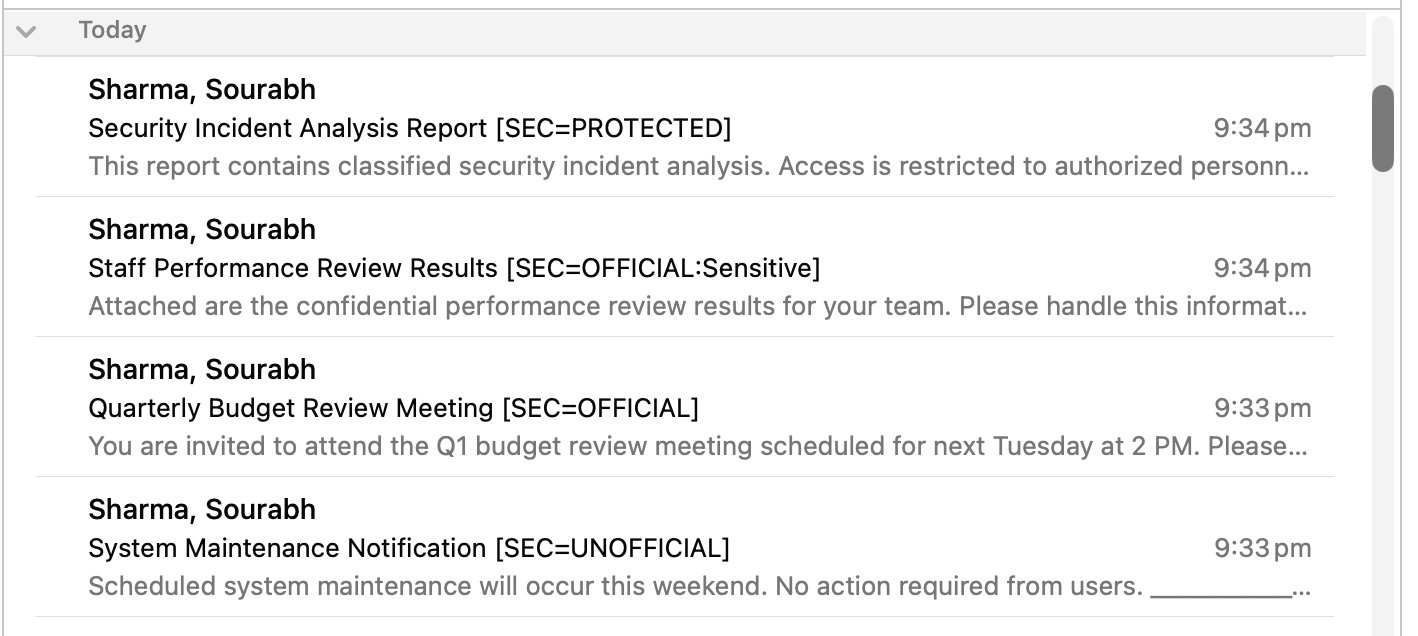
The following screenshots show how a marked email appears in an email client.
Example 1: Email client view (Outlook)
The following screenshot shows the inbox list view.
The following screenshots show the email detail view.
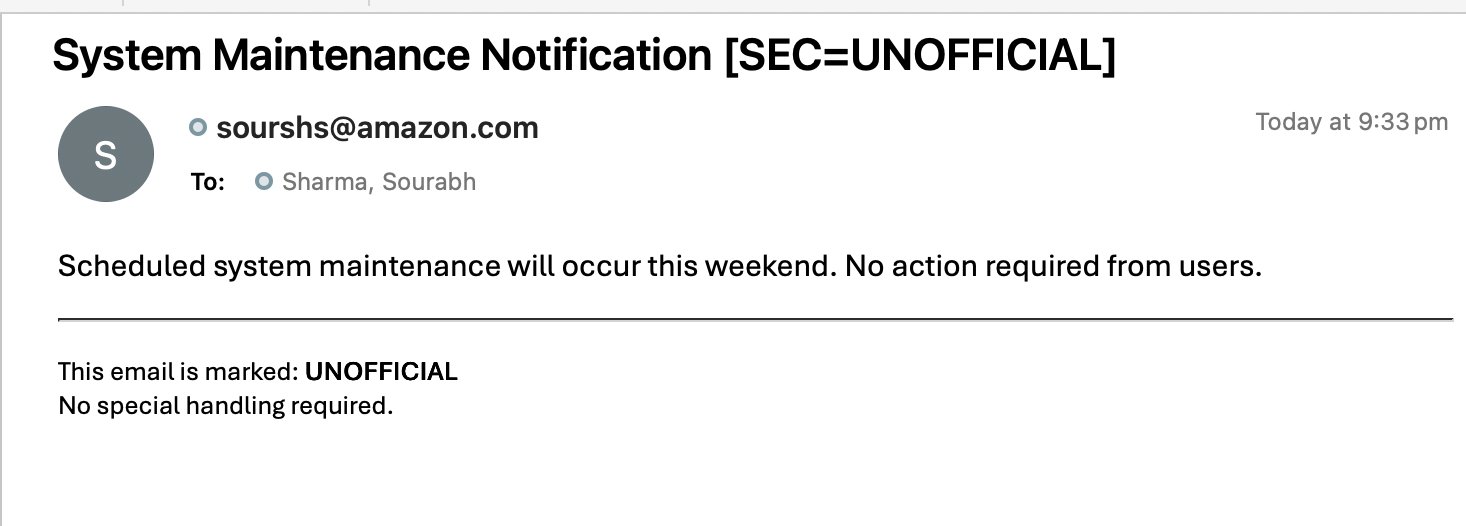
The following screenshot shows the marked Subject line in the detail view.
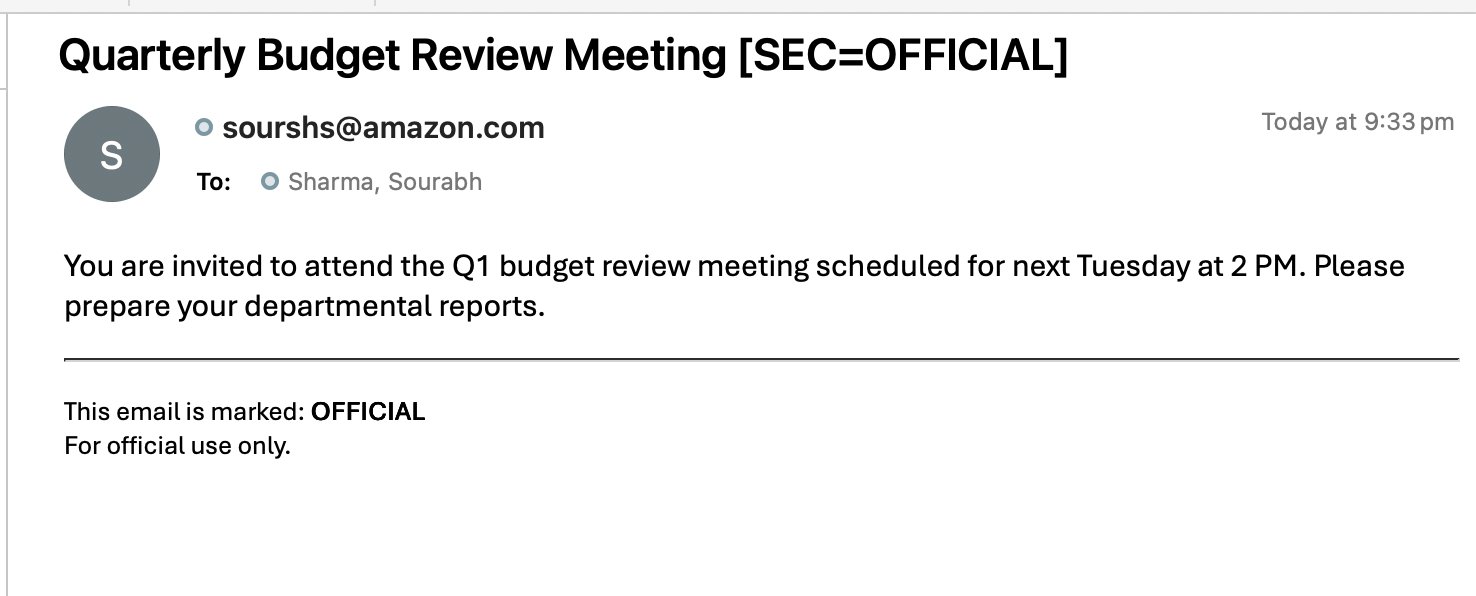
The following screenshot shows the handling instructions in the body.
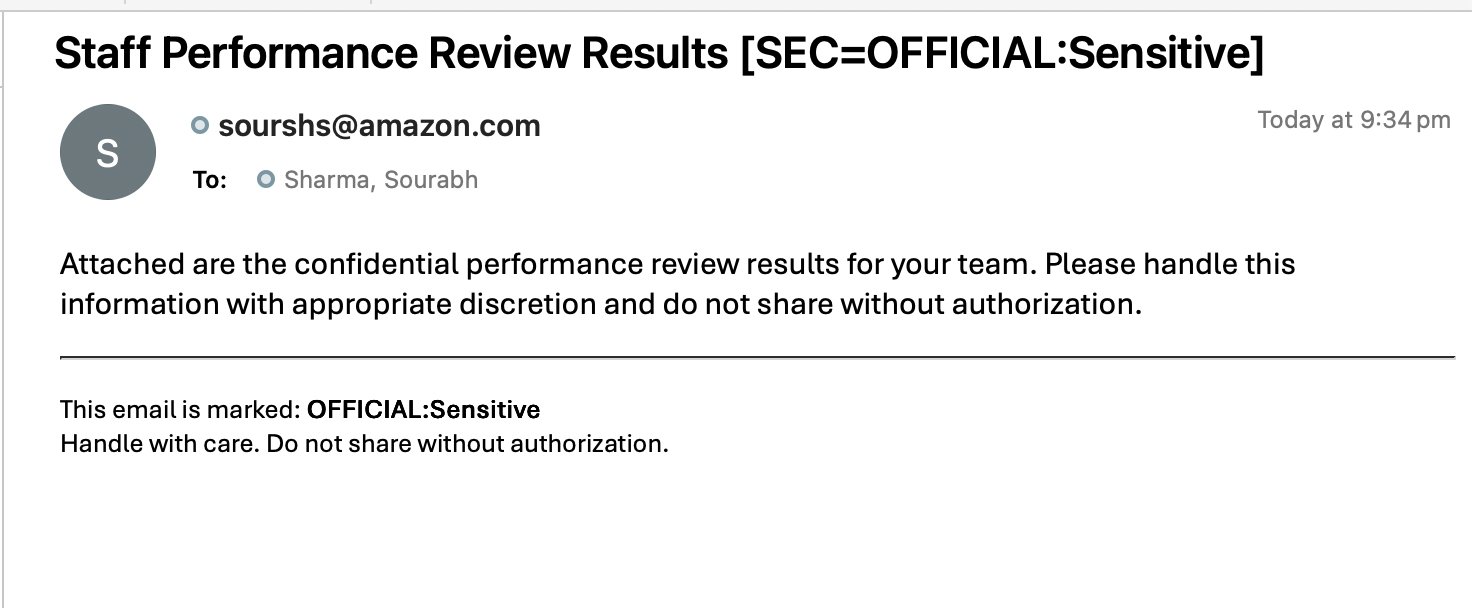
The following screenshot shows the full marked message.
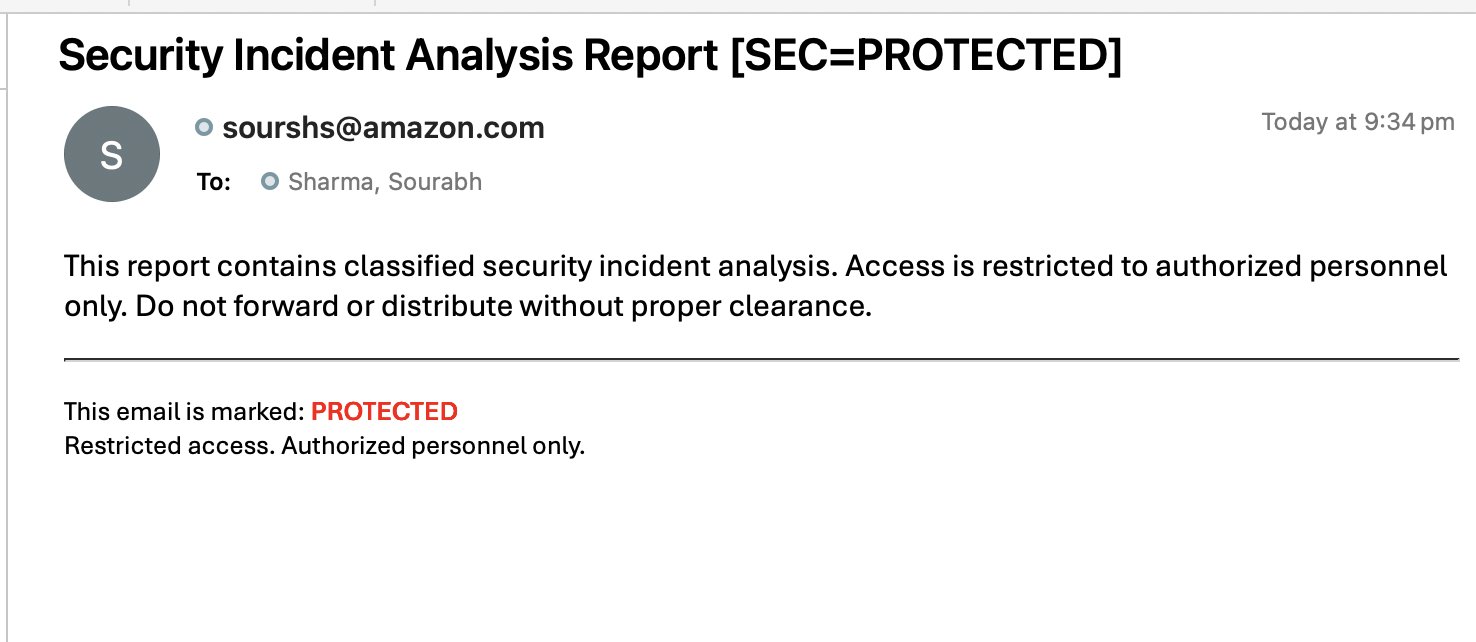
Integration examples
The following examples show how to send a templated, marked email using the AWS SDKs.
Python (Boto3)
The following Python example sends a templated email using Boto3:
import boto3
import json

# Initialize SES v2 client
client = boto3.client('sesv2', region_name='us-east-1')

# Send email using template
response = client.send_email(
    FromEmailAddress='sender@agency.gov.example',
    Destination={
        'ToAddresses': ['recipient@agency.gov.example']
    },
    Content={
        'Template': {
            'TemplateName': 'XyzGov-OFFICIAL',
            'TemplateData': json.dumps({
                'subject': 'Budget Meeting',
                'message': 'Please attend the budget meeting on Tuesday.'
            })
        }
    }
)

print(f"Email sent! Message ID: {response['MessageId']}")
Output:
Email sent! Message ID: 0100019c7050516e-0bacaf58-e9cb-4e13-a317-c5d0b21db035-000000
Node.js (AWS SDK v3)
The following Node.js example sends a templated email using AWS SDK v3:
const { SESv2Client, SendEmailCommand } = require("@aws-sdk/client-sesv2");

const client = new SESv2Client({ region: "us-east-1" });

const params = {
  FromEmailAddress: "sender@agency.gov.example",
  Destination: {
    ToAddresses: ["recipient@agency.gov.example"]
  },
  Content: {
    Template: {
      TemplateName: "XyzGov-OFFICIAL",
      TemplateData: JSON.stringify({
        subject: "Budget Meeting",
        message: "Please attend the budget meeting on Tuesday."
      })
    }
  }
};

const command = new SendEmailCommand(params);
const response = await client.send(command);
console.log(`Email sent! Message ID: ${response.MessageId}`);
Output:
Email sent! Message ID: 0100019c7050516e-0bacaf58-e9cb-4e13-a317-c5d0b21db035-000000
Java (AWS SDK v2)
The following Java example sends a templated email using AWS SDK v2:
import software.amazon.awssdk.services.sesv2.SesV2Client;
import software.amazon.awssdk.services.sesv2.model.*;
import com.google.gson.Gson;
import java.util.HashMap;
import java.util.Map;

public class SendEmail {
    public static void main(String[] args) {
        SesV2Client client = SesV2Client.builder()
            .region(Region.US_EAST_1)
            .build();

        // Prepare template data
        Map<String, String> templateData = new HashMap<>();
        templateData.put("subject", "Budget Meeting");
        templateData.put("message", "Please attend the budget meeting on Tuesday.");

        String templateDataJson = new Gson().toJson(templateData);

        // Send email
        SendEmailRequest request = SendEmailRequest.builder()
            .fromEmailAddress("sender@agency.gov.example")
            .destination(Destination.builder()
                .toAddresses("recipient@agency.gov.example")
                .build())
            .content(EmailContent.builder()
                .template(Template.builder()
                    .templateName("XyzGov-OFFICIAL")
                    .templateData(templateDataJson)
                    .build())
                .build())
            .build();

        SendEmailResponse response = client.sendEmail(request);
        System.out.println("Email sent! Message ID: " + response.messageId());
    }
}
Output:
Email sent! Message ID: 0100019c7050516e-0bacaf58-e9cb-4e13-a317-c5d0b21db035-000000
Advanced use cases
The following use cases show common variations on sending marked templated emails.
Use case 1: Bulk email with different classifications
The following commands send emails to multiple recipients with the appropriate classification:
# Send OFFICIAL email to general staff
aws sesv2 send-bulk-email \
  --from-email-address "admin@agency.gov.example" \
  --default-content 'Template={TemplateName=XyzGov-OFFICIAL}' \
  --bulk-email-entries '[
    {"Destination":{"ToAddresses":["staff1@agency.gov.example"]},"ReplacementTemplateData":"{\"subject\":\"Team Meeting\",\"message\":\"Please attend...\"}"},
    {"Destination":{"ToAddresses":["staff2@agency.gov.example"]},"ReplacementTemplateData":"{\"subject\":\"Team Meeting\",\"message\":\"Please attend...\"}"}
  ]' \
  --region us-east-1

# Send PROTECTED email to authorized personnel
aws sesv2 send-email \
  --from-email-address "security@agency.gov.example" \
  --destination "ToAddresses=authorized@agency.gov.example" \
  --content 'Template={TemplateName=XyzGov-PROTECTED,TemplateData="{\"subject\":\"Security Briefing\",\"message\":\"Classified briefing...\"}"}' \
  --region us-east-1
Use case 2: Multi-recipient with CC and BCC
The following command sends a marked email with CC and BCC recipients:
aws sesv2 send-email \
  --from-email-address "admin@agency.gov.example" \
  --destination "ToAddresses=primary@agency.gov.example,CcAddresses=manager@agency.gov.example,BccAddresses=audit@agency.gov.example" \
  --content 'Template={TemplateName=XyzGov-OFFICIAL,TemplateData="{\"subject\":\"Policy Update\",\"message\":\"New policy guidelines...\"}"}' \
  --region us-east-1
Use case 3: Reply-To address
The following command sends a marked email with a Reply-To address:
aws sesv2 send-email \
  --from-email-address "noreply@agency.gov.example" \
  --reply-to-addresses "support@agency.gov.example" \
  --destination "ToAddresses=staff@agency.gov.example" \
  --content 'Template={TemplateName=XyzGov-OFFICIAL,TemplateData="{\"subject\":\"System Update\",\"message\":\"System will be updated...\"}"}' \
  --region us-east-1
Conclusion
Subject-based protective markings give government and regulated senders a marking that DKIM signs and recipients can verify, which X-header-based markings cannot provide through Amazon SES. By combining SES templated emails with IAM policy-based access control, you can apply the correct marking automatically and restrict each user group to the classification levels they are authorized to send. Amazon SES based solution gives you the capabilities to automatically apply the protecting markings per template, centralized template management, API integration with popular SDKs, compliance with the security standards, scalability, and monitoring of your email sending activity, reputation metrics and audit user activity.
Cleaning up
If you created the templates and policies in this post only to test the approach, remove them afterward to keep your account tidy. Amazon SES has no standing charge for email templates or IAM policies; you pay only for the messages you send, so removing the test resources mainly keeps the account tidy and prevents accidental use.
1. Delete each SES email template you created (one per classification level):
aws sesv2 delete-email-template --template-name XyzGov-OFFICIAL --region us-east-1
2. Remove the IAM policies that restricted template access, and detach them from the associated users, roles, or groups.
3. If you verified an SES identity solely for this testing, remove it as well. Retain any identity that is still in production use.
About the authors
 Shashikant Sharma is a Cloud Engineer at AWS based in Sydney, specializing in Amazon SES and Media Services. As an Amazon SES Subject Matter Expert, he has been helping AWS customers adopt email sending best practices, navigate reputation issues, and follow bulk sender guidelines for running successful email campaigns.
 Sourabh Sharma is a Cloud Engineer at AWS based in Sydney, specializing in Amazon SES, Media Services, and Perimeter Security. As an Amazon SES Subject Matter Expert, his primary focus is on helping AWS customers implement email security best practices to strengthen their organizations’ security posture and improve overall email deliverability.
References
The following resources provide additional detail on the APIs and standards referenced in this post.
[1] Using templates to send personalized email with the Amazon SES API
[2] SendEmail
[3] SendBulkEmail
[5] Amazon SES Developer Guide
[6] Australian Government Email Protective Marking Standard 2025
[7] Protective Marking: Classify Outlook Emails and Office Documents