Containers
Cross-Region disaster recovery for Amazon EKS using AWS Backup
Organizations running containerized workloads on Amazon Elastic Kubernetes Service (Amazon EKS) need resilient strategies that protect both application configurations and stateful data against Regional disruptions. While single-Region architectures with multi-AZ deployments serve many availability requirements well, some workloads demand cross-Region disaster recovery (DR) to meet stringent recovery time objectives (RTOs) and recovery point objectives (RPOs) mandated by regulatory or business continuity requirements.
AWS Backup provides native support for Amazon EKS, so you can protect your cluster’s Kubernetes resources and persistent volume data in a centralized, policy-driven manner. By combining EKS backups with cross-Region copy capabilities, you can replicate your entire application state to a secondary AWS Region and restore it to an existing or new cluster when a disaster occurs.
In this post, we walk you through a complete cross-Region DR implementation for Amazon EKS using AWS Backup. We deploy a stateful retail store application in a source Region, back it up, copy the backup to a DR Region, and restore the full application, including its persistent data, to a pre-provisioned cluster in the secondary Region. By the end of this walkthrough, you will have a fully functional DR environment with your application running in the secondary Region with all stateful data intact.
Solution overview
The solution workflow consists of five phases:
- Deploy source infrastructure — Provision a VPC, Amazon EKS cluster, and supporting components in the source Region (us-east-1).
- Deploy the application — Deploy a stateful retail store application with MySQL and Redis StatefulSets backed by Amazon Elastic Block Store (Amazon EBS) persistent volumes.
- Configure backup and cross-Region copy — Create AWS Backup vaults in both Regions, execute an on-demand backup of the EKS cluster, and copy the recovery point to the DR Region.
- Deploy DR infrastructure — Provision a target EKS cluster and networking in the DR Region (us-west-2).
- Restore application to DR cluster — Use AWS Backup to restore the complete application, including Kubernetes resources and persistent volumes, to the existing DR cluster.
The following table summarizes the AWS services used in this solution:
| AWS Service | Purpose |
| Amazon EKS | Managed Kubernetes clusters in source and DR Regions |
| AWS Backup | Centralized backup, cross-Region copy, and restore of EKS resources |
| Amazon EBS | Persistent storage for stateful workloads (MySQL, Redis) |
| Elastic Load Balancing (ELB) | Network Load Balancer for application access |
| AWS Identity and Access Management (IAM) | Service roles for AWS Backup operations |
| Amazon Virtual Private Cloud (Amazon VPC) | Network isolation in both Regions |
Architecture diagram
The following diagram illustrates the high-level architecture of the cross-Region DR solution:
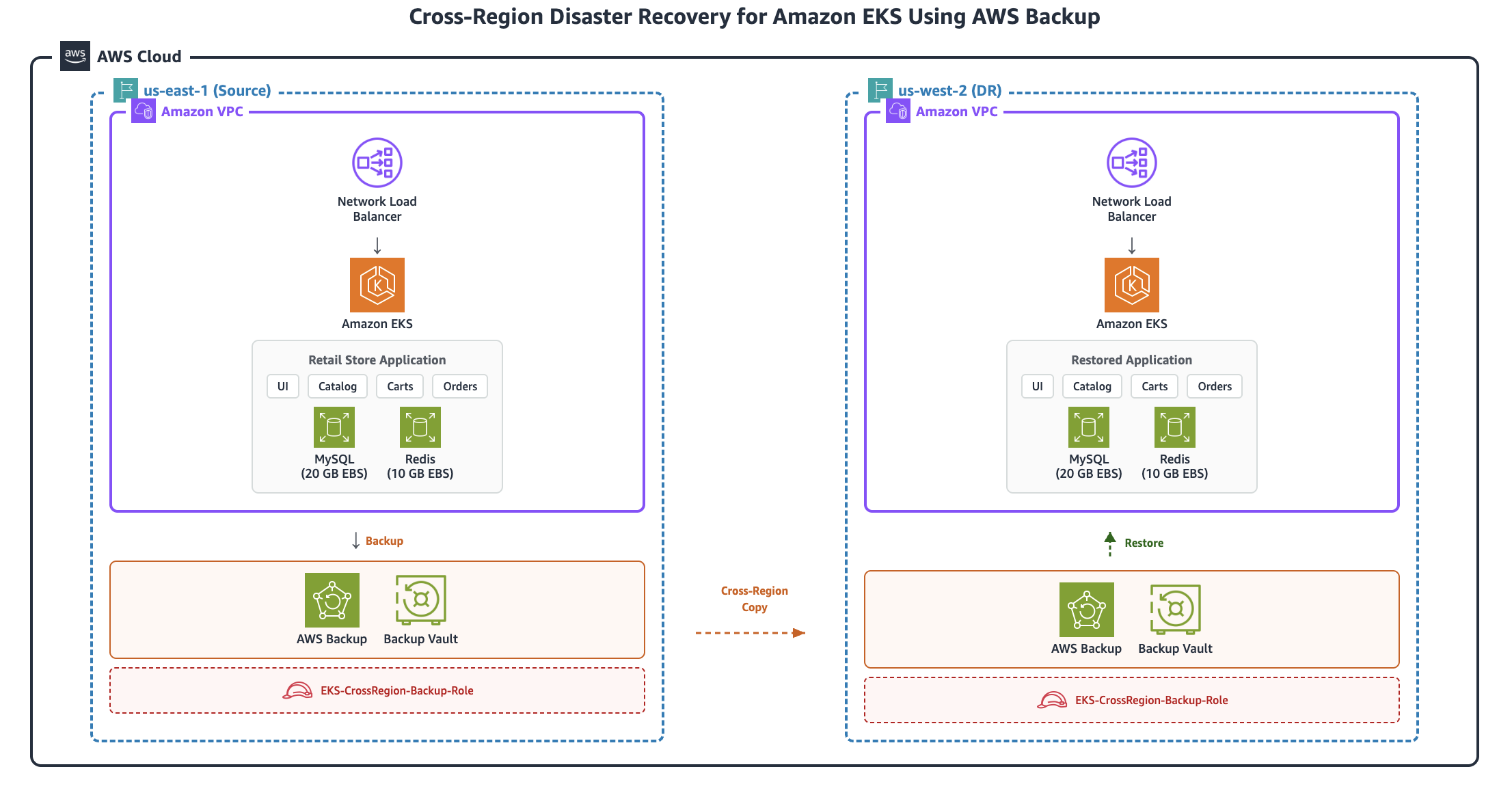
The solution backs up an Amazon EKS cluster and its persistent volumes in the source Region (us-east-1) using AWS Backup, copies the recovery point cross-Region to us-west-2, and restores the complete application with all stateful data to a pre-provisioned DR cluster.
Prerequisites
Before you begin, ensure that you have the following:
- An AWS account with permissions to create IAM roles, VPCs, EKS clusters, and AWS Backup resources
- AWS Command Line Interface (AWS CLI) v2 installed and configured
- kubectl installed
- Terraform installed (v1.0+)
- Access to two AWS Regions: us-east-1 (source) and us-west-2 (DR)
Walkthrough
All the deployment configurations used in this post are available in the GitHub repository: eks-cross-Region-dr.
Phase 1: Deploy source infrastructure (us-east-1)
In this phase, you deploy the foundational infrastructure in the source Region. This includes a VPC with public and private subnets across two Availability Zones, an Amazon EKS cluster (version 1.34) with two managed node groups, the Amazon EBS CSI driver for persistent volume support, the AWS Load Balancer Controller for service exposure, the necessary security groups and IAM roles, and storage classes configured for us-east-1a.
Clone the repository and navigate to Phase 1:
Configure variables:
Edit terraform.tfvars with your values:
cluster_name: e.g.,"eks-cross-Region-source"region:"us-east-1"vpc_cidr:"10.0.0.0/16"
Deploy the infrastructure:
Configure kubectl access:
Verify the deployment:
You should see two nodes in Ready state and all system pods running, including vpc-cni, coredns, kube-proxy, ebs-csi-driver, and aws-load-balancer-controller.
Phase 2: Deploy the application
In this phase, you deploy a stateful retail store application that consists of a MySQL StatefulSet with a 20 GB persistent volume, a Redis StatefulSet with a 10 GB persistent volume, four microservices (UI, Catalog, Carts, and Orders), and a Network Load Balancer for external access.
Navigate to Phase 2 and deploy:
Verify the deployment:
You should see six pods running (mysql-0, redis-0, ui, catalog, carts, orders), two PersistentVolumeClaims (PVCs) in Bound status (mysql-storage-mysql-0: 20 Gi, redis-storage-redis-0: 10 Gi), and six services including a LoadBalancer type for the UI.
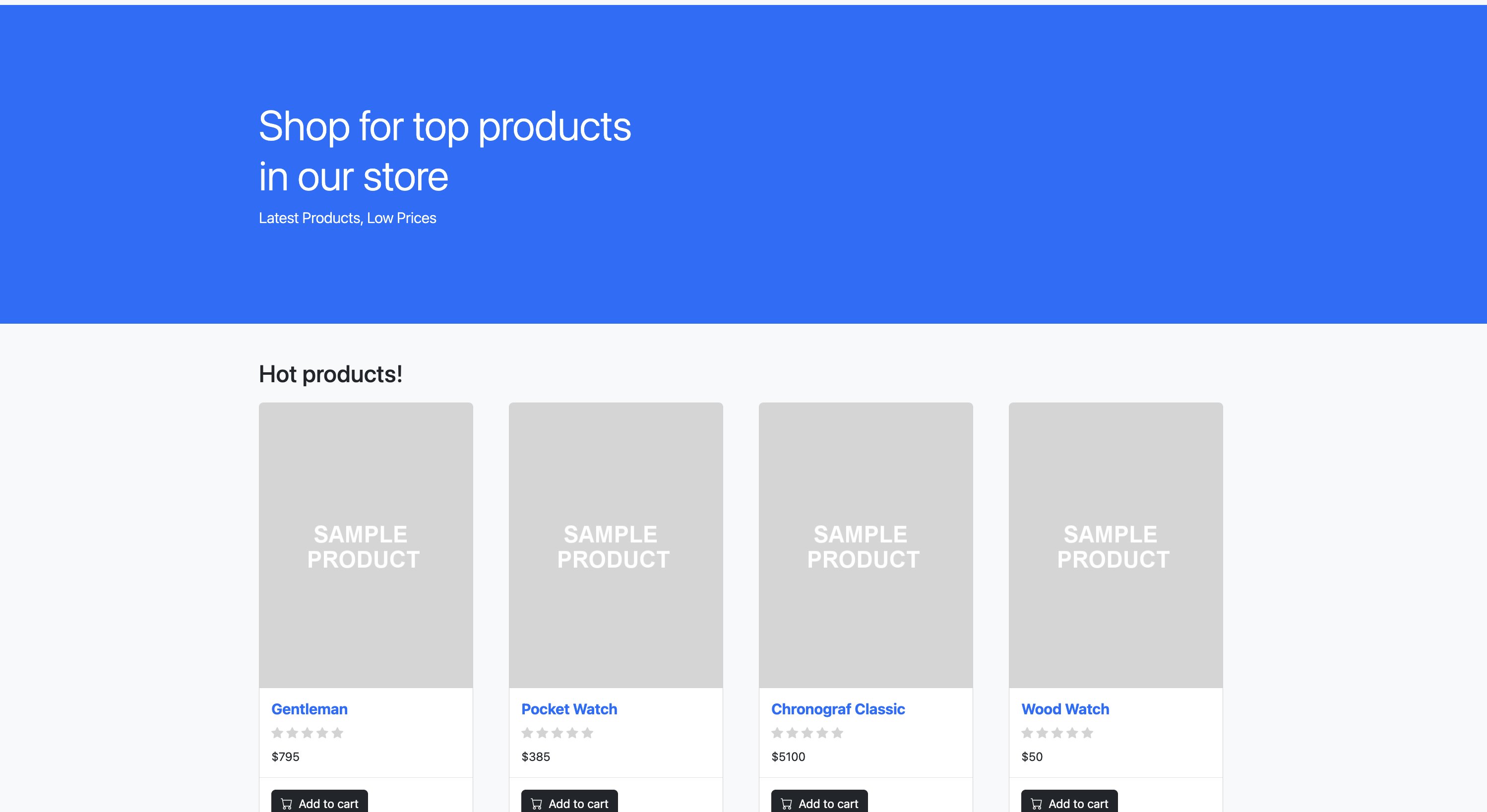
Access the application:
Open the returned URL in your browser to verify that the retail store application is running.
Phase 3: Configure backup and cross-Region copy
In this phase, you set up AWS Backup to protect your EKS cluster and copy the backup to the DR Region. This involves creating an IAM role for AWS Backup, creating backup vaults in both the source and DR Regions, executing an on-demand backup, and initiating a cross-Region copy.
Navigate to Phase 3:
Step 1: Create the IAM role for AWS Backup
Create a trust policy and IAM role that allows the AWS Backup service to perform backup and restore operations:
Step 2: Create backup vaults
Create backup vaults in both the source and DR Regions to store your recovery points:
Step 3: Start an on-demand backup
Initiate a backup of the EKS cluster in the source Region:
Step 4: Monitor backup progress
Wait for the backup to reach COMPLETED status before proceeding.
Step 5: Start the cross-Region copy
After the backup completes, copy the recovery point to the DR Region:
Step 6: Monitor cross-Region copy progress
Step 7: Retrieve the DR recovery point ARN
Save the composite recovery point ARN from the DR vault for use in Phase 5:
The following table summarizes what gets backed up in this phase:
| Resource | Description |
| EKS cluster configuration | Cluster settings and metadata |
| Kubernetes resources | Deployments, StatefulSets, Services, ConfigMaps, Secrets |
| EBS snapshots | Persistent volume data (MySQL: 20 GB, Redis: 10 GB) |
| Storage classes | Cluster storage configurations |
| RBAC configurations | Role-based access control policies |
Phase 4: Deploy DR infrastructure (us-west-2)
In this phase, you deploy the target infrastructure in the DR Region. Unlike approaches that create a new cluster during restore, this solution pre-provisions the DR cluster so that AWS Backup restores only the application workloads to the existing cluster. This approach reduces RTO because the cluster infrastructure is already in place when a disaster occurs.The DR infrastructure includes a VPC with public and private subnets, an Amazon EKS cluster with managed node groups, the Amazon EBS CSI driver, the AWS Load Balancer Controller, and storage classes configured for us-west-2a.
Note: When creating an EKS cluster as part of the restore process, ensure that the VPCs, load balancers, IAM roles, and networking in the target Region are configured. AWS Backup will provision the new cluster based on the inputs provided, however the underlying infrastructure must already be in place.
Navigate to Phase 4 and configure:
Edit terraform.tfvars with your values:
cluster_name:"eks-cross-Region-target"region:"us-west-2"vpc_cidr:"10.20.0.0/16"
Deploy the DR infrastructure:
Configure kubectl access:
Verify the infrastructure:
You should see two nodes in Ready state, all system pods running, and the gp3-primary-zone storage class available.
Phase 5: Restore application to DR cluster
In this final phase, you use AWS Backup to restore the complete application to the DR cluster. This includes preparing restore metadata with EBS snapshot ARNs, executing the restore job, and verifying application functionality.
Navigate to Phase 5:
Step 1: Get recovery point details
Step 2: Get EBS snapshot ARNs
Identify the EBS snapshots that belong to your composite recovery point:
Record the snapshot ARNs that have your composite recovery point as the parent. For example:
arn:aws:ec2:us-west-2::snapshot/snap-0abc1234def567890(Redis, 10 GB)arn:aws:ec2:us-west-2::snapshot/snap-0def5678abc901234(MySQL, 20 GB)
Step 3: Create restore metadata
Create the restore metadata file that tells AWS Backup how to restore the application to your existing cluster:
The key fields in this metadata are:
newCluster: Set to"false"because you’re restoring to an existing cluster.clusterName: The name of your DR cluster.nestedRestoreJobs: A JSON string containing EBS snapshot ARNs and their restore configuration, including target Availability Zone (us-west-2a), volume type (gp3), volume sizes, and encryption settings.
Step 4: Start the restore job
Step 5: Monitor restore progress
Step 6: Verify application pods
You should see six pods running: mysql-0, redis-0, ui, catalog, carts, and orders.
Step 7: Verify persistent volumes
You should see two PVCs in Bound status: mysql-storage-mysql-0 (20 Gi) and redis-storage-redis-0 (10 Gi).
Step 8: Access the restored application
Step 9: Verify data integrity
Confirm that your stateful data was restored correctly:
The product count in MySQL and the key count in Redis should match what was present in the source cluster.
Step 10: Test the application
Open the Load Balancer URL in your browser. You should see the retail store application with all data intact, including the product catalog, shopping cart items, order history, and user sessions. The application is now running in the DR Region (us-west-2) with all stateful data successfully restored.
Cleaning up
To avoid incurring ongoing charges, destroy all resources in reverse order:
Delete restored application (Phase 5):
Destroy DR infrastructure (Phase 4):
Delete backup resources (Phase 3):
Destroy application (Phase 2):
Destroy source infrastructure (Phase 1):
Conclusion
In this post, we demonstrated how to implement a complete cross-Region disaster recovery solution for Amazon EKS using AWS Backup. By structuring the implementation into five sequential phases, you can systematically protect your stateful Kubernetes workloads and restore them to a pre-provisioned cluster in a secondary AWS Region.This approach offers several advantages: AWS Backup natively understands EKS resources and captures both Kubernetes manifests and persistent volume data in a single composite recovery point. The recovery points are stored in an AWS Backup vault, or a Logically Air-Gapped (LAG) vault, which provides role-based access control, encryption at rest, and vault lock capabilities to safeguard your backups. Cross-Region copy provides geographic redundancy with minimal operational overhead, and restoring to an existing cluster reduces recovery time because the control plane and node infrastructure are already in place.
For production environments, consider enhancing this solution with automated backup schedules using AWS Backup plans, Amazon EventBridge rules for alerting on backup and restore job status, and regular DR testing to validate your RPO and RTO targets. You can also explore AWS Backup Audit Manager to verify that your backup policies remain compliant with organizational requirements.
To learn more, see Backup and restore for Amazon EKS in the AWS Backup documentation and Disaster recovery options in the cloud in the AWS Well-Architected Framework.
| Interested in hands-on experience? |
About the authors
 Santosh Vallurupalli is a Sr. Solutions Architect at AWS. Santosh specializes in GenerativeAI, containers, and migrations and enjoys helping customers in their journey of cloud adoption and building cloud native solutions for challenging issues.
 Goutham Annem is a Senior Technical Account Manager at AWS, based in Bay Area, California. He partners with customers to design and optimize cloud infrastructure with a focus on scalability, reliability, and performance, supporting the implementation of containerized workloads, GenAI solutions, MLOps pipelines, and technical strategies that drive business outcomes. He is a sports enthusiast with a particular fondness for badminton and cricket, and frequently indulges in hikes in the Bay Area to connect with nature.
 Pawan Matta is a Sr. Solutions Architect at AWS. He works with AWS customers in the gaming industry and guides them to deploy highly scalable, performant architectures. His area of focus is management and governance. In his free time, he likes to play FIFA and watch cricket.