Containers
End-to-end recovery from AZ impairments in Amazon EKS using EKS Zonal shift and Istio
What happens when one of your Availability Zones (AZs) starts behaving badly, but doesn’t completely fail? Picture this: your Amazon Elastic Kubernetes Service (Amazon EKS) cluster is humming along across three Availability Zones when suddenly, an Availability Zone begins experiencing subtle performance degradation—not a complete outage, but enough to frustrate your customers with slower response times and intermittent errors. This scenario represents one of the most challenging problems in modern cloud architecture: gray failures. Unlike binary failures, where services are clearly up or down, gray failures create a murky middle ground where an Availability Zone appears healthy to your monitoring systems but delivers a degraded customer experience. Your Kubernetes health checks pass, your pods stay running, but your users are quietly suffering.
The solution? End-to-end recovery from Availability Zone impairments that shift traffic appropriately across all three dimensions of your application’s communication patterns. You need to shift the obvious north-south traffic coming into your cluster and the east-west service-to-service communication within your cluster. Furthermore, you need to shift the often-overlooked outbound traffic to external dependencies such as Amazon Relational Database Service (Amazon RDS).
Here’s where the magic happens: Amazon Application Recovery Controller (ARC) zonal shift for a Network Load Balancer (NLB) provides a mechanism to redirect external requests away from impaired Availability Zones. Enabling Zonal shift in EKS clusters handles your internal east-west Kubernetes traffic, while Istio service mesh extends your traffic management capabilities to external services through ServiceEntry resources. Together, they create a comprehensive safety net that can gracefully shift traffic away from an entire Availability Zone when things go sideways—before customers even notice.
Effective monitoring is crucial for detecting when an Availability Zone is experiencing degradation, particularly for gray failures that don’t trigger standard health checks. Organizations can monitor business-critical metrics and establish baseline performance expectations to identify subtle degradations and initiate procedures to shift traffic away from impaired AZs before customer impact becomes severe. Although monitoring is essential to this process, this post focuses specifically on the traffic shifting strategy rather than the monitoring implementation. For a comprehensive guide on building a robust monitoring solution to detect unhealthy or impaired AZs, refer to our companion post: Monitoring and automating recovery from AZ impairments in Amazon EKS with Istio and ARC Zonal Shift
In this post, we walk you through building this end-to-end recovery system, showing you exactly how to configure traffic shifting that protects your applications from Availability Zone impairments while maintaining the high availability that your business demands.
Solution overview
In this post, we walk you through a comprehensive runbook that uses Istio service mesh and ARC zonal shift for an NLB and Amazon EKS to provide uninterrupted operations when an Availability Zone is experiencing an impairment. Our approach addresses all three critical traffic patterns: north-south inbound traffic, east-west service-to-service communication, and outbound traffic to external dependencies. This creates a complete framework for maintaining application performance and reliability during Availability Zone disruptions. For demonstration purposes, we’ve created an application deployed across three Availability Zones that showcases all three traffic patterns we need to manage during Availability Zone impairment. This is shown in the architecture depicted in the following figure.
The demonstration environment consists of the following:
- Two microservices deployed across three AZs in Amazon EKS:
- Frontend service: A frontend service exposed to the internet through an NLB
- DB-info service: A backend service that connects to an Amazon Aurora MySQL-Compatible Edition database
- Istio service mesh running in sidecar mode: Each pod has an Istio sidecar container (Envoy proxy). This controls and manages service-to-service communication and controls outbound traffic to external dependencies. Ambient mode can also be used with its recent supports for DestinationRule and ServiceEntries.
- Amazon Aurora MySQL cluster with three reader replicas:
- One reader replica deployed in each Availability Zone
- A cluster endpoint for write operations
- Reader endpoints for read operations
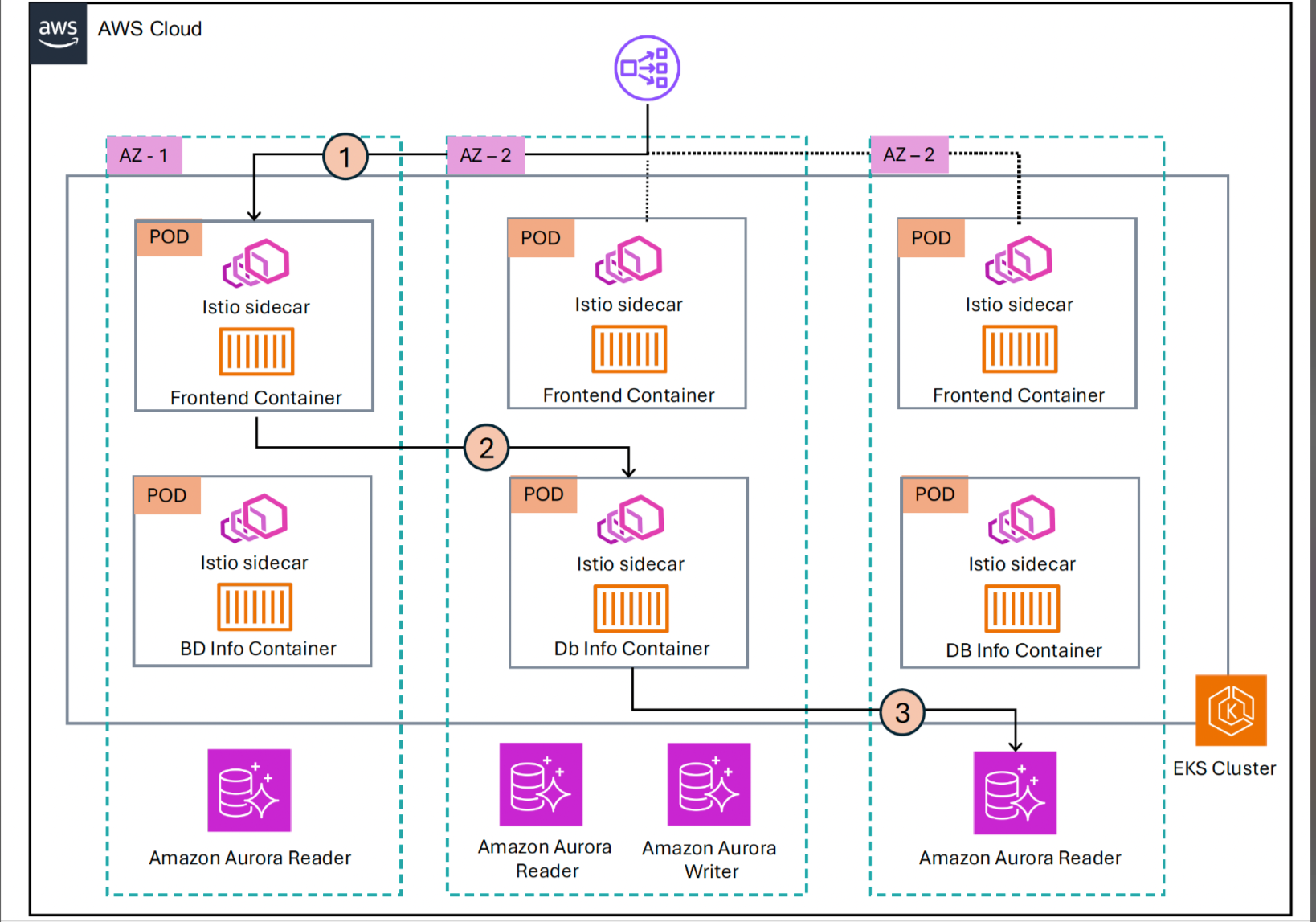
Figure 1: End-to-end AZ impairment recovery architecture
Prerequisites
The following prerequisites are necessary to complete this solution:
- An active Amazon Web Services (AWS) account with appropriate permissions
- An Amazon EKS cluster running across multiple Availability Zones (v1.33 or above) with AWS Load Balancer Controller installed
- Enable ARC zonal shift for your EKS cluster
- Install and configure Istio (sidecar mode)
- AWS Command Line Interface (AWS CLI) and kubectl installed and configured
- A basic understanding of Kubernetes and microservices architecture
- Amazon Aurora cluster with three reader endpoints, with each one in a different Availability Zone
Walkthrough
The following steps walk you through the solution and how to deploy.
Create Aurora cluster with three reader endpoints, with each one in a different Availability Zone
Refer to the documentation Creating and connecting to an Aurora MySQL DB cluster. For creating a read replica, refer to the documentation Creating a read replica for Aurora MySQL.
Create a three node EKS cluster in three different Availability Zones
You can use Amazon EKS Blueprints for Terraform to deploy an EKS cluster. Refer to Istio sidecar pattern for the Terraform code. This deploys Istio controller and Istio ingress backed by an NLB.
Deploy Istio Gateway, VirtualService, and sample application
Clone the sample-eks-az-traffic-shift repository and execute the readme.md steps 1 to 5 under the quick start section.
When we access the frontend service through the NLB, it performs the following operations:
- Returns information about the Availability Zone in which it’s currently running
- Makes 10 calls to the DB-Info Service
- For each call, it displays the Availability Zone from which the DB-Info Service responded
- It shows the database connection information, including which Availability Zone database replica was used
The following diagram shows the request flow under normal scenario. The request was first received in the us-east-1a Availability Zone by the frontend service, and it makes 10 calls to the DB-Info Service. If you look at the first call, then it was received in the us-east-1c Availability Zone by the DB-Info Service. Then, the DB-Info Service connects to the Aurora endpoint, which is reader-1 in the us-east-1a Availability Zone.
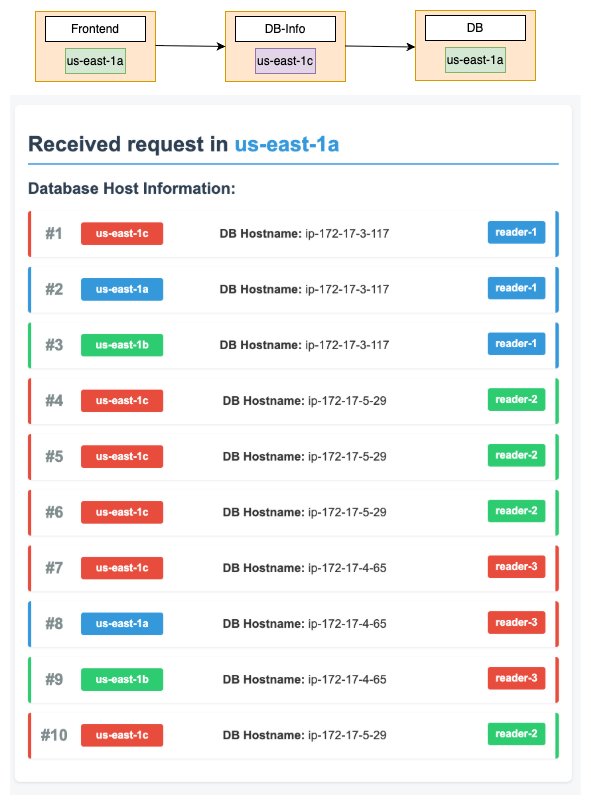
Figure 2: Normal request flow across availability zones
Zonal traffic shift run-book
You will execute the readme.md step 6 under the quick start section.
Under standard conditions, traffic flows to pods that connect to the cluster’s database reader endpoints. Without any traffic shifting rules in place, traffic naturally distributes across pods and database reader endpoints in all available Availability Zones. In the case of an impairment or degraded performance to one of the Availability Zones, we want to shift traffic away from that Availability Zone. This comprehensive approach creates a complete traffic isolation pattern, so that neither the pods nor the database endpoints in the impaired Availability Zone receive any traffic during the incident. In the following sections we go into detail regarding how we can achieve that.
1. Zonal shift
You can use zonal shift to temporarily shift traffic away from an impaired Availability Zone. This feature is crucial for handling both north-south inbound traffic and east-west service-to-service communication within your EKS cluster.
For NLB (north-south traffic): In our demonstration application, the entry point for external users is an NLB that distributes traffic to our frontend service across three Availability Zones. When you initiate a zonal shift for your NLB in a particular Availability Zone, ARC marks the NLB node in that Availability Zone as unhealthy, and it’s removed from the load balancer’s DNS. The NLB stops routing traffic to targets in the affected Availability Zone. This establishes that external users accessing your application through the NLB aren’t directed to the degraded zone.
The following diagram shows the processed bytes metrics for NLB in each Availability Zone before and after starting zonal shift. We started zonal shift in the us-east-1a Availability Zone, and it can be seen that processed bytes in the us-east-1a Availability Zone then dropped to zero.
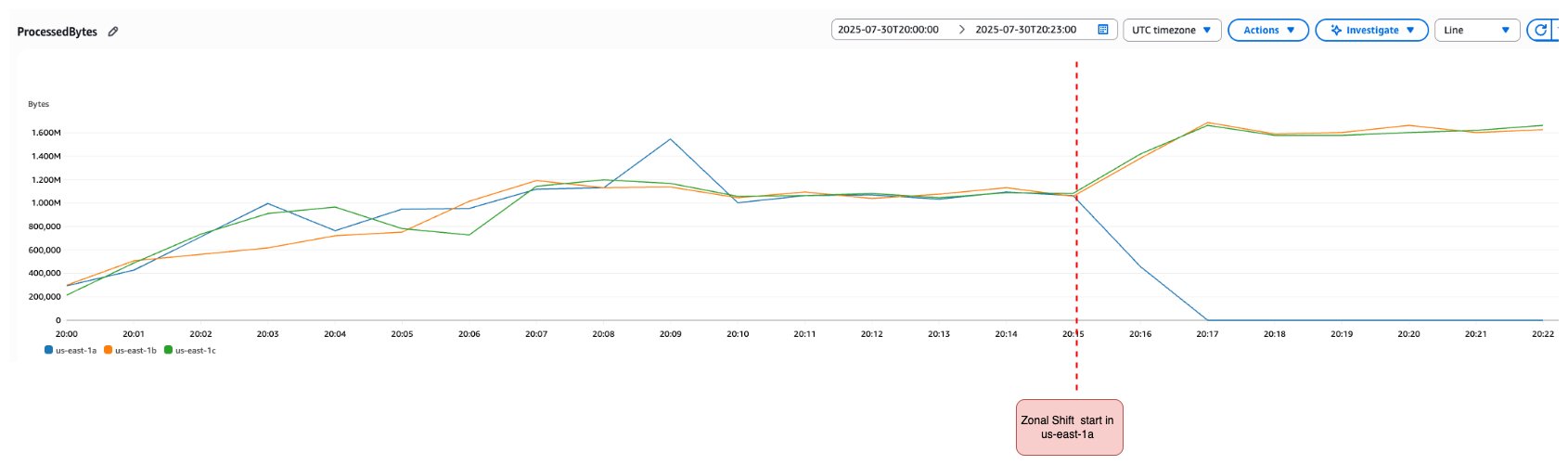
Figure 3: NLB processed bytes metrics during zonal shift
For Amazon EKS (east-west traffic): In our demonstration application, the frontend service communicates with the DB-Info Service through standard Kubernetes service discovery. Multiple DB-Info Service pods are deployed across Availability Zones and exposed through a Kubernetes ClusterIP service.
Under normal operations, Kubernetes uses EndpointSlices to maintain a dynamic list of pod IP addresses for each service. The EndpointSlice controller continuously updates these lists as pods are created, modified, or terminated. When a service request is made, kube-proxy on each node uses this information to route traffic to one of the available pod endpoints.
When you initiate an Amazon EKS zonal shift for your EKS cluster, you specify both the cluster and the Availability Zone that you want to shift traffic away from. This triggers a coordinated set of actions designed to gracefully redirect traffic away from the impaired zone. The traffic redirection mechanism works through the EndpointSlice system, where the EndpointSlice controller systematically identifies all pods located in the impaired Availability Zone and removes these pod endpoints from their corresponding EndpointSlices. Therefore, service traffic is automatically redirected to pods running only in healthy Availability Zones, while kube-proxy updates its routing tables to reflect the new endpoint configuration. As part of the node management process, all nodes in the target Availability Zone are immediately cordoned to prevent new pod scheduling. For managed node groups, Availability Zone rebalancing is suspended to maintain proper capacity distribution, and Auto Scaling Groups are updated to verify that new nodes launch only in the healthy Availability Zones. Nodes and pods in the Availability Zone you are shifting away from aren’t removed. This establishes that when zonal shift expires or gets cancelled, your traffic can safely return to the Availability Zone that has full capacity. This orchestrated approach verifies that internal service-to-service communication seamlessly avoids the impaired Availability Zone while maintaining application availability and performance. The gradual nature of this process prevents service disruption while effectively isolating the degraded Availability Zone from your application traffic flow. The following diagram shows the request made by the frontend service to DB-Info Service after zonal shift for Amazon EKS was initiated in the us-east-1a Availability Zone. None of the request is sent to the us-east-1a Availability Zone from the frontend service.
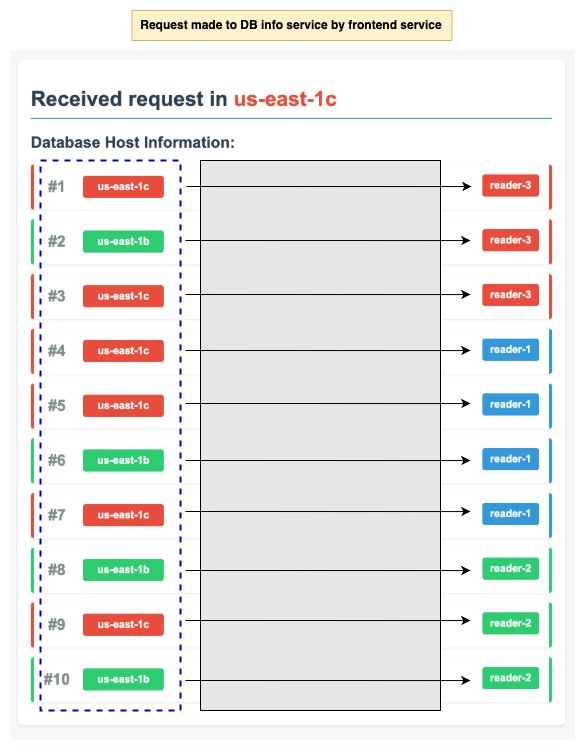
Figure 4: EKS zonal shift traffic redirection
The following diagram shows EndpointSlices for the DB-Info Service before and after zonal shift was initiated. Before zonal shift, there were three endpoints, with one in each Availability Zone. After initiating zonal shift, the endpoint in the us-east-1a Availability Zone was removed from the EndpointSlice.
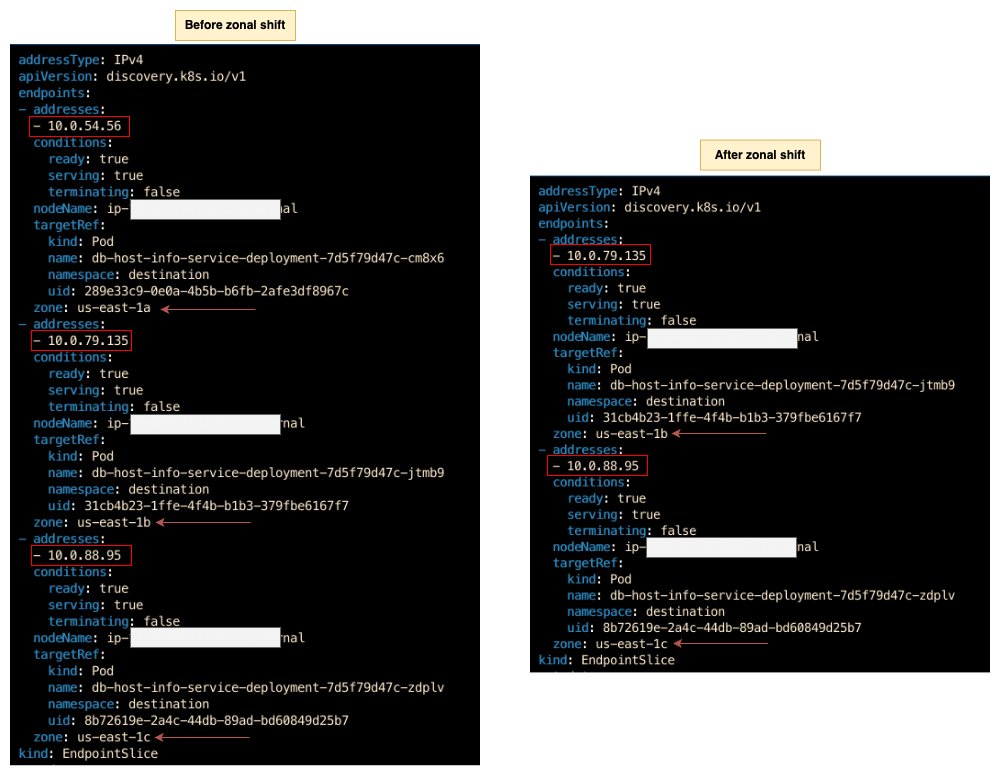
Figure 5: EndpointSlices before and after zonal shift
The combination of NLB and Amazon EKS zonal shifts ensures that both the inbound traffic to the EKS cluster and the internal cluster service communication avoid the impaired zone. This creates a comprehensive barrier against degraded performance.
The external traffic leaving the EKS cluster to the reader endpoints is still being sent to the three Availability Zones. This is where Istio service mesh comes in.
2. Istio service mesh for outbound traffic management
Although zonal shift handles inbound and east-west traffic effectively, it doesn’t control outbound connections from your Amazon EKS services to external dependencies such as Amazon RDS or services accessed through AWS PrivateLink. This is why Istio service mesh becomes essential to our zonal traffic shift strategy.
In this post we’re demonstrating using an Aurora database, so Istio service mesh ensures that the traffic isn’t routed to any reader instance in the unhealthy Availability Zone that we’re shifting traffic away from. Istio provides two key features that enable Availability Zone-aware outbound traffic management.
ServiceEntry for external dependencies: You can use Istio’s ServiceEntry resource to bring external services under Istio’s traffic management control by defining them as part of the service mesh registry. This capability is particularly valuable for any external service that exposes Availability Zone-specific endpoints, such as Amazon RDS reader replicas, or custom applications deployed with zone-specific private endpoints. For our Aurora database demonstration, we configure ServiceEntry to represent each Availability Zone-specific reader endpoint as a separate destination with locality information.
DestinationRule with locality preferences: You can use these to define traffic policies that apply to traffic intended for a service. Through these policies, you can enable localityLbSetting, which prioritizes traffic routing based on geographic proximity: first within the same region, then within the same zone. In Kubernetes, the label topology.kubernetes.io/zone determines a node’s zone and the label topology.kubernetes.io/region determines the region. You can use these locality labels to make sure that database connections from pods preferentially connect to replicas in the same Availability Zone. Furthermore, during the traffic shift procedure, this means completely avoiding the impaired zone.
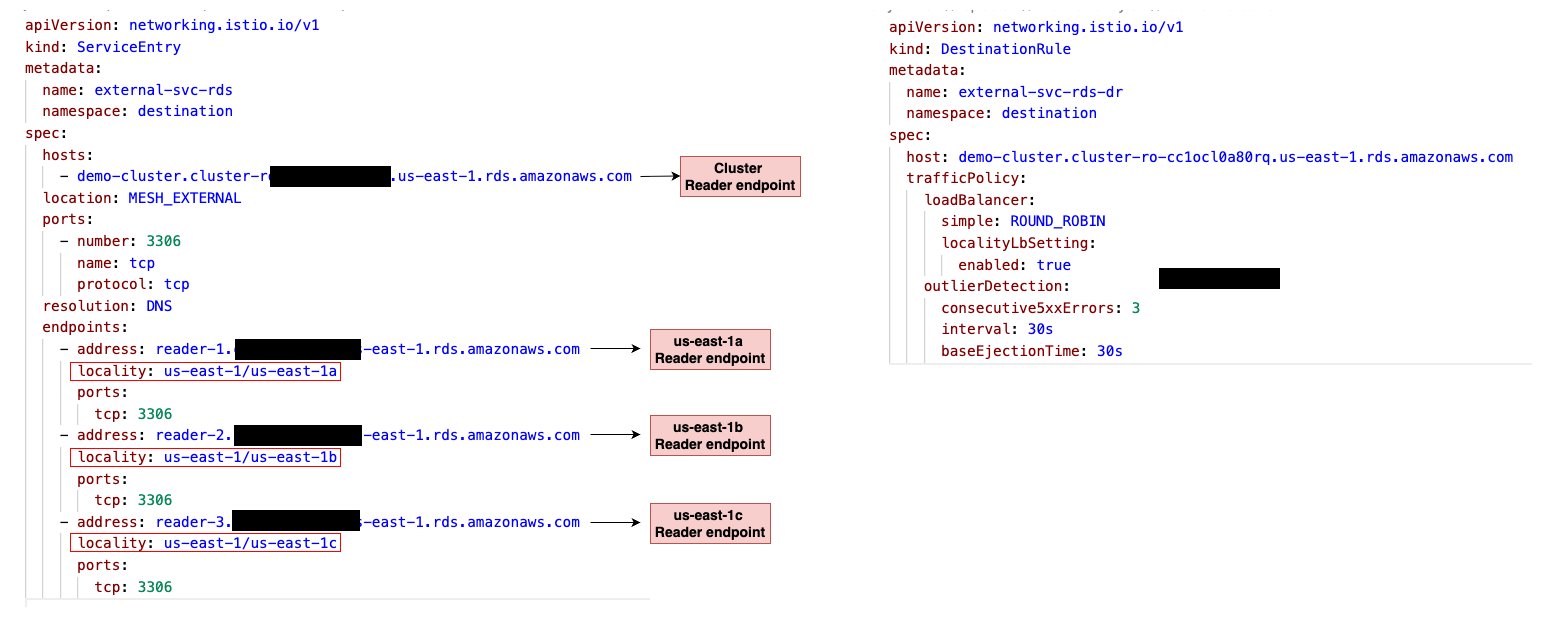
Figure 6: Istio ServiceEntry and DestinationRule configuration
We combine ServiceEntry and DestinationRule together to create a comprehensive outbound traffic management system that brings external dependencies for Aurora reader endpoints under Istio’s control. Moreover, it applies intelligent routing policies based on locality, providing complete zonal traffic shift coverage. The following diagram demonstrates how configuring Istio ServiceEntry and DestinationRule enables locality-aware routing, where requests from the DB-Info Service are directed to Aurora reader endpoints within the same Availability Zone.
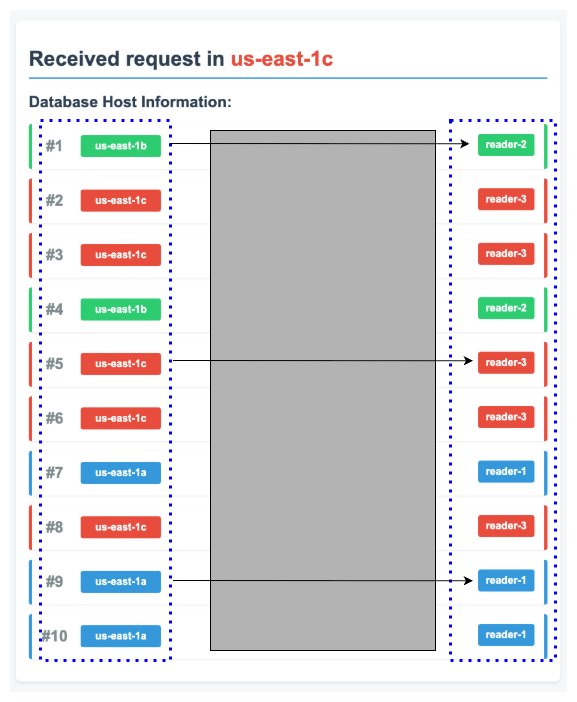
Figure 7: Locality-aware routing with Istio
3. Aurora writer endpoint
For the Aurora writer instance, and if it resides in the bad Availability Zone, the run-book must fail it over so that an available Aurora Replica (reader) in the other healthy Availability Zone is promoted to become the new primary DB instance. For more information, refer to Failing over an Amazon Aurora DB cluster
Restoring normal operations after the Availability Zone impairment is resolved
This process would only be initiated after confirming that the previously affected Availability Zone has returned to a healthy state. The procedure assumes that network traffic resumes normal routing patterns matching those in place before the zonal traffic shift procedure is run. Before proceeding, verify the following:
- The previously impacted Availability Zone shows normal health metrics
- AWS has confirmed resolution of any underlying infrastructure issues
- Your monitoring systems indicate stable conditions in the affected Availability Zone
When this is confirmed, you can reverse the zonal traffic shift measures by running the following:
- Delete the Istio DestinationRule and ServiceEntry. Refer to first step in Cleaning up section
- Cancel the NLB and Amazon EKS zonal shift.
Cleaning up
When you’re finished testing the solution, follow these steps to clean up resources and avoid incurring unnecessary AWS charges
- Delete the Amazon Aurora cluster
- Delete application resources
- Delete the EKS cluster
Conclusion
Building resilient applications in the cloud necessitates a comprehensive approach that addresses every aspect of traffic flow during infrastructure disruptions. Through this demonstration, we’ve shown how combining the Amazon Application Recovery Controller (ARC) zonal shift capabilities with Istio service mesh creates a complete zonal traffic shift strategy that seamlessly handles all three critical traffic patterns. Combining Amazon Application Recovery Controller zonal shift with Istio service mesh creates comprehensive AZ impairment recovery. This integrated solution redirects north-south, east-west, and outbound traffic away from degraded zones, transforming manual crisis response into automated resilience.
Ready to implement this solution? Start with these essential resources:
- Amazon EKS Zonal Shift Documentation
- Istio Service Mesh
- NLB Zonal Shift Documentation
- Enable ARC Zonal Shift for EKS
- Istio ServiceEntry Documentation
- Istio Installation Guide
About the authors
 Moe Wahidi is a Senior Technical Account Manager at Amazon Web Services, based in California. He specializes in containers, networking, and distributed systems. With over 20 years of experience spanning software development, network engineering, system engineering, and DevOps, Moe brings deep expertise in enterprise systems and infrastructure. He enjoys mentoring colleagues in his areas of expertise, particularly container technologies.
 Hemal Gadhiya is a Senior Solutions Architect with the Prototyping and Cloud Engineering Team in AWS Global Financial Services (GFS), where he works backwards from customer needs to build innovative cloud solutions. He specializes in resilient architectures, disaster recovery patterns, and ensuring business continuity for financial institutions on AWS.