Containers
How Ramp runs GPU AI workloads at scale with ECS Managed Instances
Ramp, a finance automation platform processing billions of dollars in spend decisions, runs GPU-powered AI inference continuously on Amazon Elastic Container Service (Amazon ECS). As the company scaled its machine learning workloads, managing the underlying Amazon Elastic Compute Cloud (Amazon EC2) fleet, Auto Scaling groups, launch templates, custom Amazon Machine Image (AMI) patching, and monitoring scripts demanded disproportionate engineering effort. Amazon ECS Managed Instances significantly reduced that overhead, bringing Ramp’s GPU infrastructure into full operational parity with the rest of their ECS infrastructure.
This post walks through how Ramp’s infrastructure team made that transition: the architecture pattern, implementation details, and what they learned along the way.
Ramp: Building the finance automation platform
Ramp is a finance automation platform trusted by more than 70,000 businesses (source: ramp.com). The platform helps them save time and money. The platform combines corporate cards, expense management, bill pay, procurement, travel, treasury, and accounting automation in a single system. Since its founding, Ramp’s mission has been to help businesses get more out of every dollar and every hour.
Advanced analytics and machine learning (ML) have powered that mission from the start. Ramp has used ML for years to provide recommendations, extract insights, and combat fraud. Today, Ramp is evolving from basic automation to an intelligent finance operations platform that manages the entire spend lifecycle, from purchase order requests through month-end close. In October 2025 alone, Ramp’s ML models made more than 26 million decisions across over $10 billion in spend, according to internal Ramp metrics. It prevented hundreds of millions of dollars in out-of-policy transactions and flagged fraudulent invoices in real time.
Delivering AI at that scale, reliably and in real time, requires substantial investment in GPU-accelerated machine learning infrastructure. Behind automated transaction categorizations, merchant matches, semantic search results, and receipt extractions, GPU inference workloads run continuously in production.
This post describes how Ramp’s infrastructure team consolidated those workloads onto Amazon ECS using Amazon ECS Managed Instances, walks through the implementation patterns, and shares what they learned along the way.
Where we started: ECS on EC2 with manual fleet management
The following diagram shows the architecture of our original ECS on EC2 setup for GPU workloads, illustrating the multiple components that required manual management.
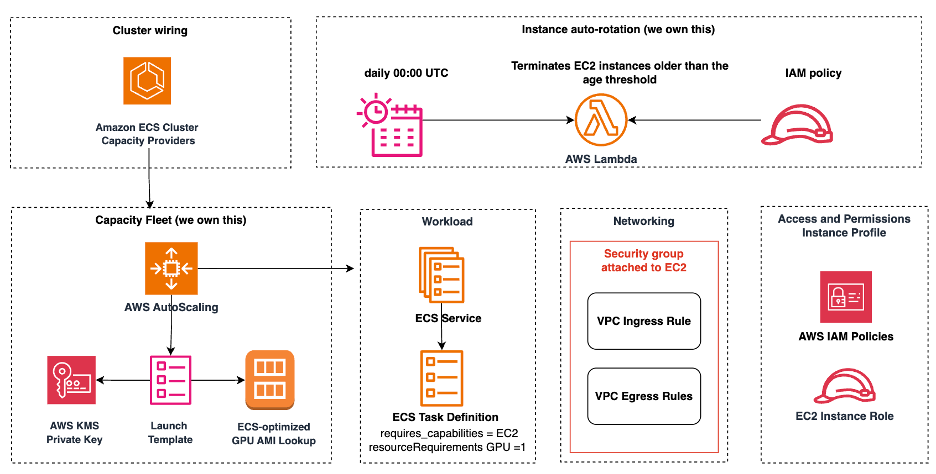
Ramp runs nearly all of its services on Amazon ECS, using AWS Fargate for the majority of compute. Fargate handles stateless API services and workers well, abstracting instance management entirely, and it integrates cleanly with our Terraform-based infrastructure-as-code. But GPU workloads are different.
When we first built our GPU-backed AI services, Fargate didn’t support GPU instances. We turned to the classic “ECS on EC2” pattern, which required provisioning and managing our own EC2 fleet. For each GPU workload, our Terraform code created:
- An Amazon EC2 Auto Scaling group (ASG).
- A launch template specifying the instance type, AMI, and user data.
- An ECS capacity provider backed by that ASG.
- An EC2 instance profile with appropriate AWS Identity and Access Management (IAM) permissions.
- User data scripts to configure the Amazon CloudWatch agent for GPU metrics (NVIDIA SMI).
- Custom scaling behavior and draining lifecycle hooks.
This pattern worked, but it came with significant operational costs. Every new GPU workload meant recreating the same boilerplate. AMI updates required manual coordination. We had to update launch templates, cycle instances, and drain tasks ourselves. GPU monitoring required installing and configuring the Amazon CloudWatch agent through user data scripts. This was a fragile mechanism, incompatible with managed environments. And critically, our GPU fleet lived as a completely separate operational concern from the rest of our ECS infrastructure. It had its own fleet management logic, its own patching rhythm, and its own debugging surface.
Our architecture with Amazon ECS Managed Instances
Amazon ECS Managed Instances is a fully managed compute option that combines the flexibility of EC2 with the simplicity of Fargate. It provides access to the full range of EC2 capabilities. These include instance type selection, GPUs, network-optimized instances, reserved capacity, and advanced security and observability configurations. AWS handles instance configuration, capacity provisioning, workload placement, patching, scaling, and maintenance.
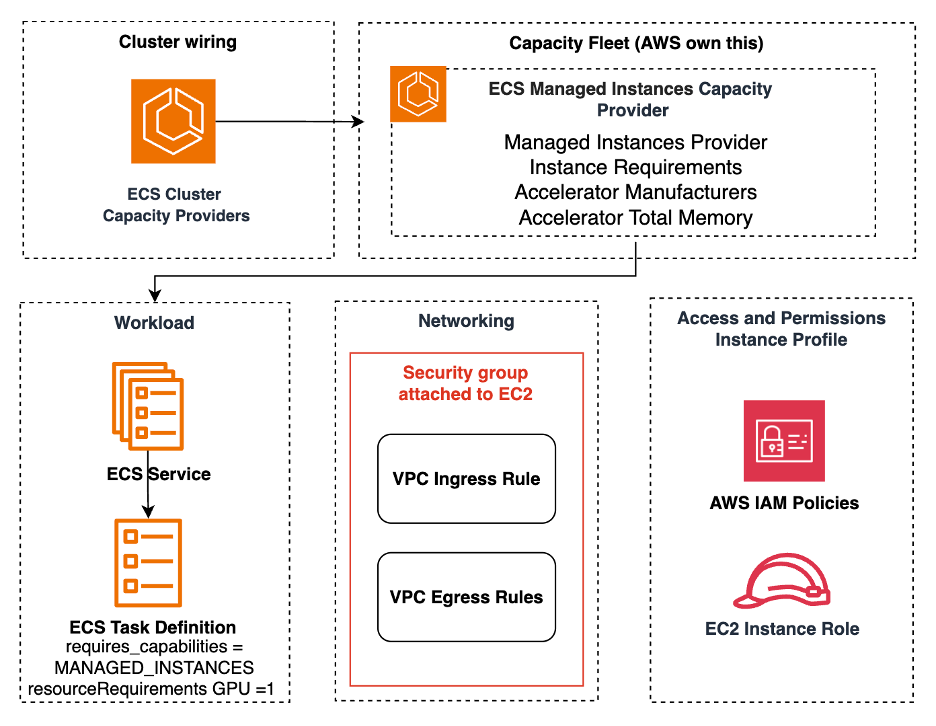
The following architecture diagram illustrates how our GPU workloads are organized within ECS clusters, showing the relationship between capacity providers, Fargate services, and managed GPU instances.
Our architecture on ECS Managed Instances follows a consistent pattern: each GPU workload family gets its own dedicated capacity provider with hardware constraints expressed through instanceRequirements. Non-GPU services continue to run on Fargate within the same ECS clusters. A single cluster hosts mixed workloads without cross-workload scheduling interference. Engineers interact with GPU services using the same deployment patterns they already know from Fargate.
The engineer’s job is reduced to expressing what hardware the workload needs. Managed Instances handles the rest.
Bore: Ramp’s internal ML inference platform
Bore is Ramp’s internal ML inference platform. Within Bore, the Bore Model Service is the primary component responsible for GPU-backed inference workloads running continuously in production:
- Text similarity scoring and cross-encoder reranking.
- Merchant matching: specialized representations for normalizing card acceptor data.
- Receipt image segmentation and cropping ahead of optical character recognition (OCR).
- High-throughput batched inference for domain-specific fine-tuned models.
Bore uses a mixed compute pattern:
- CPU-bound services run on Fargate.
- The Bore Model Service (GPU) runs on ECS Managed Instances, targeting NVIDIA L40S GPUs by using g6e instance types.
Current configurations:
- Production environment: g6e.2xlarge (1× L40S, 48 GB GPU memory).
- QA environment: g6e.xlarge (1× L40S, 48 GB GPU memory).
Embeddings: multi-model GPU inference
Our Embeddings service hosts multiple vector embedding models used across Ramp’s product. Different models have different hardware requirements, so we provision two capacity providers in each base workspace:
ecs_managed_instances_embeddings: NVIDIA A10G GPU, g5.xlarge instances, for default-tier models.ecs_managed_instances_embeddings_l40s: NVIDIA L40S GPU, g6e instances, for larger models such asQwen3-Embedding-4B,Qwen3-Embedding-8B, andGemma-300M.
Teams across Ramp depend on these GPU services. The Search team uses the Embeddings service heavily for online retrieval and large-scale backfills. The Applied AI team uses it for transaction auto-coding and categorization. The Data team uses it to standardize and classify job titles for prospect data.
Cluster and capacity provider layout
You can organize your ECS infrastructure around a base Terraform workspace per environment (QA, prod) that provisions cluster-level resources including capacity providers. Application workspaces then reference these capacity providers by name. This separation keeps cluster infrastructure stable while individual services can iterate independently.
GPU services declare a capacity provider strategy pointing at the relevant provider. Non-GPU services continue to use Fargate. This table summarizes the layout:
| Workload | Capacity Provider | Instance | GPU | Non-GPU |
| Bore | ecs_mi_bore_l40s |
g6e.2xlarge (prod) | NVIDIA L40S | Fargate |
| Embeddings (default) | ecs_mi_embeddings |
g5.xlarge | NVIDIA A10G | N/A |
| Embeddings (large) | ecs_mi_embeddings_l40s |
g6e.xlarge / 2xlarge | NVIDIA L40S | N/A |
Prerequisites
Before you begin the walkthrough, make sure that you have the following:
- An AWS account with permissions to create Amazon ECS, Amazon EC2, and AWS Identity and Access Management (IAM) resources.
- Terraform with an AWS provider version that supports ECS Managed Instances (the
managed_instances_providerblock). - An existing Amazon ECS cluster, or the ability to create one.
- IAM roles: an ECS Managed Instances infrastructure role, an EC2 instance profile, and task execution/task roles.
- A virtual private cloud (VPC) with private subnets in at least two Availability Zones, plus security groups.
- GPU service quota for your target instance families (for example, g5 and g6e) in your Region.
- A GPU container image (with the required CUDA runtime) in Amazon Elastic Container Registry (Amazon ECR).
Getting started: provisioning GPU capacity with ECS Managed Instances
This walkthrough demonstrates the key Terraform patterns we use at Ramp. They’re adapted for clarity but reflect our actual production approach.
Step 1: Create the ECS capacity provider
The core of ECS Managed Instances is the aws_ecs_capacity_provider resource with a managed_scaling block. Instead of specifying a single instance type, we use instance_requirements to express the hardware constraints and let ECS select appropriate instance types within those bounds.
Note: Unlike ASG capacity providers, ECS Managed Instances capacity providers are created for a specific cluster directly through the cluster argument, so no separate registration step is required.
Step 2: Register the capacity provider with your ECS cluster
Amazon ECS Managed Instances capacity providers don’t require a separate cluster registration step. Amazon ECS associates them with the cluster at creation time. However, the Terraform AWS provider may attempt to deregister automatically attached Managed Instances capacity providers. Adding an explicit aws_ecs_cluster_capacity_providers resource prevents this drift and sets a default Fargate strategy for non-GPU services.
Step 3: Define a GPU task definition
ECS Managed Instances GPU tasks use the MANAGED_INSTANCES launch type compatibility and declare GPU resource requirements in the container definition. The GPU value represents the number of physical GPUs to assign to the container.
Step 4: Wire the ECS service to the capacity provider
Point the ECS service at the Managed Instances capacity provider by using a capacity_provider_strategy block. Non-GPU services in the same cluster continue to use FARGATE.
What we learned
Throughout our migration to ECS Managed Instances, we gathered several practical lessons. The following recommendations are based on real issues we encountered and resolved in production.
Use separate capacity providers per GPU type
ECS Managed Instances doesn’t currently support GPU-type-aware task placement within a single capacity provider. While ECS launches best-fit instances based on a task’s resource requirements, you can’t strictly control which instances your tasks land on (for example, through placement constraints). If you need some workloads on A10G and others on L40S, create a separate capacity provider for each. This approach provides precise hardware control and avoids accidental placement on the wrong GPU tier.
Specify multiple Availability Zones
Early in our migration, we hit a capacity constraint in a single Availability Zone during a weekday traffic peak. Tasks were pending for several minutes while ECS waited for GPU instances to become available. We resolved this by expanding our capacity providers to span at least two AZs. High-end GPU instances such as g6e are more prone to AZ-level shortfalls than general-purpose instance types, so multi-AZ configuration is particularly important for GPU workloads. This provides ECS Managed Instances more placement options when launching new instances.
Use instance_requirements instead of pinning instance types
Our initial capacity provider configurations pinned specific instance types (g6e.2xlarge for Bore, g5.xlarge for default Embeddings). This worked but created a single point of failure: if that exact instance type was unavailable in our AZs, tasks would remain pending indefinitely. We shifted to expressing hardware requirements through instance_requirements where workload constraints allow. This provides ECS Managed Instances flexibility to source capacity across compatible instance families and sizes, improving both availability and cost. We still pin specific types where GPU memory constraints are strict. For example, when a model requires exactly 48 GB of GPU memory and only the L40S satisfies that.
Isolate workloads with dedicated capacity providers
We initially considered sharing a single GPU capacity provider across Bore and Embeddings. In practice, this caused scaling conflicts: a batch backfill job in Embeddings would trigger aggressive scale-out, consuming capacity that Bore’s latency-sensitive inference needed. Splitting into dedicated capacity providers per workload family addressed this. Each provider scales independently, and a surge in one workload cannot crowd out capacity for another. The overhead of managing multiple providers is minimal since each is only a Terraform resource with instance_requirements. No ASG or launch template to maintain.
Use the built-in autoscaler for GPU cost efficiency
ECS Managed Instances includes a purpose-built autoscaler that is fundamentally different from the CloudWatch alarm-driven scaling policies used with ASG capacity providers. Rather than scaling through an Auto Scaling group, it directly provisions EC2 instances quickly in response to pending tasks. It uses bin-packing to maximize utilization on existing instances before launching new ones. As demand decreases, it continuously consolidates workloads onto fewer instances.
For GPU workloads, where instance costs are high, this automatic compaction means you aren’t paying for idle GPUs between inference bursts. We didn’t need to configure any custom scaling policies. The built-in behavior handled our load patterns out of the box. For details on ECS Managed Instances provisioning and cost optimization, see Deep dive: Amazon ECS Managed Instances provisioning and optimization.
Automatic security patching eliminates operational burden
One of the most immediate operational wins from ECS Managed Instances was the elimination of our custom AMI rotation scripts. In the old ECS on EC2 model, we maintained tooling to update launch templates, cycle instances, and gracefully drain tasks during replacements. All of this kept our GPU fleet patched against security vulnerabilities and CVEs.
With ECS Managed Instances, AWS fully owns operating system patching, security updates, and instance replacement. When ECS Managed Instances determines that an instance needs replacement, the ECS scheduler uses a start-before-stop strategy. It launches a replacement instance and starts tasks on it before draining the old one. This approach biases for availability and minimizes disruption to running workloads.
Teams that need to control patching timing can use ECS Managed Instances event windows to schedule replacements during preferred maintenance periods. In our case, we found the default behavior sufficient and didn’t need to configure event windows.
Plan for GPU metrics early
GPU-specific metrics (utilization, memory usage, hardware health, and thermal conditions) are available through CloudWatch Container Insights with enhanced observability. Turn on enhanced observability on your ECS cluster to get device-level GPU metrics automatically for workloads running on ECS Managed Instances. We initially operated without these metrics and relied on application-level proxies, so we recommend turning this on from day one for any new GPU capacity provider.
Results
The following section describes the results that we saw.
Migration experience
We migrated to ECS Managed Instances incrementally over several weeks, starting with QA and progressing to production one workload at a time. For Embeddings, we validated with copied services carrying partial QA traffic. We then switched the primary services after confirming stability. We later followed a similar approach for Bore.
The migration was largely successful, but it wasn’t a single-step capacity-provider swap. We encountered an early feature gap with ECS Managed Instances. dockerLabels in task definitions, which we use extensively for Datadog autodiscovery and tagging, weren’t propagating correctly in the US East (N. Virginia) Region (us-east-1) at the time of our initial rollout. We reverted service placement back to ECS on EC2 in QA, escalated to AWS Support, and resumed the migration after the issue was resolved. dockerLabels are now fully supported on ECS Managed Instances. This feature gap has since been resolved.
Beyond that, the migration required upgrading our Terraform AWS provider, provisioning the new capacity providers, and adjusting tag propagation logic. We also resized subnets to accommodate the backing instances. (ECS Managed Instances handles tag inheritance differently than ASG-backed capacity providers.) We completed the production cutover without downtime.
The QA rollback reinforced the value of validating in a non-production environment first. Catching integration gaps early meant production was never at risk. Teams considering this migration should budget time for QA validation and feature-parity checks rather than assuming it’s a one-line configuration change.
Outcomes
We have migrated approximately 50–60 EC2 instances running GPU workloads to ECS Managed Instances across our production and QA environments. The migration covered our two largest GPU workload families: Bore and Embeddings.
For Ramp, ECS Managed Instances delivered operational simplicity as the most significant improvement. Our infrastructure engineers no longer maintain bespoke EC2 fleet management code for GPU workloads. With ECS Managed Instances, AWS is responsible for operating system patching, security updates, instance replacement, and lifecycle management. The service automatically drains workloads and replaces instances to help maintain security and compliance. This removes an entire category of operational responsibility from our team.
In effect, ECS Managed Instances extends the same operational simplicity we rely on with Fargate to our GPU-based workloads, letting us focus on building for our customers.
Platform consistency has been the other major gain. GPU workloads now follow exactly the same deployment patterns, observability tooling, and capacity management conventions as the rest of our ECS infrastructure. An engineer familiar with how we deploy a Fargate service can reason about a GPU service without needing to understand a separate fleet management system. Onboarding new GPU workloads is significantly faster than before.
This table summarizes the before-and-after comparison:
| Area | Before (ECS on EC2) | After (ECS MI) |
| AMI / patching | Manual: update LT, cycle instances | Fully automated |
| Terraform per workload | ASG + LT + capacity provider + user data | Capacity provider + instance_requirements |
| GPU metrics | CloudWatch agent through user data script | GPU metrics through Container Insights with enhanced observability (NVIDIA DCGM) |
| Deployment consistency | Separate patterns from Fargate services | Same patterns as Fargate services |
| Instances migrated | N/A | ~50 to 60 GPU instances |
Clean up resources
If you created resources following this walkthrough in a test environment, remove them to avoid ongoing costs. Delete resources in this order to avoid dependency errors:
- Delete the ECS service. Set
desired_countto 0, then destroy the service resource. This drains running tasks from managed instances. - Delete the task definition. Deregister the task definition revision.
- Remove the capacity provider. Delete the
aws_ecs_capacity_providerresource. ECS Managed Instances will terminate any backing EC2 instances automatically. - Remove the cluster capacity providers association. Delete the
aws_ecs_cluster_capacity_providersresource. - Delete supporting resources. Remove the IAM roles, instance profiles, and security groups created for ECS Managed Instances.
If using Terraform, run terraform destroy on the application workspace first, then the base workspace.
Note: ECS Managed Instances automatically terminates backing instances when the capacity provider is deleted. Verify in the EC2 console that no orphaned instances remain.
Conclusion
Amazon ECS Managed Instances has meaningfully simplified how Ramp operates GPU-backed AI workloads. By eliminating the need to manage EC2 fleets directly, it has freed our infrastructure engineers from a category of operational work that was difficult to automate and error-prone. More importantly, it has brought GPU workloads into full parity with the rest of our ECS infrastructure, with the same tools, deployment patterns, and operational model.
For teams evaluating compute options on ECS: Fargate remains the default choice for workloads that don’t require specific hardware. It abstracts instance management entirely. ECS Managed Instances is the path when you need access to the full range of EC2 capabilities, such as GPUs and specific instance families, while retaining the same managed operational model. We use Fargate for our CPU-bound services and ECS Managed Instances for GPU workloads, and both follow the same deployment and observability patterns.
If your team runs GPU workloads on ECS and is still managing ASGs and launch templates by hand, ECS Managed Instances is worth a close look. The migration requires planning: Terraform provider upgrades, subnet sizing, and tag propagation differences. But the reduction in operational overhead is immediate once complete.
Amazon recently released GPU Auto Repair for ECS Managed Instances, which automatically detects and recovers unhealthy GPU instances. This capability further reduces operational toil for teams running GPU workloads on ECS.