Containers
JVM memory, CPU, and classpath best practices for Java containers on AWS
Your Java application passes every test, deploys without error, and then throws a ClassNotFoundException in production after a routine operating system update. No code changed. No dependency changed. What happened?
Java workloads running on Amazon Elastic Container Service (Amazon ECS) and Amazon Elastic Kubernetes Service (Amazon EKS) can encounter two categories of production issues related to classpath and resource allocation:
- Nondeterministic classpath resolution that silently changes which version of a class the JVM loads.
- Resource allocation mismatches between JVM defaults and container limits.
Both can cause containers to fail even when the application code hasn’t changed, making root cause analysis challenging. Classpath issues typically surface after routine host updates. Resource mismatches tend to appear under load. These issues apply regardless of whether your containers run on AWS Fargate or Amazon Elastic Compute Cloud (Amazon EC2) instances, because the underlying JVM behavior is the same.
In this post, we explain how the JVM interacts with the container runtime and the host kernel, and walk through configuration best practices that help you prevent these issues.
Containers and the shared kernel
A common misconception is that a container runs its own operating system. In practice, a container shares the host’s kernel. When you select a base image such as Amazon Linux, Debian, or Alpine, you’re pulling in only the user space layer: the filesystem layout, shared libraries, and package managers.
Figure 1 shows this architecture. Two containers each bring their own user space but share the same host kernel. Every syscall from a container is handled by that kernel, regardless of the container runtime or base image.
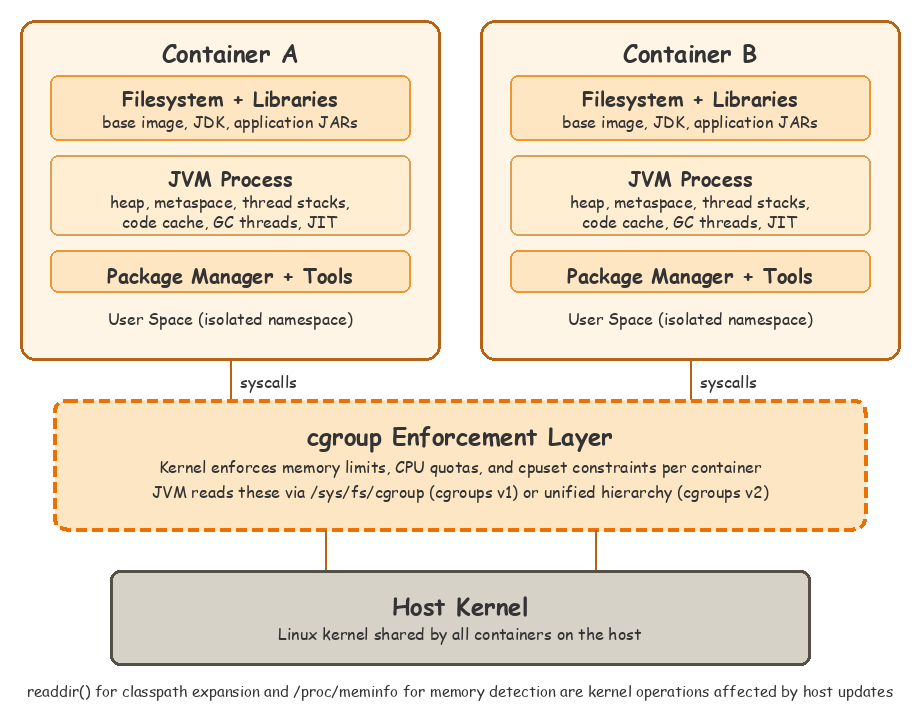
Figure 1 — Containers share the host kernel
For example, FROM amazoncorretto:17-al2023 in your Dockerfile provides the Amazon Linux user space, while FROM python:3.14-alpine provides the Alpine user space. The kernel underneath is the host’s.
The JVM running inside your container is a regular process on the host. It resolves classpaths against the container’s filesystem, but every syscall goes through the host kernel. Although modern JVMs (Java 10+, backported to 8u191+) are container-aware for resource detection, low-level operations like directory listing still depend on the host kernel’s behavior. Changes to the host kernel, including routine patches, can alter these behaviors without changes to your container image.
Classpath management
Two aspects of classpath handling can produce nondeterministic behavior in containers: the order in which the JVM loads classes, and how it expands wildcard classpaths. The following sections cover each one and the configuration practices that address them.
Classpath ordering
When a classpath contains two JARs with different versions of the same class, the JVM loads the first one it encounters. With wildcard classpaths, the loading order is nondeterministic. A change in ordering can silently change which version of a class is loaded. This can cause ClassNotFoundException or NoClassDefFoundError after a redeployment or host update.
Wildcard classpath expansion
When you specify a wildcard classpath like lib/*, the JVM expands it to include all .jar files in that directory. The expansion order isn’t guaranteed and can change between runs on the same machine.
The following OpenJDK wildcard classpath source code shows how WildcardIterator_next calls readdir() to iterate over directory entries:
The order in which readdir() returns filenames depends on the filesystem implementation and isn’t guaranteed to be sorted. The OpenJDK source code itself documents this behavior: “The order in which the jar files in a directory are enumerated in the expanded class path is not specified and may vary from platform to platform and even from moment to moment on the same machine.” Because the container shares the host kernel, the classpath ordering depends on the host’s filesystem behavior.
Host-level changes and classpath resolution
The host environment can change without modification to your container image. On Fargate, this happens through regular runtime patches. On EC2, this happens through Amazon Machine Image (AMI) updates, whether you manage them yourself, use Amazon EKS managed node groups, or use Amazon ECS Managed Instances. Across cases, the update can include kernel changes that alter the order in which directory entries are returned by readdir().
Consider a payment processing service that has been running reliably for several months. A host update or a redeployment places the task or pod on a host with a different kernel version. readdir() returns directory entries in a different order. A different version of a class loads, and the application fails unexpectedly.
Configuration best practices for classpath
Use fat JARs as your default approach. If your application architecture or build process prevents that, fall back to explicit classpath ordering. The following practices are listed from most effective to least:
Bundle dependencies into fat/uber JARs. Build tools like Maven and Gradle can produce a single JAR with dependencies bundled, which alleviates classpath ordering issues entirely. Fat JARs have trade-offs. They invalidate container layer caching, break signed JAR signatures after repackaging, and can introduce shading conflicts with overlapping packages. If you use Spring Boot 2.3 or later, its nested JAR format provides deterministic classpath ordering through classpath.idx when running with java -jar. You might not need any changes. Quarkus and Micronaut also provide deterministic classpath handling in their default packaging formats. For frameworks or custom entrypoints that rely on wildcard classpath expansion, weigh these fat JAR trade-offs against the risk of nondeterministic ordering.
Detect version conflicts at build time. In Maven, the maven-enforcer-plugin with the dependencyConvergence rule can detect version conflicts at build time. In Gradle, the failOnVersionConflict() resolution strategy provides similar functionality:
Relocate conflicting dependencies. When multiple libraries bundle the same transitive dependency at different versions, you can use dependency shading to relocate conflicting packages into unique namespaces at build time.
Prefer explicit classpath ordering. For applications that can’t use fat JARs, such as legacy deployments or application servers, replace wildcard expansion with an explicit list of JARs:
Resource allocation
Classpath issues surface at deploy time. Resource allocation mismatches tend to surface at runtime under load. The JVM’s interaction with the host kernel also affects how it detects available memory and CPU.
When the JVM starts, it inspects the system to determine how much memory to allocate and how many threads to create for garbage collection (GC), just-in-time (JIT) compilation, and fork/join pools. On a bare-metal server or a traditional virtual machine, this detection typically works as expected. Inside a container, the JVM’s defaults might not align with the container’s resource constraints.
Memory mismatches surface as an out-of-memory (OOM) kill in two distinct ways. In the first, the JVM does not detect the container limit: an older runtime reads the host’s memory and sizes the heap far above what the container allows. In the second, the JVM detects the limit correctly but sizes the heap too close to it. Metaspace, thread stacks, code cache, and other non-heap memory push total consumption over the container limit. The following sections address detection first and sizing second, because a heap that respects the wrong number cannot be corrected by tuning percentages.
JVM resource detection in containers
Container-aware detection. The JVM was designed before containers existed. Its resource detection originally read /proc/meminfo and counted CPU cores on the host. Modern JVMs (Java 10+, backported to 8u191+) are container-aware (JDK-8146115) and read cgroup limits instead. This behavior is controlled by -XX:+UseContainerSupport, which is enabled by default. Verify that this flag isn’t explicitly disabled (-XX:-UseContainerSupport) in inherited codebases or base images. Disabling it causes the JVM to ignore cgroup limits entirely. For this detection to work correctly, the JVM must also support the cgroup version running on the host.
Cgroups v2 compatibility. Cgroups v2 support was introduced in JDK 15 (JDK-8230305) and backported to JDK 11.0.16+ and JDK 8u372+, including Amazon Corretto at the same versions. If you’re running a current long-term support (LTS) release (JDK 17, 21, or 25), cgroups v2 is fully supported. On older patch versions, the JVM silently falls back to reading host memory values without logging a warning. For example, a container running on an EC2 instance with 64 GB of memory is allocated 8 GB through its task definition or pod spec. The application uses Corretto 8u362, which predates cgroups v2 support. The JVM reads the host’s 64 GB of memory. Because the JVM default maximum heap is 25 percent of detected memory, it sets a default heap of 16 GB. Under load, the heap exceeds the 8 GB container limit and the kernel terminates the process with an out-of-memory (OOM) kill.
Verify container detection before tuning. Before tuning any JVM flags, we recommend confirming that your JVM correctly detects container limits. On JDK 17+, you can use -XshowSettings:system. On JDK 11 or 8, use -XshowSettings:all instead. If the output shows host memory instead of container memory, upgrade to a version that supports cgroups v2.
Resource allocation across container services
Each AWS container service has a different resource model, but from the JVM’s perspective, what matters is the cgroup memory limit and CPU quota that the container runtime sets.
Fargate (Amazon ECS and Amazon EKS). CPU and memory are specified at the task level (Amazon ECS) or pod level (Amazon EKS). Fargate allocates a dedicated microVM per task or pod with fixed resources from predefined CPU and memory combinations. There’s no gap between what’s allocated and what’s available, so the JVM’s cgroup detection works reliably.
Amazon ECS on EC2. The task definition specifies a memory hard limit (the cgroup limit that the JVM reads) and an optional memoryReservation soft limit (used by the Amazon ECS scheduler for placement). When memory exceeds memoryReservation, multiple tasks can be scheduled based on their soft limits while each is allowed to consume up to its hard limit.
Amazon EKS on EC2. Likewise Amazon ECS, Kubernetes resource requests (used for scheduling) and limits (the cgroup limit that the JVM reads) can differ. When limits exceed requests, the scheduler places pods based on the smaller request value while each pod can consume up to its limit. If multiple pods do this simultaneously, the node runs out of physical memory and the kernel’s OOM killer selects a process to terminate.
In both EC2-based models, the JVM sizes its heap against the cgroup hard limit, but the scheduler places the workload based on the softer reservation or request value. For JVM workloads, where memory usage is relatively stable and predictable after startup, we recommend setting the hard limit equal to the reservation or request. On Amazon EKS, this assigns the pod a Guaranteed QoS class, making it the last to be evicted under node memory pressure.
CPU detection in containers
The JVM uses the detected processor count to size GC threads, JIT compiler threads, and the ForkJoinPool common pool. The way CPU resources are enforced differs across services, and this affects the JVM’s behavior:
Fargate (Amazon ECS and Amazon EKS). On Fargate, CPU is controlled through CPU shares, not through Completely Fair Scheduler (CFS) quota and period. CPU allocation is proportional rather than hard-limited. A task can burst beyond its allocated CPU when spare capacity is available, and CFS throttling does not apply. However, on current LTS releases except JDK 8 (JDK-8281571), the JVM no longer uses cpu.shares to compute availableProcessors(). Without a CFS quota to read, the JVM falls back to the host’s CPU count. The flag that restored previous behavior (UseContainerCpuShares) was removed in JDK 21. Use -XX:ActiveProcessorCount=N to match your task’s vCPU allocation.
Amazon ECS on EC2. The Amazon ECS agent translates the task definition’s cpu value into a CFS quota in the container’s cgroup. The kernel enforces this quota as a hard ceiling: the container can’t use more CPU time than the quota allows, regardless of whether the host has idle capacity. If the JVM creates more threads than the CPU allocation can support, those threads contend for the limited quota and experience CFS throttling. This increases GC pause times and degrades throughput.
Amazon EKS on EC2. Kubernetes CPU limits use the same CFS bandwidth control mechanism. The kubelet sets a CFS quota in the container’s cgroup based on the pod spec’s CPU limit. The JVM detects available processors from this quota, but with fractional CPUs, the JVM might overestimate the available processors. The effect is the same as Amazon ECS on EC2: thread overprovisioning leads to CFS throttling.
Memory configuration best practices
Prefer -XX:MaxRAMPercentage over -Xmx. The JVM uses memory beyond the heap for metaspace, thread stacks, code cache, and garbage collector overhead. Setting the heap to 100% of the container limit causes these non-heap regions to push total consumption past the limit. A common practice is to set the maximum heap to approximately 75 percent of the container memory.
Using -XX:MaxRAMPercentage instead of hard-coding -Xmx allows the heap to scale automatically when you change the container’s memory allocation. You can also set -XX:InitialRAMPercentage to control the initial heap size. A higher value pre-allocates more heap at startup, which reduces GC pressure during application initialization. A lower value reduces the initial memory footprint, but might cause more frequent garbage collection as the heap grows to meet demand. The right value is application-specific. Applications with large metaspace or many startup threads might need 30–40 percent to avoid exceeding the container limit before the heap stabilizes.
These flags work on AWS container services. The -XX:MaxRAMPercentage value of 75 percent leaves headroom for non-heap JVM memory. Applications with heavy native memory usage, such as those using Netty direct buffers or NIO memory-mapped files, might need 60–70 percent. Off-heap allocations count against the container’s memory limit but are not governed by MaxRAMPercentage.
CPU configuration best practices
Use -XX:ActiveProcessorCount to pin processor count explicitly. On Amazon ECS on EC2 and Amazon EKS on EC2, this helps prevent thread overestimation with fractional CPU allocations that leads to CFS throttling and latency spikes. On Fargate, this flag is equally important on current LTS releases except JDK 8. The JVM’s processor detection no longer reads cpu.shares (JDK-8281571), so auto-detection might not match the task’s vCPU allocation. On JDK 8, auto-detection is generally reliable for whole-vCPU allocations.
Match GC and compiler thread counts to your CPU allocation. For CPU-intensive workloads with fractional CPU allocations, consider matching thread counts to your actual CPU limit. Note that -XX:ConcGCThreads applies to concurrent collectors such as G1, ZGC, and Shenandoah:
Account for GC pauses in health check timing. CFS throttling does more than degrade throughput. When a CPU-starved JVM stalls in a garbage collection pause, it can miss a health check response window. The orchestrator then restarts a task or pod that was not actually unhealthy. This produces the same unexplained-restart symptom as an OOM kill, with the application logs going silent and no exception to point to.
On Amazon EKS, size the liveness probe’s periodSeconds, timeoutSeconds, and failureThreshold to tolerate your worst-case GC pause. Use initialDelaySeconds or a startup probe to cover the startup period. Initial heap expansion and class loading often trigger longer GC pauses than steady-state operation. The Amazon ECS equivalent is the container healthCheck’s interval, timeout, and retries for steady-state, and startPeriod to forgive failures during startup. Prefer right-sizing CPU with -XX:ActiveProcessorCount over loosening the check, so you address the cause rather than the symptom.
Configuration reference
The following table provides a quick reference for JVM configuration settings based on your deployment system:
| Configuration area | Fargate (ECS and EKS) | Amazon ECS on EC2 | Amazon EKS on EC2 |
| Memory model | Fixed at task/pod level | memory (hard) and memoryReservation (soft) | limits (hard) and requests (soft) |
| CPU enforcement | CPU shares (proportional, burstable) | CFS quota/period (hard limit) | CFS bandwidth control (hard limit) |
| JVM memory flag | -XX:MaxRAMPercentage=75.0 | -XX:MaxRAMPercentage=75.0 | -XX:MaxRAMPercentage=75.0 |
| JVM CPU flag | -XX:ActiveProcessorCount recommended (current LTS except JDK 8) | -XX:ActiveProcessorCount recommended | -XX:ActiveProcessorCount recommended |
For JVM-level startup optimizations, such as custom JREs and ahead-of-time compilation, see Optimize your Spring Boot application for AWS Fargate. For a hands-on walkthrough covering additional techniques like CDS, CRaC, and SOCI, see the Optimize for containers section of the Java on AWS workshop.
Conclusion
In this post, we showed how the JVM’s interaction with the container runtime and host kernel can lead to nondeterministic classpath resolution and resource allocation mismatches. These issues affect Java workloads across Amazon ECS and Amazon EKS, whether running on Fargate or EC2 instances. They’re difficult to diagnose in production because the application code and container image remain unchanged.
Start by verifying your JVM’s container detection with -XshowSettings:system (JDK 17+) or -XshowSettings:all (JDK 11/8). If the output shows host values instead of container limits, your JVM configuration needs attention.
For more detail on JVM container awareness, see JDK-8146115: Improve Docker container detection and resource configuration. To understand how Fargate applies host updates, see Task retirement and maintenance for AWS Fargate. For Amazon EKS managed node groups, see Understand each phase of node updates.
If you have questions or feedback about the practices described in this post, leave a comment.