Containers
Maximizing value with Amazon EKS Auto Mode: Strategies for visibility, control, and optimization
Kubernetes has transformed how organizations build, deploy, and scale applications. However, the very scale that makes Kubernetes powerful also introduces cost challenges that extend beyond basic compute expenses. As organizations adopt Kubernetes, they encounter cost optimization challenges. For example, unpredictable expenses from variable workload scaling, difficulties in allocating costs across teams and workloads, and the intricate balance of optimizing resources across different instance types. These challenges often lead to overprovisioning, a common approach to help maintain application availability at the expense of resource efficiency. Most critically, organizations often underestimate the undifferentiated effort required from their engineering teams to manage Kubernetes operations.
Platform engineering teams dedicate substantial time to operational overhead: cluster maintenance, resource over-provisioning, capacity planning, coordinating monthly security patches, testing OS updates, managing AMI versioning, and troubleshooting failed upgrades and system issues. These maintenance-heavy activities divert critical resources from strategic platform improvements and developer enablement initiatives. This represents several hours per month that could otherwise be redirected towards building new platform capabilities and accelerating developer productivity.
Amazon Elastic Kubernetes Service (Amazon EKS) has continuously evolved to address these challenges. EKS provides a fully managed Kubernetes control plane, reducing the operational burden of managing the Kubernetes API server and etcd. Building on this foundation, Amazon EKS introduced Amazon EKS Auto Mode to extend automation to the data plane, automatically provisioning compute, selecting optimal instances, dynamically scaling resources, managing core add-ons, and handling OS patching. This allows platform engineering teams to choose the level of operational control that best fits their needs, from self-managed data planes to fully automated infrastructure.
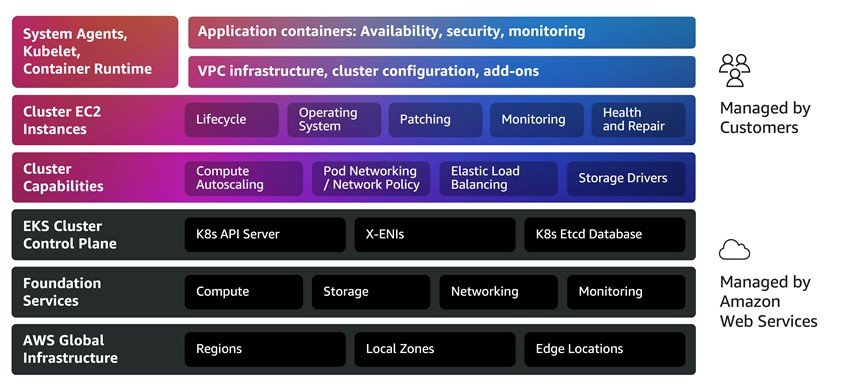
Amazon EKS Auto Mode streamlines Kubernetes management by automatically provisioning infrastructure, selecting the right compute instances, dynamically scaling resources, continuously optimizing costs, managing core add-ons, patching operating systems, and integrating with AWS security services. With Amazon EKS Auto Mode enabled, you can immediately deploy workloads to production-ready environments while focusing on VPC configuration, cluster settings, and applications rather than infrastructure management.
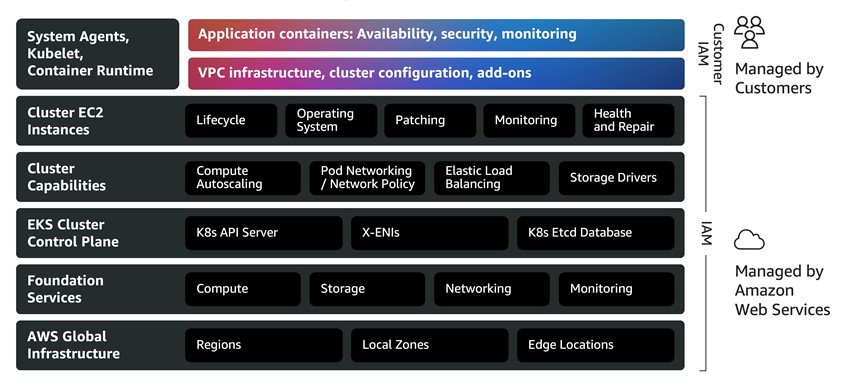
Optimizing Kubernetes spending with Amazon EKS Auto Mode
Amazon EKS Auto Mode addresses the operational overhead and infrastructure inefficiencies that drive Kubernetes costs. In this post, we explore how to maximize Auto Mode’s value through comprehensive cost visibility, proactive governance, and continuous optimization strategies. We cover essential cost management dimensions: establishing spending visibility, forecasting resource needs, implementing governance controls, and measuring efficiency improvements. For both new and experienced Amazon EKS Auto Mode users, this guide offers actionable insights to balance performance, reliability, and cost-efficiency in Kubernetes deployments.
Amazon EKS Auto Mode: Addressing Kubernetes cost complexities
The following section examines how Amazon EKS Auto Mode’s key capabilities address the Kubernetes cost challenges outlined in the introduction:
Offload cluster operations
Amazon EKS Auto Mode helps reduce operational overhead by fully automating cluster management, from provisioning to patching to recovery, relieving your platform engineering teams to focus on strategic initiatives. AWS automatically handles the complete lifecycle of your Kubernetes infrastructure, including security patching and operating system updates, provisioning and configuration of cluster networking and service components, and pre-configured secure AMIs with GPU support and drivers for accelerated workload, reducing the need to manage instance configuration and driver installation. Beyond provisioning and patching, Amazon EKS Auto Mode includes comprehensive health monitoring that automatically detects node failures and initiates recovery. The automated repair process cordons affected nodes, gracefully drains workloads, then reboots for transient issues or replaces nodes for persistent failures. This approach maintains application availability during repairs and significantly reduces recovery time, allowing your platform teams to focus on enabling developer productivity and driving platform innovation rather than spending time on infrastructure maintenance, patching, and troubleshooting.
Improve performance, availability, and security of applications
Amazon EKS Auto Mode helps make sure that your applications run reliably with minimal operational burden. The system automatically provisions capacity during demand spikes and removes underutilized nodes during low-demand periods. This helps reduce the need for costly buffer capacity. During node repairs and updates, Auto Mode cordons affected nodes, gracefully drains workloads, and respects application-level availability requirements. This dynamic approach maintains high availability while optimizing infrastructure costs as workload demands fluctuate.
Continuously optimize compute costs
Amazon EKS Auto Mode reduces infrastructure costs by helping make sure that you only pay for resources you actually use. Just-in-time scaling provisions capacity based on workload demands, while automatic removal of idle and underutilized nodes helps reduce costly buffer capacity and unnecessary compute expenses.You can continuously optimize your EC2 instance mix, identifying consolidation opportunities and replacing nodes with more cost-effective options based on workload requirements. Auto Mode automatically supports EC2 purchasing options, including Spot Instances (up to 90 percent discount), AWS Savings Plans, Reserved Instances, and On-Demand to maximize savings.Beyond infrastructure efficiency, Amazon EKS Auto Mode helps reduce operational costs associated with manual cluster administration and reduces the need for specialized platform engineering expertise. This converts fixed operational costs into variable, usage-based expenses that scale with actual demand.
Cost planning and forecasting
Total cost of ownership should factor in platform engineering hours saved from managing these capabilities manually. For organizations without dedicated platform teams, these operational savings should be considered alongside the management premium. From a cost perspective, Amazon EKS Auto Mode maintains standard Amazon Elastic Compute Cloud (Amazon EC2) pricing while adding a management fee for Auto Mode-managed nodes. You pay for Amazon EKS Auto Mode based on the duration and type of Amazon EC2 instances launched and managed by Amazon EKS Auto Mode. Consider the following example. When you deploy an application in the US West (Oregon) AWS Region. Amazon EKS Auto Mode calculates that the most cost-effective On-Demand EC2 instances to meet the needs of your application are a mix of c6a.2xlarge, c6a.4xlarge, m5a.2xlarge, and m5a.xlarge. Amazon EKS Auto Mode charges a management fee that varies based on the EC2 instance type launched, in addition to your regular EC2 instance costs and control plane costs. The following table shows the total costs for Amazon EKS Auto Mode, including the regular EC2 instance costs, for each hour and each month your application runs:
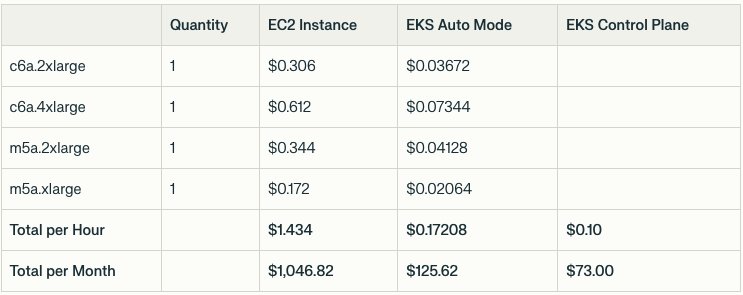
A full list of Amazon EKS Auto Mode prices can be found on the Amazon EKS pricing page.
Cost visibility and reporting
Amazon EKS Auto Mode integrates with AWS Cost Optimization tools (AWS Cost Explorer, Budgets, and AWS Cost and Usage Report (CUR)) for enhanced cost visibility, reporting, and governance. These integrations help track Kubernetes spending, implement cost controls, and optimize resources based on business needs. AWS services costs can be monitored at various levels of detail. Resource tagging is recommended for Amazon EKS Auto Mode cost tracking and can be implemented through two approaches:
- Tagging your EKS cluster.
- Tagging resources more granularly by following Custom AWS tags for Amazon EKS Auto resources and adding your tags to your custom NodeClass as shown in the following example:
To activate your tag keys
- Follow the steps as described in the AWS Billing documentation.
After you create and apply user-defined tags to your resources, it can take up to 24 hours for the tag keys to appear on your cost allocation tags page for activation. It can then take up to 24 hours for tag keys to activate.
Identifying Amazon EKS Auto Mode costs
You can use tools such as Cost Explorer:
- Open the AWS Billing and Cost Management console.
- In the navigation pane, choose Cost Explorer.
- On the Welcome to Cost Explorer page, choose Launch Cost Explorer.
- After you launch Cost Explorer, you have a similar view of your costs:
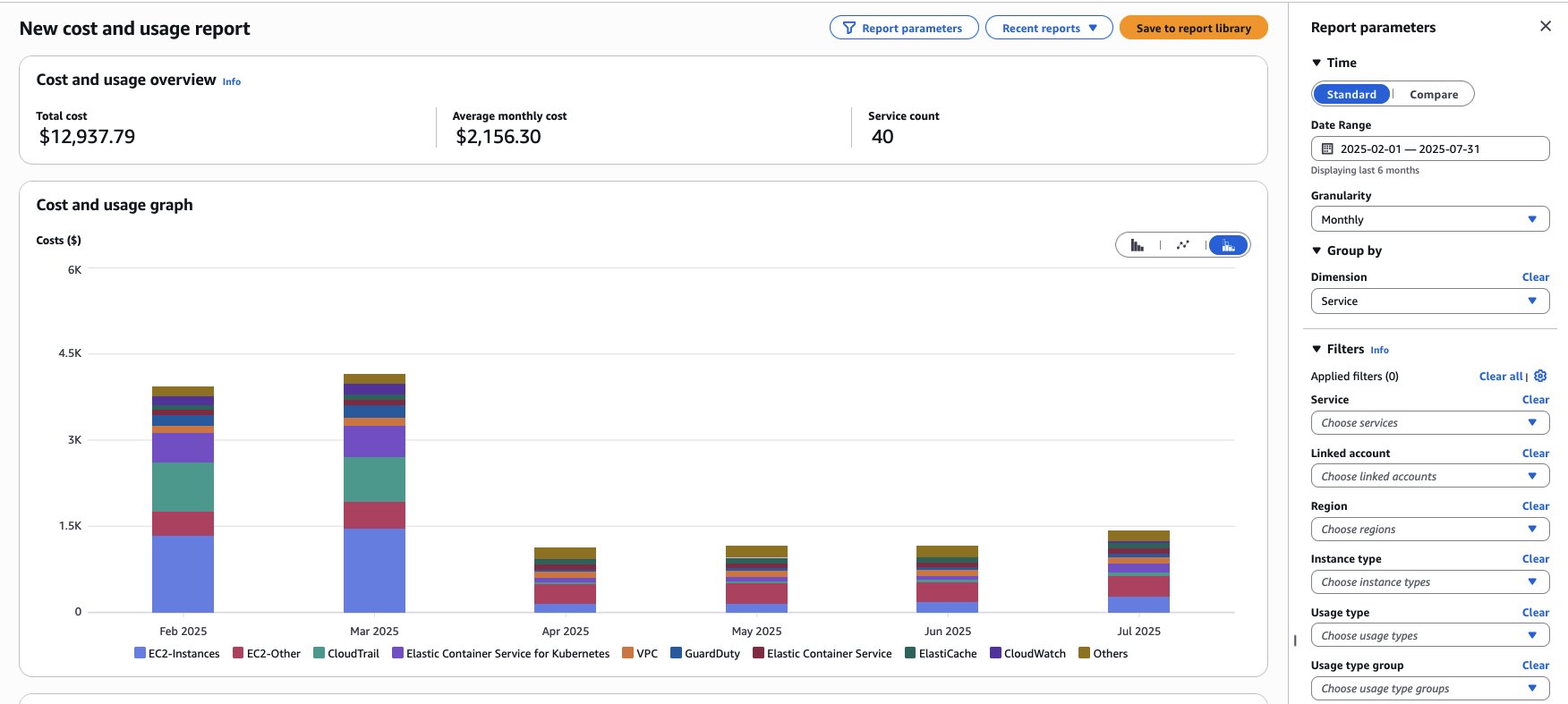
- To check the cost for running Amazon EKS Auto Mode per instance on your account, you can apply the Service filter for “Elastic Container Service for Kubernetes” and Group by the Dimension “Usage type”. To drill down the report to show the Amazon EKS Auto Mode costs, use the “Usage type” filter, and filter for all the resources containing “EKS-Auto” on its name.
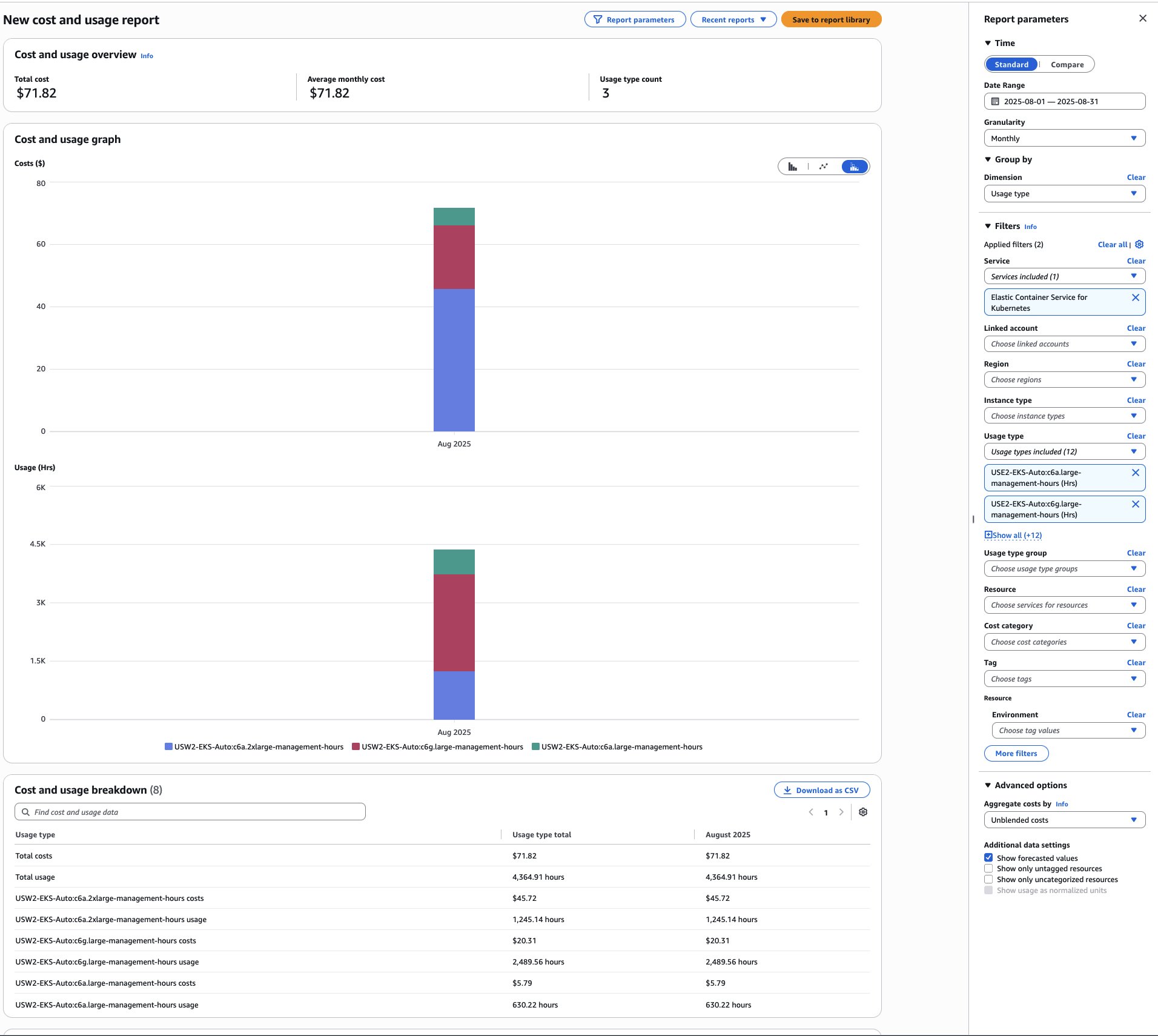
In addition, you can also use AWS Cost and Usage Report and AWS budgets to monitor usage on your specific resources.
For detailed Kubernetes cost tracking by namespace, cluster, pod, or organizational units (teams/applications), use AWS Split Cost Allocation Data. Alternatively, Kubecost offers real-time visibility into Kubernetes expenses, breaking down costs across the same dimensions while providing actionable optimization insights.
Cost control and governance
Cost tags enable both service-specific spend tracking and guardrails against unexpected costs through tools like AWS Budgets.
You can create and set up a budget in two ways:
When creating a customized budget, selecting the Cost Budget type allows you to create filters using AWS cost dimensions, including the EKS resource tags. For budgets created with the budget template, a filter for resource tags can be added while editing the budget. Tags are labels for detailed cost organization and tracking. Both AWS-generated and user-defined tags (requiring ‘user:’ prefix) exist. Tags must be activated before use. For details, see Activating the AWS-Generated Cost Allocation Tags and Activating User-Defined Cost Allocation Tags.
In combination with the preceding recommendations, use Node Pools resources to define limits that prevent new instance creation when specified thresholds are exceeded:
Best practices: How to optimize further
Amazon EKS Auto Mode provides multiple advantages when it comes to the cost optimization of Kubernetes environments by automatically deploying, updating, and scaling compute resources based on customer load. Powered by Karpenter, Amazon EKS Auto Mode helps reduce the need for manual infrastructure provisioning, configuration, and maintenance while dynamically scaling resources to meet application demands efficiently.
Amazon EKS Auto Mode continuously monitors clusters to identify underutilized or empty nodes, consolidating workloads onto appropriately sized instances to prevent over-provisioning. These default consolidation settings can be customized when creating a custom Node Pool. The default general-purpose and system Node Pools cannot be modified.
Instance family
Node Pools should specify multiple instance types, not only one. Defining broader instance families gives Amazon EKS Auto Mode greater flexibility to select cost-optimal EC2 instances.
Instance architecture
Use AWS Graviton processors for up to 40% better price-performance over x86. For arm64-compatible applications, enable Amazon EKS Auto Mode to deploy these cost-efficient instances. To learn how to migrate x86 applications to Graviton using Amazon EKS Auto Mode, see this step-by-step guide.
Capacity type
Amazon EC2 Spot Instances let you take advantage of unused EC2 capacity in the AWS cloud and are available at up to a 90% discount compared to On-Demand prices. You can use Spot Instances for various stateless, fault-tolerant, or flexible applications. With Amazon EKS Auto Mode, you can define the on-demand and spot values. Learn how to implement cost-effective Spot Instances with this step-by-step guide. By using Amazon EKS Auto Mode with Spot, you can achieve savings of 30%.
Consolidation
Amazon EKS Auto Mode offers built-in resource consolidation by monitoring usage and optimizing underused resources. The process removes inactive nodes, efficiently packs pods, and maintains availability through graceful draining. These can be configured as part of the disruption section in the Node Pool definition. By default, when an Amazon EKS Auto Mode cluster is created, or when enabled on an existing cluster, two default Node Pools are created (general-purpose and system), they are pre-configured with disruption settings, including budgets. Here is a sample configuration from the built-in general-purpose Node Pool:
The way disruption parameters are configured directly impacts your ability to achieve optimal cost efficiency in Amazon EKS Auto Mode. For instance, overly restrictive consolidation settings can delay when underutilized nodes are consolidated, resulting in unnecessary compute costs for idle resources that could otherwise be terminated.
In low-traffic environments like Development, Test, and QA that are inactive on weekends, workloads can be scaled to zero nodes. This is achieved by configuring constraints on Node Pool-created nodes and their pods. An effective approach to accomplish this is:
- Add a zero CPU limit to Node Pools and then delete all nodes. This option is the most flexible, as it allows you to keep your workloads running while still scaling down the number of nodes to zero. To do this, you need to update the spec.limits.cpu field of your Node Pools.
For detailed steps and alternative options, refer to the blog post on how to Manage scale-to-zero scenarios.
Note: To scale workloads to zero or apply additional scaling customizations in Amazon EKS Auto Mode, you must create custom Node Pools. The default general-purpose and system Node Pools cannot be modified when EKS Auto Mode is enabled.
While Amazon EKS Auto Mode effectively manages compute scaling, achieving optimal cost efficiency still depends on proper workload right-sizing. This is because Amazon EKS Auto Mode scales based on unschedulable pods, rather than actual resource utilization. As a result, a well-configured Horizontal Pod Autoscaler (HPA) remains a critical complement for efficient scaling.
Effective right-sizing and scaling require careful selection and monitoring of the right metrics. Two commonly used approaches for application-level metrics include:
- Kubernetes Metrics Server: Provides core resource utilization metrics within the Kubernetes cluster, primarily CPU and memory usage, and serves as the default metrics source for HPA.
- KEDA (Kubernetes Event-Driven Autoscaling): Extends Kubernetes autoscaling by acting as a custom metrics provider that integrates external event sources, such as queues, HTTP requests, or streams, with HPA. This enables event-driven scaling based on real-time signals derived from monitoring systems like Amazon CloudWatch and Prometheus. For a detailed example visit this blog post.
For Kubernetes right-sizing with metrics-driven GitOps automation, visit this blog post.
Conclusion
Amazon EKS Auto Mode helps optimize Kubernetes economics by automating infrastructure management and removing operational overhead. Its core capabilities, including intelligent compute right-sizing, dynamic node scaling, and automated health management, address the fundamental cost challenges organizations face while allowing teams to focus on innovation rather than infrastructure. By converting fixed operational costs into variable, usage-based expenses that scale with actual needs, Amazon EKS Auto Mode delivers measurable cost benefits without sacrificing performance. When combined with strategic tagging, governance controls, and optimization techniques, organizations achieve both operational excellence and cost efficiency.
Ready to get started? Experience Amazon EKS Auto Mode through the Amazon EKS Auto Mode Workshop for hands-on learning. For organizations implementing Auto Mode at scale, reach out to your AWS account team to learn more.
| Interested in hands-on experience? |
About the authors
 Hevert Brito is a Senior Technical Account Manager at AWS based in Utah, with a strong background in Site Reliability Engineering. He is passionate about building resilient, highly available systems and specializes in observability and reliability practices that support critical workloads. In his role, he partners closely with customers to design and implement scalable, containerized solutions that drive modern cloud architectures. Outside of work, Hevert enjoys spending time in nature, taking advantage of Utah’s scenic hiking trails in the summer and snowboarding in the winter. He also has a deep appreciation for the beach, balancing his love for the mountains with time by the ocean whenever he can.
 Goutham Annem is a Senior Technical Account Manager at AWS, based in Bay Area, California. He partners with customers to design and optimize cloud infrastructure with a focus on scalability, reliability, and performance, supporting the implementation of containerized workloads, GenAI solutions, MLOps pipelines, and technical strategies that drive business outcomes. He is a sports enthusiast with a particular fondness for badminton and cricket, and frequently indulges in hikes in the Bay Area to connect with nature.