Containers
Observability patterns for AI agents on Amazon EKS
When your AI agent takes 30 seconds to answer a routine question, burns through your token budget in a single conversation, or silently picks the wrong tool, how do you find out? AI agents are becoming a core building block for enterprise applications. They automate complex workflows, reason over domain-specific data, and interact with external systems on behalf of users. But they also call foundation models, invoke tools, reason across multiple steps, and spend real money on tokens with every request.
Organizations are moving from single-agent prototypes to production deployments. A single system can run dozens of agents and thousands of invocations a day. At that scale, you lose visibility into what your agents actually do. An agent gets stuck in a loop, calling the same tools repeatedly. It burns tokens on prompts that don’t help. One model call quietly drives up your monthly bill. Traditional monitoring surfaces none of this.
Traditional application monitoring tells you whether a service is healthy. It can’t tell you why an agent hallucinated, which tool calls consumed your token budget, or where a multi-step reasoning chain broke down. An HTTP 200 response from an agent’s endpoint says nothing about whether the agent reasoned correctly, chose the right tools, or stayed within budget. That gap between “the service is up” and “the agent is performing well” becomes a blind spot, and it grows with every agent you deploy.
The observability gap for AI agents
When an AI agent handles a request, it produces a non-deterministic execution path. The same user query can trigger a different sequence of tool calls, a different token count, and a different cost, all depending on how the model reasons that time around. That behavior creates observability requirements you simply don’t have in conventional microservices:
- Large language model (LLM) call traces: Which model was invoked, how many tokens it consumed, what it cost, and how long inference took.
- Tool call spans: Which tools the LLM selected, their inputs and outputs, and whether they succeeded or failed.
- Reasoning chains: The multi-step decision flows from the user’s query, through the intermediate reasoning, to the final response.
- Cost attribution: Per-agent and per-request token spend, mapped back to the model, the AWS Region, and the caller.
Without this visibility, teams running AI agents at scale are flying blind on quality, cost, and reliability.
In this post, we implement two observability patterns for AI agents running on Amazon Elastic Kubernetes Service (Amazon EKS). Both patterns are designed to be production ready, with cost attribution, sampling, and secure telemetry handling. They use OpenTelemetry for trace instrumentation and Bifrost as the LLM gateway that routes every model’s call to Amazon Bedrock. Langfuse serves as the observability backend for traces, cost tracking, and prompt analytics. What changes between them is the architecture (see Figure 1), specifically who owns the telemetry pipeline and where collection happens:
- Decentralized pattern: The Strands SDK auto-instruments the agent code, and each agent exports its traces straight to Langfuse. There’s no shared collector to run or operate.
- Centralized pattern: Telemetry flows through a shared OpenTelemetry (OTEL) Collector before reaching Langfuse. The Collector gives you one place to handle batching and sampling, and one place to plug in new backends later without touching the agents.
We deploy both patterns side by side on the same EKS cluster, run the same agents against real queries, and show you the traces that come out, so you can make an informed architectural choice.
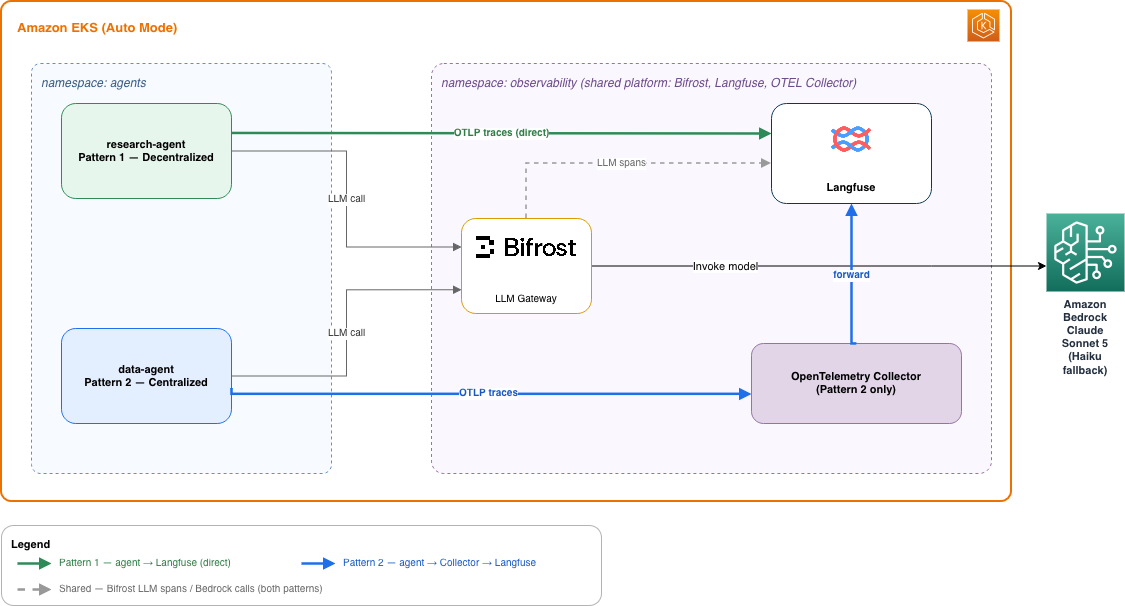
Figure 1: Observability patterns for AI agents on Amazon EKS
Key components
The architecture is a layered, Kubernetes-native design. Each layer has one job, and the boundaries between them are where the observability guarantees live. Telemetry is produced at the top, enriched as it flows down through the gateway, and collected and stored by the observability layer, all running on the same cluster.
- Foundational compute layer (Amazon EKS Auto Mode): Amazon EKS Auto Mode runs every workload, the agents, the gateway, and the observability stack, as Kubernetes Deployments, with compute, networking, and security patching managed by AWS.
- Agent layer (Strands Agents SDK). The agents are built with the Strands Agents SDK, an open source Python framework for building AI agents. It ships with built-in OpenTelemetry instrumentation, so LLM calls, tool invocations, and reasoning steps are captured as spans without extra wiring in the agent code.
- LLM layer (Amazon Bedrock): Amazon Bedrock provides managed model inference, so you get the models without running the inference infrastructure yourself.
- LLM gateway layer (Bifrost): Every model call goes through Bifrost, a high-performance LLM gateway that routes OpenAI-compatible requests to Amazon Bedrock. In Bifrost’s published benchmarks at 5,000 requests per second, the gateway adds well under 60 microseconds of its own processing overhead per request. That is a negligible fraction of the LLM call itself. It handles model fallback, moving from Sonnet to Haiku when a request is throttled, and it emits correlated OpenTelemetry spans that carry token counts and per-request cost.
- Telemetry pipeline layer (OpenTelemetry Collector): In the centralized pattern, traces and metrics flow through the OpenTelemetry Collector, a vendor-neutral pipeline that receives, batches, processes, and exports telemetry to one or more backends. It’s the single place to add sampling or a new backend later without touching the agents.
- Observability backend layer (Langfuse): Langfuse is an open source LLM observability application that receives the OpenTelemetry traces and turns them into cost tracking, prompt analytics, and trace visualization for the generative AI workloads.
- Delivery layer (ArgoCD): The whole stack is delivered with ArgoCD, declarative GitOps continuous delivery for Kubernetes. A git commit triggers workload rollouts across the cluster, so the cluster state matches what is in the repository.
Now that we’ve introduced the building blocks, let’s look at how they fit together in two distinct architectural patterns.
Observability patterns and architecture
The two patterns share the same instrumentation and differ only in where telemetry is collected. The following sections describe each one in turn.
Decentralized pattern: Framework direct to backend
The following diagram shows the decentralized pattern. Each agent exports its traces directly to Langfuse over the OpenTelemetry Protocol (OTLP), with no shared Collector in the path.
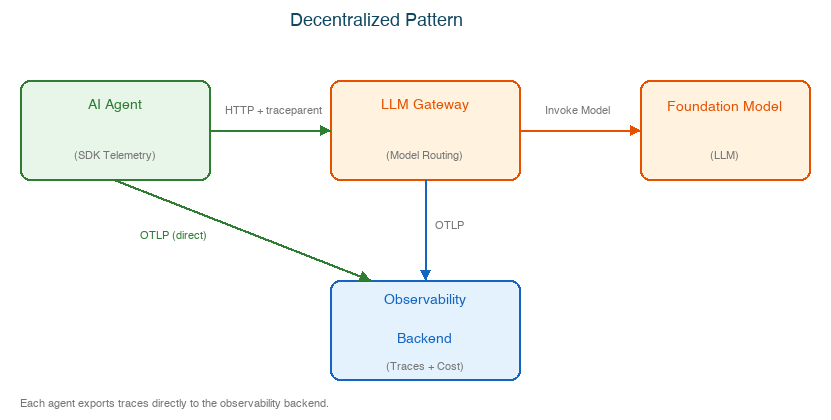
Figure 2: Decentralized pattern
In the decentralized pattern, the Strands SDK’s built-in telemetry does the work. The framework auto-instruments every LLM call, tool invocation, and reasoning step, and then exports the traces straight to Langfuse over OTLP. There’s no shared collector sitting in the middle. The agent pod talks directly to the Langfuse endpoint, and Bifrost exports its spans the same way, so the full picture still stitches together into a single trace on the backend.
The defining property here is ownership. Each agent owns its telemetry pipeline from end to end, which has a real operational upside. There’s one less component to deploy, scale, and keep alive, and the failure domain is small. If one agent’s exporter has a bad day, the other agents keep reporting as if nothing happened, because they weren’t sharing anything.
The trade-off is a configuration sprawl. Because the export behavior lives inside each agent, anything you want to change globally must be changed in every agent. Pointing telemetry at a new backend, adjusting sampling, or adding an attribute means updating and redeploying all of them. This pattern is a strong fit when you have a small number of agents, want the least possible infrastructure to run, or want each team to own its own observability wiring.
Centralized pattern: SDK through a shared collector
The following diagram shows the centralized pattern. Every agent and the Bifrost gateway send their traces through a shared Collector, which batches and processes the telemetry before forwarding it to Langfuse.
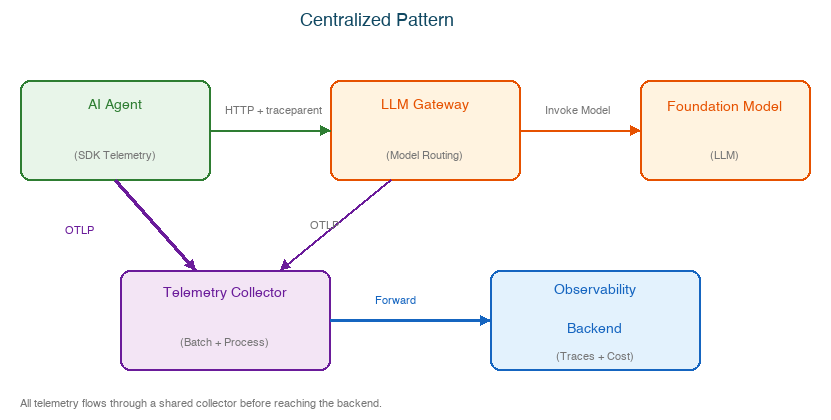
Figure 3: Centralized pattern
In the centralized pattern, telemetry from the agents and from Bifrost flows through a shared OpenTelemetry Collector deployment before it reaches Langfuse. The agents no longer talk to the backend directly. They send their spans to the Collector, and the Collector is responsible for batching, attribute enrichment, sampling, filtering, and acting as the single point where telemetry leaves the cluster.
The defining property here is control. You have one place to shape the telemetry and one place to decide where it goes. Adding a new backend, for example Prometheus for metrics or a second Langfuse project for a different team, is a new exporter block in the Collector configuration. The agents don’t change, don’t redeploy, and don’t even know a new destination was added.
The trade-off is that the Collector is now a shared dependency. It must be sized, scaled, and monitored like any other piece of critical infrastructure, and if it goes down, it can affect telemetry for every agent behind it. That cost buys you consistency and a clean separation between producing telemetry and routing it, which is why this pattern tends to win as the number of agents grows and as central teams take over observability for the whole fleet.
Trace correlation, the shared foundation
No matter which pattern is active, the way a trace gets stitched together is identical, so you can switch patterns without changing agent code and still get the same unified view. Here’s how a single request becomes one connected trace:
- The agent opens a root span through Strands auto-instrumentation when it starts handling the request.
- As the agent makes its outbound HTTP call to Bifrost, the HTTPX client instrumentation injects a trace parent header into the request, carrying the trace context along with it.
- Bifrost reads that trace parent, creates a child span for the Amazon Bedrock model invocation under the same trace ID, and attaches token counts, cost, and model identity to that span as attributes.
- Both the agent spans and the Bifrost spans land in Langfuse, either directly in the decentralized pattern or by way of the Collector in the centralized one.
- Langfuse reassembles the full trace tree under that one trace ID, so an operator sees a single view that runs from the user’s request, through each tool call, all the way down to the model’s inference and its cost.
The key idea is that trace context, not a shared collector, is what holds a trace together. The traceparent header travels with the request across process boundaries, so the agent and the gateway can run as separate services and still contribute spans to the same story.
The instrumentation standard: OpenTelemetry GenAI conventions
OpenTelemetry is the vendor-neutral standard for traces, metrics, and logs, and it’s what keeps this whole design portable. The agents emit OpenTelemetry, the gateway emits OpenTelemetry, and the backend understands OpenTelemetry, so no single vendor owns the data.
What makes it fit AI agents specifically is the GenAI semantic conventions, a shared vocabulary for describing model and agent behavior. Instead of every framework inventing its own field names, a model call is described with agreed-upon attributes such as the model that was invoked, the number of input and output tokens, the operation type, and the response metadata. Because Strands and Bifrost both speak these conventions, a trace looks the same whether it came from the agent or the gateway. A backend like Langfuse can then read cost and token usage out of it without custom parsing. This is the quiet reason the two patterns are interchangeable: they move the same standardized data along different paths.
Choosing between the two patterns
| Dimension | Decentralized Pattern | Centralized Pattern |
| Instrumentation | Framework auto-instruments | Framework + optional explicit spans |
| Collection topology | Each agent exports independently | Shared Collector aggregates the telemetry |
| Failure isolation | Export failure is per-agent | Collector is a shared dependency |
| Custom attributes with instrumentation | Limited to framework captures | Full control over span metadata |
| Multi-backend routing | Per-agent config changes | Single Collector config change |
| Sampling control | Framework-level only | Collector-level tail sampling |
| Operational overhead | Low | Medium |
| Best for | Fast setup, small teams, independent agents | System scale, multi-backend, centralized ops |
Start decentralized when you have a handful of agents and want the least to operate. Move to centralized after you have enough agents that consistent, fleet-wide control is worth running one more piece of infrastructure. Because the agent code is the same in both, this is a migration you can make later without a rewrite.
Deploy the system
The following setup provisions both patterns on the same Amazon EKS cluster so you can explore them side by side.
Prerequisites
You must have the following prerequisites:
- AWS account with Amazon Bedrock model access (Claude Sonnet 5 and Haiku 5 in the US West (Oregon) Region (us-west-2)). Foundation model (FM) availability varies by AWS Region, so check the model support by region documentation if you plan to deploy elsewhere.
- AWS Command Line Interface (AWS CLI) configured on your device or AWS CloudShell
- kubectl, a CLI tool to interact with the Kubernetes API server.
- Terraform >= 1.5, for provisioning AWS infrastructure.
- helm, a CLI tool for deploying packages on Kubernetes.
- Git.
- Container runtime (Docker or Podman or Finch) for container image builds.
Provision infrastructure
Start by cloning the repository and provisioning the cluster infrastructure:
The preceding script provisions the infrastructure for this pattern demo, with an approximate deploy time of approximately 20 minutes:
- Amazon EKS cluster (v1.35) with auto mode and pod identity.
- ArgoCD for GitOps delivery of the workloads.
- Bifrost LLM gateway with Bedrock routing and Sonnet → Haiku fallback.
- Langfuse (headless-initialized, pre-configured project and API keys).
- OTEL Collector for Centralized Pattern.
After the infrastructure is provisioned, verify that the core components are running:
Expected output:
Next, explore the UIs of the application’s key components by running port-forward commands. First, run the following kubectl command to obtain the password for the user admin, then navigate to http://localhost:8080 in your browser to access the ArgoCD UI:
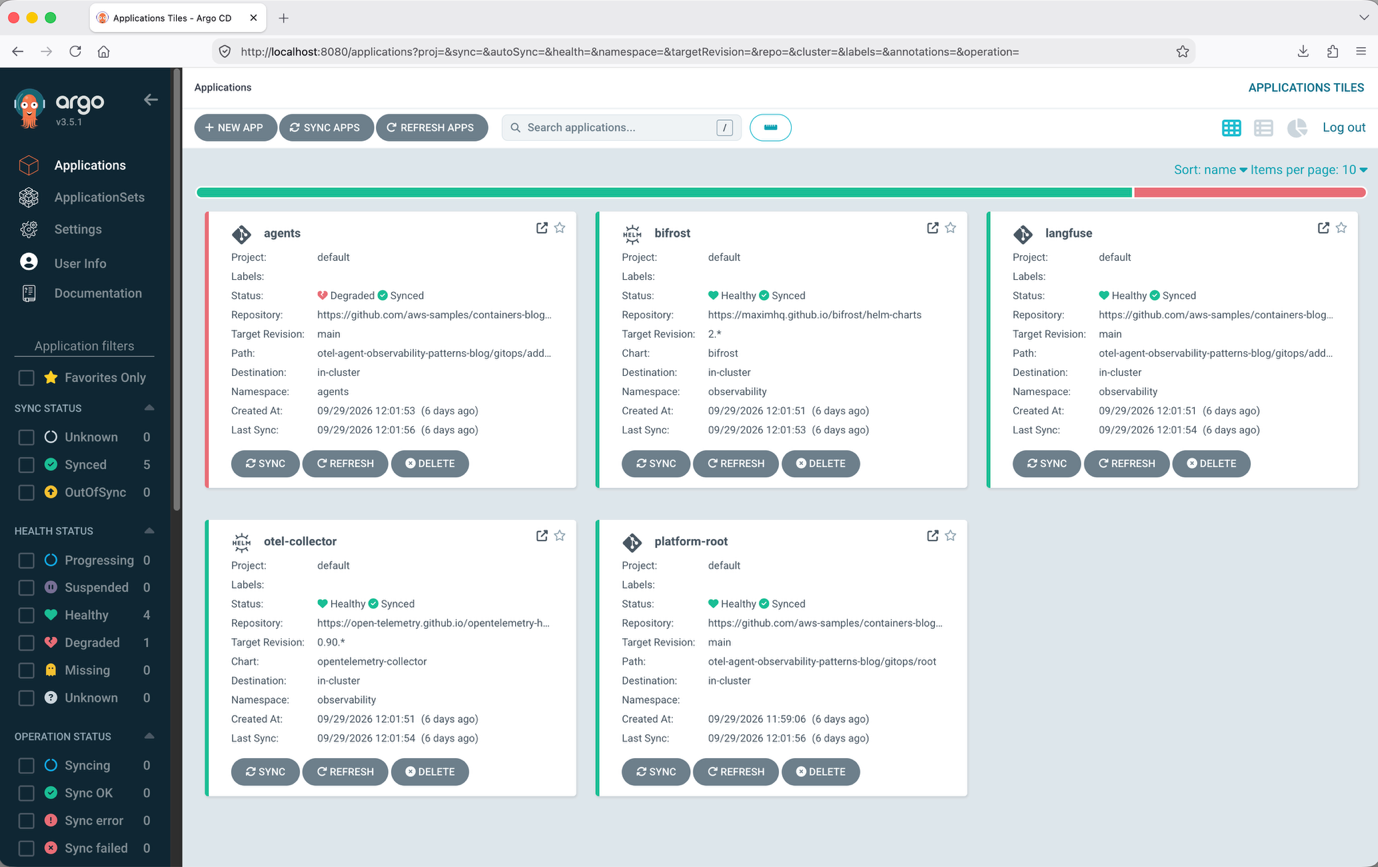
Figure 4: ArgoCD console
Ignore the Agents application if its health shows as degraded or progressing. We will deploy the agents in the next step.
Access the Bifrost dashboard
Next, run the following kubectl command, then navigate to http://localhost:8090 in your browser to access the Bifrost UI. The dashboard shows every Amazon Bedrock request with its model, tokens, cost, and latency, and you can manage providers, keys, and the OTEL plugin in one place.
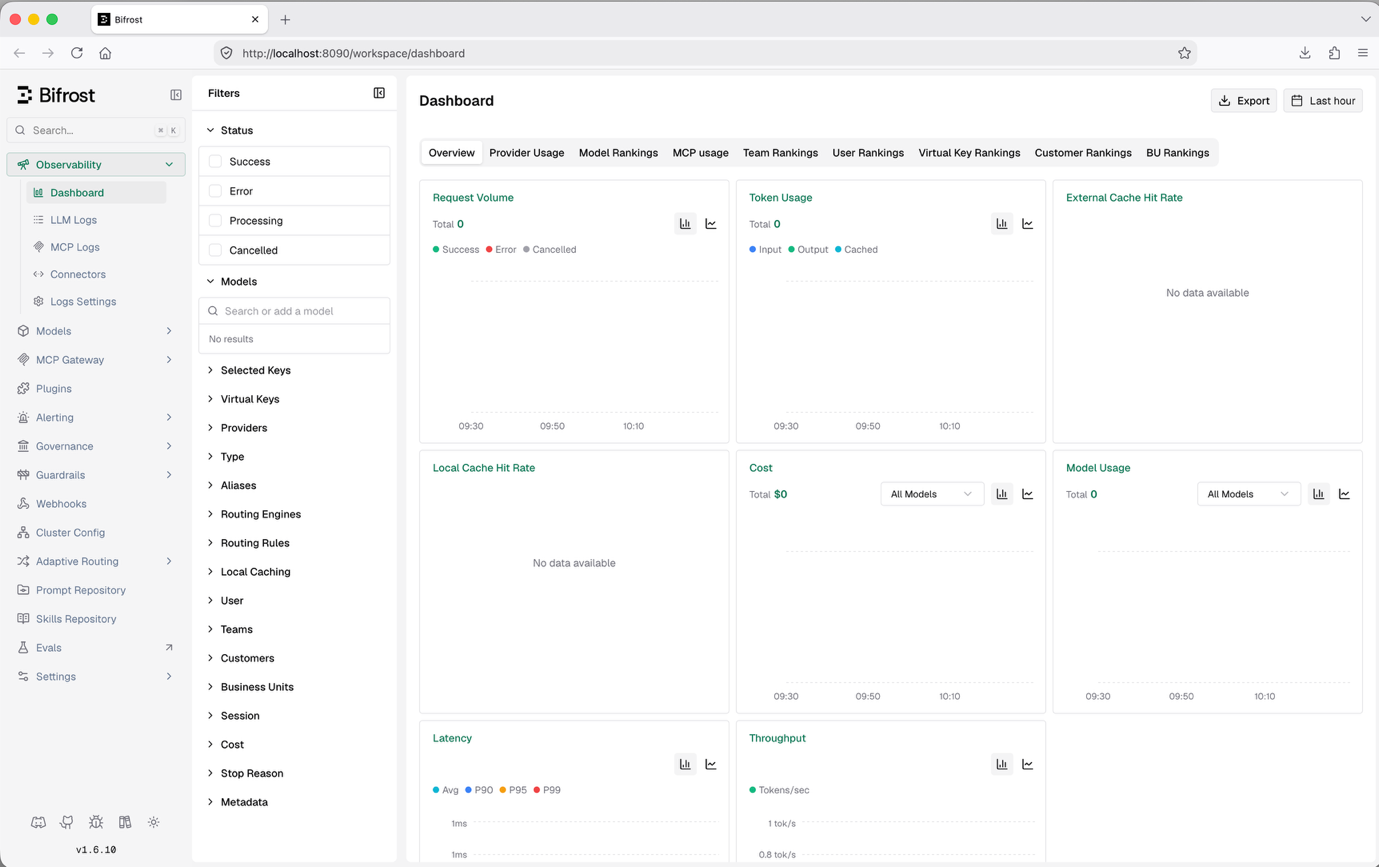
Figure 5: Bifrost console
Next, run the following kubectl command then navigate to the URL http://localhost:3000 on your browser to access Langfuse UI. The Langfuse UI shows the full trace tree for every agent request, from the root invocation through each tool call down to the model generation, with per-span token counts, cost, and latency, plus dashboards for spend, usage, and prompt analytics across the fleet.
After you’re logged in, select the agent-observability project in the Langfuse console.
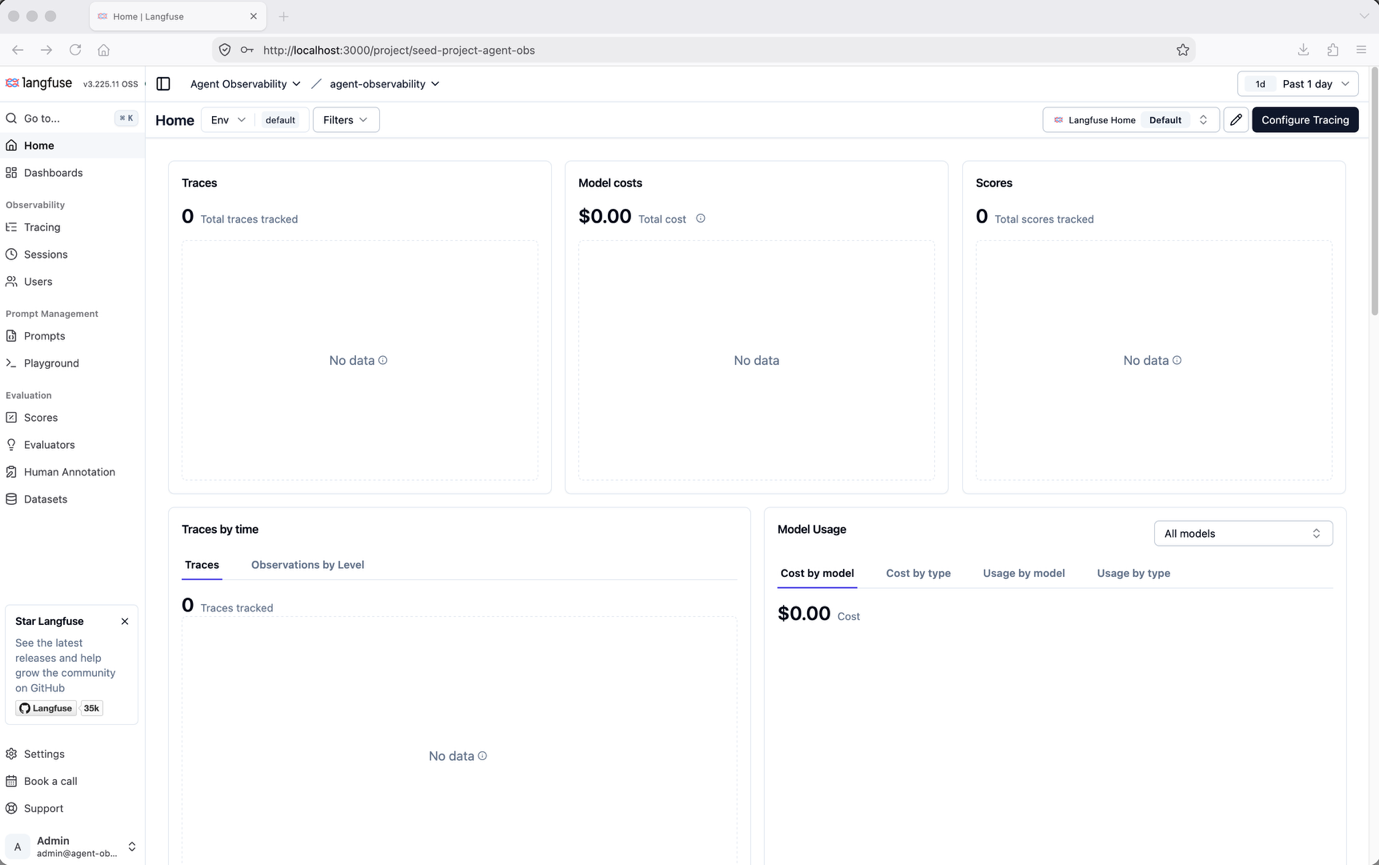
Figure 6: Langfuse console
Next, run the following kubectl command then navigate to the URL http://localhost:9001 on your browser to access MinIO UI. MinIO’s console browses the buckets that back Langfuse, holding the raw trace and media data behind the traces you see in the UI.
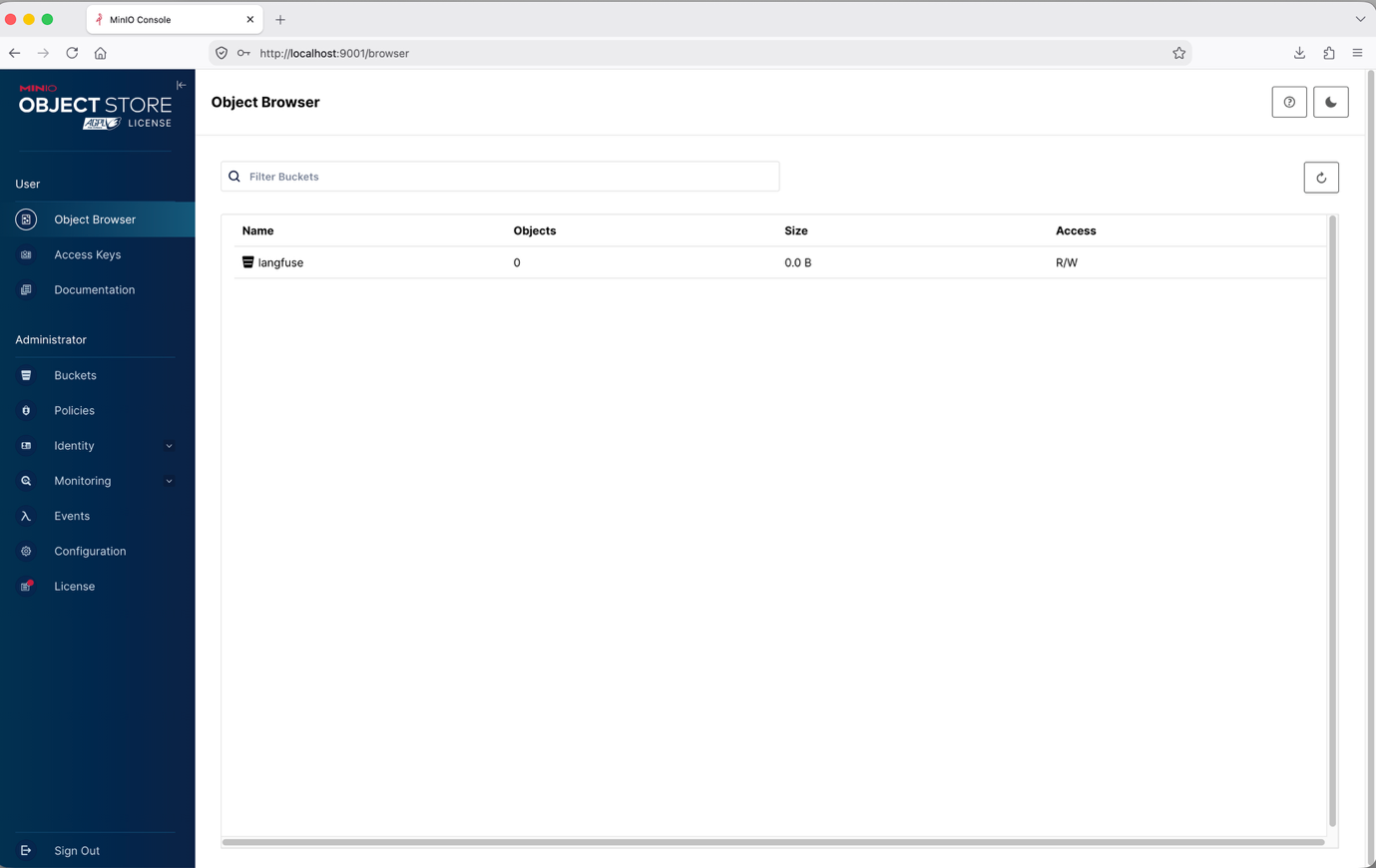
Figure 7: MinIO console
Deploy the agents
Now that the infrastructure is ready, deploy the agents by running the setup script:
ArgoCD syncs and deploys two agents:
- research-agent: Running decentralized pattern, sends traces directly to Langfuse.
- data-agent: Running centralized pattern through the collector to Langfuse.
Both agents expose a FastAPI /invoke endpoint. The Strands SDK instruments each agent invocation transparently. No explicit span code appears in the endpoint handler.
Verify pods are running:
Expected output:
Decentralized pattern walkthrough (research-agent)
This section walks through how the research agent is instrumented and what its traces look like in Langfuse.
How the agent is instrumented
The research agent uses Strands SDK built-in telemetry with direct export to Langfuse. The observability setup lives in a single bootstrap call at startup. Rather than letting Strands wire up its own exporter, the bootstrap registers a TracerProvider with a filtering span processor that drops low-value spans (the Strands event-loop-cycle spans and the raw httpx client span), so the trace tree in Langfuse shows the major items: agent invoke, tool calls, and the LLM span.
The observability-relevant code is a single bootstrap call at startup:
The preceding excerpt is simplified. The full source handles both patterns with priority logic, filters the httpx span by its instrumentation scope, and includes error handling.
In the agent, you still write no explicit span code. You name the agent and attach a few trace attributes, so the root span and per-agent cost show up correctly in Langfuse, everything else is business logic:
Setting name on the Agent makes the root span appear as invoke_agent research-agent in Langfuse, instead of the SDK default (invoke_agent Strands Agents). The trace attributes (agent.name, agent.pattern, and langfuse.tags) travel with the trace, so you can filter traces and roll up token cost per agent. The pod environment determines the export path, and the agent code does not reference Langfuse, OTEL, or export configuration directly.
Triggering a request
With the agents deployed and running, trigger a request to the research agent and examine the traces it produces. First, port-forward the agent service:
In a new terminal, send the request:
Expected response:
Viewing the traces in Langfuse
First, port-forward the Langfuse web service:
Navigate to http://localhost:3000, log in with the credentials, and select the agent-observability project. Choose Tracing, then Traces in the left sidebar to view the trace for this invocation.
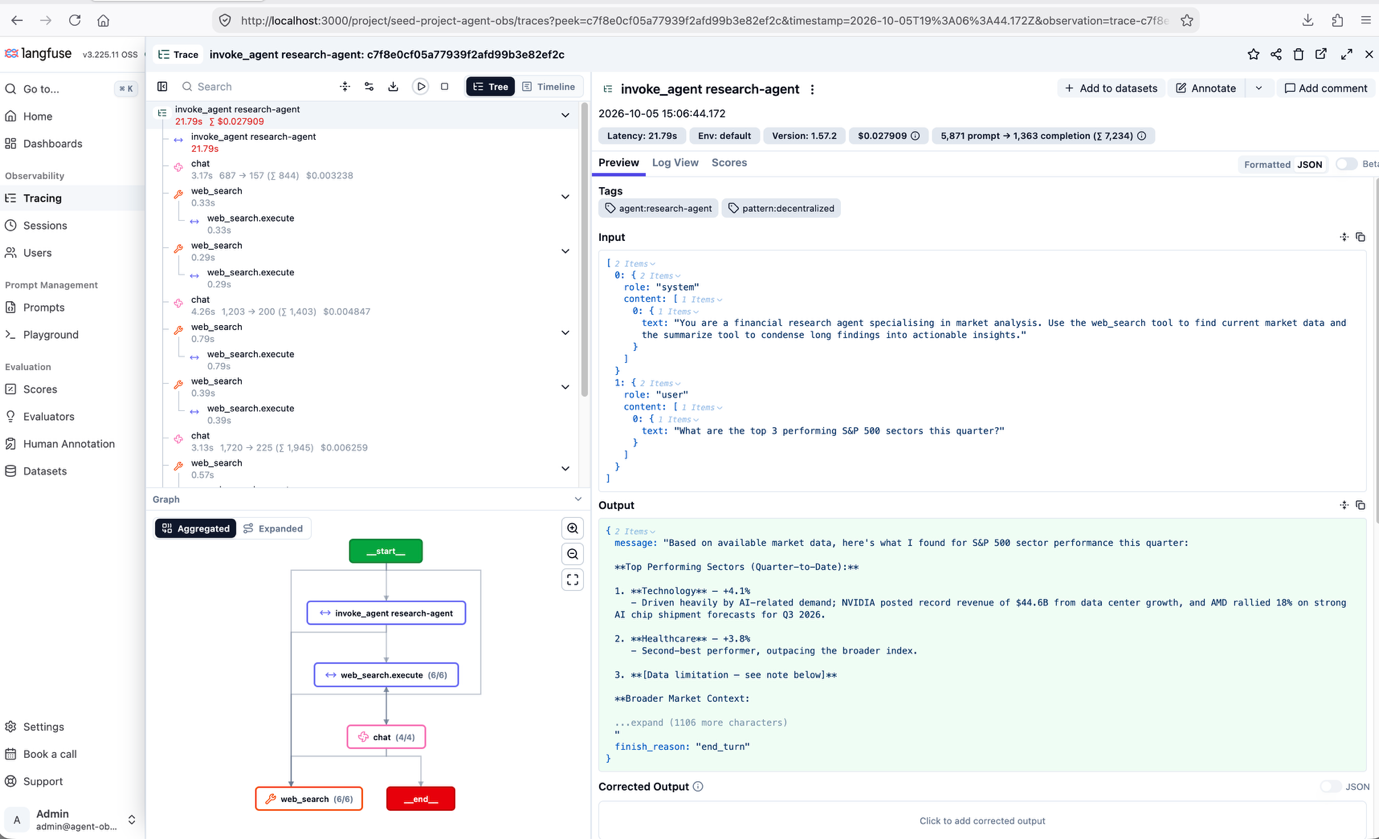
Figure 8: Decentralized pattern traces in the Langfuse console
Key observations with running this test with this decentralized pattern:
- The agent made four LLM (chat) calls and six execute_tool web search calls, costing $0.0279 total.
- The LLM calls hit Sonnet (bedrock/us.anthropic.claude-sonnet-5). No Haiku fallback occurred for this request.
- The final synthesis call dominated latency at 9.54s (2,261 input tokens and 781 output tokens). It also had the highest cost at $0.0136.
- Token usage across the four generations totaled 5,871 input and 1,363 output tokens.
- Total request time was 21.79s, with LLM inference (the four chat spans) accounting for approximately 92 percent of latency (approximately 20.1s). Tool calls were sub-second each, with the slowest, web_search, at 0.79s.
- Cost is computed by Langfuse from the model-price entry registered for bedrock/us.anthropic.claude-sonnet-5 ($2.20 / 1M input tokens, $11.00 / 1M output tokens).
Centralized pattern walkthrough (data-agent)
This section walks through how the data agent is instrumented and how its traces reach Langfuse through the Collector.
How the agent is instrumented
The data agent uses the same init_telemetry() bootstrap. The only difference is the pod environment: OTEL_EXPORTER_OTLP_ENDPOINT is set instead of LANGFUSE_BASE_URL, routing traces to the Collector. The same filtered pipeline is used, so both patterns produce an equivalent trace shape in Langfuse:
Both patterns are handled by the same init_telemetry() function, which uses priority logic to detect which environment variables are present. In the centralized pattern, you could also filter spans at the Collector with a filter or tail_sampling processor instead of client-side. We filter client-side so both patterns yield an identical trace shape.
The telemetry bootstrap and export path are identical across patterns. The switch is purely an environment variable change. Each agent sets its own name and trace_attributes (including its pattern label), so the root span shows the agent’s name and cost can be rolled up per agent in Langfuse:
OTEL Collector in action
The Collector receives OTLP from the agents and Bifrost, batches spans, and forwards to Langfuse:
Triggering a request
Now, trigger a request to the data agent and review the resulting traces using the centralized pattern. Start by port-forwarding the data-agent service:
Open a new terminal, send the following curl request to the data-agent:
Expected response:
Viewing the trace in Langfuse
Using the same port-forward and credentials retrieved already from decentralized pattern, navigate to the agent-observability project in Langfuse to view the data-agent trace.
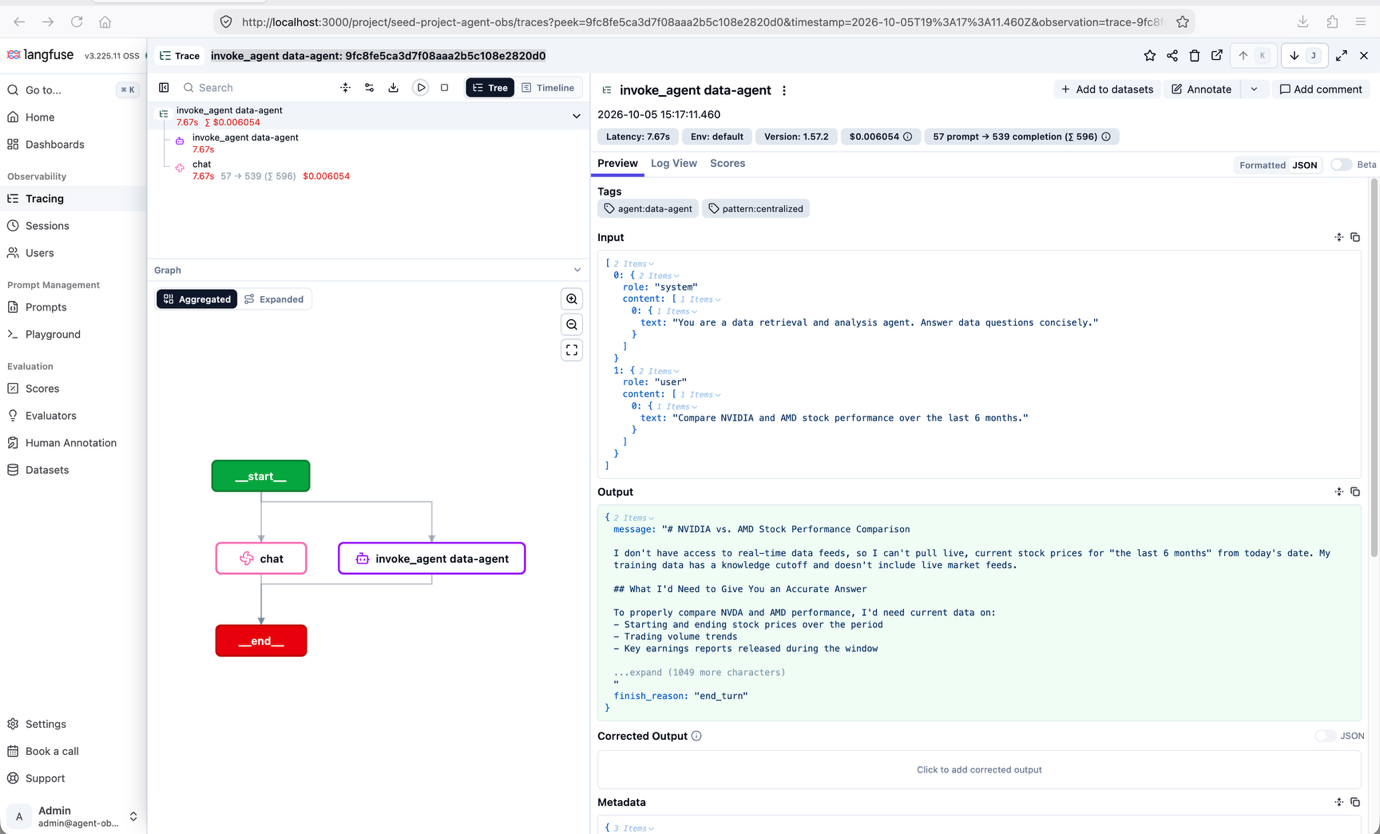
Figure 9: Centralized pattern traces in the Langfuse console
Key observations with running this test with this centralized pattern:
- A single LLM (chat) call with no tool usage. The data-agent has no tools configured.
- The LLM call hit Sonnet (bedrock/us.anthropic.claude-sonnet-5). No Haiku fallback occurred for this request.
- Token usage was 57 input / 539 output tokens, costing $0.0061 total.
- The Bifrost LLM span is correlated under the agent trace through the W3C traceparent header. This is identical behavior to Pattern 1.
- The trace arrived at Langfuse through the OTEL Collector, but the trace tree looks the same to the operator as the decentralized pattern. The architectural difference (who owns the pipeline) is invisible at the trace level.
- Cost is computed by Langfuse from the model-price entry registered for bedrock/us.anthropic.claude-sonnet-5 ($2.20 / 1M input tokens, $11.00 / 1M output tokens).
Extending the collector
Beyond trace forwarding, the centralized pattern unlocks capabilities that require a single processing layer. The operational advantage becomes clear when adding a new backend. For example, deriving Prometheus metrics from spans requires only a Collector config change:
No agent redeployment. No code changes. The Collector derives metrics from the same trace data that is already flowing. You can add a second Langfuse project, route to Jaeger, or fan out to a OTLP-compatible backend, all by editing one YAML file.
Additional design considerations
After you’ve traces flowing from the agent request to the model response, the work shifts from “can I see the agent” to “can I run this at scale, safely, and affordably.” These are the extensions worth planning for:
- Custom span attributes: Tag spans with business metadata like user ID, tenant, or priority to slice traces in Langfuse, watching cardinality on anything that becomes a metric label.
- Prompt and response capture policy: Record full payloads in staging for streamlined debugging, and truncate or redact them in production to control cost and sensitivity.
- Personally identifiable information (PII) redaction: Scrub sensitive fields before spans leave the cluster, ideally in a Collector processor, so there is one enforcement point.
- Tail-based sampling: Have the Collector keep only slow, failed, or high-cost traces and drop the rest, cutting storage without losing the traces you would open.
- Retention and storage tiers: Set retention windows in Langfuse and remember the backing object store grows with payload size, so sampling and capture policy shape your bill.
- The cost of observability itself: Size the Collector and set sampling with the same discipline as the agents, aiming for enough signal rather than every span.
- Alerting on cost budgets: Derive metrics from spans and alert when per-agent or per-tenant daily token spend crosses a threshold, so runaway loops page you instead of surprising the bill.
- Collector resilience: Give the shared Collector a memory limiter, a retry queue, and enough replicas that a restart or backend hiccup does not drop fleet-wide telemetry.
- Securing the telemetry path: Protect OTLP with TLS and auth and scope Langfuse and Bifrost credentials through EKS Pod Identities and AWS Secrets Manager, treating telemetry as sensitive data.
Clean up
When you’re done, tear the environment down so it stops accruing charges using the following command:
The teardown script deletes agent workloads first, waits for AWS-side resource cleanup, then destroys the Terraform stacks.
Conclusion
Observability for AI agents isn’t the same problem as observability for microservices. In this post, we demonstrated two patterns that close the observability gap for AI agents differently, and neither is universally right. The decentralized pattern gives every agent its own telemetry path with no shared infrastructure, so it is fast to stand up and fully isolated. The centralized pattern routes everything through a shared Collector, giving you one place to add backends, adjust sampling, or redact data without touching agent code. Both patterns produce the same traces in Langfuse, use the same Bifrost gateway, and run on the same Amazon EKS cluster. That means you can start with one and move to the other as your fleet grows.
That portability is the real takeaway. After your agents emit standardized OpenTelemetry, the backend becomes a choice rather than a commitment, and the pattern you pick today does not lock in the application you run tomorrow. Start with the traces, and the rest of your observability strategy has room to evolve with your agents.
The complete implementation, including the agents, the Bifrost gateway, the Langfuse backend, and the GitOps configuration, is available in the AWS Samples GitHub repository. Clone it, point it at your own cluster, and you will have both patterns running side by side in under an hour.
For more information, see the following resources:
- Open Agentic Platform (OAP): The complete open, Kubernetes-native platform for running agentic workloads on Amazon EKS, bringing together the agents, gateway, sandboxing, and observability components in this post along with the rest of the stack.
- Platform Engineering on EKS Workshop Workshop: hands-on guidance for building an internal developer platform on Amazon EKS.
- Strands Agents SDK: the open source framework used to build the agents, with built-in OpenTelemetry instrumentation.
- OpenTelemetry GenAI semantic conventions
- Multi-Agent Systems for Financial Services on Amazon EKS and AgentCore AWS blog post.