AWS Database Blog
Build a Spring Boot REST API with Amazon Aurora DSQL
In this post, you learn how to build a Spring Boot REST API that integrates with Aurora DSQL. You’ll configure the Aurora DSQL JDBC Connector for IAM authentication, implement optimistic concurrency control, and run the application across two regional nodes to observe active-active behavior.
Aurora DSQL reduces the operational complexity of managing multi-Region replication while Spring Boot provides the familiar framework for building REST APIs. This combination allows you to focus on application logic rather than database infrastructure management.
This post is intended for developers and solutions architects who are familiar with Java, Spring Boot, and relational databases.
Walkthrough
By the end of this walkthrough, you’ll have a working REST API that demonstrates the following:
- Setting up Aurora DSQL with the Aurora DSQL JDBC Connector.
- Handling optimistic concurrency control with retry logic.
- Building a RESTful product inventory API using Spring Boot.
- Running the application on two regional nodes and testing concurrent multi-Region writes.
Solution overview
The following diagram illustrates the architecture of the sample application.
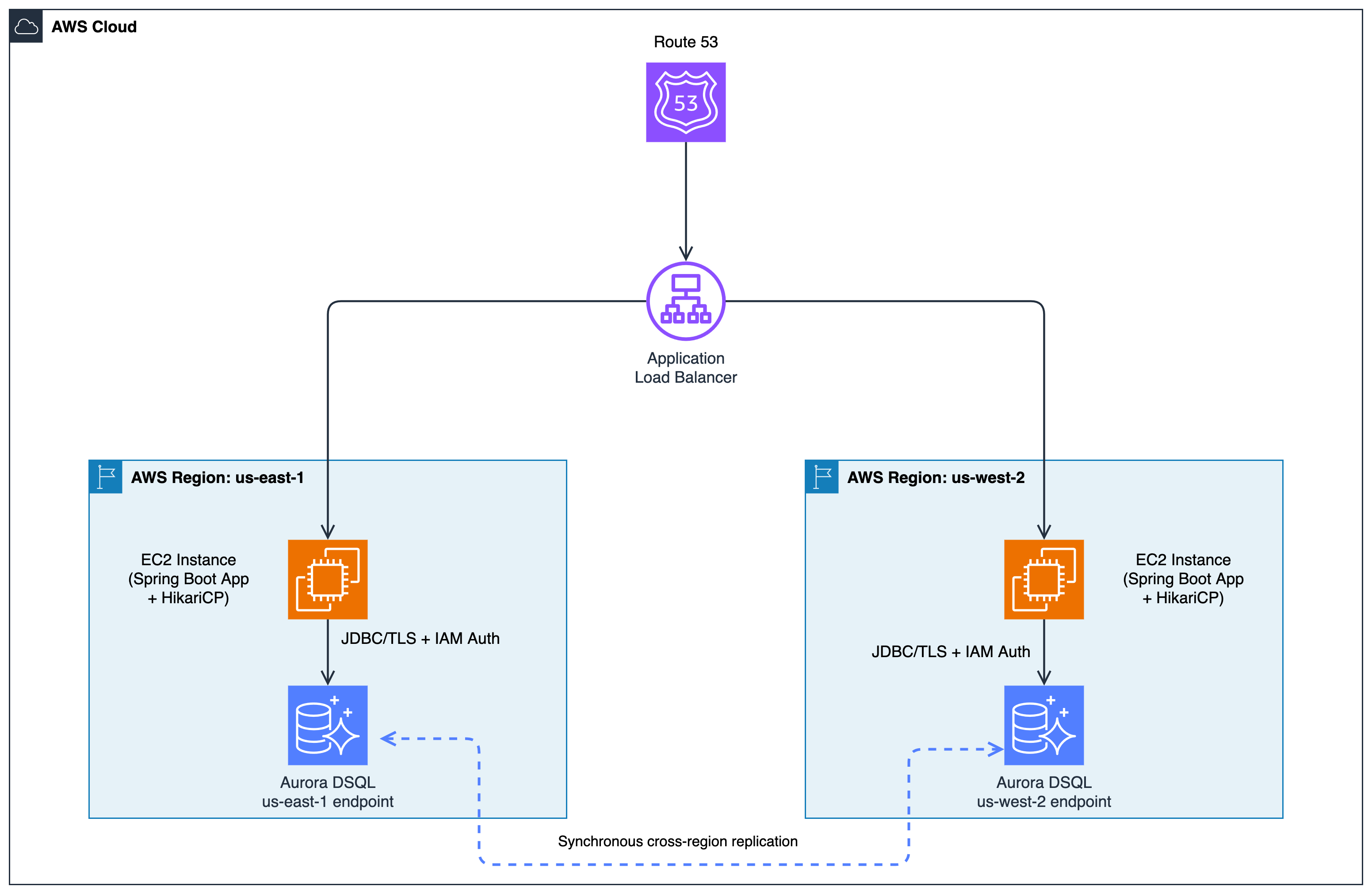
Figure 1: Architecture diagram showing two Spring Boot application nodes deployed in AWS Regions us-east-1 and us-west-2. Each node connects through HikariCP connection pooling and the Aurora DSQL JDBC Connector with IAM authentication to regional endpoints of an Aurora DSQL multi-region cluster. The diagram illustrates synchronous cross-region replication between the regional endpoints.
The application uses the following components:
- Spring Boot 3.3 – REST API framework.
- HikariCP – Connection pooling.
- Aurora DSQL JDBC Connector – IAM authentication, token refresh, TLS encryption, and database connectivity.
- Application Load Balancer (ALB) – Distributes incoming traffic across Spring Boot nodes and routes around unhealthy instances.
Prerequisites
Before you begin, make sure you have the following:
- An AWS account with an Aurora DSQL cluster created (check the Aurora DSQL documentation for current Region availability).
- AWS Command Line Interface (AWS CLI) configured with credentials.
- Java 17 or higher installed.
- Maven 3.6 or higher installed.
- An AWS Identity and Access Management (AWS IAM) user or role with the minimum permissions shown below.
AWS IAM Policy (minimum permissions):
Replace <region>, <account-id>, and <cluster-id> with your actual values. For production workloads, follow the principle of least privilege and scope permissions to specific clusters.
Step 1: Create your multi-Region Aurora DSQL cluster
- Create the cluster in your primary Region
- Create the cluster in your secondary Region
- Peer the primary cluster with the secondary
Step 2: Set up the project
Clone the sample repository:
Update src/main/resources/application.properties with your DSQL endpoint:
The application uses the Aurora DSQL JDBC Connector which automatically handles IAM authentication, token refresh, and TLS encryption.
Aurora DSQL data type support: Aurora DSQL supports a subset of PostgreSQL data types including UUID, VARCHAR, TEXT, INTEGER, BIGINT, DECIMAL, BOOLEAN, TIMESTAMP, DATE, and JSON. The sample application uses these types throughout. For the complete list of supported types and Aurora DSQL-specific limits, see Supported data types in Aurora DSQL.
Step 3: Handle optimistic concurrency
Aurora DSQL uses optimistic concurrency control instead of traditional locking. Optimistic concurrency control allows multiple transactions to proceed without locking resources, checking for conflicts only at commit time. When concurrent transactions conflict, one will receive a 40001 SQL state error. We handle this with retry mechanism.
There are two layers of handling required:
Layer 1: Tell HikariCP not to evict the connection on a 40001 error
Layer 2: Retry the transaction with exponential backoff
You can tune via application.properties without changing code:
Step 4: Build the REST API
The sample application includes a product inventory API that provides standard CRUD operations:
Step 5: Run and test the application
Connect to the EC2 instance running the application:
Make sure its Security Group allows outbound traffic on port 5432 to the Aurora DSQL cluster endpoint:
For detailed steps on connecting to an EC2 instance, refer to the Connect to your EC2 Instance.
Build and run the application:
Initialize the database schema:
Expected response: HTTP/1.1 200 OK
Create a product:
Expected response:
Retrieve the products:
Expected response:
Update stock:
Expected response:
Step 6: Testing concurrent multi-Region writes
- Update
src/main/resources/application.propertieswith your regional DSQL endpoints. - Build the application.
- Start the application on each node.
- Update
src/main/java/com/example/controllerto add the concurrent write endpoint. - Run the multi-Region concurrent write test
Example 1: Creating Products Concurrently
Expected results:
Node 1:
Node 2:
finalStockreturns to 1000 because all 500 increments fromus-east-1and 500 decrements fromus-west-2are accounted.Example 2: Single-entry concurrent UPDATE example
One of the two requests will succeed immediately. The other will receive a
40001OCC conflict from Aurora DSQL, and@Retryablewill transparently retry it. Both requests return HTTP 200.Check the Spring Retry debug logs to see the conflict and retry:
Verify the final state from either node:
Clean up
To avoid incurring future charges, delete the resources you created:
- Delete the multi-Region Aurora DSQL clusters.
- Remove the Application Load Balancer.
- Stop and terminate the EC2 Instance running the Spring Boot application.
Key takeaways
The following are key considerations when building applications with Aurora DSQL:
- Aurora DSQL JDBC Connector – The Aurora DSQL JDBC Connector handles IAM-based authentication, automatic token refresh, and TLS encryption. This can reduce the need for manual password management, token rotation logic, and SSL configuration.
- Optimistic concurrency – Aurora DSQL uses optimistic concurrency control, which requires implementing retry logic but enables better scalability than pessimistic locking. When two users update the same row simultaneously, one receives a
40001error. Two layers of handling are required:DsqlExceptionOverridetells HikariCP not to evict the connection (keeping the pool healthy under load), and@Retryabletransparently retries the transaction with exponential backoff. - Connection pooling – Proper HikariCP configuration supports efficient connection reuse and optimal performance.
Security considerations
When deploying this application in a production environment, consider the following security best practices:
Follow the principle of least privilege by scoping your AWS IAM policy to the specific Aurora DSQL cluster ARN. Use dsql:DbConnect instead of dsql:DbConnectAdmin for application users that do not need administrative access. For secrets management, verify that your AWS credentials are managed through AWS IAM roles for Amazon Elastic Compute Cloud (Amazon EC2), Amazon Elastic Container Service (Amazon ECS) task roles, or AWS IAM Roles Anywhere rather than long-lived access keys.
At the regional level, place an Application Load Balancer in front of your Spring Boot nodes. Configure Amazon Route 53 health checks on the ALB endpoints in each region. If a regional endpoint becomes unavailable and the ALB in that region starts failing health checks, Amazon Route 53 automatically shifts DNS traffic to the ALB in the surviving region. Because each node runs identical application code and connects to its nearest regional endpoint via configuration only, no application code changes are required during this failover.
Production considerations
The patterns in this post provide a foundation for production applications. For a production deployment, also consider the following:
For observability, add Amazon CloudWatch metrics for connection pool utilization, token refresh success and failure rates, and retry counts. Use structured logging with correlation IDs for request tracing. Implement a Spring Boot Actuator health indicator that verifies database connectivity, so your load balancer can detect unhealthy instances. Adjust HikariCP’s maximumPoolSize, minimumIdle, and connectionTimeout based on your expected concurrency, and monitor pool metrics to right-size these values. Be aware that Aurora DSQL uses Distributed Processing Units (DPUs) for pricing, which measure database activity including compute resources, I/O operations, and SQL workload execution, so review the Aurora DSQL pricing page to understand cost implications for your workload.
For regional failover, Aurora DSQL’s multi-Region cluster provides built-in high availability. If a regional endpoint becomes unavailable, the cluster remains operational through the secondary regional endpoint.
Conclusion
In this post, we demonstrated how you can build a Spring Boot REST API that integrates with Amazon Aurora DSQL. By using the Aurora DSQL JDBC Connector for IAM authentication and TLS encryption, and implementing optimistic concurrency control with Spring Retry, you can build scalable, globally distributed applications without the operational overhead of traditional databases.
The sample code provides foundational patterns for authentication, concurrency control, and error handling that you can adapt to your own applications. Whether you’re building a new application or evaluating Aurora DSQL for an existing workload, these patterns help you take advantage of the serverless, multi-Region capabilities of Aurora DSQL.
To provide feedback or contribute, visit the GitHub repository.