AWS Database Blog
Build durable AI agents with LangGraph and Amazon DynamoDB
I’ve been fascinated by the rapid evolution of AI agents. Over the past year, I’ve watched them grow from simple chatbots into sophisticated systems that can reason through complex problems, make decisions, and maintain context across long conversations. Yet an agent is only as good as its memory.
In this post we show you how to build production-ready AI agents with durable state management using Amazon DynamoDB and LangGraph with the new DynamoDBSaver connector, a LangGraph checkpoint library maintained by AWS for Amazon DynamoDB. It provides a production-ready persistence layer built specifically for DynamoDB and LangGraph that stores agent state with intelligent handling of payloads based on their size.
You’ll learn how this implementation can give your agents the persistence they need to scale, recover from failures, and maintain long-running workflows.
A quick look at Amazon DynamoDB
Amazon DynamoDB is a serverless, fully managed, distributed NoSQL database with single-digit millisecond performance at any scale. You can store structured or semi-structured data, query it with consistent millisecond latency, and scale automatically without managing servers or infrastructure.Because DynamoDB is built for low latency and high availability, it is often used to store session data, user profiles, metadata, or application state. These same qualities make it an ideal choice for storing checkpoints and thread metadata for AI agents.
Introducing LangGraph
LangGraph is an open source framework from LangChain designed for building complex, graph-based AI workflows. Instead of chaining prompts and functions in a straight line, LangGraph lets you define nodes that can branch, merge, and loop. Each node performs a task, and edges control the flow between them.
LangGraph introduces several key concepts:
- Threads: A thread is a unique identifier assigned to each checkpoint that contains the accumulated state of a sequence of runs. When a graph executes, its state persists to the thread, which requires specifying a thread_id in the config (
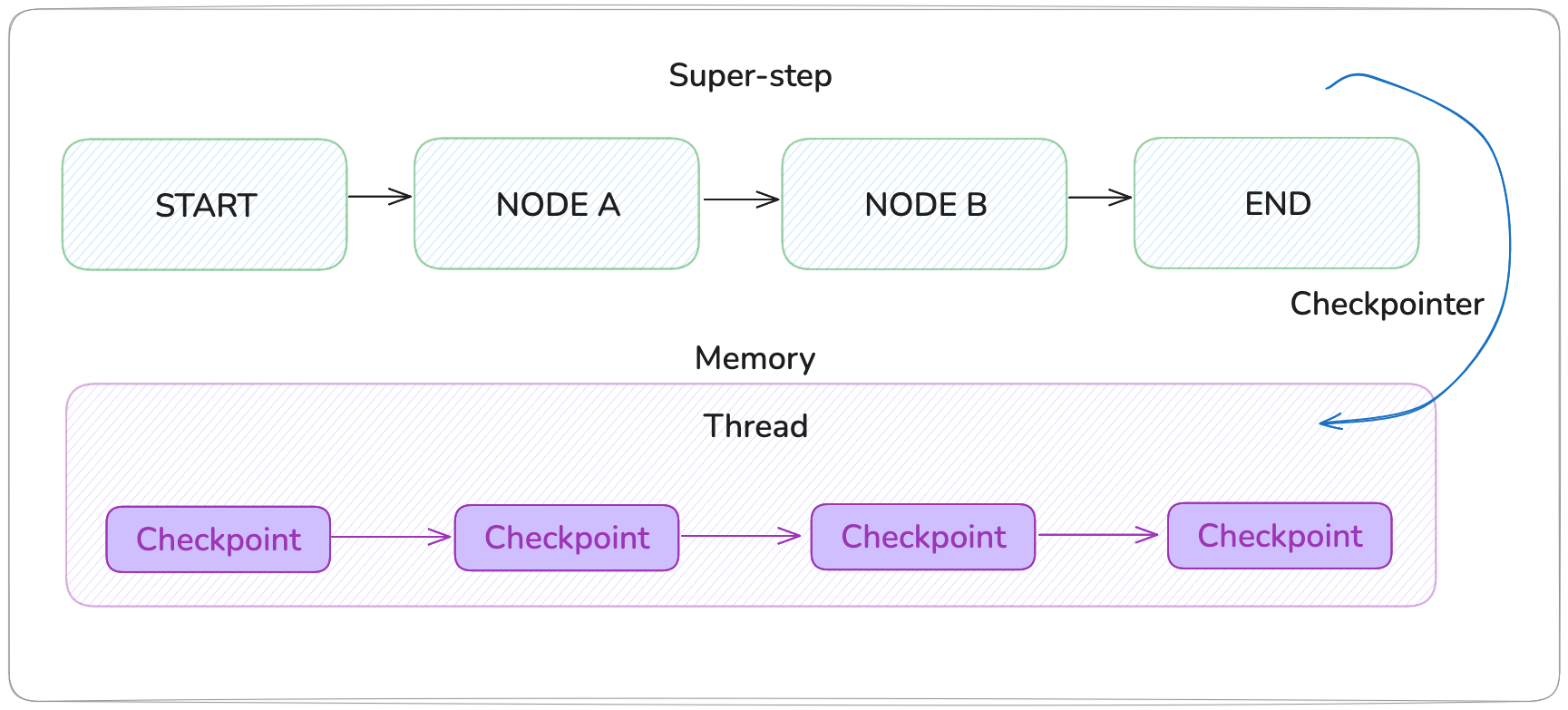
{"configurable": {"thread_id": "1"}}). Threads must be created before execution to persist state. - Checkpoints: A checkpoint is a snapshot of the graph state saved at each super-step, represented by a StateSnapshot object containing config, metadata, state channel values, next nodes to execute, and task information (including errors and interrupt data). Checkpoints are persisted and can restore thread state later. For example, a simple two-node graph creates four checkpoints: an empty checkpoint at
START, one with user input before node_a, one with node_a’s output before node_b, and a final one with node_b’s output atEND. - Persistence: Persistence determines where and how checkpoints are stored (such as, in-memory, database, or external storage) using a checkpointer implementation. The checkpointer saves thread state at each super-step and enables retrieval of historical states, allowing graphs to resume from checkpoints or restore previous execution states.
Persistence is what enables advanced features such as human-in-the-loop review, replay, resumption after failure, and time travel between states.
InMemorySaver is LangGraph’s built-in checkpointing mechanism that stores conversation state and graph execution history in memory, enabling features like persistence, time-travel debugging, and human-in-the-loop workflows. You can use InMemorySaver for fast prototyping, state exists only in memory and is lost when your application restarts.
The following image shows LangGraph’s checkpointing architecture, where a high-level workflow (super-step) executes through nodes from START to END while a checkpointer continuously saves state snapshots to memory (InMemorySaver):
Why persistence matters
By default, LangGraph stores checkpoints in memory using the InMemorySaver. This is great for experimentation because it requires no setup and offers instant read and write access.
However, in memory storage has two major limitations. It is ephemeral and local. When the process stops, the data is lost. If you run multiple workers, each instance keeps its own memory. You cannot resume a session that started elsewhere, and you cannot recover if a workflow crashes halfway.
For production environments, this is not acceptable. You need a persistent, fault-tolerant store that allows agents to resume where they left off, scale across nodes, and retain history for analysis or audit. That is where the DynamoDBSaver comes in.
Imagine a scenario where you’re building a customer support agent that handles complex, multi-step inquiries. A customer asks about their order, the agent retrieves information, generates a response, and waits for human approval before sending a response.
But what happens when:
- Your server times out mid-workflow?
- You need to scale to multiple workers?
- The customer comes back hours later to continue the conversation?
- You want to audit the agent’s decision-making process?
With in-memory storage, you’re out of luck. The moment your process stops, everything vanishes. Each worker maintains its own isolated state. There’s no way to resume, replay, or review what happened.
Introducing DynamoDBSaver
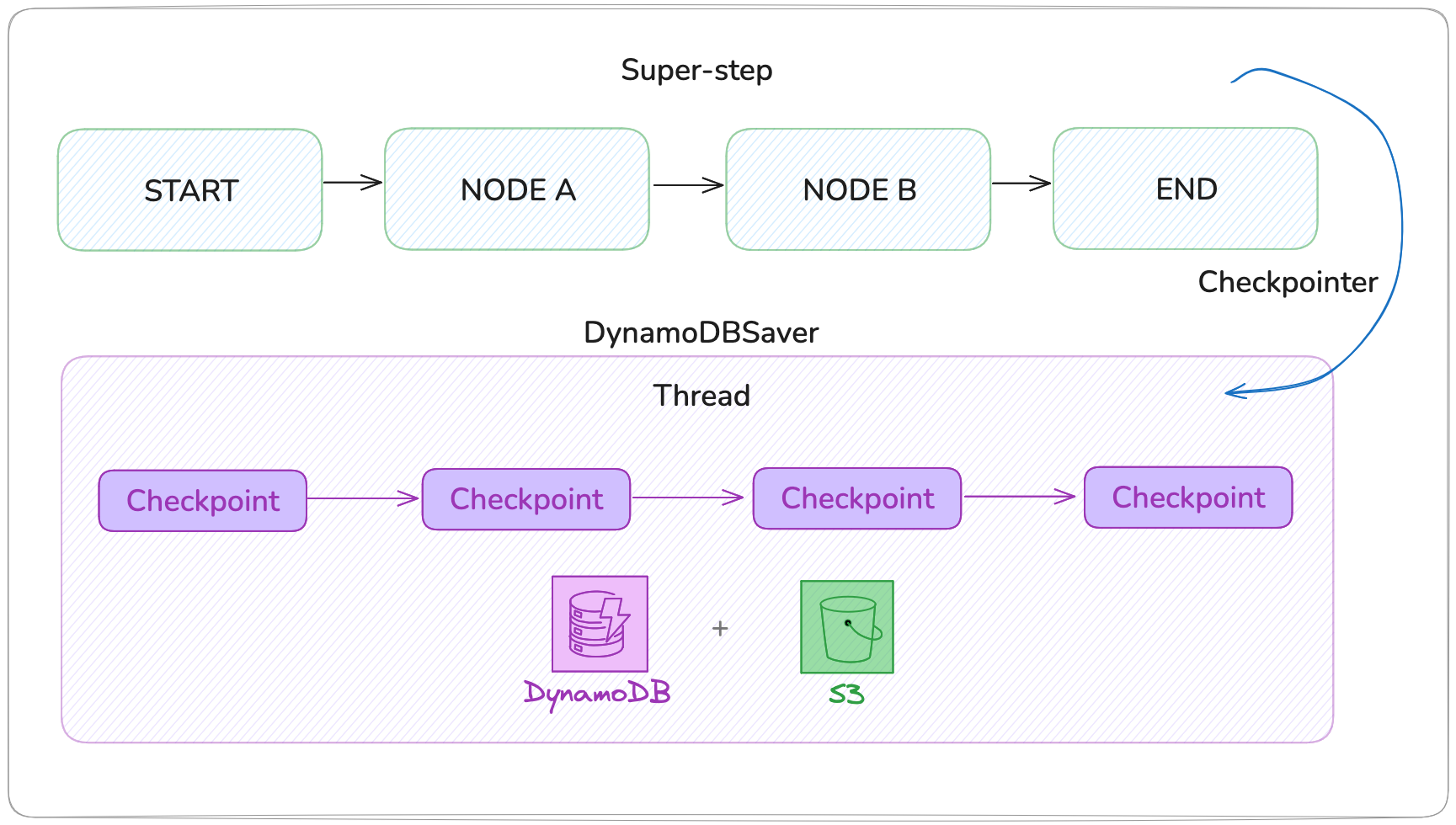
The langgraph-checkpoint-aws library provides a persistence layer built specifically for AWS. DynamoDBSaver stores lightweight checkpoint metadata in DynamoDB and uses Amazon S3 for large payloads.
Here is how it works:
- Small checkpoints (< 350 KB): Stored directly in DynamoDB as serialized items with metadata like
thread_id,checkpoint_id, timestamps, and state - Large checkpoints (≥ 350 KB): State is uploaded to S3, and DynamoDB stores a reference pointer to the S3 object
- Retrieval: When resuming, the saver fetches metadata from DynamoDB and transparently loads large payloads from S3
This design provides durability, scalability, and efficient handling of both small and large states without hitting the DynamoDB item size limit.
DynamoDBSaver includes built-in features to help you manage costs and data lifecycle:
- Time-to-Live (
ttl_seconds) enables automatic expiration of checkpoints at specified intervals. Old thread states are cleaned up without manual intervention, ideal for temporary workflows, testing environments, or applications where a historical state beyond a certain age has no value. - Compression (
enable_checkpoint_compression) reduces checkpoint size before storage by serializing and compressing state data, which lowers both DynamoDB write costs and S3 storage costs while maintaining full state fidelity upon retrieval.
Together, these features help provide fine-grained control over your persistence layer’s operational costs and storage footprint, allowing you to balance durability requirements with budget constraints as your application scales.
Getting started
Let’s build a practical example showing how to persist agent state across executions and retrieve historical checkpoints.
Prerequisites
Before we begin, you’ll need to set up the required AWS resources:
- DynamoDB table: The
DynamoDBSaverrequires a table to store checkpoint metadata. The table must have a partition key named PK (String) and a sort key named SK (String). - S3 bucket (optional): If your checkpoints may exceed 350 KB, provide an S3 bucket for large payload storage. The saver will automatically route oversized states to S3 and store references in DynamoDB.
You can use the AWS Cloud Development Kit (AWS CDK) to define these resources:
Your application needs the following AWS Identity and Access Management (AWS IAM) permissions to use DynamoDBSaver as LangGraph checkpoint storage:
DynamoDB Table Access:
dynamodb:GetItem– Retrieve individual checkpointsdynamodb:PutItem– Store new checkpointsdynamodb:Query– Search for checkpoints by thread IDdynamodb:BatchGetItem– Retrieve multiple checkpoints efficientlydynamodb:BatchWriteItem– Store multiple checkpoints in a single operation
S3 Object Operations (for checkpoints larger than 350KB):
s3:PutObject– Upload checkpoint datas3:GetObject– Retrieve checkpoint datas3:DeleteObject– Remove expired checkpointss3:PutObjectTagging– Tag objects for lifecycle management
S3 Bucket Configuration:
s3:GetBucketLifecycleConfiguration– Read lifecycle ruless3:PutBucketLifecycleConfiguration– Configure automatic data expiration
Installation
Install LangGraph and the AWS checkpoint storage library using pip:
Basic setup
Configure the DynamoDB checkpoint saver with your table and optional S3 bucket for large checkpoints:
Building the workflow
Create your graph and compile it with the checkpointer to enable persistent state across invocations:
Obtaining state
Retrieve the current state or access previous checkpoints for time-travel debugging:
Real-world use cases
1. Human-in-the-loop review
For sensitive operations (financial transactions, legal documents, medical advice), you can pause workflows for human oversight:
2. Failure recovery
In production systems, failures happen. Network interruptions, API timeouts, or transient errors can stop execution mid-way.
With in-memory checkpoints, you lose progress. With DynamoDBSaver, the workflow can query the last successful checkpoint and resume from there. This helps reduce re-computation, speed up recovery, and improve reliability.
3. Long-running conversations
Some workflows span hours or days. The durability of DynamoDB makes sure conversations persist:
Moving from prototype to production is as simple as changing your checkpointer. Replace MemorySaver with DynamoDBSaver to gain persistent, scalable state management:
Clean up
To avoid incurring ongoing charges, delete the resources you created:
If you used AWS CDK to deploy, run the following command:
If you used the CLI, run the following commands:
- Delete the DynamoDB table:
- Empty and delete the Amazon S3 bucket:
Conclusion
LangGraph makes it straightforward to build intelligent, stateful agents. DynamoDBSaver makes it safe to run them in production.
By integrating DynamoDBSaver into your LangGraph applications, you can gain durability, scalability, and the ability to resume complex workflows from a specific point in time. You can build systems that involve human oversight, maintain long-running sessions, and recover gracefully from interruptions.
Get Started Today
Start with in-memory checkpoints while prototyping. When you’re ready to go live, switch to DynamoDBSaver and let your agents remember, recover, and scale with confidence. Install the library with pip install langgraph-checkpoint-aws.
Learn more about the DynamoDBSaver on the langgraph-checkpoint-aws documentation to see the available configuration options.
For production workloads, consider hosting your LangGraph agents using Amazon Bedrock AgentCore Runtime. AgentCore provides a fully managed runtime environment that handles scaling, monitoring, and infrastructure management, allowing you to focus on building agent logic while AWS manages the operational complexity.