AWS Database Blog
Building async Python applications with Tortoise ORM and Amazon Aurora DSQL
High concurrency async Python applications like rideshare platforms handle large volumes of simultaneous database operations. Tortoise ORM paired with Amazon Aurora DSQL gives you a strong foundation for building them. With Python’s asyncio framework, you can use cooperative multitasking: when one coroutine awaits a database response, others proceed without blocking.
Tortoise ORM is an async-native Python ORM inspired by Django’s model syntax. It’s built on asyncio from the ground up. Every database operation is a native coroutine with no bridging overhead. With Tortoise ORM’s asyncpg backend, you connect directly to the serverless architecture of Aurora DSQL, where connection efficiency and concurrency matter.
In this post, you build a working rideshare application that demonstrates reusable patterns for connecting Tortoise ORM to Aurora DSQL. You will learn how to:
- Define Tortoise ORM models using UUID primary keys compatible with the distributed architecture of Aurora DSQL.
- Manage table relationships at the application level using UUID columns to minimize optimistic concurrency control (OCC) conflicts.
- Connect through AWS Identity and Access Management (IAM) authentication using Boto3’s DSQL client with asyncpg’s connection pool patched for compatibility.
- Handle optimistic concurrency control (OCC) in Aurora DSQL with async retry logic and exponential backoff with jitter.
- Run async CRUD operations for a rideshare domain: riders, drivers, rides, and payments.
Why Tortoise ORM with Aurora DSQL?
Tortoise ORM is a purpose-built async-native Python ORM, and pairing it with the serverless architecture of Aurora DSQL creates a stack optimized for high-concurrency Python applications. Here’s why this combination works:
Django-like model syntax with minimal adaptation: If your team knows Django, they already know Tortoise ORM. Model definitions use familiar field types (CharField, UUIDField, DecimalField), and the query API mirrors Django’s (filter(), get(), create()). The main adaptation for Aurora DSQL is using UUID primary keys for distributed-friendly key generation, with relationships modeled as UUID columns in this sample.
asyncpg driver for PostgreSQL: Tortoise ORM’s asyncpg backend connects directly to Aurora DSQL over PostgreSQL’s wire protocol. The asyncpg library is an async PostgreSQL driver that uses PostgreSQL’s binary protocol for efficient data transfer.
Clean OCC retry integration: Python’s async/await control flow makes retry logic straightforward. You wrap operations in an async retry function with exponential backoff, with no framework-specific annotations or decorators required.
Zero database credential management: IAM tokens generated through Boto3’s DSQL client replace stored passwords entirely. Combined with the serverless scaling of Aurora DSQL, you remove both credential rotation and capacity planning.
Solution overview
You will create an async Python application that models a rideshare platform with the following entities:
- Riders: users who request rides.
- Drivers: users who fulfill ride requests.
- Rides: trip records linking riders to drivers with status tracking.
- Payments: payment records associated with completed rides.
The following diagram shows the application architecture. An async Python application built with Tortoise ORM connects through the asyncpg driver to an Amazon Aurora DSQL cluster over a TLS-encrypted connection. The application authenticates with short-lived IAM tokens generated by the Boto3 DSQL client instead of a static password. The Tortoise ORM models (Riders, Drivers, Rides, and Payments) map to tables in Aurora DSQL. An OCC retry layer wraps write operations to handle concurrency conflicts.
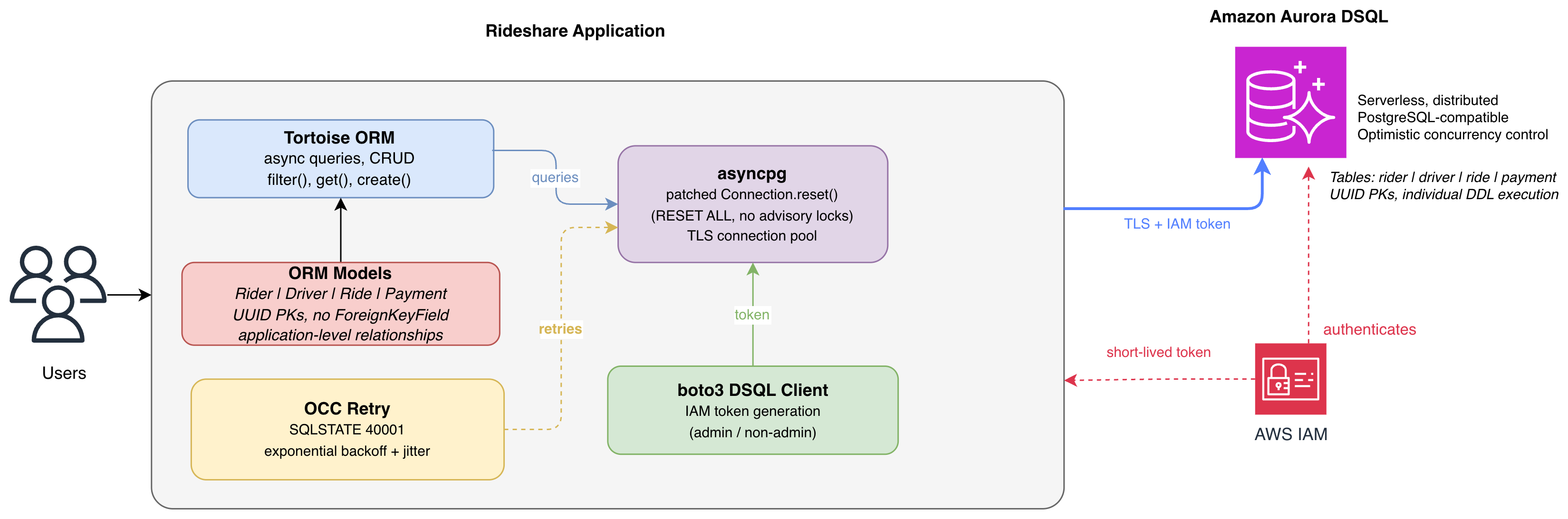
Figure 1: Tortoise ORM application architecture with Amazon Aurora DSQL
When you run the application:
- The application generates an IAM authentication token using boto3’s DSQL client and patches asyncpg’s connection reset.
- Tortoise ORM initializes with the asyncpg backend using the IAM token as the password and TLS enabled.
- Schema creation executes each DDL statement individually through a raw asyncpg connection (Aurora DSQL doesn’t support multiple DDL in one transaction).
- The application runs async CRUD operations demonstrating the full rideshare workflow: creating riders and drivers, requesting rides, completing trips, and processing payments.
- OCC retry logic handles any concurrent write conflicts with exponential backoff and jitter.
Key considerations
When you use any ORM with the distributed architecture of Aurora DSQL, you need to make specific adaptations. The migration guide covers additional patterns.
- UUID primary keys: Aurora DSQL recommends UUID V4 because they require no coordination across the distributed system. Tortoise ORM supports UUID fields natively with
fields.UUIDField(primary_key=True, default=uuid.uuid4). Aurora DSQL also supports sequences and identity columns (withCACHEspecified) when you need integer identifiers. - Choosing a relationship strategy: With the DSQL foreign key feature, you can enforce business logic as a constraint shared by a parent and child column. For example, you can prevent a
product-idfrom being deleted while its relatedproduct-descriptionlookup table still contains the same id. This sample instead usesUUIDFieldcolumns and manages relationships in application logic. Both approaches work well on Aurora DSQL: choose the one that fits your application’s needs. - Asyncpg connection pool reset: The asyncpg driver calls
pg_advisory_unlock_all()when returning connections to the pool. Advisory locks aren’t available in Aurora DSQL. You must patch asyncpg’sConnection.reset()to a narrowed version that executesRESET ALLwhile skipping the unsupported advisory lock call. - Single DDL per transaction: Multiple DDL statements in a single transaction aren’t supported. Each
CREATE TABLEmust execute as its own statement using a raw connection. - No SAVEPOINT support: The
SAVEPOINTcommand isn’t available in Aurora DSQL. Avoid nested transactions in your Tortoise ORM operations. - IAM authentication: Aurora DSQL uses time-limited IAM tokens instead of static passwords. The Boto3 DSQL client generates tokens through
generate_db_connect_admin_auth_token()for admin users andgenerate_db_connect_auth_token()for non-admin application users. Generate a fresh token locally for each new connection request. Tokens are short-lived and disposable. - Optimistic concurrency control: When two transactions modify the same row concurrently, one receives a serialization error (
SQLSTATE 40001, error codeOC000orOC001). Your application must implement retry logic. Both error codes are safe to retry.
Prerequisites
Before you begin, make sure that you have the following:
- An AWS Account.
- AWS Command Line Interface (AWS CLI) v2 configured with credentials.
- Python 3.10 or later.
- An Aurora DSQL cluster (single-Region is sufficient for this tutorial). Step 1 walks through the creation process.
- An IAM user or role with the minimum permissions shown in the following policy.
IAM permissions configuration
Use the following IAM policy. ClusterSetup covers the one-time cluster creation step. DatabaseAccess is what your application uses at runtime.
Replace region and account-id with your values. The dsql:DbConnectAdmin action is used when connecting as the admin user. The dsql:DbConnect action is used when connecting as a non-admin application user (Step 6).
Important: After creating your cluster, scope both statements to your specific cluster ARN (replace /* with /<cluster-id>) and remove dsql:CreateCluster. The wildcard character is used initially because the cluster ID isn’t known before creation.
Estimated time and costs
This tutorial takes 15–20 minutes. Running the sample generates minimal database activity. Aurora DSQL charges for Distributed Processing Units (DPUs) and storage (GiB-month). See Amazon Aurora DSQL Pricing. Delete your cluster after testing.
Solution walkthrough
In this walkthrough, you create an Aurora DSQL cluster, clone the sample application, and configure Tortoise ORM to work with Aurora DSQL. You then define the data models, set up the connection, add optimistic concurrency control (OCC) retry logic, and run the rideshare application. The following steps walk through each part in order.
Step 1: Create an Aurora DSQL cluster
First, configure an AWS CLI named profile for the IAM user that will interact with Aurora DSQL. This keeps your DSQL credentials isolated from other AWS profiles:
This command prompts for the AWS Access Key ID and AWS Secret Access Key you generated when you created the IAM user for this tutorial. It also prompts for the default AWS Region (for example, us-east-1) and output format (json). Verify the profile is configured correctly:
You should see your account ID, IAM user ARN, and user ID in the response.
Now create a single-Region Aurora DSQL cluster using the AWS CLI:
Note the cluster ID from the output. Retrieve the endpoint:
Wait for the status field to show ACTIVE. The endpoint field is the host name your application connects to (for example, abc123def456.dsql.us-east-1.on.aws).
Step 2: Clone the sample and install dependencies
Clone the repository:
Create a virtual environment and install dependencies:
These are the only dependencies needed. Tortoise ORM’s asyncpg backend connects directly to Aurora DSQL using IAM tokens generated by Boto3. No additional adapter package is required.
Note: If you want to run the sample immediately, skip ahead to “Step 7: Run the application”. The following sections walk through the key parts of the code (model definitions, connection setup, and retry logic) to explain the adaptations specific to Aurora DSQL in this sample.
Step 3: Define the Tortoise ORM models
In src/rider_models.py, you define four tables using Tortoise ORM’s Django-like model syntax. All use UUID primary keys.
Key design decisions:
- Each model uses
fields.UUIDField(primary_key=True, default=uuid.uuid4). Aurora DSQL recommends UUIDs because they require no coordination across the distributed system. - Relationships are represented as
UUIDFieldcolumns (such asrider_id,driver_id) rather thanForeignKeyField, giving you explicit control over joins. - Status fields use
CharFieldwith application-level validation rather than database-level enums.
Step 4: Configure the Aurora DSQL connection
In src/rider_config.py, you configure IAM authentication, patch asyncpg, and set up schema creation. The code supports both admin and non-admin users:
Key points:
generate_auth_token()auto-detects admin and non-admin users: admin usesgenerate_db_connect_admin_auth_token(), non-admin usesgenerate_db_connect_auth_token()._dsql_safe_reset()patches asyncpg’sConnection.reset()method. Without this patch, asyncpg callspg_advisory_unlock_all()when returning connections to the pool, which Aurora DSQL doesn’t support. The replacement executesRESET ALLto clear session-level settings while skipping the unsupported advisory lock call.- The connection uses
ssl_module.create_default_context()because Aurora DSQL requires TLS for all connections. - Schema creation runs each DDL statement individually with
SET search_path TO {SCHEMA}, using a rawasyncpg.connect(). Aurora DSQL does not allow multiple DDL statements per transaction.
Step 5: Implement OCC retry logic
In src/retry.py, a reusable utility handles optimistic concurrency control in Aurora DSQL:
Usage in the application:
Design principles:
- Re-read before retry: The function must fetch the latest state from the database on each invocation. Stale reads cause repeated conflicts.
- Exponential backoff with jitter: Wait times increase exponentially (50 ms, then 100 ms, then 200 ms) with random jitter added. This prevents concurrent retries from colliding again (the thundering herd problem).
- Scoped updates: Use Tortoise ORM’s
update_fieldsparameter to write only the columns you changed, reducing the conflict surface.
Step 6: Set up a non-admin application user (optional)
For production workloads, use a least-privilege application user instead of admin. In Aurora DSQL, every non-admin database user maps 1:1 to an IAM identity through the AWS IAM GRANT command.
Note: This step requires an IAM user with permissions to create IAM policies and modify Aurora DSQL cluster access.
1. Verify your IAM user has dsql:DbConnect
Your IAM policy’s DatabaseAccess statement (from Prerequisites) should include both dsql:DbConnectAdmin and dsql:DbConnect.
2. Create the database role and schema (connect as admin)
Open src/setup_app_user.sql. Replace cluster-endpoint and region with your values. Then run:
This creates a rideshare_app database role, links it to your IAM identity with AWS IAM GRANT, and sets up a rideshare schema with CRUD permissions.
3. Connect as the non-admin user
Set the environment variables and run:
The code automatically selects the correct token method based on whether CLUSTER_USER is “admin” or any other value.
Step 7: Run the application (admin user)
Set environment variables and run:
When you run riders_app.py, the application executes the complete rideshare workflow against your Aurora DSQL cluster and logs its progress to the console. You will see it initialize the connection and create the schema, then seed a set of riders and drivers. Next, it simulates several rides end to end: requesting each ride, matching it to a driver, completing the trip, and processing payment. It then queries the data back to display ride history per rider and completed-ride statistics per driver. It also demonstrates the OCC retry pattern by updating a driver’s rating through the retry-safe utility. Finally, it prints a summary of total rides, revenue, and payments, and confirms the demo completed successfully. After reviewing this output and the data it created, proceed to clean up the demo data.
Note: If you see “Missing required environment variable CLUSTER_ENDPOINT”, check that your environment variables are set in the current shell session.
Step 8: Clean up demo data
After reviewing the tables and data created by the demo, run the cleanup script:
Security considerations
For production deployments, apply these security best practices:
- Token-based authentication: Aurora DSQL replaces static database passwords with short-lived IAM tokens generated at runtime. In this sample, Boto3’s DSQL client produces tokens valid for 15 minutes. Scope the
dsql:DbConnectAdminaction to your specific cluster ARN rather than using wildcards, and separate admin credentials (for schema migrations) from application credentials (for runtime operations). - TLS encryption in transit: Aurora DSQL requires TLS for all connections. The sample uses Python’s
ssl.create_default_context()which validates server certificates against system CA roots. Never turn off certificate verification in production. - Network isolation: Deploy your application within an Amazon Virtual Private Cloud (Amazon VPC) and use VPC endpoints to reach Aurora DSQL without traversing the public internet.
- Principle of least privilege: Grant only
dsql:DbConnectto your application’s runtime IAM role. Reservedsql:DbConnectAdminexclusively for schema setup or migration roles. Avoid broad actions likedsql:*on your roles. - Credential hygiene: Use IAM roles (Amazon Elastic Compute Cloud (Amazon EC2) instance profiles, Amazon Elastic Container Service (Amazon ECS) task roles, or IAM Roles Anywhere) rather than long-lived access keys. The boto3 credential chain resolves credentials automatically without embedding secrets in your application.
Production considerations
- Connection pool tuning: Tortoise ORM’s asyncpg backend uses a connection pool. Configure
minsizeandmaxsizein the connection credentials based on your expected concurrency. Monitor pool utilization to right-size these values. - Token refresh for long-running applications: An IAM authentication token is used only to establish a connection. It’s passed as the password when the connection opens. After a connection is established, it remains valid even after the token expires, up to the maximum connection duration of Aurora DSQL (60 minutes) or until it’s closed. You only need a new token when opening a new connection. For a pooled application, generate a fresh token each time the pool creates or replaces a connection, rather than reusing one token for the pool’s lifetime. The token’s own lifetime is set with the
expires-inoption, which defaults to 15 minutes and can be extended up to 7 days. - Observability: Add structured logging with correlation IDs for request tracing. Monitor connection pool health, OCC retry counts, and token refresh success/failure rates with Amazon CloudWatch metrics.
- Health checks: Implement a health check endpoint that verifies database connectivity with a lightweight
SELECT 1query, so your load balancer can detect unhealthy instances.
Aurora DSQL service limits: Design your application within the cluster quotas and database limits of Aurora DSQL. Each cluster supports up to 10,000 active connections at a rate of 100 new connections per second (burst capacity 1,000). A single connection stays open for a maximum of 60 minutes. Size your connection pool and plan connection refresh accordingly. For write operations, a single transaction can modify up to 3,000 rows and 10 MiB of data and can run for a maximum of 5 minutes. Design batch writes to stay within these bounds. For the complete list, see Cluster quotas and database limits in Amazon Aurora DSQL.
Clean up
To avoid ongoing charges for resources created in this walkthrough, remove them when you’re finished.
To delete the Aurora DSQL cluster
Using the AWS CLI:
To remove database tables without deleting the cluster
Conclusion
In this post, you built an async rideshare application using Tortoise ORM and Amazon Aurora DSQL. The required adaptations are minimal: UUID primary keys, asyncpg pool patching, individual DDL execution, and OCC retry. These patterns apply broadly to any async Python application on Aurora DSQL. The combination of Tortoise ORM’s native coroutine-based queries and the serverless scalability of Aurora DSQL makes this stack a strong choice for high-concurrency workloads. Examples include rideshare, delivery tracking, real-time marketplaces, and IoT event processing.
To take this further, deploy the application across multiple Regions using multi-Region clusters in Aurora DSQL for active-active writes. You can also connect as a non-admin user with a custom schema to test multi-tenant patterns.
Get started by cloning the aurora-dsql-samples repository and deploying the sample against your own Aurora DSQL cluster. For more on Aurora DSQL, see the Aurora DSQL User Guide. For Tortoise ORM documentation, visit tortoise.github.io. To learn more, refer to Introducing Amazon Aurora DSQL and Amazon Aurora DSQL for global-scale financial transactions on the AWS Database Blog.