AWS Database Blog
Deploying Amazon RDS for Db2 using Terraform
Customers running IBM Db2 workloads often ask for a repeatable, auditable way to provision Amazon Relational Database Service (Amazon RDS) for Db2 that fits their existing infrastructure-as-code practice. In this post, we introduce a modular Terraform template, published in the aws-samples/sample-rds-db2-tools repository. The template takes you from an empty AWS account to a running RDS for Db2 instance tracked in AWS License Manager in under an hour.
Solution overview
The template is split into seven numbered Terraform modules as depicted in the following diagram.
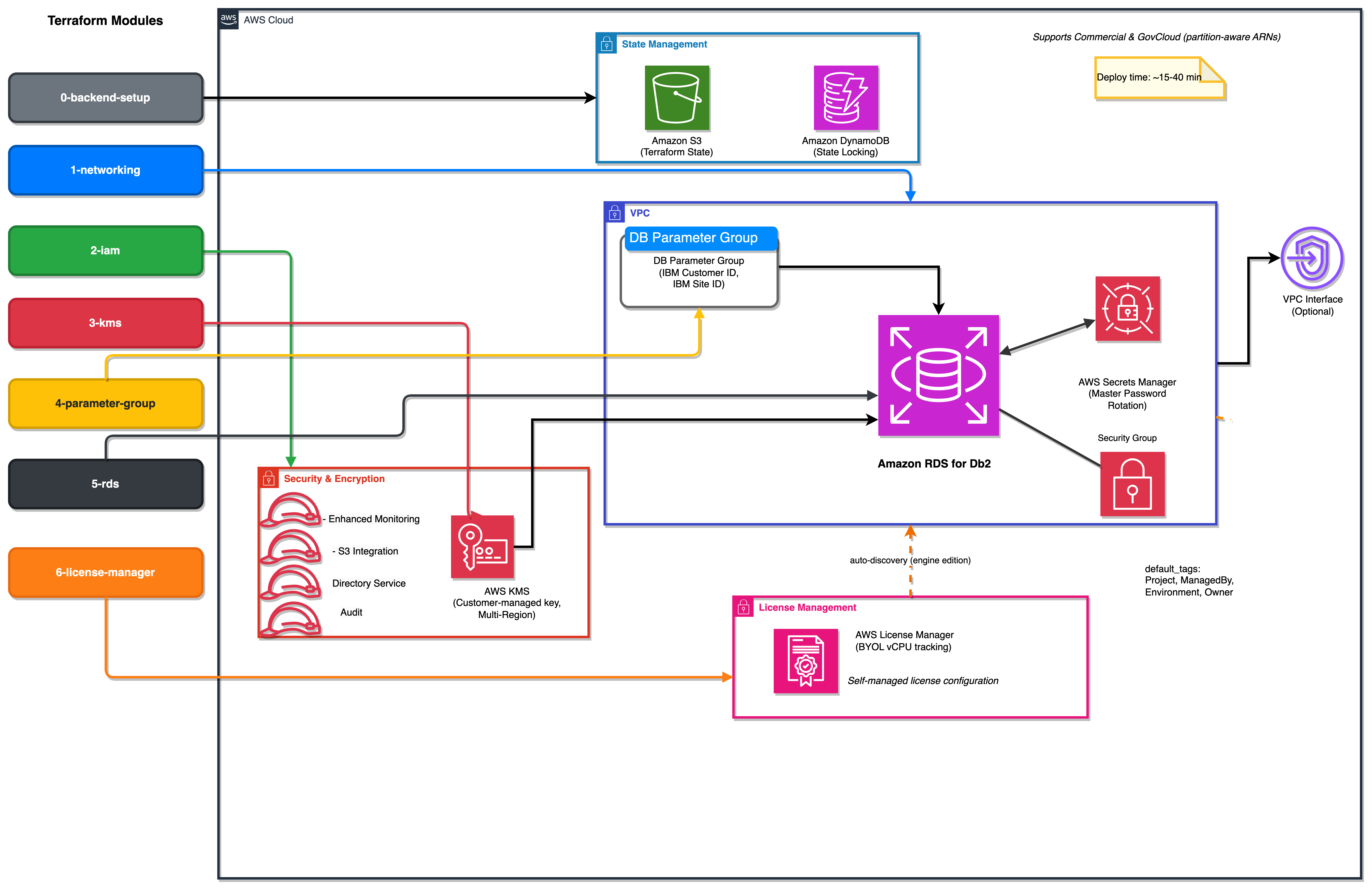
Each module owns a focused piece of the stack and keeps its own remote state, so you can iterate on one module without affecting the others. The template uses Amazon Simple Storage Service (Amazon S3), Amazon DynamoDB, and AWS Key Management Service (AWS KMS) for state, locking, and encryption.
| Module | What it creates |
0-backend-setup |
Amazon S3 bucket and Amazon DynamoDB table for Terraform remote state |
1-networking |
DB subnet group derived from your virtual private cloud (VPC), with optional interface VPC endpoints |
2-iam |
Enhanced monitoring, S3 integration, directory service, and audit IAM roles |
3-kms |
Customer-managed AWS KMS key (multi-Region capable) |
4-parameter-group |
DB parameter group containing your IBM customer ID and IBM site ID |
5-rds |
The RDS for Db2 instance itself |
6-license-manager |
AWS License Manager self-managed license with an engine-edition product filter |
Every module reads its inputs from a terraform.tfvars file and uses default_tags on the AWS provider so every resource is tagged consistently (Project, ManagedBy, Environment, Owner).
The template supports AWS commercial Regions and AWS GovCloud (US) Regions. All ARNs are constructed using the aws_partition data source, so the same code produces arn:aws:... in commercial and arn:aws-us-gov:... in GovCloud without modification.
Prerequisites
To follow along, you need:
- An AWS account with permissions to create IAM roles, KMS keys, RDS instances, and License Manager configurations.
- Terraform 1.5 or later installed locally.
- An existing Amazon Virtual Private Cloud (Amazon VPC) and security group where the RDS for Db2 instance will run.
- An IBM customer ID and IBM site ID (required for bring-your-own-license, per RDS for Db2 licensing documentation).
Clone the repository:
Walkthrough
The following subsections summarize each module. Full commands, variable descriptions, and sample tfvars files are in the repository’s README.
Step 1: Initialize remote state
Create the S3 bucket and DynamoDB table that will hold state for the remaining modules:
The configure-modules.sh script writes a backend.tf into each downstream module so they all use the same shared state bucket.
Step 2: Networking, IAM, and encryption
Modules 1 through 3 set up the supporting infrastructure. Each finishes in under a minute:
1-networkingauto-classifies your VPC’s subnets as public or private based on their route tables and creates a DB subnet group with the appropriate set.2-iamcreates four optional IAM roles, each behind a boolean flag. Existing roles can be reused by setting the matching_existsflag, so you don’t getEntityAlreadyExistserrors.3-kmscreates a customer-managed KMS key or reuses one via alias lookup. Setmulti_region_key = trueif you plan to add a cross-Region standby replica later.
Step 3: Parameter group
Module 4 creates the DB parameter group with your IBM customer ID and IBM site ID. Validation enforces supported combinations: Db2 11.5 accepts editions se and ae; Db2 12.1 accepts ce, se, and ae. Both IDs are marked sensitive, so they are hidden from plan output.
Step 4: RDS for Db2 instance
Module 5 is the longest-running step (15 to 40 minutes, depending on storage size and whether Multi-AZ is enabled). A few convenience features reduce the number of decisions you must make up front:
- Leave
engine_versionblank to auto-resolve the latest minor version for your chosen major version (for example, Db2 11.5 resolves to11.5.9.0). - Leave
db_instance_identifierblank to auto-build a name likedb2se-11-5-r7i-xl-xs-gp3-saz-12k-myprojfrom your engine, version, instance class, storage type, and tag. - Set
manage_master_user_password = true(the default) to have RDS create and rotate the master password in AWS Secrets Manager. The secret ARN is exported asmanaged_master_user_secret_arn.
The module also handles the gp3 IOPS rule: if allocated_storage < 400 GiB, it omits the iops and storage_throughput arguments so the API accepts the request.
Step 5: License Manager
Module 6 creates the self-managed license configuration. Per the RDS for Db2 licensing documentation, customers using BYOL register vCPU consumption through License Manager. License Manager then auto-discovers matching RDS instances through a product information filter on engine edition.
Two important notes:
- The first time you use License Manager in an account and Region, you must create the service-linked role. The module ships a
bootstrap.shscript that does this idempotently. Run it once before the firstterraform apply. - The AWS Terraform provider does not currently expose the
product_information_listblock onaws_licensemanager_license_configuration. The module works around this with a post-createnull_resourcethat callsaws license-manager update-license-configurationthrough the AWS Command Line Interface (AWS CLI). Discovery of matching RDS instances can take up to 24 hours.
Clean up
To avoid incurring ongoing charges, destroy the modules in reverse order:
The 0-backend-setup module has prevent_destroy = true on the state bucket and lock table. If you want to tear down the state backend itself, remove that lifecycle rule first.
Conclusion
This modular Terraform template gives you a production-grade path to provisioning Amazon RDS for Db2 with remote state and License Manager integration out of the box. You also get partition-aware ARNs for GovCloud compatibility and RDS-managed master passwords. Each module is small, focused, and idempotent, so you can adopt them incrementally. For example, you can point the 3-kms module at an existing KMS alias, or skip 2-iam entirely if your monitoring and audit roles already exist.
Get the full template, parameter reference, troubleshooting guide, and sample tfvars files at aws-samples/sample-rds-db2-tools.
For related Db2 content on AWS, see the Amazon RDS for Db2 User Guide and the AWS Database Blog.