AWS Database Blog
Enable self-managed AD Kerberos authentication with Amazon RDS for Db2
Amazon Relational Database Service (Amazon RDS) for Db2 supports Kerberos authentication through your own Active Directory domain, whether it runs on AWS, on-premises, or in another cloud. Connecting Amazon RDS for Db2 directly to a customer-managed Microsoft Active Directory gives you centralized authentication and single sign-on for your database users. The setup hinges on delegating a precise set of AD permissions to a dedicated service account and passing those credentials to RDS securely.
In this post, we show how to configure Windows Active Directory for Amazon RDS for Db2 with Kerberos authentication and how to validate the setup from a domain-joined client. We walk through the end-to-end process published in the aws-samples/sample-rds-db2-tools repository:
- Creating a dedicated OU and service account.
- Delegating the required AD permissions for Amazon RDS for Db2 to interact with your AD.
- Storing credentials in an AWS Key Management Service (AWS KMS)-encrypted secret in AWS Secrets Manager.
- Verifying the configuration with a PowerShell script that translates raw GUIDs into human-readable permission names.
We then show how to validate the configuration from a domain-joined Db2 client:
- launching an EC2 instance.
- joining it to the domain.
- installing the Db2 Runtime Client.
- connecting with a Kerberos ticket (no password).
We also cover one non-obvious step that catches most people: granting servicePrincipalName read/write on User objects requires ADSI Edit (adsiedit.msc), not the standard Active Directory Users and Computers snap-in.
Solution overview
The following diagram shows the architecture for authenticating Amazon RDS for Db2 against a customer-managed Active Directory.
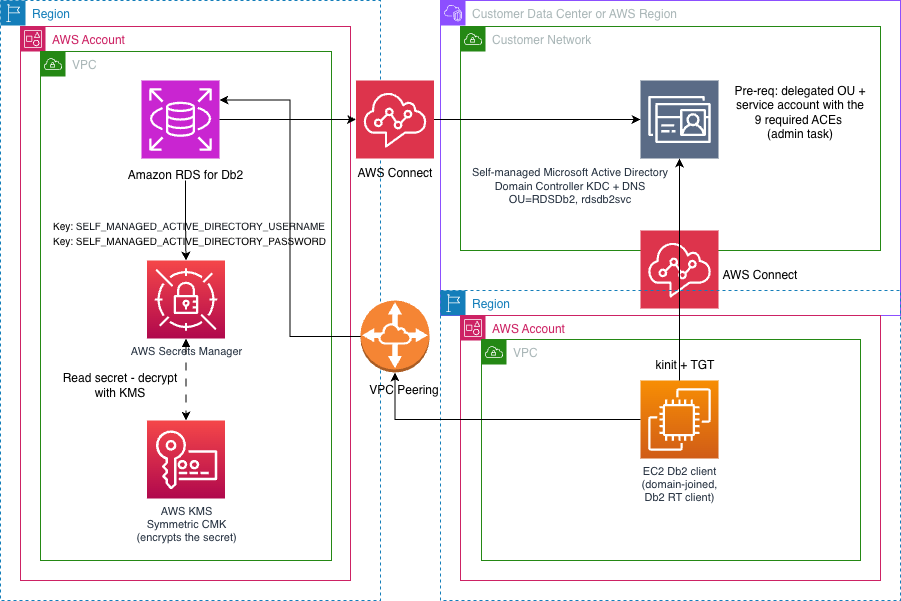
In this design, RDS for Db2 joins your self-managed AD domain directly. A dedicated AD service account user id and password is stored in AWS Secrets Manager and encrypted with an AWS KMS key. During the domain join, RDS retrieves these credentials from Secrets Manager to register the instance in your directory. A domain-joined Db2 client obtains a Kerberos ticket (TGT) from the AD KDC, then connects to RDS for Db2 using that ticket with no password exchanged. Connectivity between RDS, the client, and the domain controllers relies on the standard AD ports — DNS (53), Kerberos (88, 464), LDAP (389, 3268), and the RPC dynamic range (49152–65535).
What you will build
- A dedicated OU and AD service account scoped to RDS for Db2 and a delegated ACLs with the permissions RDS for Db2 requires.
- An AWS KMS key and Secrets Manager secret to pass credentials to RDS securely.
- An Amazon RDS for Db2 instance configured with self-managed AD variables.
- A tested connection using an AL2023 EC2 domain-joined client.
1. Delegate AD permissions
Create a dedicated OU and service account, then grant the necessary access control entries (ACEs) using the Delegation of Control Wizard and ADSI Edit:
- Create/Delete User and Computer objects in the OU.
- Reset Password, Read/Write
msDS-SupportedEncryptionTypeson descendant User objects (through the Delegation Wizard). - Read/Write
servicePrincipalNameon descendant User objects — use ADSI Edit (adsiedit.msc).
Or run the provided PowerShell script which applies all nine ACEs in one idempotent pass:
Verify with the included human-readable ACL viewer script:
Replace ServiceAccount name with your preferred name or keep it as rdsdb2svc. In TargetOU, change OU name to your preferred name or keep it as RDSDb2 but you must change the DC names to match the domain name of your AD. For example: "OU=RDSDb2,DC=corp,DC=mycompany,DC=com".
The repository documents two equivalent methods for this delegation: a step-by-step UI walkthrough using the ADUC Delegation of Control Wizard and ADSI Edit, and the PowerShell script shown above. Both produce the same ACL, so pick whichever fits your operations model. Before you start, read the repository README to understand the full step-by-step flow end to end, then follow the detailed UI walkthrough (or the PowerShell guide) for the delegation itself.
Full walkthrough in the repo: README-UI.md
2. Create a KMS key and Secrets Manager secret
Create a symmetric KMS key and store the service account credentials as a Secrets Manager secret with a resource policy that allows RDS to read it:
Full walkthrough in the repo: README-KMS-Secret.md
3. Store the service account credentials in AWS Secrets Manager
Store the AD service account username (sAMAccountName only — no DOMAIN\ prefix) and password as a Secrets Manager secret, encrypted with the KMS key from the previous step, and attach a resource policy that lets RDS read it. RDS for Db2 retrieves this secret during the domain join:
Full UI and CLI instructions are in the repo: README-KMS-Secret.md
4. Configure the RDS for Db2 instance
Modify or create the DB instance, supplying the Secret ARN in the Directory section. For CLI:
Full walkthrough in the repo: README-RDS-Db2.md
5. Test the connection from a domain-joined Db2 client
Launch an Amazon Linux 2023 EC2 instance in the same VPC, join it to your AD domain, and install the Db2 Runtime Client:
Step 1 – Join to AD
Installs realmd, sssd, adcli, and krb5-workstation:
Step 2 – Install Db2 RT client
Step 3 – Configure DSN entries
Auto-detects domain join, writes both local-auth and Kerberos DSNs:
Step 4 – Connect
Full walkthrough in the repo: README-Db2-Client.md
Important points
- ADSI Edit, not ADUC, for SPN on User objects. The ADUC snap-in filters
servicePrincipalNamefrom the User objects attribute list. ADSI Edit shows the full schema. This is the most common stumbling block. - Scope matters. Granting SPN read/write on Computer objects instead of User objects produces an ACL that looks correct but fails at runtime. Amazon RDS for Db2 checks permissions on the User object it creates, not a Computer object.
- Verify with PowerShell, not the UI. The ADUC Security tab collapses attribute-level ACEs into blank rows. The provided
Show-OUDelegation.ps1script resolves GUIDs to names and makes the ACL readable. - Username format in Secrets Manager. The secret must contain the
sAMAccountNameonly — noDOMAIN\prefix. Including the domain prefix causes instance creation to fail.
Networking
Multiple networking scenarios exist between AD and RDS. Refer to this guide for the following three network topologies:
- AD and RDS in the same VPC.
- AD hosted in Microsoft Azure (VPN or AWS Direct Connect + ExpressRoute).
- AD in a different VPC or AWS account (VPC Peering or AWS Transit Gateway).
The key ports are DNS (53), Kerberos (88, 464), LDAP (389, 3268), and RPC dynamic ports (49152–65535). Missing the RPC range is the most common cause of intermittent failures after a successful initial join.
Clean up
To avoid ongoing charges and to remove the principals this walkthrough created in your Active Directory, tear the resources down in the reverse order you created them:
- Terminate the EC2 Db2 client — leave the domain (realm leave) so it removes its own computer object, then terminate the instance and delete any dedicated IAM instance profile/role.
- Remove self-managed AD from RDS for Db2 — either detach the domain with
aws rds modify-db-instance --disable-domain(and reboot) to keep the instance, or delete the instance withaws rds delete-db-instanceif you no longer need it. - Delete the Secrets Manager secret holding the service account credentials.
- Schedule the KMS key for deletion and remove its alias. Do not delete the key while any instance still uses it for storage encryption, or its snapshots become unrecoverable.
- Remove the AD objects — delete the service account and the dedicated OU (recursively, to clear any computer/user objects RDS created during domain joins), or reset the OU ACL if you want to keep the OU but drop the delegated permissions.
Step-by-step commands for each of these, including console and CLI options and verification checks, are in the cleanup guide in the GitHub repository.
Conclusion
In this post, we showed how to enable Kerberos authentication for Amazon RDS for Db2 using a self-managed Active Directory. We delegated the exact nine AD permissions to a dedicated service account, passed its credentials to RDS securely through a KMS-encrypted Secrets Manager secret, joined the DB instance to the domain, and verified the result end-to-end from a domain-joined Db2 client connecting with a Kerberos ticket and no password. Along the way we called out the steps that most commonly trip people up: using ADSI Edit for the servicePrincipalName ACE, scoping permissions to User objects, and opening the RPC dynamic port range.
The PowerShell scripts, CLI commands, and verification tooling referenced throughout are available in the aws-samples/sample-rds-db2-tools GitHub repository. Clone the repo, adapt the variables to your domain, and you can have centralized, single sign-on authentication for your RDS for Db2 workloads running quickly. To learn more, see Kerberos authentication for Amazon RDS for Db2 in the Amazon RDS User Guide. If you have questions or suggestions, leave a comment.