AWS Database Blog
Enabling nested transactions in Amazon DynamoDB using C#
Amazon DynamoDB is a fully managed, serverless NoSQL database service designed for high-performance applications at any scale. In this post, I introduce a framework for managing atomicity, consistency, isolation, and durability (ACID) compliant transactions in DynamoDB using C#, featuring support for nested transactions. This capability allows you to implement sophisticated logic with finer control over data consistency and error handling within your .NET applications. With this nested transaction framework, you can isolate issues, allow for partial rollbacks, and build maintainable, modular workflows on top of the built-in transactional capabilities of DynamoDB.
Quick recap of the transaction framework
Before diving into nested transactions, let’s briefly revisit what this transaction framework does. The Amazon DynamoDB transaction framework is a C# library that streamlines working with DynamoDB built-in transactional capabilities. It provides you with:
- A
TransactScopeclass that manages the transaction lifecycle (begin, commit, rollback) - Streamlined ACID-compliant operations across multiple DynamoDB tables
- An abstraction layer that manages the low-level details of DynamoDB’s
TransactWriteItemsandTransactGetItemsAPIs, such as coordinating transactions and building requests across multiple nested levels. - Error handling and retry logic built into the framework
This framework helps you build reliable applications that maintain data consistency even when working with multiple related data items. You can use it for scenarios such as inventory management, financial transactions, user profile updates, or any situation where multiple DynamoDB operations need to succeed or fail together as a unit.
Why nested transactions matter
Nested transactions allow transactional operations to exist within the scope of a parent transaction. This feature enhances flexibility and robustness in your enterprise-grade systems. For example, modular components in your system can encapsulate their own logic without impacting parent transaction structure, while partial rollbacks can be performed if an issue occurs in one part of a process. By isolating errors and scoping them locally, nested transactions reduce the risk of full transaction failure, increasing fault tolerance and making your systems more straightforward to debug and maintain.
Sample application overview
To demonstrate how you can use nested transactions in practice, I have created a sample Windows Forms application that showcases the framework’s capabilities. This application lets you perform common data operations (create, delete, retrieve) on different product types while maintaining transactional integrity through multiple levels of nested transactions.
The sample application addresses several common scenarios where nested transactions are valuable:
- Complex business workflows – When you need to make changes to multiple related items (such as ecommerce order processes and content management updates)
- Error isolation – When you want to contain failures within specific operation groups without rolling back the entire process
- Modular system integration – When different components of your system need to maintain their own transaction contexts
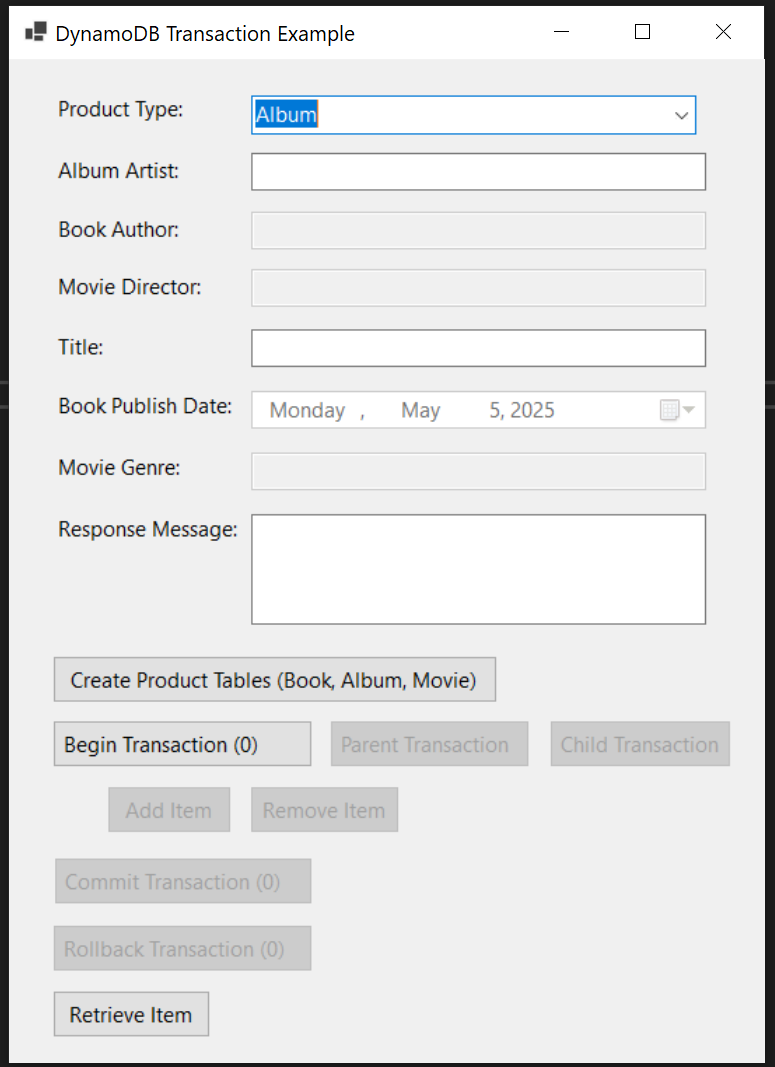
The UI application in the following image provides a form titled DynamoDB Transaction Example that uses the nested transaction framework. It helps you manage books, albums, and movies in a nested transactional context.
Here is a walkthrough of the key steps:
- To initialize DynamoDB tables for books, albums, and movies, choose Create Product Tables (Book, Album, Movie). This is typically a one-time setup step you’d handle as an administrator.
- After the tables are in place, you select Album, Book, or Movie from the Product Type dropdown menu. This selection customizes the form fields to match your product’s attributes. For example, selecting Album will prompt you for Album Artist and Title, and Movie will ask for Director and Genre.
- Fill in the corresponding product details. These details differ based on your selected product category. For instance, a book will need the author’s name, title, and optionally a publish date, and a movie will need the director’s name, title, and genre. The form gives you the option to perform transactional operations including adding, removing, and retrieving product entries.
You can use the nested transactional controls to begin multiple transactions, add or remove items within your current transaction, and either commit or roll back your current transaction. To demonstrate the Nested Transaction Framework, the nested transaction navigation is also built in. You can move between parent and child transactions, enabling precise control over which operations are grouped together. The transaction level is indicated in parentheses (for example, Transaction (1)), and actions such as Commit Transaction and Rollback Transaction affect your current and child transactions.
You can optionally retrieve product data by providing keys, such as Album Artist and Title (choosing Retrieve Item). All responses (success messages, error notifications, or retrieved data) appear in the Response Message field and corresponding product attribute boxes.
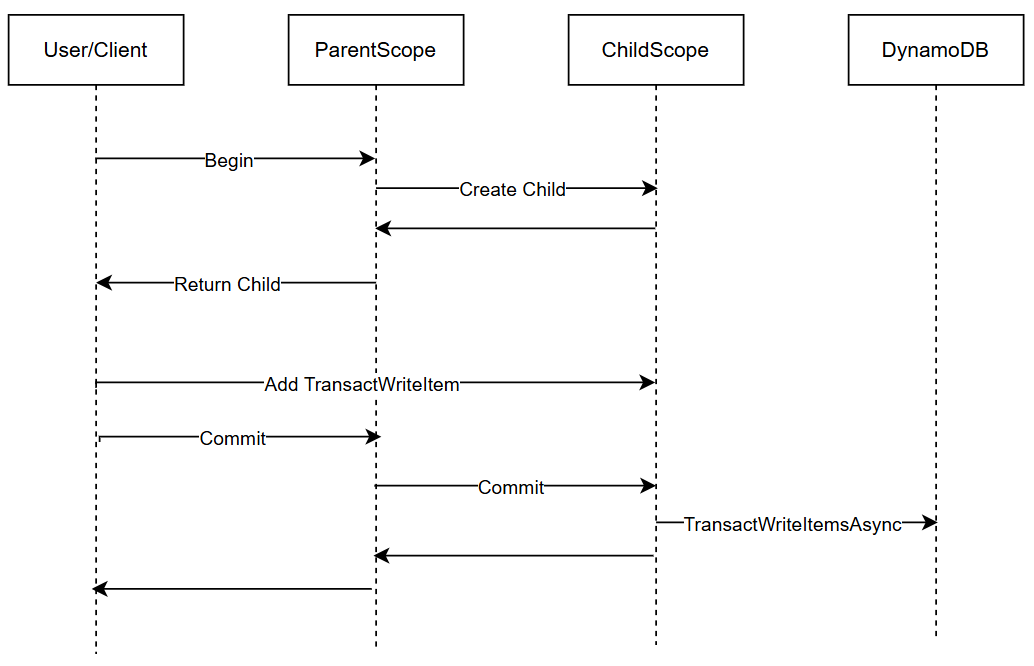
The following diagram illustrates a sequence flow of nested transaction in DynamoDB, demonstrating how parent and child transaction scopes interact to provide atomic operations with isolation.
Framework architecture
This framework enhances the TransactScope class and employs design patterns such as Composition and Chain of Responsibility to support nested transactions. Commit operations follow a Last-In-First-Out (LIFO) order, processing the child TransactScope before the parent, and rollback operations also cascade downward, providing a complete cleanup in the event of failure. The system allows bidirectional traversal between scopes, making it more straightforward for you to manage complex transaction flows.
Note on architecture applicability: The framework architecture design presented here, while implemented in C# for the above sample application, applies to all other object-oriented programming languages and platforms, ensuring broad applicability of the design principles.
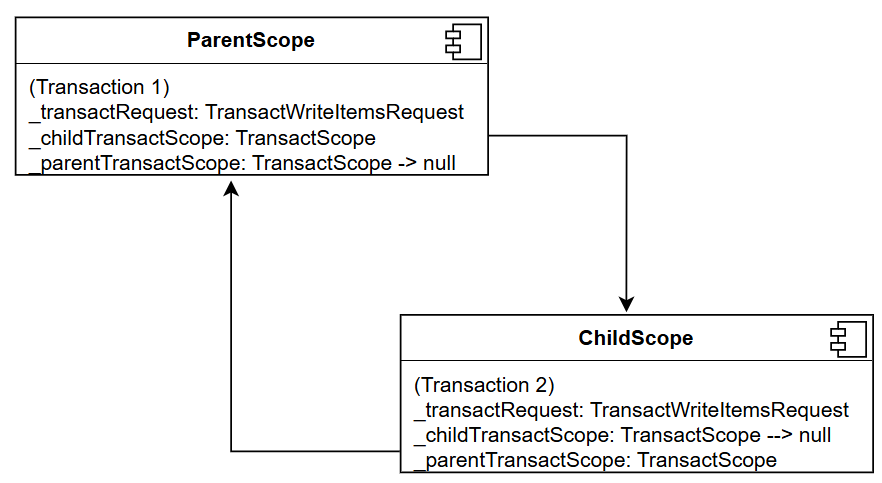
The following diagram illustrates a nested transaction model using a custom TransactScope class structure. The _transactRequest property holds a TransactWriteItemsRequest, which is used to batch multiple write operations (Put, Update, Delete) in DynamoDB into a single transaction. The _childTransactScope points to a TransactScope (specifically, the child scope), indicating that a nested transaction exists within this TransactScope. Conversely, the _parentTransactScope points back to the parent TransactScope, establishing the parent-child relationship between transactions.
Layered architecture
To use the nested transaction framework effectively in your applications, it’s helpful if you understand its layered architecture. This design provides separation of concerns, making your code more maintainable and testable.The architecture is composed of four main layers:
- UI layer – The Windows Forms interface serves as your entry point for initiating and managing transactions. It calls methods in the service layer to BeginTransaction(), CommitTransactionAsync(), and RollbackTransaction(), to control your transaction lifecycle.
- Service layer – This layer, including
ProductServiceandTransactScope, manages the orchestration of your transactions. It creates and navigates between nested scopes and centralizes transaction logic. This is where most of your transaction management code will live. - Data access layer – Here,
ProductProviderexecutes your data operations, such as insertions and deletions, all within the transaction context provided by the service layer. You’ll implement specific data access logic for your domain objects in this layer. - DynamoDB – At the bottom, DynamoDB supports atomic execution through its built-in transactional APIs (
TransactWriteItems), making sure that all or none of your operations succeed.
Design highlights
The workflow is designed with core features that enhance usability and robustness, primarily through a Begin/Commit/Rollback structure. This ensures transactional integrity and consistency in DynamoDB by making operations atomic (either all succeed or none do). Additionally, the ability to use nested transactions allows for more complex, modular workflows by easily switching between parent and child scopes.
The interface also provides dynamic feedback to help you track your actions. Transaction depth indicators (shown in parentheses) update as operations are staged, providing clear insight into your workflow’s current state. Finally, the system supports multiple product types (books, albums, and movies) within a unified interface. This way, you can add, remove, and retrieve items across multiple DynamoDB tables within the same transaction scope. The centralized transaction management in the service layer keeps responsibilities clearly separated, and DynamoDB provides atomicity. This layered approach improves maintainability while offering you the flexibility needed for real-world applications.
Best practices for nested transactions
To make the most of this design in your applications, follow these practical guidelines:
- Mind DynamoDB limits – Keep your transactions short to stay within DynamoDB limits (100 items, 4 MB per transaction). Plan your data model accordingly.
- Implement retry logic – DynamoDB transactions can fail due to conditional checks, conflicts, or capacity issues. Build effective retry mechanisms with exponential backoff into your application.
- Monitor performance – Set up Amazon CloudWatch alarms to track transaction metrics such as transaction conflict rate, latency, and exceptions to identify bottlenecks early.
- Limit nesting depth – Although nested transactions provide flexibility, excessive nesting (beyond three to four levels) can create overly complex execution paths that are difficult to debug and maintain.
Real-world use cases
Now that you understand the framework, let’s discuss some practical scenarios where you might apply nested transactions in your own applications:
- Ecommerce order processing – When a customer places an order, you might need to update inventory levels, process payment information, and create order records. With nested transactions, you can isolate the payment processing in a subtransaction that can be independently rolled back if the payment fails.
- Multistep user registration – If your application requires a complex registration process with multiple verification steps such as initial user profile creation, security verification, and account finalization, you can use nested transactions to track progress through each stage while maintaining the ability to roll back specific steps if necessary.
- Content management systems – When publishing content that requires updates to multiple related entities (such as articles, authors, or categories), nested transactions help maintain consistency while allowing partial operations within specific domains.
- Financial applications – For operations involving multiple accounts or instruments, nested transactions provide the granular control needed to provide consistency while isolating specific operational contexts such as account management context, transaction processing context, and data consistency context.
Conclusion
In this post, I introduce a nested transaction framework in Amazon DynamoDB using C# that offers enhanced control and robustness in your transactional workflows. By extending the TransactScope class, this solution gives you the flexibility to model complex, modular business operations with finer control over commit and rollback behavior. The structured UI workflow and layered architecture spanning the UI, service, and data access tiers provide transactional integrity, isolation, and consistency across all your product-related operations.
The complete source code for this implementation is available in our GitHub repository.