AWS Database Blog
Enforcing TLS and managing certificate rotation for RDS and Amazon Aurora PostgreSQL
When an Amazon Relational Database Service (Amazon RDS) certificate expires and your application’s trust store isn’t updated, connections fail without warning. Teams discover the problem when users report errors, not when they can still prevent them. AWS announces Certificate Authorities (CA) rotation events months in advance and provides tooling to manage them, but without proactive certificate lifecycle management, you might experience unplanned downtime across production workloads when rotations occur.
The risk isn’t limited to operational issues. Default RDS and Amazon Aurora configurations allow both encrypted and unencrypted PostgreSQL connections. Without proper configuration, you might have unencrypted database traffic flowing undetected, which could expose sensitive data in transit and potentially affect your security posture based on your configuration choices. Although AWS provisions Transport Layer Security (TLS) certificates automatically and provides enforcement mechanisms like rds.force_ssl=1, you must explicitly enable them based on your security requirements. Even organizations that have enforced TLS often lack visibility into which connections are actually encrypted and whether their applications are prepared for the next CA rotation.
In the AWS shared responsibility model, AWS operates the Certificate Authority infrastructure and provisions server certificates per instance. You’re responsible for enforcing TLS usage, configuring client verification, and managing the rotation lifecycle according to your security requirements.
In this post, you learn how to enforce TLS encryption for all PostgreSQL connections on AWS, configure client-side certificate verification, and deploy an automated monitoring of expiring certificates 30 days in advance of certificate rotation events.
How TLS works in RDS and Aurora
Amazon RDS uses a managed Certificate Authority hierarchy (rds-ca). This hierarchy issues server certificates for each DB instance. When a client connects, the following TLS handshake occurs:
- Client initiates connection to the RDS endpoint.
- Server presents its certificate (issued by the
rds-caauthority). - Client validates the certificate against its local trust store (if
sslmodeisverify-caorverify-full). - Client and server negotiate a cipher suite and establish the encrypted channel.
- All subsequent data travels over the encrypted connection.
Amazon RDS for PostgreSQL and Aurora PostgreSQL support TLS 1.2 and TLS 1.3. The actual TLS version depends on your client library capabilities and PostgreSQL engine version.
Solution overview
The solution combines three layers:
- Server-side enforcement: The rds.force_ssl parameter rejects any connection attempt that doesn’t use TLS.
- Client-side verification: The sslmode=verify-full connection parameter helps clients verify the server’s identity against a trusted CA bundle.
- Automated lifecycle monitoring: Amazon EventBridge rules, AWS Lambda, and Amazon CloudWatch work together to alert you before certificates expire.
Key services used: Amazon RDS for PostgreSQL, Amazon Aurora PostgreSQL, Amazon EventBridge, AWS Lambda, Amazon CloudWatch, AWS Identity and Access Management (IAM).
The benefits are:
- Server-side enforcement to help block plaintext connections.
- Automated rotation that can help avoid unplanned downtime.
- Continuous compliance validation through Amazon EventBridge rules.
The following is the architectural diagram for the automated lifecycle monitoring solution:
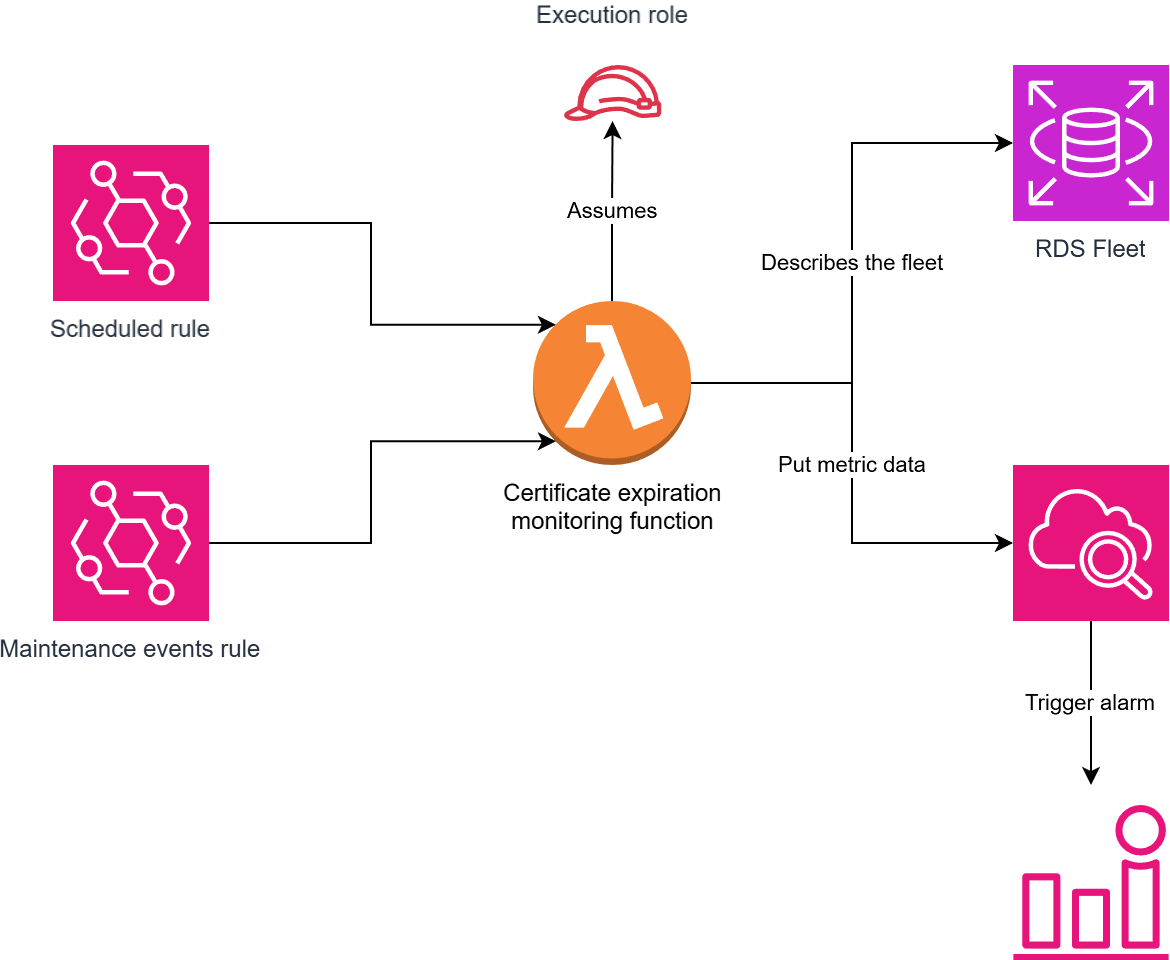
Figure 1: Automated certificate lifecycle monitoring architecture
Prerequisites
You must have the following prerequisites to follow along with this post.
- An AWS account with an Amazon RDS for PostgreSQL or Amazon Aurora PostgreSQL instance (engine version 14 or later).
- IAM permissions for Amazon RDS, AWS Lambda, Amazon EventBridge, and Amazon CloudWatch.
- PostgreSQL client (psql 14 or later recommended).
- Familiarity with Amazon RDS parameter groups.
- The openssl CLI (for validation steps).
Step 1: Enforcing TLS on the server side
The rds.force_ssl parameter operates at the server level. It is designed to control whether Amazon RDS rejects non-SSL connections. PostgreSQL version 15 and later default rds.force_ssl to 1 (on). For earlier versions, it defaults to 0 (off).
Create or modify a parameter group (only if version is <=14)
Default parameter groups are immutable. Create a custom parameter group first.
Expected output: JSON describing the new parameter group (DBParameterGroupArn, and so on).
Enable rds.force_ssl (only if version is <=14)
Set rds.force_ssl=1 in the custom parameter group, which is designed to reject all non-SSL connections. ApplyMethod=pending-reboot means the change takes effect after the next instance reboot. Without this, PostgreSQL will still accept unencrypted connections.
Expected output: {“DBParameterGroupName”: “my-parameter-group”}.
Apply the parameter group to your instance (only if version is <=14)
Attach the custom parameter group to the target RDS instance. --apply-immediately applies the parameter group association right away, but the rds.force_ssl value itself requires a reboot to take effect.
Expected output: JSON showing the instance in pending-reboot state for the parameter group.
After the instance applies the new parameter group (which requires a reboot), all non-SSL connection attempts are rejected with:
Aurora PostgreSQL differences
For Aurora PostgreSQL, the parameter works identically but is configured through a DB cluster parameter group rather than a DB instance parameter group. Use modify-db-cluster-parameter-group instead.
Step 2: Certificate authority options
Amazon RDS offers three current Certificate Authority (CA) options, each designed to give you flexibility in balancing cryptographic strength, performance, and longevity. A key operational benefit of all three is that Amazon RDS automatically rotates the DB server certificate before it expires. This is designed to help minimize manual certificate renewal tasks.
The first option, rds-ca-rsa2048-g1, uses an RSA key with a 2048-bit key size. This is the most widely compatible choice and a solid baseline for most workloads. Its CA certificate has a 40-year validity window, giving you decades before the root itself needs replacement.
If you need stronger cryptographic assurance, rds-ca-rsa4096-g1 doubles the RSA key size to 4096 bits. The larger key makes brute-force attacks exponentially harder, and the CA validity stretches to 100 years. This effectively future-proofs the trust anchor for the lifetime of your infrastructure.
For teams that prefer elliptic-curve cryptography, rds-ca-ecc384-g1 delivers comparable security to RSA-4096 with significantly smaller keys and faster handshakes. At 384 bits on the ECC curve, it provides robust protection while reducing computational overhead. This is particularly attractive for high-throughput or latency-sensitive workloads. It also carries a 100-year validity period.
Regardless of which CA you choose, the automatic server certificate rotation means that day-to-day certificate lifecycle management stays hands-off. Your only responsibility is to make sure that your client trust store includes the appropriate CA bundle. This can validate the new server certificates as they roll in.
| CA Identifier | Key Type | Key Size | Validity | Auto Server Cert Rotation |
rds-ca-rsa2048-g1 |
RSA | 2048 bits | 40 years | Yes |
rds-ca-rsa4096-g1 |
RSA | 4096 bits | 100 years | Yes |
rds-ca-ecc384-g1 |
ECC | 384 bits | 100 years | Yes |
Check your current CA
Query the current CA certificate assigned to your RDS instance. Confirm one of: rds-ca-rsa2048-g1, rds-ca-rsa4096-g1, rds-ca-ecc384-g1. If it shows rds-ca-2019, you must migrate to a supported CA.
Expected output: rds-ca-rsa2048-g1 (or whichever CA is currently active).
Apply a new CA (if needed)
Change the CA assigned to the instance to one of the supported options. --apply-immediately triggers the CA swap immediately. A brief connectivity interruption might occur.
Expected output: JSON with PendingModifiedValues showing the new CA identifier.
Step 3: Client-side certificate verification
Understanding sslmode options
When connecting to a PostgreSQL database, the sslmode parameter is your primary lever for controlling how secure that connection will be. It determines whether encryption is used, whether the server’s certificate is validated, and whether the hostname on the certificate matches the server you intended to reach. Each step up the ladder adds a layer of assurance but also a layer of configuration responsibility.
At the bottom of the spectrum, disable does exactly what it says: no encryption, no verification and no protection. Traffic flows in plain text, vulnerable to anyone who can observe the network. One step up, allow and prefer will negotiate encryption: use TLS if the server supports it, but won’t insist on it and won’t verify the server’s identity. The difference between the two is subtle: allow starts unencrypted and upgrades only if required, whereas prefer (the default in most client libraries) starts by attempting TLS but silently falls back to plain text if it fails. In both cases, you have no guarantee that encryption is in place, and no protection against impersonation.
With require, you cross an important threshold: encryption is mandatory, and the connection will fail rather than fall back to plain text. However, the client still doesn’t verify who it’s talking to, so an on-path attacker presenting any valid-looking certificate could intercept traffic. Moving to verify-ca adds certificate authority validation: the client confirms that the server’s certificate was signed by a trusted CA, which eliminates most impersonation scenarios but still leaves a narrow gap: a compromised certificate issued to the wrong hostname. Finally, verify-full closes that gap by also checking that the hostname on the certificate matches the server you’re connecting to. This is the most secure option and the recommended setting for any production workload handling sensitive data.
The following table summarizes how each mode stacks up:
| sslmode | Encryption | CA Verification | Hostname Check | Protection Level |
| disable | No | No | No | None |
| allow | Negotiated | No | No | Minimal |
| prefer (default) | Negotiated | No | No | Opportunistic |
| require | Yes | No | No | Encryption only |
| verify-ca | Yes | Yes | No | CA verified |
| verify-full | Yes | Yes | Yes | Full (recommended) |
Downloading the RDS CA bundle
Combined bundle (all AWS Regions)
Download the global CA bundle that includes all AWS regions. This file contains the full certificate chain for all RDS/Aurora instances worldwide. Use this unless you want region-specific bundles.
Expected output: a .pem file in your working directory (typically 20-30 KB).
Region-specific bundle (example: eu-west-1)
Download only the CA bundle for a specific region if you want a smaller trust store. Replace eu-west-1 with the AWS region where your RDS instance lives.
Verify the downloaded bundle
Inspect the first certificate in the bundle to confirm the issuer is Amazon RDS. Confirm Issuer: CN=Amazon RDS Root… in the output.
Now verify the connection works:
Or with environment variables:
Step 4: Certificate rotation strategy
Certificates rotate for two reasons: CA expiry (the root CA reaches its validity end date) and security hygiene (AWS periodically rotates server certificates to reduce scope from key compromise).
Rotation workflow
A safe rotation follows this sequence across environments:
- Update client trust stores with the new CA bundle. Include both old and new CAs during the transition period.
- Test connectivity in dev/staging with the new bundle.
- Modify the DB instance to use the new CA:
aws rds modify-db-instance --db-instance-identifier my-postgres-instance --ca-certificate-identifier rds-ca-rsa2048-g1 --apply-immediately. - Validate connections post-rotation through pg_stat_ssl.
- Roll out to production following the same sequence: trust store first, then CA rotation.
- Remove the old CA from trust stores after confirming all instances use the new CA.
AWS-initiated and customer-initiated rotation
With the new CAs (rds-ca-rsa2048-g1, rsa4096-g1, ecc384-g1), AWS is designed to automatically rotate the server certificate before expiry. The CA bundle in your client trust store is designed to remain unchanged, with the leaf server certificate rotating. No client-side action is needed for automatic server certficate rotation.
Customer-initiated rotation is needed when migrating from the rds-ca-2019 to a newer CA, switching between CA types (such as RSA to ECC), or your organization’s security policy requires periodic CA changes.
Step 5: Validating encryption in transit
Query pg_stat_ssl
Query pg_stat_ssl to review TLS status for all active connections.
ssl=true: connection is encrypted.ssl=false: connection is plaintext.
tls_version shows whether TLSv1.2 or TLSv1.3 is negotiated per connection.
Confirm no plaintext connections
Count active connections where ssl=false (unencrypted). With rds.force_ssl=1 active, this typically returns 0. A non-zero count might indicate that some clients are bypassing TLS. Investigate any such connections.
Expected output: count = 0 when force_ssl is enabled. If rds.force_ssl=1 is active, this query should always return 0.
Test with openssl s_client
Use openssl to test the full TLS handshake from a client machine. -starttls postgres triggers the PostgreSQL STARTTLS upgrade before the TLS handshake. -CAfile points to the trusted CA bundle for certificate chain validation.
Check for Verify return code: 0 (ok) in the output, which confirms the certificate chain is valid.
Expected partial output:
Step 6: Automating monitoring expiry
To stay ahead of certificate expirations, you need automated monitoring that periodically scans every RDS instance in your account and raises an alert when any certificate is nearing its end of life or is already using the deprecated rds-ca-2019 CA.
Rather than wiring up individual AWS resources manually through CLI commands, we provide an AWS Cloud Development Kit (AWS CDK) project that deploys the complete certificate monitoring stack as a single, reproducible infrastructure-as-code deployment. The CDK project provisions the Lambda function, Amazon EventBridge rules (both a daily schedule and a maintenance event listener), the IAM execution role with least-privilege permissions, and a CloudWatch alarm, all with a single cdk deploy command. The source code is available on GitHub.
The CDK stack deploys the following resources:
- AWS Lambda function: a Python 3.12 function that paginates through all RDS instances, checks each one’s CA certificate validity date against a configurable threshold (defaulting to 30 days), flags any instance still using the deprecated
rds-ca-2019CA, and publishes the count of at-risk instances as a custom CloudWatch metric. - IAM execution role: a narrowly scoped role granting the Lambda only the permissions it needs:
rds:DescribeDBInstances,rds:DescribeCertificates,cloudwatch:PutMetricData, and standard CloudWatch Logs permissions. No write or modify permissions on RDS resources are required. - Amazon EventBridge schedule rule: a
rate(1 day)rule that triggers the Lambda daily to proactively scan the fleet. - Amazon EventBridge maintenance event rule: a pattern-matched rule that fires on RDS certificate rotation events (
RDS-EVENT-0501,RDS-EVENT-0502), triggering the Lambda reactively whenever AWS initiates a certificate rotation. - CloudWatch alarm: evaluates the custom
ExpiringCertificatesmetric and transitions to ALARM state when ≥ 1 expiring certificate is detected, withtreat-missing-dataset tonotBreaching.
Deploying the stack
Clone the repository and deploy:
The CDK stack accepts the following configurable parameters:
- FunctionName: the name assigned to the Lambda function on AWS. Used to identify it on the console, CLI, and in the IAM policy that scopes log group permissions. Change it if you’re deploying multiple instances of this stack in the same account or want a naming convention match.
- ExpiryThresholdDays: how many days before a certificate’s ValidTill date the function should flag it as “expiring soon.” Set to 30 by default, meaning any cert expiring within 30 days gets counted. Lower it (for example, 14) if you only want urgent alerts, raise it (for example, 90) for more lead time.
- MaintenanceRuleName: the name of the Amazon EventBridge rule that listens for RDS maintenance events (
RDS-EVENT-0501andRDS-EVENT-0502). These events fire when AWS schedules or completes a certificate rotation on your behalf. The rule triggers the Lambda reactively when something changes. - ScheduleRuleName: the name of the Amazon EventBridge rule that triggers the Lambda on a daily
rate(1 day)schedule. This is the proactive check, even if no maintenance event fires, the Lambda still runs daily to catch anything drifting toward expiry. - AlarmName: the name of the CloudWatch alarm. This alarm monitors the custom metric and transitions to ALARM state when the count of expiring instances meets or exceeds the threshold.
- MetricNamespace: the CloudWatch namespace where the Lambda publishes its metric. Namespaces group related metrics together. Default is
RDS/CertificateMonitoring, change it if you have a different organizational convention for custom metrics. - MetricName: the name of the custom CloudWatch metric within the namespace. The Lambda publishes the count of at-risk instances to this metric after each run. The alarm watches this exact metric name.
- AlarmThreshold: the number of expiring/deprecated certificates that triggers the alarm. Default is 1 (any single instance at risk fires the alarm). Raise it if you want to tolerate a few known exceptions before alerting.
How it works
After deployment, the monitoring solution operates in two complementary modes:
- Proactive (scheduled scan): every day, the Amazon EventBridge schedule invokes the Lambda. The function enumerates all RDS instances, queries each one’s CA certificate metadata, calculates days until expiry, and publishes the
ExpiringCertificatescustom metric to CloudWatch. If the count is ≥ 1, the CloudWatch alarm transitions to ALARM state. - Reactive (event-driven): when AWS initiates a certificate rotation on any instance (events
RDS-EVENT-0501orRDS-EVENT-0502), the Amazon EventBridge maintenance rule immediately triggers the Lambda, providing near-real-time awareness of rotation activities in progress.
Cleaning up
Because CDK manages all resources, cleanup requires a single command:
This removes the Lambda function, IAM role, Amazon EventBridge rules, CloudWatch alarm, and SNS topic in a single operation.
Common pitfalls and troubleshooting
Even with a solid certificate rotation plan in place, there are a handful of issues that catch teams off guard, usually during or immediately after a change. Most stem from a mismatch between what the server expects and what the client is configured to do: an outdated trust store, an Object-Relational Mapping (ORM) quietly overriding your SSL settings, or an application that was never explicitly configured for encryption suddenly being forced into it. Performance concerns after enabling TLS are also common, though typically more perceived than severe after connection pooling is in place.
| Problem | Cause | Solution |
| Connections fail after rotation | Client trust store contains only the previous CA bundle | Update trust store with the combined bundle (includes both old and new CAs) before rotating |
| Application ignores sslmode setting | Some ORMs override connection parameters | Set PGSSLMODE environment variable as a fallback. Review framework-specific SSL configuration |
| Performance degradation after enabling TLS | TLS adds ~1-3ms per connection establishment | Use connection pooling to amortize handshake cost. For ongoing data, overhead is typically <5% CPU |
| Cannot connect after enabling rds.force_ssl | Application was using unencrypted connections | Add sslmode=require (minimum) or verify-full to all connection strings before enabling force_ssl |
Summary and checklist
Before declaring your RDS for PostgreSQL deployment production-ready from a TLS perspective, walk through this checklist. Each item represents a layer in your defense-in-depth strategy, skip one, and you leave a gap that could surface as a connection failure, a security audit finding, or worse, unencrypted data in transit.
rds.force_ssl=1enabled in parameter group: makes sure the server is configured to reject any unencrypted connection attempt at the door.- Client connections use
sslmode=verify-full: guarantees encryption and server identity verification from the application side. - Current CA applied (
rds-ca-rsa2048-g1,rsa4096-g1, orecc384-g1): confirms you’ve moved off the deprecatedrds-ca-2019certificate authority. - CA bundle distributed to all application servers: every client that connects must trust the CA that signed the server certificate.
pg_stat_sslconfirms zero unencrypted connections: your validation step. If any row showsssl=false, something slipped through.- Amazon EventBridge and Lambda monitors certificate expiry: automated scanning eliminates reliance on human memory or calendar reminders.
- CloudWatch alarm configured for expiry threshold: turns the monitoring data into actionable notifications before anything breaks.
- Rotation tested in non-production environment: never let production be the first place you discover a trust store mismatch.
Conclusion
In this post, you walked through the full lifecycle of TLS enforcement for Amazon RDS and Aurora PostgreSQL, from enabling rds.force_ssl=1 to reject plaintext connections, through configuring sslmode=verify-full on the client side for server identity verification, to understanding CA options and their automatic rotation behavior. You then deployed automated monitoring stack that scans your fleet daily and reacts to rotation events in near-real time, so no certificate silently drifts toward expiry.
The combination of server-side enforcement and client-side verification gives you a zero-trust posture where neither side alone bears the full responsibility: the server refuses unencrypted traffic while the client independently validates who it’s talking to. With the newer RDS CAs handling server certificate rotation automatically, and Amazon EventBridge plus Lambda watching for anything approaching its expiry window, the operational burden shifts from reactive firefighting to proactive confidence.
Start with the pg_stat_ssl queries from Step 5: identify instances still accepting plaintext traffic, update their connection strings to sslmode=verify-full, then enforce rds.force_ssl=1 across your parameter groups. The goal is clear: zero unencrypted connections, verified server identity on every handshake, and no certificate expiration catching you off guard.