Implement multi-Region endpoint routing for Amazon Aurora DSQL
Amazon Aurora DSQL is a serverless distributed PostgreSQL-compatible database with virtually unlimited scale, highest availability, and zero infrastructure management. Aurora DSQL alleviates the need for database sharding and instance upgrades while supporting both single-Region and multi-Region deployments. Aurora DSQL provides dedicated regional endpoints for each Region in your multi-Region cluster enabling applications to connect directly to their optimal Region for the lowest possible latency. Its architecture provides strong data consistency for reads and writes with 99.99% availability in single-Region deployments and 99.999% availability in multi-Region deployments through its active-active distributed design.
Applications using Aurora DSQL multi-Region clusters should implement a DNS-based routing solution (such as Amazon Route 53) to automatically redirect traffic between AWS Regions. This ensures continuity of operations if either an Aurora DSQL cluster or an entire AWS Region becomes unreachable.
Best practices recommend implementing application-level routing logic to manage regional failovers holistically. However, when your application relies on multiple data stores including Aurora DSQL, you need a specific strategy for handling situations where Aurora DSQL regional endpoints become unreachable. In this post, we show you automated solution for redirecting database traffic to alternate regional endpoints without requiring manual configuration changes, particularly in mixed data store environments.
Endpoint management for multi-Region Aurora DSQL Clusters:
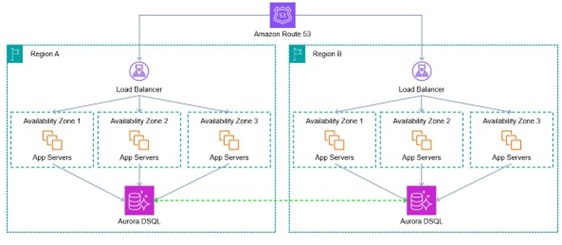
Let’s look at multi-Region application architecture, using Amazon Aurora DSQL as the persistence layer.
Aurora DSQL multi-Region clusters use synchronous cross-Region replication to maintain strong consistency between the Regions (and between the DSQL witness Region, which is not shown in the diagram). DSQL can accept reads and writes to either regional endpoint and, thanks to Aurora DSQL’s strong consistency, a reader in Region A can immediately see a committed write in Region B and vice-versa. This property of DSQL makes building multi-Region active-active applications much easier.
Since DSQL is keeping the data consistent across regions. The application stack doesn’t even need to know that it’s operating in a multi-Region active-active configuration. It can be completely ignorant of the other Region. The application does not need to perform any cross-Region coordination or messaging. DSQL handles that.
With Aurora DSQL, you don’t need to worry about database failover or switchover operations as the service automatically handles these operations. However, in specific scenarios where an application uses multiple data stores for different API calls or for applications connecting from an external datacenter to multi-Region DSQL clusters, directly switching between DSQL endpoints is more efficient than redirecting entire application server endpoints. This approach reduces operational complexity and minimizes the effort required during service disruptions by targeting only the affected database connections rather than moving the complete application stack. Any event that causes a disruption to a DSQL regional cluster is likely to also impact availability of your application in the affected Region. We present an automated solution that connects applications to a reachable regional endpoint in the event of a regional endpoint failure in a multi-Region DSQL cluster setup.
The solution discussed in this post is available as a sample code on GitHub.
Solution overview
In this solution, we demonstrate how to implement automatic redirection of connections from an application between Aurora DSQL endpoints using a custom Python client-side library. When deployed, it monitors Aurora DSQL endpoints through Amazon Route 53 APIs. The library first identifies healthy endpoints through these health checks, then measures the latency between the client and each healthy endpoint. It automatically routes the client connection to the healthy endpoint with the lowest latency and makes sure that, in the rare event of a regional endpoint becoming unreachable, the client connections are routed to the lowest-latency healthy Aurora DSQL endpoint. And thanks to Aurora DSQL’s strong consistency, clients can immediately see the effects of all transactions successfully committed on any endpoint.
Let’s look into the key features of this solution:
Automatic endpoint selection – To provide optimal connectivity, this solution maintains a dynamic list of available database cluster endpoints and regularly performs latency tests to available endpoints, creating a ranked list based on response times. This ranking is then combined with predefined priority settings in the configuration file. Based on the latency to each endpoint, it then chooses the best endpoint for each connection.
Route 53 health checks – This solution integrates with Route 53 health checks, using the AWS global infrastructure for comprehensive health monitoring. This approach provides a robust and flexible system for maintaining endpoint health and informing routing decisions.
Automatic connection failover support – To maintain high availability and minimize application downtime, the solution continuously monitors the health of each Regional database cluster endpoint. When issues are detected with the current endpoint, it automatically redirects client connections to healthy alternative endpoints. This makes sure client applications maintain continuous database access, even if a particular endpoint is unreachable. This solution manages which Region clients establish their database connections. The result is minimal disruption to the user experience, because applications smoothly transition to available endpoints without manual intervention.
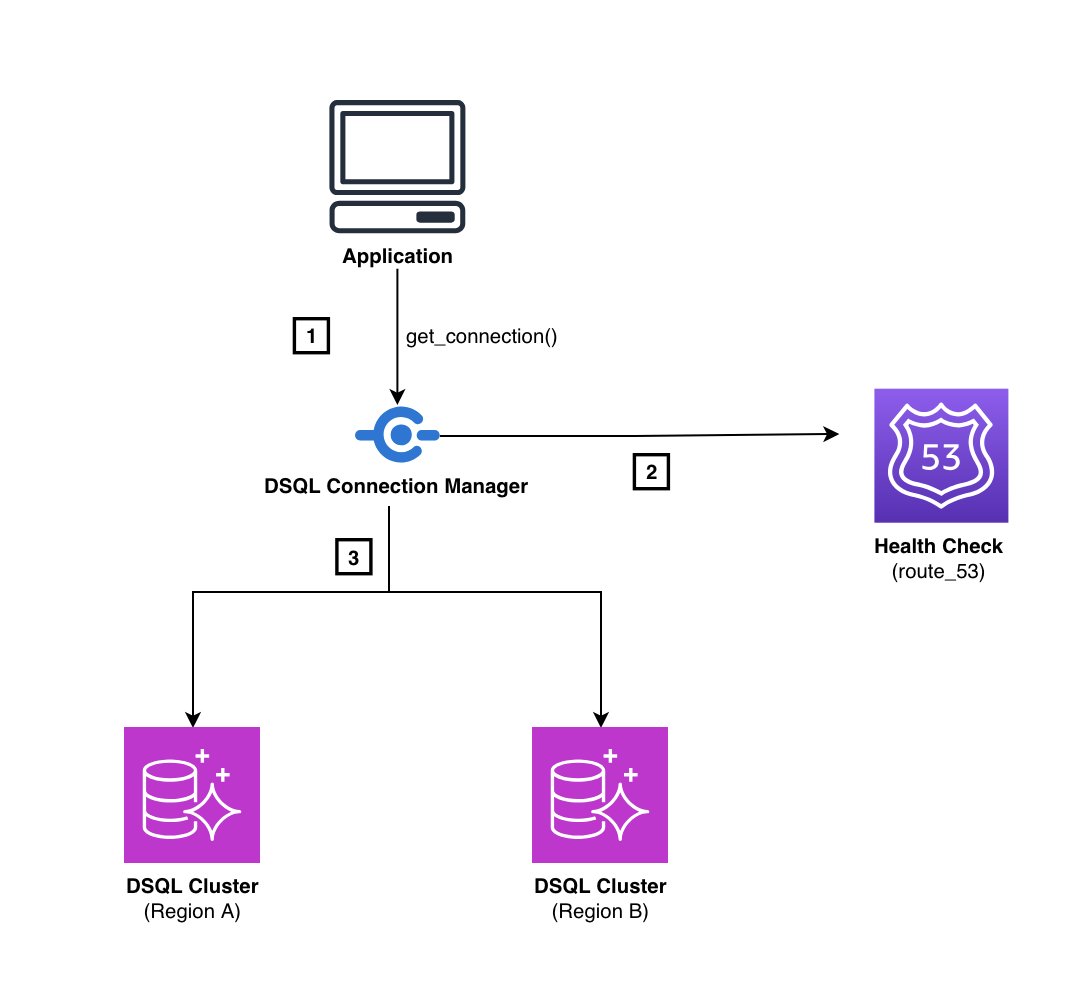
The following diagram illustrates the solution workflow.
The workflow includes the following steps:
The client (running in either Region where the cluster has been deployed.) calls get_connection() to initiate a connection, after which the library evaluates available DSQL endpoints and establishes the optimal connection based on health and performance metrics.
The library consults Route 53 health checks for real-time endpoint status. These health checks run at 30-second intervals, providing near up-to-date information about endpoint availability and continuously monitoring for signs of degradation or failure.
Using health check data, the library connects to the healthy endpoint. If the primary endpoint fails, the system automatically redirects to healthy alternatives.
Prerequisites
To deploy this solution, you must complete the following prerequisites:
Make sure Python version 3.10 or higher is installed on your system. Verify the installation by running the following code on your terminal:
python3 --version
Obtain AWS credentials with appropriate DSQL access permissions. Configure these credentials using the AWS Command Line Interface (AWS CLI) or environment variables.
Verify that your system has network access to the DSQL endpoints. This might involve configuring Amazon Virtual Private Cloud (VPC) settings or security groups.
Confirm your AWS credentials have permissions to create and manage Route 53 health checks.
Install Python and dependent packages, and configure the AWS CLI
Complete the following steps:
Clone the repository:
git clone https://github.com/aws-samples/sample-multi-region-Endpoint-Routing-for-Aurora-DSQL.git
 cd sample-multi-region-Endpoint-Routing-for-Aurora-DSQL
Set up the Python environment and create a new virtual environment named venv:
python3 -m venv venv
source venv/bin/activate  # On Windows: venv\Scripts\activate
Install the necessary dependencies in the file requirements.txt required to run this solution:
pip install -r requirements.txt
Configure the AWS CLI. This provides a convenient way to set up your credentials globally.
aws login
Follow the prompts in your terminal. The command will automatically open your default browser and guide you through the authentication process. After successful authentication, your AWS CLI session will be valid for up to 12 hours.
Set up configuration files and Route 53 health checks
The GitHub repository contains a configuration file named dsql_config_with_healthchecks.json. This file has a structure similar to the following example. You must modify the following fields:
For both Regions, update the cluster_id field using the cluster IDs you recorded in the prerequisites.
Replace the hostname field with your Regional DSQL endpoint that was captured earlier.
–config – This parameter specifies the path to a configuration file. The configuration file is the JSON file dsql_config_with_healthchecks.json, which contains information about DSQL endpoints and connection settings.
–setup – This parameter creates Route 53 health checks and updates the health_check_id for each endpoint in the configuration file dsql_config_with_healthchecks.json.
–test – This parameter is to run connectivity tests.
This script reads your configuration file, creates a health check in Route 53 for each endpoint, and updates your configuration file with the newly created health check IDs. The health_check_id is a unique identifier for the Route 53 health check associated with each endpoint.
Test connectivity with Route 53 health checks and client-side latency routing
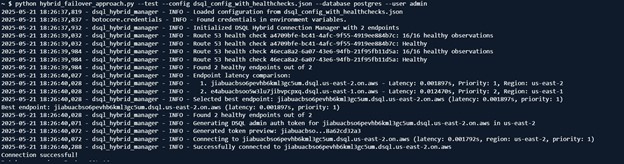
To test the basic connectivity to your DSQL endpoints, run the following command. This script combines client-side latency measurement for optimal endpoint selection, Route 53 health checks for reliable health monitoring, and automatic failover capabilities to provide continuous service availability.
This script executes a series of operations to validate the application (or client connection) failover mechanism:
First, it establishes a connection to the optimal available endpoint as determined by your configuration priorities.
After it’s connected, the script intentionally disables the Route 53 health check associated with this primary endpoint, simulating a failure.
The script then waits for the health check status to propagate through the AWS network, replicating real-world failure conditions.
Then the script attempts to create a new connection, which should now fail over to a secondary endpoint due to the simulated failure of the primary.
During this period, it verifies that your system successfully fails over to a secondary endpoint, confirming continuous operation despite the primary endpoint’s simulated failure.
After confirming successful failover, the script re-enables the health check for the primary endpoint and validates that connections can once again be established to the restored primary endpoint.
2025-05-21 19:03:52,864 - main - INFO -
 === STEP 1: Testing connection under normal conditions ===
2025-05-21 19:03:52,866 - dsql_hybrid_manager - INFO - Loaded configuration from dsql_config_with_healthchecks.json
2025-05-21 19:03:52,879 - botocore.credentials - INFO - Found credentials in environment variables.
2025-05-21 19:03:52,982 - dsql_hybrid_manager - INFO - Initialized DSQL Hybrid Connection Manager with 2 endpoints
2025-05-21 19:03:54,055 - dsql_hybrid_manager - INFO - Route 53 health check a4709bfe-bc41-4afc-9f55-4919ee884b7c: 16/16 healthy observations
2025-05-21 19:03:54,055 - dsql_hybrid_manager - INFO - Route 53 health check a4709bfe-bc41-4afc-9f55-4919ee884b7c: Healthy
2025-05-21 19:03:55,011 - dsql_hybrid_manager - INFO - Route 53 health check 46eca8a2-6a07-43e6-94fb-21f95fb11d5a: 16/16 healthy observations
2025-05-21 19:03:55,011 - dsql_hybrid_manager - INFO - Route 53 health check 46eca8a2-6a07-43e6-94fb-21f95fb11d5a: Healthy
2025-05-21 19:03:55,011 - dsql_hybrid_manager - INFO - Found 2 healthy endpoints out of 2
2025-05-21 19:03:55,057 - dsql_hybrid_manager - INFO - Endpoint latency comparison:
2025-05-21 19:03:55,057 - dsql_hybrid_manager - INFO -   1. xxxxxxxxxxxxxxx.dsql.us-east-2.on.aws - Latency: 0.002422s, Priority: 1, Region: us-east-2
2025-05-21 19:03:55,057 - dsql_hybrid_manager - INFO -   2. yyyyyyyyyyyyyyy.dsql.us-east-1.on.aws - Latency: 0.012726s, Priority: 2, Region: us-east-1
2025-05-21 19:03:55,057 - dsql_hybrid_manager - INFO - Selected best endpoint: xxxxxxxxxxxxxxx.dsql.us-east-2.on.aws (latency: 0.002422s, priority: 1)
2025-05-21 19:03:55,058 - main - INFO - Best endpoint selected: xxxxxxxxxxxxxxx.dsql.us-east-2.on.aws (latency: 0.002422s)
2025-05-21 19:03:55,058 - main - INFO - Health check ID: a4709bfe-bc41-4afc-9f55-4919ee884b7c
2025-05-21 19:03:55,058 - dsql_hybrid_manager - INFO - Found 2 healthy endpoints out of 2
2025-05-21 19:03:55,100 - dsql_hybrid_manager - INFO - Generating DSQL admin auth token for xxxxxxxxxxxxxxx.dsql.us-east-2.on.aws in us-east-2
2025-05-21 19:03:55,101 - dsql_hybrid_manager - INFO - Generated token preview: jiabuacbso...a4e75aa0f9
2025-05-21 19:03:55,101 - dsql_hybrid_manager - INFO - Connecting to xxxxxxxxxxxxxxx.dsql.us-east-2.on.aws (latency: 0.001538s, region: us-east-2, priority: 1)
2025-05-21 19:03:55,344 - dsql_hybrid_manager - INFO - Successfully connected to xxxxxxxxxxxxxxx.dsql.us-east-2.on.aws
2025-05-21 19:03:55,344 - main - INFO - Connected to: xxxxxxxxxxxxxxx.dsql.us-east-2.on.aws
2025-05-21 19:03:55,344 - main - INFO - Running query iteration 1/1
2025-05-21 19:03:55,451 - main - INFO - Result: ('PostgreSQL 16',)
2025-05-21 19:03:55,451 - main - INFO - Query execution time: 106.33ms
2025-05-21 19:03:55,451 - main - INFO - Average query execution time over 1 iterations: 106.33ms
2025-05-21 19:03:55,451 - main - INFO - Connection closed
2025-05-21 19:03:55,452 - main - INFO -
 === STEP 2: Simulating failure of the primary endpoint's health check: a4709bfe-bc41-4afc-9f55-4919ee884b7c ===
2025-05-21 19:03:55,627 - main - INFO - Disabled health check a4709bfe-bc41-4afc-9f55-4919ee884b7c to simulate failure
2025-05-21 19:03:55,628 - main - INFO - Waiting 60 seconds for health check status to propagate...
2025-05-21 19:04:55,674 - main - INFO -
 === STEP 3: Testing connection with primary endpoint health check failure ===
2025-05-21 19:04:55,674 - dsql_hybrid_manager - INFO - Loaded configuration from dsql_config_with_healthchecks.json
2025-05-21 19:04:55,684 - dsql_hybrid_manager - INFO - Initialized DSQL Hybrid Connection Manager with 2 endpoints
2025-05-21 19:04:55,796 - dsql_hybrid_manager - ERROR - Error checking Route 53 health status for a4709bfe-bc41-4afc-9f55-4919ee884b7c: An error occurred (InvalidInput) when calling the GetHealthCheckStatus operation: Invalid parameter : The specified health check has a special status of always healthy. GetHealthCheckStatus can't return the status of one of these special health checks.
2025-05-21 19:04:56,797 - dsql_hybrid_manager - INFO - Route 53 health check 46eca8a2-6a07-43e6-94fb-21f95fb11d5a: 16/16 healthy observations
2025-05-21 19:04:56,797 - dsql_hybrid_manager - INFO - Route 53 health check 46eca8a2-6a07-43e6-94fb-21f95fb11d5a: Healthy
2025-05-21 19:04:56,797 - dsql_hybrid_manager - INFO - Found 1 healthy endpoints out of 2
2025-05-21 19:04:56,837 - dsql_hybrid_manager - INFO - Endpoint latency comparison:
2025-05-21 19:04:56,837 - dsql_hybrid_manager - INFO -   1. yyyyyyyyyyyyyyy.dsql.us-east-1.on.aws - Latency: 0.013187s, Priority: 2, Region: us-east-1
2025-05-21 19:04:56,837 - dsql_hybrid_manager - INFO - Selected best endpoint: yyyyyyyyyyyyyyy.dsql.us-east-1.on.aws (latency: 0.013187s, priority: 2)
2025-05-21 19:04:56,837 - main - INFO - Best endpoint selected: yyyyyyyyyyyyyyy.dsql.us-east-1.on.aws (latency: 0.013187s)
2025-05-21 19:04:56,837 - main - INFO - Health check ID: 46eca8a2-6a07-43e6-94fb-21f95fb11d5a
2025-05-21 19:04:56,878 - dsql_hybrid_manager - ERROR - Error checking Route 53 health status for a4709bfe-bc41-4afc-9f55-4919ee884b7c: An error occurred (InvalidInput) when calling the GetHealthCheckStatus operation: Invalid parameter : The specified health check has a special status of always healthy. GetHealthCheckStatus can't return the status of one of these special health checks.
2025-05-21 19:04:56,879 - dsql_hybrid_manager - INFO - Found 1 healthy endpoints out of 2
2025-05-21 19:04:56,918 - dsql_hybrid_manager - INFO - Generating DSQL admin auth token for yyyyyyyyyyyyyyy.dsql.us-east-1.on.aws in us-east-1
2025-05-21 19:04:56,919 - dsql_hybrid_manager - INFO - Generated token preview: e4abuacbso...238cb4c5fe
2025-05-21 19:04:56,919 - dsql_hybrid_manager - INFO - Connecting to yyyyyyyyyyyyyyy.dsql.us-east-1.on.aws (latency: 0.011756s, region: us-east-1, priority: 2)
2025-05-21 19:04:57,234 - dsql_hybrid_manager - INFO - Successfully connected to yyyyyyyyyyyyyyy.dsql.us-east-1.on.aws
2025-05-21 19:04:57,234 - main - INFO - Connected to: yyyyyyyyyyyyyyy.dsql.us-east-1.on.aws
2025-05-21 19:04:57,234 - main - INFO - Running query iteration 1/1
2025-05-21 19:04:57,368 - main - INFO - Result: ('PostgreSQL 16',)
2025-05-21 19:04:57,368 - main - INFO - Query execution time: 133.73ms
2025-05-21 19:04:57,368 - main - INFO - Average query execution time over 1 iterations: 133.73ms
2025-05-21 19:04:57,368 - main - INFO - Connection closed
2025-05-21 19:04:57,369 - main - INFO - Failover successful! Switched from xxxxxxxxxxxxxxx.dsql.us-east-2.on.aws to yyyyyyyyyyyyyyy.dsql.us-east-1.on.aws
2025-05-21 19:04:57,369 - main - INFO -
 === STEP 4: Restoring original health check configuration ===
2025-05-21 19:04:57,500 - main - INFO - Re-enabled health check a4709bfe-bc41-4afc-9f55-4919ee884b7c
2025-05-21 19:04:57,502 - main - INFO - Waiting 60 seconds for health check status to propagate...
2025-05-21 19:05:57,553 - main - INFO -
 === STEP 5: Testing connection after restoring health check ===
2025-05-21 19:05:57,554 - dsql_hybrid_manager - INFO - Loaded configuration from dsql_config_with_healthchecks.json
2025-05-21 19:05:57,561 - dsql_hybrid_manager - INFO - Initialized DSQL Hybrid Connection Manager with 2 endpoints
2025-05-21 19:05:58,571 - dsql_hybrid_manager - INFO - Route 53 health check a4709bfe-bc41-4afc-9f55-4919ee884b7c: 16/16 healthy observations
2025-05-21 19:05:58,571 - dsql_hybrid_manager - INFO - Route 53 health check a4709bfe-bc41-4afc-9f55-4919ee884b7c: Healthy
2025-05-21 19:05:59,775 - dsql_hybrid_manager - INFO - Route 53 health check 46eca8a2-6a07-43e6-94fb-21f95fb11d5a: 16/16 healthy observations
2025-05-21 19:05:59,775 - dsql_hybrid_manager - INFO - Route 53 health check 46eca8a2-6a07-43e6-94fb-21f95fb11d5a: Healthy
2025-05-21 19:05:59,775 - dsql_hybrid_manager - INFO - Found 2 healthy endpoints out of 2
2025-05-21 19:05:59,815 - dsql_hybrid_manager - INFO - Endpoint latency comparison:
2025-05-21 19:05:59,815 - dsql_hybrid_manager - INFO -   1. xxxxxxxxxxxxxxx.dsql.us-east-2.on.aws - Latency: 0.001920s, Priority: 1, Region: us-east-2
2025-05-21 19:05:59,815 - dsql_hybrid_manager - INFO -   2. yyyyyyyyyyyyyyy.dsql.us-east-1.on.aws - Latency: 0.011219s, Priority: 2, Region: us-east-1
2025-05-21 19:05:59,815 - dsql_hybrid_manager - INFO - Selected best endpoint: xxxxxxxxxxxxxxx.dsql.us-east-2.on.aws (latency: 0.001920s, priority: 1)
2025-05-21 19:05:59,815 - main - INFO - Best endpoint selected: xxxxxxxxxxxxxxx.dsql.us-east-2.on.aws (latency: 0.001920s)
2025-05-21 19:05:59,815 - main - INFO - Health check ID: a4709bfe-bc41-4afc-9f55-4919ee884b7c
2025-05-21 19:05:59,815 - dsql_hybrid_manager - INFO - Found 2 healthy endpoints out of 2
2025-05-21 19:05:59,862 - dsql_hybrid_manager - INFO - Generating DSQL admin auth token for.dsql.us-east-2.on.aws in us-east-2
2025-05-21 19:05:59,864 - dsql_hybrid_manager - INFO - Generated token preview: jiabuacbso...f42f2e31ea
2025-05-21 19:05:59,865 - dsql_hybrid_manager - INFO - Connecting to xxxxxxxxxxxxxxx.dsql.us-east-2.on.aws (latency: 0.001445s, region: us-east-2, priority: 1)
2025-05-21 19:06:00,099 - dsql_hybrid_manager - INFO - Successfully connected to xxxxxxxxxxxxxxx.dsql.us-east-2.on.aws
2025-05-21 19:06:00,099 - main - INFO - Connected to: xxxxxxxxxxxxxxx.dsql.us-east-2.on.aws
2025-05-21 19:06:00,099 - main - INFO - Running query iteration 1/1
2025-05-21 19:06:00,210 - main - INFO - Result: ('PostgreSQL 16',)
2025-05-21 19:06:00,210 - main - INFO - Query execution time: 110.73ms
2025-05-21 19:06:00,210 - main - INFO - Average query execution time over 1 iterations: 110.73ms
2025-05-21 19:06:00,211 - main - INFO - Connection closed
2025-05-21 19:06:00,211 - main - INFO -
 === ROUTE 53 FAILOVER TEST SUMMARY ===
2025-05-21 19:06:00,211 - main - INFO - Primary endpoint: xxxxxxxxxxxxxxx.dsql.us-east-2.on.aws
2025-05-21 19:06:00,212 - main - INFO - Failover endpoint: yyyyyyyyyyyyyyy.dsql.us-east-1.on.aws
2025-05-21 19:06:00,212 - main - INFO - Restored endpoint: xxxxxxxxxxxxxxx.dsql.us-east-2.on.aws
2025-05-21 19:06:00,212 - main - INFO - RESULT: Route 53 failover test SUCCESSFUL!
Using the DSQL connection manager in your application
After you have the hybrid_failover_approach.py file, integrating it into your application is straightforward. The connection manager is designed as a drop-in replacement for database connections—no background processes or complex setup required.
The following code is a general example of how you can use the connection manager in your applications:
from hybrid_failover_approach import DSQLHybridConnectionManager

# Initialize once at application startup
db_manager = DSQLHybridConnectionManager(config_file="dsql_config_with_healthchecks.json")

# Use everywhere you need a connection
conn = db_manager.get_connection("postgres", "admin")
First, configure your DSQL endpoints by modifying the dsql_config_with_healthchecks.json file.
The following code shows a real-world example of how it looks in a Flask application:
from flask import Flask, jsonify
from hybrid_failover_approach import DSQLHybridConnectionManager

app = Flask(__name__)
db_manager = DSQLHybridConnectionManager(config_file="dsql_config_with_healthchecks.json")

@app.route('/users')
def get_users():
# Automatically connects to the fastest, healthiest endpoint
conn = db_manager.get_connection("postgres", "admin")

try:
with conn.cursor() as cursor:
cursor.execute("SELECT id, name, email FROM users")
return jsonify(cursor.fetchall())
finally:
conn.close()
The beauty of this approach is its simplicity—you get intelligent routing, automatic failover, and health monitoring without managing any background processes or complex infrastructure. It’s just a smarter way to connect to your DSQL clusters.
Cleanup
To delete the health checks, use the AWS CLI with the health check IDs that were added to your configuration file during setup:
You can find the health check IDs in your dsql_config_with_healthchecks.json file under the health_check_id field for each endpoint. Run the delete command for each health check ID in your configuration.
Health check configuration
You can customize health check frequency in the DSQL connection manager:
health_check_ttl=60, # Cache health check results for 60 seconds
The health_check_ttl parameter caches health check results for the specified duration. Lower values (< 60s) enable faster failover but increase API calls to Route 53, while higher values reduce API load but may delay issue detection. Start with 60 seconds and adjust as needed.
Summary
In this post, we discussed a custom solution that provides an effective way to managing Aurora DSQL connections with automatic cross-Region connection failover support. By deploying this solution, you can provide reliable database connectivity for your applications while maintaining optimal performance and availability.
Try out the solution for your own use case, and share your feedback in the comments.