AWS Database Blog
Introducing open source Bulk Executor for Amazon DynamoDB
When using Amazon DynamoDB, you sometimes want to perform bulk operations against all the items in a table, which has historically required custom coding. The open source Bulk Executor for DynamoDB simplifies bulk tasks like these. You can use this feature to invoke commands like count, find, delete, or update. No coding is required, even when running at large scale.
Bulk Executor runs as a command line utility in your terminal. It appears to you as if the job is running locally on your machine (with output streaming to your console) while it’s driving potentially hundreds of machines in the background through an AWS Glue back end.
Bulk Executor provides a variety of useful commands out of the box (like finding items matching some advanced criteria and printing them, counting them, or deleting them) and has an extension mechanism for adding new bulk commands you write yourself.
In this post, we explore the built-in capabilities of Bulk Executor and show you how to install and use it for common bulk operations against your DynamoDB tables. A Part 2 post will discuss interesting internal implementation details.
Bulk tasks
Here are some of the bulk tasks people might find useful:
- Find needles in the haystack. Scans a table in parallel finding items matching arbitrary criteria. Useful when you have a high latency tolerance and would prefer a brute force search over pre-made indexes.
- Count items in a table or count items matching a certain criteria. For example, you might want to get a count of old items to judge if you could save storage costs by deleting them.
- Delete items matching a certain criteria. This would be the follow-on after the count, where you decide to save storage costs by deleting the old items. The definition of early can be based on an expression.
- Copy the items from one table to another, including cross-Region and cross-account. Useful as part of a larger process for quickly moving a table to a new account.
- Update items according to programmatic rules. For example, you might want to add or remove an attribute from every item.
- Fill tables with synthetic realistic-looking data. Useful for generating test tables. You can use a Python function to generate the items using a library like Faker to make them realistic, indicate how many items, and the fill runs in parallel.
- Load from external sources (CSV, JSON, Parquet) from Amazon Simple Storage Service (Amazon S3) into existing tables and with more control on the formatting than the default import from Amazon S3 native feature.
- Load from a full or incremental export (or a series of exports). Allows using incremental export like an incremental backup. Also allows filtering/transforming the items as they’re being imported.
- Play backward an incremental export. Allows rolling back changes during a time period, for recovery significantly faster and cheaper than doing a PITR restore, with a Python function hook to decide if each item should be rolled back or not.
- Compare two tables for differences. Works as a sanity check after doing something that should leave two mostly equivalent tables (such as stream processing from an old table into a second table).
- Run a SQL statement against the table. Lets you perform a large aggregate calculation.
Each of these tasks traditionally would be performed as an AWS Glue job using custom code you wrote yourself. That requires a lot of undifferentiated heavy lifting on your part: how DynamoDB segmented scans work, how Spark data frames behave, how parallelization happens within a Glue Spark context, how to observe AWS Glue execution, how to catch and report AWS Glue exceptions, how to consolidate AWS Glue output, and how to rate limit your database consumption in a distributed context.
The Bulk Executor does all that for you. It uses AWS Glue in the background for parallel execution, but that’s a hidden implementation detail. Everything appears to run as a local script with Amazon CloudWatch LiveTail bringing down real-time updates to your command line.
Any custom commands you build can focus on core business logic and leave the execution details to the Bulk Executor.
Command usage
This section shows sample usage of some pre-existing bulk commands. A later section describes installation.
Count
Counts the number of records in your table. You can provide a where clause that accepts Spark SQL syntax to count only records matching a given criteria. Internally it uses the AWS Glue DynamoDB connector which performs segmented scans for mass parallel reads.
Examples
Find
Finds and prints the items matching a given criteria. Supports the same Spark SQL syntax as count. Also supports optional orderby and limit clauses to sort the results and limit their count. The first 10 items are printed to the console with large output sets written to Amazon S3 at a location that’s specified in the terminal’s output.
Examples
Delete
Deletes items matching a given criteria. If you specify a limit, then at most that many items will be deleted. Because this command has irreversible effects on your tables, Bulk Executor requires PITR (point-in-time recovery) to be set on the table before execution, and the same with any other mutating commands.
Examples
Copy
Copies items from one table to another. You can specify the source and destination tables using a simple table name or an ARN (Amazon Resource Name). When using a simple table name, it assumes the table is in the local account and AWS Region, but with an ARN, you can refer to a table in a different account, a different Region, or both. With this, you can make a copy of a table across accounts and Regions if you like, so long as permissions allow.
While using backup/restore is the standard approach, you can use this command to target an existing table which can be useful such as with MRSC (Multi-Region strong consistency) global tables which must be created empty and can’t be a restore target. You can also directly control the read rate from the source and write rate to the target. A filter or transformation expression is not yet implemented but would be an easy addition to support copying a subset of items or modifying them in transit.
Examples
Update
Updates items in a table, according to the rules you set. It scans the table in parallel and hands each item in turn to a Python function that you specify. That function returns an update statement expressing what, if anything, should change with that item. It can return nothing (no action) or an update statement. The statement can include a condition expression for maximum safety. The Python code can use logic under your control to add, delete, or modify aspects of each item or only some items. You can use this to, for example, backfill a TTL attribute.
Examples
Fill
The fill command fills a table with synthetic records. You specify your own Python generator function that builds realistic looking data (usually using the Faker library that’s been built-in). This generator function can return individual items or whole item collections (useful when using single table design). You also specify the number of items to load.
Examples
Load
Loads content from Amazon S3 into your table. This command supports formats that AWS Glue can natively read: CSV, JSON, and Parquet. You point at the Amazon S3 location of the data and specify how you want the data processed. For example, for CSV you can control its separator character and multi-line parsing, as well as provide a mapping for column name and types (for example, you can have a ttl attribute as a Number). With JSON you can provide a JsonPath to load a subset. This supplements the native import from Amazon S3 by adding support for plain JSON, for Parquet, and for CSV having non-string data types.
Examples
Load export
Loads a full or incremental export into an existing table, with control over how it gets imported. You specify the location in Amazon S3 of the export. It auto-detects if it’s a full or incremental export. You can provide a transform that can limit what items are loaded and modify the items as they pass. The transform is a Python function that accepts the item about to be inserted or upserted (or possibly deleted, when driving off an incremental export) and lets you adjust it in order to, for example, mask personally identifying information (PII), remove certain parameters, add TTL attributes, or suppress the load of that item.
Examples
Revert export
Reverts the data in an incremental export. You can use this to recover after erroneous writes by you performing an incremental export for the time period of the errors and then running this script to undo the mistakes listed in that export. With no transform parameter, it will undo all the writes. With a named transform you can have Python triage the action: take no action on good writes but allow through the undo of the bad writes (or slightly adjust the bad writes to be good writes, if that’s possible). It’s the mirror image of Load Export command because it plays the events in the incremental export backward.
Examples
Diff
Compares two tables to report any difference. Accepts an optional format which can be compact (prints primary keys of all changed items with +, -, * for adds, removes, changes) or full (prints the full values of all changed items with + and – for before and after). Default is compact. Accepts an optional sample-fraction to indicate a fraction of the two tables to compare, between 0.0 and 1.0, which can help with spot checking that runs faster and at lower cost. Accepts an optional s3 parameter to output the result to Amazon S3.
Examples
Scan count
This is another command that counts the number of items in a table but uses Scan calls instead of Spark data frames internally. Instead of accepting a where clause holding a Spark SQL expression, this accepts a FilterExpression, ExpressionNames, and ExpressionValues. The advantage of this approach is it pushes the predicates to the database and pulls nothing except the count out of the database, so it tends to run quicker than regular count.
Examples
SQL
Runs a Spark SQL query based on scanning the table and processing the results within Spark. Only SELECT queries are allowed. Optionally set a limit on the number of records to return.
Examples
Sample output
The output of each run includes various things in the output, as shown in this section:
- The Glue job ID. Useful if you want to use the AWS Glue console to observe the action.
- The job start time.
- A reminder that Control-C will stop execution not only locally but of the AWS Glue job as well.
- Metrics on the tables involved. This is based on the describe-table metadata that updates every few hours, so might be stale.
- A cost estimate. It’s approximate, but useful to give you a sense of the size of the job. Remember to press Control-C if the costs seem too high.
- A statement about any max read and write rates in effect.
- Then the output, which in this case is the 10 matching items and a link to the Amazon S3 location for the full data set.
- Finally, the AWS Glue costs incurred, if specifying
--XWaitForDPU. Every--Xparameter is a parameter to the Bulk Executor itself. This one says that when the job finishes you want to wait the 30 seconds until the data processing unit (DPU) costs are aggregated and report them.
Pricing and performance
As you can see in the last example, the find job found the 7 million matching items out of 1.7 billion source items in 7 minutes at a cost of $10 ($7.82 for DynamoDB and 5.06 * $0.44 = $2.23 for AWS Glue).
When you start your Bulk job, we provide an estimate of the DynamoDB costs based on how many items are being read or written and the estimated size of the items. We omit global secondary indexes (GSIs) from our cost estimates because the number of GSIs and their write behaviors across a table can be highly variable. We don’t attempt to estimate AWS Glue or Amazon S3 costs.
If you’re doing a large delete, you can see Cost-effective bulk processing with Amazon DynamoDB for some ways to optimize the cost by choosing when to perform the work.
Rate limiting
It’s important to rate limit your table activity if there’s a chance you’ll be competing with other organic traffic to the table and want to limit the risk of throttling. To this end you can specify a max read and write rate. For example:
If you don’t specify, there are heuristics which will try to guess the appropriate rate for your table based on your table’s provisioned level, account quotas, or both.
Each thread internally rate limits its own actions because threads tend to read or write to the same key range area which can create hot partitions if left to run without limits. Most commands use 1,500 read units per second and 500 write units per second as the per-thread limit. In the future this might be parameterized.
We previously wrote about our approach to rate limiting in Rate-limiting calls to Amazon DynamoDB using Python Boto3, Part 1, and Rate-limiting calls to Amazon DynamoDB using Python Boto3, Part 2: Distributed Coordination.
There is also a --XTimeout parameter specifying the max duration of the run. Default of 60 minutes. You can raise based on the read/write rate compared to the amount of work needing to be performed.
Installation
First, make sure you have Python installed with boto3, and clone the repository from GitHub to bring a copy of the code to your local machine. Exact commands are in the README on GitHub.
Then, you install Bulk Executor with a bootstrap command:
The bootstrapping process creates a few things within the target Region:
- An AWS Glue job with a well-known name.
- An IAM role for the AWS Glue job to use (if you don’t provide one).
- An Amazon S3 bucket to hold the Glue scripts (as well as some eventual command output).
- A few Amazon CloudWatch Logs log groups.
The end architecture looks like this:
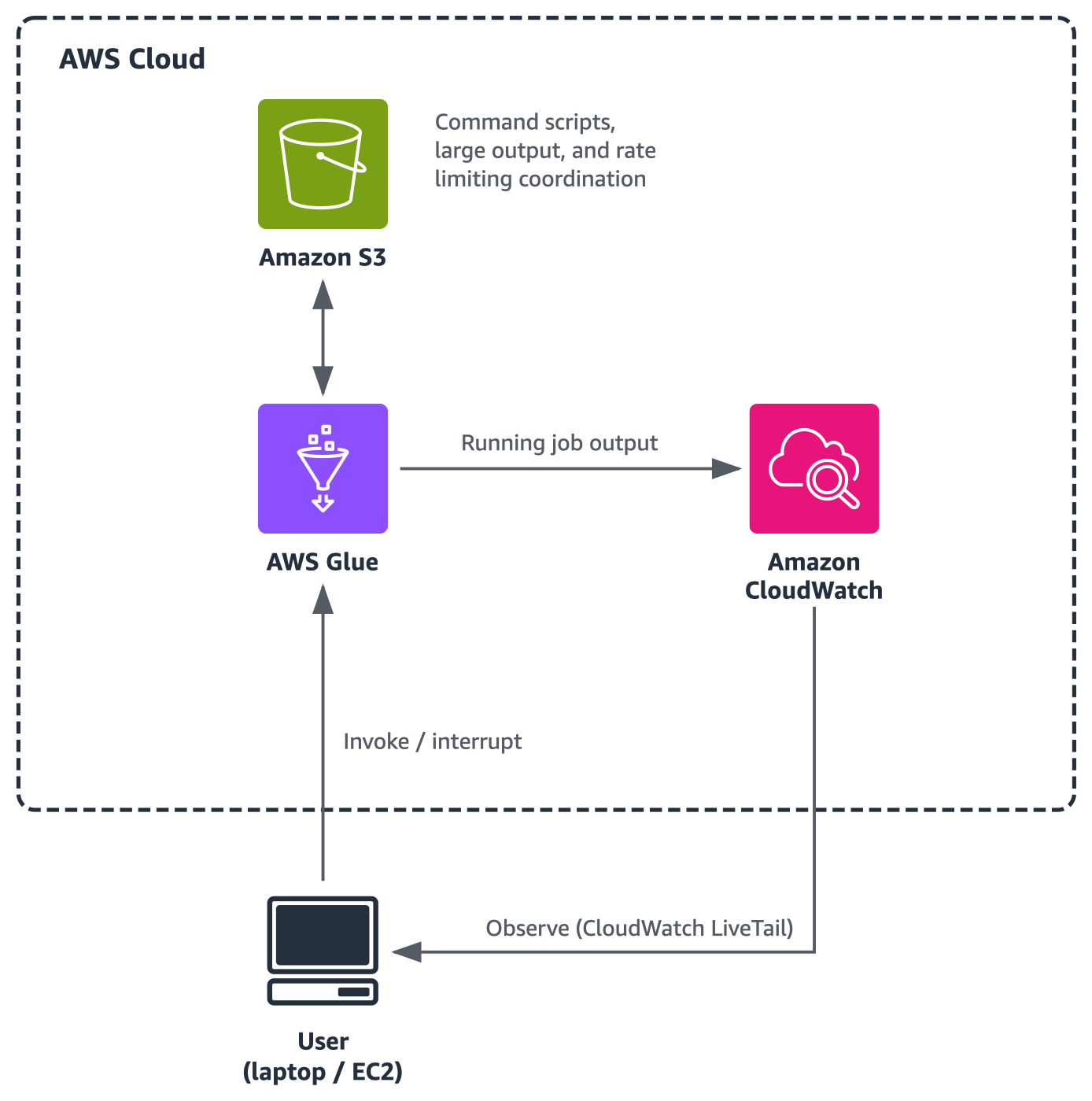
The command line interface can run on your laptop, in an Amazon Elastic Compute Cloud (Amazon EC2) environment, or in a container. Using a laptop is no slower, because most of the activity happens within the AWS context and most of Bulk’s infrastructure exists in the cloud.
Clean up resources
You can uninstall Bulk Executor with a teardown command:
The teardown removes the AWS Glue job and any roles created during the bootstrap. The teardown process won’t remove any output written to Amazon S3 during bulk execution jobs, nor does it remove the CloudWatch Log groups or events held within. Your account will accrue baseline storage charges until you remove them fully.
A note on security
Bulk assumes two security personas: a Bulk Admin and a Bulk User.
The Bulk Admin has elevated IAM permissions to run bootstrap: sufficient to create a Glue job, attach an IAM role to the job (the role should have some DynamoDB permissions), create an Amazon S3 bucket, and so on to get the whole environment setup. (The full list is in Bulk’s README).
The Bulk User needs more limited access: enough to start/stop the Glue job and pull data out of CloudWatch Logs, and ideally describe DynamoDB tables for client-side validation checks.
When deploying custom Python code (like the fill generator, update generator, or load-export transform) the intended process is that the Bulk Admin reviews the custom code and calls bootstrap to put it into place. This is because the role attached to the Glue job might include permissions beyond those of the Bulk User, and so it would be inappropriate for the Bulk User to be able to run arbitrary code without the Bulk Admin having put it in place intentionally.
For more information
You can find more information in Bulk’s README about things like additional --X configuration options and techniques for writing your own pluggable commands.
Over time we expect the list of commands should grow. We welcome additional contributors. If you have a great idea, we’d be happy to have you involved.
Conclusion
With Bulk Executor for DynamoDB, you can perform bulk actions against DynamoDB tables using AWS Glue on the back end while working with an experience that feels like a command-line utility. Give it a try and share your feedback in the comments.