AWS Database Blog
Optimize replication lag for Amazon RDS for Oracle replicas using redo compression – Part 1
Amazon Relational Database Service (Amazon RDS) for Oracle replicas are built using Oracle Data Guard technology, and you can use replicas to offload read-only workloads from the primary instance, bring data closer to end users, and provide disaster recovery protection through cross-Region replicas. RDS for Oracle deploys replicas using Maximum Performance mode of the Data Guard configuration to avoid performance impact on the primary because of the latency in shipping redo changes to remote replica instances.
A replica lag is a metric that indicates the data divergence between the primary and the replica instance. Various factors affect the replica lag, including network latency between primary and replica instances, resource configuration of the instances, available network bandwidth, and transaction rate. Regardless of the use case, it’s important to have a replica running with the lowest possible lag, especially when it’s used as a target for disaster recovery scenarios to meet a low recovery point objective (RPO). In this two-part blog series, we discuss various configurations and tuning options along with troubleshooting steps to optimize the lag of a replica instance in RDS for Oracle.
In part 1 (this post), we show you how to optimize lag for RDS for Oracle replicas using the redo compression feature. In part 2, we discuss various techniques to monitor, troubleshoot, and resolve replication lag for RDS for Oracle replicas.
What is redo compression and how does it help?
One of the challenges in replicating Oracle databases to remote locations to meet low RPO requirements is dealing with networking configurations that can have higher latency or bandwidth constraints. This becomes particularly challenging for transaction-intensive workloads with high redo generation rates, especially in cross-Region deployments where network paths typically exhibit increased latency compared to same-Region configurations. A common approach to address these network challenges is to reduce the amount of data transmitted over constrained network connections by applying compression techniques.
The redo transport compression feature of Oracle Data Guard reduces the amount of data shipped to remote standby instances over the network by compressing the redo before transmission from the primary and decompressing it at the standby instance.
RDS for Oracle supports the redo compression feature to optimize redo transport efficiency for replica instances. This can considerably reduce the transport lag of replicas, especially for cross-Region replicas where redo traffic traverses networks with higher latency compared to same-Region replica instances. Though redo compression can considerably reduce the amount of redo data to be shipped, it comes at the cost of additional CPU cycles consumed for compression and decompression operations.
Refer to Redo Transport Compression in a Data Guard Environment (Doc ID 729551.1) for further details on the redo transport compression feature of Oracle Database.
Prerequisites
The steps discussed in the post assume that you have the following resources and skills:
- Two sets of RDS for Oracle Enterprise Edition instances with cross-Region replicas. Replica is an Enterprise Edition feature. The replicas can be either mounted or open. For this post, we use read replicas (open mode). Make sure that the version of your RDS for Oracle instances supports the redo compression feature.
- Required Advanced Compression licenses to implement the redo compression feature.
- Amazon CloudWatch monitoring enabled on the RDS for Oracle instance to monitor resource utilization and replica lag.
- Basic knowledge of Oracle Data Guard concepts and configuration.
Enable redo compression
Redo transport compression can be implemented in RDS for Oracle using parameter groups, as discussed in Redo transport compression with RDS for Oracle. Enable the rds.replica.redo_compression parameter on the replica instance by setting it to ZLIB or LZO, which are the supported compression algorithms. Enabling this parameter in the option group automatically sets the LOG_ARCHIVE_DEST_n parameter with a COMPRESSION attribute. Setting the parameter to ENABLE picks up ZLIB as the compression algorithm. Enabling this parameter on the primary instance has no effect on redo compression, except when the primary becomes a replica after a role transition.
As per the Oracle licensing guide, Data Guard Redo Transport Compression is part of the Advanced Compression option, which is licensed separately on top of Oracle Database Enterprise Edition. Redo compression works with both mounted replicas (database remains in mounted mode, no Active Data Guard license required) and read replicas (open for read-only access, Active Data Guard license required).
There is no additional cost for enabling redo compression in RDS for Oracle except for the licensing considerations.
Test replication lags with and without redo compression
In this section, we show the impact and benefit of enabling redo compression for a cross-Region replica configuration. In this example, there are two pairs of primary-replica configurations: one pair has redo compression enabled and the other pair has redo compression disabled. Primary instances are running in us-east-1 and read replicas are running in us-west-2 Regions. The test is conducted using the SLOB Oracle I/O workload generation tool kit to produce a synthetic workload.
Refer to the SLOB documentation for more details about the SLOB tool and configurations.
Note: The outcome of this testing is shared for educational purposes only. The benefit and impact of redo compression vary based on the workload characteristics and data properties. We strongly recommend that you test redo compression on your non-production instances with a real application before enabling it in production.
Step 1: Prepare primary and replica instance pairs with compression enabled and compression disabled, with primary in us-east-1 and replica in us-west-2
The following table shows the configurations for the two sets of primary/replica instances used for the testing.
| Instance name | Role | Instance type | Storage configuration | Region | Redo compression setting (rds.replica.redo_compression) |
| blog-primary-compression-off | primary | db.r7i.8xlarge | io2, 1TB, 40K iops | us-east-1 | DISABLE |
| blog-replica-compression-off | read-replica | db.r7i.8xlarge | io2, 1TB, 40K iops | us-west-2 | DISABLE |
| blog-primary-compression-on | primary | db.r7i.8xlarge | io2, 1TB, 40K iops | us-east-1 | ENABLE |
| blog-replica-compression-on | read-replica | db.r7i.8xlarge | io2, 1TB, 40K iops | us-west-2 | ENABLE |
- It’s important to choose an instance/EBS configuration that meets the workload requirements of the application. We chose
r7i.8xlargefor this testing to get consistent 40K IOPS and 1250 MB/s throughput. - Increase the size of redo logs to 512 MB for the primary instances using
rdsadmin.rdsadmin_util.add_logfileto support transaction-intensive workloads, as discussed in Performing common log-related tasks for Oracle DB instances. - Enable
rds.replica.redo_compression=ENABLEin the pair of instances (blog-primary-compression-on and blog-replica-compression-on), as discussed in Redo transport compression with RDS for Oracle.
Step 2: Install and configure SLOB in an Amazon Elastic Compute Cloud (Amazon EC2) instance that has connectivity to both primary instances
Though SLOB is not resource-intensive on the client, we recommend using an instance with 8 vCPUs and 32 GB RAM.
Create two separate installations of SLOB to run load tests for both primary instances simultaneously for a straightforward comparison of results.
Step 3: Create a tablespace called SLOBDATA and load sample data for 800 schemas
To connect to the primary instances, use a client tool of your choice, such as SQL*Plus, to create the SLOBDATA tablespace.
Run the SLOB data load process for 800 schemas.
We used the following parameters in slob.conf to load the data.
Refer to the SLOB documentation for details of these parameters.
This step needs to be followed for both primary instances.
Step 4: Run load testing using 800 schemas.
This generates a load with approximately 140 MB/s redo.
You can start the load test for both primary instances simultaneously from the same Amazon EC2 instance that hosts two SLOB installation directories.
You can run the following query using SQL*Plus on the primary instances at the beginning and end of the load test to look at the redo size generated by the instance. The difference between the begin value and end value shows the redo size generated by the load test, assuming no other activities are going on in the instance.
Now, run the load testing using SLOB.
Re-run the query to fetch the redo size at the end of the load test.
End_redosize-Begin_redosize shows the redo generated in bytes.
Step 5: Monitor resource utilization and replica lag using CloudWatch and queries against the database.
You can monitor the CPU utilization, network transmit throughput, and replica lag for instances using CloudWatch metrics.
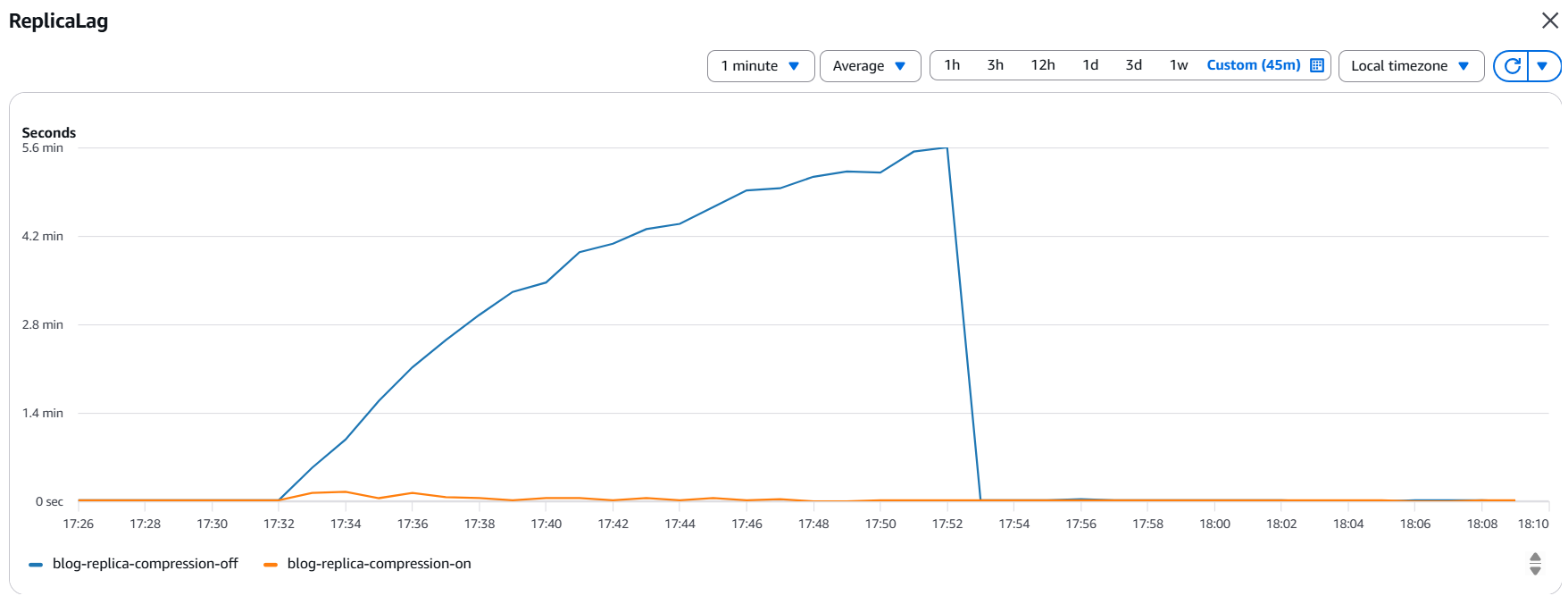
The following graphs indicate that the replica lag of the replica instance with the redo compression feature enabled was low (maximum 20 seconds) compared to the significant lag (338 seconds) experienced by the replica instance without redo compression. The instance without redo compression also took longer to resolve the gap after the load test was completed.
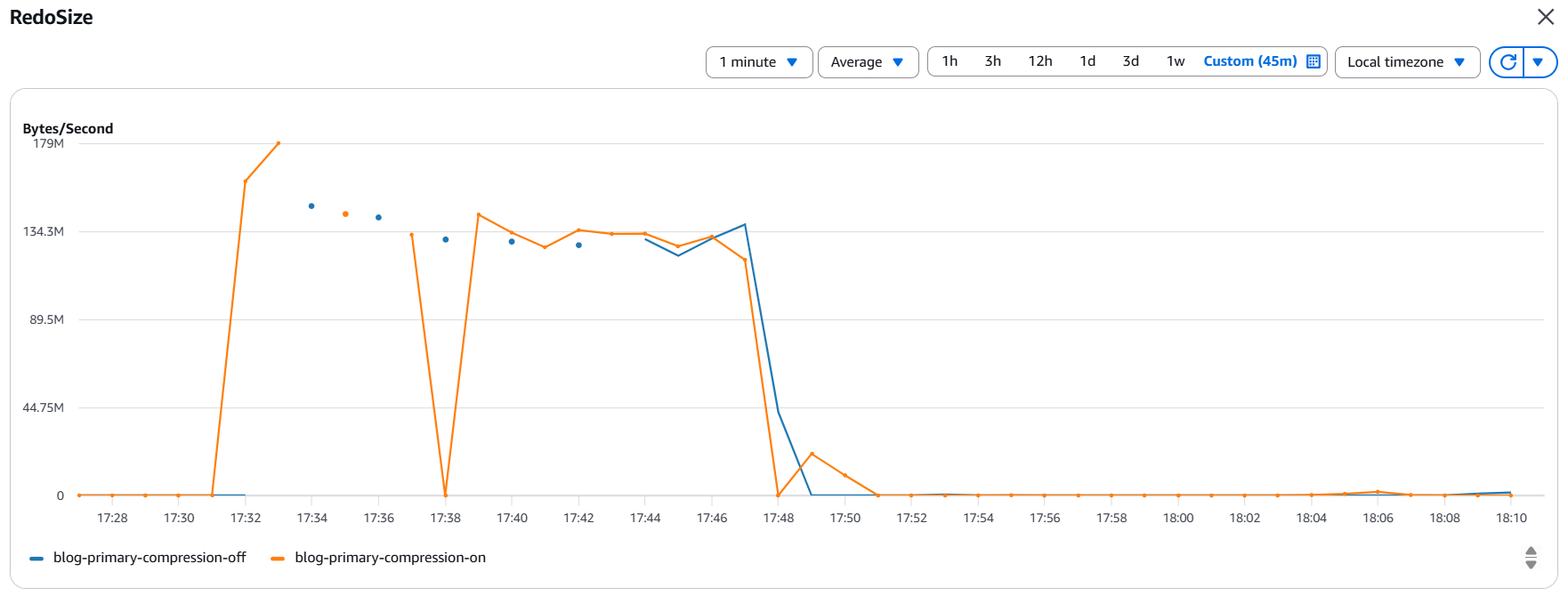
The following graphs show the redo generation rate and write throughput on the primary instances during the testing period.
The following graph shows similar redo generation statistics (peak ~140MB/s) during the testing period for both the instances.
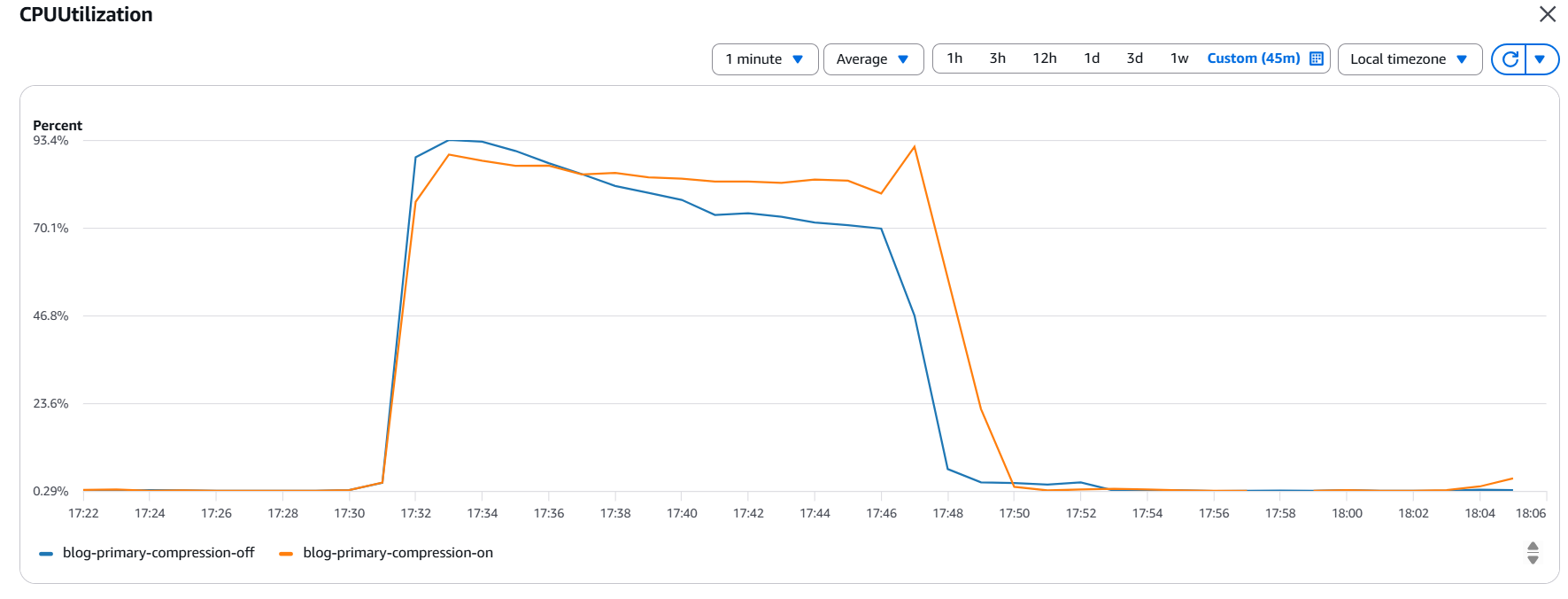
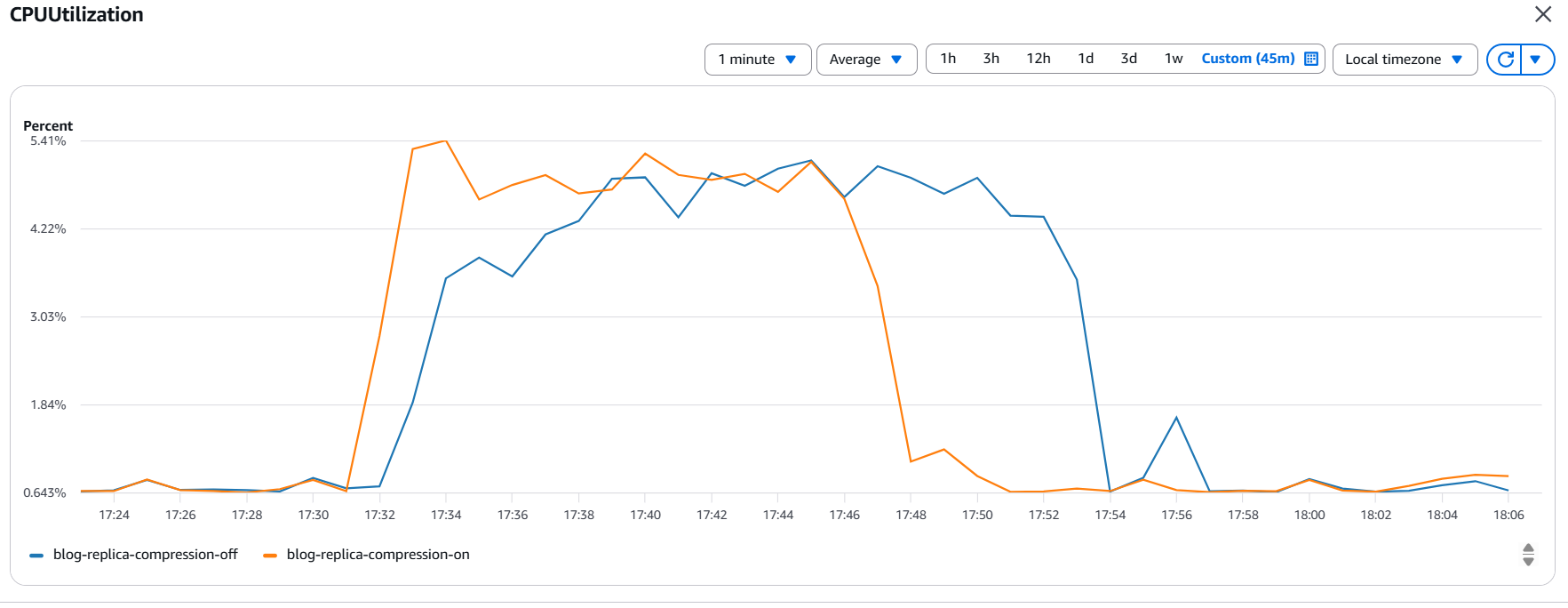
The primary and replica instances show slightly higher CPU utilization because of redo compression in this specific example.
The following graph shows CPU utilization on the primary instances during the testing period.
The following graph shows CPU utilization on replica instances during the testing period.
The following graph shows reduced network transmit throughput when redo compression is enabled.
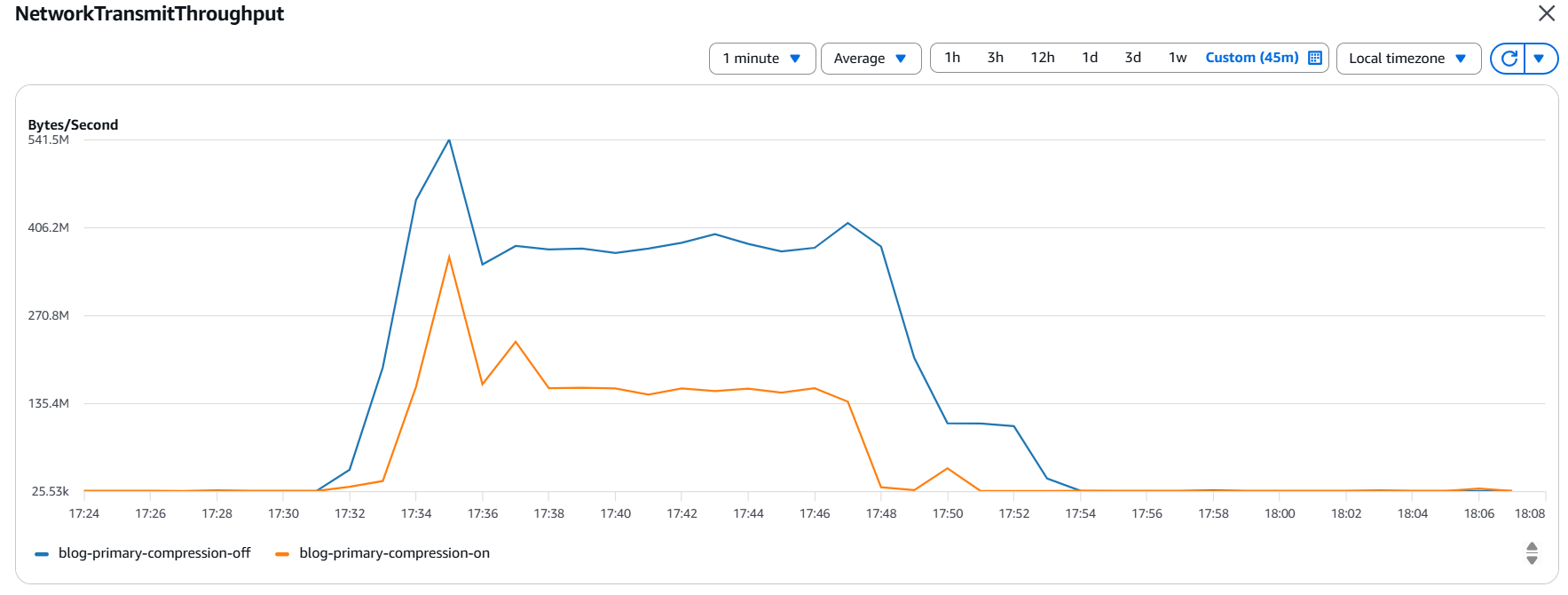
Additionally, the query against the v$dataguard_stats view on the replica with redo compression disabled indicates that the lag was primarily contributed by transport lag and not apply lag.
As mentioned in the documentation, apply lag is a measure of the degree to which the data in a target database lags behind the data in the originating database, because of delays in propagating and applying redo to the target database. Apply lag includes the transport lag as well, and in this testing, the lag was entirely contributed by transport lag.
This test showed considerable benefit of using the redo compression feature to optimize RPO for an application that generates ~140 MB/s redo.
Note: 140MB/s redo generation was chosen for this specific testing based on the instance class and storage configuration. You should be able to test using a higher transaction rate by using appropriate instance and EBS configurations that support the resource requirements of the workload.
Recommendations
- Though setting the
rds.replica.redo_compressionparameter on the primary instance has no effect on compressing redo traffic to the replicas, we recommend setting the parameter on the primary as well to help make sure redo compression remains intact after Data Guard role transitions. - Test the performance impact on your workload from the additional CPU consumption before enabling redo compression in production instances.
- There is no compression algorithm that’s the best for all workloads. You need to test which algorithm meets your requirement before implementing it in production.
- Though you can have a mix of replica instances with redo compression enabled and disabled, you may not find a real benefit of compression in a mixed configuration. We recommend keeping the configuration with all replicas in the same compression setting.
- If the database is configured with Transparent Data Encryption (TDE) or contains LOB columns, it can adversely impact the compression ratio. Test the benefits using the real schema and application before implementing in production.
Clean up
After testing, you can clean up the resources provisioned for this testing, which include:
- RDS for Oracle primary instances.
- RDS for Oracle read replicas.
- Amazon EC2 instance hosting the SLOB module.
Conclusion
In this post, you learned how to optimize replication lag on RDS for Oracle replicas using the redo compression feature. Optimizing replica lag is a key requirement to meet business service level agreement (SLA) and RPO requirements in a cross-Region disaster recovery scenario. It also becomes important when the replica is used for read-only queries with low tolerance to data divergence.
RDS for Oracle now supports the redo transport compression feature, which ships redo to remote replicas over a low-bandwidth network at lower lag. Validate your license requirements for using the Advanced Compression feature, and explore the option of optimizing replica lag using this feature to meet your workload requirements.
Refer to part 2 to learn about various monitoring and troubleshooting steps for resolving replica lag-related challenges.