AWS Database Blog
Provision Oracle Database@AWS stack using AWS CloudFormation
Oracle Database@AWS (ODB@AWS) delivers Oracle Exadata infrastructure, managed by Oracle Cloud Infrastructure (OCI), from within AWS data centers. It enables you to migrate Oracle databases to AWS while benefiting from the high performance, scalability, and advanced capabilities of Exadata. Oracle Database@AWS offers deep integration with native AWS services, including Amazon Simple Storage Service (Amazon S3), zero-ETL pipelines, and AWS Key Management Service (AWS KMS). Oracle databases run alongside applications deployed on Amazon Elastic Compute Cloud (Amazon EC2), Amazon Elastic Container Service (Amazon ECS), Amazon Elastic Kubernetes Service (Amazon EKS), and more. This tight integration simplifies data flows, enhances security, and accelerates application development across diverse compute environments.
Currently Oracle Database@AWS offers the following Oracle Database services
- Oracle Autonomous AI Database on Dedicated Exadata Infrastructure (ADB-D)
- Oracle Exadata Database Service on Dedicated Infrastructure (ExaDB-D)
Infrastructure as code (IaC) is the process of provisioning and managing an application’s infrastructure through a set of configuration files. IaC is designed to help you centralize infrastructure management, standardize resources, and scale quickly so that new environments are repeatable, reliable, and consistent. You can deploy the resources in Oracle Database@aws using IAC tools like Terraform or AWS CloudFormation.
AWS CloudFormation is an infrastructure as code (IaC) service that allows you to easily model, provision, and manage AWS and third-party resources. AWS CloudFormation helps you model and set up your AWS resources so that you can spend less time managing those resources and more time focusing on your applications that run in AWS.
In this post, we explain how to set up key components of Oracle Database@AWS offering including ODB network, Oracle Exadata infrastructure, Exadata VM clusters and Autonomous VM clusters using AWS CloudFormation template.
Solution overview
To get started with Oracle Database@AWS, you can view the listing in AWS Marketplace. To use the service, you configure it within your AWS account through a process referred to as onboarding. To begin onboarding, contact your Oracle representative and request a Private Offer. After you agree on pricing, terms and conditions, you complete the purchase through AWS Marketplace. After the purchase is complete, you link your AWS account with an OCI tenancy. This is called multicloud linking. Based on your requirements, you can use the entitlement sharing capability to share the AWS Marketplace entitlements for ODB@AWS across AWS accounts in the same AWS organization. After you complete onboarding, you can begin provisioning the Oracle Database@AWS system resources for Exadata Database Service on Dedicated Infrastructure and Autonomous AI Database on Dedicated Exadata Infrastructure. Provisioning starts with creating an ODB network and Exadata infrastructure. Based on your workloads and requirements, you then create either an Exadata VM cluster for the Oracle Exadata Database Service, or an Autonomous VM Cluster for Autonomous AI Database on Dedicated Exadata Infrastructure.
To begin using Oracle Database@AWS, you can create the following resources using the Oracle Database@AWS console, AWS CLI, or APIs:
- ODB network
- Oracle Exadata infrastructure
- Exadata VM cluster or Autonomous VM cluster
- ODB peering connection
The following diagram shows the Oracle Database@AWS architecture.
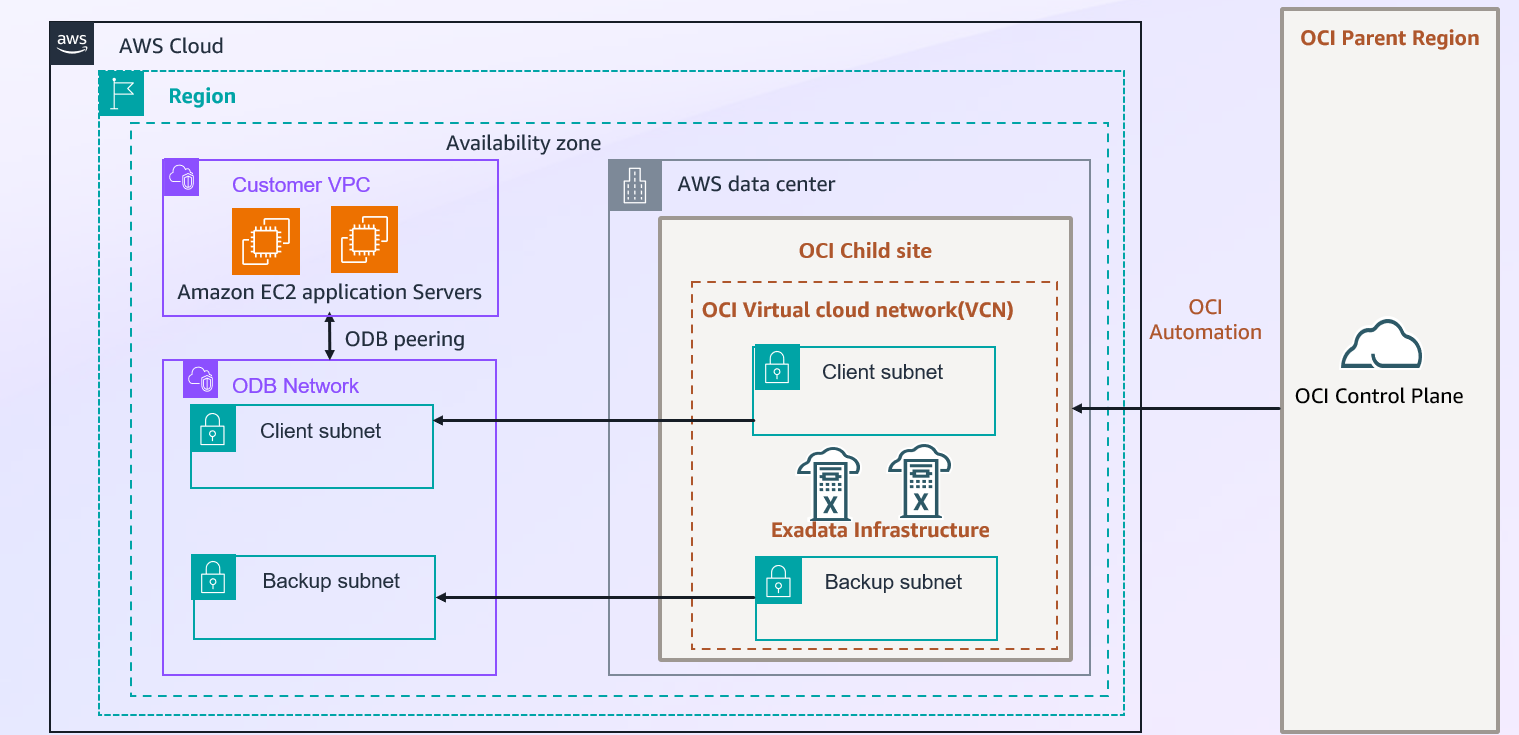
Before we dive in, it is important to understand the architecture of Oracle Database@AWS and the key components involved in it.
- Amazon Virtual Private Cloud and Subnet: An Amazon virtual private cloud (Amazon VPC) lets you launch AWS resources into a virtual network you’ve defined. This virtual network resembles a traditional network that you operate in your own data center, with the benefits of using the scalable infrastructure of AWS. After you create an VPC, you can add subnets.
A subnet is a range of IP addresses in your Amazon VPC. You can create AWS resources, such as Amazon EC2 instances, in specific subnets. - OCI Virtual Cloud Network (VCN) and Subnet: A Virtual Cloud Network (VCN) is a customizable, private network that you set up in an OCI tenancy within a specified Oracle Region. It provides a secure and scalable network environment where you can deploy and manage your OCI resources, such as compute instances, databases, and storage. A VCN acts as a virtualized version of a traditional network, including key components like subnets, route tables, and gateways. VCNs let you to isolate and segment your cloud resources within logically separated networks, enhancing security and manageability. VCNs are divided into subnets, which are smaller subdivisions that allow you to segment resources and control traffic at a finer level. Subnets can be either public (allowing public IP addresses and internet access) or private (restricting direct internet access). In Oracle multicloud architecture, when an ODB network with client and backup subnets is created in an AWS Region, a corresponding OCI VCN with subnets is automatically created in your OCI tenancy in the paired OCI region.
- OCI Region (Parent Site): An OCI Region is a geographic area that has one or more data centers known as availability domains. In the Oracle multicloud model, an OCI region connected to a paired AWS Region is called a Parent Site. ODB@AWS is available only in the regions discussed in Regional Availability.
Each OCI region operates independently of other regions, providing fault tolerance and disaster recovery capabilities. Each region consists of one or more availability domains. An OCI availability domain (AD) is one or more data centers within an OCI region. In regions that have multiple ADs, the ADs are physically isolated from each other. They don’t share infrastructure, power, cooling, or internal networking, so a failure in one AD is unlikely to affect other ADs in the same region. - OCI Child Site: An OCI child site is a data center that extends an OCI availability domain (AD) to an Availability Zone (AZ) in an AWS region. With the OCI child site model, the Exadata infrastructure used for Oracle Database@AWS physically resides in an AWS data center (an AZ within an AWS region), but is logically mapped to an OCI region and its network components.
- ODB Network: The ODB network is a private and isolated network that hosts Oracle Exadata VM Clusters and Autonomous VM Clusters within a specified AWS Availability Zone (AZ). The ODB network consists of a CIDR range of IP addresses. The ODB network maps directly to the network that exists within the OCI child site and enables communication between AWS and OCI. In Oracle’s multicloud architecture, the ODB network provides network connectivity for the OCI components that are part of the Oracle Database@AWS service.
When you create an ODB network, you specify information such as the following:- Availability Zone — The ODB network is specific to an AZ.
At the time of writing this post, you can use Oracle Database@AWS in the following AWS Regions:
US East (N. Virginia)
You can use the AZs with the physical IDs use1-az4 and use1-az6.
US West (Oregon)
You can use the AZs with the physical IDs usw2-az3 and usw2-az4.
Asia Pacific (Tokyo)
You can use the AZs with the physical IDs apne1-az1 and apne1-az4.
US East (Ohio)
You can use the AZs with the physical IDs use2-az1 and use2-az2.
Europe (Frankfurt)
You can use the AZs with the physical IDs euc1-az1 and euc1-az2.Run the following command to find the logical AZ names in your account that map to the preceding physical AZ IDs.
- Client CIDR addresses — The ODB network requires a client subnet CIDR for Exadata VM clusters and Autonomous VM clusters.
- Backup CIDR addresses — The ODB network requires a backup subnet CIDR for managed database backups of VM clusters. The backup subnet is optional for Exadata VM clusters.
- AWS service integrations — You can configure a network path for AWS service integrations such as Amazon S3 and zero-ETL with Amazon Redshift. For more information, see AWS service integrations.
Refer to ODB Network creation for more information on CIDR requirements.
- Availability Zone — The ODB network is specific to an AZ.
- Oracle Exadata Infrastructure: Oracle Exadata infrastructure is a high-performance, integrated hardware and software platform designed for running Oracle Databases. Exadata is a pre-configured and pre-tested full-stack platform, meaning all the necessary hardware and software components are integrated and optimized to work together seamlessly. Exadata features a scale-out architecture with database servers and intelligent storage servers that can be independently scaled to meet changing workload demands. Exadata storage servers go beyond traditional storage by having their own CPUs and specialized software that enable them to perform database operations such as SQL query processing close to the data. Exadata uses a high-bandwidth, low-latency network fabric (such as RDMA over Converged Ethernet or RoCE) to connect database servers and storage servers, ensuring rapid data access and transfer rates. In Oracle multicloud architecture, Exadata infrastructure is the underlying hardware for both Oracle Exadata Database Service and Oracle Autonomous AI Database.
When you create Exadata infrastructure in Oracle Database@AWS, you specify information such as the following:- The total number of database servers.
- The total number of storage servers.
- The Exadata system model (X11M).
- The AZ that hosts the infrastructure (see Supported Regions for Oracle Database@AWS)
Refer to Exadata Infrastructure for more information.
- Exadata VM clusters: An Exadata VM cluster is a set of tightly coupled Exadata VMs. Each VM has a complete Oracle database installation that includes all features of Oracle Enterprise Edition, including Oracle Real Application Clusters (Oracle RAC) and Oracle Grid Infrastructure. You can create one or more Oracle Exadata databases on a VM cluster.
For diagrams that show the architecture of VMs and VM clusters, see Exadata Database Service on Dedicated Infrastructure Technical Architecture
When you create a VM cluster, you specify information that includes the following:- An ODB network
- An Oracle Exadata infrastructure
- The database servers on which to place the VMs in the cluster
- The total amount of usable Exadata storage
For more information on how to create refer to Exadata VM Cluster
- Autonomous VM clusters: Autonomous VM Clusters (AVMCs) allow a physical Exadata Cluster (Machine) to be partitioned into multiple virtual clusters. They can be used to isolate environments for different database workloads through separate access rules, network configurations, as well as customizable compute memory, and storage resources. The AVMC is one of the infrastructure components of the four-level database architecture model on which an Autonomous Container Database is built. One or more AVMCs are provisioned inside an Exadata Infrastructure (EI) resource, providing the link between the EI and the Autonomous Container Database resources in your deployment. AVMCs provide isolated environments for different database workloads through separate access rules, network configurations, as well as customizable compute memory, and storage resources. You can configure the ECPU core count per VM, database memory per CPU, database storage, and maximum number of autonomous container databases while creating Autonomous VM Cluster. For more information refer to Create Autonomous VM Cluster
- ODB Peering: ODB peering is a user-created network connection that allows traffic to be routed privately between an Amazon VPC and an ODB network. In Oracle multicloud architecture, traffic between your applications in the VPC and the Oracle Database in the ODB network is routed privately through ODB peering without traversing the public internet. For more information refer to creating ODB peering connection.
- Oracle Exadata databases: With Oracle Database@AWS, you use the AWS console to create the Oracle Exadata infrastructure and VM clusters that host the Exadata databases. You then use OCI APIs to create and manage the Oracle databases. For more information on how to create the database refer to Exadata Database and Autonomous Database
For more details on components of Oracle Database@AWS refer to Architecture.
For detailes steps on how to create above resources refer to creating resources in your Oracle Database@AWS
Prerequisites
Before you begin, make sure you have the following prerequisites:
- A basic understanding of CloudFormation and usage of templates
- An understanding of the Oracle Database@AWS offering
- Perform the steps in Onboarding to Oracle Database@AWS. You must have accepted a private offer to use Oracle Database@AWS.
- Grant your IAM principal the policy permissions listed in Allow users to provision Oracle Database@AWS resources. These permissions are necessary to use Oracle Database@AWS.
You can use the following AWS CloudFormation templates to provision various resources in Oracle Database@AWS. Customize the parameters according to your business requirements. It is important to understand the significance of each parameter and their allowed values.
The following are the templates available at the time of writing this blog. For the latest information, refer to Provisioning Oracle Database@AWS through AWS CloudFormation.
Step 1: Create an ODB network in Oracle Database@AWS
For more information on IP address requirements refer to Planning IP address space in Oracle Database@AWS
Step 2: Create an Oracle Exadata infrastructure in Oracle Database@AWS
Step 3: Create an Exadata VM cluster or Autonomous VM cluster in Oracle Database@AWS
Step 4: Create ODB Peering Connection
Create the CloudFormation stack
To provision your resources with AWS CloudFormation, complete the following steps:This CloudFormation template creates the following resources:
- A VPC
- An internet gateway
- Two public subnets
- Two private subnets
- A public route table
- A private route table
- A public route
- Route table associations for all four subnets
- An ODB network
- An ODB peering connection
- An Exadata infrastructure
- An Exadata VM Cluster
- An Autonomous VM Cluster
Before deploying, review the template carefully, and if you don’t need any of these resources, modify the template accordingly.
- Clone the GitHub repository to your local machine or download the script from AWS Samples.
- Follow the GitHub readme to verify the prerequisites and deploy the CloudFormation stack.
- Verify the completion of the stack deployment.
Important: When deploying ODB@AWS using AWS CloudFormation, be aware that certain resource property changes require complete resource replacement rather than in-place updates. Properties such as CpuCoreCount and DbServers configurations will trigger a replacement when modified. Review the AWS CloudFormation documentation for a complete list of properties that require replacement before implementing any changes.
Once you are done with creating resources you can configure connectivity between the AWS Virtual Private Cloud (VPC) and the ODB Network for Oracle Database@AWS by
- Configuring VPC route tables for OdbPeeringConnection
- Configuring DNS for Oracle Database@AWS
- An outbound endpoint
The endpoint is required to send DNS queries to the ODB network. - A resolver rule
This rule specifies the domain name of the DNS queries that the Route 53 Resolver forwards to the DNS for the ODB network.
- An outbound endpoint
Refer to network configuration for more details.
Clean up
If you no longer require this setup and want to avoid future charges, you can delete the resources that you created as part of this setup, namely the ODB network, Exadata Infrastructure and VM ClustersTo delete all other resources that were launched as part of the AWS CloudFormation stack, complete the following steps:
- On the AWS CloudFormation console, choose Stacks in the navigation pane.
- Choose the stack you created, then choose Delete.
- Choose Delete stack when prompted.
For more information, refer to Deleting a stack on the AWS CloudFormation console.
Summary
In this post, we showed how you can use AWS CloudFormation to deploy resources in Oracle Database@AWS.
To learn more on how to get started refer to Getting started with Oracle Database@AWS