AWS Database Blog
Simplify cross-account stream processing with AWS Lambda and Amazon DynamoDB
Organizations often use a multi-account architecture for security and isolation. However, with your Amazon DynamoDB tables now in one account, you might need to process their stream events in another. Until recently, this meant routing through Amazon Kinesis Data Streams or building custom relay infrastructure with cross-account AWS Identity and Access Management (IAM) roles, adding unwanted complexity. Resource-based policies for Amazon DynamoDB Streams now helps you avoid these workarounds. Your AWS Lambda functions can directly consume streams across accounts with no custom infrastructure required.
DynamoDB is a serverless, fully managed, distributed NoSQL database with single-digit millisecond performance at scale. You can build modern, high-performance applications without managing infrastructure. One of its key features is DynamoDB Streams, which captures data changes in near real time. This capability supports use cases such as audit logging, search indexing, cross-Region replication, anomaly detection, and real-time analytics.
Lambda is a serverless compute service you can use to run code without provisioning or managing servers. Lambda integrates with DynamoDB Streams, so you can automatically trigger functions in response to table updates. This integration is helpful for use cases like data replication, materialized views, analytics pipelines, and event-driven architectures.
In this post, we explore how to use resource-based policies with DynamoDB Streams to enable cross-account Lambda consumption. We focus on a common pattern where application workloads live in isolated accounts, and stream processing happens in a centralized or analytics account.
Benefits of cross-account Lambda with DynamoDB streams
With resource-based policies for DynamoDB streams, you can grant a Lambda function in one AWS account direct access to read from a DynamoDB stream in another account. No custom relay infrastructure is required.
With this feature, you can now simplify multi-account event-driven architectures, improve security, and reduce operational burden. Lambda manages the ingestion, filtering, delivery, retries, and error handling just as it does with same account event source mappings.
There are many reasons you might want to process DynamoDB stream events in a different AWS account, such as if you’re operating a SaaS offering, running a centralized analytics pipeline, or managing isolated environments for development, staging, and production. Resource-based policy support for DynamoDB streams makes it straightforward to implement these patterns while maintaining strong access control.
This capability enables several architectural patterns:
- Centralized data processing – Route streams from multiple application accounts to a central analytics or data lake account where Lambda functions perform aggregation, transformation, and loading into your data warehouse.
- Shared services – Build reusable audit logging, compliance monitoring, or notification services in a dedicated account that consume streams from tables across your organization.
- Multi-tenant architectures – Allow tenant-specific Lambda functions in isolated accounts to process data from a centralized DynamoDB table, maintaining security boundaries while supporting event-driven workflows.
Solution overview
The cross-account access model uses two components:
- Resource-based policy on the DynamoDB stream (in the source account) – Grants permission to the Lambda execution role in the consuming account
- IAM execution role (in the consuming account) – Allows the Lambda function to read from the stream
When you configure an event source mapping between a Lambda function and a cross-account DynamoDB stream, access is granted using the combined permissions of the stream’s resource policy and the Lambda function’s execution role. The stream’s resource-based policy authorizes the Lambda execution role, and the execution role provides the specific permissions needed to read and process stream records.
To illustrate how this works, consider a SaaS provider that offers document processing services to enterprise customers. Each customer operates in a dedicated AWS account for improved isolation and security. When a document is processed, the tenant writes a record to a DynamoDB table with DynamoDB streams enabled. The SaaS offering team wants to aggregate these records in a central AWS account for billing and analytics. With cross-account Lambda and DynamoDB streams, this integration becomes straightforward and fully managed.
The following diagram illustrates the architecture.
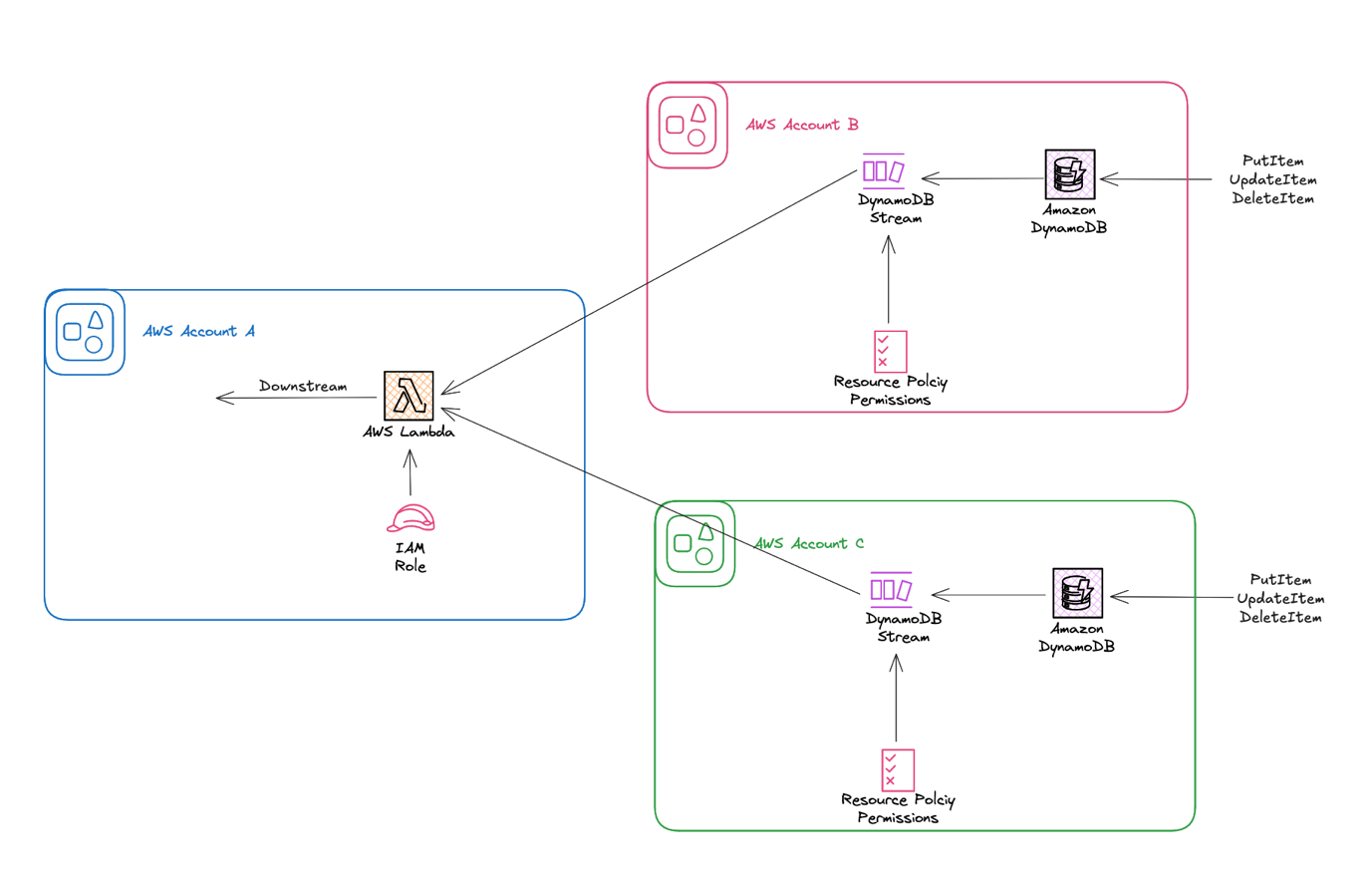
In this post, we set up a Lambda function in Account A to process DynamoDB stream events from a table in Account B. We create the Lambda execution role first, then set up the DynamoDB table with streams, configure the cross-account permissions, and finally connect them with an event source mapping.
The following commands use variables to make the setup reusable and reduce manual copying of Amazon Resource Names (ARNs) between steps.
Prerequisites
To deploy this solution, you must have two AWS accounts and permission to create the necessary resources. This solution uses the AWS Command Line Interface (CLI), which you can install using these steps.
Define variables
Use the following code to define the variables:
Create Lambda execution role in Account A
In Account A, create an IAM role that will serve as the Lambda execution role:
Create Lambda function in Account A
Create the Lambda function code:
Package the code:
Create the Lambda function:
Create DynamoDB table with streams in Account B
In Account B, create a DynamoDB table with streams enabled:
Attach resource-based policy to stream in Account B
In Account B, attach a resource-based policy to your DynamoDB stream.First, create the JSON policy:
Next, apply the policy:
Create event source mapping in Account A
In Account A, create an event source mapping between your Lambda function and the cross-account stream:
Considerations
Keep in mind the following when deploying this solution:
- Both the DynamoDB table and Lambda function must be in the same AWS Region
- Standard DynamoDB Streams and Lambda pricing applies; there are no additional charges for cross-account access
- The stream’s resource-based policy uses the Lambda execution role ARN as the principal for fine-grained access control
- The stream’s resource-based policy supports standard IAM policy features, including conditions and policy variables
- Make sure to include the following required actions in your policy:
dynamodb:DescribeStream,dynamodb:GetRecords, anddynamodb:GetShardIterator - This feature works with both new and existing DynamoDB tables with streams enabled
- This feature does not support Amazon managed keys
Cleaning up
To avoid incurring future charges, remove the resources created in this walkthrough:
- In Account A, delete the resources you created:
Delete the Lambda function:
Delete the IAM role:
- In Account B, delete the DynamoDB table:
Conclusion
Resource-based policy support for DynamoDB streams gives you a powerful new way to build event-driven systems across AWS account boundaries. With this feature, you can create secure, scalable pipelines without writing custom integration logic. This solution can help if you’re running a SaaS offering, consolidating logs, or processing change data centrally.
DynamoDB streams with Lambda provides a managed, reliable path for real-time stream processing. Start building with cross-account Lambda and DynamoDB streams today and simplify your event-driven architecture.