AWS Database Blog
Turbocharge your applications with Amazon DocumentDB 8.0
Amazon DocumentDB (with MongoDB compatibility) announced the general availability of Amazon DocumentDB 8.0 that delivers breakthrough performance improvements that can transform your application experience. With up to 7x faster aggregation pipeline latency and 5x improved storage compression, you can build faster applications while significantly reducing costs.
Amazon DocumentDB 8.0 brings in support for MongoDB 8.0 API driver compatibility while maintaining support for applications built using MongoDB API versions 6.0 and 7.0. This post explores the new features in Amazon DocumentDB 8.0 and demonstrates how they improve performance and cost efficiency.
Amazon DocumentDB is a serverless, fully managed, MongoDB API-compatible document database service that cost-effectively runs critical document workloads at virtually any scale without managing infrastructure. Amazon DocumentDB serves tens of thousands of customers globally across all industries. You can enhance your applications with gen AI and machine learning (ML) capabilities using vector search for Amazon DocumentDB and integration with Amazon SageMaker Canvas.
New features in Amazon DocumentDB 8.0:
- MongoDB 8.0 API Driver Compatibility – Amazon DocumentDB 8.0 adds compatibility with MongoDB 8.0 API drivers while maintaining support for MongoDB API version 6.0 and 7.0.
- Query Planner Version 3 – Delivers up to 2x overall performance improvement over Planner v2 with up to 7x faster query latency for aggregation pipelines. Planner v3 adds intelligent optimizations including match stage pull-up, $lookup and $unwind coalescing, and distinct scan optimization for low cardinality indexes.
- Zstandard (Zstd) Dictionary-Based Compression – Amazon DocumentDB 8.0 introduces Zstd compression as an alternative to LZ4, achieving up to 5x better compression ratios for smaller documents.
- Text Index v2 – Improved text search with better parsing for complex strings, including support for URLs, email addresses, and special characters.
- Collation Support – Perform language-specific string comparisons with support for locale-aware sorting and filtering.
- Views – Views function as virtual read-only collections that present data from underlying collection based on specified aggregation pipeline.
- Vector Search Enhancements – Parallel vector index builds are now up to 30x faster, enabling you to build AI-powered applications with significantly reduced index creation time.
- New Aggregation Stages – Support for six aggregation stages including $merge, $bucket, $replaceWith, $vectorSearch, $set, and $unset stages. For a full list of supported aggregation stages, see Aggregation pipeline operators.
- New operators: Support for five new operators including $pow, $rand, $dateTrunc, $dateToParts, and $dateFromParts. For a full list of supported operators, see Query and projection operators.
For full release notes, see Amazon DocumentDB release notes.
Let’s dive deeper into the enhancements that make Amazon DocumentDB 8.0 more performant for your applications
Smarter, faster queries: New Query Planner Version 3
New Query Planner V3 (NQP V3) is built on the foundation of v2 Planner, which achieved up to 10x performance improvements for find and update queries. v3 extends these gains to distinct and aggregation operations through intelligent optimizations.
What makes Planner v3 faster?
NQP V3 employs three key optimizations that dramatically reduce query execution time:
- Distinct Scan Optimization – Uses index-only scans for low-cardinality fields
- Match Stage Pull-Up – Moves filter operations earlier in aggregation pipelines
- $lookup and $unwind Coalescing – Combines join and unwind operations to remove intermediate processing
Test data and cluster configuration:
Test data: Queries used in this section are executed against the dataset generated with py-tpcc benchmarking suite using the following configuration.
This execution results in 3 million records in Customer, History and Orders collections and 10 million in the Stock collection.
Cluster and instance configuration: Query execution times are based on queries running on an r6g.2xlarge instance with default configuration settings for Amazon DocumentDB clusters 5.0 and 8.0 respectively
Distinct scan optimization:
For distinct operations on low-cardinality indexed fields, Planner v3 introduces a new Distinct_Scan execution stage that uses index-only scans (IXONLYSCAN),improving performance for distinct operations on low cardinality indexes.For distinct operations on indexed fields with low cardinality, Planner v3 introduces a new Distinct_Scan execution stage that index-only scans (IXONLYSCAN)improving performance for distinct operations.
With the Distinct_Scan optimisation, the query to find out distinct warehouse IDs returned results in single digit millisecond on version 8.0 whereas the query in 5.0 took multiple seconds.
| Version | Execution Time |
|---|---|
| Amazon DocumentDB 5.0 | 5,285 ms |
| Amazon DocumentDB 8.0 | 6 ms |
Amazon DocumentDB 8.0 returns result in 6 ms compared to 5,285 ms in Amazon DocumentDB 5.0, representing a significant performance improvement.
To see the query plan for your distinct query run explain():
Match stage pull-up: Smarter pipeline execution
NQP v3 automatically reorders your aggregation pipelines, moving filter operations ($match) earlier when possible. This reduces the number of documents processed by expensive transformation stages—without requiring you to rewrite your queries.
For example, here is a query with the match stage later in the pipeline to find the top 10 highest-value customers.
This query returns results in milliseconds on version 8.0, compared to over 10 seconds on version 5.0:
| Version | Execution Time |
|---|---|
| Amazon DocumentDB 5.0 | 14,113 ms |
| Amazon DocumentDB 8.0 | 619 ms |
Note: When the query is rewritten to place the match stage first in the pipeline, version 5.0 returns the result in under a second.
$lookup and $unwind Coalescing:
When joining collections with $lookup followed by $unwind (a common pattern), NQP V3 automatically combines these operations. This removes intermediate data structures and reduces memory overhead.
Here is a query to get the payment transaction report from HISTORY and CUSTOMERS collections using $lookup and $unwind to get the info for top customers at warehouse 1, showing payments > $10 with customer daily revenue tracking.
This query returns results in milliseconds on version 8.0, compared to over 19 seconds on version 5.0:
| Version | Execution Time |
|---|---|
| Amazon DocumentDB 5.0 | 19,161 ms |
| Amazon DocumentDB 8.0 | 604 ms |
Store more data, pay less: dictionary-based compression
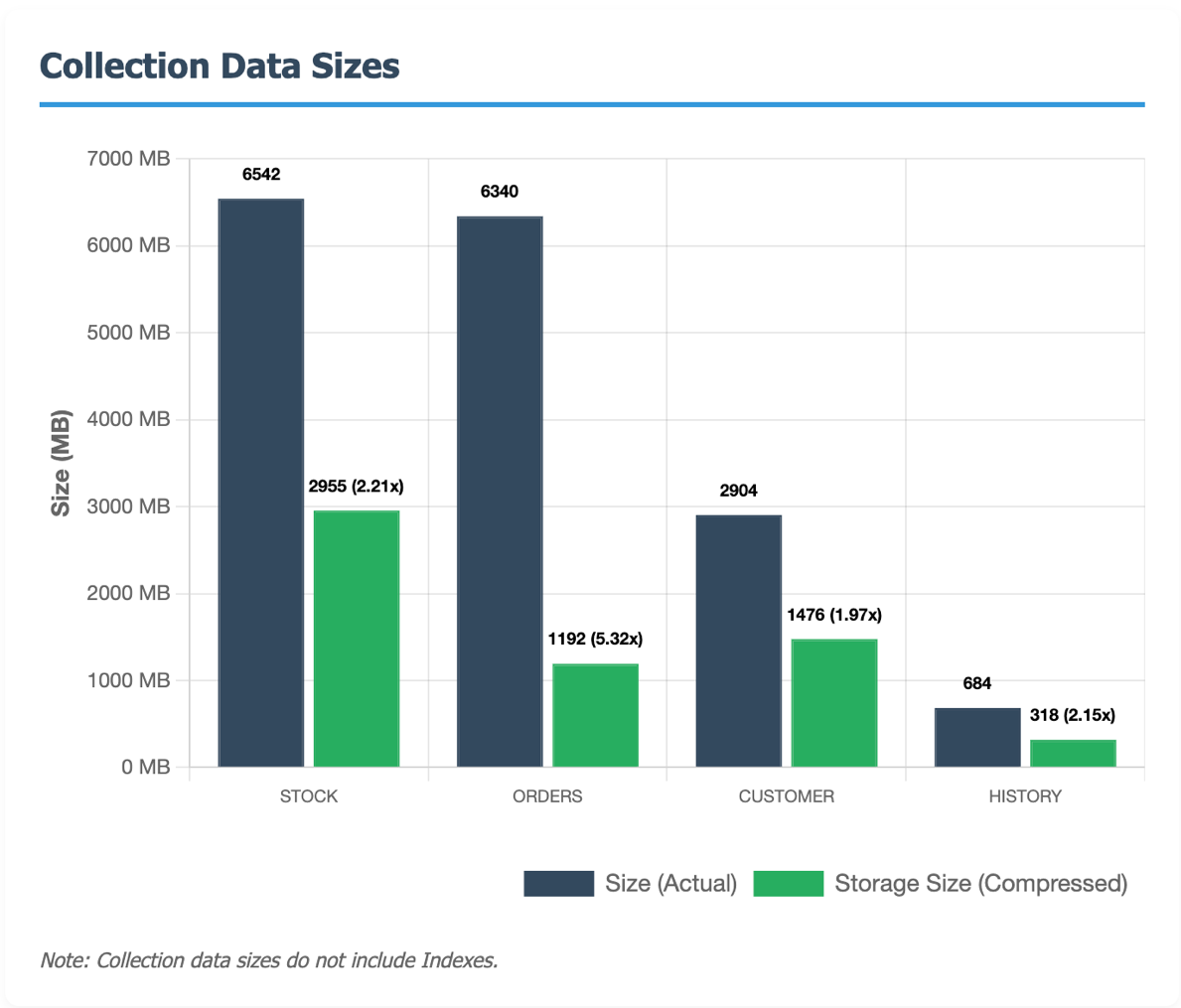
Amazon DocumentDB introduces a new compression algorithm Zstandard (Zstd) dictionary-based compression, in version 8.0, resulting in faster inserts while delivering up to 5x compression ratios that can dramatically reduce your storage costs. With storage expenses scaling linearly with data size, this enhancement allows you to store significantly more data without proportionally increasing your storage footprint.
Compression enabled by default
Amazon DocumentDB 8.0 automatically enables compression with Zstd as the default algorithm. Any document larger than 128 bytes benefits from compression. While these defaults work for most workloads, you can adjust settings like change the compression algorithm to LZ4, if your use case demands it.
Storage savings
Testing with the TPC-C benchmark dataset demonstrates the substantial storage savings possible with Zstd compression. The ORDERS collection achieved a 5.32x compression ratio, meaning you store over 5 times more data in the same space. Here’s how different collections performed:
How ZSTD dictionaries work
Zstd dictionaries learn from your actual data. Amazon DocumentDB samples your documents to build a custom 2KB compression dictionary tailored to your specific collection. This dictionary captures patterns in your field names and values, achieving significantly higher compression ratios—especially for collections with consistent schemas or repeated field names.
Key characteristics:
- Each collection maintains its own dedicated 2KB dictionary
- Requires a minimum of 100 documents to train the dictionary
- Documents larger than 128 bytes are automatically compressed after the first 100 documents are inserted
- The dictionary adapts to your data model, not a generic pattern.
Track compression performance using Collection stats commands:
Example output:
For more information, see dictionary-based compression in Amazon DocumentDB
Enhanced search capabilities: text index v2 and collation
Amazon DocumentDB 8.0 enhances search capabilities with two new features: Text Index V2, which brings intelligent parsing for complex string formats, and Collation support, which enables language-aware sorting and filtering for global applications.
Text index v2: better parsing for complex strings
Building on the text search capabilities introduced in Amazon DocumentDB 5.0, Text Index v2 delivers advanced tokenization that makes structured text formats fully searchable. When you index content containing URLs, email addresses, file paths, or scientific notation, Amazon DocumentDB automatically breaks them into searchable components.
Enhanced format support: Text Index v2 intelligently parses and indexes the following formats:
- Email addresses – Search “janedoe@company.com” using “janedoe”, “company”, or “com”
- URLs – Find “https://company.com/path/resource” with “company”, “path”, or “resource”
- File paths – Search “/home/user/thesis.pdf” by “home”, “user”, “thesis”, or “pdf”
- Scientific notation – Parse “6.022e023” or “1e5” as searchable components
- Decimal numbers – Index “3.14” or “0.001” with proper numeric handling
- Signed integers – Support for “+1” and “-1” formats
- XML content – Parse “Hello &” while handling entities correctly
Underscore(_) Handling: Text Index v2 treats underscores as part of the word, preserving identifiers like “user_profile” or “api_key” as single searchable tokens essential for technical content and variable names.
Let us see a few example queries, these queries won’t return any results with Text Index v1 but will return the results in Text Index v2.
Sample Data:
Create text index:
Queries:
Collation: language-specific string comparison
Collation brings language-specific string comparison and sorting to Amazon DocumentDB. This is essential for applications serving international users where alphabetical ordering varies by language and locale. You can now perform case-insensitive searches and apply locale-specific rules for accurate text matching.
Collation settings can be applied at the collection level or index level, and are supported exclusively on Query Planner v3 (enabled by default in version 8.0).
Case-insensitive search
Let’s see an example to perform case-insensitive search on customer data.
Querying emails using a search term that differs in case from the stored value in the database
Locale-aware searching (French):
Let’s see an example to perform locale aware accent in-sensitive search on customer data.
Search for lastName: “Garcia” will return the record as the collation settings will treat Garcia= García
Case insensitive search with Locale setting
To view index-level collation settings, use db.collection.getIndexes(), which returns detailed index information including collation configuration. By default, indexes inherit the collection’s collation settings.
To view collation setting on an existing collection, use db.getCollectionInfos() function.
Reduce complexity, enhance access control with Views
Amazon DocumentDB 8.0 supports views with planner v3. A view is a read-only, virtual collection defined by an aggregation pipeline that presents transformed or calculated results from one or more source collections—without modifying the underlying data.
Amazon DocumentDB 8.0 introduces support for Views with Query Planner v3, so you can create read-only virtual collections defined by an aggregation pipeline that presents transformed or calculated results from one or more source collections. Views present transformed data from underlying collections through aggregation pipelines—without duplicating or modifying the source data.
Using Views, you can streamline the application maintenance process. Instead of writing complex aggregation pipelines in multiple places, you can encapsulate query logic once in a database-stored view definitionYou can use Views to implement granular security that restricts data access at row-level through role-based access control. You can create views that filter sensitive data and expose only specific fields, then grant users access exclusively to their designated views, not to the underlying collections.
Here’s an example of creating a view on the Customers collection that filters data and limits fields, along with creating a user with access to the specific view.
This view only user can query active_customers but cannot: access underlying customer collection or see customer records that have other than active status or see customer email addresses.
To see the definition of a view use db.getCollectionInfos() function.
Upgrading to Amazon DocumentDB 8.0:
You can upgrade your Amazon DocumentDB 5.0 instance-based clusters to version 8.0 using AWS Database Migration Service (AWS DMS). For more information, see upgrading your Amazon DocumentDB cluster.
Getting started with Amazon DocumentDB 8.0
Amazon DocumentDB 8.0 is available now in all AWS Regions where Amazon DocumentDB operates.
Using AWS Console
To get started with Amazon DocumentDB 8.0 create a new cluster using AWS Console by choosing version 8.0.
- Navigate to Amazon DocumentDB console and choose create.

- Select instance-based clusters and for Engine version choose, 8.0.0.
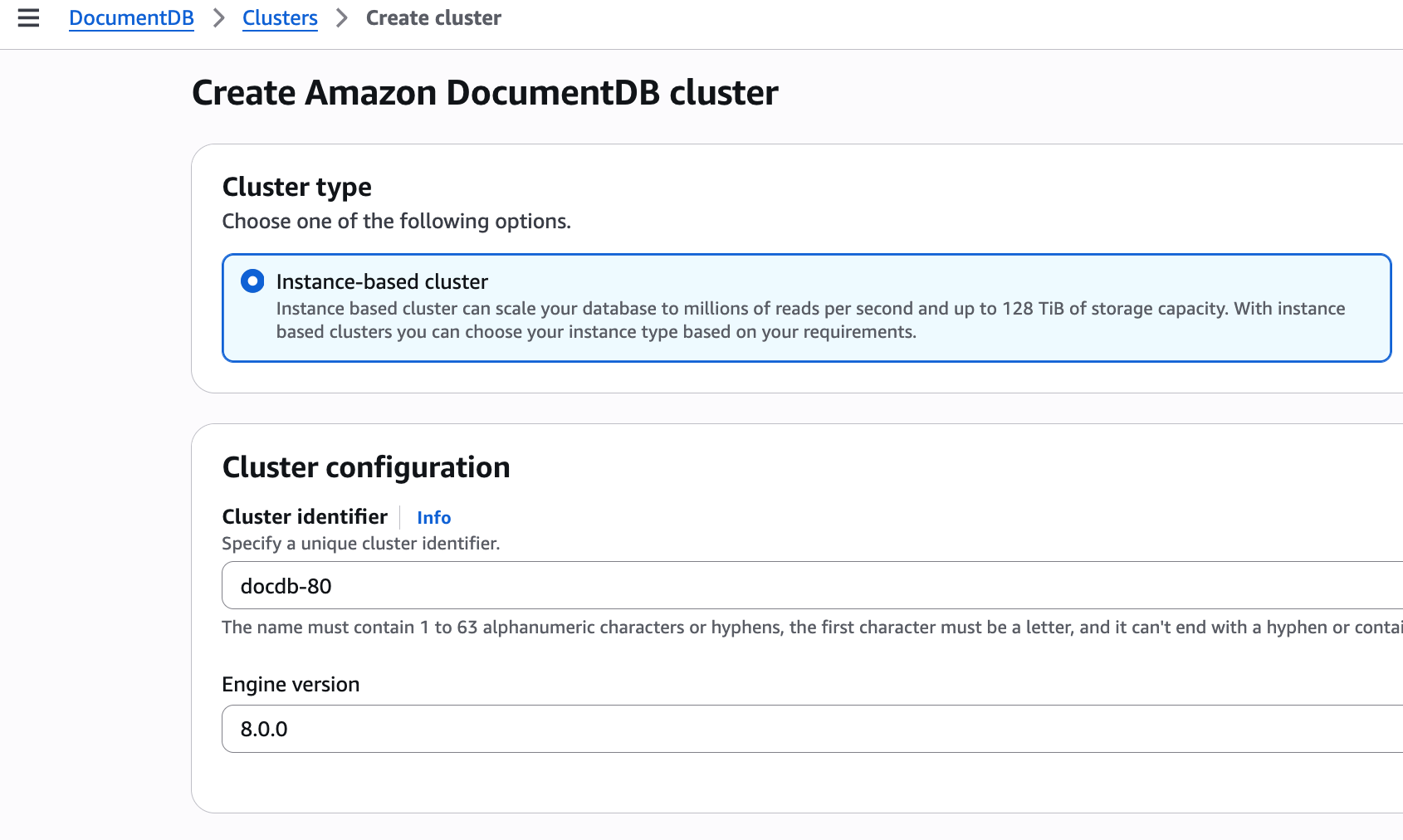
Continue to configure your cluster settings according to your requirements, for more information, see creating a new Amazon DocumentDB clusters
Using AWS CLI
When using the AWS CLI to create an Amazon DocumentDB cluster, specify:
–-engine-version as 8.0.0 to create an Amazon DocumentDB 8.0 cluster.
After cluster creation, add instances using create-db-instance.
Upgrading to Amazon DocumentDB 8.0:
You can upgrade your Amazon DocumentDB 5.0 instance-based clusters to version 8.0 using AWS Database Migration Service (DMS). For more information, see upgrading your Amazon DocumentDB cluster.
Conclusion
Amazon DocumentDB 8.0 provides MongoDB 8.0 API compatibility with six aggregation stages and five operators, while delivering significant performance improvements via Query Planner v3, with up to 5x storage savings through Zstd compression, and enhanced search capabilities with Text Index v2 and collation support. Views simplify architecture and access control, and 30x faster vector index builds accelerate development of GenAI powered use cases.
For more information about recent launches and blog posts, see Amazon DocumentDB resources.