AWS DevOps & Developer Productivity Blog
Automating AWS SDK for Java v1 to v2 Upgrades with AWS Transform
The AWS SDK for Java v2 represents a fundamental shift in how Java applications interact with AWS services, addressing critical security requirements while delivering measurable performance improvements. For organizations still operating on v1, this transition extends beyond a routine version upgrade—it’s a strategic imperative for maintaining secure, efficient cloud operations. With v1 reaching end-of-support on December 31, 2025, organizations face a hard deadline where security vulnerabilities will no longer receive patches, potentially violating compliance frameworks that require current, supported software versions.
Security enhancements alone justify the migration, with v2 implementing advanced credential management, modernized encryption clients, and comprehensive TLS security protocols that v1’s architecture cannot accommodate. Beyond security, v2 delivers architectural improvements through non-blocking I/O operations and modular service clients that reduce application footprint while improving response times.
This blog post demonstrates how to automate AWS SDK for Java v1 to v2 upgrades using AWS Transform custom, enabling organizations to modernize their Java applications efficiently while minimizing manual intervention and potential errors.
AWS Transform custom uses agentic AI to perform large-scale modernization of software, code, libraries, and frameworks to reduce technical debt. It handles diverse scenarios including language version upgrades, API and service migrations, framework upgrades and migrations, code refactoring, and organization-specific transformations.
Prerequisites
Before beginning the transformation process, verify the following requirements:
- AWS Transform CLI installed and configured in your development environment
- Authentication configured to execute an AWS Transform custom transformation
Solution Overview
The AWS Transform CLI provides AWS-Managed Transformations that are pre-built, AWS-vetted transformations for common use cases that are ready to use without any additional setup. The AWS/java-aws-sdk-v1-to-v2 transformation enables you to upgrade the AWS SDK from v1 to v2 for Java projects. We will use this verified transformation definition to upgrade a sample Java application from AWS SDK for Java v1 to v2.
Step 1: Prepare the Sample Project
Clone the AWS Java sample repository to your local environment:
git clone https://github.com/aws-samples/aws-java-sample
cd aws-java-sample
Step 2: Execute the Transformation
The AWS Transform CLI’s def exec command provides multiple parameters for customizing transformations. View all available options using atx custom def exec --help. For this transformation, execute the following command (replace <path_to_project> with your actual project path):
atx custom def exec -n AWS/java-aws-sdk-v1-to-v2 -p <path_to_project> -t -c "mvn package"Parameter breakdown:
-p: Path to the code repository to transform-n: Name of the transformation definition in the registry-t: Trusts all tools (no tool prompts)-c: Command to run when building repository
Step 3: Provide Additional Guidance
Before AWS Transform generates the transformation plan, it asks if there is specific guidance to take into consideration when generating the plan. For example, some organizations may require or have approved the use of specific versions of libraries. If there are specific requirements like this or guidance you would like to provide, please add it here. For this sample, enter the following prompt that demonstrates how you can specify a specific version of a library that may be needed to meet organizational requirements:
Please utilize version 2.34.0 of software.amazon.awssdk
Step 4: Review the Transformation Plan
AWS Transform analyzes your project and generates a comprehensive transformation plan. This plan details all proposed changes, including:
- Update Maven dependencies
- API migration patterns
- Builder pattern implementations
- Update exception handling
The transformation plan will be outlined in a plan.json file in the specified directory in the output (Figure 1). We suggest doing a thorough review of the transformation plan to ensure it encapsulates all expected updates. If adjustments are needed, feedback can be provided through the CLI interface. AWS Transform custom incorporates all feedback provided to refine the transformation plan before proceeding.
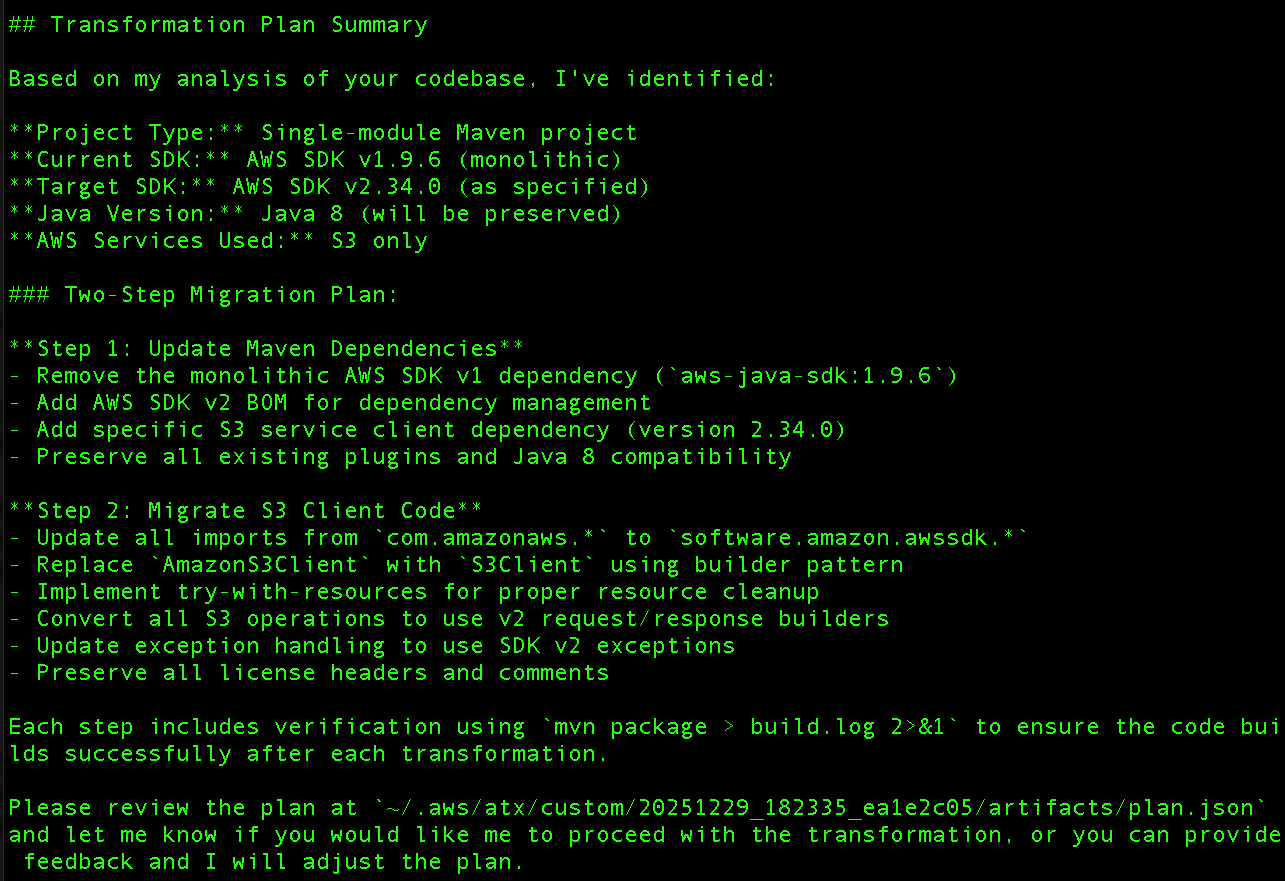
Figure 1: Transformation plan output
Step 5: Apply the Transformation
After confirming the transformation plan meets your requirements, type proceed and press Enter. AWS Transform custom proceeds to the next step and executes the transformation according to the approved plan.
Step 6: Verify Changes
Once the transformation is complete, you can review the validation summary that was written to the validation_summary.md file in the specified directory. After reviewing the summary, we will use our IDE (VS Code in this case, you can use your preferred mechanism) to examine the transformation results.
POM.xml Updates: The AWS SDK dependency upgrades from version 1.9.6 to 2.34.0 (Figure 2), reflecting the version that was specified during the planning phase.
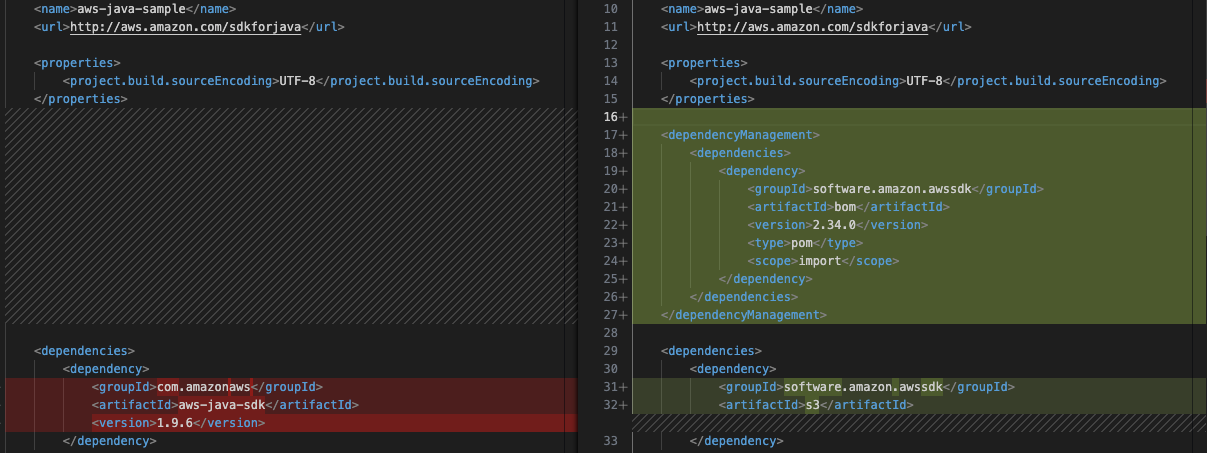
Figure 2: POM.xml Updates
Code Pattern Updates: The S3Sample.java file shown in Figure 3 demonstrates v2’s builder pattern implementation.
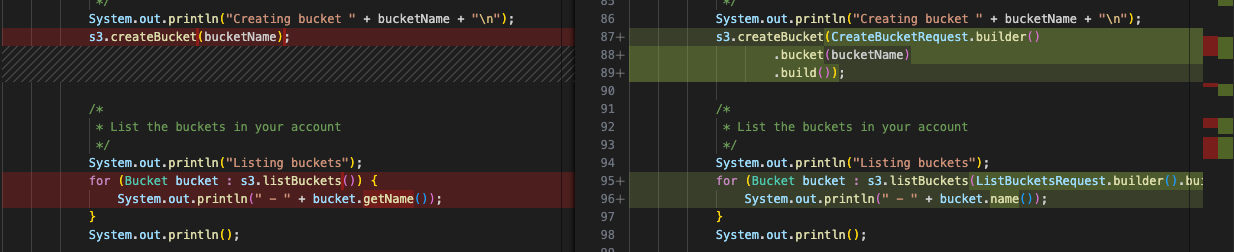
Figure 3: Builder pattern updates
Step 7: Build the application
Since the build command was passed as part of the -c parameter, AWS Transform custom will have already verified that the application builds as expected. We will also validate the transformation by building the application via the following command:
mvn clean packageThe application should build successfully and you should see a BUILD SUCCESS message.
Step 7: Test the application
Next, we will verify that the application’s functionality is working as expected after the transformation. Configure your AWS credentials and run the application:
aws configure
mvn clean compile exec:java
The application should execute successfully (as seen in Figure 4), demonstrating that core functionality remains intact after the transformation.
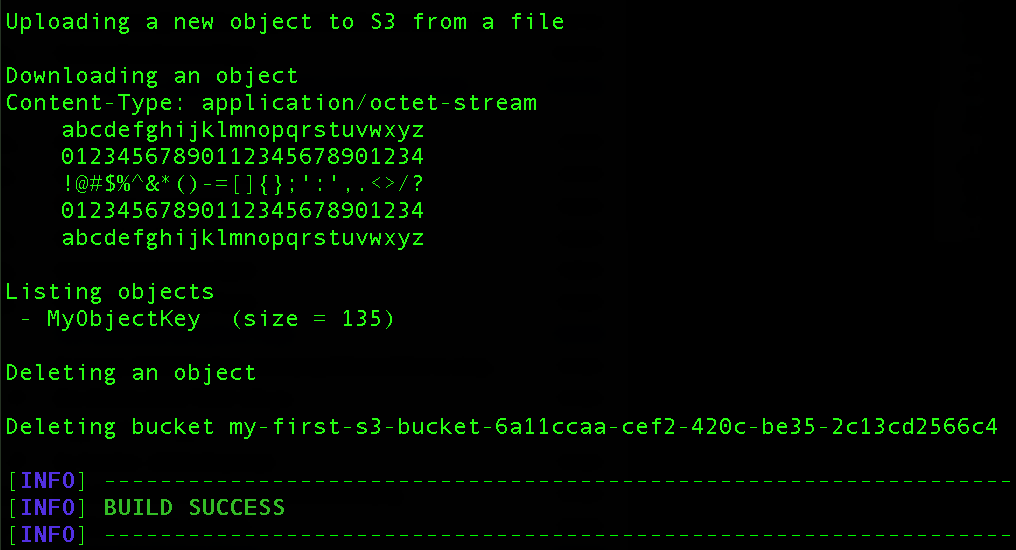
Figure 4: Successful application execution
Custom Transformation Definition
While AWS provides managed transformations for modernizing legacy projects, these standard solutions may not always meet an organization’s unique requirements. Although AWS allows customization of these managed transformations through plan context and feedback mechanisms, some scenarios demand custom solutions. This is particularly true when organizations need to:
- Upgrade proprietary internal frameworks
- Update custom libraries
- Manage complex SDK version upgrades
- Handle organization-specific code patterns
AWS Transform custom addresses these needs by enabling organizations to create and maintain their own transformation definitions. This capability offers several advantages:
- Allows organizations to codify their specific modernization requirements
- Creates reusable transformation patterns
- Enables consistent application of organizational best practices
- Facilitates scalable modernization efforts across multiple projects
- Preserves and leverages institutional knowledge through documented transformations
By defining these custom transformations once, organizations can efficiently execute standardized modernization tasks across their entire codebase, ensuring consistency and reducing manual effort.
Conclusion
The automated transformation from AWS SDK for Java v1 to v2 using the AWS Transform CLI demonstrates how organizations can modernize their Java applications efficiently while maintaining code quality and functionality. This approach eliminates the manual effort traditionally required for SDK migrations, reducing both time investment and the risk of introducing errors during the upgrade process.
Key benefits realized through this automation:
- Accelerated migration timeline – What typically requires weeks of manual refactoring completes in minutes
- Consistent transformation patterns – Verified transformations ensure uniform code updates across your entire codebase
- Reduced human error – Automated pattern recognition and replacement eliminates common migration mistakes
- Immediate security improvements – Applications gain V2’s enhanced security features without extensive manual intervention
As AWS continues to innovate and enhance AWS SDK for Java v2 with new features and optimizations, maintaining current SDK versions becomes increasingly important. By automating this critical upgrade process, development teams can focus on delivering business value while ensuring their applications leverage the latest AWS capabilities and security enhancements. Get started with AWS Transform custom today to begin your modernization journey, or explore additional AWS-Managed Transformations to address other modernization use cases.