AWS DevOps & Developer Productivity Blog
AWS Transform custom: AI-driven Java modernization to reduce tech debt
In today’s rapidly evolving software landscape, maintaining and modernizing Java applications is a critical challenge for many organizations. As new Java versions are released and best practices evolve, the need for efficient code transformation becomes increasingly important. Organizations today face significant challenges when modernizing their Java applications. Legacy codebases often contain outdated patterns, deprecated APIs, and inefficient implementations that hinder performance and maintainability. Traditional manual refactoring approaches are time-consuming, error-prone, and difficult to scale across large codebases. In addition, as developers spend more time on new development and deployment, the volume of technical debt continues to rise, requiring transformation of legacy code at-scale.
AWS Transform custom addresses these challenges through intelligent automation, providing AWS-managed transformations – standardized transformation packages for common scenarios like Java version upgrades. These transformations enable teams to achieve quick wins through standardized, tested transformation patterns that can be executed at scale, bringing significant time and cost savings to customers. In addition, customers can create custom user defined transformations to address technical debt with code transformations across languages, frameworks, and more.
This post explores how to leverage AWS Transform custom’s out-of-the-box transformation for Java upgrades. By the end of this post, you’ll understand how to use these standardized transformations to modernize your Java applications efficiently while maintaining full control over the transformation process.
Introduction to AWS Transform custom
AWS Transform custom uses agentic AI to automate large-scale code modernization, handling language version upgrades, API migrations, framework updates, and organization-specific transformations. Through continual learning, the agent improves from every execution and developer feedback, delivering high-quality, repeatable transformations without requiring specialized automation expertise.
Prerequisites
Before starting your Java modernization journey with AWS Transform custom, ensure you have the necessary development environment, build tools, and AWS Transform custom command line interface (CLI) installed. For detailed prerequisites and setup instructions, refer to the AWS Transform custom Prerequisites Guide.
Understanding the Modernization Scenario
We’ll demonstrate AWS Transform custom using a Movie Service application – a Spring Boot REST API built on Java 8 with Gradle. This represents a typical enterprise modernization challenge with legacy dependencies, outdated patterns, and technical debt.
Leveraging AWS-Managed Transformations
AWS Transform custom focuses on leveraging AWS-managed transformations designed for common modernization tasks like Java version upgrades.
AWS-managed transformations are pre-built, AWS-vetted transformations for common use cases that are ready to use without any additional setup. These transformations provide immediate value with minimal configuration, making them ideal for standard upgrade scenarios.
Understanding AWS Transform custom CLI Capabilities
AWS Transform custom provides a comprehensive command-line interface that enables both interactive and automated transformation workflows:
atx --version                    # Display ATX version
atx --help                       # Display general help
atx custom def list              # List transformation packages
atx                              # Start interactive conversation
For detailed information on all available commands, refer to the AWS Transform custom command reference.
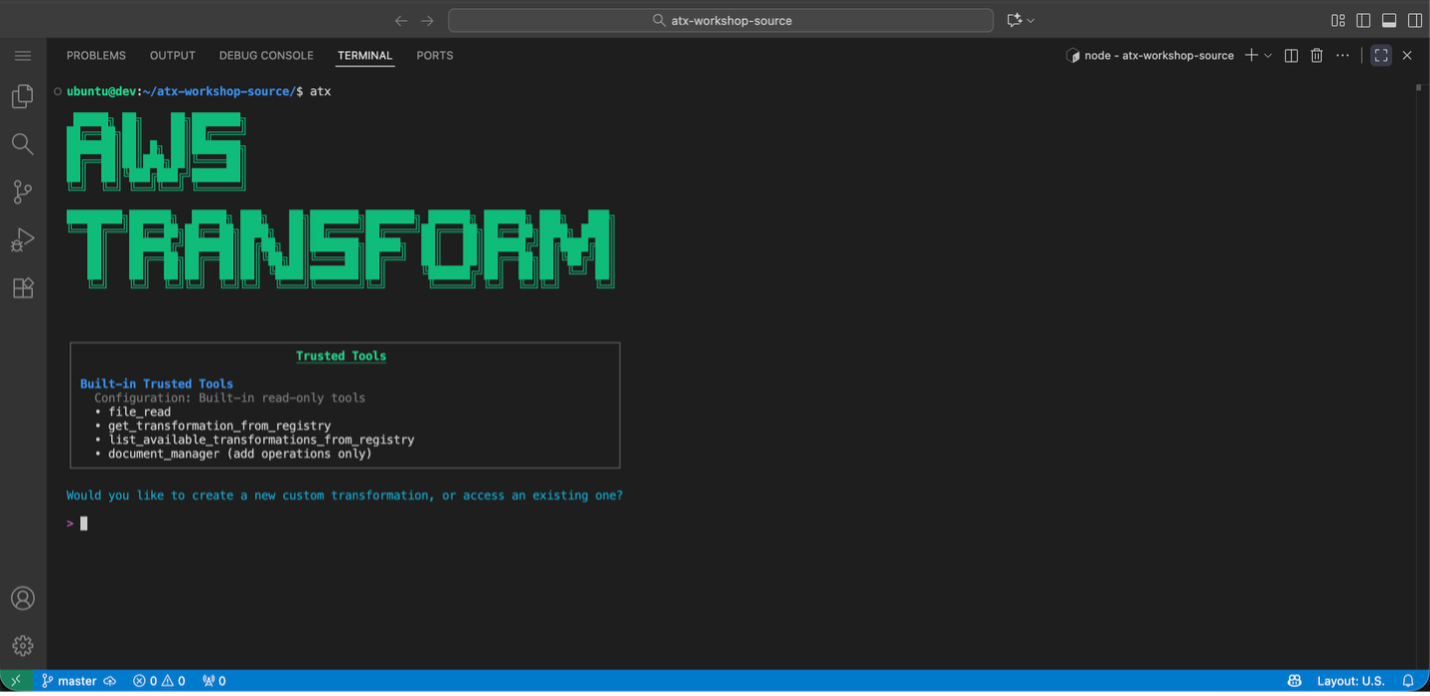
Figure 1:AWS Transform custom interactive mode
Discovering Available Transformations
Use atx custom def list to view all available transformations, including AWS-managed transformations and custom-defined (user-defined) transformations created by your organization. Key AWS-managed transformations include Java/Python/Node.js version upgrades and AWS SDK migrations.
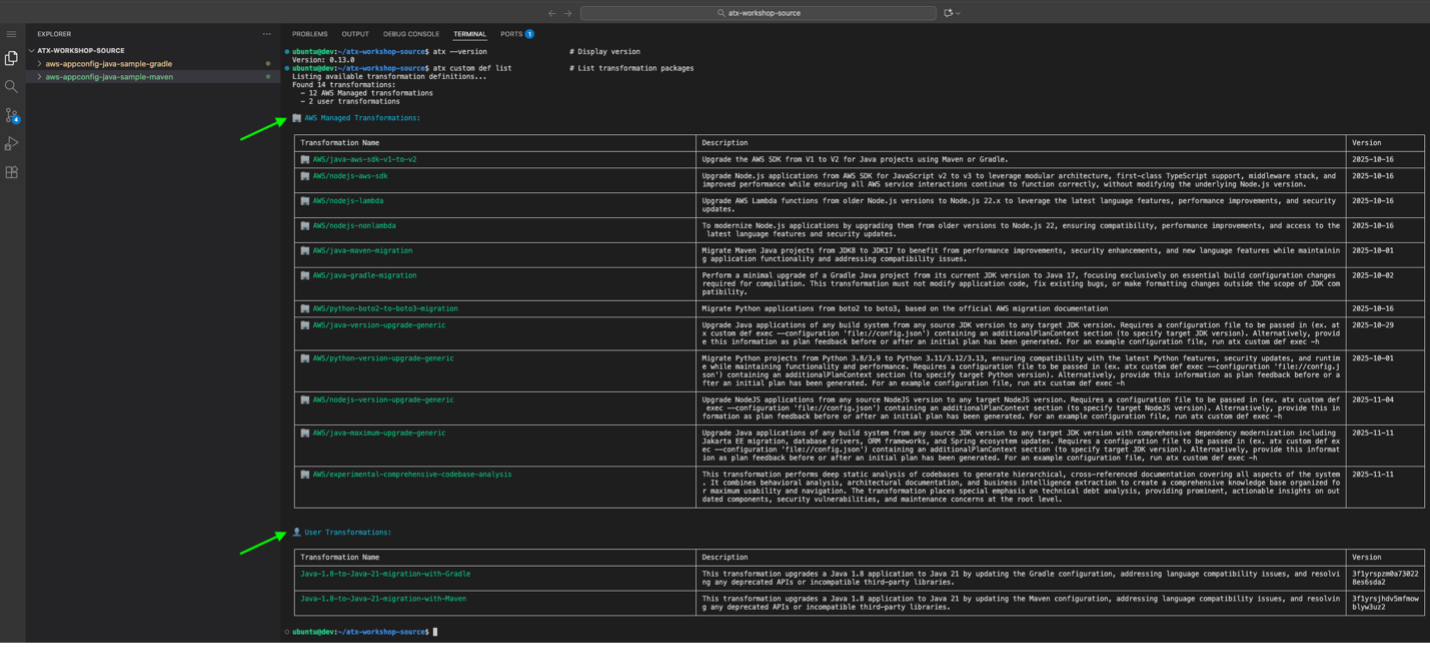
Figure 2: AWS Transform custom lists available AWS Managed and custom-defined (user-defined) transformations
Applying AWS-Managed Transformations
Before applying any transformations, ensure your project is initialized with Git and that all build and test cases are working correctly with Java 8 (Test cases can be skipped when necessary by using the appropriate build command option and instructions to the agent). For Gradle projects, verify that ./gradlew build executes successfully.
The transformation process follows a structured approach:
- Ensure Clean Git State:
git status
git add .
git commit -m "Baseline before Java 21 transformation"
- Apply Transformation: You can apply transformations using either interactive or direct command modes. In this blog, we will use the interactive mode to walk through the process step-by-step:
Interactive Mode (used in this blog):
First, create a config.json file with your transformation configuration:
{
  "codeRepositoryPath": "/path/to/your/aws-appconfig-java-sample-gradle",
  "transformationName": "AWS/java-version-upgrade",
  "buildCommand": "./gradlew clean build",
  "validationCommands": "build and validate using \"./gradlew clean build\" after transformation to test with java 21",
  "additionalPlanContext": "This is a Java 8 to 21 transformation of a gradle app , also include all dependency migration as well. Use java path /path/to/your/java-8/bin/java and /path/to/your/java-21/bin/java when building before and after transformation. We are using gradle wrapper gradlew, update it if needed for java 21 upgrade. Check for deprecated methods and dependencies and update them."
}
Update the codeRepositoryPath in your config.json to point to your local project directory and update the Java path in additionalPlanContext to match your Java 8 and 21 installation. For more details about configuration files and their parameters, refer to Using Configuration Files.
Then execute the transformation in interactive mode (used for this blog walkthrough):
For Java version upgrade with Gradle using config.json (Interactive Mode):
atx custom def exec -t --configuration file://config.json
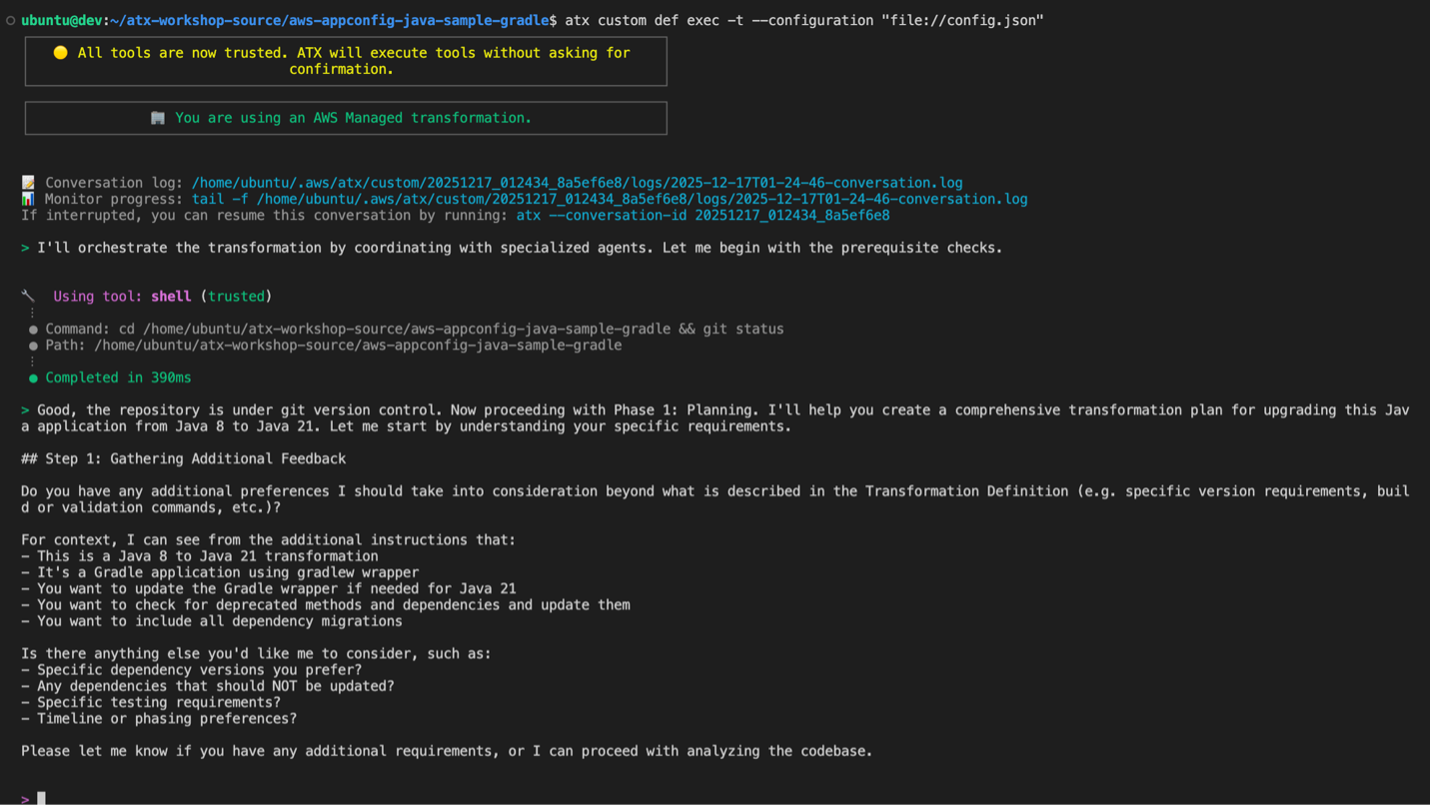
Figure 3: AWS Transform custom execute a gradle transformation in interactive mode with transformation configuration supplied from config.json
Direct Command Mode (alternative approach): Use this mode for automated CI/CD pipelines or when you want to execute transformations without interactive prompts.
atx custom def exec -x -t --configuration “file://config.json”
Parameter explanation: –
--configuration: Specifies the configuration file for interactive mode
– -x: Executes the transformation automatically without interactive prompts (direct mode)
– -t: Enables test mode for validation during execution (direct mode)
--configuration: Specifies the configuration file path with file://prefix (direct mode)
ATX Execution Command Executing AWS managed Java version upgrade transformation for Gradle project using ATX CLI
- Review Transformation Plan: AWS Transform custom analyzes your project based on the configuration provided in
config.jsonand generates a comprehensive transformation plan. This plan details all proposed changes, including:
- Java version updates: Migration from Java 8 to Java 21 configurations
- API migration patterns: Automatic updates for deprecated APIs and modern alternatives
- Framework modernization: Spring Boot version upgrades and compatibility updates
- Dependency modifications: Updated library versions compatible with Java 21
- Build system updates: Gradle configuration and plugin changes for Java 21 compatibility
- Code pattern improvements: Implementation of modern Java features and best practices
We recommend doing a thorough review of the transformation plan to ensure it encompasses all expected updates. The additionalPlanContext in your config.json helps guide the transformation to include dependency migrations and Gradle wrapper updates. If adjustments are needed, provide feedback through the CLI interface.
Additionally, if you want to customize the transformation to target additional changes, for example upgrading additional legacy dependencies contained in the project, you can provide this as feedback when reviewing the transformation plan. AWS Transform custom incorporates all feedback provided to refine the transformation plan before proceeding.
- Apply the Transformation: After confirming the transformation plan meets your requirements, type
proceedand press Enter. AWS Transform custom executes the transformation according to the approved plan.
The transformation process automatically:
– Creates a new branch and commits the transformed changes in there
– Updates Gradle configuration for Java 21
– Migrates Java EE to Jakarta EE packages (if applicable)
– Updates framework dependencies for Java 21 compatibility
– Applies all necessary code changes
– Updates test cases and testing frameworks for Java 21 compatibility
– Runs comprehensive validation builds
Results of AWS-Managed Transformations
After applying the Java version upgrade transformation, below changes are observed:
Configuration Updates: – Java version: 1.8 → 21 – Spring Boot version upgrades – Gradle plugin and configuration updates – Dependency version modernization
To validate the changes, switch to Java 21 and run ./gradlew build to ensure the transformation was successful, then test the application functionality.
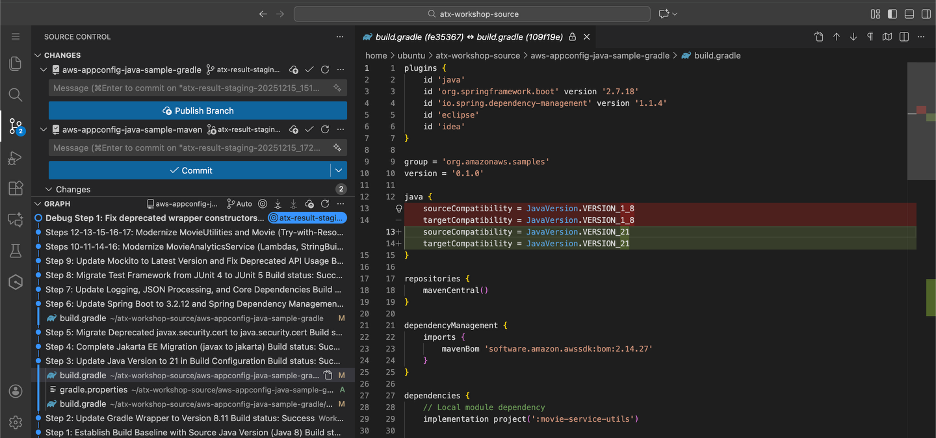
Figure 4: Updated Gradle Configuration Gradle build.gradle showing updated Java 21 configuration and modernized dependencies
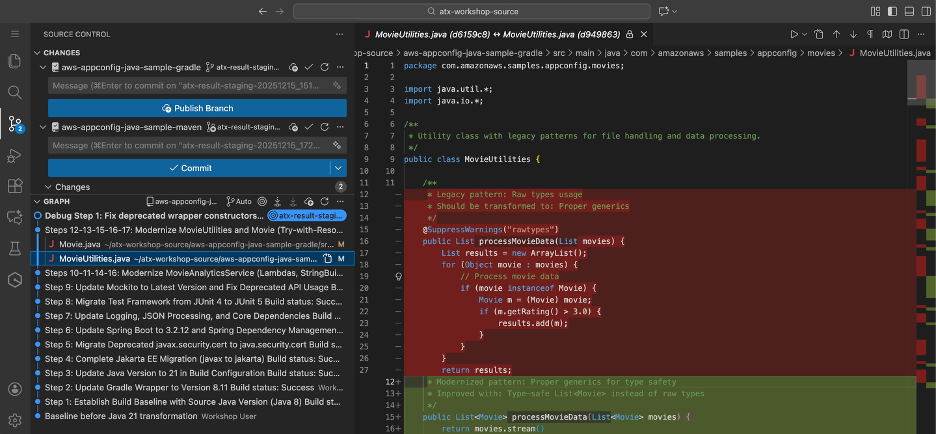
Figure 5: Updated code where legacy pattern of raw types usage is transformed to generics
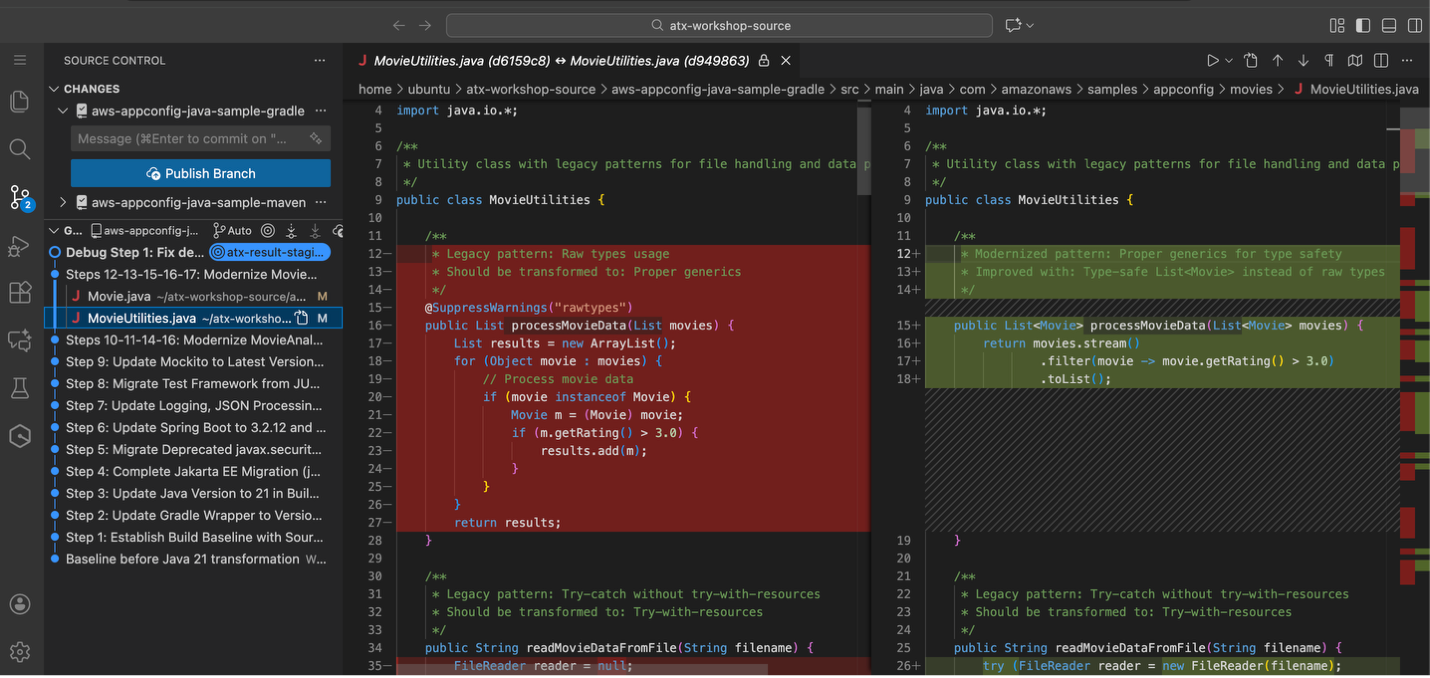
Figure 6: Second example of updated code where legacy pattern of raw types usage is transformed to generics
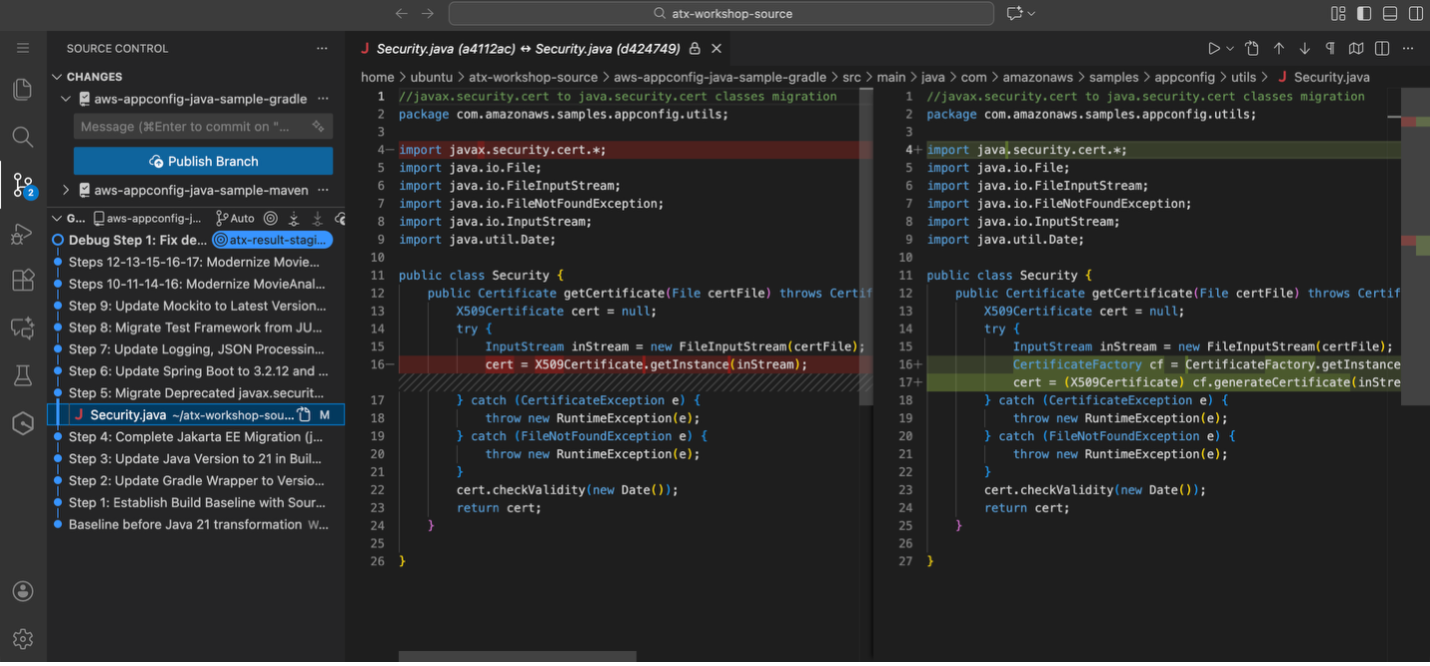
Figure 7: Updated dependency from javax.security to java.security and uses CertificateFactory to get X509Certificate
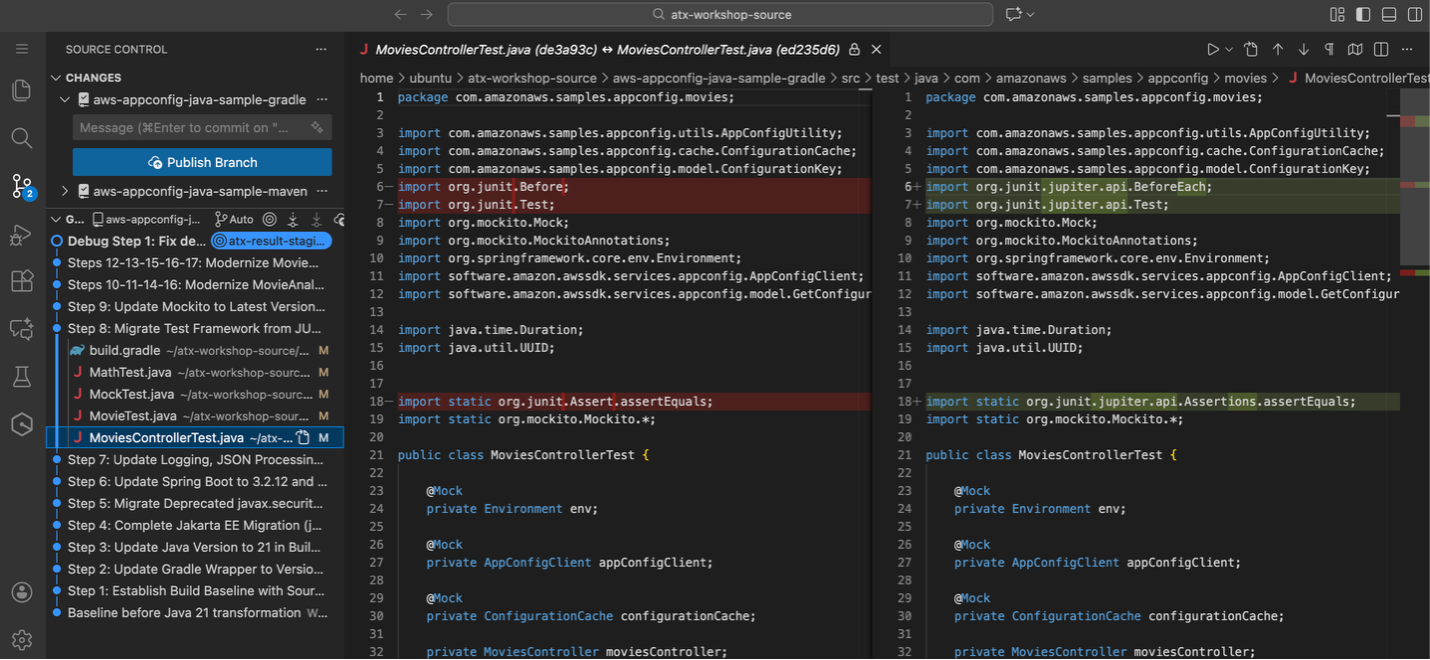
Figure 8: Updated Test cases from junit 4 to junit5
Beyond AWS-Managed Transformations: Custom-Defined Transformations
While AWS-managed transformations provide excellent coverage for standard Java modernization scenarios, there are cases where the available AWS-managed transformations may not address your specific transformation requirements. In such situations, AWS Transform custom enables users to create and test their own organization specific, custom-defined transformation definitions.
When to Create Custom-Defined Transformations
Custom-defined transformations become necessary when AWS-managed transformations don’t cover your specific needs, such as proprietary frameworks, organization-specific coding standards, or complex multi-step migration scenarios.
Creating Custom-Defined Transformations
AWS Transform custom enables teams to develop custom transformations using transformation rules and configuration files. This allows organizations to define transformation logic specific to their requirements, test on sample code, and share validated transformations across teams.
AWS Transform custom’s interactive mode (atx) is particularly beneficial for creating Custom-defined transformations, enabling conversational interaction to iteratively refine requirements and get real-time feedback. Custom-defined transformations provide flexibility to extend AWS Transform custom’s capabilities when AWS-managed transformations don’t meet specific modernization needs.
Continual Learning and Knowledge Items
AWS Transform custom automatically learns from each transformation execution to improve future results. For Java upgrades specifically, the service captures patterns like successful refactoring strategies, common dependency conflicts, and framework compatibility matrices across Java versions. This knowledge feeds back into future transformations, making them more accurate at predicting successful upgrade paths and reducing manual intervention.
Knowledge items are account-specific and remain within your AWS account boundaries. Users can enable or disable continual learning, providing full control over this preference.
Conclusion
In this blog, we demonstrated how AWS Transform custom enables efficient Java application modernization using AWS managed transformations. Starting with a legacy Movie Service application running Java 8 and Spring Boot 2.x, we successfully transformed it to Java 21 with modern dependencies and patterns.
The step-by-step process showed how to establish a baseline, discover available transformations using atx custom def list, and apply transformations through AWS Transform custom’s CLI. The result was a fully modernized application with updated Java versions, Spring Boot upgrades, and modern Java features like enhanced switch expressions and local variable type inference – all achieved in minutes rather than weeks of manual refactoring.
Beyond Java Modernization
Beyond Java modernization, AWS Transform custom’s transformation capabilities extend to other programming languages and frameworks, making it a versatile solution for comprehensive application portfolio modernization across diverse technology stacks. The agent supports diverse transformation use cases including:
- Version upgrades for Java, Python, and Node.js
- Runtime and API migrations (AWS SDK v1→v2, Boto2→Boto3)
- Framework transitions and upgrades
- Language translations and architectural changes
- Organization-specific, custom-defined transformations
Through its define once, transform everywhere approach, AWS Transform custom enables organizations to capture and amplify transformation knowledge by defining transformations once and executing repeatable tasks across the entire organization. This reduces knowledge silos and ensures consistent quality regardless of team or project scope.
Getting Started
Ready to modernize your Java applications with AWS Transform custom? Here’s how to begin:
- Install AWS Transform custom CLI (atx) using the installation script and verify your environment
- Configure AWS credentials with
transform-custom:*permissions - Explore available AWS-managed transformations using
atx custom def list - Apply transformations to your Java applications using direct execution mode (
atx custom def exec) or interactive mode (atx) - Validate results through comprehensive testing with
./gradlew buildfor Gradle projects - Scale across your application portfolio for consistent modernization
Additional Resources
For detailed setup instructions and documentation, visit:
- AWS Transform custom Getting Started Guide
- AWS Transform custom Product Page
- AWS Transform custom Documentation
- AWS Transform custom Command Reference
Start your modernization journey today and experience the power of AI-driven code transformation at scale.