AWS DevOps & Developer Productivity Blog
Build your own continuous modernization pipeline with AWS Transform custom
Introduction
Development velocity has reached new heights with AI-driven development tools and practices. Organizations are generating code faster than ever before. But that speed carries risk. Researchers Anderson, Parker, and Tan warned in MIT Sloan Management Review, “Legacy systems tend to carry hidden debt; layering AI-generated code on top of them creates additional tangled dependencies.” The faster you generate code, the faster technical debt compounds — especially in brownfield environments where outdated frameworks, deprecated libraries, and undocumented services already carry years of accumulated risk.
As organizations accelerate their software development, manual or periodic processes to synchronize dependencies and update documentation no longer keep pace, and technical debt piles up faster than ever. Continuous modernization built into your pipeline enables you to maintain up-to-date dependencies and documentation across repositories on every commit, preventing future tech debt and improving AI agent accuracy and accountability.“
You can embed AI-powered code transformations directly into your CI/CD pipelines, turning modernization from a periodic project into an automated, ongoing practice. AWS gives you two ways to get there. AWS Transform – continuous modernization is the fully managed option, delivering continuous modernization automatically with no pipeline for you to build or maintain. The Do-It-Yourself (DIY) approach assembles the same practices yourself using AWS Transform custom and your existing CI/CD platform. Choose DIY when you need to fit modernization into a specific pipeline (GitHub Actions, AWS CodePipeline, Jenkins, GitLab CI, and so on), or want to customize the workflow with existing tools like Dependabot.
In this post, we cover the DIY approach on how to set up a continuous modernization pipeline using AWS Transform custom and demonstrate it in action.
The Do It Yourself (DIY) path – continuous modernization pipeline with AWS Transform custom
Sample application: instrumentShop
For this walkthrough, we use a dated Java application called instrumentShop (Figure 1) — a Java microservices application built with Spring Boot that simulates an online instrument shop to demonstrate four practices: automated dependency remediation, auto-documentation on every commit, scaling transformations across repositories, and continual learning.
Architecture overview
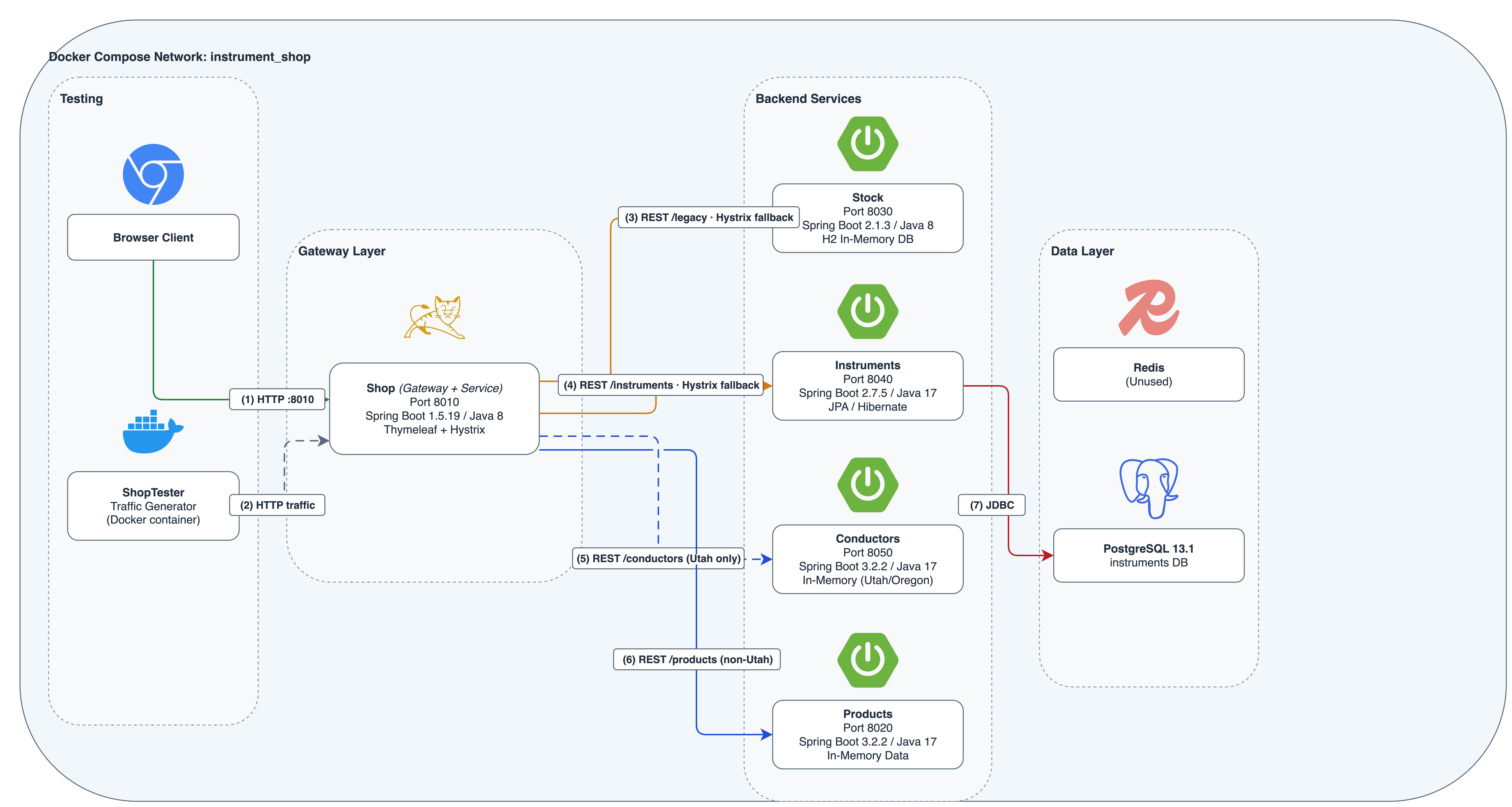
Figure 1: instrumentShop Java application architecture
The instrumentShop application is a Spring Boot microservices application with a Spring Gateway (v1.5.19) routing traffic from a single HTTP/8010 entry point to four REST services: Agents, Instruments, Consumers, and Products. A Thymeleaf client provides server-side rendering, PostgreSQL 13.1 handles persistence via JDBC, and Hystrix provides circuit-breaking for inter-service calls. A ShopTester utility generates HTTP traffic for testing.
This application is a strong candidate for continuous modernization:
- Spring Boot 1.5.19 is years past end of life and carries known CVEs
- Hystrix has been in maintenance mode since Netflix deprecated it in 2018
- Cross-service coordination — dependency updates must propagate across multiple microservices
- Transitive dependency risk — PostgreSQL JDBC drivers and other transitive dependencies accumulate security advisories over time
A typical workflow for the continuous modernization pipeline is shown below (Figure 2):
- A developer pushes code to main — GitHub Actions triggers the auto-documentation workflow, generating updated architecture docs and technical debt reports.
- Dependabot detects a vulnerable dependency — A PR opens automatically. GitHub Actions triggers the dependency remediation workflow, runs AWS Transform custom to remediate the code, validates with tests, and pushes the result back to the PR.
- A platform team defines a new transformation (e.g., “Upgrade Spring Boot to the latest stable release “) — The scheduled GitHub Actions workflow runs the transformation weekly in non-interactive mode across all instrumentShop microservices and other repositories in the portfolio.
- The agent learns — Knowledge items from each execution improve future runs, reducing manual intervention over time.
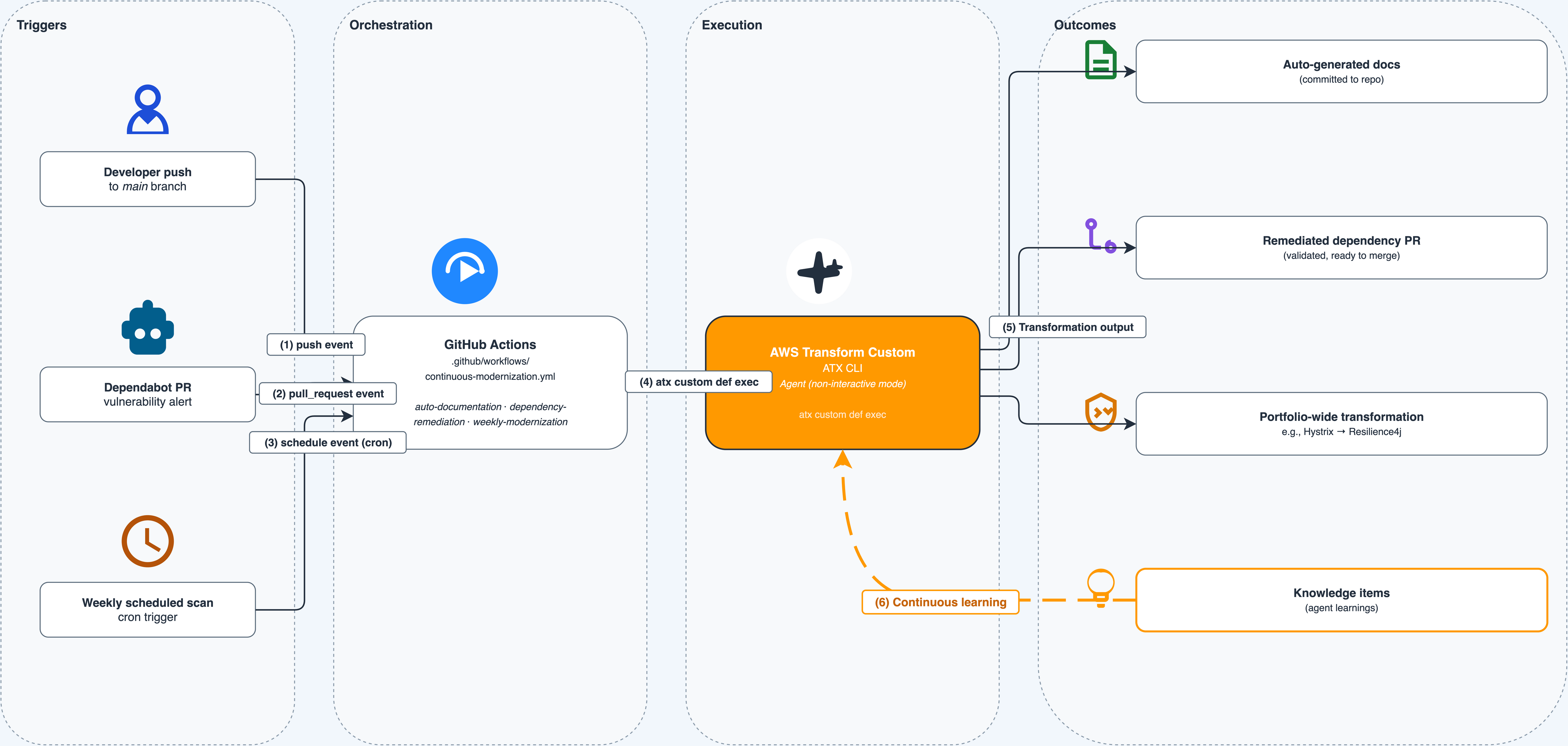
Figure 2: AWS Transform continuous code modernization workflow
Prerequisites
- Before setting up the continuous modernization pipeline, ensure you have the following:
- An active AWS account with permissions for AWS Transform custom
- AWS Transform CLI installed and configured in your development environment
- Authentication with AWS credentials configured locally and proper IAM permissions to call AWS Transform
- Git installed for cloning sample repositories
- GitHub Dependabot enabled on your repository for automated vulnerability detection
Continuous modernization through CI/CD in action
Continuous modernization shifts code transformation from a periodic project into an automated, pipeline-driven practice. Instead of scheduling a “modernization sprint” once a year, your CI/CD pipeline identifies and remediates technical debt on every commit, every dependency alert, and across every repository.
We implement this through four practices, each powered by AWS Transform custom running as a step in GitHub Actions workflows.
Note: This post uses GitHub Actions because the instrumentShop demo repository is built with it. The same AWS Transform CLI (atx) commands work with AWS CodePipeline, Jenkins, GitLab CI, CircleCI, or any CI/CD system that runs shell commands. Continuous modernization is a practice, not a tool choice.
Important: Every atx custom def exec invocation in this post uses the –trust-all-tools flag, which allows the agent to execute tools without interactive confirmation. This is required for non-interactive CI/CD execution. Review your organization’s security policies before enabling this flag in production pipelines.
1. Dependency analysis and remediation
GitHub Dependabot scans your repository for known vulnerabilities and generates alerts when a new vulnerability is added or your dependency graph changes—for example, when you push commits that update packages or versions. However, resolving these alerts requires more than bumping a version number. Upgrading a dependency can introduce breaking API changes, require code modifications, or demand configuration updates.
AWS Transform custom helps handle the code changes needed to resolve the alerts. It runs via a GitHub Actions workflow that triggers automatically to:
- Fetch the list of latest Dependabot alerts
- Run AWS Transform custom to analyze the alerts and apply code transformations
- Run your build and test suite to validate the changes
- Create a new pull request for each resolved alert
The workflow calls a shell script that invokes the AWS Transform CLI in headless mode with retry logic. Place this script at the root of your repository:
run_dependabot_alert_fixes.sh:
#!/usr/bin/env bash
set -euo pipefail

# -------------------------------------------------------------------
# run_dependabot_alert_fixes.sh
# Runs the Dependabot alert remediation transformation in headless mode.
# Retries up to MAX_RETRIES times on failure.
#
# Usage:
#   ./run_dependabot_alert_fixes.sh [-n <transformation-name>] [-p <path>] [-c <build-command>]
#
# Defaults:
#   -n  Remediate-Critical-GitHub-Dependabot-Alerts-Java-Maven
#   -p  .                   (current directory)
#   -c  mvn clean install   (Maven build)
# -------------------------------------------------------------------

TRANSFORMATION_NAME="Remediate-Critical-GitHub-Dependabot-Alerts-Java-Maven"
CODE_PATH="."
BUILD_CMD="mvn clean install"
MAX_RETRIES=3

while getopts "n:p:c:" opt; do
  case $opt in
    n) TRANSFORMATION_NAME="$OPTARG" ;;
    p) CODE_PATH="$OPTARG" ;;
    c) BUILD_CMD="$OPTARG" ;;
    *) echo "Usage: $0 [-n <transformation-name>] [-p <path>] [-c <build-command>]" && exit 1 ;;
  esac
done

echo "=== AWS Transform Custom ==="
echo "Transformation: $TRANSFORMATION_NAME"
echo "Code path:      $CODE_PATH"
echo "Build command:  $BUILD_CMD"
echo "============================"

attempt=1
while [ $attempt -le $MAX_RETRIES ]; do
  echo "--- Attempt $attempt of $MAX_RETRIES ---"

  if atx custom def exec \
    -n "$TRANSFORMATION_NAME" \
    -p "$CODE_PATH" \
    -c "$BUILD_CMD" \
    -x -t; then
    echo "=== Transformation completed successfully ==="
    exit 0
  fi

  echo "Attempt $attempt failed."
  attempt=$((attempt + 1))

  if [ $attempt -le $MAX_RETRIES ]; then
    echo "Retrying in 10 seconds..."
    sleep 10
  fi
done

echo "=== All $MAX_RETRIES attempts failed ==="
exit 1
This script accepts optional flags to override the transformation name (-n), code path (-p), and build command (-c). The -x flag enables non-interactive mode and -t enables --trust-all-tools, both required for CI/CD execution. On failure, it retries up to three times with a 10-second backoff.
Your CI/CD workflow must configure AWS credentials and install the AWS Transform CLI before invoking this script. With this setup, Dependabot alerts are reviewed continuously for any changes — not just a version bump, but the complete code adaptation required to make the upgrade work.
2. Auto documentation
Documentation is one of the most neglected aspects of modern software development. Documentation increases accuracy and acts as a contract between requirements and implementation. AWS Transform custom codebase analysis capability generates structured documentation covering architecture, technical debt, code metrics, and migration planning on every incremental update ensuring every Agent or human that modifies the codebase is working from a true “current state”.
By embedding this as a post-push step in your CI/CD pipeline, your documentation stays current automatically. The workflow triggers on every pull request to main, runs your build and test suite, then calls a shell script that invokes AWS Transform custom to generate documentation and commits it back to the PR branch.
Place this script at the root of your repository:
run_code_analysis.sh:
#!/usr/bin/env bash
set -euo pipefail

# -------------------------------------------------------------------
# run_code_analysis.sh
# Runs an AWS Transform custom transformation in headless mode.
# Retries up to MAX_RETRIES times on failure.
#
# Usage:
#   ./run_code_analysis.sh [-n <name>] [-p <path>] [-c <build-cmd>] [-U <pr-url>]
#
# Defaults:
#   -n  GitHub-PR-Context-Codebase-Analysis
#   -p  .                   (current directory)
#   -c  mvn clean install   (Maven build)
#   -U  (empty)             PR URL
# -------------------------------------------------------------------

TRANSFORMATION_NAME="GitHub-PR-Context-Codebase-Analysis"
CODE_PATH="."
BUILD_CMD="mvn clean install"
PR_URL=""
MAX_RETRIES=3

while getopts "n:p:c:U:" opt; do
  case $opt in
    n) TRANSFORMATION_NAME="$OPTARG" ;;
    p) CODE_PATH="$OPTARG" ;;
    c) BUILD_CMD="$OPTARG" ;;
    U) PR_URL="$OPTARG" ;;
    *) echo "Usage: $0 [-n <name>] [-p <path>] [-c <build-cmd>] [-U <pr-url>]" && exit 1 ;;
  esac
done

echo "=== AWS Transform Custom ==="
echo "Transformation: $TRANSFORMATION_NAME"
echo "Code path:      $CODE_PATH"
echo "Build command:  $BUILD_CMD"
echo "PR URL:         $PR_URL"
echo "============================"

attempt=1
while [ $attempt -le $MAX_RETRIES ]; do
  echo "--- Attempt $attempt of $MAX_RETRIES ---"

  if atx custom def exec \
    -n "$TRANSFORMATION_NAME" \
    -p "$CODE_PATH" \
    -c "$BUILD_CMD" \
    -g "additionalPlanContext=$PR_URL" \
    -x -t; then
    echo "=== Transformation completed successfully ==="
    exit 0
  fi

  echo "Attempt $attempt failed."
  attempt=$((attempt + 1))

  if [ $attempt -le $MAX_RETRIES ]; then
    echo "Retrying in 10 seconds..."
    sleep 10
  fi
done

echo "=== All $MAX_RETRIES attempts failed ==="
exit 1
This script accepts optional flags for the transformation name (-n), code path (-p), build command (-c), and PR URL (-U). Pass the PR URL to the agent via the -g flag as additionalPlanContext, giving it awareness of the pull request context when generating documentation. On failure, it retries up to three times with a 10-second backoff.
Your CI/CD workflow must configure AWS credentials and install the AWS Transform CLI before invoking this script. The workflow commits the generated documentation back to the PR branch automatically, keeping your architecture docs and technical debt reports current with every code change.
Every push now updates the documentation (Figures 3 and 4) — reducing knowledge silos and preserving institutional knowledge.
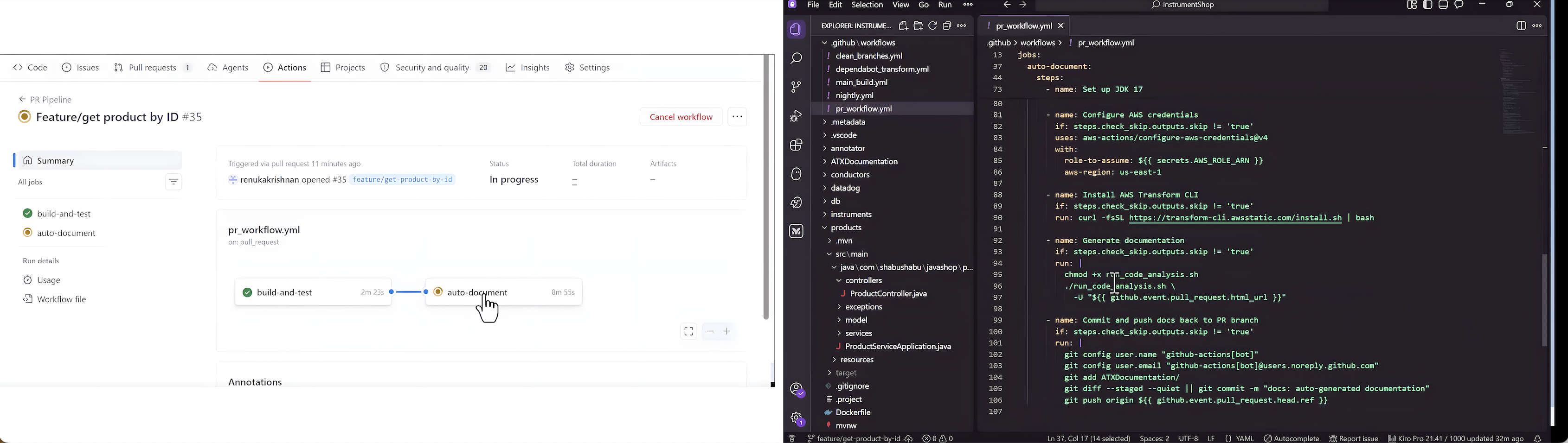
Figure 3: PR triggering auto-documentation
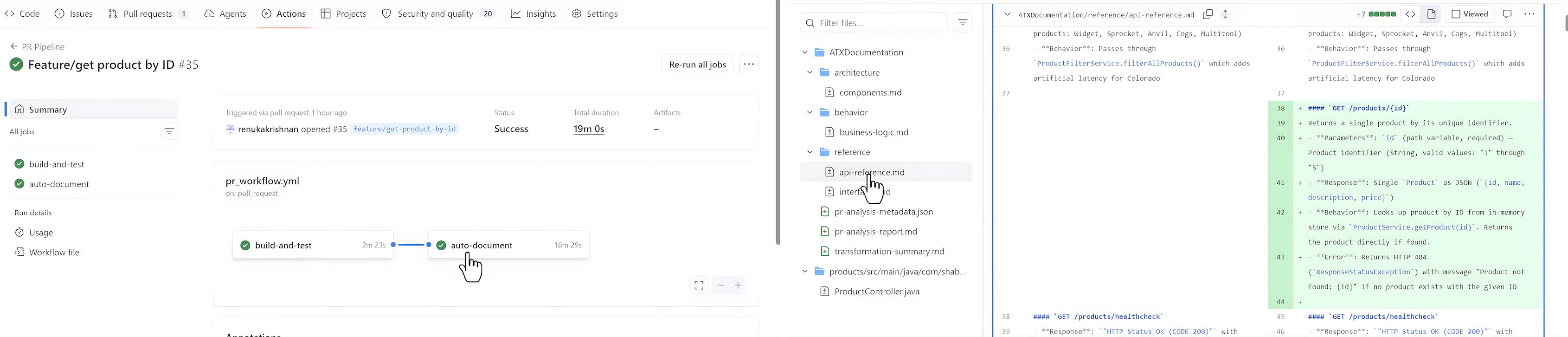
Figure 4 – Generated documentation output
3. Scale across repositories
For organizations with hundreds of microservices, transforming one repository at a time doesn’t scale. AWS Transform custom non-interactive mode combined with GitHub Actions matrix strategy allows you to orchestrate transformations across your entire portfolio in parallel. You can run them on demand or on a recurring schedule, so modernization runs as a continuous practice rather than a one-time project.
# .github/workflows/scale-modernization.yml
name: Scale Modernization
on:
  schedule:
    - cron: '0 6 * * 1'
  workflow_dispatch:

jobs:
  transform-repos:
    runs-on: ubuntu-latest
    strategy:
      matrix:
        repo:
          - magnefique-studios/instrumentShop
          - magnefique-studios/orderService
          - magnefique-studios/paymentGateway
    steps:
      - name: Checkout ${{ matrix.repo }}
        uses: actions/checkout@v4
        with:
          repository: ${{ matrix.repo }}
          token: ${{ secrets.GH_PAT }}

      - name: Configure AWS credentials
        uses: aws-actions/configure-aws-credentials@v4
        with:
          role-to-assume: ${{ secrets.AWS_ROLE_ARN }}
          aws-region: us-east-1

      - name: Install ATX CLI
        run: curl -fsSL https://transform-cli.awsstatic.com/install.sh | bash

      - name: Run transformation
        run: |
          atx custom def exec \
            --transformation-name "spring-boot-3-upgrade" \
            --code-repository-path "." \
            --build-command "mvn clean install" \
            --non-interactive \
            --trust-all-tools
Tip: GitHub Actions matrix strategy runs each repository in parallel automatically — no separate orchestration layer needed. For larger portfolios, you can also wrap this in AWS Batch or AWS Fargate for large-scale parallel execution. The AWS Transform web console tracks progress across all repositories in a single view.
4. Continual learning
Each time AWS Transform custom completes a transformation, a memory agent scans the full execution trajectory and extracts lessons. Lessons include patterns that the agent learned, decisions that the agent made during planning, and feedback you provide during execution. AWS Transform custom automatically attaches these lessons to your transformation definition, which improves accuracy in subsequent runs.
AWS Transform custom applies lessons automatically, and each lesson belongs to a category that groups related lessons for review. You can browse and archive any lesson you do not want AWS Transform custom to apply to future runs.This keeps a human in the loop on what the agent “remembers” which matters when the same transformation runs across many repositories with different conventions.
In practice, this means your “Spring Boot 3 Upgrade” transformation gets sharper with each execution. The first repository surfaces the edge cases; once you review the resulting lessons and archive the ones that do not fit, subsequent runs handle those edge cases without intervention.
For production use, you can combine these practices into a single workflow file:
Note: The individual workflows shown in Practices 1–3 are presented separately for clarity. Combine them into a single workflow file as shown here, or keep them as separate workflow files depending on your team’s preference.
# .github/workflows/continuous-modernization.yml
name: Continuous Modernization
on:
  push:
    branches: [main]
  pull_request:
    types: [opened]
  schedule:
    - cron: '0 6 * * 1'

jobs:
  dependency-remediation:
    if: github.actor == 'dependabot[bot]'
    runs-on: ubuntu-latest
    steps:
      - uses: actions/checkout@v4
        with:
          ref: ${{ github.head_ref }}
      - name: Configure AWS credentials
        uses: aws-actions/configure-aws-credentials@v4
        with:
          role-to-assume: ${{ secrets.AWS_ROLE_ARN }}
          aws-region: us-east-1
      - name: Install ATX CLI
        run: curl -fsSL https://transform-cli.awsstatic.com/install.sh | bash
      - name: Remediate dependency changes
        run: |
          atx custom def exec \
            --transformation-name "dependency-remediation" \
            --code-repository-path "." \
            --build-command "mvn clean install" \
            --non-interactive \
            --trust-all-tools

  auto-documentation:
    if: github.event_name == 'push'
    runs-on: ubuntu-latest
    steps:
      - uses: actions/checkout@v4
      - name: Configure AWS credentials
        uses: aws-actions/configure-aws-credentials@v4
        with:
          role-to-assume: ${{ secrets.AWS_ROLE_ARN }}
          aws-region: us-east-1
      - name: Install ATX CLI
        run: curl -fsSL https://transform-cli.awsstatic.com/install.sh | bash
      - name: Generate documentation
        run: |
          atx custom def exec \
            --transformation-name "codebase-documentation" \
            --code-repository-path "." \
            --build-command "echo 'docs-only'" \
            --non-interactive \
            --trust-all-tools

  weekly-modernization:
    if: github.event_name == 'schedule'
    runs-on: ubuntu-latest
    steps:
      - uses: actions/checkout@v4
      - name: Configure AWS credentials
        uses: aws-actions/configure-aws-credentials@v4
        with:
          role-to-assume: ${{ secrets.AWS_ROLE_ARN }}
          aws-region: us-east-1
      - name: Install ATX CLI
        run: curl -fsSL https://transform-cli.awsstatic.com/install.sh | bash
      - name: Run modernization scan
        run: |
          atx custom def exec \
            --transformation-name "tech-debt-analysis" \
            --code-repository-path "." \
            --build-command "mvn clean install" \
            --non-interactive \
            --trust-all-tools
Conclusion
Continuous modernization moves code transformation out of periodic sprints and into your CI/CD pipeline. By combining GitHub Dependabot’s vulnerability detection with AWS Transform custom agent, orchestrated through GitHub Actions, you can:
- Remediate dependency vulnerabilities automatically — beyond version bumps to full code adaptation
- Keep documentation current with every commit, preserving institutional knowledge
- Scale transformations across hundreds of repositories with consistent quality
- Improve continuously as the agent accumulates knowledge items from each execution
The instrumentShop sample application demonstrates that even a moderately complex microservices architecture — with end-of-life Spring Boot versions, deprecated libraries like Hystrix, and multiple interconnected services — can be continuously modernized without dedicated modernization sprints.
Ready to get started? This post walked through the do-it-yourself path with AWS Transform custom. If you would rather have continuous modernization delivered as a fully managed service, explore AWS Transform continuous modernization. Either way, visit the AWS Transform documentation to start your continuous modernization journey.