AWS DevOps & Developer Productivity Blog
Production-Ready Autonomous Incident Resolution with AWS DevOps Agent (now GA) and Datadog MCP Server
This post was co-written with Bharadwaj Tanikella (AI/ML Product Engineering Leader) and Mohammad Jama (Product Marketing Manager) from Datadog.
In December 2025, we showed how AWS DevOps Agent and Datadog MCP Server could work together to autonomously correlate monitoring data with the infrastructure deployed and configured on AWS to resolve incidents in minutes instead of hours. Since then, Datadog MCP Server has reached general availability as the standard way for AI agents to access Datadog’s monitoring platform. Today, AWS DevOps Agent is generally available, giving teams a production-ready path to autonomous incident resolution across AWS, multicloud and on-premises environments.
What’s New: From Preview to GA
As engineering teams adopt AI-powered tools and build services that leverage AI agents, they want to extend their AI capabilities to incorporate familiar observability data and workflows. AI agents, however, often struggle with traditional API endpoints, causing them to miss the very context they need to resolve incidents effectively. Datadog MCP Server solves this by acting as a bridge between your observability data in Datadog and any AI agent that supports the Model Context Protocol (MCP). Now generally available, the MCP Server ingests prompts from users and AI agents and maps them to the corresponding Datadog resources and data. Under the hood, it handles authentication, HTTP request routing, endpoint selection, and response formatting so that agents receive highly relevant context without the brittleness of direct API calls. It supports modular toolsets so you can connect only the capabilities you need, from core observability data (logs, metrics, traces, dashboards, monitors, incidents) to specialized domains like APM trace analysis, security scanning, database monitoring, and CI/CD pipeline visibility.
Even with reliable access to observability data, incident response remains a manual, reactive process. On-call engineers must piece together the root cause of the incident from multiple data sources, draft mitigation plans, coordinate across teams, and then repeat the cycle when similar issues recur. This reactive approach does not scale as applications grow more complex and distributed.
AWS DevOps Agent changes this by introducing autonomous, always-on incident triage and investigation to your operations. AWS DevOps Agent is your always-available operations teammate that resolves and proactively prevents incidents, optimizes application reliability and performance, and handles on-demand SRE (Site Reliability Engineer) tasks across AWS, multicloud, and on-prem environments. It learns your resources and their relationships, correlates telemetry, code, and deployment data across your environment, and drives systematic improvements that prevent future incidents. Now, this also has several new capabilities that were not available during preview. It coordinates incident response automatically through channels like Slack, PagerDuty, and ServiceNow, keeping the right people informed without manual effort. It also delivers proactive prevention recommendations that address root causes before they lead to repeat incidents. In addition, DevOps Agent now supports multicloud and on-premises environments, extending its reach beyond AWS-only workloads to meet teams wherever their infrastructure runs.
With its built-in Datadog MCP Server integration, AWS DevOps Agent can pull the right Datadog context during an investigation, such as searching error logs, analyzing span-level latency, and reviewing recent deployment events. Together, these new features give engineering teams a fully integrated, production-ready workflow for autonomous incident resolution across AWS and Datadog.
Setting Up and Using AWS DevOps Agent with Datadog
In this section, we will guide you through the steps required to enable Datadog MCP Server in your AWS DevOps Agent account and configure it for incident resolution.
Pre-requisites
For this walkthrough, you should have access to and understanding of the following:
- An AWS account
- Agent Space role – for basic service operations
- Agent Space web app role – for using the Agent Space web app functionality
- (Optional) Secondary source account roles if monitoring multiple AWS accounts. Refer to the DevOps Agent user guide for the details on setting up these roles.
- A Datadog account
- Access to Datadog MCP Server
Setting up Datadog in the AWS DevOps Agent Console
- Start in the AWS DevOps Agent console by connecting your Datadog account.
- Navigate to Capability Providers, select the Datadog integration panel and click Register button.
- Enter Server Name, Endpoint URL, an optional Description, and click the Next button.
- AWS DevOps Agent validates the connection and displays a confirmation message.
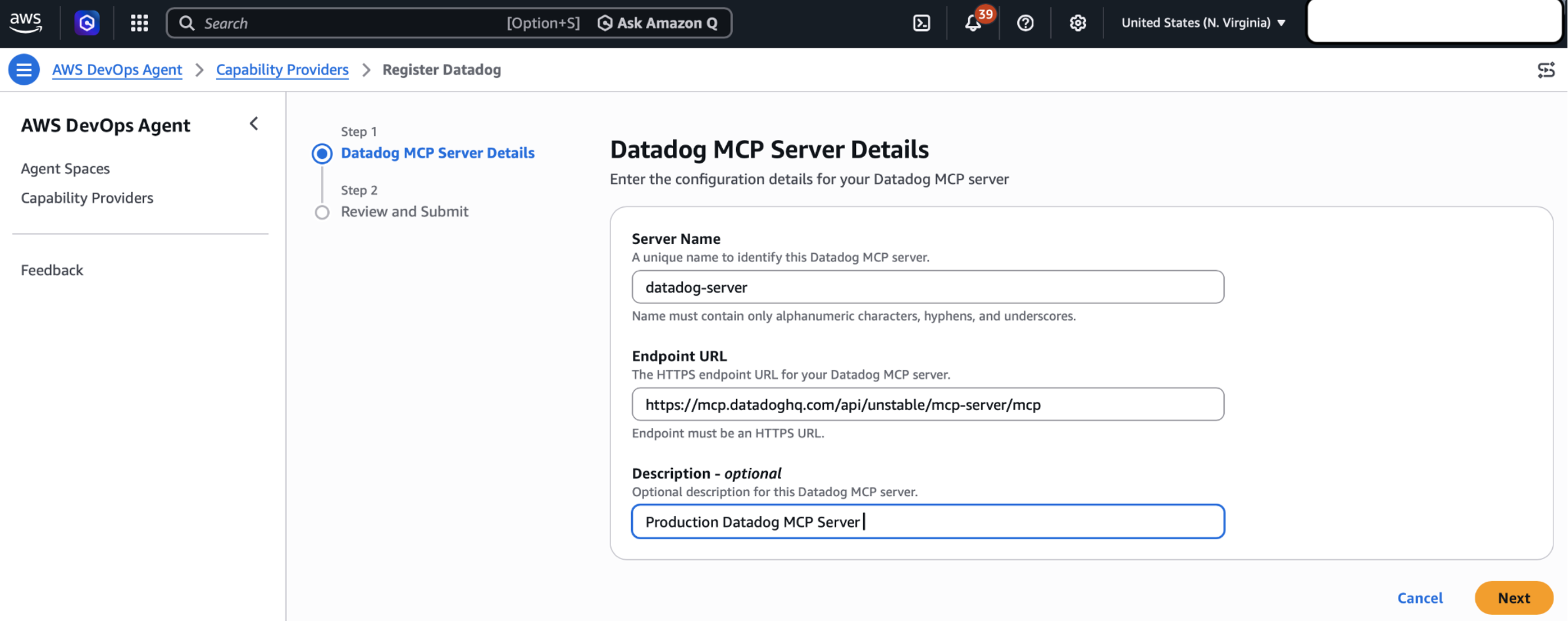
Figure 1: Setting up Datadog MCP Server in AWS DevOps Agent Console
Create an AWS DevOps Agent Space
Create an Agent Space in your primary AWS account to serve as the operational hub for incident investigations.
- Open the AWS DevOps Agent console in us-east-1.
- Choose Create Agent Space and provide a meaningful name and description.
- Configure the required IAM role that grants AWS DevOps Agent access to your AWS resources. You can use the automated role creation process or create the role manually.
- After your Agent Space is ready, add the Datadog MCP Server as a telemetry source to enable comprehensive incident investigation.
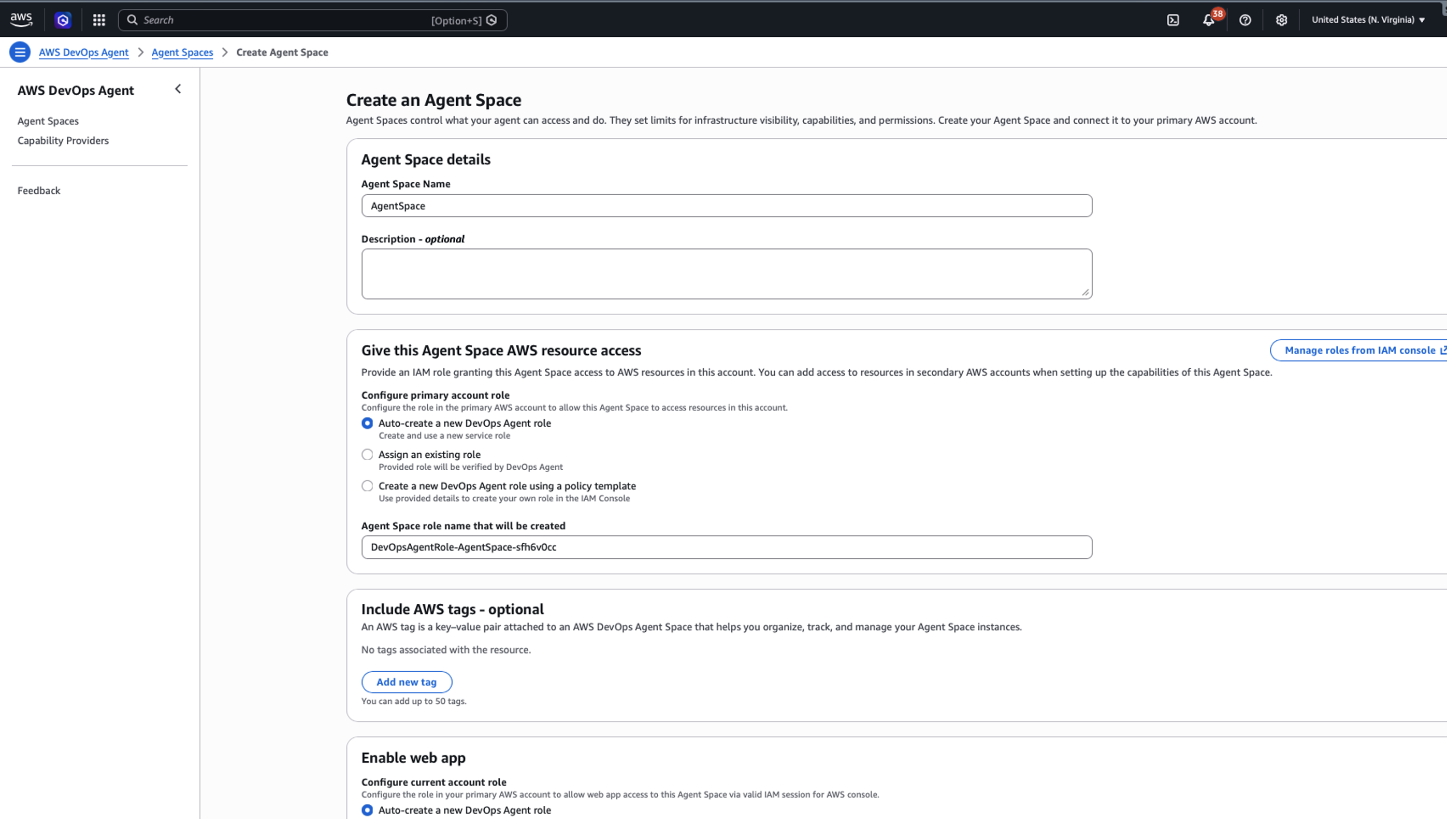
Figure 2: Creating an AWS DevOps Agent in Agent Space
Real-World Example: Resolving Errors
Let’s walk through how AWS DevOps Agent and Datadog work together to resolve a production incident. In this scenario, Datadog monitors detect a spike in Amazon API Gateway 5XX errors affecting downstream services.
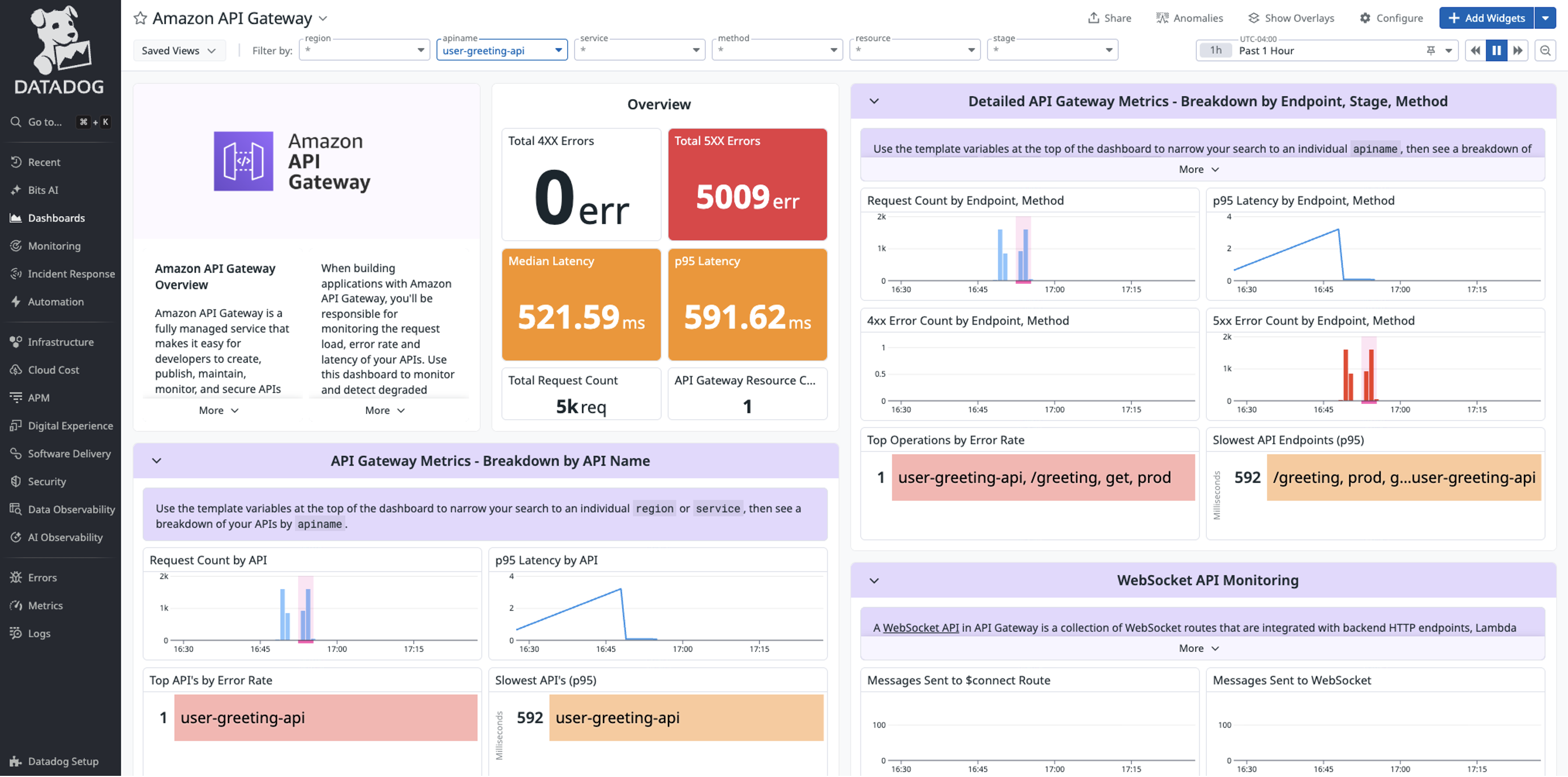
Figure 3: Sample 5xx errors in Datadog
Investigating errors from Incident with Datadog MCP Server and AWS DevOps Agent
When the 5xx alert triggers, AWS DevOps Agent automatically analyzes the incident using both Datadog metrics and API Gateway logs. Through the investigation chat interface, an engineer guides AWS DevOps Agent to examine the API Gateway configuration. The agent correlates API Gateway and AWS Lambda execution logs, quickly identifying error patterns.
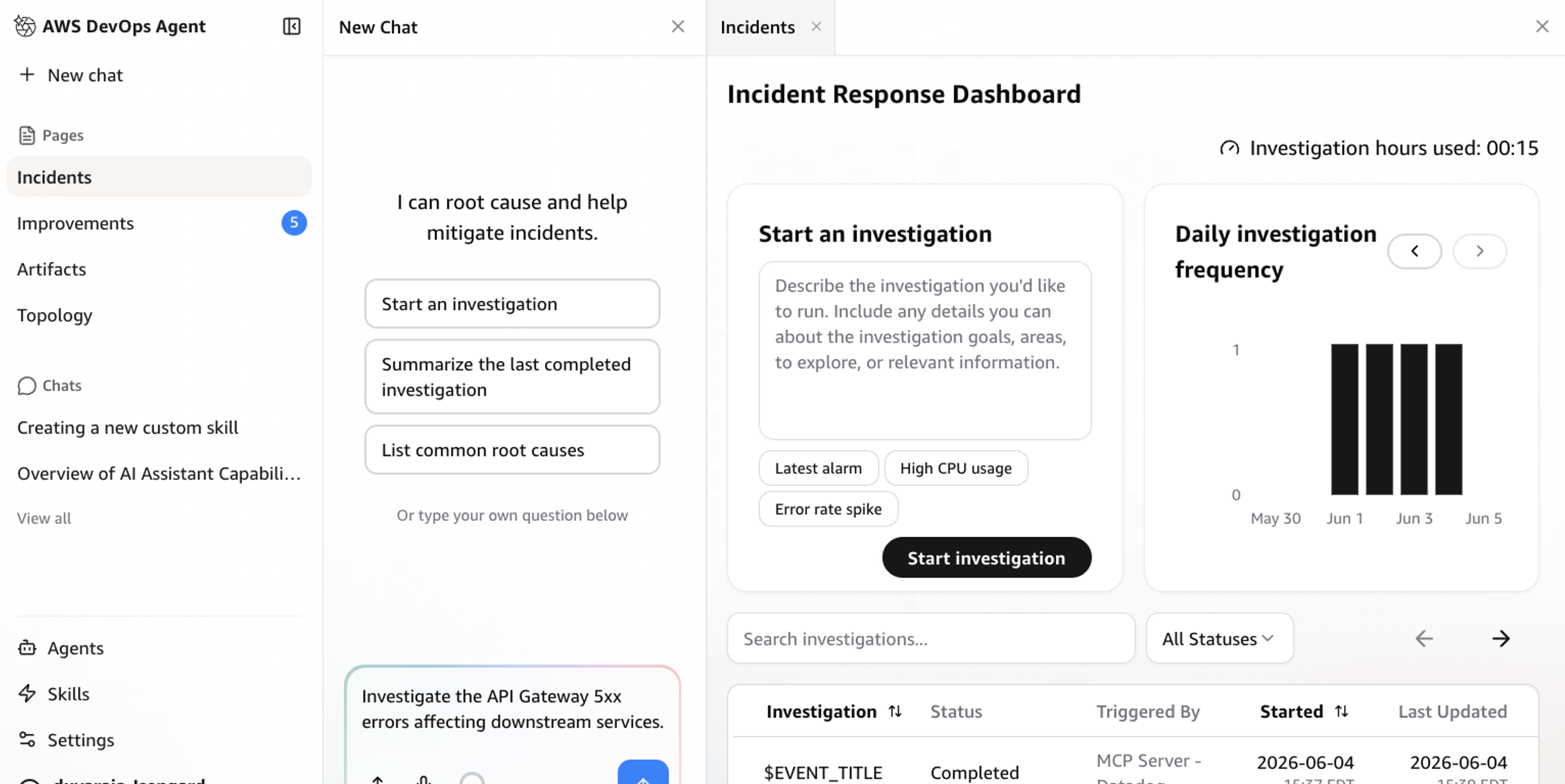
Figure 4: Investigating an incident with AWS DevOps Agent and Datadog MCP Server
Resolving issue
AWS DevOps Agent helps identify potential misconfigurations in the Lambda and Amazon DynamoDB integration and suggests immediate fixes. The agent documents all findings and actions in an incident investigation, backed by telemetry from both Datadog and AWS services. After resolution, AWS DevOps Agent generates a detailed analysis report with specific recommendations to prevent similar incidents.
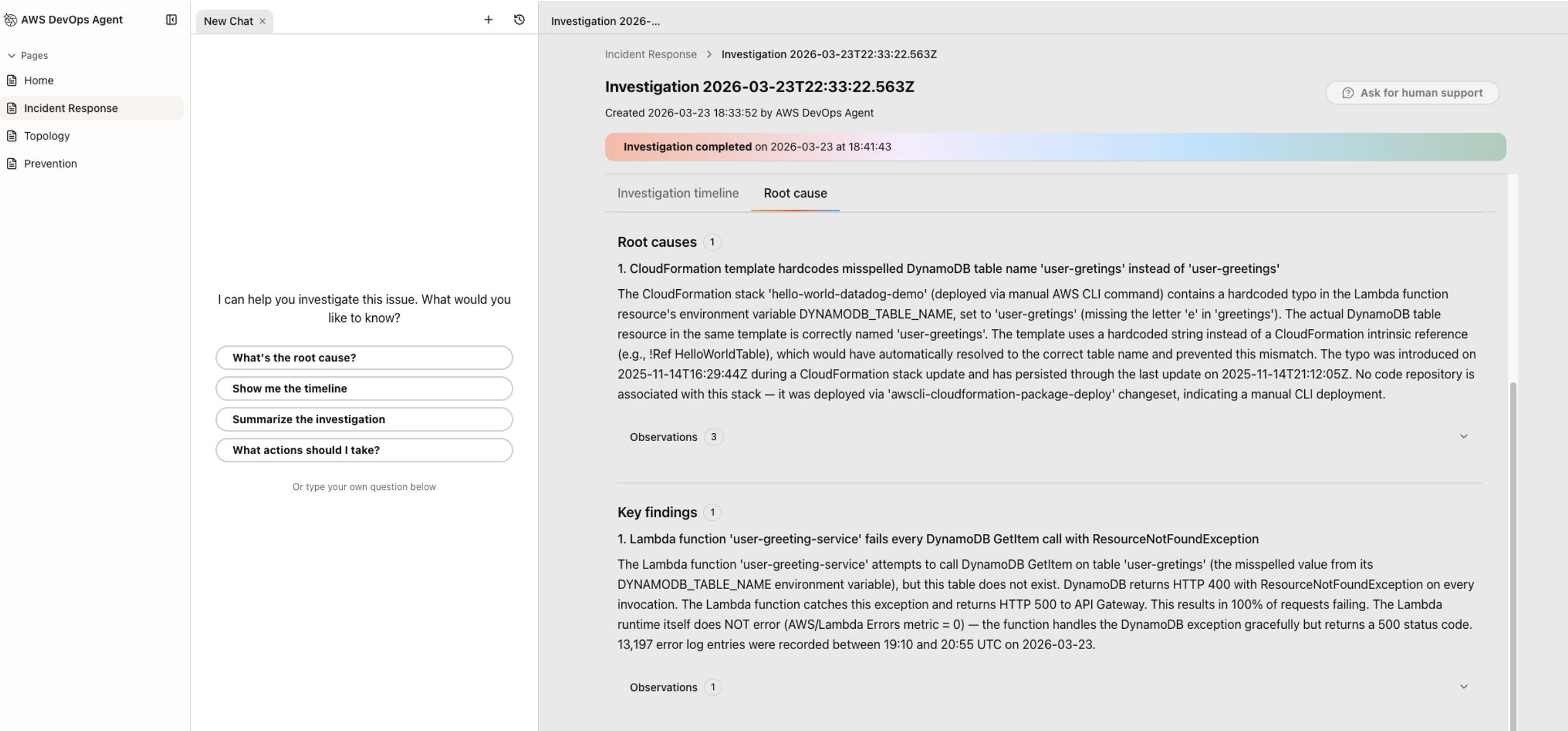
Figure 5: Investigation summary produced by AWS DevOps Agent
Mitigation plans
After completing investigation, AWS DevOps Agent goes beyond identifying the root cause — it generates a detailed mitigation plan with step-by-step remediation guidance specific to the incident. Beyond immediate fixes, the plan includes longer-term prevention recommendations such as adding retry logic, implementing circuit breakers, or adjusting capacity thresholds to reduce the risk of recurrence.
This shifts the on-call experience from reactive to proactive. Instead of context-switching across multiple tools to build a remediation plan from scratch, engineers get a ready-to-execute plan they can review, refine, and route through existing change management workflows — keeping stakeholders informed as fixes are implemented. Over time, AWS DevOps Agent learns from resolved incidents across your environment, making its mitigation plans increasingly precise by recognizing patterns, referencing past resolutions, and surfacing preventive measures before similar issues repeat. AWS DevOps Agent also leverages its deep understanding of your environment, enabling you to dive deeper into your application environment, beyond just asking questions, to create, save, and share custom charts and reports.
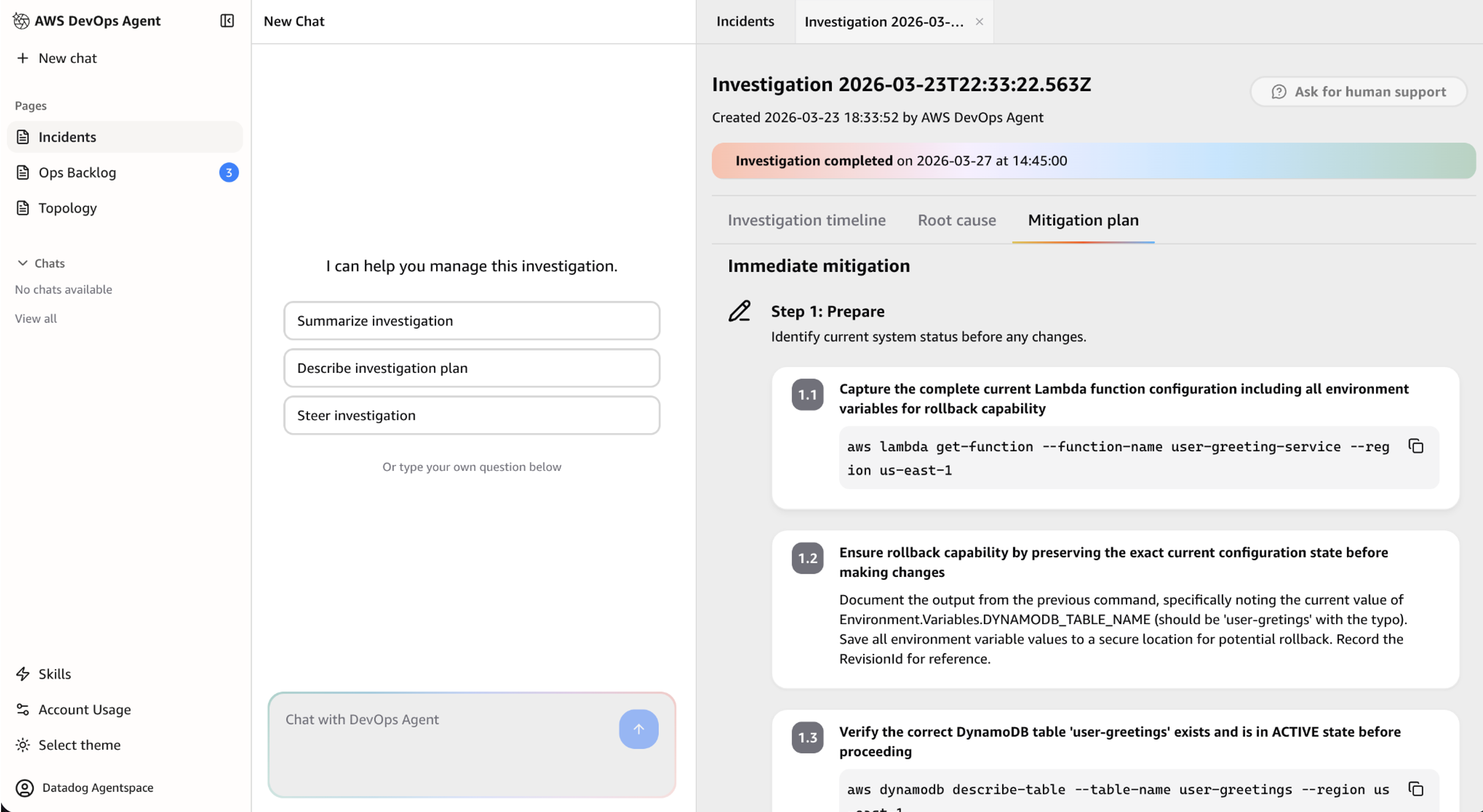
Figure 6: Mitigation plan generated by AWS DevOps Agent
Prevention
AWS DevOps Agent can evaluate recent incidents to identify improvement opportunities that prevent future incidents and reduce Mean Time To Detection (MTTD) and Mean Time to Recovery (MTTR).
- Navigate to the Improvements page in the AWS DevOps Agent web app
- Click Run Now. Once its completed, it displays a personalized incident prevention recommendation, as displayed in Figure 7 below. Note: The “Run Now” button may not produce visible results immediately. Prevention analysis runs asynchronously in the background and results may take time to appear. This is expected since the feature is designed for production environments with longer incident histories.
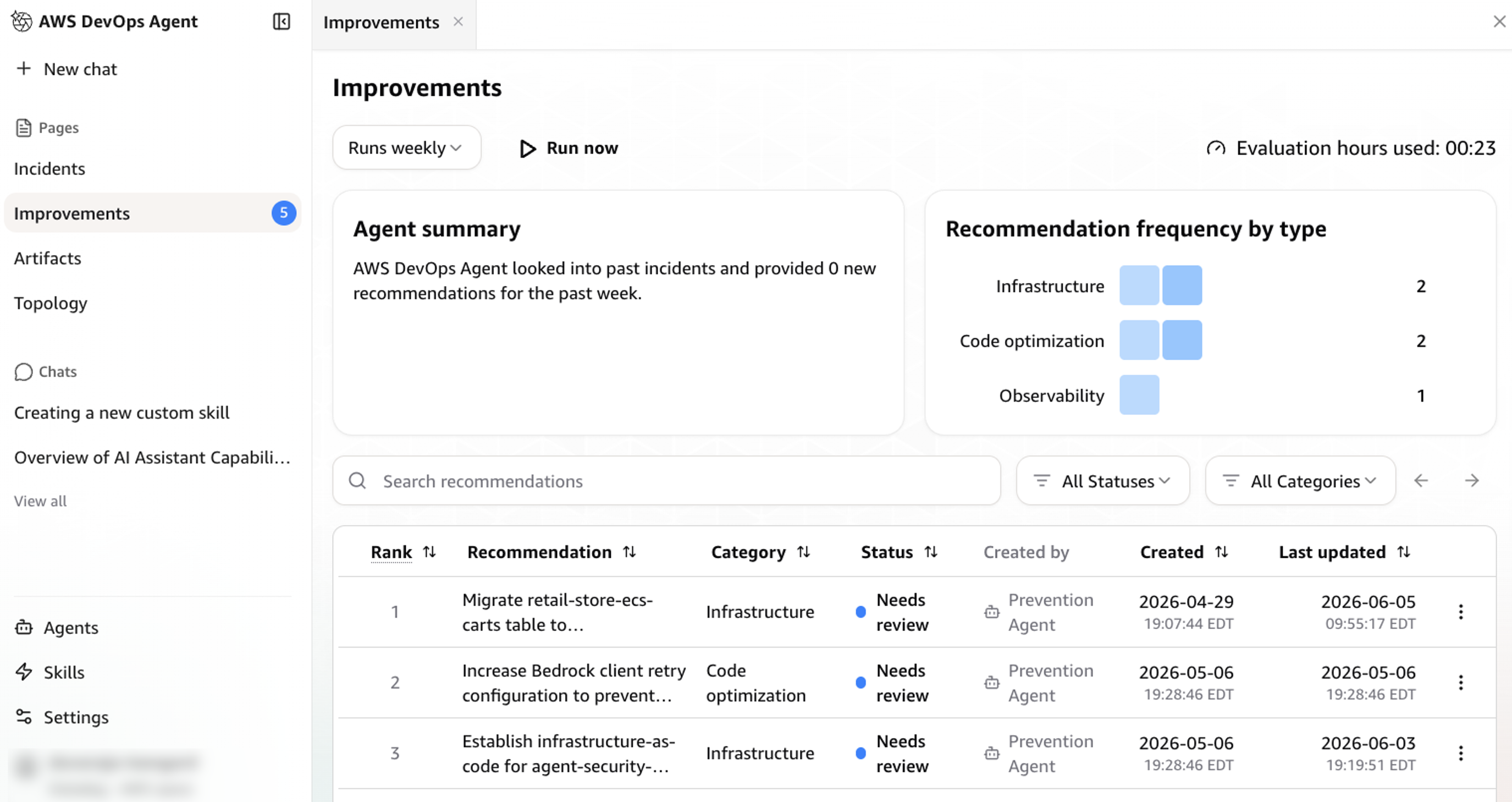
Figure 7: Personalized incident prevention recommendation from AWS DevOps Agent
Cleanup
When you’re done using the integration, you can clean up your resources by following these steps:
- Delete your Agent Space from the AWS DevOps Agent console
- Remove the Datadog MCP Server connection from your Capability Providers
- Delete the IAM roles created for the Agent Space
- (Optional) If you created additional source account roles, remove those as well
Conclusion
With Datadog MCP Server and AWS DevOps Agent now generally available, this integration automatically correlates Datadog logs, metrics, and traces with AWS telemetry, code, and deployment data, giving teams an autonomous investigation that identifies root causes, delivers actionable mitigation plans, and recommends preventive improvements. Early adopters have seen resolution times drop from hours to minutes and deeper root cause analysis across AWS, multicloud and hybrid environments. To learn more, check out the AWS DevOps Agent.
Datadog is an AWS Specialization Partner and AWS Marketplace Seller that has been building integrations with AWS services for over a decade, amassing a growing catalog of 100+ AWS and 1000+ built-in integrations. This new AWS DevOps Agent and Datadog MCP Server integration builds upon Datadog’s strong track record of AWS partnership success. If you’re not already using Datadog, you can get started with a 14-day free trial via the AWS Marketplace.