.NET on AWS Blog
Modernize SQL Server databases to Aurora PostgreSQL using AWS Transform
Introduction
Modernizing SQL Server databases to Aurora PostgreSQL often stalls before it starts. Infrastructure setup, network configurations, credential sharing, and security reviews create weeks of friction before teams can even assess what the migration involves. With Offline Source in AWS Transform full-stack Windows modernization, you can skip those barriers and begin modernizing your Microsoft SQL Server databases to Amazon Aurora PostgreSQL-Compatible Edition (Aurora PostgreSQL) by uploading a SQL Server database schema file.
If you manage SQL Server estates and have been postponing modernization because of the complexity of getting started, this post is for you. You will learn how Offline Source eliminates infrastructure prerequisites, how the transformation workflow operates end-to-end (including .NET application code assessment), and how to go from a Source Microsoft SQL Schema DDL export to a validated Aurora PostgreSQL schema with transformed application code.
The challenge: infrastructure before insight
Assessing a SQL Server database for modernization has traditionally required:
- Network connectivity between the source database and transformation tooling
- Credential sharing or agent installation on the source server
- Provisioning of intermediate environments for schema analysis
For organizations with strict security policies, regulated environments, or databases behind corporate firewalls, these prerequisites alone can delay modernization projects by weeks or months before any assessment work begins.
Solution overview
With Offline Source in AWS Transform, you can create a virtual representation of your source database from a standard Data Definition Language (DDL) export file. Instead of connecting to a live SQL Server instance, you upload your DDL and AWS Transform performs assessment, conversion, validation, and deployment to Aurora PostgreSQL with zero infrastructure prerequisites.
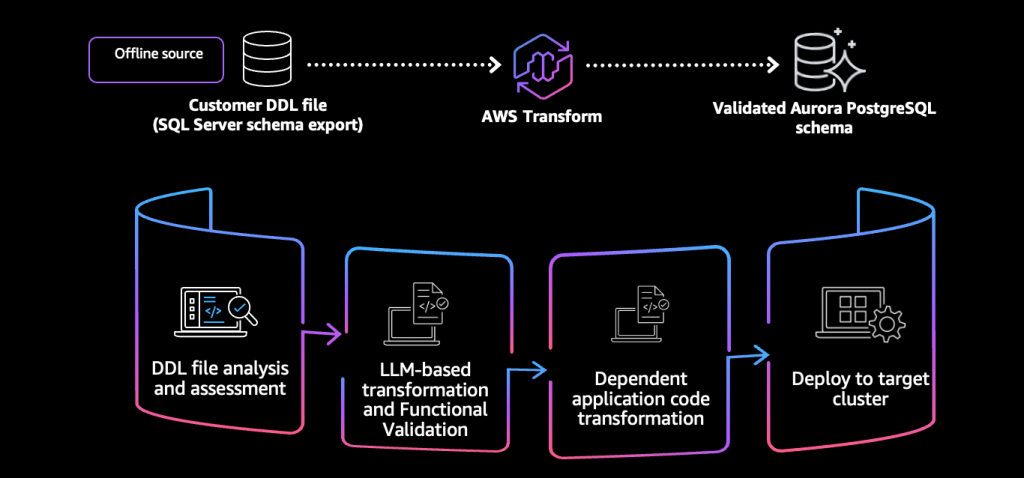
Figure 1: AWS Transform Offline Source workflow
- Database assessment: Analyze database objects for complexity, dependencies, and level of effort
- Schema conversion: LLM-based conversion of SQL Server objects to PostgreSQL
- Validation: Three-layer verification (structural, semantic, functional)
- Deployment: Apply validated schema to an Aurora PostgreSQL cluster
- Application assessment and transformation: Connect .NET source code to assess and transform database-dependent application code alongside the schema
Prerequisites
Before you begin, verify you have the following:
- An AWS account with access to the AWS Transform console
- Credentials to connect to SQL Server to extract DDL
- An AWS account with permissions to create Aurora PostgreSQL clusters (AWS Transform provisions the target cluster as part of the deployment step)
- Optional: A source code repository (GitHub, GitLab, or Bitbucket) accessible via AWS CodeConnections, or uploaded via Amazon S3 or Personal Access Token (PAT), for .NET application assessment AWS CodeConnections
- AWS Transform for SQL Server is available in US East (N. Virginia) us-east-1 only. For databases in other regions, clone to us-east-1 for transformation.
- IAM Identity Center enabled in your AWS account
- Microsoft SQL Server version 2008 R2 through 2022 (all editions supported). SQL Server can be hosted on AWS or outside of AWS.
- Optional, for .NET assessment: .NET Core 6, 7, 8, or 10 application. Legacy .NET Framework 4.x and earlier is not supported.
Walkthrough
The following sections walk through each stage of the Offline Source workflow.
Step 1: Extract and upload your SQL Server DDL
AWS Transform provides two ways to extract your DDL:
- Option 1 (recommended): When you create a transformation job, AWS Transform provides an extraction script (
ExtractDatabaseMetadata.ps1) to run against your SQL Server. This script extracts DDL definitions for SQL Server object types (tables, stored procedures, functions, triggers, and more) per database and detects multiple feature areas (SSIS, SSRS, Service Broker, Agent Jobs, and more), giving the most complete picture for assessment. - Option 2 (manual): Export your SQL DDL files manually (
CREATE TABLE,CREATE PROCEDURE, and similar statements) using SSMS or sqlpackage, then zip and upload. Each SQL file should contain statements for only one database.
Upload the resulting DDL file (or zip) to AWS Transform to create your Offline Source.
Step 2: Review the assessment
AWS Transform analyzes all database objects for complexity and dependencies. The assessment report includes:
- Dependency mappings showing how objects relate to each other
- Complexity scores for each object (Simple, Moderate, Complex)
- Level of Effort (LOE) estimates for manual transformation versus automated conversion
- Estimated effort savings showing how much time the agent automates versus what requires human review
The assessment also identifies items that may need manual review, such as DDL triggers that require PostgreSQL event triggers or functions that use constructs only valid inside exception blocks. You can use these findings to plan your team’s involvement before conversion begins.
Step 3: Customize the transformation
After reviewing the assessment, AWS Transform generates a transformation plan that defines how your conversion will execute. The plan consolidates execution strategy, phase sequencing, conversion rules, and infrastructure configuration into a single reviewable artifact. You can accept the defaults and proceed, or customize any aspect before conversion begins.
The transformation plan covers four areas:
- Execution waves – databases are converted in wave order, with up to five databases running in parallel within each wave. The next wave starts only after all databases in the current wave finish. You can reorder databases between waves or remove them entirely.
- Job plan – the sequence of phases for your conversion job (schema conversion, target provisioning, schema deployment, code transformation, and optional synthetic test data generation). You can skip optional phases as needed.
- Conversion and custom rules – type mappings (for example, SQL Server
MONEYto PostgreSQLDECIMAL(19,4)), schema name mappings (for example,dbotopublicfor single-database migrations), function mappings (for example,GETDATEtoCURRENT_TIMESTAMP), identity column strategy (GENERATED BY DEFAULTorGENERATED ALWAYS), and procedure result handling (refcursor or function return style). Sensible defaults are applied automatically; you only need to change what does not fit your use case. - Target provisioning configuration – whether to create a new Aurora PostgreSQL cluster or connect to an existing one, along with instance class, network settings, and credential management.
You can customize these settings by editing the plan directly in the console, describing your preferences in plain language, or providing a JSON configuration file. For example, you can request “Map MONEY to DECIMAL(19,4), use public for dbo, and generate identity columns with GENERATED ALWAYS” and AWS Transform applies the matching rules.
Step 4: Run LLM-based schema conversion
With AWS Transform, we use large language models (LLMs) to convert SQL Server schema objects to PostgreSQL. The conversion is context-aware and preserves business logic intent, not just syntax.
Conversion proceeds in stages:
- Foundation objects (schemas, sequences, synonyms, user-defined types)
- Tables and primary keys
- Constraints and indexes
- Programmable objects (stored procedures, functions, views, triggers)
The LLM-based approach handles complex T-SQL patterns and proprietary SQL Server syntax that typically require manual conversion with rule-based tools. This results in higher automated conversion rates and fewer manual interventions.
Step 5: Validate converted objects
Converted objects pass through three layers of automated validation:
- Structural validation confirms the converted PostgreSQL schema is syntactically correct and deployable.
- Semantic validation verifies that converted objects preserve the logical meaning and behavior of the source.
- Functional validation compares query behavior between source and target to catch discrepancies before anything touches a live environment.
Each validation pass launches an isolated sandbox, loads both target schemas, and runs an AI expert reviewer that inspects type mappings, constraints, and routines. AWS Transform generates validation reports after storage object conversion and after code object conversion. Each report provides per-category results (tables, columns, constraints, indexes, views, procedures, functions) with Pass, Warning, and Fail indicators.
After validation completes, an Expert Assessment grades the overall conversion:
- Ready: Objects fully converted and validated
- Conditional: Objects converted with minor issues flagged for review
- Not Ready: Objects requiring manual intervention
Step 6: Address remaining issues
For objects graded Conditional or Not Ready, AWS Transform provides a Schema Conversion Report with specific next steps. You have two options:
- Use the built-in AWS Transform web console to review and fix conversion issues directly in the browser, with no local IDE installation required.
- Alternatively, use Kiro or other local AI coding assistants with the AWS Transform MCP Server to fetch artifacts into your preferred IDE.
You can retry validation after making changes and deploy iteratively until the full schema passes validation.
The web console provides a fully integrated experience for reviewing conversion reports, editing SQL, retrying validation, and deploying changes. For teams that prefer local development, the MCP Server connects your IDE to your AWS Transform workspace, providing the same artifacts and deployment capabilities within your existing development workflow.
Step 7: Deploy to Aurora PostgreSQL
Once validated, set up a database connector to grant AWS Transform access to your AWS account. AWS Transform then provisions a target Aurora PostgreSQL cluster and deploys the converted schema:
- Choose an existing cluster or let AWS Transform create a new one for you.
- AWS Transform applies converted objects to the target.
- Database credentials are generated and stored in AWS Secrets Manager.
- Review the deployment report for any issues.
After deployment, you can optionally disable the RDS Data API if it is no longer needed for ongoing operations.
Step 8: Assess and transform .NET application code
After schema deployment completes, AWS Transform gates code transformation on the deployed schema. Connect your .NET Core (6, 7, 8, or 10) source code repository for application assessment and transformation. Your application must use ADO.NET or Entity Framework (6.3-6.5, or EF Core 1.0-8.0) for database access. Assessment can begin before schema deployment, but code transformation requires the schema to be deployed first.
To connect your source code, you can use:
- AWS CodeConnections for GitHub, GitLab, or Bitbucket repositories
- Amazon S3 for uploading source code directly
- Personal Access Token (PAT) stored in AWS Secrets Manager
Once connected, AWS Transform:
- Discovers the repositories available through the connector.
- Downloads and analyzes the source code, identifying database references, Entity Framework models, connection strings, and SQL query patterns.
- Generates an application assessment report with modernization complexity (Low, Medium, High) and specific transformation recommendations.
After assessment completes, you can start code transformation to update your .NET application code to target Aurora PostgreSQL. The code transformation uses the schema conversion results to update connection strings, ORM mappings, and inline SQL queries in your application.
Step 9: Validate with synthetic data (optional)
AWS Transform can generate synthetic data in your target cluster for validation without exposing production data. A synthetic data generation report outlines what was created, allowing thorough testing of stored procedures, views, and application queries against representative data volumes.
Cleanup
If you created a new Aurora PostgreSQL cluster for testing purposes during this walkthrough:
- Navigate to the Amazon RDS console.
- Select the cluster you created.
- Choose Actions > Delete.
- Confirm deletion.
AWS Transform workspaces can be retained at no additional cost for future reference.
Conclusion
With Offline Source in AWS Transform for SQL Server, you remove friction points in SQL Server modernization: getting started and Schema conversion accuracy and validation. Upload a DDL file instead of configuring live database connectivity. Assess, convert, validate, and deploy your schema to Aurora PostgreSQL without provisioning infrastructure. Connect your .NET source code repository to transform application code alongside the database – all within a single unified workflow.
To get started with Offline Source, open the AWS Transform console and create your first transformation workspace. For more information, refer to the AWS Transform documentation. To learn more about Aurora PostgreSQL as a modernization target, refer to Amazon Aurora PostgreSQL-Compatible Edition.