AWS for Games Blog
How Agentic AI Is Transforming Game Infrastructure Management
Preparing for a game launch can be challenging. Deciding on how many servers should be provisioned, their location and the scaling policy creates a balance between costs and player satisfaction. For one games studio, the operations team spent 60% of their time context-switching between AWS Console interfaces and troubleshooting capacity issues during launch events. During one major content release, manual scaling decisions led to a 2-hour queue time spike that resulted in 12% player churn.
Challenges operations teams face
Managing game servers at scale is a complex challenge that game developers face today. Once a game is launched, it becomes the operations team’s responsibility to keep the game available. They need to monitor the health of game servers across multiple regions, ensure there’s enough capacity to meet demands, all while keeping costs as low as possible and maintaining player experience. As more and more games are released, often with differing backend systems, more people and resources are diverted from working on new games. It becomes a challenge for the team to manage the infrastructure, requiring a breadth of technical knowledge to ensure that player experience isn’t negatively impacted.
- Infrastructure complexity – Game operation teams often manage multiple game titles, many of which use different game server hosting technologies. Each platform has its own management interface, monitoring tools, and operational procedures, making it difficult to get a unified view of the game servers.
- Rapidly changing demand – When player counts surge during new content releases or seasonal events, teams need to quickly scale up capacity. During off-peak times, they must scale down to keep operating costs down. These decisions require understanding demand patterns and predicting capacity needs, while ensuring a seamless performance for users.
- Balancing cost optimization and player experience – Game server costs can increase quickly as game servers are deployed globally and can be hard for teams to scale. Game operation teams need to balance cost efficiency with player experience, making decisions about instance selection, spot vs on-demand, region selection, and fleet scaling policies. Without proper tooling, teams would guess the number of servers required and look at metrics such as player latency and queuing times, risking player attrition.
- Knowledge Silos – To be able to manage game servers effectively, knowledge in multiple game hosting technologies is required with services like Amazon GameLift Servers and Kubernetes. This knowledge is often siloed across teams, creating bottlenecks when team members are unavailable.
Introduction to the Agentic Game Infrastructure Management System
The Guidance for Game Backend & Infrastructure Agentic Workflows is designed to work for operations teams who manage Amazon GameLift Servers fleets and Amazon Elastic Kubernetes Service (EKS) clusters and nodes. Engineers can ask natural language questions about their infrastructure and get information in return which saves time. Engineers can avoid having to navigate the AWS Console or memorising CLI commands.
The Guidance for Game Backend & Infrastructure Agentic Workflows allows you to ask questions about your infrastructure, such as where your resources are located and performance metrics of your clusters and fleets. The system has the capability to give personalized cost optimization recommendations to your game servers and explore your logs to proactively identify faults in your infrastructure.
How it works
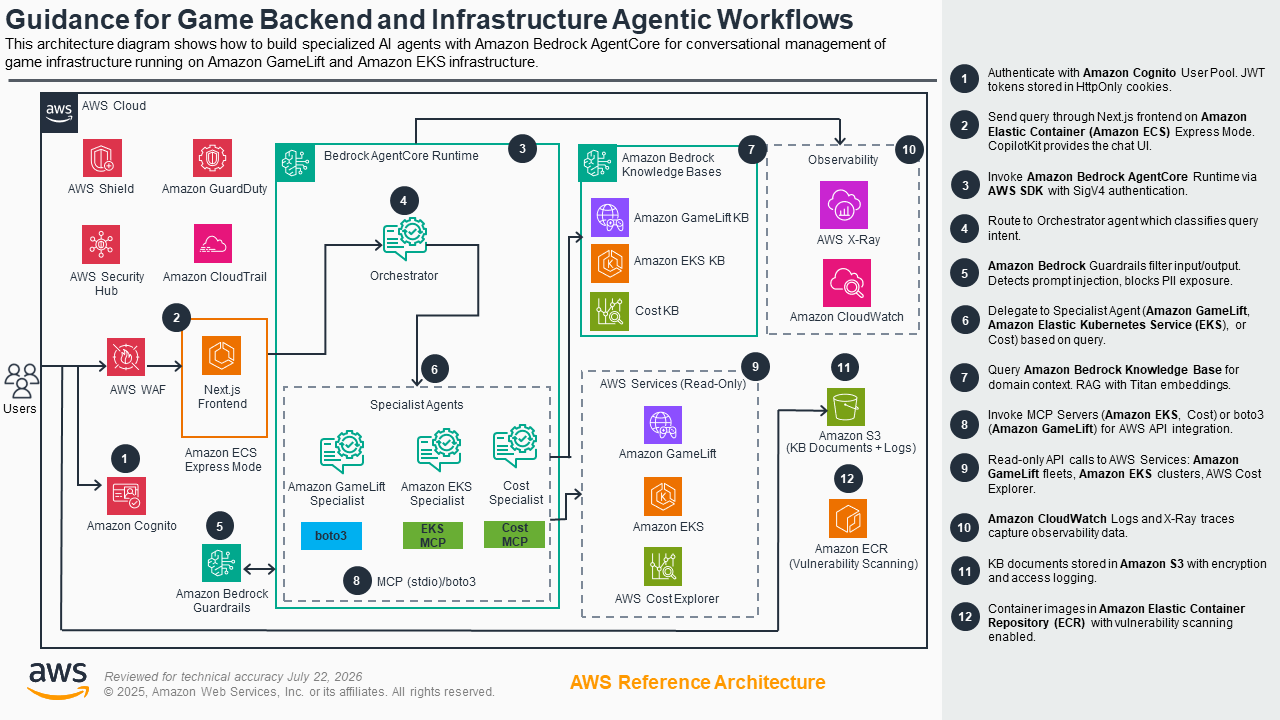
Figure 1 – Agentic Game Infrastructure Management system architecture with Amazon Bedrock AgentCore orchestration
The Agentic Game Infrastructure Management system is built around Amazon Bedrock AgentCore, which is a fully managed, serverless service for deploying AI agents at scale. AgentCore is flexible and allows for interchanging the LLM model and provides isolated agent environments. It supports long execution times and payloads up to 100MB, with automatic scaling and session management. AgentCore supports Model Context Protocol (MCP) servers and can use tools. It can also maintain conversation memory across sessions, allowing agents to retain context and provide coherent multi-turn interactions. AgentCore’s security features include SigV4 authentication, IAM-based access control and Amazon Bedrock Guardrails for content filtering and PII protection.
It uses a Next.js frontend hosted on Amazon Elastic Container Service (ECS), using CopilotKit for the Chat UI and Amazon Cognito for user authentication to the deployment. The backend utilizes Amazon Bedrock AgentCore to create four specialized agents:
- Game Agent Orchestrator – Main AI orchestrator that routes queries to appropriate specialist agents
- GameLift Servers Specialist – Fleet management, scaling, and optimization
- EKS Specialist – Kubernetes cluster operations and troubleshooting
- Cost Specialist – AWS spending analysis and cost optimization
These agents have access to the Amazon EKS, Cost and Boto3 MCP servers to allow API read-only access to the infrastructure and the observability data in Amazon CloudWatch and AWS X-Ray. In addition, Bedrock Knowledge Bases on GameLift Servers, EKS and Cost Optimization are deployed to provide domain knowledge when queried by the agents.
When an authenticated user wants to ask a question, they interact with the chat frontend, which is then passed to the Game Agent Orchestrator agent to determine the appropriate agent to handle the query. All inputs and outputs are filtered by Bedrock Guardrails to protect against prompt injections and the exposure of PII.
How to Deploy
Prerequisites
To deploy this solution, you require an AWS account with an IAM User with the correct permissions.
- AWS CLI – v2.x
- uv – v0.9
- Node.js – v18
- yq
- Python – v3.13
Stage 1: Local Development
Step 1: Clone Repo & Create local environment config
git clone https://github.com/aws-solutions-library-samples/guidance-for-game-backend-and-infrastructure-agentic-workflows
cd guidance-for-game-backend-and-infrastructure-agentic-workflows
cp ui/.env.local.example ui/.env.local
The default settings in the local environment work out of the box.
Step 2: Start the local dev environment
./dev-start.shThis script:
- Installs Python dependencies via uv sync
- Start the AgentCore Runtime on http://localhost:8080
- Install Node.js dependencies
- Start the Next.js frontend on http://localhost:3000
- Auto-detect and enable conversation memory if previously deployed
Step 3: Verify it’s running
open http://localhost:3000 in your browser.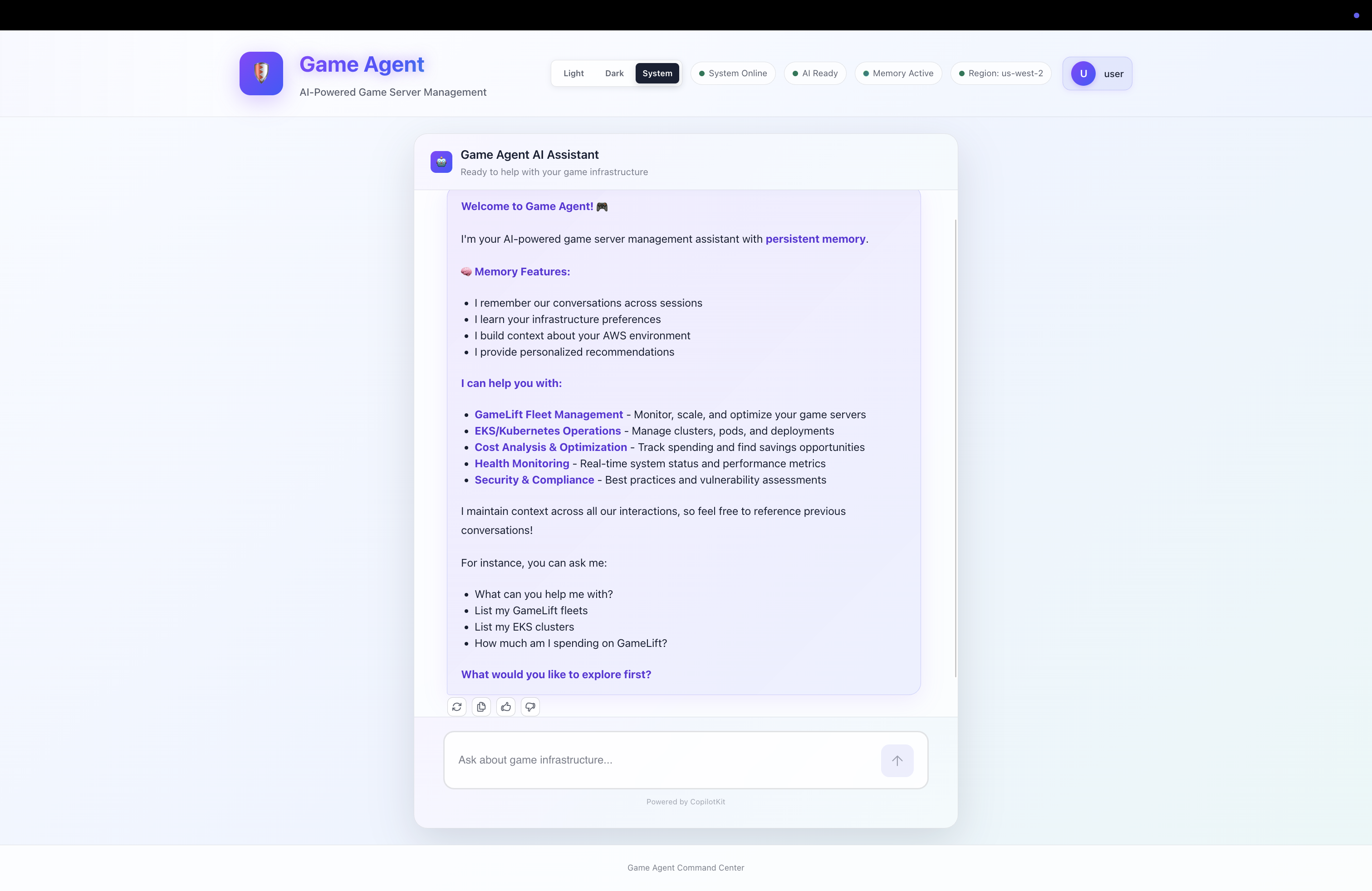
Figure 2 – AI assistant interactions to manage games infrastructure
Step 4: Stop local environment
./dev-stop.shStage 2: Production Deployment to AWS
Step 1: Deploy to AWS
./deploy-all.shThis is a single command that executes the following steps in order:
- Download KB documentation – fetches docs for the knowledge bases
- Base infrastructure (
01-base-infrastructure.yaml) – Cognito user pool, IAM roles, ECR repositories - Bedrock Guardrails (
04-bedrock-guardrails.yaml) – content filtering for the AI - Bedrock Managed Prompts – system prompts for each specialist agent
- Account-wide observability – CloudWatch Transaction Search, X-Ray setup
- AgentCore Runtime – installs backend deps, configures and launches the runtime via agentcore CLI (CodeBuild-based deployment). Patches the Dockerfile for MCP server compatibility
- CloudWatch delivery – wires runtime traces to X-Ray
- Observability stack (
03-agentcore-observability.yaml) – dashboards and alarms - Knowledge Bases – deploys 3 KBs (GameLift, EKS, Cost) and seeds them with documentation
- Wire KB IDs + Prompt ARNs – updates the AgentCore Runtime environment with KB IDs, guardrail ID, and prompt ARNs
- Build & push frontend container – builds the Next.js app, pushes to ECR
- Deploy frontend (
02-frontend-ecs-express.yaml) – ECS service with Cognito auth - Security infrastructure (
05-security-infrastructure.yaml) – WAF (attached directly to ECS), CloudTrail audit logging, Amazon Inspector ECR scanning
Step 2: Create your admin user
./scripts/infrastructure/add-admin-user.shYou’ll be prompted for an email and password. This creates a Cognito user in the admin group.
Step 3: Access the production deployment
The deploy script prints the frontend URL at the end:
Log in with the credentials you created in Step 2.
Stage 3: Post-Deployment Testing
Step 1: Subscribe to security alerts
# Get the SNS topic ARN
TOPIC_ARN=$(aws cloudformation describe-stacks \
  --stack-name game-agent-security \
  --query 'Stacks[0].Outputs[?OutputKey==`SecurityAlertsTopicArn`].OutputValue' \
  --output text)

aws sns subscribe \
  --topic-arn "$TOPIC_ARN" \
  --protocol email \
  --notification-endpoint your-email@example.com
Extra: EKS Cluster Enrollment
If you want the system to manage your EKS clusters, it requires:
cd infrastructure/kubernetes

# Enroll a cluster (read-only access)
./enroll-cluster.sh my-cluster us-west-2

# With audit logging
./enroll-cluster.sh my-cluster us-west-2 --enable-audit-logs

# To remove access later
./deregister-cluster.sh my-cluster us-west-2
Cleanup
To remove everything from AWS:
./teardown-all.shThis deletes resources in this order: security -> observability -> knowledge bases -> prompts -> frontend -> guardrails -> AgentCore Runtime + Memory -> base infrastructure. It also cleans up orphaned resources and empties S3 buckets before deletion.
Observability resources (/aws/spans log group, Transaction Search config) are preserved by the teardown script.
Conclusion
The Agentic Game Infrastructure Management system demonstrates how agentic AI can transform the way operations teams manage game infrastructure. By combining Amazon Bedrock AgentCore with specialized agents for GameLift Servers, EKS, and cost optimization, teams can interact with their infrastructure using natural language instead of navigating multiple consoles and memorizing CLI commands. This approach reduces context-switching, accelerates incident response, and enables teams to make data-driven scaling and cost decisions in real time.
AgentCore’s modular architecture allows teams to extend the system by creating additional specialist agents for other operational concerns such as game server security, player analytics, or live event management. As your infrastructure grows, the agentic approach scales with it—empowering smaller teams to manage increasingly complex environments without proportional headcount growth. Get started today by deploying the solution in your AWS account and exploring how agentic AI can streamline your game operations workflow.