IBM & Red Hat on AWS
Real-time AI agents with Confluent Cloud and Amazon Bedrock AgentCore
Real-time AI agents that act on operational data need the current state of that data when they generate a response. An agent might approve a transaction, assess whether a patient is ready to go home, flag a machine for maintenance, or answer a question about an order that changed status a few seconds ago. Each decision depends on the current value rather than the value from the last batch job.
When this data flows through Apache Kafka topics, agents need to read the latest record for an entity, such as a machine or an order, during a conversation. That access also needs to follow who is asking, so each user sees only the data they’re allowed to use. Retrieval Augmented Generation (RAG) with a knowledge base fits content such as documents and policy text, but current operational state needs a direct lookup at the moment an agent asks.
In this post, we show how an agent can make that lookup as a tool call. Lightning Tables in Confluent Cloud keep the latest record for each key in a Kafka topic ready to query. The Real-Time Context Engine (RTCE) exposes those tables to agents as Model Context Protocol (MCP) tools. Agents built with Amazon Bedrock AgentCore call these tools through a gateway that checks each user before the query reaches Confluent Cloud.
How Lightning Tables and RTCE serve Kafka data to agents
When you enable a Lightning Table for a topic, Confluent Cloud materializes the topic data into a table that’s optimized for fast lookups. According to Confluent, the table updates within 100 milliseconds of new data arriving in the topic, and queries return in less than a second. Lightning Tables are fully managed, so you don’t write Kafka consumers or manage Apache Flink jobs to keep the table current. For a compacted topic with keyed records, the table keeps only the latest record for each key. The following screenshot (Figure 1) shows how to enable a Lightning Table for a topic.
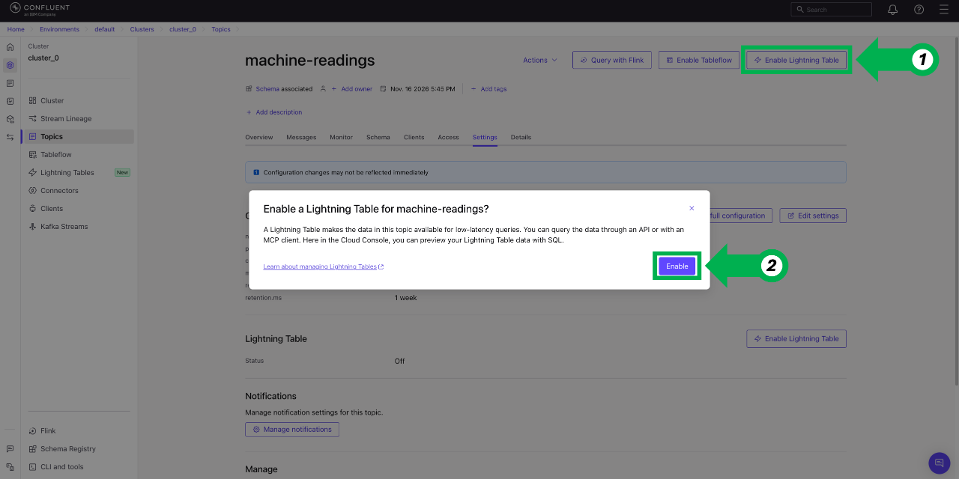
Figure 1. Enable Lightning Table in the settings of a Kafka topic in Confluent Cloud.
RTCE gives agents three MCP tools to use a Lightning Table. The listTopics tool lists the available topics, getMetadata returns a topic’s columns and types, and queryData runs a read-only SQL query with key lookups, filters, and ranges. Each query returns at most 200 rows and has a 20-second timeout. As the SQL reference describes, Confluent Cloud rejects aggregates, joins, subqueries, and write statements.
Architecture overview
To make the flow concrete, this section uses a predictive maintenance example. A maintenance planner asks an agent whether a pump can keep running until the next planned stop. The answer depends on the pump’s latest sensor readings, which can change within minutes, and on its maintenance history. The planner makes the final decision.
The following diagram (Figure 2) shows this request end to end.
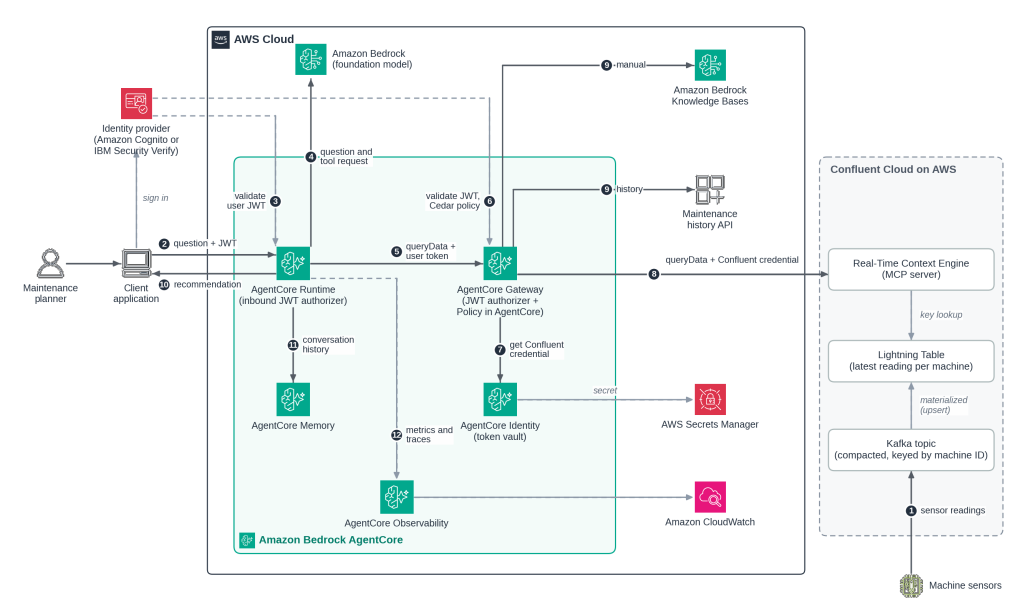
Figure 2. A predictive maintenance request from a planner through AgentCore Gateway and RTCE to a Lightning Table in Confluent Cloud.
The following steps describe the flow:
- Sensor readings arrive in a Kafka topic in Confluent Cloud. The topic is compacted and keyed by machine ID, so its Lightning Table runs in upsert mode and keeps the latest reading for each machine.
- A maintenance planner signs in to a client application through your identity provider and asks about a pump. The application sends the question and the user’s JSON Web Token (JWT) to an agent on Amazon Bedrock AgentCore Runtime.
- An inbound JWT authorizer on AgentCore Runtime validates the token before agent code runs.
- The agent sends the question to a foundation model of your choice on Amazon Bedrock, which requests the RTCE
queryDatatool for that pump. - The agent calls the tool through Amazon Bedrock AgentCore Gateway and passes the user’s token.
- The gateway’s JWT authorizer validates the token. Policy in Amazon Bedrock AgentCore then permits or denies the call based on Cedar policies.
- For a permitted call, the gateway gets the Confluent credential from the AgentCore Identity token vault, which stores the secret in AWS Secrets Manager.
- The gateway calls RTCE, which runs a key lookup on the Lightning Table and returns the pump’s latest readings.
- The agent gets the pump’s maintenance history from an existing API and its manual from a knowledge base in Amazon Bedrock Knowledge Bases, both available as tools on the same gateway.
- The agent combines these results with the latest readings and returns a recommendation to the planner.
- Amazon Bedrock AgentCore Memory keeps the conversation history, so the planner can ask follow-up questions without restating context.
- Amazon Bedrock AgentCore Observability sends metrics and traces to Amazon CloudWatch, so you can trace each tool call and its latency.
Authorize agent access to RTCE
Each RTCE tool request in the flow passes two authorization checks, first in the AgentCore Gateway and then in Confluent Cloud.
In the gateway, configure the JWT authorizer with your identity provider’s discovery URL and the audiences, client IDs, scopes, or custom claims that a token must carry. Then use Policy in AgentCore to write Cedar policies that decide whether that user can make that tool call.
A policy can use claims from the token, such as a role, and tool inputs, such as the topic name. The policy engine denies any tool call that no policy permits and logs each decision to Amazon CloudWatch. Write policies for all three RTCE tools. For example, a policy can let maintenance planners call getMetadata and queryData only on the machine readings topic. Because listTopics returns every topic that the Confluent credential can read, decide which users can call it at all.
In Confluent Cloud, RTCE authorizes the credential that the gateway sends, not the user. Confluent documents two credentials for this kind of caller, a Global API key for a service account and OAuth 2.0 client credentials through an identity pool. Grant the account behind the credential only the roles that agents need. The Lightning Tables access control documentation lists the role that each RTCE tool requires.
Design considerations
A Lightning Table picks its ingestion mode from the topic’s cleanup policy. If agents need the current state of an entity, such as a machine, you can use a compacted topic with keyed records. The Lightning Table then runs in upsert mode and keeps only the latest record for each key. Each queryData call returns at most 200 rows, so agent tools work best as key lookups or filtered reads.
When you enable a Lightning Table, you can add a description of the topic data. The listTopics tool returns this description, which can help an agent choose the right topic.
Each topic needs a registered schema, and a Lightning Table supports only some schema changes. After an unsupported change, the table stops ingesting new records, so review schema changes on topics that agents read before you apply them.
For supported Regions and cluster types, private networking, and pricing, see Lightning Tables support and limitations, private networking for Lightning Tables and Confluent pricing.
Use cases this pattern fits
The pattern applies wherever an agent needs the current state of streaming data to answer a question. The following are some examples:
- Patient monitoring and discharge planning. An agent can combine a patient’s latest vital signs with the care record and summarize discharge readiness for a clinician to review.
- Fraud and anomaly triage. An agent can check a transaction or access event against recent account activity and flag it for an analyst to review.
- Dynamic pricing and allocation. An agent can read current demand or inventory before it recommends a price or an allocation change.
- Predictive maintenance and device monitoring. An agent can combine the latest equipment or fleet readings with maintenance records and flag what needs attention.
- Account and order support. A support agent can read the current status of an account or order before it answers a customer.
Conclusion
In this post, we showed how an AI agent can read the latest record in a Kafka topic as a tool call. A Lightning Table keeps the latest state of the topic, and RTCE exposes it as read-only MCP tools. AgentCore Gateway gives agents one endpoint for those tools and for other sources such as existing APIs and knowledge bases. The gateway checks each user with its JWT authorizer and Policy in AgentCore, and Confluent Cloud checks the role bindings of the gateway’s credential. You can apply the same approach to the other use cases in this post, such as fraud triage or order support, wherever an agent needs current streaming data.
Get started
To try this approach, subscribe to Apache Kafka & Apache Flink on Confluent Cloud in AWS Marketplace. Create a Kafka cluster, enable a Lightning Table on a topic, and add the RTCE endpoint to AgentCore Gateway as an MCP server target. Then connect your agent to the gateway and ask it about the latest state of your data.