IBM & Red Hat on AWS
Use Gemma 4 31B in IBM watsonx Orchestrate with Amazon Bedrock
You can now use Gemma 4 31B in IBM watsonx Orchestrate, served through Amazon Bedrock. When you build AI agents for enterprise workflows, the model you choose shapes how your agents reason through multi-step tasks, call tools, and track long conversations. Gemma 4 31B is an open-weight model from Google DeepMind. It’s available in public preview as a built-in model in watsonx Orchestrate.
In this post, we show what Gemma 4 31B brings to your agents, how watsonx Orchestrate uses Amazon Bedrock to serve it, and how to select it for an agent.
What is IBM watsonx Orchestrate?
IBM watsonx Orchestrate gives you one governed environment where you build, deploy, and manage AI agents across business functions such as HR, sales, procurement, and customer care. It’s available in AWS Marketplace as a fully managed software as a service (SaaS) offering, with a free trial.
With watsonx Orchestrate, you can:
- Coordinate multiple agents. Combine agents built in watsonx Orchestrate with agents from external frameworks or platforms such as Amazon Bedrock AgentCore.
- Build with or without code. Business users can work in Agent Builder, a no-code studio. Developers can use the Agent Development Kit (ADK) with Python and OpenAPI.
- Work through conversation. Give tasks to agents in natural language through chat, voice, or channels such as Slack.
- Govern agents from one place. Apply guardrails, enforce policies, and use role-based access controls.
What is Gemma 4 31B?
Gemma 4 31B is released under the Apache 2.0 license. It’s the dense model in the Gemma 4 family, with 30.7 billion parameters across 60 layers. As a dense model, it uses all its parameters for every token.
For agent workloads, Gemma 4 31B provides:
- Native function calling. The model has built-in support for structured tool use. Your agents can use it to call the tools and connections that you configure in watsonx Orchestrate, such as enterprise systems, APIs, and workflows.
- A 256K-token context window. An agent can keep long policy documents, earlier tool results, and conversation history in context across a long workflow.
- Configurable thinking mode. The model can reason step by step before it answers, and you can adjust how much it reasons for each agent.
- Multimodal input. Gemma 4 31B is a multimodal model, which makes it relevant for enterprise workflows involving text, document understanding, and information extraction.
- Multilingual support. The model supports more than 35 languages and was pre-trained on more than 140 languages.
For benchmarks and full specifications, see the Gemma 4 model card.
How IBM watsonx Orchestrate uses Amazon Bedrock for Gemma 4 31B
Amazon Bedrock hosts Gemma 4 31B, and watsonx Orchestrate connects to it for you. When an agent uses Gemma 4 31B, watsonx Orchestrate sends the model requests to Amazon Bedrock and returns the results to the agent. This model and provider combination is optimized for watsonx Orchestrate agents and has been tested for agent workflows. For model details, see Gemma 4 31B in the Amazon Bedrock User Guide. For the full list of built-in models, see Choosing your LLM in the watsonx Orchestrate ADK documentation.
Regional availability
For the AWS Regions where Gemma 4 31B is available in watsonx Orchestrate, see Available AI models in the IBM watsonx Orchestrate documentation.
Get started
Complete the following procedures to try Gemma 4 31B on IBM watsonx Orchestrate.
Start a free trial of IBM watsonx Orchestrate
- Open the IBM watsonx Orchestrate SaaS listing in AWS Marketplace, and start the free trial.
- Sign in with your IBMid. If you don’t have one, create an IBMid.
- On the Provision your trial page, choose a Deployment region.
- For Instance name, enter a unique name.
- Choose Create trial instance.
- Choose Access your trial now to open the watsonx Orchestrate home page.
Configure an agent with Gemma 4 31B
- In the navigation menu, under Build & Run, choose Active inventory, and then choose Agents.
- Choose Create agent or choose an existing agent to edit it.
- On the Behavior tab, for Model, choose Gemma 4 31B – Google (via AWS Bedrock Mantle).
- In the Draft Preview pane, enter a test prompt, and check the agent’s responses and tool calls.
- When you’re satisfied with the results, choose Deploy.
Figure 1 shows the Behavior section of an IBM watsonx Orchestrate agent, where you select the model for your AI agent.
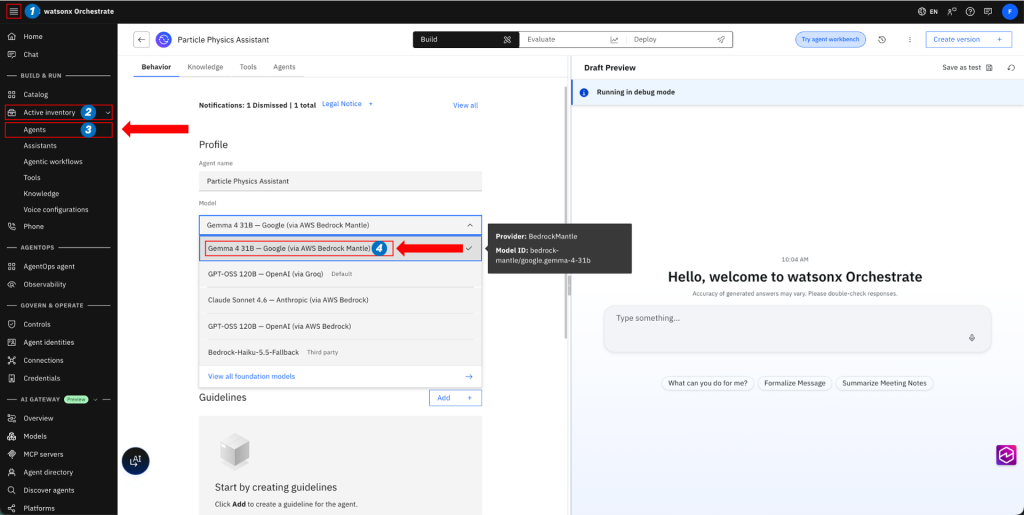
Figure 1. Choosing Gemma 4 31B as the model for your AI Agent n IBM watsonx Orchestrate.
To compare results for your use case, run the same agent with different models.
When you choose Gemma 4 31B, watsonx Orchestrate applies the ReAct Core agent style, which follows a think, act, and observe pattern using the model’s native tool calling and reasoning capabilities. If you’ve built agents with GPT-OSS 120B in watsonx Orchestrate, you can reuse the same prompting and tool-use practices. Unless your agent instructions say otherwise, the model might prefer its own knowledge over your connected knowledge bases. For sample instructions, see Special considerations in the watsonx Orchestrate ADK documentation.
You can also configure the model’s reasoning mode using the llm_config attribute in your agent specification. The llm_config parameter provides advanced configuration options for the LLM used by the agent, controlling decoding behavior, output format, and model-specific behavior. If omitted, defaults from the AI gateway or model provider are used. Learn more in the agent builder documentation.
Conclusion
In this post, we showed what Gemma 4 31B brings to agents in IBM watsonx Orchestrate, how watsonx Orchestrate serves the model through Amazon Bedrock, and how to select it for an agent. As a next step, try Gemma 4 31B with an agent that works through long policy documents or chains several tools calls in one workflow. For related posts and resources, see Additional content.
To start building, subscribe to a free trial of IBM watsonx Orchestrate in AWS Marketplace. For help with onboarding or questions about your deployment, contact your IBM or AWS account team.
Additional content:
- IBM watsonx Orchestrate now supports GPT-OSS 120B on Amazon Bedrock
- Integrating Kiro with IBM MCP Servers: watsonx Orchestrate, Instana, and Beyond
- Build AI agents with IBM watsonx Orchestrate ADK and Kiro on AWS
- Building Agentic Workflows with IBM watsonx Orchestrate on AWS
- IBM watsonx Orchestrate, Instana, and API Connect for GraphQL now available in AWS Marketplace AI Agents and Tools category
- IBM on AWS Partner Page