IBM & Red Hat on AWS
Integrating Kiro with IBM MCP Servers: watsonx Orchestrate, Instana, and Beyond
Developers building AI-powered agent workflows need tools that give them full control over agent design, deployment, and lifecycle management. IBM watsonx Orchestrate, available on AWS Marketplace, provides the environment to build, deploy, and scale custom AI agents. The Agent Development Kit (ADK) is the pro-code framework within watsonx Orchestrate that gives developers complete control over agent design.
Combined with Kiro, an AI-powered development environment with an IDE and CLI, you can author agent specifications, manage the agent lifecycle, and test conversational workflows from a single workspace. The Model Context Protocol (MCP) is an open standard that connects AI agents with external tools and data sources through standardized interfaces.
In this post, you configure IBM watsonx Orchestrate MCP servers in Kiro to build AI agents using foundation models (FMs) on Amazon Bedrock and manage the full agent lifecycle from your IDE. You configure both the watsonx Orchestrate ADK MCP Server (wxo-mcp) for agent lifecycle management and the watsonx Orchestrate Documentation MCP Server (ibm-wxo-docs) for documentation access, and you review how additional IBM MCP servers extend the same pattern to observability and data workflows.
What is the IBM watsonx Orchestrate ADK?
The ADK is a Python-based framework, packaged as a library and CLI, that helps you build, test, and deploy agents on watsonx Orchestrate. You identify target workflows such as high-volume tasks, decision-based processes, or collaborative workflows, and then define the agent architecture by determining the required tools, knowledge sources, and specific tasks.
Key ADK capabilities include:
- Declarative agent authoring. Define agents using YAML, JSON, or Python files with full control over behavior, while keeping specifications portable and version-controllable.
- Multiple agent styles. Choose from styles optimized for different workflow complexities.
- Tool and API integration. Implement tools using Python functions, OpenAPI specifications, and MCP servers.
- Model flexibility through AI Gateway. Integrate models from providers including Amazon Bedrock with configurable routing, without changing agent code.
- Multi-agent orchestration. Build collaborator agents that divide complex tasks among specialized agents.
- Knowledge base integration. Connect agents to domain-specific content from documents or vector stores.
- Evaluation and testing. Validate agent behavior through the CLI and embedded web chat, then deploy across draft and live environments.
Architecture and Integration with AWS and Kiro
The following architecture shows how IBM watsonx Orchestrate on AWS integrates with Amazon Bedrock for FM access and with Kiro for agent development. The diagram shows the flow from the developer workstation through Kiro to the watsonx Orchestrate environment, and the connections to FMs through both the native offering and the AI Gateway.
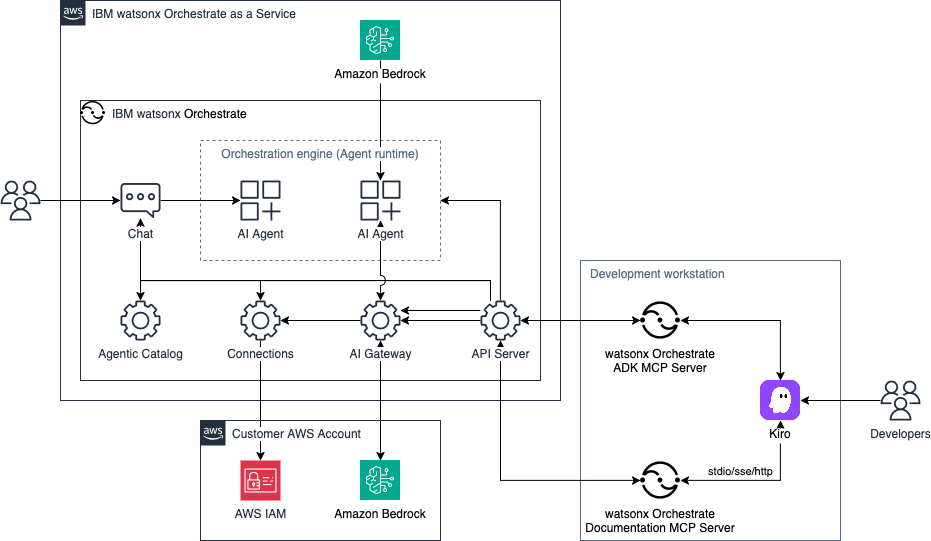
Figure 1. Build, deploy, and manage AI agents with Kiro and the watsonx Orchestrate ADK.
The architecture includes the following components.
Developer workstation:
- Kiro IDE.AI-powered development environment for authoring and testing agents.
- watsonx Orchestrate ADK MCP server (wxo-mcp). Handles agent lifecycle management through the MCP protocol.
- watsonx Orchestrate Docs MCP server (ibm-wxo-docs). Provides access to watsonx Orchestrate documentation.
- ADK extension.Visual agent management within the Kiro IDE.
IBM watsonx Orchestrate on AWS:
- Orchestration engine with agent runtime and chat interface.
- Agentic Catalog for managing agents and capabilities.
- Connections component for storing external service credentials.
- AI Gateway for routing to external FMs.
- API server for managing service requests.
- Amazon Bedrock providing GPT-OSS 120B, managed by IBM.
Customer AWS account:
- Amazon Bedrock supported FMs, such as Anthropic Claude Sonnet 4.6.
- AWS Identity and Access Management (AWS IAM) for managing credentials used to access Amazon Bedrock API keys.
watsonx Orchestrate MCP Servers for Kiro
This integration uses two MCP servers that work together to provide a complete agent development experience within Kiro. The following table compares the two servers.
| wxo-mcp | ibm-wxo-docs | |
|---|---|---|
| Purpose | Agent lifecycle management (create, import, deploy, and test agents) | Access to watsonx Orchestrate documentation |
| Transport | stdio (local through uvx) | HTTP (remote endpoint) |
| Package | ibm-watsonx-orchestrate==1.13.0 | N/A (remote URL) |
| Auth | WxO API key (environment variable) | None (public docs) |
The wxo-mcp server handles agent creation, tool import, connection management, and deployment to watsonx Orchestrate. The ibm-wxo-docs server provides contextual documentation access, so you can look up ADK commands and specifications without leaving Kiro.
Implementation walkthrough
This section walks you through configuring the IBM MCP servers in Kiro and verifying the integration.
Prerequisites
Before you begin, make sure you have the following:
- An AWS account with permissions to create IAM users.
- Access to Amazon Bedrock foundation models in your AWS Region of choice.
- An active subscription to IBM watsonx Orchestrate. You can start with a 30-day free trial from AWS Marketplace.
- Kiro IDE installed and configured on your workstation. Download it from kiro.dev.
- The uv Python package and project manager installed.
- Python 3.11 or later, and pip.
Cost Considerations
The IBM watsonx Orchestrate MCP servers and the ADK extension have no cost. You incur costs for your watsonx Orchestrate subscription based on the plan you select on AWS Marketplace after the free trial period ends.
This walkthrough also incurs costs from Amazon Bedrock invocations, which are billed based on tokens processed. For current pricing, see the Amazon Bedrock pricing page. Kiro pricing depends on usage. For current pricing, see Kiro pricing.
Step 1: IBM-side setup
Sign up for an IBM watsonx Orchestrate subscription on AWS Marketplace. A 30-day free trial is available. After you log in, complete the following steps:
- Choose your user icon on the top right and choose Settings.
- From the API details tab, copy the service instance URL, choose the Generate API key button and copy the key value. The wxo-mcp server uses these credentials.
Step 2: Kiro-side setup
Install the Kiro IDE and make sure you have the following tools on your workstation:
- uv, the Python package and project manager. This is required for uvx to run the wxo-mcp server.
- Python 3.11 or later.
Create a project directory and install the watsonx Orchestrate ADK by running the following commands:
$ mkdir -p ~/kiro-ibm-mcp-project/{agents,tools,knowledge,flows}
$ cd ~/kiro-ibm-mcp-project
$ uv init
$ uv add ibm-watsonx-orchestrate
$ source ./.venv/bin/activate
$ orchestrate –version
Use the Service instance URL and Api key values from Step 1 to add and activate your watsonx Orchestrate environment:
$ orchestrate env add \
-n <environment-name> \
-u <your-instance-url> \
--type mcsp
$ orchestrate env activate <environment-name> --api-key <your-api-key>
Open the project in the Kiro IDE and turn on MCP in the Kiro settings panel.
Step 3: Configure MCP servers in Kiro
Open the MCP configuration in Kiro by completing the following steps:
- Choose the Kiro Ghost icon in the activity bar.
- Choose MCP SERVERS.
- Choose the pencil icon to edit the MCP configuration.
- Add the following to your json:
{
    "mcpServers": {
        "wxo-mcp": {
            "command": "uvx",
            "args": [
                "--with",
                "ibm-watsonx-orchestrate",
                "ibm-watsonx-orchestrate-mcp-server"
            ],
            "env": {
                "WXO_MCP_WORKING_DIRECTORY": "${WXO_MCP_WORKING_DIRECTORY}"
            }
        },
        "ibm-wxo-docs": {
            "type": "http",
            "url": "https://developer.watson-orchestrate.ibm.com/mcp",
            "disabled": false
        }
    }
}
The following table summarizes the values you need to replace for each server.
| MCP Server | Transport | What to replace |
|---|---|---|
| wxo-mcp | stdio (local through uvx) | WXO_MCP_WORKING_DIRECTORY with your project path, for example, ~/kiro-ibm-mcp-project |
| ibm-wxo-docs | HTTP (remote) | No changes needed. This server connects to the IBM public documentation endpoint. |
The following figure shows the IBM MCP servers configured and connected in Kiro.
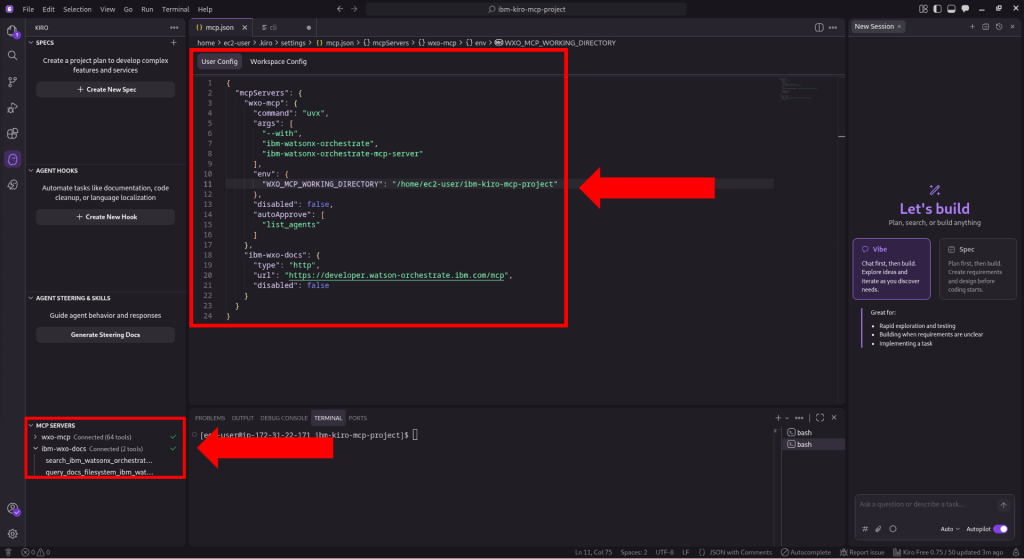
Figure 2. The IBM MCP servers configured in Kiro, showing Connected status.
Step 4: Verify the integration
After you save the configuration, all three MCP servers appear under MCP SERVERS in the Kiro settings panel with a Connected status. To verify each server, test natural language queries in Kiro chat.
Test watsonx Orchestrate (wxo-mcp):
Test watsonx Orchestrate Docs (ibm-wxo-docs):
The following figure shows the natural language queries running in Kiro chat against the IBM MCP servers.
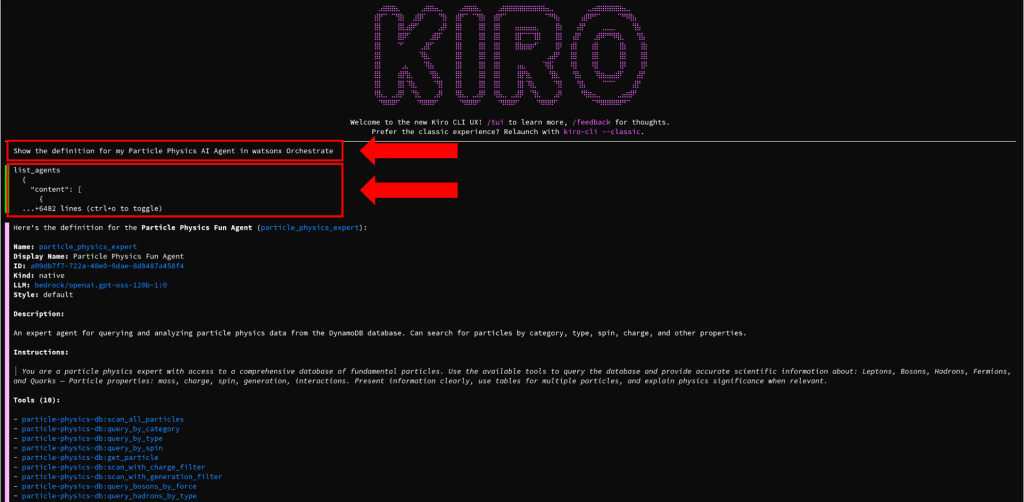
Figure 3. Testing the IBM MCP server integrations through natural language in Kiro chat.
If a server shows a connection error, verify that your credentials are correct, that the required tools (uv, Docker, and Python) are installed, and that your network can reach the remote endpoints.
Clean up
To avoid ongoing charges when you finish this walkthrough, complete the following steps:
- Remove the MCP server entries from your mcp.json configuration in Kiro.
- Cancel your IBM watsonx Orchestrate subscription on AWS Marketplace if you no longer need it.
- Stop any running Instana MCP Server Docker containers.
- Revoke the API tokens you generated for Instana and watsonx Orchestrate.
Other IBM MCP Servers for Kiro
Beyond watsonx Orchestrate, IBM offers additional MCP servers that integrate with Kiro to extend AI-powered workflows across observability and data management.
IBM Instana Observability MCP Server
The IBM Instana MCP Server turns observability workflows into natural language conversations. It exposes the Instana REST API capabilities through MCP, so you can query application performance metrics, investigate infrastructure issues, access distributed traces, and manage alert configurations directly from Kiro, without switching contexts or constructing API calls.
Key capabilities include:
- Application performance monitoring.Access real-time and historical performance data for applications, endpoints, services, and traces.
- Infrastructure monitoring.Monitor hosts, analyze snapshots, manage software inventory, and explore infrastructure topology.
- Alert configuration.Manage the lifecycle of smart alert configurations.
- Infrastructure catalog.Explore available metrics, plugins, and monitoring capabilities across your stack.
The Instana MCP Server is available as a container image on AWS Marketplace and runs locally through Docker, or you can deploy it on Amazon Elastic Container Service (Amazon ECS), Amazon Elastic Kubernetes Service (Amazon EKS), or Amazon Elastic Compute Cloud (Amazon EC2) for team use. For a detailed walkthrough, see Implement Conversational Observability with IBM Instana MCP Server and Kiro.
To configure the Instana MCP Server in Kiro, add the following to your mcp.json configuration:
{
    "mcpServers": {
        "Instana MCP Server": {
            "command": "mcp-instana",
            "args": ["--transport", "stdio"],
            "env": {
                "INSTANA_BASE_URL": "https://your-instana-instance.instana.io",
                "INSTANA_API_TOKEN": "your_instana_api_token"
            }
        }
    }
}
Replace INSTANA_BASE_URL with your Instana tenant URL and INSTANA_API_TOKEN with your Instana API token generated from your Instana tenant dashboard.
Test Instana MCP Server:
Show me the current application performance metrics
List any active alerts in my Instana environment
What infrastructure hosts are being monitored?
Give me all applications that have at least one Amazon EC2 instance associated with them.
The following image shows the results in Kiro CLI (Figure 4):
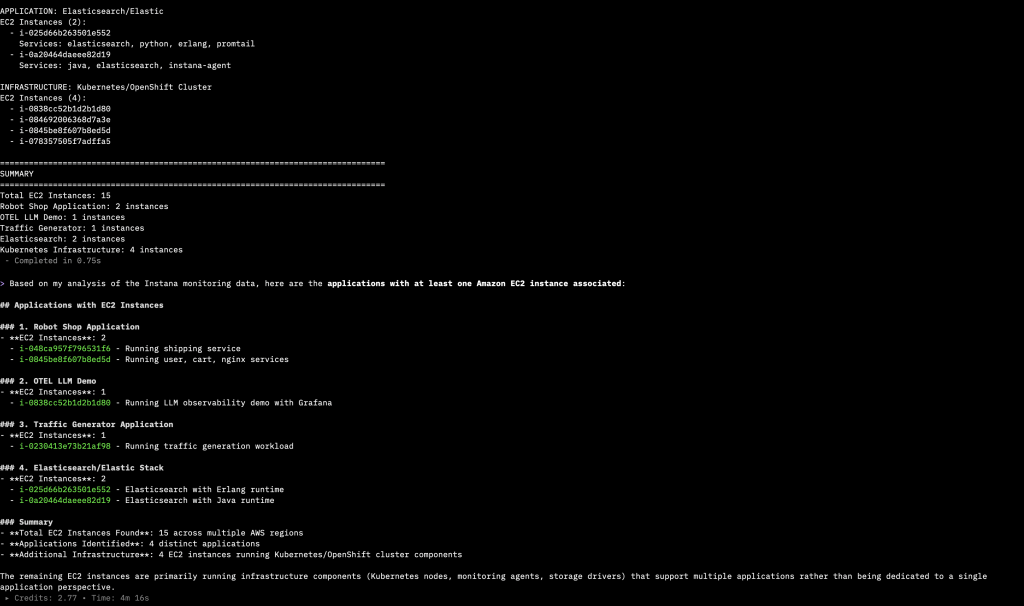
Figure 4. Instana MCP Server showing applications correlated with Amazon EC2 instances in Kiro CLI.
IBM watsonx.data MCP Server
The IBM watsonx.data MCP Server connects AI agents to document libraries in watsonx.data for data retrieval and interaction with the open data lakehouse. Available as both a local and remote MCP server, it provides query and retrieval access to watsonx.data directly through Kiro using natural language.
IBM watsonx.data is available as a service on AWS Marketplace, providing an open, hybrid, and governed data store built on an open data lakehouse architecture.
Together, these IBM MCP servers cover agent orchestration with watsonx Orchestrate, observability with Instana, and data management with watsonx.data, all accessible through natural language from within Kiro.
Summary
In this post, you configured IBM MCP servers in Kiro: the watsonx Orchestrate ADK server for agent lifecycle management and the watsonx Orchestrate Docs server for documentation access. You also reviewed how the same pattern extends to the Instana MCP Server for conversational observability and the watsonx.data MCP Server for data retrieval. With a single mcp.json configuration, you can interact with these IBM services directly from Kiro using natural language.
As next steps, consider the following:
- Build and deploy AI agents using the watsonx Orchestrate ADK with foundation models on Amazon Bedrock.
- Connect knowledge bases and Python tools to extend agent capabilities.
- Use the Instana MCP Server to troubleshoot application performance issues directly from Kiro.
- Explore the watsonx.data MCP Server for data retrieval from your data lakehouse.
Additional resources
AWS Marketplace:
- IBM watsonx Orchestrate
- IBM watsonx.data
- IBM Instana Observability PayPerUse
- IBM Instana Observability MCP Server
Related blog posts:
- Build AI agents with IBM watsonx Orchestrate ADK and Kiro on AWS
- Implement Conversational Observability with IBM Instana MCP Server and Kiro
- Building Agentic Workflows with IBM watsonx Orchestrate on AWS
- Observe AI Agents on Amazon Bedrock AgentCore with IBM Instana
- Enable AI with enterprise data using new IBM watsonx.data features on AWS