AWS for Industries
Enabling a new AWS Region for financial services enterprises
Financial services institutions (FSIs), including banks, payment processors, capital markets firms, and global insurers, typically begin their cloud journey in one AWS Region. They often choose the Region nearest to their primary operations. Over time, they build layers of complexity on top of that foundation: governance frameworks, security controls, networking architectures, identity federation, and compliance evidence pipelines, all tuned to one Region. Then the trigger arrives. A regulator, an operational resilience mandate, or a data residency rule forces them into a new AWS Region, and the timeline is set by the regulator, not the business. The Digital Operational Resilience Act (DORA) requires EU financial entities to prove cross-Region failover. Ring-fencing rules force data isolation by requiring that regulated entities keep critical banking data within jurisdictional boundaries. Cross-border banking laws dictate where customer data lives. For these institutions, enabling a new Region is not a greenfield build. It is replicating a mature, governed environment under a regulatory deadline, touching governance, security, identity, networking, DNS, compute, operations, and every application team at once.
The financial services version is harder for two reasons: scrutiny and sequencing. A missed control is not a bug; it is a finding an auditor or supervisor will flag. Deny policies, multi-Region logging, and your encryption strategy all have to be right before the first workload lands, not after. The work is also tightly ordered: governance gates security, security gates networking, networking gates DNS. Miss the sequence and you stall for weeks. This blog provides a structured framework that walks through each workstream, governance, security, networking, DNS, compute, CI/CD, and operations, showing what blocks what and where teams can work in parallel.
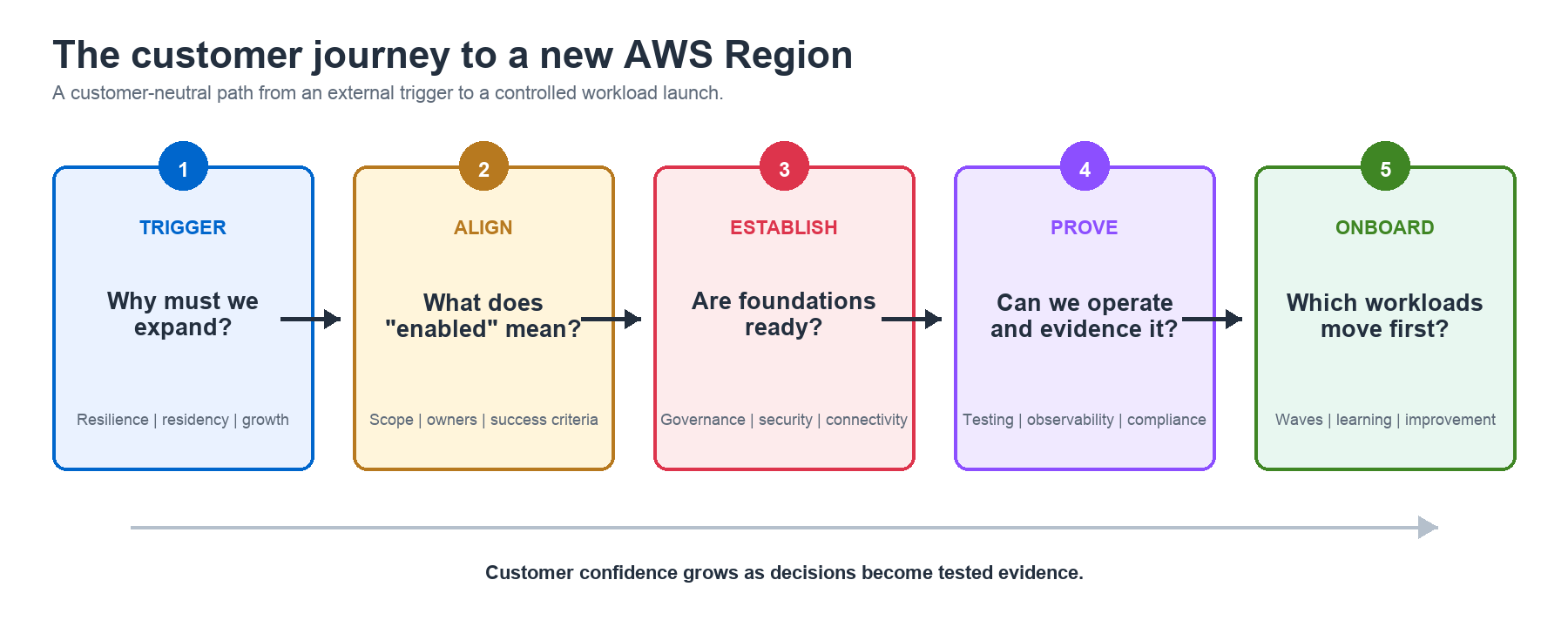
In this blog, we provide a practitioner-focused guide for enabling a new AWS Region in a financial services enterprise AWS environment. We walk through each workstream, from initial governance approval through networking, security, operations, and workload readiness, highlighting the considerations, dependencies, and common pitfalls that teams encounter. We also map key regulatory requirements to architectural decisions so your team can trace compliance obligations to specific implementation choices. This guide is for cloud foundation engineering teams, cloud architects, and infrastructure leads in financial services. It helps these teams plan and execute a Region expansion while satisfying regulatory expectations.
Every enterprise environment is different. This blog is not prescriptive. It is a structured framework of considerations.
Governance and planning
Before any technical work begins, a Region expansion must typically pass through your organization’s governance process. This process is customer-specific and varies widely, but it typically starts with Architecture Review Board (ARB) approval. You’ll need to submit a formal request documenting the business justification, which gates all subsequent work from a budget and risk-authorization perspective.
Early in the process, you should align stakeholders on what “Region enablement” means for your organization. Does enablement mean network connectivity and control plane extension only? Does it include deployment of shared services like logging infrastructure? Setting this definition early prevents scope ambiguity later.
Service availability is another critical validation step. Not all AWS services are available in every Region. Before committing to a Region, validate that the services your workloads depend on are available there. Use the AWS Regional Services List as your starting point. Availability also varies within a service. Verify that the target Region offers the Amazon Elastic Compute Cloud (Amazon EC2) instance families your workloads require, including the relevant processor architecture and generation.
Regulatory and data residency requirements must be addressed early. Consult your compliance team regarding any regulatory implications. Requirements such as HIPAA, GDPR, GxP, or industry-specific mandates like PCI DSS for payment processors constrain where data can reside, how it’s handled, or whether certain services require additional controls. For example, some multinational organizations use opaque identifiers instead of email addresses in AWS IAM Identity Center. This approach can help protect personally identifiable information (PII) under jurisdiction-specific data protection rules.
Compliance documentation
If your organization operates in a regulated industry, expanding into a new Region may trigger compliance documentation requirements. Use AWS Artifact to access compliance reports and certifications such as SOC 1/2/3, PCI DSS, ISO 27001, and HIPAA that cover the new Region. Not all compliance programs cover all Regions simultaneously, so verify that the certifications your organization relies on explicitly include the target region.
If your compliance team maintains a shared responsibility matrix or a customer responsibility evidence package, update it to reflect the new Region. Auditors may ask for evidence that controls are applied consistently across all Regions in scope. Also check the target Region’s compliance requirements. Relevant obligations can include GDPR, PCI DSS scope expansion, FedRAMP for GovCloud, and country-specific regulations such as BaFin, MAS, or FSA.
Ensure that your audit and evidence collection processes, whether automated or manual, are configured to capture compliance evidence from the new Region from day one.
Cost management and visibility
Expanding into a new Region introduces new cost dimensions that need to be tracked and governed from the outset. Verify that your cost allocation tags are applied to resources in the new Region. If cost attribution relies on tags such as CostCenter, BusinessUnit, or Environment, enforce them through tag policies. Include those policies in the new Region’s account baseline.
Create or update AWS Budgets to include the new Region. Consider a Region-specific budget to track ramp-up costs and detect unexpected spend. Add anomaly alerts because unexpected spend during initial deployment can indicate misconfiguration or runaway resources.
If you use AWS Cost and Usage Reports (CUR), verify that the reporting pipeline includes the new Region. Check Amazon Athena queries, Amazon QuickSight dashboards, and any third-party cost tools. CUR is account-level and does include all Regions, but your downstream analytics may filter by Region and need to be updated.
Data transfer between Regions incurs charges. Common drivers include AWS Transit Gateway peering, Amazon Simple Storage Service (Amazon S3) replication, Amazon Relational Database Service (Amazon RDS) replication, Amazon DynamoDB global tables, and Amazon CloudWatch log forwarding. Traffic to nonlocal VPC endpoints can add further cost.
For a detailed overview of multi-Region data transfer costs and architectural patterns, refer to the AWS multi-Region capabilities reference.
If you use Savings Plans or Reserved Instances, check whether your existing commitments apply to the new Region. Compute Savings Plans are flexible across Regions, but EC2 Instance Savings Plans and Reserved Instances are Region-specific. You may need to purchase additional commitments for the new Region or adjust your coverage strategy.
Enable AWS Cost Anomaly Detection for the new Region to catch unexpected spending patterns early, particularly during the initial deployment phase when usage patterns are not yet established.
Controls and security
A core priority is ensuring your security and compliance posture extends to the new Region. This must happen before workloads are deployed, deploying infrastructure without visibility is a significant risk.
Organizational policies
If you use AWS Control Tower Region deny controls or custom Service Control Policies (SCPs), update them to include the new Region. Confirm that only approved Regions remain accessible. Review not just the Region deny list, but also any SCPs that reference Region-specific Amazon Resource Names (ARNs) or resource identifiers. Similarly, review any Resource Control Policies (RCPs) for Region-specific constraints, such as allowed Region lists, endpoint restrictions, or resource-level conditions, that need updating to include the new Region. If you do not use Control Tower, you should still implement Region-level guardrails through custom SCPs to prevent uncontrolled resource creation in the new Region. For organizations expanding into a new Region for the first time, this is an opportunity to adopt Control Tower or establish equivalent governance controls.
Audit your AWS Identity and Access Management (IAM) policies, permission boundaries, and permission sets for hard-coded Region references in resource ARNs. While this is uncommon in well-architected environments, it does occur in practice and will silently block operations in the new Region.
Tip: Use your asset inventory or cloud security posture management (CSPM) tooling to scan for Region-specific policy constraints before enablement. Examples include AWS Security Hub, AWS Config, and AWS Systems Manager Inventory.
Visibility and threat detection
Confirm that your organizational trail in AWS CloudTrail is configured as a multi-Region trail. If it is, the new Region is automatically covered. If it is not, this must be addressed before the SCP change that enables the Region. Operating a Region without CloudTrail visibility creates a gap in your audit trail that regulators and internal security teams will flag.
Verify that AWS Security Hub cloud security posture management (CSPM) is enabled in the new Region. Amazon GuardDuty, Amazon Inspector, and Amazon Macie are Regional services. Enable and configure each service in the new Region and integrate it with the existing delegated administrator account. Make sure your AWS Config resource recorder includes the new Region so that configuration compliance evaluation covers resources deployed there.
Third-party security tooling
Verify that third-party security products monitor the new Region and generate findings from it. Examples include Palo Alto Prisma Cloud, Wiz, and Orca. Notify your Security Operations Center (SOC), which owns monitoring, detection, and incident response. Ask the team to validate its tooling in the new Region before you onboard a workload.
If your environment relies on tools such as HashiCorp Vault with performance replication clusters, CrowdStrike, Tanium, or Qualys, verify that they are operational in or can reach the new Region.
Encryption and key management
Review your use of multi-Region AWS Key Management Service (AWS KMS) keys. If workloads in the new Region need to decrypt data encrypted in other Regions, for example, for cross-Region backup restoration, multi-Region keys need to be replicated.
Note that AWS-managed keys (those created automatically by AWS services) cannot be made multi-Region. If your workloads currently rely on AWS-managed keys for encryption, you will need to migrate to customer-managed keys (CMKs) to enable cross-Region decryption. Plan this migration early, as re-encrypting existing data with new CMKs can be time-consuming and requires coordination with application teams.
Some organizations require AWS CloudHSM for cryptographic key material ownership and FIPS 140-2 Level 3 compliance beyond what KMS provides. CloudHSM clusters are Regional. Create a cluster in the target Region when workloads require local cryptographic operations or cannot tolerate remote-cluster latency.
If you operate private certificate authority (CA) infrastructure, decide whether the new Region needs local certificate issuance. This applies to AWS Private CA, AWS Lambda-based issuance workflows, and integrations with providers such as DigiCert. Evaluate certificate issuance latency and deployment volume. Also consider short-lived certificate rotation and whether the disaster recovery model requires independent issuance in each Region.
Account vending and bootstrapping
Whatever account vending solution you use, it must be updated to support the new Region. If you use Account Factory for Terraform (AFT), review account customizations for Region-specific Terraform providers, Region-specific resources, and Jinja template iterations. If your global customizations reference Region-specific resources, for example, a log destination ARN in a single Region, these need to be parameterized.
For Landing Zone Accelerator (LZA), update the global-config.yaml or accounts-config.yaml to include the new Region. Be aware that stack creation across Regions can take several hours or more, depending on the number of accounts and resources time. If you use Customizations for AWS Control Tower (CFCT) or custom solutions, apply the equivalent Region configuration updates for your tooling.
Resource naming
Amazon S3 bucket names are globally unique. If account baselining creates buckets for access logs or flow logs, include a Region identifier or another unique suffix in each name. For example: alb-access-logs-111222333444-us-west-2.
Organizational structure
Determine whether your Organizational Unit (OU) design needs to accommodate Region-based or geography-based segmentation. Some organizations separate workloads by Region at the OU level to apply different SCPs per geography, for example, different data handling controls for EU versus US. If you operate a single workload OU today, adding a Region with different compliance requirements may necessitate structural changes.
If AWS Resource Access Manager (AWS RAM) shares subnets, Transit Gateway, or prefix lists at the OU level, review those shares. Add any new OUs that require access.
Networking
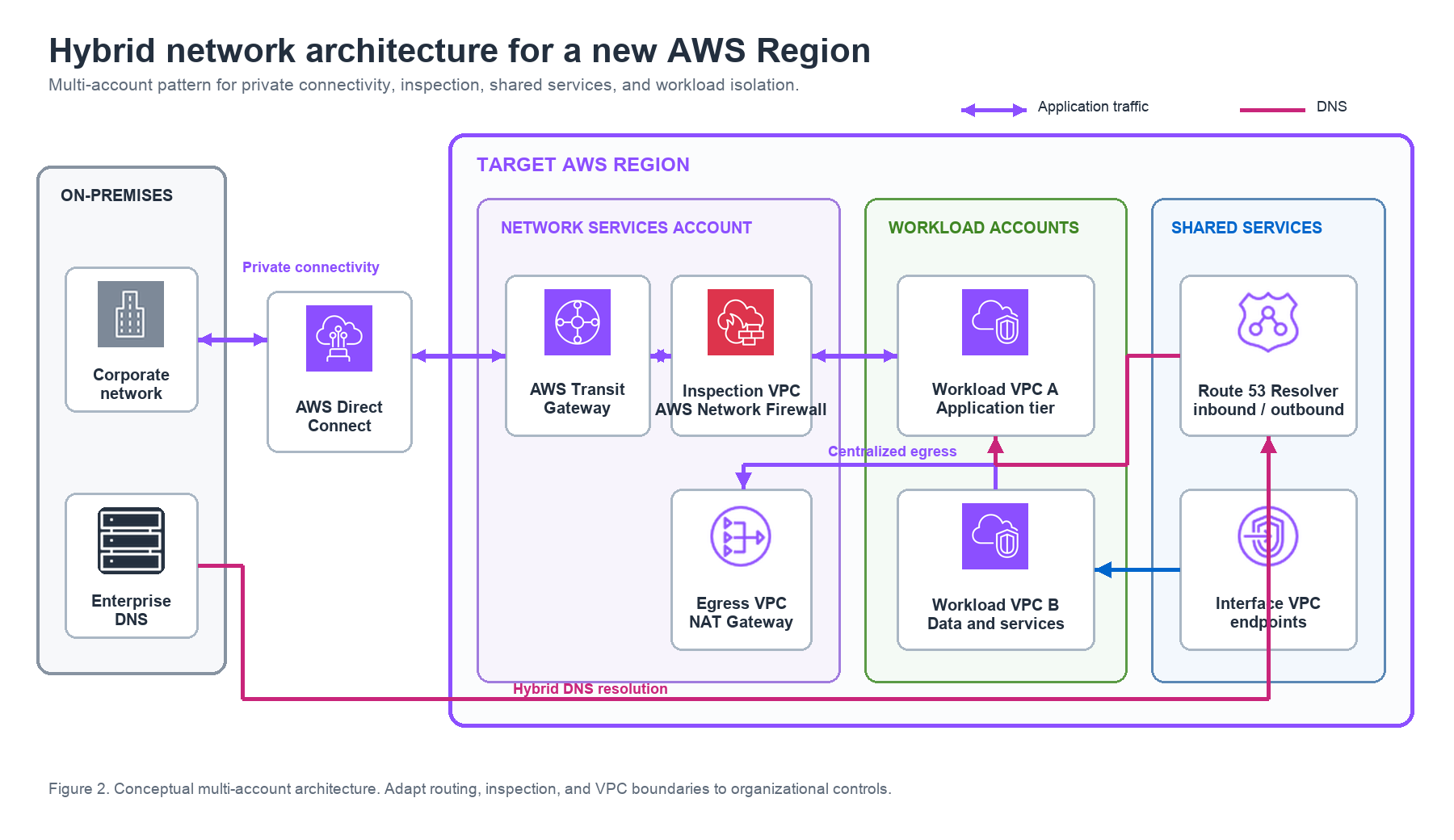
Networking is typically the most complex and time-consuming workstream in a Region expansion. It touches IP address management, hybrid connectivity, firewall deployment, DNS, and more.
IP address planning
Determine how to allocate IP address space for the new Region from your organization’s IP address management (IPAM) plan. The approach depends on your existing allocation and connectivity model.
If a large contiguous supernet is already allocated for cloud use, subdivide it for the new Region. For example, carve the Regional allocation from an existing /10 or /12. You don’t necessarily need to request an entirely new allocation. Carve a Regional block, commonly a /12, /14, or /16, from the existing cloud supernet. Assign it to the new Region’s Transit Gateway or AWS Cloud WAN segment.
If you are using AWS Transit Gateway peering, contiguous and summarizable ranges per Region are important. Transit Gateway peering uses static routes, so each Region’s address space needs to be advertised as a summary route to the peer. AWS Direct Connect Gateway (DXGW) advertises up to 100 prefixes over a transit virtual interface for IPv4 and IPv6. Route summarization helps multi-Region and multi-data-center environments stay within this limit. If advertised prefixes exceed 100, the BGP session goes idle and routes are withdrawn, and AWS does not automatically notify you. Therefore, alerting on advertised prefix count is recommended. On-premises routing infrastructure also benefits from efficient, summarizable route tables.
If you are using AWS Cloud WAN, the contiguity requirement is relaxed. Cloud WAN handles routing between segments dynamically and does not depend on static peering routes the way Transit Gateway peering does. You still want clean, non-overlapping address space for operational clarity, but you have more flexibility in how you allocate it. This is one of the practical advantages of Cloud WAN in multi-Region environments. Cloud WAN does not require summarizable routes. This makes it useful when an organization lacks a contiguous supernet large enough for a /12, /14, or /16 Regional allocation.
Regardless of your connectivity model, the new Region’s CIDR ranges must not overlap with existing on-premises or cloud address spaces if you plan to route traffic between them.
Tip: Use Amazon VPC IPAM to centrally plan, track, and audit your IP address allocations across Regions and accounts. This is especially valuable during Region expansions where address space fragmentation can become a long-term operational burden.
Hybrid connectivity
If you have a data center in or near the new Region and require dedicated connectivity, order AWS Direct Connect connections early. For large regulated organizations, provisioning can take months depending on internal processes, location, and providers. The organization’s network team will need to configure on-premises border routers, for example, Cisco ASRs. They must also update core routing.
Direct Connect Gateway (DXGW) is a global construct. Evaluate whether your existing DXGW can serve the new Region or whether a new one is needed. Be mindful of the limit of six transit gateways per Direct Connect gateway (the default, non-adjustable quota governing how many Transit Gateway associations a DXGW can serve). Increases are not always approved because these are shared infrastructure resources.
Transit connectivity
For AWS Transit Gateway-based environments, create a new Transit Gateway in the new Region within your centralized networking account. Establish Transit Gateway peering with existing Regional Transit Gateways and configure static routes. Plan and create change requests for the peering connections.
For AWS Cloud WAN-based environments, Cloud WAN simplifies multi-Region connectivity significantly, as it is designed for global network management. Adding a new Region segment is typically less operationally complex than Transit Gateway peering. Configure network function groups and service insertion for the new Region if using inspection.
Shared VPCs and inspection
Create the required shared VPCs in the new Region. These commonly include an endpoints VPC, an internet ingress VPC, and an internet egress VPC with NAT gateways or third-party appliances. Also create any DMZ VPCs for third-party connectivity.
Deploy AWS Network Firewall or third-party firewall appliances for east-west and north-south traffic inspection. Ensure firewall rule sets are reviewed and adapted for the new Region’s network ranges. If using centralized VPC endpoints, create them in the new Region.
The new Region introduces new Elastic IP addresses (EIPs). Share them with third parties and customers that maintain egress IP allow lists. If you use Bring Your Own IP (BYOIP), plan the address allocation accordingly.
Create managed prefix lists for the new Region’s network ranges and ensure they are shared via AWS RAM to the appropriate OUs and accounts. If your organization uses SD-WAN for branch office or manufacturing site connectivity, coordinate with your network team. Cloud WAN’s tunnelless Generic Routing Encapsulation (GRE) capabilities may simplify this, but it still requires planning.
DNS
DNS is often the most consequential and error-prone aspect of a Region expansion. A misconfiguration can render thousands of existing workloads unreachable.
Resolver infrastructure
Create Amazon Route 53 Resolver inbound and outbound endpoints in the new Region, or leverage Route 53 Profiles, which also address VPC endpoint DNS resolution. Configure on-premises DNS infrastructure, such as BlueCat, Infoblox, or Active Directory conditional forwarders, to recognize and route queries for the new Region appropriately.
Naming convention
Establish a DNS naming convention that supports multi-Region operation. This is critical for operational consistency and automation and must be agreed upon internally. Common patterns include region-prefixed naming such as us-west-2.prod.aws.customer.cloud, service-prefixed naming such as payments.us-west-2.aws.customer.cloud, or environment-prefixed naming such as prod.eu-west-1.customer.internal.
A previously single-Region organization might use a flat name such as app.customer.cloud. Adding a Region component requires coordinated changes to shared infrastructure and applications.
Critical: DNS misconfigurations can offline entire fleets. Test thoroughly before production changes.
Hosted zones
Determine your DNS authority model for the new Region. Are you using Route 53 private hosted zones with VPC associations? Are you using public hosted zones with NS record delegation? Are you forwarding all DNS to on-premises resolvers such as BlueCat or Infoblox via forwarding rules?
Each model has different implications for adding a new Region. With Route 53 private hosted zones, you need to associate the new Region’s VPCs with existing zones and consider whether latency-based or failover routing policies need updating. With public hosted zones and NS delegation, you may need new subdomain delegations for Region-specific endpoints. With on-premises forwarding, you need to add forwarding rules for the new Region’s DNS endpoints and ensure conditional forwarders on-premises recognize the new zones. Regardless of the model, ensure the new Region’s VPCs are associated with the correct hosted zones and that resolution works end-to-end before deploying workloads.
Compute and image management
Amazon Machine Images (AMIs) are regional resources. Any application or service that you plan to deploy in the new Region will require its AMIs to be available there. If you operate a custom image factory, extend its build pipeline into the new Region or copy and validate existing AMIs there. The images should include the same hardened operating-system configuration and required security agents. Security agents are called out here because they are typically embedded in base images shared across all workloads, making them a prerequisite for any deployment.
If you share AMIs across accounts via an image sharing account or use AMI allow lists, update those configurations for the new Region. Common approaches include using a centralized image sharing account that copies AMIs to each Region and shares them with workload accounts, or using cross-Region AMI copy at deployment time. The centralized approach offers better governance and auditability, while cross-Region copy is simpler for smaller organizations. Whichever model you use, ensure that AMI encryption keys are available in the target Region.
CI/CD and deployment tooling
If you use self-hosted CI/CD infrastructure on AWS, consider deploying runners in the new Region. Cross-Region deployment latency increases execution time for Ansible playbooks and other deployment scripts. It’s also important for data residency, as some regulatory frameworks may restrict where deployment automation can execute when handling sensitive configuration data.
Review your AWS CloudFormation templates and Terraform modules for hard-coded Region references, Region-specific resource constraints, or assumptions about single-Region operation. Review infrastructure-as-code validation rules for Region-specific checks that might reject the new Region. This includes Open Policy Agent (OPA), HashiCorp Sentinel, and custom scanning pipelines.
Operations and observability
Log centralization
If Amazon CloudWatch subscription filters feed a centralized log pipeline, verify that its Regional resources exist in the new Region. These resources can include Amazon Data Firehose, Amazon Kinesis Data Streams, and AWS Lambda transformations. CloudWatch Log Groups, subscription filters, and Firehose delivery streams are all Regional resources.
Verify that VPC Flow Logs, Amazon RDS logs, and Amazon S3 access logs are configured to ship to the correct centralized destinations from the new Region. Confirm that AWS CloudTrail logs and Amazon GuardDuty findings are routing to your centralized Amazon S3 buckets in the log archive account.
If you use Splunk, Datadog, Dynatrace, or similar third-party log ingestion tools, determine whether your current setup ingests logs from the new Region or whether it needs a local deployment. Also determine whether it needs to be scaled up to handle the additional volume.
Recommendation: Rather than deploying logging infrastructure, for example, Splunk heavy forwarders or aggregators, in every Region, consider centralizing log storage in Amazon S3 and ingesting from a single location. This reduces cost and operational complexity. You can always failover the ingestion layer if needed.
Monitoring and alerting
CloudWatch Alarms are Regional. Replicate standard alarm configurations in the new Region, including CPU, disk, and application health alarms. Also recreate Amazon Simple Notification Service (Amazon SNS) integrations, AWS Lambda auto-remediation, and ServiceNow ticket workflows. Update centralized CloudWatch dashboards or third-party monitoring dashboards to include metrics from the new Region.
Backup and disaster recovery
AWS Backup plans and vaults are Regional. Validate that your centralized backup vault in the backup account has a corresponding vault in the new Region. Ensure backup plans are configured to protect resources in the new Region and that cross-Region backup copy rules are configured if your disaster recovery strategy requires it.
Tagging
Update AWS Organizations tag policies before deploying resources. For example, add the new location to the allowed values for a CountryCode tag. Failure to do this will cause tagging failures that cascade into billing, cost allocation, and compliance reporting gaps.
Operational tooling
Replicate required configuration data into the new Region. This can include AWS Systems Manager Parameter Store parameters, AWS Secrets Manager secrets, and HashiCorp Vault data needed locally or with low latency. Parameters that are Region-agnostic (such as global feature flags) may not need replication, but anything that references regional endpoints, ARNs, or environment-specific values will. Verify that your IT service management (ITSM) and configuration management database (CMDB) tools will automatically discover resources in the new Region, or update them manually.
Service quotas
When you operate in a single Region, your AWS Service Quotas have likely been tuned over time, increased through support cases as your workloads grew. A new Region starts with default quotas, and these defaults may be insufficient for your planned deployment.
Audit quota increases in your existing Regions and compare them with defaults. Use the Service Quotas API operations list-service-quotas and get-service-quota to automate the inventory. Common examples include Amazon EC2 vCPU limits, Elastic IP address limits, and Amazon VPC limits. Also review AWS Lambda concurrency, Amazon RDS instances, AWS KMS keys, and Elastic Load Balancing listeners and target groups.
Request increases proactively in the new Region. Don’t wait for deployments to fail. Use the Service Quotas console or API to request increases in the new Region before workloads are deployed. Some quota increases are auto-approved, but others require manual review and can take days.
Tip: You can use the AWS Service Quotas API to create quota request templates at the organization level, which can streamline this process across multiple accounts.
Be aware that some quotas are per-account per-Region, for example, EC2 vCPU limits, while others are global per-account, such as the number of IAM roles. Understand which quotas need Region-specific increases.
Pay particular attention to Direct Connect and networking quotas. A DXGW supports six Transit Gateway attachments by default, and increases are not always approved because these resources rely on shared infrastructure. Also consider DXGW allowed prefixes with a limit of 100 per DXGW, VPC endpoints per VPC, and Route 53 Resolver endpoints per Region. These networking quotas can be especially impactful and are often overlooked during planning.
Order of operations
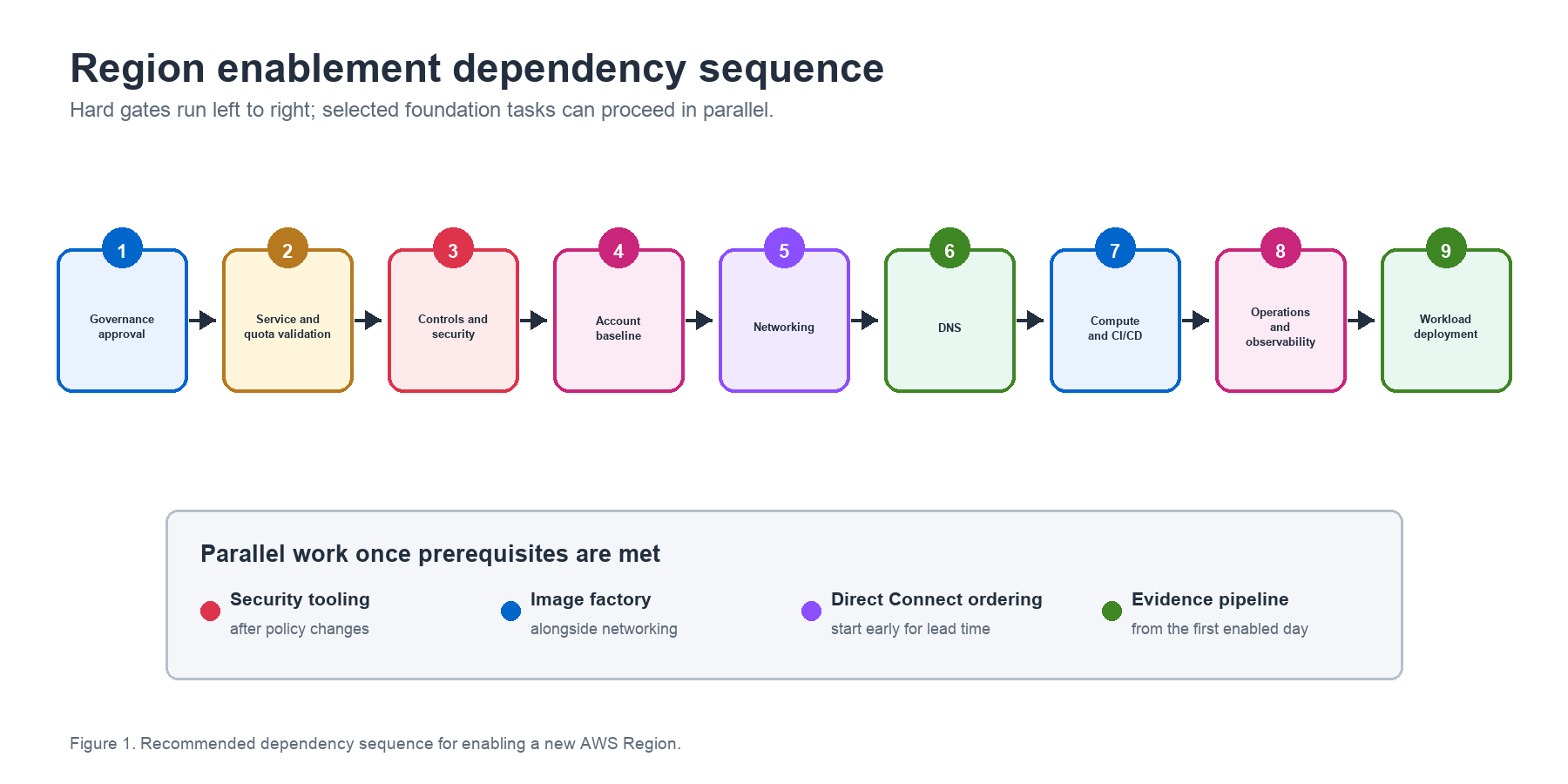
Many workstreams can proceed in parallel. For example, AMI image factory work can run alongside networking, and security tooling can proceed after SCP updates. Other tasks have hard dependencies. Governance must precede SCP changes, and networking must work before DNS configuration. DNS must resolve before CI/CD runners operate. Validate every prerequisite before workload deployment. The following is a recommended high-level sequence:
- Obtain governance approval for budget allocation and risk authorization. In parallel, validate service and instance type availability to confirm that the Region is viable for your workloads.
- Verify AWS CloudTrail before enabling the Region through SCP and RCP updates. Then enable Amazon GuardDuty, AWS Security Hub, Amazon Inspector, third-party security tools, and SOC notifications.
- Update landing zone and account baselining tools such as AFT, LZA, or custom tooling.
- In parallel with account baselining, plan CIDR allocations and order Direct Connect where required. Deploy Transit Gateway or Cloud WAN connectivity, shared VPCs, VPC endpoints, firewalls, and the egress stack.
- Configure DNS after networking is functional.
- Extend the AMI image factory (can proceed in parallel with networking).
- Deploy CI/CD runners after networking and DNS are complete.
- Configure operations and observability including log pipelines, monitoring, backups, and tagging.
- Enable account vending and workload deployment after all of the above is validated.
Conclusion
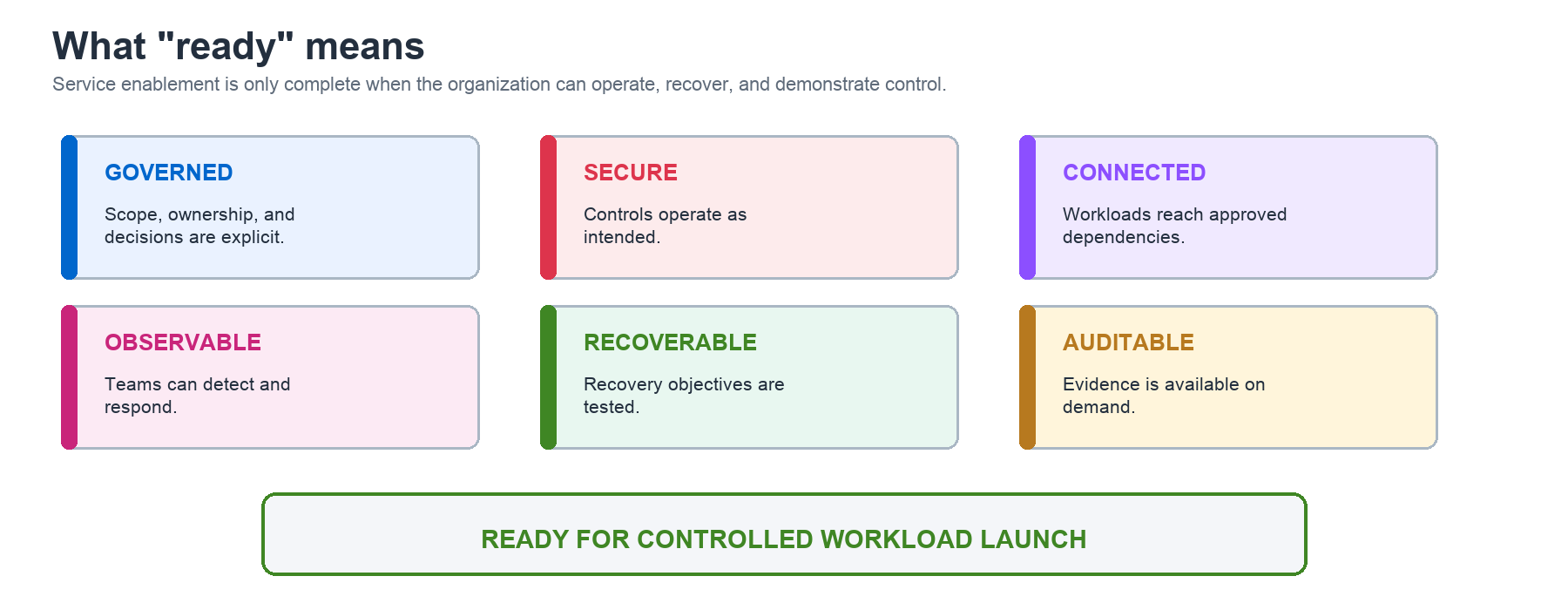
Every environment is different, but the categories of work stay consistent across financial services. Work through governance, controls, account baselining, networking, DNS, compute, CI/CD, and operations in dependency order. This reduces launch risk and helps meet regulatory obligations from day one.
To put this framework to work, take these next steps.
- Run a dependency-mapping exercise: bring together cloud foundation, networking, security, and operations leads. Map sequential blockers and workstreams that can run in parallel.
- Build your Region expansion runbook: use this guide as the skeleton, fill it with your tooling, naming conventions, CIDR allocations, and compliance requirements, and assign an owner to each domain.
- Validate current-state readiness: audit your existing multi-Region setup, including AWS CloudTrail, SCPs, and service quotas, before you enable the new Region. Teams find gaps in Regions they already run during this step.
- Engage your AWS account team: your Solutions Architect can help assess Region readiness, identify service availability gaps, and connect you with AWS networking and security specialists.
The most common mistake we see is treating Region enablement as one team’s project. Successful organizations run Region enablement as a cross-functional program. They use one accountable owner, a shared dependency tracker, and a weekly coordination meeting until workloads are live. Methodical Region expansion strengthens resilience and reduces blast radius. It also gives the organization confidence to meet regulatory requirements and serve customers closer to where they are.