AWS Messaging Blog
Build an AI email pipeline with Amazon Bedrock and SES Mail Manager
Processing inbound email attachments at scale involves extracting files, routing them by recipient, scanning for malware, and classifying content. This traditionally requires stitching together polling loops, event rules, and multiple integration points. Amazon Simple Email Service (Amazon SES) Mail Manager now provides two new rule actions that simplify this pattern. The Lambda action invokes AWS Lambda functions directly from rule sets, and the Bounce action returns rejection responses. Together, they let you build multi-step email processing pipelines with declarative configuration.
In this post, you learn how to build an attachment processing pipeline that automatically extracts email attachments and classifies them with Amazon Bedrock. The pipeline also rejects infected files with RFC-compliant bounce responses. The complete implementation is available as an AWS Cloud Development Kit (AWS CDK) deployment in the companion GitHub repository sample-amazon-ses-mail-manager-attachment-pipeline. You can deploy it manually using the steps in this post, or hand it off to an AI coding agent such as Kiro or Claude Code. The repository includes a machine-readable agentic deployment guide that walks an agent through every deployment step, from prerequisite checks to post-deploy verification.
The problem: scaling document intake for a multi-tenant platform
Consider a fictitious SaaS platform from AnyCompany that lets customers submit documents by email. Each customer sends invoices, contracts, and supporting files to a dedicated address (for example, acme@uploads.anycompany.io or globex@uploads.anycompany.io). They expect those attachments to land in their isolated storage, classified and ready for downstream processing.
Without a purpose-built pipeline, the typical approach looks like this: an Amazon S3 event notification triggers a Lambda function that polls for new MIME objects, parses them, looks up the recipient in a routing table, and fans out extraction to another function. Worse, it relies on a separate virus-scanning step having run first. Orchestration lives in AWS Step Functions or Amazon EventBridge rules. Adding a new customer means updating routing configuration in multiple places. Adding classification means bolting on yet another Lambda in the chain.
The result is fragile. When volume spikes during month-end invoice runs or onboarding waves, the polling loop backs up and retries cascade. Infected files occasionally slip past the scanner because the scan and extraction steps are not transactionally linked.
This pipeline solves the problem declaratively. Mail Manager’s traffic policy rejects unauthorized senders and enforces size limits at the SMTP connection level. This filtering happens before any processing resources are consumed. The rule set handles virus scanning, bouncing, archiving, classification, and extraction in a single ordered sequence. Each step completes before the next begins. If an attachment is infected, the sender gets an immediate SMTP bounce. There are no silent failures and no orphaned files in downstream storage.
The result is a pipeline where:
- Adding a customer means adding an email address to the Mail Manager address list and a row in Amazon DynamoDB. No changes to code.
- Adding a classification category means editing a prompt string. No schema migration.
- Infected files never reach storage because the bounce fires during the SMTP transaction, before any Lambda is invoked.
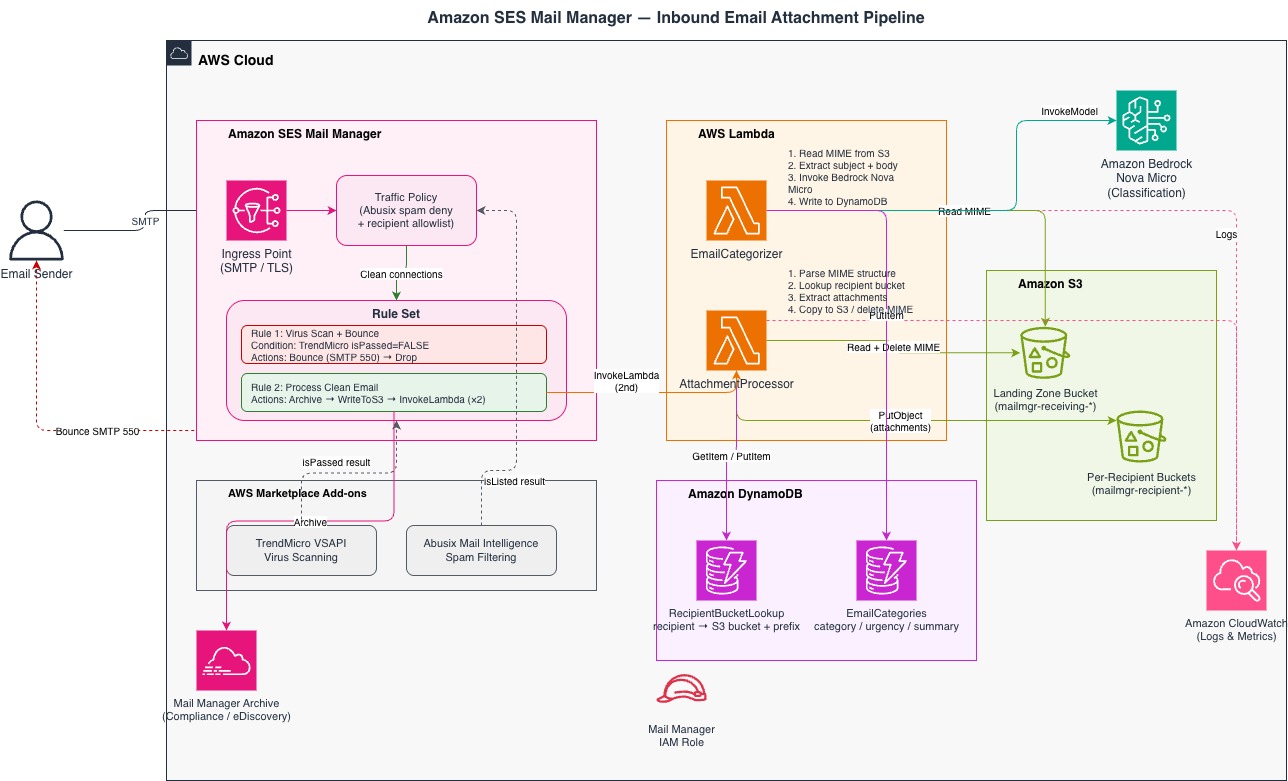
Pipeline architecture overview
Table 1: Architecture components and their roles in the email processing pipeline
| Component | Role |
| Amazon SES Mail Manager open Ingress Endpoint | Email arrives via public internet at a Mail Manager open ingress point over SMTP. |
| Mail Manager traffic policy | Filters spam using the Abusix (or Spamhaus) email add-on, then enforces a recipient allowlist at the connection level. |
| Mail Manager rule set | Messages for allowed recipients are passed to the rule set, which sequentially evaluates each message against two rules. |
| Rule 1 | Uses the Trend Micro email add-on to scan for infected attachments, then bounces any unsafe messages back to sender (using Amazon SES outbound). |
| Rule 2 | Clean messages passed from Rule 1 are copied to a Mail Manager archive and written as raw Multipurpose Internet Mail Extensions (MIME) objects to a “landing-zone” Amazon S3 bucket. |
| AWS Lambda (AttachmentProcessor) | Triggered by the arrival of objects in the S3 bucket, this function parses MIME email, extracts attachments, and routes them to per-recipient S3 buckets. |
| AWS Lambda (EmailCategorizer) | Triggered by the arrival of objects in the landing-zone S3 bucket, this function classifies each email using Amazon Nova Micro via Amazon Bedrock and writes results to Amazon DynamoDB. |
| Amazon S3 (landing zone + per-recipient buckets) | Stores raw MIME objects in a shared landing-zone bucket; stores extracted attachments in isolated per-recipient buckets keyed by local part (for example, invoices/ for invoices@uploads.anycompany.io). |
| Amazon DynamoDB (RecipientBucketLookup) | Maps recipient email addresses to their designated S3 bucket and key prefix. |
| Amazon DynamoDB (EmailCategories) | Stores Amazon Bedrock classification results: category, urgency, and summary. |
| Amazon Bedrock (Amazon Nova Micro) | Classifies each email into a category (invoice, contract, HR, unknown) and urgency level. |
| AWS IAM roles | Mail Manager and Lambda execution permissions following the principle of least privilege. |
How the Mail Manager traffic policy filters connections
The traffic policy (Receive-attachments) makes connection-level decisions before any message content is processed. It evaluates two statements in order:
- Deny spam — Connections from senders flagged by Abusix as spam sources are denied immediately.
- Allow approved recipients — Connections where the recipient is in the
approved-recipientsaddress list pass through to the rule set.
The policy uses a default action of DENY, so any connection that does not match an explicit ALLOW statement is rejected. The policy also enforces a 35 MB maximum message size. You can add additional statements to enforce SPF, DKIM, or DMARC authentication results. This is useful in regulated industries where sender verification is required before any processing occurs.
The PolicyStatements array defines the evaluation order (deny first, then allow):
For the complete create_traffic_policy call with all parameters, see the companion repository.
API reference: CreateTrafficPolicy
Rule set: the processing pipeline
Messages that pass the traffic policy enter the rule set (attachment-pipeline-rules), which evaluates two rules in order.
Rule 1 — Virus scan and bounce
This rule checks the Trend Micro add-on result. If Trend Micro reports isPassed = FALSE (infected attachment detected) — note that Mail Manager has already accepted the message by this point — the rule fires a Bounce action, which generates a non-delivery report (NDR) back to the sender with SMTP 550 (permanent failure) and status 5.7.1 (security/policy reason). It then Drops the message. No further rules run.
This after-the-fact NDR prevents infected messages from entering your processing pipeline while still providing clear guidance to legitimate senders.
Rule 2 — Process clean email
This rule has no conditions, so it applies to every message that passed the virus scan. It runs four actions in sequence:
- Archive — Mail Manager stores a copy in the archive for compliance and electronic discovery (eDiscovery).
- WriteToS3 — Mail Manager writes the raw MIME object to the
amzn-s3-demo-bucket-general-receivingS3 bucket, keyed by message ID. - InvokeLambda (
EmailCategorizer,REQUEST_RESPONSE) — Mail Manager invokes the categorizer, which classifies the email with Amazon Bedrock and writes results to Amazon DynamoDB. - InvokeLambda (
AttachmentProcessor,REQUEST_RESPONSE) — Mail Manager invokes the processor, which extracts attachments and routes them to per-recipient S3 locations.
The categorizer fires before the attachment processor by design: the attachment processor deletes the original MIME from Amazon S3 after successfully extracting attachments. By running first, the categorizer is guaranteed to find the MIME in Amazon S3.
Because the Bounce and Drop actions fire in Rule 1, the Lambda functions in Rule 2 are never invoked for infected messages. There is no risk of malicious content reaching your Amazon S3 buckets or Amazon Bedrock.
API reference: CreateRuleSet
How Amazon Bedrock classifies inbound email
The MailManager-EmailCategorizer function uses Amazon Nova Micro (amazon.nova-micro-v1:0) to classify each email. Amazon Nova Micro is a fast, lightweight text-only model optimized for classification and structured output tasks. Access to all Amazon Bedrock foundation models, including Amazon Nova Micro, is available by default in all commercial AWS Regions. No access request is needed.
The function performs the following steps:
- Parses the recipient, message ID, and subject from the Mail Manager event.
- Retrieves the raw MIME from the
amzn-s3-demo-bucket-general-receivingS3 bucket. - Extracts the plain-text or HTML body from the MIME structure.
- Sends the subject (capped at 500 characters) and body (capped at 4,000 characters) to Amazon Bedrock with a classification prompt.
- Writes the structured result to the
EmailCategoriesDynamoDB table.
The classification prompt returns a structured JSON response:
If Amazon Bedrock returns an error or malformed JSON, the function falls back to category: unknown, urgency: non-urgent and continues. It never blocks the attachment processor.
Choosing a classification model
To customize the classification categories for your use case, update the SYSTEM_PROMPT in the categorizer Lambda function. The prompt uses a structured instruction format that you can extend with additional categories, urgency levels, or routing rules. For example, an insurance carrier could add categories like claim_new, claim_status, document_submission, and complaint to automatically triage patient email. You can also update the COMPANY_NAME environment variable to inject your organization’s name into the classification prompt without modifying the function code.
To switch the model, update the BEDROCK_MODEL_ID environment variable. The following table compares supported options:
| Model | Model ID | Best for | Latency | Relative cost |
| Amazon Nova Micro | amazon.nova-micro-v1:0 | Fast structured classification, low latency | ~200ms | Lowest |
| Amazon Nova Lite | amazon.nova-lite-v1:0 | Richer summaries, multi-label classification | ~400ms | Moderate |
| Anthropic Claude 3 Haiku | anthropic.claude-3-haiku-20240307-v1:0 | Complex reasoning, nuanced categorization | ~600ms | Higher |
Attachment extraction and routing
The MailManager-AttachmentProcessor function handles MIME parsing, recipient-based routing, and cleanup. It performs the following steps:
- Parses the recipient email address and message ID from the Mail Manager event information.
- Retrieves the raw MIME message from the
amzn-s3-demo-bucket-general-receivingS3 bucket using the message ID from the event as the S3 key. - Looks up the recipient’s S3 destination in the
RecipientBucketLookupDynamoDB table, or creates a new entry if this is the first email for that recipient. - Extracts attachment parts from the MIME message, skipping plain-text and HTML body parts that have no file name.
- Copies each attachment to the recipient’s S3 bucket at the prefix
{local_part}/(for example,invoices/for invoices@example.com). - Deletes the original MIME object from the landing-zone bucket, but only if every attachment copy succeeded. If any copy failed, the MIME is retained for retry.
- Returns a response to Mail Manager indicating success or failure.
This synchronous invocation pattern allows the rule set to make routing decisions based on the Lambda function’s response. If attachment extraction fails, subsequent rules can bounce the message or route it to a quarantine location.
Attachment detection logic
The function detects attachments using three criteria:
Content-Dispositioncontainingattachment.- Any MIME part with a file name (even if disposition is
inlineor missing). - Non-text, non-multipart parts (such as
application/pdforimage/*).
For parts without a file name, the function generates one from the content type (for example, attachment.pdf).
Input validation and security
The pipeline implements the following input validation to protect against malicious content and unexpected inputs:
- messageId validation — the
messageIdfrom the Mail Manager event is validated against an alphanumeric-plus-hyphen pattern ([a-zA-Z0-9\-]+) before use as an S3 key. Unexpected formats raise aValueError, which causes Mail Manager to apply theActionFailurePolicy. - Attachment filename sanitization — filenames from MIME
Content-Dispositionheaders are attacker-controlled. Before use as S3 key components, each filename is processed throughos.path.basename()to strip directory components, leading-dot stripping to prevent hidden-file creation, and a character allowlist ([\w.\- ]). Filenames are also truncated to 255 characters. - Prompt size caps — the email body sent to Amazon Bedrock is capped at 4,000 characters. The subject line is capped at 500 characters, preventing oversized prompts and excessive token usage.
The following additional controls are recommended before adapting this pipeline for production:
- Validate attachment file types against an approved allowlist (such as
.pdf,.docx,.xlsx). Reject or quarantine messages with disallowed file types. - Implement per-attachment size limits in addition to the overall 35 MB message size limit.
- Verify MIME structure integrity before parsing. Handle malformed MIME structures as error conditions.
- Log validation failures to Amazon CloudWatch for security monitoring and audit purposes.
AWS CloudFormation and CDK support for Mail Manager rule actions
The InvokeLambda and Bounce rule actions are supported natively in AWS::SES::MailManagerRuleSet as of March 2026. The companion CDK stack uses CfnMailManagerRuleSet directly. No Custom Resource is required.
When using the Python CDK L1 bindings, note that typed property classes for Bounce and InvokeLambda are not yet exposed in the Python bindings. Pass these actions as plain dicts with camelCase keys matching the AWS CloudFormation property names. RuleActionProperty accepts Dict[str, Any] for each field:
API reference: AWS::SES::MailManagerRuleSet | AWS CDK API Reference
Prerequisites
This post and companion GitHub project assume familiarity with SMTP protocols, email infrastructure concepts, AWS Lambda, Amazon S3, Amazon DynamoDB, and AWS IAM.
Estimated time: 20–30 minutes to deploy and test.
Estimated cost: This pipeline uses a Mail Manager open ingress endpoint that costs $50/mo in addition to various AWS services that are charged based on actual usage. In a low-volume test environment (fewer than 1,000 email messages per day), costs should typically be under $60 USD per month driven primarily by Mail Manager archiving, S3 storage, Lambda invocations, and Amazon Bedrock token usage. Use the AWS Pricing Calculator to estimate costs for your expected volume.
AWS IAM permissions: The deploying user needs permissions to create and manage AWS CloudFormation stacks, Lambda functions, S3 buckets, DynamoDB tables, AWS IAM roles, and Amazon SES Mail Manager resources. For testing, AdministratorAccess is sufficient. For production, scope permissions to the specific actions required: cloudformation:CreateStack, lambda:CreateFunction, s3:CreateBucket, dynamodb:CreateTable, iam:CreateRole, iam:PassRole, ses:CreateTrafficPolicy, ses:CreateRuleSet, and ses:CreateAddressList. (Separately, the Lambda functions’ own execution roles, created by the stack, grant bedrock:InvokeModel at runtime; that permission is not needed by the person deploying the stack.)
To deploy this pipeline, you need the following:
- An active AWS account.
- AWS Command Line Interface (AWS CLI) version 2.x or later installed and configured with credentials and default region.
- AWS CDK version 2.x or later installed (
npm install -g aws-cdk) and Python 3.12 or later. - Amazon SES configured with production access in the target region with a verified Amazon SES identity for the bounce sender address.
- Ability to administer the DNS entries for the Amazon SES identity to add an MX record pointing to the Mail Manager ingress endpoint’s A record.
Deployment
Tip: Whichever path you choose, review the Prerequisites section first to make sure your AWS account has the necessary permissions and that you have a verified domain available in Amazon SES. The complete solution is available as an open-source reference implementation. To deploy it in your AWS account, clone the companion repository:
From here, you have two paths to get up and running:
Option 1: Deploy manually
Follow the step-by-step instructions in the repository’s README.md. At a high level, you will:
- Install prerequisites (AWS CDK, Node.js, Python).
- Configure your environment variables (AWS account, region, verified domain).
- Bootstrap your CDK environment.
- Deploy the stack with
cdk deploy. - Complete post-deployment verification (confirm email receiving rules are active and test with a sample message).
Option 2: Deploy with a coding agent
If you use an AI-powered coding assistant (such as Amazon Q Developer CLI or Kiro), install the AWS MCP server and SES/Mail Manager skills to empower your AI assistants with deep context on Amazon SES and Mail Manager. These resources give your assistant live access to AWS APIs and CDK documentation, which significantly reduces trial-and-error during deployment. The repository’s AGENTS.md file contains machine-readable guidance, deployment failure recovery patterns, and region handling notes specifically for AI assistants. Simply point your AI assistant at the AGENTS.md file in the repository root. This file provides structured, machine-readable instructions that guide the agent through the full deployment, from prerequisite checks through stack deployment and validation, without manual intervention.
Validating the deployment
Once your stack is deployed and the MX record is in place, send a test email with an attachment to one of your approved recipient addresses. Then confirm each stage of the pipeline executed successfully:
1. Check Lambda execution
Open Amazon CloudWatch Logs for both functions and confirm they completed without errors:
You should see log entries showing the message ID being processed by each function in sequence: the categorizer first, then the attachment processor.
2. Confirm email classification
Query the EmailCategories DynamoDB table to verify Amazon Bedrock classified your test message:
A successful record includes category, urgency, and a short summary, all generated by Amazon Nova Micro from the email’s subject and body.
3. Verify attachment extraction
Look up your recipient’s S3 destination in the RecipientBucketLookup table, then list the bucket contents to confirm the attachment arrived:
If all three checks pass, your pipeline is fully operational. Email messages are being scanned, classified, and routed to per-recipient storage without any external orchestration.
Troubleshooting
If your test email does not flow through the pipeline as expected, start with these common issues:
| Symptom | Likely cause | Resolution |
| Bounce action fails silently — infected emails are dropped without notification | The bounce_sender identity is not verified in the deployment region. Amazon SES identities are regional. |
Verify the domain in your target region: aws sesv2 create-email-identity --email-identity example.com --region <region>, add the DKIM CNAMEs to DNS, and wait for verification. No redeployment required. |
| Bounce action returns a validation error | bounce_sender is set to a bare domain instead of an email address |
Use a full address like bounce@example.com, not just example.com |
For CDK deployment issues, stack rollback errors, and teardown conflicts, see the repository troubleshooting guide.
General debugging tip: Both Lambda functions log to /aws/lambda/MailManager-EmailCategorizer and /aws/lambda/MailManager-AttachmentProcessor in Amazon CloudWatch Logs. Start there for any runtime failures.
Clean up
To avoid ongoing charges, destroy the stack when you are done:
Note: If the destroy fails with a
ConflictException, detach the ingress point from the traffic policy first. Amazon DynamoDB tables created withRETAINpolicies may also need manual deletion. See the repository’s Common failure modes table for details.Do not forget to remove the MX record from your domain’s DNS once the ingress point is deleted. After completing the clean up, verify on the AWS Management Console that the Mail Manager ingress endpoint, Amazon S3 buckets, Amazon DynamoDB tables, and Lambda functions no longer appear in your account.
Conclusion
The Lambda action and Bounce action in Amazon SES Mail Manager support multi-step inbound email processing without complex orchestration workarounds. This pipeline demonstrates how these capabilities work together in production: scanning attachments for malware, classifying email content with AI, extracting and routing files to per-recipient storage, and providing immediate RFC-compliant feedback to senders. The modular architecture supports extension: add new classification categories, integrate additional scanning engines, or chain Lambda functions for multi-stage processing. The synchronous invocation pattern means that every processing step completes before the next begins, giving you full control over the pipeline flow. Get started by cloning the sample-amazon-ses-mail-manager-attachment-pipeline repository and deploying to your account. For an overview of the four new Mail Manager capabilities used in this pipeline, see Four new Amazon SES Mail Manager capabilities, explained.
FAQ
Q: Can I use a different Amazon Bedrock model for email classification?
Yes. Update the BEDROCK_MODEL_ID environment variable on the MailManager-EmailCategorizer Lambda function. No changes to code are required. See the preceding model comparison table for supported options.
Q: Do I need to request access to Amazon Nova Micro?
No. In all commercial AWS Regions, access to Amazon Bedrock foundation models including Amazon Nova Micro is available by default. AWS GovCloud (US) regions require an explicit access request through the Amazon Bedrock console.
Q: What happens if the Lambda function times out or fails?
A REQUEST_RESPONSE invocation is time-bounded to approximately 30 seconds, or sooner if your function’s own configured timeout is shorter. In either case, Mail Manager applies the ActionFailurePolicy configured on the rule action. If set to CONTINUE, the pipeline moves to the next action. If set to DROP, the message is discarded. This pipeline uses CONTINUE, so a transient classification failure does not block attachment delivery.
Q: Can I add more classification categories?
Yes. Edit the SYSTEM_PROMPT in the categorizer Lambda function. The function writes whatever categories the model returns to Amazon DynamoDB. No schema changes are needed.
Q: How does the pipeline handle email messages with no attachments?
The AttachmentProcessor detects zero attachment parts, skips extraction, deletes the raw MIME from the landing-zone bucket, and returns success. The EmailCategorizer still classifies the message normally.
Q: What is the maximum attachment size supported?
The traffic policy enforces a 35 MB maximum message size (total MIME payload including all attachments and base64 encoding overhead). Individual attachments are not size-limited beyond this total cap.
Q: Can I deploy this with an AI coding agent?
Yes. The repository includes an AGENTS.md file with machine-readable deployment instructions. Point your AI assistant (Kiro, Claude Code, Amazon Q Developer CLI) at this file and it handles the full deployment without manual intervention.
Q: Is the Bounce action RFC-compliant?
Yes, with one clarification: it is not a live SMTP-transaction rejection. Mail Manager first accepts the message, then the rule set runs. If the Bounce action fires, it generates a non-delivery report (NDR) back to the sender with an RFC 5321-compliant SMTP reply code and an RFC 3463-compliant enhanced status code.
Related posts
- Four new Amazon SES Mail Manager capabilities, explained (TBD).
- Modernize email sending with Amazon SES and Proofpoint SER.
- Announcing Mail Manager for Amazon SES.