Migration & Modernization
Automate large scale network migration using AWS Transform Network Migration APIs
AWS Transform for VMware simplifies how organizations migrate VMware workloads to AWS by providing an AI-driven, agentic experience that automates the entire migration journey, from initial discovery and assessment, through migration planning and wave execution, to the actual migration of virtual machines to AWS. It addresses one of the critical migration challenges: translating on-premises network configurations into AWS-native constructs while maintaining security policies, connectivity requirements, and operational consistency.
Today, we’re excited to announce the general availability of AWS Transform Network Migration APIs , enabling programmatic access to the same powerful network translation capabilities that power the AWS Transform console experience.
In this blog post, we walk you through an end-to-end example to migrate VMware NSX network configurations to AWS programmatically. The complete code is available in this GitHub repository. While this example focuses on VMware NSX, you can adapt the code for other supported source network configurations.
The challenge
Organizations with large-scale migration initiatives need programmatic access to integrate AWS Transform’s network translation capabilities into their existing automation workflows. Console-only operations don’t scale efficiently when you’re migrating hundreds of network segments across multiple accounts and regions. If you have established orchestration platforms, you cannot incorporate AWS Transform’s network translation into your existing automation tools without APIs. This creates a gap between your existing migration processes and AWS Transform’s advanced capabilities. The lack of programmatic control also prevents integration with CI/CD pipelines and limits your ability to deliver fully automated, end-to-end migration solutions.
The solution
The AWS Transform Network Migration Public APIs provide programmatic access to automate network infrastructure migration from VMware environments (including NSX and vSphere) and other supported sources (Cisco ACI, Palo Alto, Fortinet and ModelizeIT) to AWS. Built on the same technology that powers AWS Transform’s console experience, these APIs enable you to:
- Define network migration configurations programmatically.
- Initiate and manage network mapping processes.
- Review and customize mapped network segments and constructs
- Generate infrastructure as code (AWS CloudFormation, AWS Cloud Development Kit, Terraform, and Landing Zone Accelerator on AWS (LZA) compatible YAML file).
- Deploy networks automatically or integrate with existing CI/CD pipelines.
- Analyze migration results and validate connectivity.
With these APIs, you can build custom solutions that combine network migration with your existing tools, automate migrations across hundreds of network segments and multiple accounts, and deliver end-to-end migration solutions that use AWS Transform capabilities within your workflows.
Network migration workflow overview
The following workflow shows you an example of programmatically migrating networking components from VMware NSX to AWS using the public APIs. For more details on the console-based workflow, see the AWS Transform for VMware documentation.
- Create a network migration definition – Define the source network location (S3), target deployment model, and network topology preferences.
- Start network mapping – Initiate automated discovery and mapping of network segments from your source configuration.
- Edit segments and constructs – Customize network configurations, modify CIDR blocks, or update tags.
- Generate infrastructure code – Produce CloudFormation, CDK, LZA or Terraform templates for your target AWS network.
- Deploy network – Automatically deploy the generated infrastructure to your target AWS accounts.
- Run analysis – Validate connectivity and analyze migration results using Amazon Virtual Private Cloud (VPC) Reachability Analyzer.
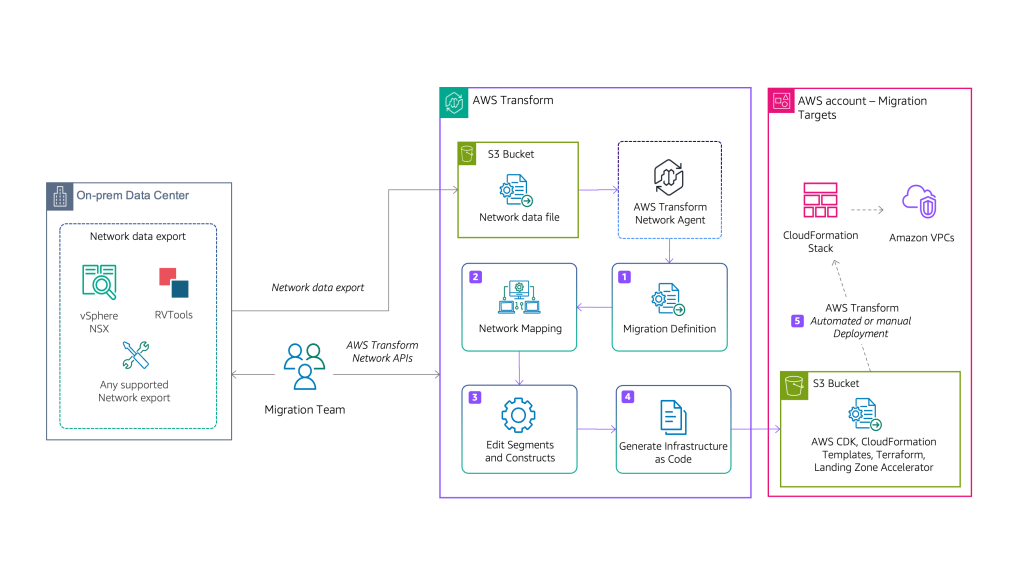
Figure 1: Architecture showing the AWS Transform Network APIs workflow
Prerequisites
Before using the Network Migration APIs sample code, ensure you have the following in place:
1. AWS Account Setup and permissions
- Migration planning account: An AWS account where AWS Transform runs migration orchestration.
- Target account(s): One or more AWS accounts where the migrated network infrastructure will be deployed
- Identity and Access Management (IAM) Permissions: IAM permissions for AWS Transform for VMware Network Migration operations.
2. Network Configuration Export
You must export your source network configuration to Amazon Simple Storage Service (Amazon S3) before initiating the migration. AWS Transform supports the following source formats. For more details check Migrate network in AWS Transform Documentation
3. Development Environment
- Python: Version 3.13 or higher
- Boto3: AWS SDK for Python (pip install boto3).
- AWS Credentials.
- Amazon S3 Buckets:
- Source bucket containing your exported network configuration.
- Target bucket for generated infrastructure code and migration artifacts.
Solution walkthrough with code examples
The following examples demonstrate show how to use the Network Migration APIs to automate your network migration. Each step can run independently or orchestrated together for a complete end-to-end workflow.
Step 0 – Installation
Clone the repository and install dependencies and setup the environment variable
git clone https://github.com/aws-samples/aws-network-migration-samples
cd aws-network-migration-samples
pip install -r requirements.txt

export AWS_REGION=us-east-1
export SOURCE_ACCOUNT_ID=YOUR-SOURCE-ACCOUNT-ID  # Replace with your 12-digit account ID
export TARGET_ACCOUNT_ID=YOUR-TARGET-ACCOUNT-ID  # Replace with your 12-digit account ID
Step 1: Create network migration definition
The first step is to create a new network migration definition that specifies the source and target network configuration. This tells AWS Transform to find the exported network configurations and how you want your target AWS network infrastructure to be designed. It includes the source platform (NSX, VSPHERE, CISCO_ACI, PALO_ALTO_FIREWALL, FORTIGATE_FIREWALL), source and target S3 locations, deployment model (single or multi-account), and network topology (isolated VPCs or hub-and-spoke).
In the 01_create_definition.py file, change the following parameters to match your environment:
- Replace SOURCE-BUCKET-NAME with your S3 bucket containing the exported network configuration.
- Replace NETWORK-EXPORT-FILE-NAME with your actual exported network file name.
- Replace TARGET-BUCKET-NAME with your S3 bucket for generated infrastructure code.
- Update sourceEnvironment value if not using NSX (options: NSX, VSPHERE, CISCO_ACI, PALO_ALTO_FIREWALL, FORTIGATE_FIREWALL)).
- Adjust targetNetwork.topology (ISOLATED_VPC or HUB_AND_SPOKE) based on your architecture needs.
For a hub-and-spoke topology, it will create three VPCs (inbound, outbound, and inspection). The targetNetwork.inboundCidr parameter allows you to define the CIDR range for the inbound VPC.
Alternatively, you can define these parameters in config.json file provided along with the package.
Run the script 01_create_definition.py to create the network definition:
python 01_create_definition.pyThe output provides a network migration DefinitionID in UUID format. After creating the definition, run the following helper to get the execution ID:
python 01a_list_execution.py <definitionID> Save the definitionID and executionID as environment variables, which are referenced in subsequent scripts:
Windows (PowerShell):
$env:DEFINITION_ID=definitionID
$env:EXECUTION_ID=executionID
Linux/Mac:
export DEFINITION_ID=definitionID<br />export EXECUTION_ID=executionID
Create network migration definition
Step 2: Start network mapping
Next, we will start an asynchronous job that reads your source network configuration from the S3 bucket provided in Step 1, identifies network segments (VPCs, subnets, routing tables, security groups), and maps them to equivalent AWS constructs. This process analyzes your network topology, dependencies, and security policies to create a migration plan.
Run the script 02_start_mapping.py to start the network mapping:
python 02_start_mapping.py Then run this helper script to poll the mapping status:
python 02a_wait_mapping.py After the mapper job completes successfully, proceed to the next steps.
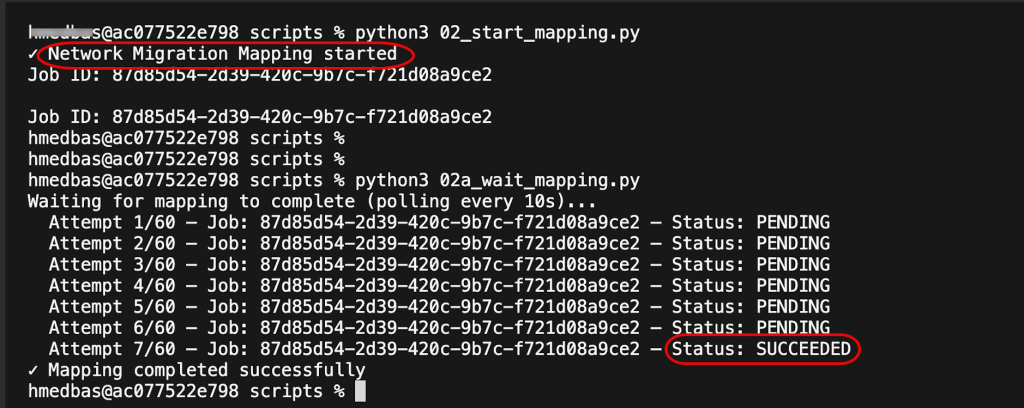
Figure 2: Start network mapping
Step 3: Edit segments and constructs (optional)
Optionally, you can adjust network segment properties and constructs before code generation. Update CIDR blocks to avoid IP conflicts, add or change tags for cost allocation and compliance. Each segment contains multiple constructs (individual network resources) that can be customized independently. The code example shows how to edit VPC constructs and update their tags. For your specific scenario, you might need to iterate through all the segments and constructs.
After you run this step, you will get confirmation that the segment constructs were updated successfully. Changes are stored and will be reflected in the infrastructure code generated in Step 4.
python 03_edit_segments.py

Figure 3 – Edit segments and constructs
Step 4: Generate infrastructure code
Now that we have generated the network segments, we are ready to produce infrastructure as Code (IaC) templates that define the target AWS network infrastructure. The generated templates include VPCs, subnets, route tables, internet gateways, NAT gateways (for hub-and-spoke), AWS Transit Gateways (for hub-and-spoke), security groups, and all necessary networking components.
You can generate multiple formats simultaneously to support different deployment tools and workflows. This includes CloudFormation, Terraform, CDK, or Landing Zone Accelerator. The generated templates are automatically uploaded to the target S3 bucket that you specified in Step 1.
python 04_generate_code.py
Then run this helper script to wait and poll the code generation status
python 04a_wait_code_generation.py After the code generation is complete, you can download the generated artifacts using these commands:
# List generated files
aws s3 ls s3://YOUR-TARGET-BUCKET-NAME/<execution-id>/ --recursive
# Download CloudFormation templates
aws s3 cp s3://YOUR-TARGET-BUCKET-NAME/<execution-id>/cloudformation/ . --recursive
# Download Terraform configuration
aws s3 cp s3://YOUR-TARGET-BUCKET-NAME/<execution-id>/terraform/ . --recursive
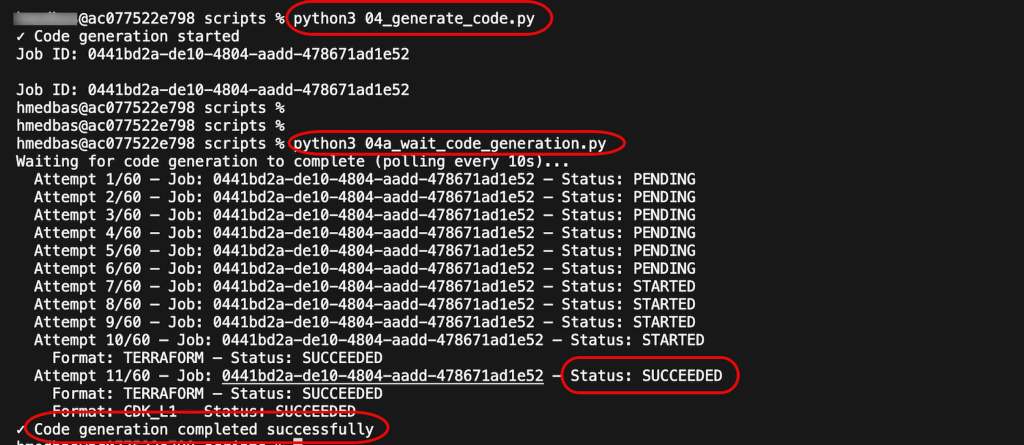
Figure 4: Generate infrastructure code
Step 5: Deploy the network infrastructure
You can review the generated CloudFormation templates and customize them as needed. Deployment is optional. AWS Transform can deploy the network infrastructure directly to your target AWS account(s), or you can choose to deploy it yourself using your own processes and tools.
If you choose to deploy through AWS Transform, the service will:
- Create VPCs, subnets, and route tables.
- Configure internet gateways and NAT gateways.
- Set up Transit Gateway (for hub-and-spoke topology).
- Apply security groups.
The deployment uses AWS CloudFormation and might take up to 30 minutes to complete, depending on the network configuration.
python 05_deploy_network.py Then run this helper script to wait and check for deployment status:
python 05a_wait_deployment.py 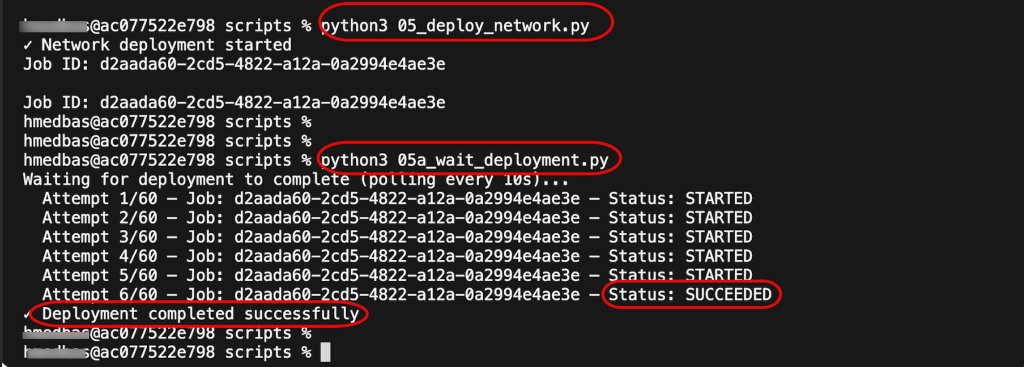
Figure 5: Deploy the network infrastructure
Step 6: Run network analysis (Optional)
The last step is to verify that AWS Transform generated the components as expected. We do that by running AWS VPC Reachability Analyzer to verify network connectivity across your deployed infrastructure. This validates that routing tables, security groups, and gateway configurations are correct. Results include detailed connectivity reports identifying any issues that need remediation before migrating servers. The analysis validates both intra-VPC and inter-VPC connectivity (for hub-and-spoke topologies).
Then run this helper script to wait for the analysis to complete:
python 06a_wait_analysis.py
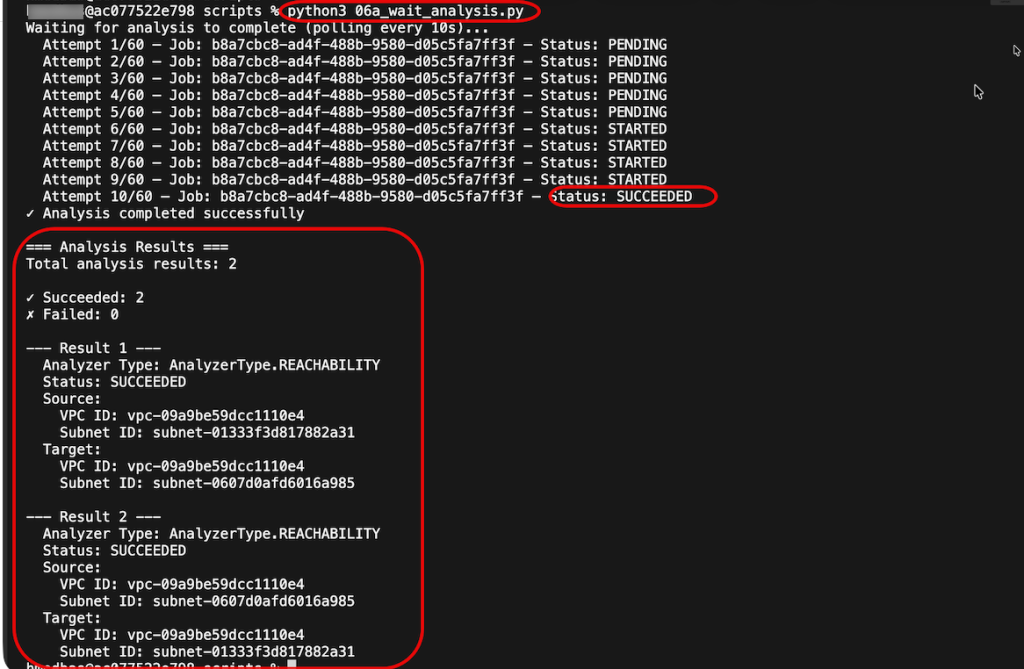
Figure 6: Run network analysis
Complete End-to-End Workflow (Optional)
Optionally, we included an extra script that orchestrates all six steps in sequence with appropriate delays between operations, automatically passing IDs between steps. This shows how to build a fully automated network migration pipeline that runs from definition creation through deployment and validation without manual intervention.
Before you run it, you need to define the parameters (source and target accounts, and source and target buckets) in config.json.example file or in 01_create_definition.py .
python complete_workflow.py
Monitoring and troubleshooting
You can track and monitor all Network Migration API calls can be monitored through:
- AWS CloudTrail logs for API call history.
- Amazon CloudWatch metrics for API performance and error rates.
- You can use AWS CLI to run the individual API calls to list network resources.
Clean up
To clean up the resources you need to delete the network definitions
python 07_delete_all_network_definitions.py --confirm On the target account, navigate to the Amazon S3 console. Search for the generated network definition files and delete them.
To delete the actual network components created by the CloudFormation template, you need to navigate to the AWS CloudFormation console and delete the Stack.
Conclusion
In this blog post, we walked you through a programmatic end-to-end network migration scenario, showing how AWS Transform APIs can be used to automate the entire migration process. From creating a network migration definition and mapping your source network segments, to customizing configurations, generating infrastructure as code, deploying to AWS, and validating connectivity—each step can be executed programmatically to build a complete automated migration pipeline.
By providing programmatic access to AWS Transform’s proven network translation capabilities, these APIs enable you to:
- Build custom migration solutions that integrate with your existing tools and processes.
- Automate network migrations across hundreds of segments and multiple accounts.
- Deliver end-to-end migration experiences that combine AWS capabilities with your unique workflows.
- Accelerate VMware-to-AWS migrations by eliminating manual network configuration tasks.
Get started today:
- Explore the complete code samples in this GitHub repository.
- Review the AWS Transform documentation for detailed API reference.
- Review AWS Transform documentation
- Review AWS Transform for VMware Blog Post
Finally let us know in the comments if you have questions