Migration & Modernization
Disaster Recovery for VMware Workloads on Amazon EVS
Many organizations run business-critical workloads on VMware, and most know that a single outage can disrupt operations, impact customers, and put revenue and reputation at risk. Disaster recovery (DR) is the solution: a secondary environment ready to take over when the primary site goes down. But building one has traditionally meant heavy upfront investment, long hardware lead times, and an environment that drifts from production, so the project gets postponed.
Amazon Elastic VMware Service (Amazon EVS) removes those barriers. You deploy a full VMware environment (VMware Cloud Foundation) on demand in AWS, with no hardware to buy, no lead time, and no drift. You pay for what you use, and your teams keep the same VMware tools and processes they already know. AWS manages the underlying infrastructure, and workloads recover without modification.
This post walks through six phases for implementing a disaster recovery solution with Amazon EVS: define your strategy and objectives, create the recovery environment, mirror production, protect your workloads, recover them when needed, and switch over. Along the way, we cover the trade-offs that help you choose the right DR strategy for your business.

Figure 1: The six steps to building a DR solution on Amazon EVS
Phase 1: Define Disaster Recovery Objectives and Strategy
Before building anything, step back and think about what you’re protecting and why.
Scope. Which workloads are critical for the business, how many need protection, and what’s the impact if they go down? This sets the scope of your entire DR design.
Recovery objectives. How long can your business stay down, and how much data can you afford to lose? Those are your Recovery Time Objective (RTO) and Recovery Point Objective (RPO).
Geography. Where does production run today, and where should recovery live so one disaster can’t take both down? Data residency and compliance will narrow your eligible AWS Regions.
Tooling. What tools would your teams need to operate those workloads at the DR site? Extending familiar tooling avoids new learning curves and untested failure modes.
Environment fidelity. Do applications need to land an exact copy of production, same IPs, same policies, or is there flexibility? This drives your networking and configuration approach.
Budget. Is there a budget ceiling, and do you prefer committed capacity or on-demand flexibility? This dictates how much you can afford to keep standing by before a disaster happens.
Business continuity. Does your company have a Business Continuity Plan ?If so, align your DR plan with it. The BCP sets the priorities, the acceptable downtime, and the recovery order.
Ransomware protection. Do you need to verify workloads are clean before restoring? Immutable storage and isolated recovery environments prevent reinfection.
Once you’ve worked through these, the strategy practically selects itself. The right strategy isn’t the one with the lowest RTO across the board. But the one where every workload gets the level of protection the business needs, at a cost you can sustain, with a process your team can execute and test with confidence. The table below shows four common approaches.
| Cold(On-Demand) | Pilot Light(Minimal) | Warm Standby(Partial) | Hot(Active)* | |
| What’s pre-deployed | Nothing (EVS is deployed at disaster time) | Minimal EVS environment (2 to 4 hosts) | Scaled-down cluster (sized for critical workloads) | Full cluster (matching production capacity) |
| Cost | $ | $$ | $$$ | $$$$ |
| RTO** | highest(8 hours+) | medium‑high(~4 hours+) | medium-low(~2 hours+) | low(~15 minutes+) |
| RPO | Hours to days(last backup) | Minutes(last replication) | Minutes(last replication) | Near-zero(continuous sync) |
| Recovery actions * | Deploy EVS → Mirror Prod → Recover VMs → Switch over | Recover VMs → Switch over | Recover VMs → Switch over | Recover VMs → Switch over |
| Testing confidence | Low(untested until disaster) | Medium(cluster validated) | High(partial failover testing) | Very high(continuous validation) |
| Best for | Non-critical workloads with relaxed RTO | Standard production workloads | Critical apps with strict SLAs | Zero-downtime, mission-critical |
* Hot (Active): it is achievable at the application layer; at infrastructure level requires vSAN stretched clustering (not yet on EVS).
** RTO depends on how many recovery actions remain at disaster time, where fewer/shorter recovery activities mean a lower RTO.
Phase 2: Create the DR Environment
Creating the recovery environment comes down to three decisions: where to deploy, what to deploy, and how much to keep running ahead of time. For the full deployment workflow, see the Amazon EVS documentation.
Where. Deploy Amazon EVS in an AWS Region or Availability Zone separate from your primary site, inside your own VPC. From there, connect to other services in AWS or on-premises as needed.
What. Select the EC2 bare-metal instance that provides the infrastructure foundation, and the VMware Cloud Foundation version that delivers the software-defined datacenter your workloads expect.
How much. Understand your upper and lower limits, then decide where to land between them.
- Ceiling. To figure out the upper limit, take the workload inventory from the previous phase, total the resources your critical workloads consume, and factor in VCF management overhead. That gives you the maximum number of hosts needed to recover everything at once.
- Floor. On the other end, the lower limit is defined by Broadcom depending on VCF version, storage type, and Fleet Footprint. Check the VCF documentation for the latest values. Today, for VCF 5.2 and 9.x, Broadcom recommends a high availability deployment with 4 hosts and vSAN storage for production environments. VCF 9 also offers a simple deployment starting at 3 hosts with vSAN or 2 with external storage, better suited for environments where cost matters more than management-plane redundancy.
- Choose your tier. Now decide where between those limits you want to sit today. This is the core cost-versus-speed decision. The more hosts you keep pre-deployed, the faster you can recover, but the more you pay to keep that capacity idle. You could deploy nothing and build entirely when disaster strikes (Cold) or keep a small footprint running and scale out when needed (Pilot Light or Warm Standby). Also, a common practice is to run non-critical workloads on the DR site day-to-day, then shut them down when disaster hits to reclaim capacity.
Phase 3: Mirror your production environment configuration
Once Amazon EVS is deployed, configure it, so workloads run exactly how they do at the source site: networking, security, compute, storage, and identity. When this match production, workloads recover cleanly and behave the way they did at the primary site.
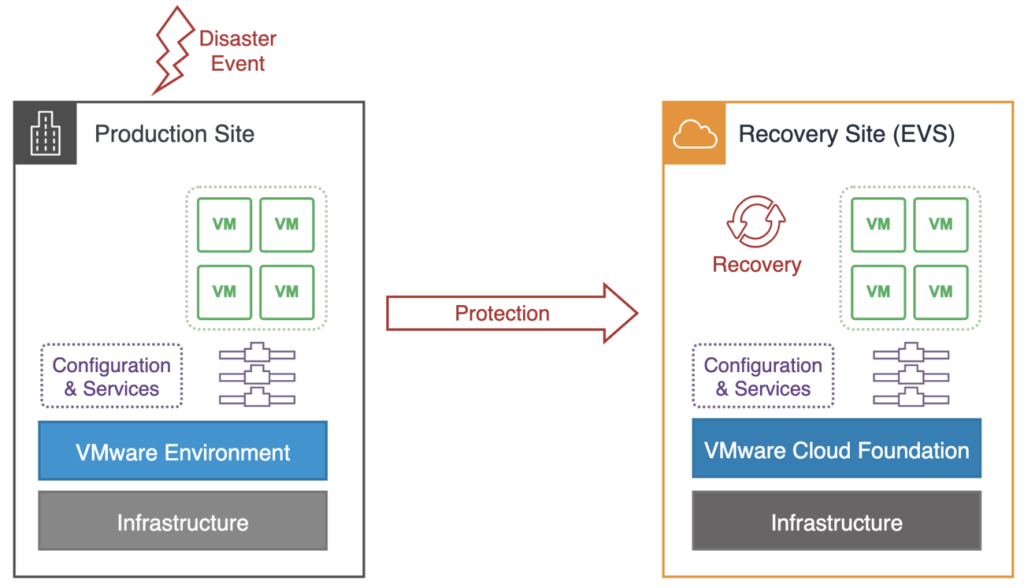
Figure 2: Disaster recovery overview
Of these, networking is the hardest part and the one that matters most. If VMs can’t reach the segments, gateways, and firewall rules they expect after failover, nothing else works. The service gives you solid alternatives for reproducing the production network at the recovery site. Two models are most common:
Code-Driven Network Replication
This approach uses Infrastructure as Code (IaC) tools like Terraform, Ansible, PowerCLI, or VCF Automation to replicate the production network configuration to the recovery site. How it works depends on your readiness strategy. If the recovery site doesn’t exist yet, you capture the production network as code and run it when the site is deployed. If it’s already running, the IaC pipeline keeps both sites in sync automatically. Either way, when DR activates, VMs attach to networks that are already in place. Works across all tiers.
NSX Federation
NSX Federation lets you manage networking for both sites from one central place, the NSX global manager. You define segments, firewall policies, and security groups once, and they get pushed to both locations automatically. When VMs recover at the DR site, they land on the same IPs, same firewall rules, same security policies. No re-IP, no reconfiguration, no drift.
It requires a DR environment already deployed and running with networking infrastructure at both sites. Some setup is needed upfront, and certain policies only activate once VMs are registered at the recovery site. Even so, it’s the cleanest path to instant network readiness for environments where both sites need to stay in lockstep.
| NSX Federation | Code-Driven Network Replication | |
| Network sync | Automatic, real-time | Manual or IaC-driven, periodic |
| Re-IP at failover | No (same segments stretched) | Possible (depends on mapping) |
| Infrastructure overhead | Higher (Global Mgr. + Edges at both sites) | Lower (no cross-site NSX infra) |
| Drift risk | None (enforced by Global Manager) | Exists unless automated |
| Best for | Warm Standby, Hot — frequent changes, zero re-IP | Cold, Pilot Light, Warm Standby — stable networks, IaC maturity |
Phase 4 & 5: Protect and Recover the Workloads
With the recovery environment created and configured to match production, the question becomes how to get your workload data there and how to bring virtual machines back to life when the moment comes. Several solutions work with Amazon EVS. The table below compares the available solutions across the criteria that matter most, and the sections that follow walk through each one in detail.
| VMware Live Recovery | Veeam | FSx for NetApp ONTAP | AWS Backup | |
| Covers | Protection + Recovery | Protection + Recovery | Protection + Recovery | Protection only |
| Replication layer | Hypervisor(vSphere Replication) | Hypervisor(I/O filter + proxy) | Storage(SnapMirror, block-level) | Scheduled(snapshots to S3) |
| RPO | 5 min – 24 hrs. | ~2 sec (CDP), min (replication), hrs. (backup) | 5 minutes | Hours – Days |
| Automation | High (recovery plans, scripts, re-IP) | High (failover plans, Instant VM Recovery) | Medium-high (BlueXP one-click) | Minimal (backup scheduled, recovery manual) |
| Testing | Non-disruptive, isolated networks | Non-disruptive failover testing | FlexClone zero-space copies | None built-in |
| Granularity | Per VM | Per VM | Per storage-volume | Per VM |
| DR site required | Yes | Yes (CDP/Replication), No (Backup) | Yes | No |
| Complexity | Low | Moderate | Low-Moderate | Very Low |
| Licensing | Per VM – VCF addon. | Per VM | Pay per GB | Pay per GB |
| Best for | VMware teams wanting one integrated solution | Teams wanting one service across all tiers | Organizations already on NetApp ONTAP | Baseline protection and compliance layer |
Hypervisor-Level Replication
These solutions replicate virtual machines by intercepting changes to their disks at the hypervisor level and transmitting them to the recovery site. They typically deploy appliance VMs at both sites to manage and move data. This approach offers the tightest RPO and requires a recovery environment already running. Both protection and recovery are handled in the same service.
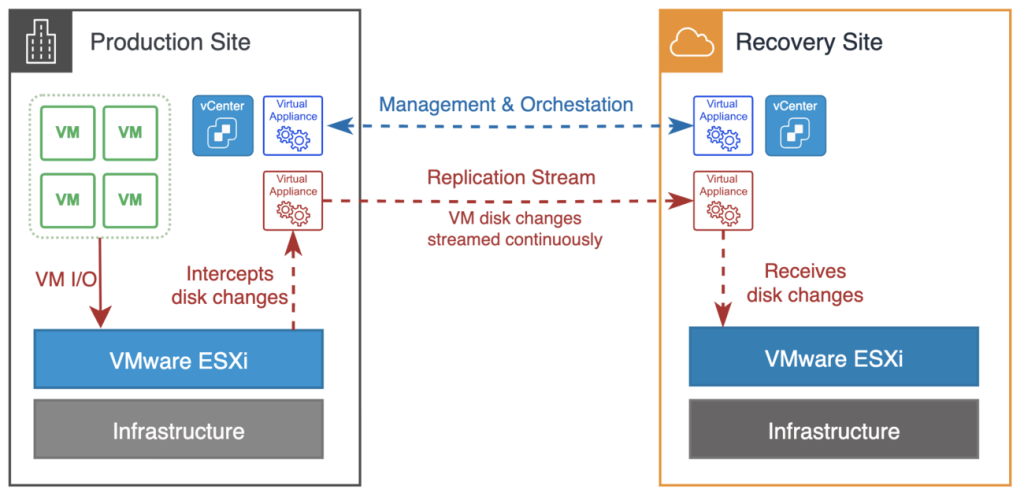
Figure 3: Hypervisor-based replication — DR orchestration and data replication through virtual appliances
This is the unified DR platform in VCF, with two workflows: one focused on keeping operations running, and one designed for safe recovery after a cyberattack. Disaster Recovery Orchestration: handles classic DR. You deploy an appliance on each site and replicate with vSphere Replication, vSAN Data Protection, or your storage array. Recovery plans handle the rest: IP changes, network mappings, and startup order. RPO depends on the replication method: about 5 minutes with vSphere Replication, whatever schedule you set with vSAN DP, and near-zero with synchronous arrays. RTO is usually just a few minutes if the DR site is already up. Cyber Recovery gives you an isolated place to recover from ransomware. A small connector sends deduplicated VM snapshots to an immutable cloud file system. If something goes wrong, you spin up an isolated recovery environment and use Live Mount to boot clean snapshots instantly, no full restore required, and no need to run a DR site 24/7.
Partner Solutions
Several partner products work with Amazon EVS. Veeam is one of the most common and handles both protection and recovery on a single service across multiple tiers.For protection, it offers three modes: scheduled backups to Amazon S3 (RPO in hours), near-continuous replication to a standby VM (RPO in minutes), and Continuous Data Protection that captures every write at the hypervisor level (RPO around 2 seconds). For recovery, failover plans handle boot sequences and re-IP rules automatically, and Instant VM Recovery can spin up a machine directly from a backup while the full restore finishes in the background.Backup mode doesn’t require a DR environment ahead of time. Replication and CDP modes do. Granularity is per VM. Complexity is moderate because one console manages everything, but running all three modes together takes planning. Immutable backups protect recovery points from ransomware. Licensing is per VM.
Storage-Level Replication
Storage-based replication works at the block level and requires the same storage sub-system at both sites. Amazon FSx for NetApp ONTAP is one option; comparable solutions are available from partners such as EverPure.
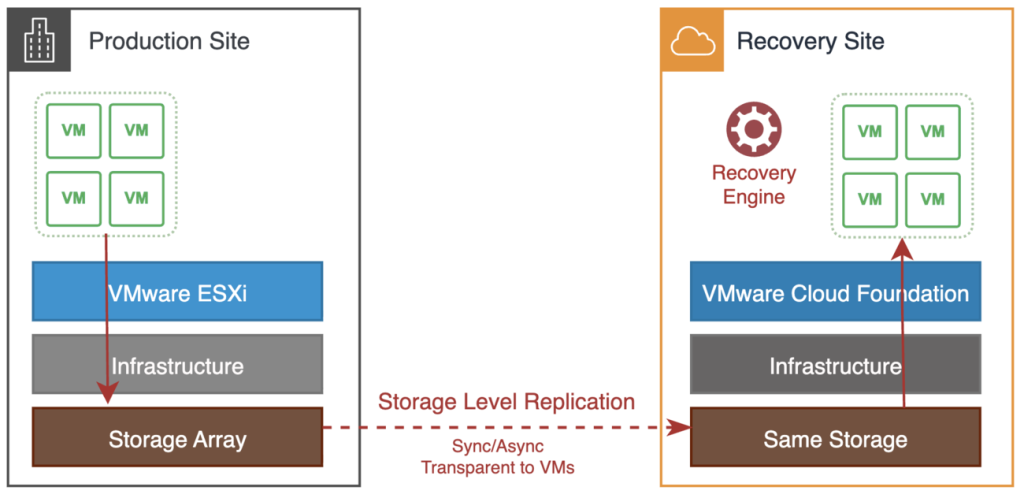
Figure 4: Storage-level replication — block-level synchronization between the production and recovery storage array
This solution requires FSx for NetApp ONTAP at both sites and handles both protection and recovery. For protection, SnapMirror replicates storage volumes every 5 minutes at the block level, completely transparent to the VMs with no guest-level overhead. The full EVS environment is only needed at recovery time. For recovery, BlueXP orchestrates the failover: it breaks the SnapMirror relationship, makes the replica volumes writable, mounts them as datastores on the DR site, registers the VMs in vCenter, and powers them on in the order you define. The whole process is one-click or API-driven. Granularity is per volume, which usually means a group of VMs. Complexity is low to moderate. Pricing is pay-as-you-go per gigabyte, cost-effective at scale. Best fit for organizations already on NetApp ONTAP that want storage-efficient replication with minimal operational overhead.
Scheduled Backups
The simplest and cheapest form of protection. Periodic snapshots stored in durable external storage. RPO is hours to days depending on how often you back up. No DR environment needs to be running ahead of time.
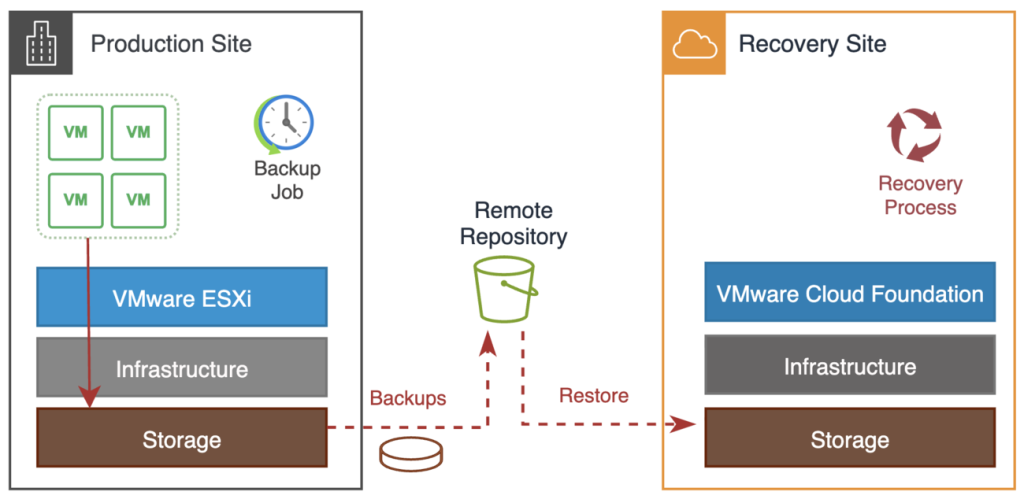
Figure 5: Backup and restore — scheduled snapshots to a remote repository with on-demand recovery
This option handles protection only. It takes scheduled snapshots of your VMs and stores them in Amazon S3, with optional Vault Lock for immutability, so nobody, including ransomware, can delete or modify your recovery points.Recovery is entirely manual. An operator restores the machines, configures networking, sets up boot order, and validates. There is no orchestrated failover. That makes it unsuitable on its own for anything time-critical, but it works well as baseline protection and a compliance layer underneath one of the other approaches. Policy-driven, no agents, and CloudTrail logs for every operation. Granularity is per VM, and complexity is as low as it gets.
Phase 6: Switch Over and Test
The final phase is about two things: switching users over to the recovery site and testing often enough that the process still works when a real disaster happens
Performing the Switchover
Switchover is simply updating DNS so users and systems stop pointing to the primary site and start pointing to the recovery site. Use Route 53 health checks with failover routing, weighted records, or DNS updates triggered by your orchestration tooling. Keep TTLs low on critical records (sixty seconds or less) because long TTLs can stretch your effective RTO well beyond what your replication tool delivers. And make sure your runbooks capture external dependencies too: partner integrations, applications with hard‑coded IPs, and third‑party DNS zones you don’t control.
Testing Your DR Plan
A DR plan that has not been tested is just a guess. The most common reason real recoveries fail is drift: an application missing from replication, a firewall rule changed only in production, a script pointing at something renamed months ago. Most replication tools support non-disruptive testing through isolated networks or sandbox environments, so use them on a schedule: monthly for critical workloads, quarterly for the rest. Track actual RTO against target and the number of surprises per test; the trend in surprises is the real measure of DR maturity. Rotate who runs the runbooks so broken automation shows up in a drill, not a declaration.
Failing Back to Production
After a real failover, you will eventually need to return workloads to the primary site once it is restored. The same replication tools you used for protection work in reverse: replicate the DR environment back to production, validate consistency, then switch traffic back. Plan and test failback from the beginning; an untested failback carries the same risk as an untested failover.
Conclusion
Disaster recovery on Amazon EVS is not a single tool or a single decision. It’s a series of choices across six phases, each shaped by your RTO, RPO, cost constraints, and operational reality. You pick where and how to deploy the recovery environment, how closely it mirrors production, how data gets there, how workloads come back online, and how you prove the whole thing works.The good news is that Amazon EVS gives you the flexibility to start small and grow. You can begin with a minimal footprint and scheduled backups for your lower-priority workloads, and layer in continuous replication and full orchestration for the ones that can’t afford downtime. You don’t have to solve everything at once, and you don’t have to commit to all the capacity at once.The one thing you can’t skip is testing. A DR strategy that lives only in documentation is a liability. Run your tests, track your surprises, close the gaps, and repeat. The goal isn’t perfection on day one. It’s confidence that builds over time, one validated recovery at a time.
Get Started with Amazon EVS
Ready to build disaster recovery for your VMware workloads on AWS? Explore Amazon EVS and start planning your recovery strategy today.
Learn what Amazon EVS offers on the Amazon EVS product page.
Dig into the technical detail in the Amazon EVS documentation.
Deploy your first environment from the Amazon EVS console