Migration & Modernization
How resource tagging scopes the AWS Transform connector role
Introduction
When an AccessDenied error blocks a test launch or cutover in AWS Transform for migrations, the cause is often a missing or incorrect resource tag on the connector role. This post shows you how to diagnose and fix it. When you connect a target account, the service deploys two roles: a service-linked role that AWS Transform uses to operate, and the connector role (AWSTransform-Connector-role-<workspace-id>) that performs the migration write actions in your account. This post is about the connector role.
With the connector role, you get a set of AWS Identity and Access Management (IAM) managed policies scoped to what your migration workflow needs. Resource tags gate its write actions, such as creating instances, launching servers, and modifying security groups. The role can act only on resources that carry the tag keys the policies expect: ATWorkspace, CreatedBy, and CreatedFor. When a resource is missing the expected tag, IAM denies the action.
The connector role exercises these tag-gated write actions during the rehost execution phase: after wave planning and network setup are complete, when test launches, conversions, and cutovers run. Correct tags at that point determine whether an action is allowed, which is what moves your migration forward or blocks it. Tag your resources from the AWS Transform tagging page before launching. Getting this right up front keeps launches and conversions succeeding the first time. This post explains how the tag-to-permission gate works, which tags matter, and how to diagnose and fix the common tagging failures that surface during test launches and cutovers. AWS Transform for migrations supports two connector models:
- Single-account created in and scoped to one target account
- Multi-account operates across accounts in an AWS Organizations structure
This post focuses on the single-account connector. The same tag conditions apply to the multi-account connector. For the full connector setup, see the connector documentation.
Prerequisites
Before you begin, confirm you have the following in place:
- A target account connected through the Connect target account step of the AWS Transform job plan. This is where you choose a single-account or multi-account connector (this post uses single-account), and completing it creates the connector role in that account.
- AWS Transform MGN available in the target Region, with source servers registered or planned. For background, see AWS Transform MGN.
- IAM read access to review the connector role permissions (for example iam:GetRole and iam:ListAttachedRolePolicies) so you can inspect its attached policies.
- Access to the AWS Transform tagging page for each workspace you operate.
How tag-conditioned permissions work
The connector role model rests on one idea: to create, launch, modify, or tag your migration resources, the role can act only on resources that carry the tags it expects, usually CreatedBy or CreatedFor together with ATWorkspace. For these write actions, IAM evaluates the resource’s tags against the policy conditions. When the required tag is present, the action succeeds; when it is missing, IAM denies the action. The service scopes read-only and service-to-service calls differently, through conditions such as aws:CalledVia or the calling account. So when permissions block a launch or conversion, the tag-conditioned write actions are where you look first.
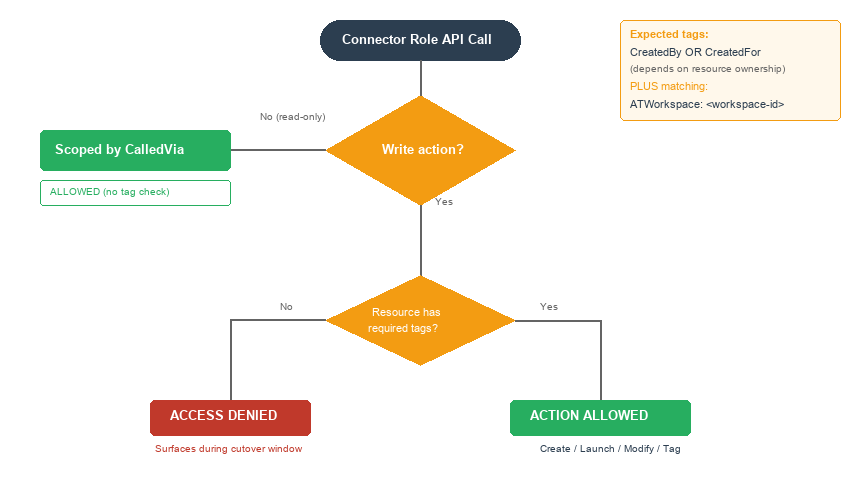
Figure 1. How tags gate connector-role write actions (create, launch, modify, tag): the action is allowed only when the resource carries the expected tags (CreatedBy or CreatedFor plus a matching ATWorkspace). A missing or wrong tag produces an AccessDenied.
The policy in practice
The connector role’s permissions are organized into AWS managed policies with descriptive names, one for landing zone setup, one for network migration, and one for server migration. Because these are AWS managed policies, AWS applies permission updates for you as the service evolves. The server migration policy is the one that governs launches and conversions, and it expresses its tag requirements through Condition blocks.
To inspect them in your account, open the IAM console, navigate to the role named AWSTransform-Connector-role-<workspace-id>, and review its attached managed policies. The following is an example of the statement that governs a launch against an Amazon EC2 subnet. The exact policy may change over time, but the tag-conditioned pattern is the durable part to understand:
{
  "Sid": "Ec2ViaMgnLaunchOnWorkspaceVpc",
  "Effect": "Allow",
  "Action": ["ec2:CreateSecurityGroup", "ec2:RunInstances"],
  "Resource": [
    "arn:aws:ec2:*:*:subnet/*",
    "arn:aws:ec2:*:*:network-interface/*",
    "arn:aws:ec2:*:*:vpc/*"
  ],
  "Condition": {
    "StringEquals": {
      "aws:ResourceTag/CreatedFor": "AWSTransform",
      "aws:ResourceTag/ATWorkspace": "<workspace-id>"
    },
    "ForAnyValue:StringEquals": {
      "aws:CalledVia": ["mgn.amazonaws.com"]
    }
  }
}
Consider a workload that looks ready to migrate: the server is replicating and healthy, its security groups are set in the launch template, and its network interface is in the right subnet. The one gap is the target subnet, which belongs to another workload and was not tagged for this AWS Transform workspace. Because of this statement, ec2:RunInstances succeeds only when the target subnet carries CreatedFor: AWSTransform and the matching ATWorkspace. Since this subnet has neither, the connector role cannot launch into it. The launch fails, not because a permission is absent, but because the resource is missing the tag that unlocks it. Viewed this way, the tag gate is a safeguard. It prevents the connector role from launching a workload into an untagged subnet that may belong to another workload or workspace. A tagging gap surfaces as a controlled stop rather than a migration landing in the wrong place.
The AWS Transform tagging page
AWS Transform provides a dedicated console page for tagging. It lists the network, source server, and EC2 resources in your account that the migration may need, for both the replication staging area and the launch instances, and shows their current tagging status. You reach it from the AWS Transform MGN console. The URL follows this pattern (bookmark it per workspace):
You can also prompt AWS Transform for migrations to provide the tagging page link for your workspace.
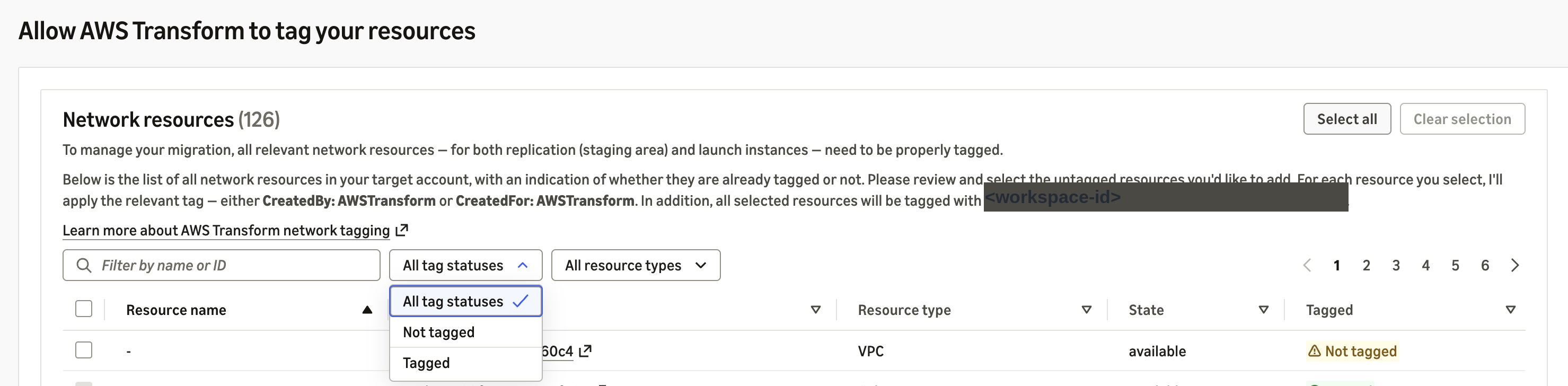

Figure 2. The AWS Transform tagging page showing network, source servers and EC2 resources. Resources marked Not tagged must be selected and tagged before launches succeed. The ATWorkspace tag value scopes resources to your workspace.
Why the tagging page matters
The tagging page is a reliable way to apply tags correctly, because the tag key names and values can be trusted from this page. Manual tagging through the EC2 console works, but if you apply a key or value that is not exactly what the policy expects, the permission check fails. The tagging page applies the correct key-value pairs for your connector. In a live environment with least-privilege IAM, the practitioner doing the tagging needs two console permissions. Use ec2:CreateTags to tag network resources, and mgn:TagResource to tag source servers and replication resources. Without these permissions in the practitioner’s own IAM role, the tagging page loads but cannot apply changes. Bookmark the tagging page link for each workspace, and use it after each infrastructure change: adding a subnet, changing a security group, or modifying a VPC. Run it before each cutover window. A quick check before launch keeps your cutover on track.
The tags the connector role checks
| Tag | Applied to | How and where it is applied | Purpose |
CreatedBy: AWSTransform |
MGN applications, waves, source servers, replication instances, staging volumes, snapshots, launch templates, conversion and replication security groups | The service applies it during a job step, or you apply it from the tagging page | Matches CreatedBy conditions in the connector policies |
CreatedFor: AWSTransform |
Network resources you own: VPCs, subnets, ENIs | Only from the tagging page, where you select which resources to tag | Matches CreatedFor conditions on launch statements |
ATWorkspace: <workspace-id> |
Most tagged resources, paired with CreatedBy or CreatedFor |
Applied alongside the tag above, carrying the workspace ID | Isolates one workspace from another (single-value) |
Table 1. The tags the connector role checks, where each applies, and the policy condition it satisfies.
Your own tagging strategy stays intact. You can add your own tag keys to these resources, for example an environment or lob (line of business) tag, alongside the keys AWS Transform uses. The connector role checks only its own condition keys and ignores the rest. When you re-tag from the page, it refreshes the managed tag values to match the current workspace. Take note of the ATWorkspace tag. Its value is a workspace ID tied to how AWS Transform scopes resources, so if the resource already carries a different ATWorkspace value, the page replaces it with the current workspace ID. That change moves the resource from one workspace to another. Not every tag on these resources drives the connector role. A source server also carries Name and transform:jobid for identification and traceability, but no connector policy condition currently keys off them. When you debug a permission issue, focus on CreatedBy, CreatedFor, and ATWorkspace.
Source servers compared with replication resources
In the MGN console, select a source server. The server’s own tags are under the Tags tab. The tags for the replication resources it creates (staging EC2 instances, EBS volumes, and snapshots) are under Replication settings. A source server can be tagged correctly while its replication resources are not, so check both. The two layers use different tag mechanisms. Source server tags (MGN-managed entities such as applications, waves, and source servers) use mgn:TagResource. Tags on the EC2 resources that MGN creates during replication (staging instances, EBS volumes, snapshots) use ec2:CreateTags. When a replication-related tag is missing, the error appears on the EC2 action, not on the MGN resource.
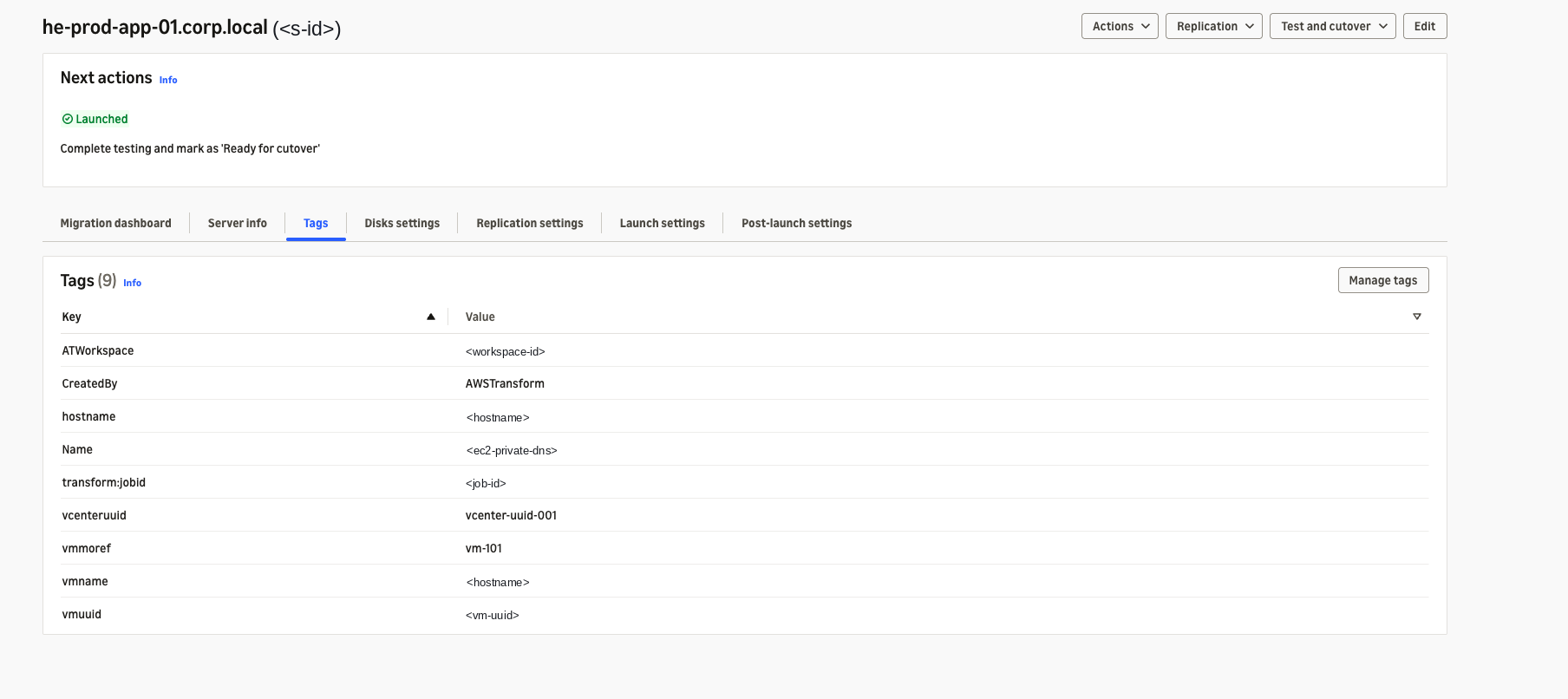
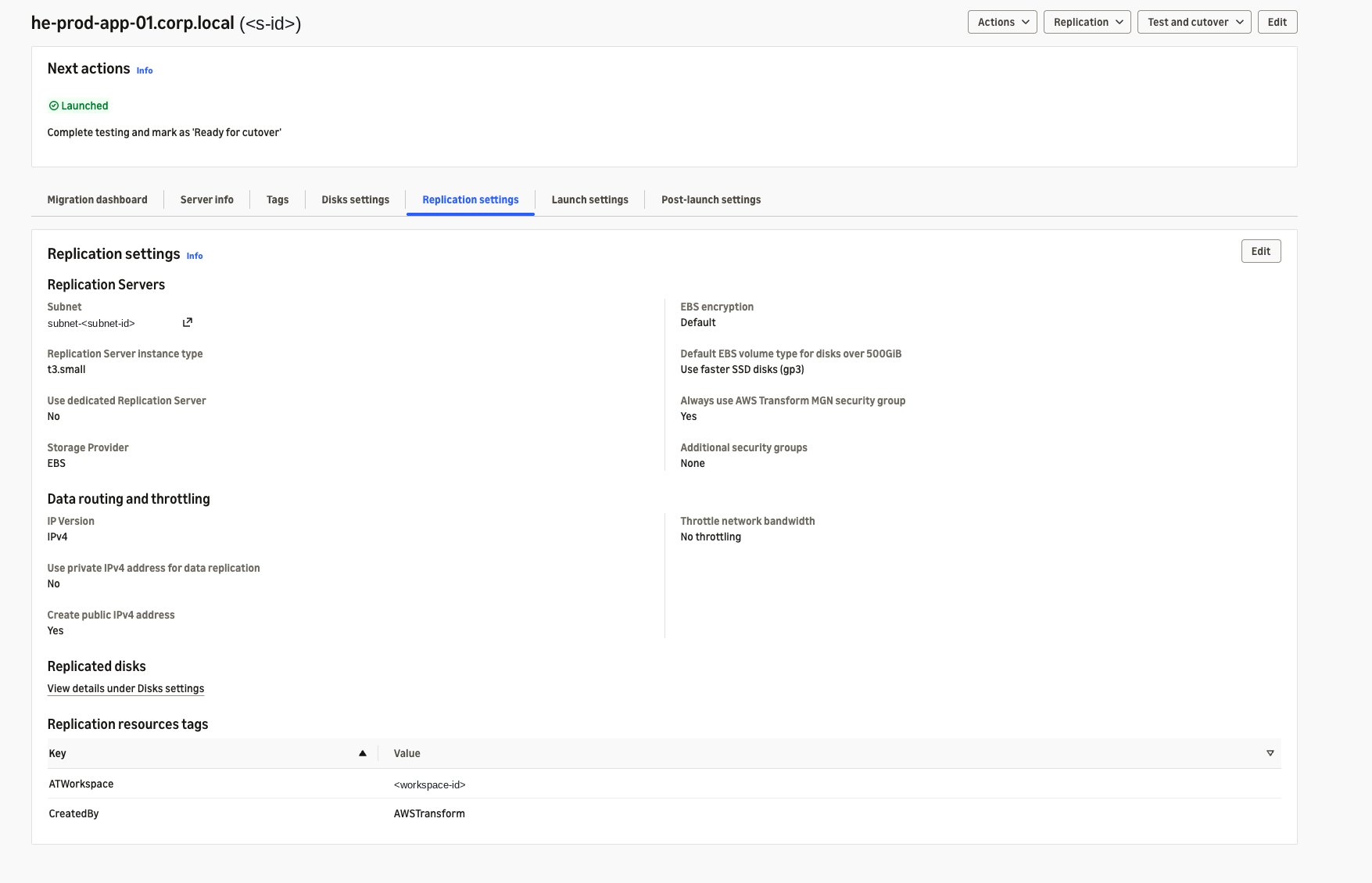
Figure 3. Source server Tags tab (top) and Replication settings (bottom). Both must carry the correct ATWorkspace and CreatedBy values for write actions to succeed.
A tagging strategy
Tag network resources (VPCs, subnets, security groups, ENIs) from the tagging page before your first test launch. Tag source servers after they are registered in AWS Transform MGN and appear on the tagging page. The sequencing matters because the connector role checks tags at action time, not at registration time.
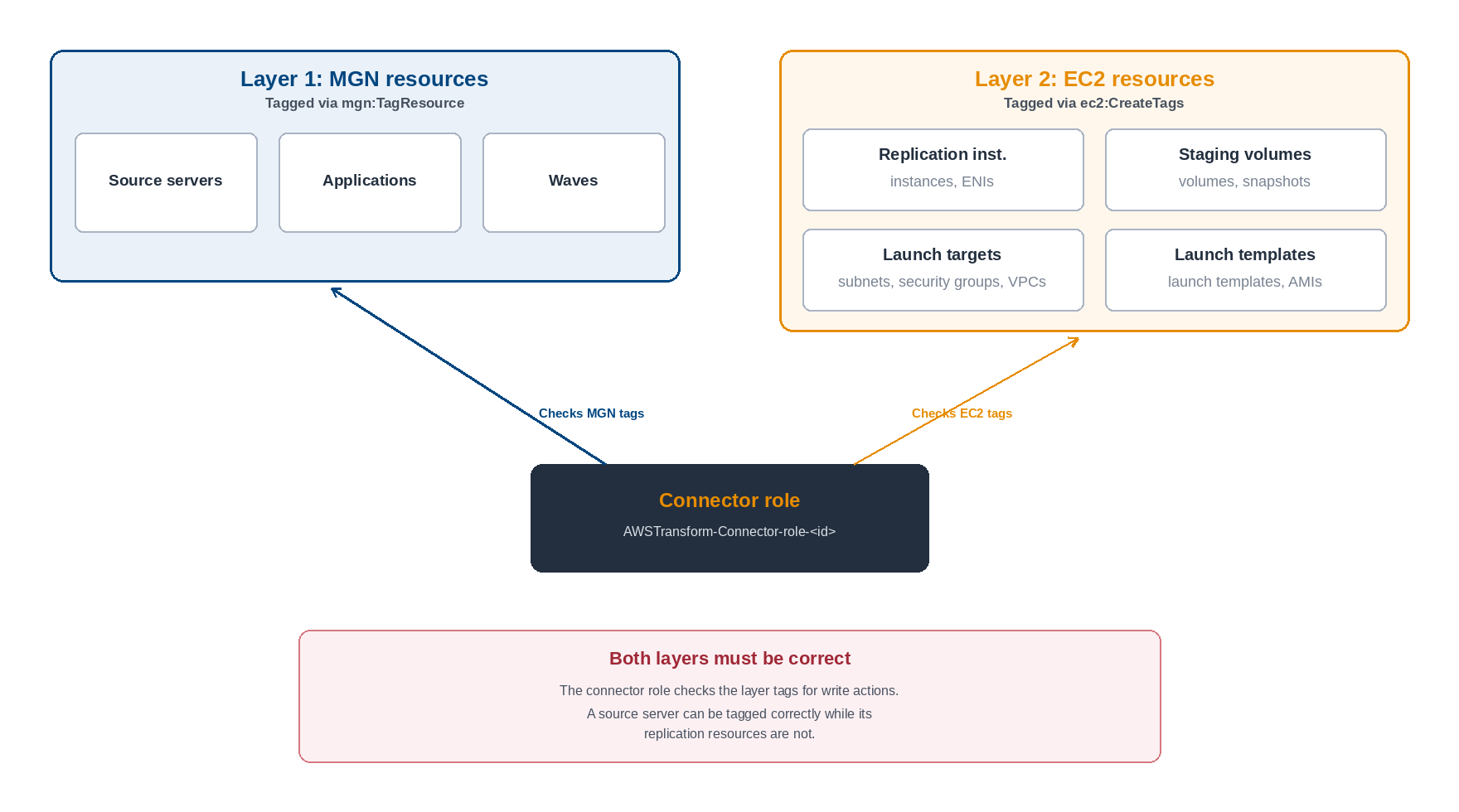
Figure 4. The two-layer tagging model: MGN resources are tagged with mgn:TagResource, and EC2 resources are tagged with ec2:CreateTags. Both layers must be tagged correctly for the connector role’s write actions to succeed.
When you might extend the connector policy
The connector role covers the standard rehost workflow, including iam:PassRole for the standard MGN service roles it uses during conversion and launch. One scenario still calls for an addition: Custom instance profiles (iam:PassRole). If your launch template specifies a custom instance profile whose role is not one of the standard MGN roles, the connector role needs iam:PassRole for that role ARN. Without it, RunInstances succeeds but the instance launches without the profile. To add it, open the IAM console, navigate to the connector role, choose Add permissions, create a customer managed policy, and add an iam:PassRole statement scoped to the specific role ARN your instance profile uses.
Cross-workspace subnet conflicts
The ATWorkspace tag is single-value: each resource can belong to only one workspace at a time. If one workspace tags a subnet with its ATWorkspace value, and then a second workspace tags the same subnet with a different ATWorkspace value, the second tagging operation overwrites the first. The first workspace’s connector role loses ec2:RunInstances permission on that subnet immediately, because the tag no longer matches. Plan your subnet-to-workspace mapping before you start tagging. If two teams share a VPC but target different subnets, assign each subnet to one workspace exclusively. If teams must share a subnet, keep them in the same workspace so their jobs use the same ATWorkspace value.
Common errors
The following table lists the five most common tagging-related failures during test launches and cutovers. In each case, the error message says AccessDenied on a specific EC2 action, but the resolution is a missing or incorrect tag.
| Error (action denied) | When it surfaces | Resolution |
ec2:RunInstances denied on subnet |
Test launch or cutover | Open the tagging page. Tag the target subnet with CreatedFor: AWSTransform and the correct ATWorkspace value. |
ec2:RunInstances denied on network-interface |
Cutover with pre-created ENIs | The ENI must carry the same tags as the subnet. Tag it from the tagging page, or apply the exact key names from the connector policy. |
ec2:AuthorizeSecurityGroupEgress denied |
During conversion, after snapshot | The MGN conversion security group is not tagged for this workspace. If MGN launched a server in this account before AWS Transform, the conversion security group predates the connector. Tag it from the tagging page. |
| Failed to connect on port 443 (conversion server) | During conversion | The connector role could not add egress rules to the conversion security group (see the row above). It fell back to the VPC default security group, which has no outbound rules, so the conversion server cannot reach AWS endpoints. Fix the conversion security group tagging to prevent the fallback. |
iam:PassRole not authorized |
Test launch with a custom instance profile | The connector role does not include iam:PassRole for your custom role. Add a customer managed policy with an iam:PassRole statement scoped to the specific instance profile role ARN. |
Table 2. Common tagging-related failures during test launches and cutovers, with the action denied and the fix.
If your account had AWS Transform MGN launch a server before AWS Transform for migrations was connected, some resources predate the connector role and carry tags from the earlier MGN setup. The connector role cannot act on them until you tag them for AWS Transform. Re-tag these resources from the AWS Transform tagging page so they carry the correct values for the current connector policy.

Figure 5. The AWS Transform tagging page showing the default conversion server security group as Not tagged. In accounts where MGN launched a server before AWS Transform, this security group predates the connector and must be tagged from this page.
In each case, the resolution starts at the AWS Transform tagging page. Confirm that VPCs, subnets, security groups (including the MGN conversion security group if applicable), and ENIs carry the expected tags before launching.
Validate with a test launch
Run a test launch on at least one server per wave before your cutover window opens. A successful test launch validates the full tag chain is intact for that server’s subnet, security group, and ENI combination. If it fails, the common errors table shows which action was denied and which tag to check. A successful test launch confirms tags are correct for that server and its resources. It does not confirm correctness for servers in other subnets or security group configurations. Validate at least one server per subnet and security group pattern in the wave.
Conclusion and next steps
The AWS Transform connector role gates its write actions through tag conditions on the resources it operates on. When a launch or conversion fails with AccessDenied, the cause is usually a missing tag on the target resource, not a missing permission in the policy. Knowing this narrows your debugging to one question: does the resource carry the tag the policy expects? Before your next test launch, open the tagging page. Confirm that each subnet, security group, ENI, and VPC your wave targets carry the correct CreatedFor and ATWorkspace values. Run a test launch on at least one server per wave to validate the tag chain end-to-end. If you operate multiple workspaces, plan your subnet-to-workspace assignment up front to avoid ATWorkspace overwrites.
Related resources
AWS Transform connector documentation
AWS Transform: Resource tagging verification
Acknowledgements
Special thanks to Angela McCord, Diego Dalmolin, Joel Knight, Suman Rajotia, and Tilly Wolfram for their contributions to this post.