Migration & Modernization
Refine AWS Transform Generated Networks Using AI-Guided Optimization
Introduction
A network migration to AWS moves more than a topology. It also moves the decisions baked into that topology: VLANs grouping unrelated workloads that should have been segmented long ago, firewall rules written for an infrastructure that is now decommissioned, and address ranges fragmented by rack placement rather than logical boundaries. A migration is the right moment to fix that debt and getting your network right before deployment saves re-architecture later.
With AWS Transform’s network migration capability, you review and optimize the network before you deploy it. AWS Transform takes your network and firewall configuration and translates it into AWS-native Amazon Virtual Private Cloud (Amazon VPC) networks, subnets, and security groups. It applies networking best practices along the way. AWS Transform handles the conversion, freeing your team to focus on the decisions that matter, which parts of the legacy topology still serve you, and which ones to leave behind.
In this post, we walk through how AWS Transform’s AI-guided recommendations surface modernization suggestions you might not have considered. We also show how to handle the refinements where your domain knowledge matters most.
Getting Started
Source Network File Upload
This walk-through assumes you already have your workspace set up in AWS Transform and have created a Migration – VMware migration job. If you need help to create your first migration job, check out AWS Transform documentation.
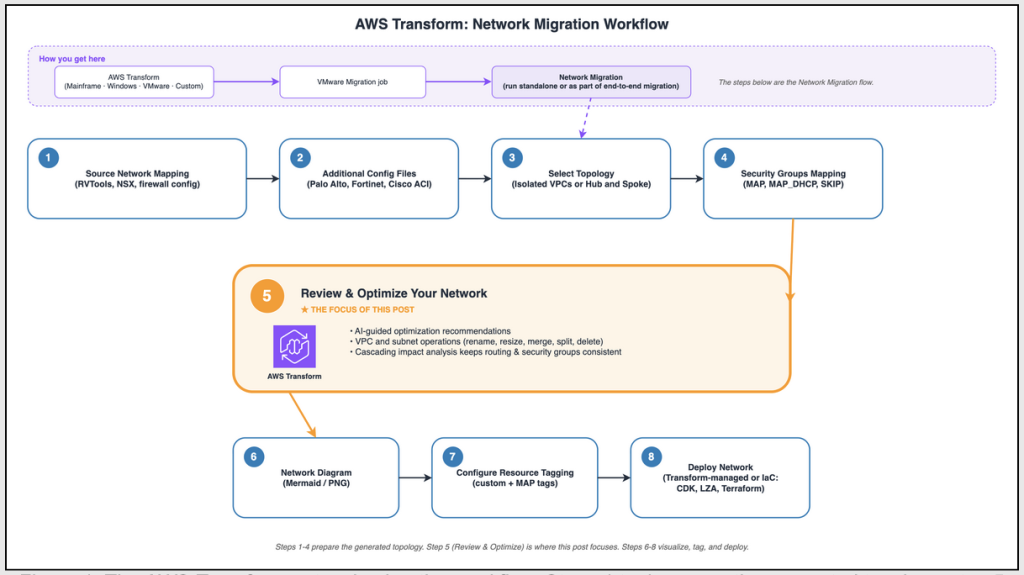
Figure 1. The AWS Transform network migration workflow.
Within that job, you’ll find the network migration agent (which can be a stand-alone job, or part of an end-to-end migration job).
The first thing the network migration flow asks for is your source network files. AWS Transform accepts the most common Software Defined Networks (SDN) and firewall export files, and other exports from tools like RVTools and modelizeIT. Upload your network export file, and AWS Transform will convert and process it automatically.
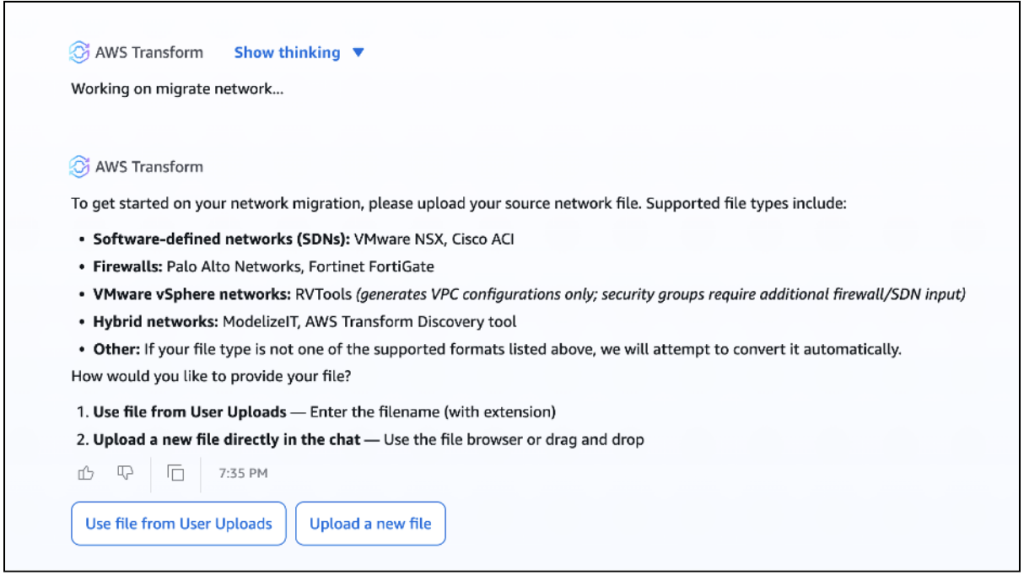
Figure 2. Uploading the source network files in AWS Transform.
For this walkthrough, we’re using an RVTools file combined with a firewall export. The RVTools file gives AWS Transform visibility into your VMware network topology, while the firewall export provides the security rules that will become AWS security groups. Once you upload these files, AWS Transform does the initial heavy lifting: it parses your source configurations, identifies network segments, maps firewall rules to security group equivalents, and generates an initial AWS topology.
Hub and Spoke network topology
Before AWS Transform generates the new network topology, you’ll select a network architecture pattern: Isolated VPCs and Hub and Spoke. The Isolated model gives each VPC full isolation with no communication between them. If you have applications that need to talk to each other across network boundaries, Hub and Spoke is the right fit.
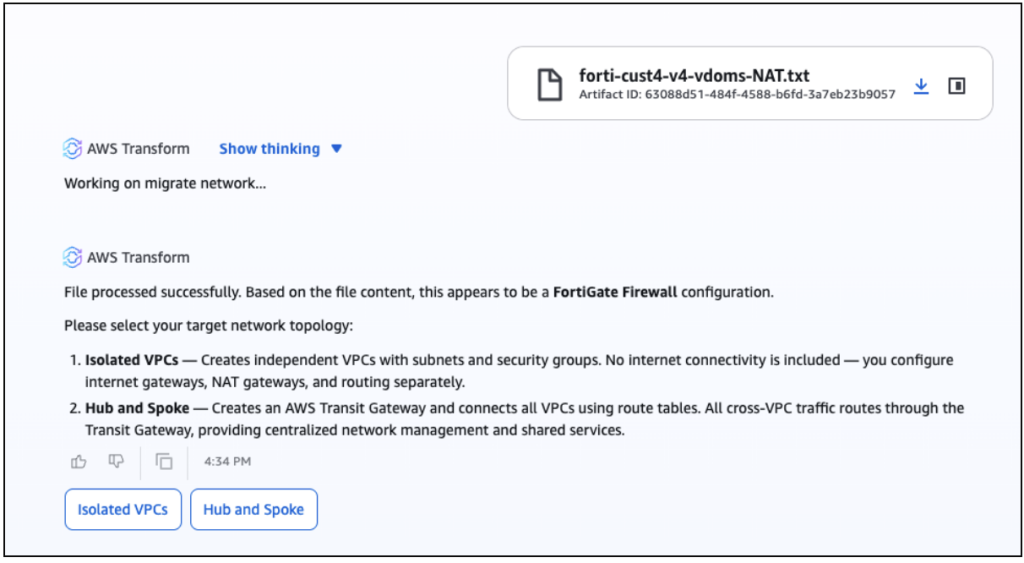
Figure 3. Choosing a network architecture pattern: Isolated VPCs or Hub and Spoke.
The Hub and spoke option will deploy an AWS Transit Gateway (TGW) as the central hub connecting your workload VPCs (the spokes) with Inspection, Inbound, and Outbound VPCs. All cross-VPC traffic routes through the Inspection VPC, where you can enforce firewall rules and monitor north/south and east/west traffic. Hub and Spoke is the recommended choice for migrations that need centralized security inspection and shared connectivity between workloads.
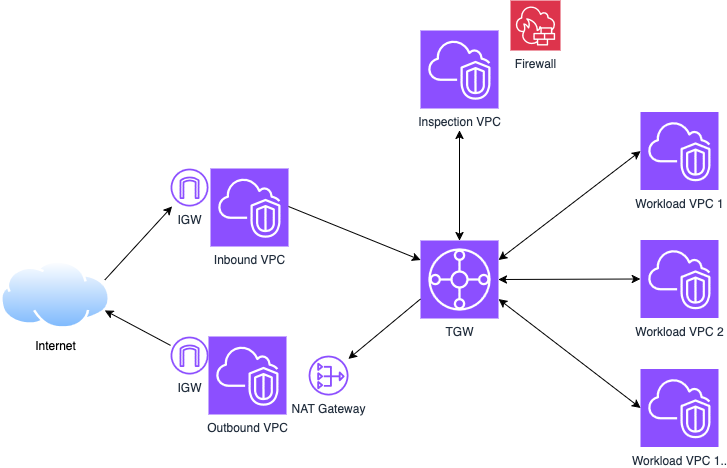
Figure 4. The Hub and Spoke topology: an AWS Transit Gateway hub connecting workload spoke VPCs with dedicated Inspection, Inbound, and Outbound VPCs.
Guided Modernization
AWS Transform offers a Guided Modernization option, an AI agent that reviews your generated network and recommends improvements covering naming, sizing, scope, and security.
Guided Modernization analyzes the generated network and returns a prioritized list of recommendations, which you approve, reject, or customize. For changes that require your judgment, you guide AWS Transform what to do, and it will manage the change for you.
For our example, AWS Transform surfaced naming, scope, right-sizing, and security-group findings, and confirmed there were no CIDR conflicts with existing VPCs in the target account. Here is the generated network before we touch it:
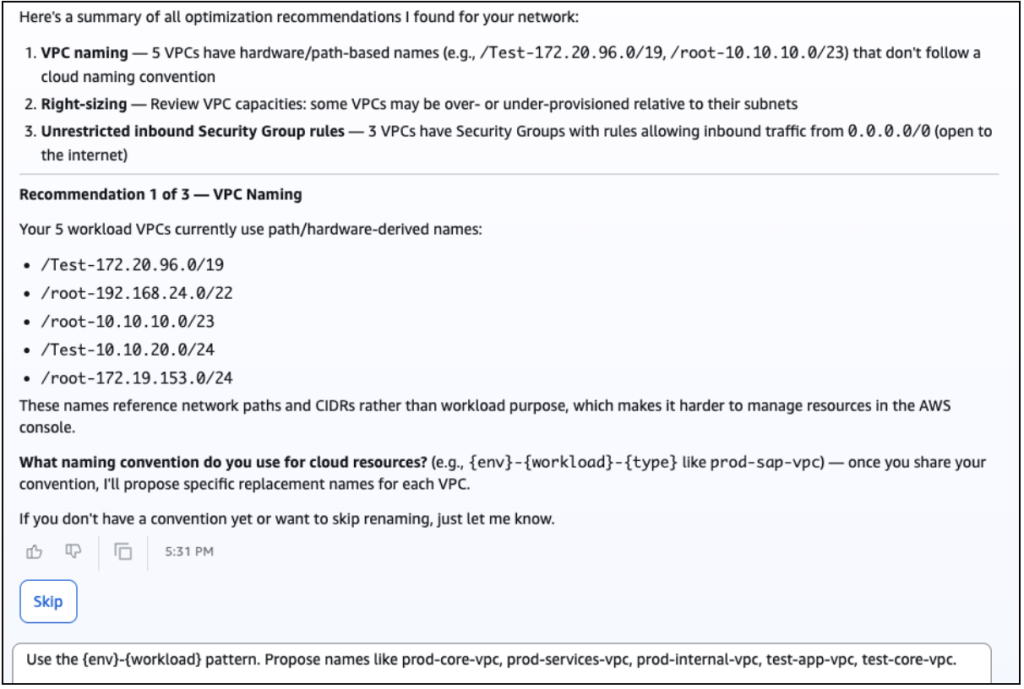
Figure 5. The prioritized list of AI-guided recommendations for the generated network.
Recommendation 1 – VPC naming
Five VPCs carry hardware- or path-derived names (for example, /root-10.10.10.0/23) that mean nothing in a cloud context. AWS Transform asks for your naming convention, such as {env}-{workload}-vpc, then proposes replacements. You review each name, accept or adjust, and AWS Transform applies the change while keeping downstream references consistent through cascading impact analysis.
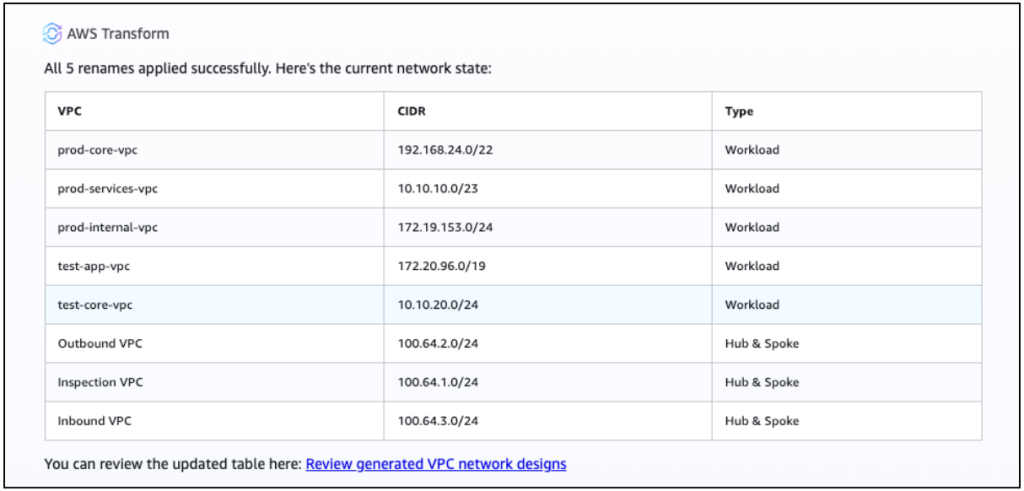
Figure 6. Standardizing VPC names against a cloud naming convention.
Recommendation 2 – Right-sizing
AWS Transform reviews whether each VPC CIDR matches actual capacity needs, so you reserve headroom for auto-scaling without wasting address space. It flagged test-app-vpc at 172.20.96.0/19 – 8,192 addresses for a single-subnet test workload, and recommended resizing to a /22. We accept the recommendation. The aim here is to act on what AWS Transform surfaces, not to hand-tune every block.
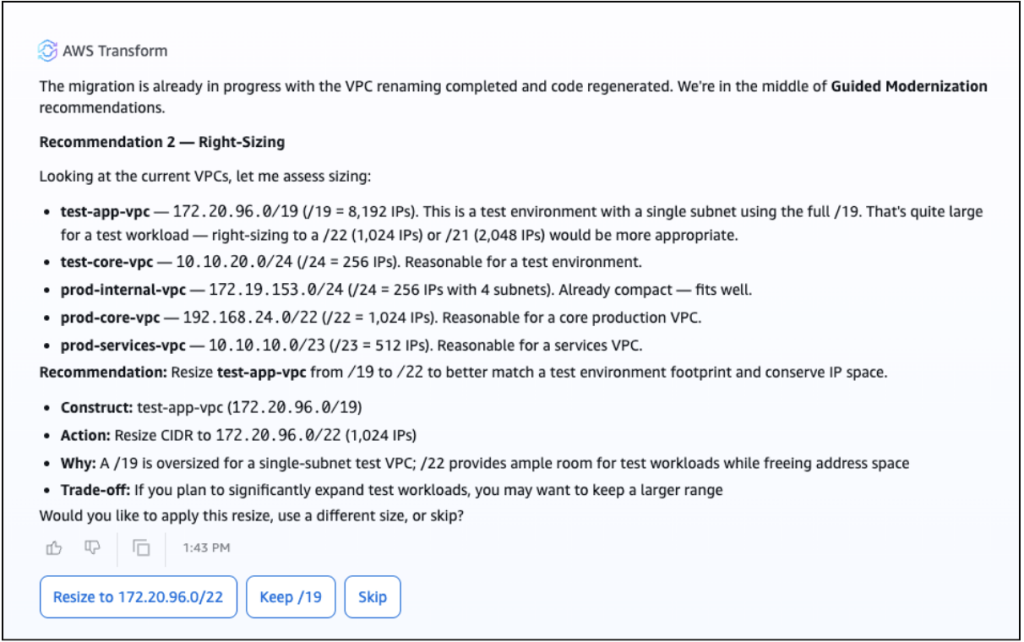
Figure 7. Right-sizing an oversized VPC CIDR block.
Merge what the firewall only split
On-premises, our firewall mapped each network domain and segment into its own boundary. As a result, the production services tier (prod-services-vpc, 10.10.10.0/23) and the SAP database tier (test-core-vpc, 10.10.20.0/24) landed in separate VPCs even though both sit in the same address space and share a trust level.
In this case, there is no cloud-based requirement to keep them apart, so we direct AWS Transform to merge test-core-vpc into prod-services-vpc. AWS Transform sizes the merged VPC to contain both (here 10.10.0.0/19), rebuilds the security group associations, and rewires the routes to the Transit Gateway automatically.
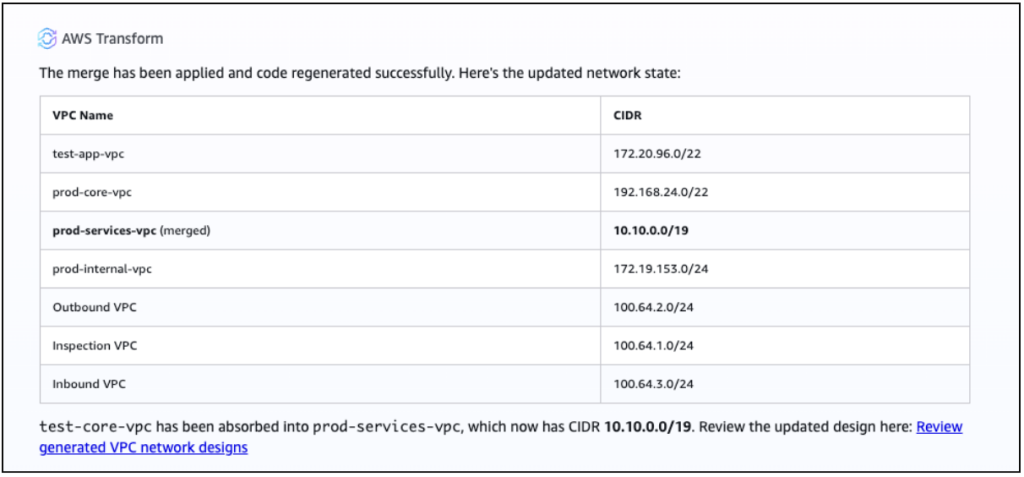
Figure 8. Consolidating two VPCs that the firewall had kept separate.
In this example, not every network needs to move. A pre-production test network (test-app-vpc), for example, exists only to validate changes on-premises. Carrying it over means provisioning and paying for a Transit Gateway attachment that never serves production traffic. We asked AWS Transform to remove it, so we can keep the target network scoped to our production network setup.
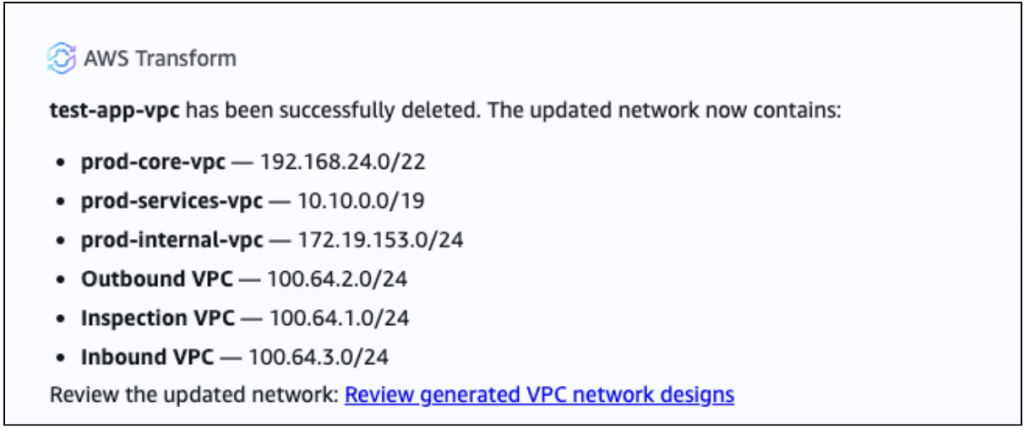
Figure 9. Removing a network that does not belong in the migration scope.
Recommendation 3 – Unrestricted inbound Security Group rules
During the security posture review, AWS Transform flagged three security groups in test-app-vpc with inbound rules open to the entire Internet: Inbound TCP 80,443 and 8083.
Firewall exports often carry forward temporary exceptions that become permanent. These rules are valid if you intend to expose servers directly to the internet, but deserve a review, if those servers will sit behind an AWS Elastic Load Balancing (ELB) or Amazon CloudFront.
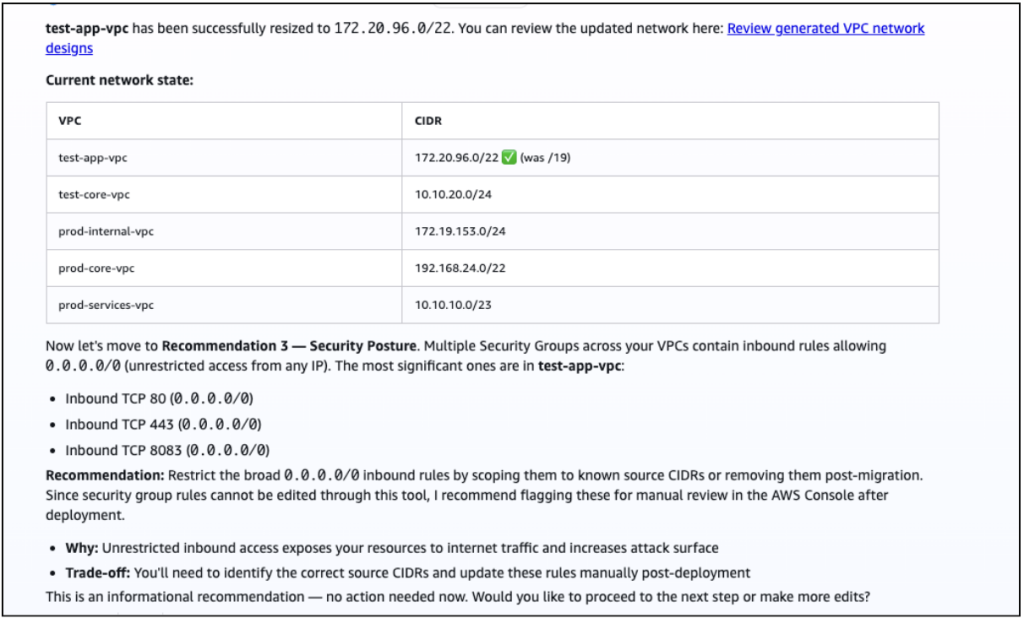
Figure 10. Security group rules flagged during the security posture review.
Cascading impact analysis is what makes every change safe. After each operation, AWS Transform recalculates dependent resources automatically: route tables, security group references, and Transit Gateway attachments. You make the intent-level decision and AWS Transform handles the downstream updates.
After a few guided exchanges and a couple of direct edits, a network that mirrored a decade of on-premises drift is right-sized, consistently named, and production-ready.
Validate and Deploy
With the optimization done, confirm the design before deployment. Generate the network diagram in AWS Transform and verify: every spoke VPC connects to the Transit Gateway, the Inspection VPC sits in the path between spokes, and security groups reflect the scoping you set. Because cascading impact analysis ran after every change, the topology is already consistent; this is your final check before provisioning.
From there, deployment is your choice. You can let AWS Transform deploy the network directly, using AWS CloudFormation under the hood. Or, if your organization deploys through its own pipeline, you can export the design as infrastructure as code in the formats AWS CDK, Landing Zone Accelerator, or HashiCorp Terraform. Either path starts from the same optimized, validated topology.
Conclusion
In this walkthrough we took a firewall-protected, multi-tier environment and, in a single guided session, standardized VPC names, right-sized an oversized CIDR, flagged 0.0.0.0/0 rules for remediation, merged two VPCs, and removed networks that didn’t belong in the new home. A legacy on-premises design became a right-sized, consistently named, production-ready AWS topology.
AWS Transform guided you through each decision: standardizing names, right-sizing CIDRs, reviewing permissive rules, merging segments that only existed because of on-premises constraints, and excluding networks that don’t belong to the migration scope. These steps are built into the workflow, surfaced at the right moment, with cascading impact analysis after each edit.
Try it with your own RVTools or firewall export, upload your source files, run the Review and optimize step, and see how quickly a legacy network becomes a production-ready AWS network topology.