Migration & Modernization
Simplify how you build and publish Custom Agents with AWS Transform Agent Builder Toolkit
AWS Transform is a collaborative enterprise IT transformation workbench powered by expert agents that accelerate cloud migration, application modernization, and continuous tech debt reduction. On May 14, 2026, AWS announced general availability of the AWS Transform Agent Toolkit Kiro Power, enabling Professional services organizations (e.g., consulting firms delivering cloud migrations), Independent Software Vendors (ISVs) embedding their tools into transformation workflows, and enterprise customers encoding internal standards (e.g., migration runbooks, assessment frameworks, code review checklists, or architecture decision criterias) into reusable agents within AWS Transform. This post covers why custom agents matter, how they work in production, the end-to-end architecture, and a hands-on Landing Zone readiness assessment agent you can deploy and play with.
The Problem: Why Custom Agents Matter
AWS Transform handles transformation execution: VMware migrations, .NET modernization, SQL conversion, and wave planning. Every organization, however, transforms differently. A partner has a proprietary delivery methodology that they apply across dozens of customers. An enterprise has internal standards their cloud foundation must meet before any workload moves. An ISV has a specialized tool that needs to participate in the transformation workflow, not sit outside it. Today, all of them rebuild these custom workflows from scratch for every engagement, in spreadsheets, manual runbooks, and the heads of individual consultants. When those consultants rotate off, the process breaks.
The agent builder toolkit lets you encode that custom logic as an agent and deploy it inside AWS Transform. Your agent composes with the platform’s native agents: it reads what they discovered, gates execution until its own checks pass, and hands results back to the workspace which is a resource that contains connectors, jobs, and artifacts, and serves as a permissions boundary. The logic becomes a deployable product rather than institutional knowledge.
Take a common example: before any workload moves, the partner needs to assess whether the customer’s landing zone is ready: networking, security, operations, compliance, disaster recovery, and cost controls. Today that means weeks of interviews and assessments, where a consultant manually consolidates all findings. With the toolkit, a partner builds an agent that pulls existing documentation from the customer’s Confluence, scores maturity across AWS prescriptive guidance on Cloud Foundations, generates a report, cross-references it against their IaC repository in GitHub and produces CloudFormation templates to close the gaps, all in a single job that runs inside the AWS Transform workspace. The same agent gets deployed to the next customer without modification. The partner’s methodology becomes a product, not a person.
Impact in Production
AWS Professional Services (ProServe) built a custom agent on AWS Transform’s composable foundation, embedding institutional knowledge from thousands of prior engagements. The ProServe Delivery Agent delegates to purpose-built agents for wave planning, dependency mapping, workload scheduling, and runbook generation, each owning a discrete phase yet composing into unified workflows that consultants orchestrate with strategic oversight.
Mainframe modernization makes this composability tangible. Traditional approaches demand thorough manual analysis and refactoring across millions of lines of COBOL, resulting in multi-year implementation timelines. With Transform, partners develop specialized agents that handle specific aspects of the lifecycle, from assessment and business rules extraction to reverse-engineering and forward-engineering. One agent extracts business logic, another maps cross-subsystem dependencies, a third generates cloud-native target architectures, and the ProServe Delivery Agent sequences them into a cohesive engagement plan. The result: what once required rigid change management and lengthy development cycles collapses into months, with modernized applications enabling rapid changes, upgrades, and deployments from day one.
“AWS Professional Services’ custom agent demonstrates this vision perfectly. It delivers customized workflows directly in customer accounts, with goal-based, interactive agents that personalize each migration. Whether orchestrating large VMware migrations or handling dynamic wave planning for enterprises migrating thousands of VMs, these agents adapt to each customer’s unique context.” — Asa Kalavade, Vice President of AWS Transform
Common Terminologies
- AWS Transform: An enterprise workbench where partners, ISVs, customers, and AWS expert agents work together on migration, modernization, and transformation jobs.
- AWS Transform Agent Toolkit kiro power: provides the SDK, runtime packages, and developer tools to build, deploy, and register custom agents with AWS Transform. Kiro is the IDE where you install the AWS Transform Agent Toolkit Power from the marketplace, enabling guided agent development with documentation search, deployment automation, and registration tools.
- Orchestrator: The top-level agent component that coordinates the overall workflow. It defines phases, decides when to call subagents or tools, and manages state transitions such as moving from discovery to validation to report generation.
- AWS Transform MCP Server: The runtime MCP server (agent-builder-agentic-mcp-aws-transform) that agents use to communicate with AWS Transform, enabling human-in-the-loop (HITL) forms, status updates, and job orchestration.
- AWS Transform Connectors: Enable secure access to resources across account boundaries and third-party systems. You create a source connector specifying the target account; the owner approves. Once active, connectors handle cross-account IAM role assumption, KMS encryption, and user traceability through CloudTrail.
- AWS Transform Artifact Store: The customer-owned artifact store announced May 14, 2026. You configure your own Amazon S3 bucket, optionally encrypt with your KMS key, and manage access policies through your account. Migration practitioners upload files directly for use by transformation agents and centralize artifact storage across multiple accounts, meeting data sovereignty and compliance requirements.
- Agent Registry: is a catalog in AWS Transform registry where deployed agents are registered for discovery. Once registered, agents appear in AWS Transform workspaces and can be assigned to jobs.
- Amazon Bedrock AgentCore: The AWS managed runtime where your containerized agent executes. The toolkit’s one-command deployment builds your container, pushes to Amazon Elastic Container Registry (ECR) , deploys to Bedrock AgentCore, and registers with AWS Transform.
- Human-in-the-Loop (HITL): The mechanism for agents to pause execution and present interactive forms to the user for validation, confirmation, or input before proceeding to the next phase.
How it works
The agent builder toolkit uses a containerized deployment model. Your agent runs as a Docker container (ARM64) on Bedrock AgentCore, communicating with AWS Transform through the agentic MCP server. Connectors handle secure cross-account resource access while Transform Artifactory provides customer-controlled storage for all transformation artifacts.
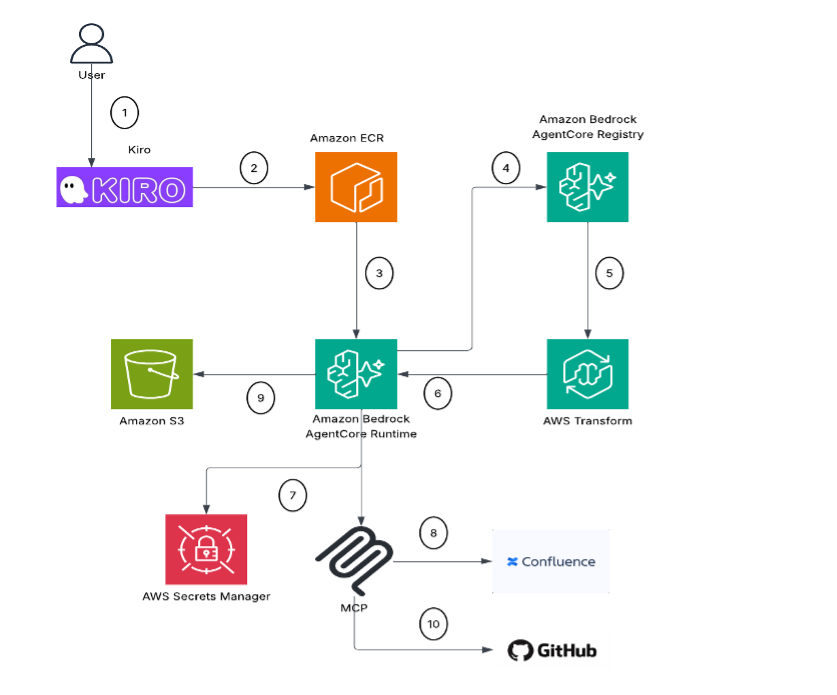
Figure 1 : Landing Zone Readiness
This example builds a Landing Zone (LZ) readiness agent using a five-phase pattern: Negotiate (gather from Confluence), Confirm (HITL validation), Execute (generate report), Analyze Code (validate against GitHub IaC), and Remediate (generate CloudFormation, open PR). The steps outlined below :
- User develops custom agents locally in Kiro.
- The agent is published as a container image to Amazon ECR using AWS Transform Agent Toolkit power.
- The image from ECR gets deployed to Amazon Bedrock AgentCore Runtime.
- The custom agent is registered with AWS Transform Registry.
- A new job is created selecting the registered agent in AWS Transform.
- AWS Transform invokes the custom agent hosted on AgentCore Runtime.
- The custom agent retrieves secrets from AWS Secrets Manager.
- The agent uses those secrets to call customer tooling via MCP (e.g., Confluence, Github).
- The agent publishes assessment report to the Artifact Store (Amazon S3) for human review.
- The agent creates a pull request on GitHub remediating gaps identified in the assessment.
The example above illustrates a landing zone readiness assessment, but the pattern is extendable for any transformation workflow. Swap your MCP connections, point to different source systems, and the same develop-publish-deploy-invoke lifecycle could be applied whether you are migrating databases, discovering VMware estates, or modernizing mainframes.
Prerequisites
- AWS CLI configured with credentials
- Finch or Docker installed and running
- Kiro with the AWS Transform Agent Power Toolkit installed
- Amazon Bedrock model access— Claude Sonnet 4.5 enabled in us-east-1
Deployment Steps
The deployment consists of 4 steps:
Step 1: Create IAM Roles
Step 2: Create secrets to store credentials in AWS Secrets Manager and an Amazon S3 bucket to publish Assessment report
- Creating a secret using AWS Secrets Manager to store Atlassian credentials
- Create second secret to store Github credentials. Ensure you provide appropriate read and write access against the code repository (contents, pull request, and metadata at the least)
- Create the report bucket:
Step 3: Deploy from Kiro
In Kiro chat:
The toolkit builds the ARM64 image, pushes to ECR, deploys to Bedrock AgentCore, and registers the agent. Takes 3-5 minutes.
Step 4: Run in AWS Transform
Add the agent to a workspace and start a job. Type :
Assess Landing Zone Readiness from Confluence, publish reports to S3, and generate IaC to bridge gaps in GitHub
The agent runs 5 phases autonomously, pausing at Phase 2 for human validation.
Expected Outputs :
- A scored readiness report

Figure 2 : Landing Zone Assessment Report
2. GitHub PR with CloudFormation templates for identified gap

Figure 3 : GitHub PR with CloudFormation templates for identified gap
The complete sample code for the landing zone assessment agent can be found in the repository .
Conclusion
In this post, we showed how the Agent Builder Toolkit enables partners, ISVs, and customers to encode proprietary methodologies as custom agents operating within the AWS Transform workspace. Custom agents extend orchestration to any use case, from landing zone readiness assessments and database migrations to VMware estate discovery to mainframe modernization, with no restrictions on workload type or domain. Build once, deploy with one command, reuse across every engagement.
To get started, contact your Partner Development Manager or apply through AWS Partner Central to join the composability initiative, install Kiro Power, scaffold your agent using the orchestrator templates, and deploy.
For more on building with AWS Transform composability, explore these resources:
- Mainframe Modernization Through AWS Transform Composability: Partner Co-Innovation with Agentic AI
- AWS Transform for migrations
- Accelerate enterprise solutions with agentic AI-powered consulting: Introducing AWS Professional Service Agents
We welcome your feedback. Share your experience building custom agents in the comments or reach out to your AWS account team to discuss how composability applies to your transformation roadmap.