Microsoft Workloads on AWS
Reduce time-to-market for AI agents using Microsoft SQL Server 2025 and Amazon Bedrock AgentCore
Enterprises struggle to integrate AI capabilities into existing applications without costly code changes. Traditional approaches require modifying application layers, updating APIs, and extensive testing cycles—all of which extend time-to-market and increase project risk.
This post demonstrates how you can reduce time-to-market by invoking AI agents on Amazon Bedrock AgentCore directly from Microsoft SQL Server 2025. This is made possible by sp_invoke_external_rest_endpoint, a new system stored procedure that enables native REST API calls from T-SQL. Using a deep research scenario running on an ERP (Enterprise Resource Planning) application with database triggers as an example, you’ll learn how to connect database workloads to AI agents at the database level, eliminating the need for application modifications. Deep research, in this context, means the agent autonomously investigates related data across these systems and synthesizes its findings into an actionable summary.
In this walkthrough, you deploy an AI deep research agent to AgentCore Runtime using AWS CDK, create a sample CRM database with tables and data, configure SQL Server 2025 to invoke the agent through database triggers, and observe how inserting a new record automatically triggers the agent to research across multiple ERP data sources — orders, inventory, and shipments — and produce a comprehensive report.
The solution leverages AWS Cloud Development Kit (AWS CDK) for infrastructure, Strands Agents SDK for the AI agent, Amazon Nova 2 Lite as the foundation model, and SQL Server 2025’s new sp_invoke_external_rest_endpoint stored procedure.
The complete source code, including CDK infrastructure and SQL scripts, is available in the aws-samples/sample-sql-server-ai-agents-with-amazon-bedrock-agentcore GitHub repository.
What’s new in SQL Server 2025
SQL Server 2025 introduces sp_invoke_external_rest_endpoint, a system stored procedure that enables direct REST API calls from T-SQL. This capability opens new integration patterns that were previously impossible without middleware or application code changes.
Key capabilities of sp_invoke_external_rest_endpoint include:
- Support for HTTP methods: GET, POST, PUT, PATCH, DELETE
- JSON and XML response handling
- Configurable timeouts and retry logic
- Secure credential storage using DATABASE SCOPED CREDENTIAL
To enable this feature, run the following query in SQL Server Management Studio (SSMS):
EXECUTE sp_configure 'external rest endpoint enabled', 1;
RECONFIGURE WITH OVERRIDE;
Use cases for sp_invoke_external_rest_endpoint
This new feature enables several enterprise integration patterns:
- AI agents integration: Trigger AI agents to analyze data and generate research reports when records are inserted or updated
- Real-time notifications: Send alerts to external systems (Slack, Teams, PagerDuty) based on database events
- Cross-system synchronization: Push data changes to external APIs for real-time sync with other enterprise systems
- Audit and compliance logging: Send audit events to external SIEM or logging platforms
- Workflow orchestration: Trigger AWS Step Functions or other workflow engines from database events
Amazon Bedrock AgentCore Runtime overview
Amazon Bedrock AgentCore Runtime provides managed infrastructure for deploying and running AI agents. Key features relevant to this solution include:
- Managed infrastructure: No need to provision or manage compute resources
- Session management: Dedicated execution environment (microVM) execution for each agent session
- Asynchronous processing: Support for long-running tasks up to 8 hours
- Multiple authentication options: IAM, and OAuth2
For enterprise workloads that require background processing—like researching data across multiple systems—AgentCore Runtime’s asynchronous model is ideal. The agent can work independently while the database trigger returns immediately.
Solution overview
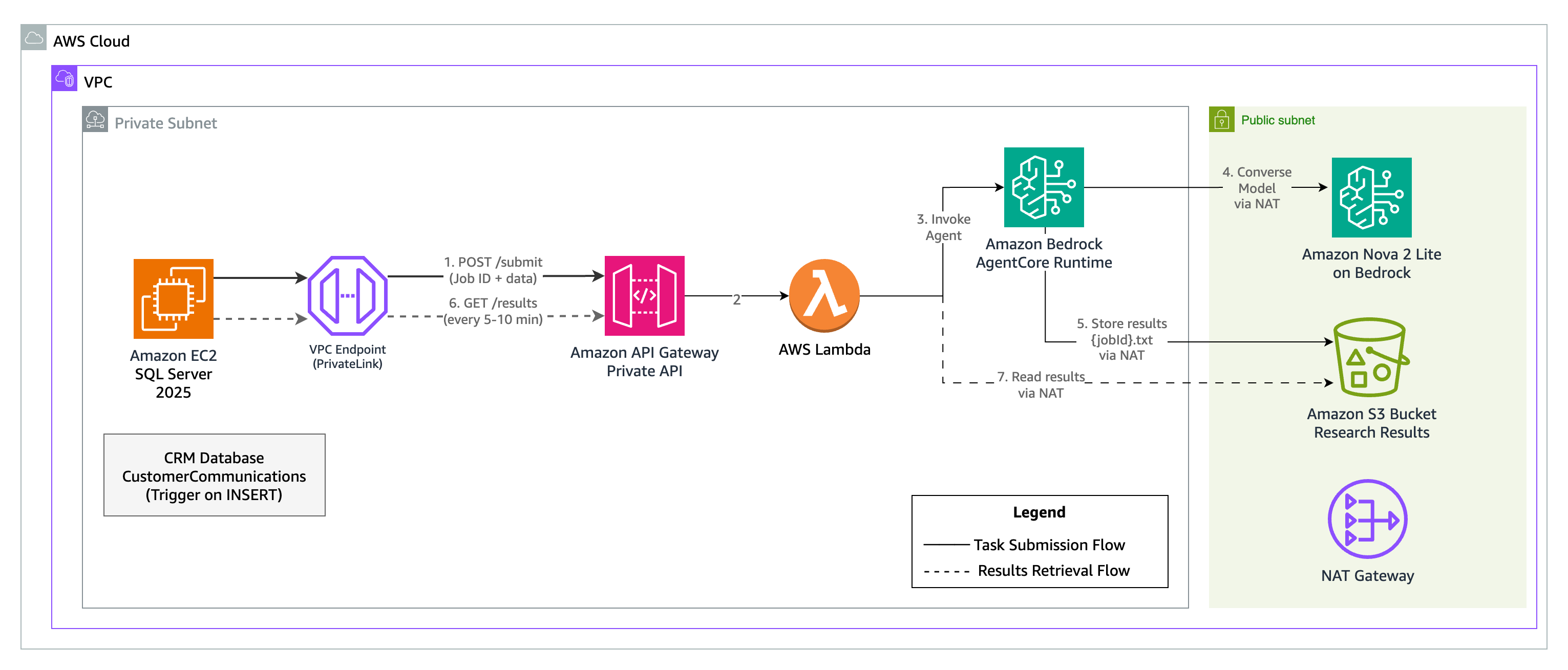
Figure 1. Solution architecture for ERP deep research AI agent with SQL Server 2025
The architecture (Figure 1) consists of:
- SQL Server 2025 running on Amazon EC2 with a CRM database
- Database trigger that fires when new customer communications are inserted
- A private REST API on Amazon API Gateway with API key authentication (no public internet exposure)
- AWS Lambda function that handles both task submission and results retrieval endpoints
- Amazon Bedrock AgentCore Runtime hosting the AI agent built with Strands Agents SDK
- Amazon S3 bucket for storing agent results with Job ID as filename
The following table maps each architecture component to its location in the GitHub repository:
| Component | Repository path | Deployed to | Description |
|---|---|---|---|
| AI Deep Research Agent | agent/ | Amazon Bedrock AgentCore Runtime | Strands Agents SDK multi-agent workflow and tools |
| CDK Infrastructure | cdk/ | AWS CloudFormation | VPC, API Gateway, Lambda, S3, and AgentCore Runtime |
| SQL Scripts | sql/ | SQL Server 2025 on Amazon EC2 | Schema, credentials, stored procedures, and triggers |
Use case: ERP deep research
In this scenario, a company uses a CRM database to store customer communications—support tickets, emails, and call transcripts. The CustomerCommunications table captures:
| Column | Description |
|---|---|
| CommunicationId | Primary key (used as Job ID for the AI agent) |
| CustomerId | Reference to the customer |
| CustomerSegment | Enterprise, SMB, or Startup |
| CustomerRegion | West, Central, or East |
| CustomerTier | Gold, Silver, or Bronze |
| CommunicationText | The actual communication content |
| AdditionalNotes | Populated by the AI agent with research results |
The complete schema with sample data is available in 03-crm-schema.sql.
After you complete the steps in this walkthrough, when a support representative logs a new customer communication, the solution automatically:
- Analyzes the communication to identify products, orders, and issues mentioned
- Researches related ERP data (inventory levels, order status, delivery tracking)
- Generates a comprehensive research report
- Stores the report back in the
AdditionalNotescolumn
All of this happens without any changes to the CRM application — the integration is entirely at the database level through triggers.
Data flow
- A new customer communication record is inserted into the CRM database
- The database trigger fires and calls
sp_invoke_external_rest_endpoint - The stored procedure sends a POST request to the private API Gateway with the record’s primary key as Job ID
- API Gateway validates the API key and forwards the request to Lambda
- Lambda invokes the AI agent on AgentCore Runtime
- The stored procedure returns immediately (asynchronous pattern)
- The AI agent analyzes the communication, researches related ERP data, and generates a deep research report
- The agent stores results in S3 with the Job ID as filename
- A SQL Server Agent job periodically queries the APICallLog table for jobs with “Submitted” status and polls the Results Retrieval API for each one
- The API reads results from S3 and returns them to SQL Server
- CRM users see deep research reports without any application changes
Security design
This solution uses a private API Gateway with API key authentication. All components reside within a VPC with no public internet exposure. (Figure 2)
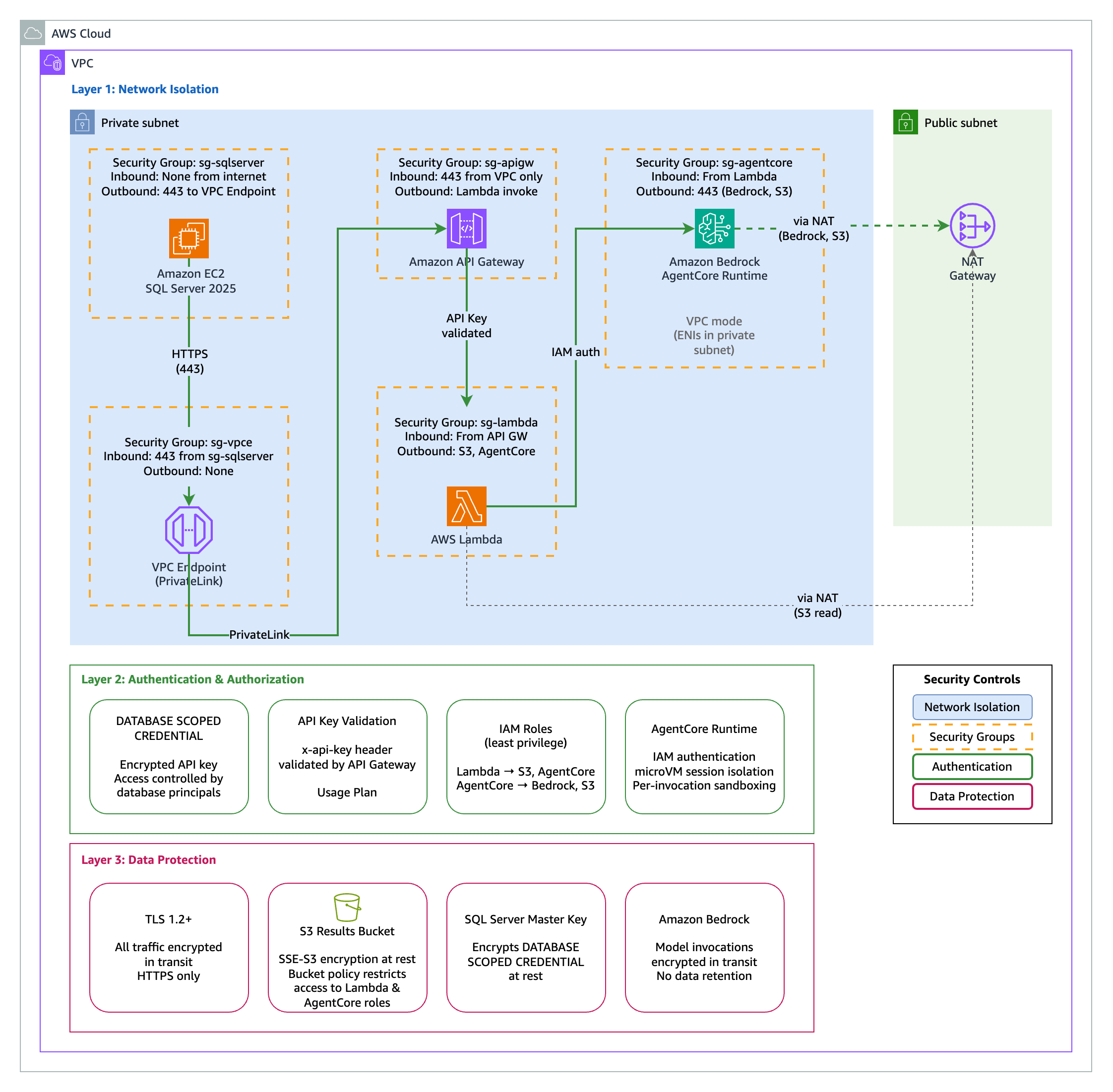
Figure 2. Security architecture using a private API Gateway and Bedrock AgentCore within a VPC.
Key security controls:
- Private API Gateway: Accessible only via VPC endpoint
- API key authentication: Stored securely using DATABASE SCOPED CREDENTIAL
- VPC isolation: SQL Server and API Gateway in private subnets
- NAT Gateway: Controlled outbound access for the agent
Securing the API key with DATABASE SCOPED CREDENTIAL
This solution stores the API key using DATABASE SCOPED CREDENTIAL rather than hardcoding it in stored procedures. The credential name must match the URL being called—this is a security feature of sp_invoke_external_rest_endpoint that prevents credentials from being used with unintended endpoints. You will run this as part of the deployment steps in 02-create-credentials.sql:
-- Create master key (required for credential encryption)
CREATE MASTER KEY ENCRYPTION BY PASSWORD = '<strong-password>';

-- Create credentials for each endpoint (name must match URL)
CREATE DATABASE SCOPED CREDENTIAL [https://<api-id>.execute-api.<region>.amazonaws.com/prod/submit]
WITH IDENTITY = 'HTTPEndpointHeaders',
SECRET = '{"x-api-key":"<YOUR_API_KEY>"}';

CREATE DATABASE SCOPED CREDENTIAL [https://<api-id>.execute-api.<region>.amazonaws.com/prod/results]
WITH IDENTITY = 'HTTPEndpointHeaders',
SECRET = '{"x-api-key":"<YOUR_API_KEY>"}';
The credential encrypts the API key at rest and restricts access to authorized database principals.
AI Deep Research Agent
The AI agent uses a multi-agent workflow built with the Strands Agents SDK and deployed to Amazon Bedrock AgentCore Runtime. The agent is powered by Amazon Nova 2 Lite, a fast, cost-effective reasoning model optimized for agentic workflows. Nova 2 Lite demonstrates reliable function calling for task automation and strong performance in multi-step reasoning—ideal for orchestrating the research workflow across multiple data sources.
Three specialized agents collaborate to produce comprehensive research reports:
- Order Researcher – Investigates order details, shipment tracking, and delivery status
- Inventory Researcher – Analyzes product availability across warehouses and pricing history
- Report Writer – Synthesizes findings into an actionable report with recommendations
The following snippet shows the core structure of this multi-agent setup, including how tools are defined, agents are configured, and the entry point is registered with Amazon Bedrock AgentCore Runtime:
from strands import Agent, tool
from strands.models.bedrock import BedrockModel
from bedrock_agentcore.runtime import BedrockAgentCoreApp
app = BedrockAgentCoreApp()
model = BedrockModel(model_id="global.amazon.nova-2-lite-v1:0", temperature=0.3)
# Define tools for ERP data access
@tool
def check_inventory(sku: str) -> str:
    """Check inventory levels across all warehouses."""
    # Query ERP inventory data...

# Create specialized agents
order_researcher = Agent(model=model, tools=[get_order_details, track_shipment])
inventory_researcher = Agent(model=model, tools=[check_inventory, lookup_product])
report_writer = Agent(model=model, tools=[])

@app.entrypoint
async def agent_invocation(payload: dict):
    # Run multi-agent workflow and store results in S3
    ...
The complete agent implementation is available in cdk/agent/.
Infrastructure
The AWS CDK stack deploys the agent to AgentCore Runtime along with the supporting infrastructure:
const agentRuntime = new AgentCoreRuntime(this, 'DeepResearchAgent', {
  agentName: 'erp-deep-research-agent',
  handler: 'main.agent_invocation',
  runtime: Runtime.PYTHON_3_12,
  code: Code.fromAsset('agent'),
  environment: { RESULTS_BUCKET: resultsBucket.bucketName }
});
The CDK stack includes VPC with private subnets, VPC endpoint for API Gateway, private API Gateway with API key, Lambda handler, S3 bucket for results, and the AgentCore Runtime agent. See the cdk/ folder for the complete infrastructure code.
Prerequisites
To follow along with this walkthrough, you need:
- An AWS account
- AWS CLI installed and configured
- AWS CDK v2 installed
- Python 3.12 or later
- Node.js 18 or later (required by AWS CDK)
- uv installed (required for packaging the agent)
- SQL Server 2025 installed on an Amazon EC2 instance with
sp_invoke_external_rest_endpointenabled
Implementation walkthrough
Step 1: Deploy the AWS infrastructure
Clone the repository and deploy the CDK stack:
git clone https://github.com/aws-samples/sample-sql-server-ai-agents-with-amazon-bedrock-agentcore.git
cd sample-sql-server-ai-agents-with-amazon-bedrock-agentcore/cdk
npm install
npm run package-agent
npx cdk deploy
The npm run package-agent command bundles the Python agent dependencies for AgentCore Runtime. The cdk deploy command provisions the VPC, private API Gateway, Lambda function, S3 bucket, and AgentCore Runtime agent. Note the API Gateway ID and API key from the CDK outputs — you will need them for the SQL Server configuration.
Step 2: Configure SQL Server
Connect to your SQL Server 2025 instance and run the SQL scripts from the sql/ folder in order.
Run 01-enable-rest-endpoint.sql to enable the REST endpoint feature. Then run 02-create-credentials.sql to store your API key securely — replace the placeholders with your API Gateway ID, region, and API key from the CDK outputs.
Step 3: Create the CRM database
Run 03-crm-schema.sql to create the CRM database, the CustomerCommunications and APICallLog tables, and insert sample data.
Step 4: Create stored procedures and trigger
Run 04-stored-procedures.sql to create the stored procedures for task submission and results retrieval — replace the API Gateway placeholders as you did in Step 2. The trigger fires after INSERT and calls a stored procedure that invokes sp_invoke_external_rest_endpoint. The following snippet shows the core API call:
-- Core API call using stored credential (credential name matches URL)
EXEC @returnValue = sp_invoke_external_rest_endpoint
     @url = @url,
     @payload = @payload,
     @method = 'POST',
     @credential = [https://<api-id>.execute-api.<region>.amazonaws.com/prod/submit],
     @timeout = 30,
     @response = @response OUTPUT;
Then run 05-triggers.sql to create the database trigger.
Step 5: Set up the polling job
Run 06-polling-job.sql and 07-agent-job.sql to create a SQL Server Agent job that polls for completed results every 10 minutes. The job queries the APICallLog table for records with “Submitted” status and calls the results retrieval API for each one.
Testing the solution
With the infrastructure deployed and all SQL scripts executed, insert a test record to trigger the AI deep research:
INSERT INTO CustomerCommunications
    (CustomerId, CustomerSegment, CustomerRegion, CustomerTier, CommunicationText)
VALUES
    (1001, 'Enterprise', 'West', 'Gold',
'Subject: URGENT - Where is my order?

Hi Support Team,

I placed order #ORD-2025-78432 on January 15th for 50 units of SKU-WH2000...
We have a major client presentation on February 10th and absolutely need these headsets.

Can you please check:
1. Where is my shipment right now?
2. What is the current stock level - can you ship from another warehouse?
3. Is expedited shipping possible at this point?

[...see 03-crm-schema.sql for complete sample data...]');
After the agent completes processing, query the results. If you configured the SQL Server Agent job from 07-agent-job.sql, it automatically polls for completed results every 10 minutes. You can also run the RetrieveAIDeepResearchResults stored procedure manually to retrieve results immediately.
SELECT CommunicationId, AdditionalNotes
FROM CustomerCommunications
WHERE CommunicationId = 1;
Sample output (redacted for brevity):
CommunicationId  AdditionalNotes
---------------  ---------------------------------------------------------------
1                ## Internal Deep Research Report

                 ### Executive Summary
                 This report details a critical situation involving Gold-tier
                 enterprise customer Mateo Jackson (AnyCompany Industries,
                 Customer ID: 1001) regarding order ORD-2025-78432...

                 ### Order and Shipment Analysis
                 - **Current Location:** Distribution Center - Chicago IL
                 - **Estimated Delivery:** February 5, 2025

                 ### Inventory and Product Analysis
                 | Warehouse    | Quantity Available |
                 |--------------|-------------------|
                 | Seattle-WH01 | 245 units         |
                 | Austin-WH02  | 180 units         |
                 | Chicago-WH03 | 92 units          |

                 ### Recommended Actions
                 1. Contact FedEx for real-time updates
                 2. Develop contingency shipping plan from alternate warehouse
                 3. Customer communication with Gold-tier priority handling

                 **Urgency Rating: High**
The complete sample data and testing scripts are available in the GitHub repository.
Best practices
When adapting this solution for production workloads, consider the following:
- Error handling: Implement robust error handling in stored procedures and log all API responses
- Timeout configuration: Set appropriate timeouts based on expected API response times
- Retry logic: Consider implementing retry logic for transient failures
- Polling strategy: Schedule results retrieval every 5-10 minutes for pending jobs using SQL Server Agent
- Monitoring: Use Amazon CloudWatch to monitor API Gateway and Lambda invocations
- Credential rotation: Establish a process for rotating API keys stored in DATABASE SCOPED CREDENTIAL
- S3 lifecycle: Configure S3 lifecycle policies to clean up old result files
- Trigger performance: The trigger in this walkthrough calls
sp_invoke_external_rest_endpointsynchronously, which holds the INSERT transaction open until the API responds. In production, decouple this by having the trigger write to a Service Broker queue or a staging table, and process the API calls asynchronously using activation procedures or a SQL Server Agent job.
Clean up
To avoid ongoing charges for the resources deployed in this walkthrough:
- Run
cdk destroyfrom thecdk/directory of the cloned repository to remove the API Gateway, Lambda function, AgentCore Runtime, S3 buckets, VPC resources, and associated IAM roles - Terminate the SQL Server EC2 instance if it was created for this walkthrough
Conclusion
SQL Server 2025’s sp_invoke_external_rest_endpoint enables powerful new integration patterns that reduce time-to-market for AI-powered applications. By invoking AI agents directly from database triggers, you can add AI capabilities to existing applications without modifying application code.
This approach delivers:
- Faster time-to-market: No application code changes required
- Lower risk: Database-level integration minimizes testing scope
- Higher ROI: Leverage existing database investments
To get started, clone the aws-samples/sample-sql-server-ai-agents-with-amazon-bedrock-agentcore repository and follow the steps in this walkthrough. For more information, explore the Amazon Bedrock AgentCore documentation and SQL Server 2025 documentation.