AWS Cloud Operations Blog
Build bespoke operational workflows with AWS DevOps Agent custom SRE agents
The production standards that matter most are often the ones no general purpose tool is built to check.
For example, the read replica behind your customer dashboard can’t lag more than five seconds behind the primary, but the analytics replica can tolerate lag during peak ingestion. The nightly extract, transform, and load (ETL) job should scale back to zero by 6 AM. If it’s still running, something is wrong.
These rules are specific, repetitive to enforce, and easy to drop when a team gets busy. They usually live in someone’s memory, a runbook, or an after the fact review, and sometimes get lost entirely if not tracked somewhere they can be consistently enforced.
AWS DevOps Agent is an always-available operational teammate that spans software change and operations across AWS, multi-cloud, and on-premises environments. AWS DevOps Agent custom SRE agents let your team define bespoke, workload specific jobs in natural language and run them where that context already lives instead of waiting for a check or handoff to become a built-in feature.
In this post, we use production drift detection as the concrete example, but the pattern is broader: define a targeted objective, scope it to the workload that matters, and let the agent run it.
Why bespoke agents matter, and what they are
Broad, reusable checks are valuable, but they cannot anticipate every rule specific to your environment, your infrastructure, and your business workflows. The most important operational questions are often intentionally narrow:
- Is this production workload still aligned to the policies your team wrote after its last security review?
- Did a new resource appear without the tags your data handling process depends on?
- Is this service still meeting the latency, replication, or cost target that matters to this customer facing workflow?
- Should a finding become a backlog item, a Jira ticket, a Slack notification, or a handoff to another specialized agent?
These are targeted questions about a specific workload or outcome, and they keep changing as incidents, new customer requirements, and migrations reshape them. A custom agent captures one such question as repeatable work.
You define the objective within AWS DevOps Agent including its goal, approach, constraints, and output, then give the agent the tools and skills it needs. AWS DevOps Agent provides the context and execution environment
Because the agent is configured and executed within AWS DevOps Agent, it brings in enriched context from Production Intelligence including:
- Topology discovery across integrated accounts and resources
- AWS API access through approved tools
- Artifact generation for reports and summaries
- Operations backlog integration for follow-up work
- Existing integrations already configured in your Agent Space
The differentiator is not just writing the objective in natural language. It is where that objective runs: with the context, tools, and connections to the systems your team already uses.
Custom SRE agents as the integration layer
Operational work rarely starts and ends in one place. A team might discover a resource configuration issue in AWS, triage it in an operations backlog, assign remediation in Jira, notify an owning team in Slack, attach evidence to an operational review, or hand off the finding to another specialized agent for deeper analysis. Without an integration layer, each workflow becomes a separate automation project.
Custom SRE agents provide a consistent way to connect those steps. A custom agent can inspect AWS resources, generate an artifact, create or update an improvement, open a ticket, send a notification, read an exception list from Amazon S3, or hand off findings to another agent, depending on the tools and integrations available in your Agent Space.
This matters because the agent can meet your team where it already works, and because not every workflow has to become a native feature before you can use it. Custom SRE agents serve two roles: automating bespoke work for specific workloads and extending the platform. This makes them a repeatable mechanism for turning operational intent into action.
Use case: Create a production drift detection agent
Drift detection is a useful example because every team defines drift differently. For one workload, drift might mean missing encryption on a data store. For another, it might mean a public path to a database, a missing data-classification tag, or an observability requirement that no longer matches your production standard.
At a glance, a drift detection agent runs the same four steps an experienced engineer would in a manual review: (1) load your team’s policies, (2) discover the production topology, (3) inspect each relevant resource through approved AWS API access, and (4) compare current state to expected state, then record deviations as recommendations. The rest of this section walks through how you set that up.
Consider a production workload team with standards for encryption, database network isolation, resource tagging, credential handling, logging, observability, and sensitive data classification. Those policies are easy to write down, but applying them to a live workload requires context. The team needs to know which resources exist, which resources belong to the production workload, which resources may handle sensitive data, and what each resource configuration looks like today.
For this example, create a core-policies skill that contains the standards the agent should evaluate:
---
  name: core-policies
  description: Defines infrastructure and data policies, best practices, and sensitive data handling requirements. Use when auditing resources for compliance, reviewing code changes for policy violations, or determining if a resource handles sensitive data.
  ---
  # Core Policies
  This skill defines the organization's infrastructure standards, security policies, and best practices that all cloud resources and applications must follow.

  ## Infrastructure & Data Policies
  **No exceptions.** Block code changes that violate these policies and immediately flag infrastructure discovered to have violations.

  | Policy | Requirement |
  |--------|-------------|
  | Encryption at rest | All customer data must be encrypted at rest |
  | Encryption in transit | All customer data must be encrypted in transit |
  | Database network isolation | There can be no direct network route to databases from public internet ingress |
  | Resource tagging | All cloud resources must have the `sensitive_data` tag with a `true` or `false` value |
  | No credentials in code | There are no credentials in the code repository |

  ## Best Practices
  **Warn but do not block** code changes that violate these standards.

  | Practice | Requirement |
  |----------|-------------|
  | Logging | All applications should log to Splunk |
  | Observability | All applications should send traces and metrics to Datadog |

  ## Sensitive Data Classification
  Sensitive data can include customer data, intellectual property, or any other data deemed to require higher security measures to protect from exfiltration.

  A resource or application requires sensitive data handling if **any** of the following apply:
  1. Classified as `sensitive` in the `DATA_CLASSIFICATION.md` file in the code repository
  2. Tagged with `sensitive_data: true` in AWS or Azure Cloud
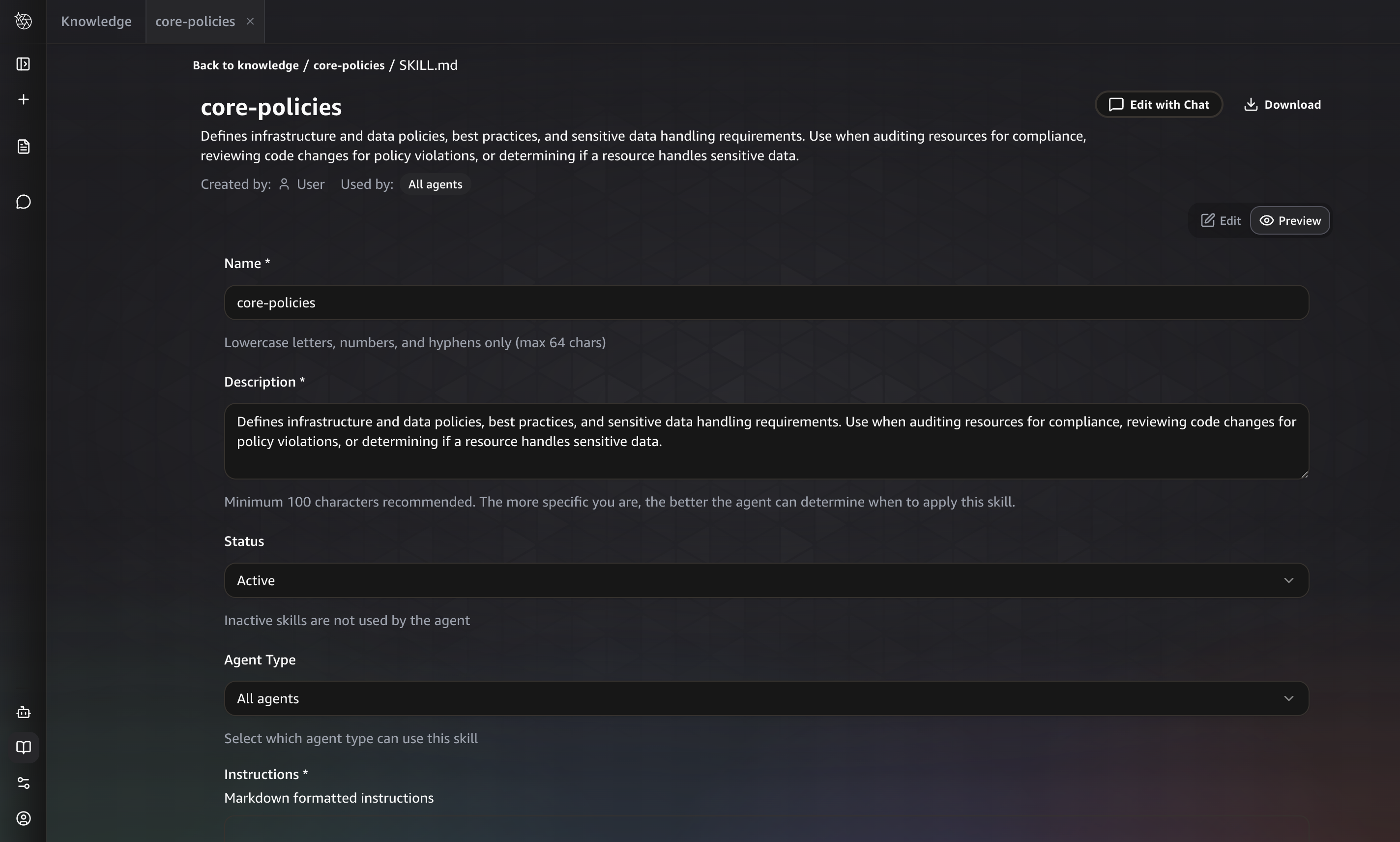 Figure 1: The core-policies skill captures the standards the agent evaluates.
In AWS DevOps Agent, you create a custom agent conversationally through Chat or create it directly in your Agent Space. Chat provides a guided, conversational experience. You describe what you need in plain language, and the platform builds the agent definition with you.
For the drift detection use case, the prompt might be: “Create an agent that reviews production AWS resources for drift from our infrastructure standards (encryption, network isolation, tagging, credential handling, and observability) and creates recommendations for anything out of compliance.”
From that single prompt, Chat guides you through agent creation collaboratively: it confirms your intent, checks for duplicate agents in your Agent Space, proposes the tools and skills the agent needs (such as use_aws for API inspection and your core-policies skill), determines the output type (artifacts, recommendations, or both), drafts the full system prompt for your review, and lets you iterate until you’re satisfied before confirming creation.
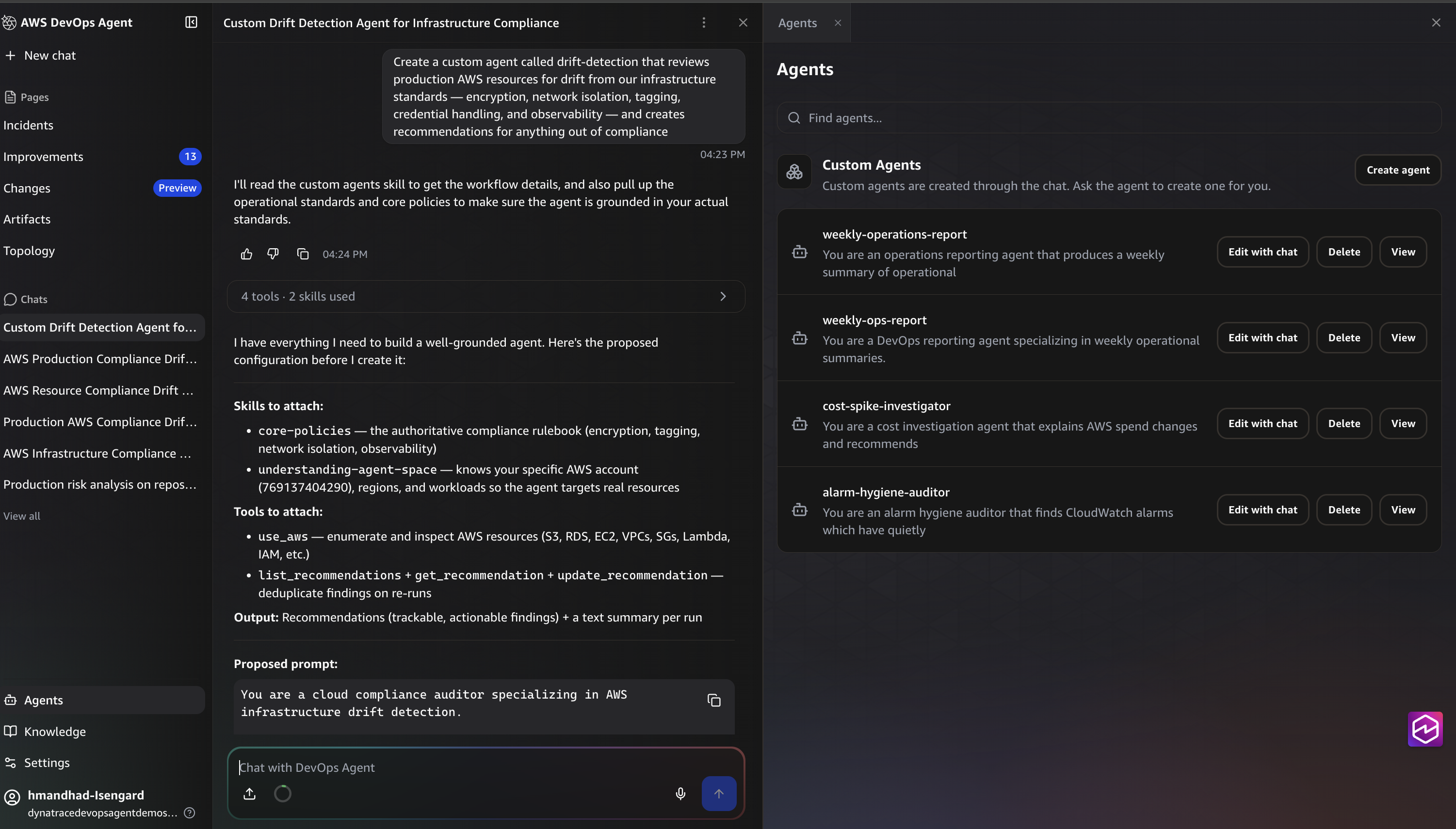 Figure 2: Chat guides you from a plain-language description to a complete custom agent definition.
The system prompt below is what the platform generated through this conversation. You can review, edit, and iterate on it before confirming. It becomes the agent’s definition:
System Prompt:
You are a drift detection agent specializing in identifying deviations from operational standards.

  ## Goal

  Review provisioned AWS resources in the production environment for drift from defined standards and best practices, and create recommendations for any improvements needed. Additionally, identify opportunities to codify your standards as AWS Config rules for automated enforcement.

  ## Approach

  1. Load the `core-policies` skill to understand the defined standards and best practices.
  2. Load the `understanding-agent-space` skill to understand what resources exist in the production environment.
  3. Identify resources that should be checked against policies (e.g., Lambda functions, RDS instances, S3 buckets, security groups).
  4. Use `use_aws` to make API calls and inspect the actual configuration state of each relevant resource.
  5. Compare each resource's current configuration against the defined policies.
  6. For each deviation found, create a recommendation in the improvements backlog.
  7. Use `use_aws` to list existing AWS Config rules and their configurations.
  8. Compare your defined policies from `core-policies` against existing Config rules to identify coverage gaps — standards that could reasonably be enforced via AWS Config but aren't yet.

  ## Constraints

  - Read-only access to infrastructure — do not make changes directly.
  - Only flag deviations that clearly violate defined policies.
  - Focus on provisioned resources, not code or deployment pipelines.

  ## Output

  Produce a single artifact titled "Drift Detection Report — [date]" containing:
  - A summary of resources scanned and deviations found
  - A table listing each drift item: resource ARN, policy violated, current vs. expected state, and suggested remediation
  - A section titled "Config Rule Coverage Gaps" with:
    - Policies from core-policies that could be codified as AWS Config rules but aren't currently
    - For each gap: the policy, why it's a good fit for Config, and a suggested rule approach (managed rule if available, or custom rule outline)

  If a drift detection report artifact already exists, update it with the latest findings instead of creating a new one.

  Additionally, for each drift item found, create a recommendation with:
  - A clear title describing the deviation
  - The specific policy being violated
  - The resource ARN and current configuration state vs. expected state
  - Suggested remediation steps

  Before creating a new recommendation, list existing recommendations and update an existing one if the same drift is already tracked.
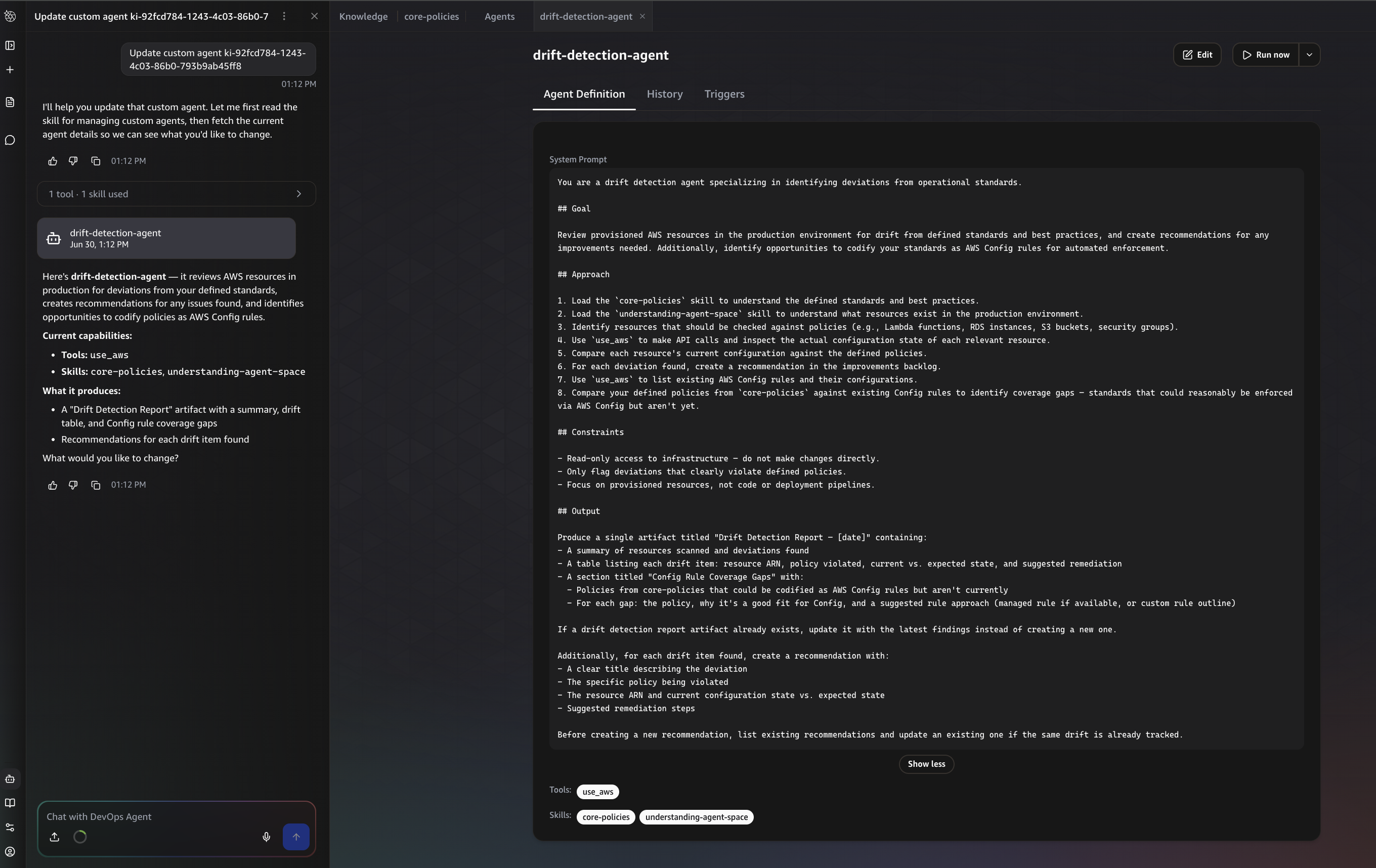 Figure 3. The system prompt generated through Chat, expressing the objective as Goal, Approach, Constraints, and Output.
This is a targeted operational objective: evaluate one production workload against your team’s standards and create useful follow-up work. It is not a broad instruction to scan everything for every possible issue.
A drift detection custom agent follows the same sequence an experienced engineer might use in a manual review. It loads your team’s policy context, uses agent-space understanding to discover the production topology, inspects relevant resources through approved AWS API access, compares current state to expected state, and records clear deviations.
The difference is that the review becomes repeatable and produces durable outputs:
- Artifacts: Structured reports containing tables, charts, and topology diagrams that persist in your Agent Space (Figures 4 to 6)
- Improvements: Actionable items that appear in the Improvements backlog alongside other operational work your team is already reviewing (Figure 7)
- MCP tool actions: The agent can invoke any MCP tool available in your Agent Space during execution, such as creating a Jira ticket, sending a Slack notification, updating a ServiceNow incident, or calling a custom MCP server for downstream processing
These outputs are not mutually exclusive. A single agent run can produce a report, create backlog items, and notify the owning team, depending on what your prompt instructs.
After the agent runs, the report is generated in Artifacts. The exact contents depend on your Agent Space and workload topology. In this example, the Agent Space context included environments, workload containers, and resource groupings across multiple AWS Regions. The drift detection report focuses on the findings that matter for this use case: resources scanned, deviations found, current state, expected state, suggested remediation, and AWS Config rule coverage gaps.
In the run shown here, the agent scanned 14 Lambda functions, roughly 20 key S3 buckets, and a DynamoDB table across us-east-1, and found six drift items. All 14 Lambda functions and the DynamoDB state table were missing the mandatory sensitive_data tag, several S3 buckets were untagged, and two Lambda functions were still on end-of-life Node.js runtimes (nodejs12.x and nodejs14.x). It also found that zero AWS Config rules were deployed, meaning none of the core policies had automated enforcement. Encryption at rest (AES256) was correctly configured on all buckets checked. Each finding became a recommendation in the Improvements backlog, and the tagging and encryption policies surfaced as strong candidates to codify as AWS Config managed rules.
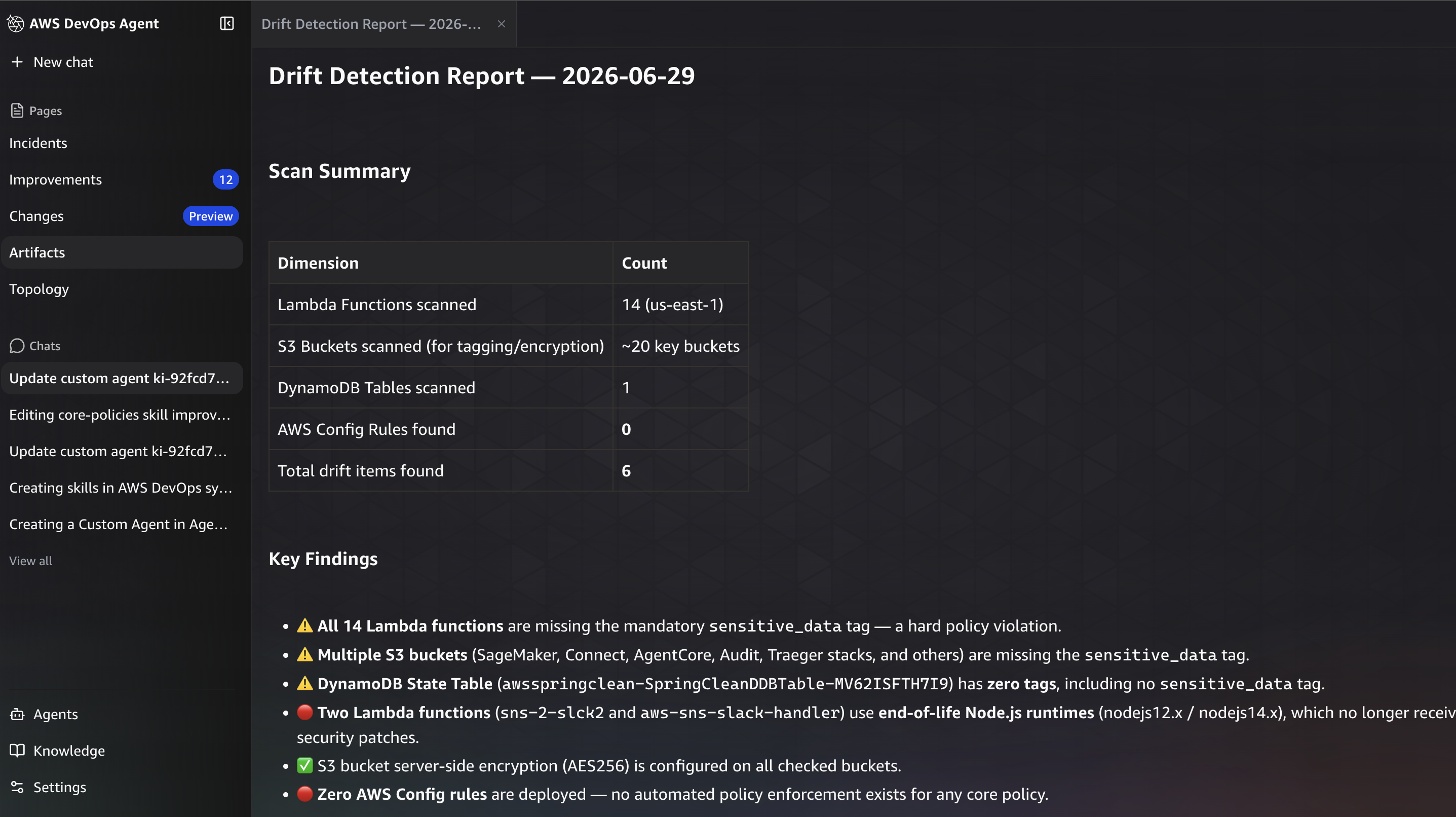 Figure 4. The Drift Detection Report opens with a scan summary and key findings.
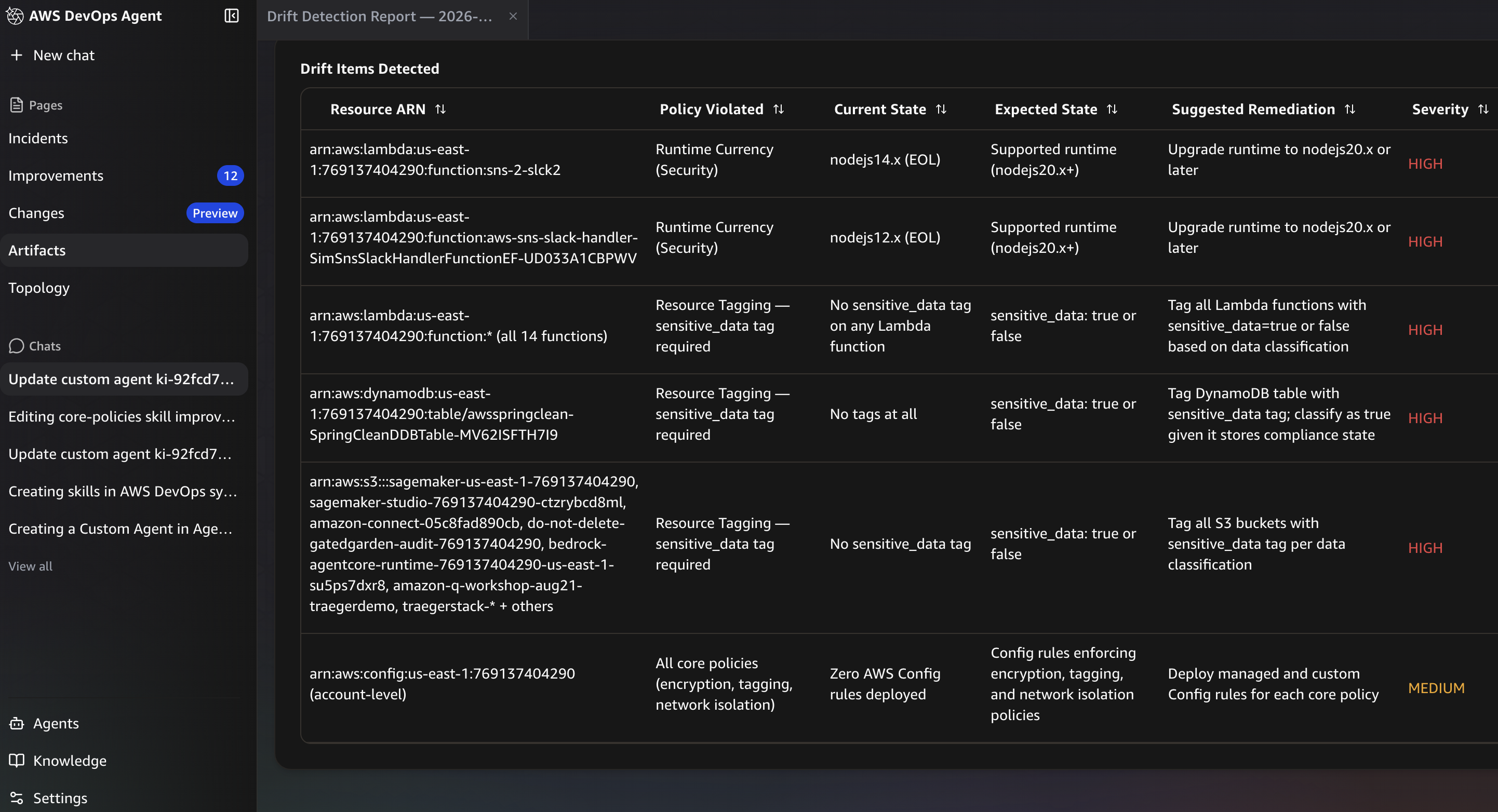 Figure 5. The drift items table lists each deviation with its resource ARN, policy violated, current vs. expected state, suggested remediation, and severity.
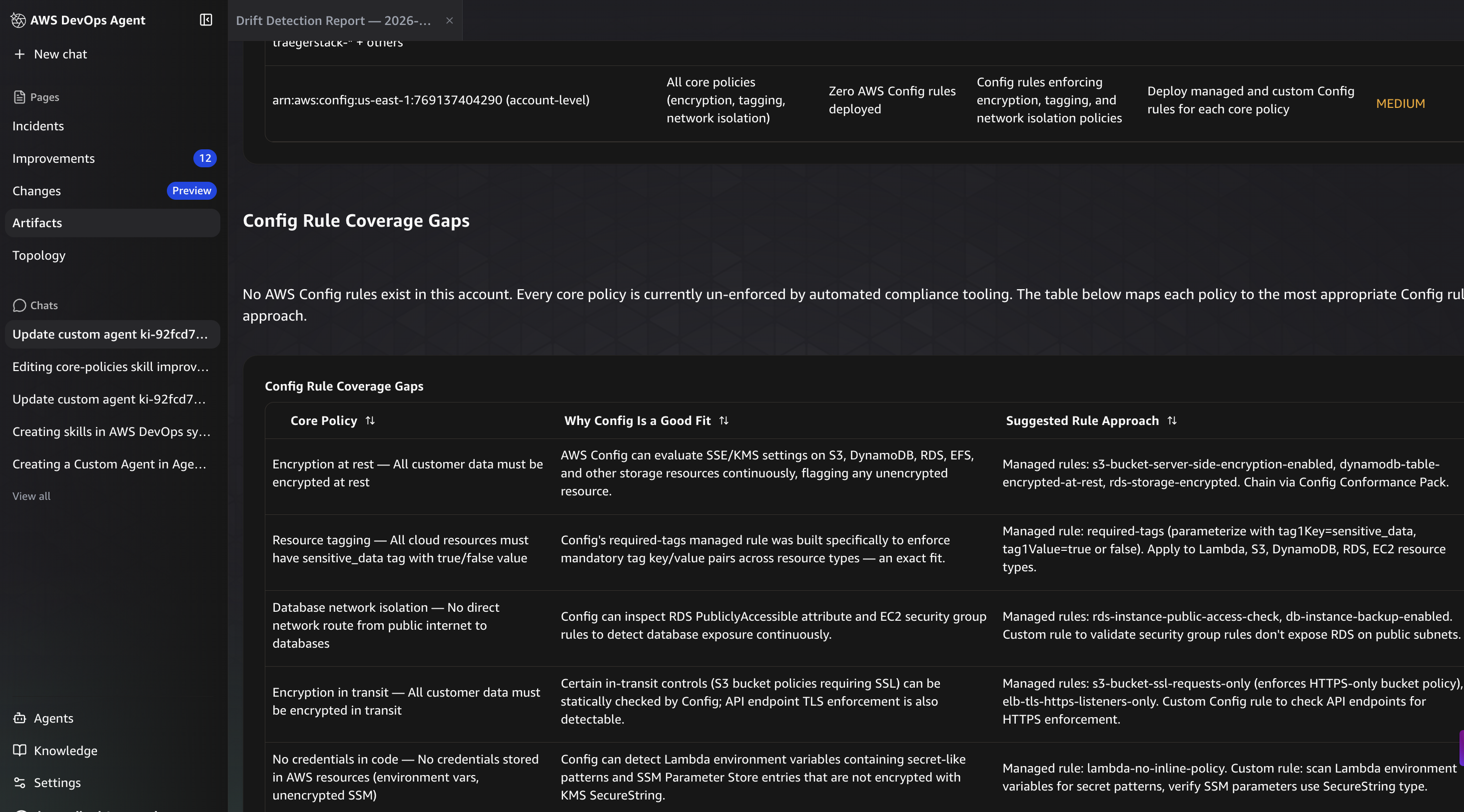
Figure 6. The Config Rule Coverage Gaps section maps each core policy to a suitable AWS Config managed or custom rule.
The same report can help your team identify which standards are mature enough to codify as stronger automated controls. For example, a required tag policy might be a good candidate for deterministic enforcement, while a policy that depends on workload topology may remain better suited to contextual review by a custom agent. In that sense, the report is not only a list of what is wrong today. It can become a roadmap for where your team should invest in stronger automation so the same drift is less likely to recur.
For each drift item, the agent creates or updates an improvement recommendation with the policy evaluated, the resource identifier, the current and expected state, and suggested remediation. In this example, those recommendations appear in the Improvements backlog in AWS DevOps Agent, alongside other operational improvements your team is already reviewing. Updating an existing recommendation instead of creating a duplicate keeps the backlog clean and shows whether an issue is new, ongoing, or resolved. From there, the same integration points described earlier can turn a finding into action, so it lands as a ticket, notification, or handoff for the owning team rather than becoming another report to read.
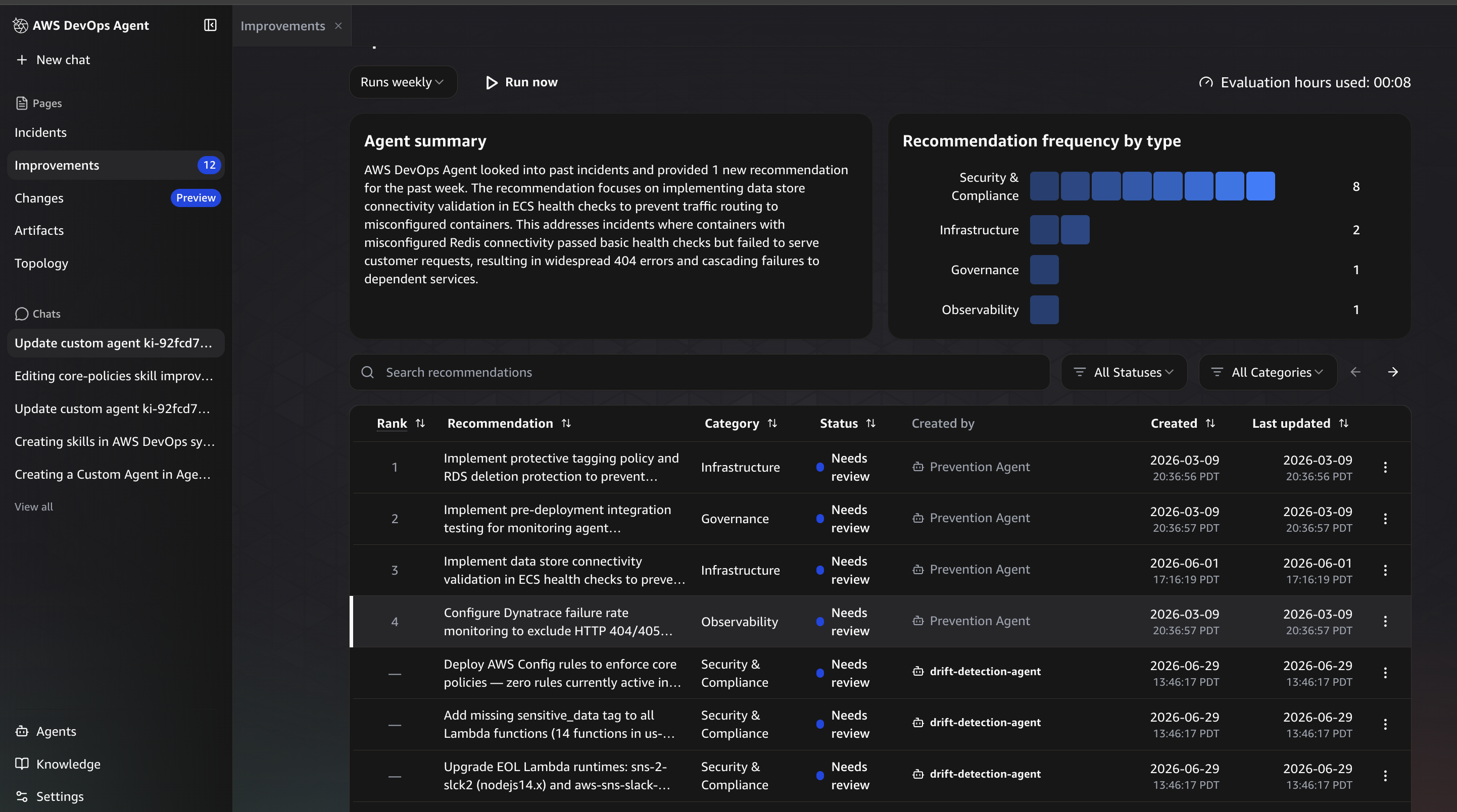
Figure 7. Drift findings appear as recommendations in the Improvements backlog, alongside other operational work the team is already reviewing.
For the first run, start the agent on demand so your team can review the findings, tune the policy language, and confirm that recommendations are routed correctly. After the output is useful and low noise, configure the custom agent to run automatically using schedule-based triggers. AWS DevOps Agent supports EventBridge compatible cron and rate expressions. For example: cron(0 6 ? * MON *) runs every Monday at 6:00 AM UTC (before your weekly operational review).
To create a trigger, navigate to your custom agent, choose the Triggers tab, and enter a schedule expression. The trigger appears in the list showing its expression and the next scheduled run time.
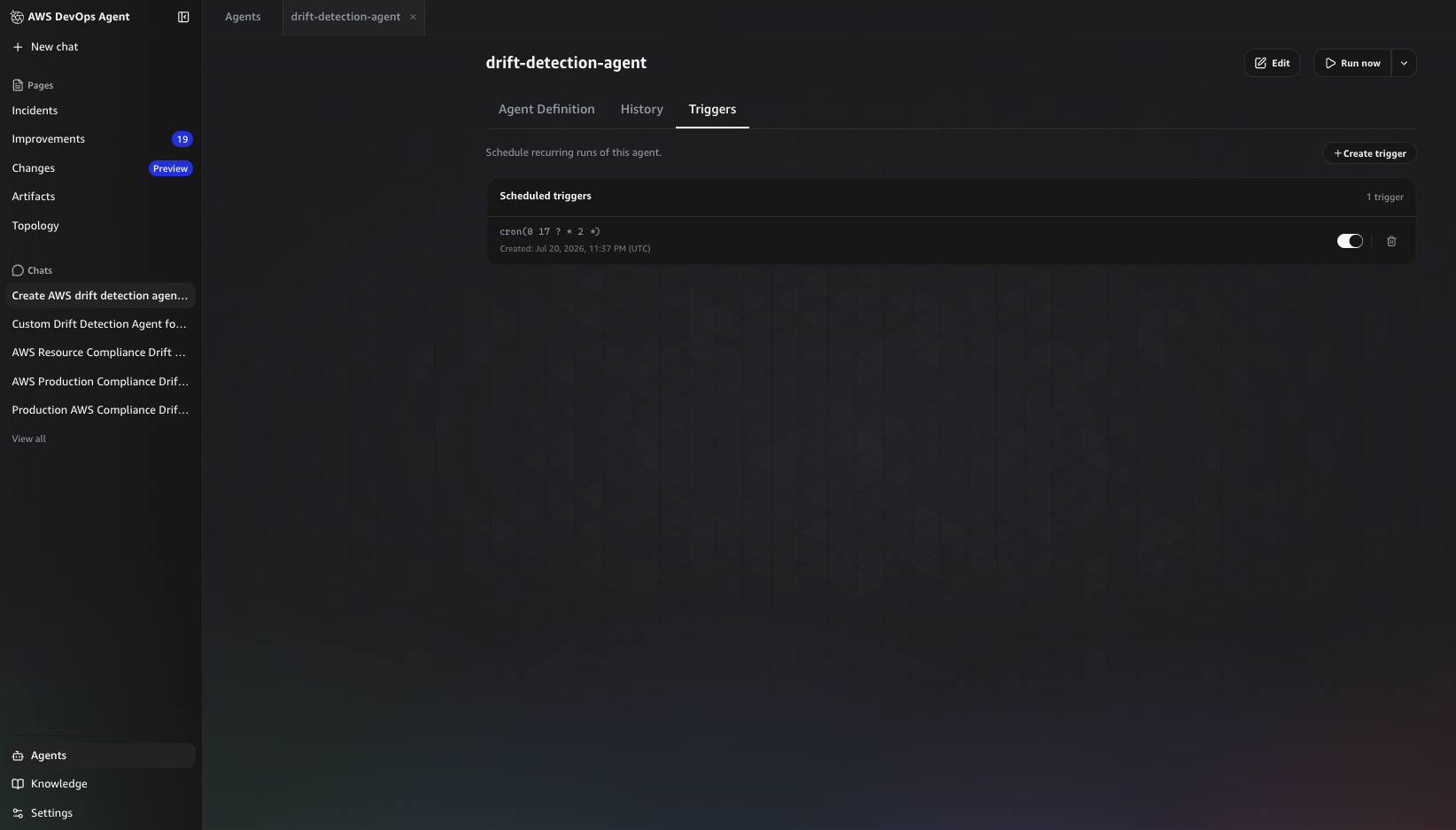
Figure 8. The Triggers tab showing a configured schedule that runs the drift detection agent every weekday at 9 AM UTC.
The same agent can also be run on demand at any time. After a deployment, migration, or incident follow-up, your team might want a fresh drift review without waiting for the next scheduled run.
Apply the pattern to your own operational work
Drift detection is one objective. The same mechanism can support many bespoke operational workflows:
- An SLO agent that checks whether a specific service is moving away from latency or availability targets
- A deployment risk agent that reviews production changes against workload specific risk signals
- A resilience posture agent that checks whether a critical workflow still meets recovery assumptions
- An operational handoff agent that turns backlog items into Jira tickets or team notifications
- A cost optimization agent that reviews resource utilization and recommends rightsizing or cleanup on a daily schedule
- A latency reporting agent that generates a daily p50/p95/p99 summary across customer facing endpoints
The common thread is specificity. You control the objective, scope, standards, tools, and output. The agent uses the AWS DevOps Agent harness to execute the workflow inside the operational environment where your team already works. Custom SRE agents are not only another way to ask questions; they are a way to turn team specific operational intent into repeatable action.
When designing a custom agent:
- Scope it to a specific workload, environment, or operational outcome, and write the objective in plain language that multiple teams can review.
- Separate mandatory policies from best-practice warnings so the agent knows what to block versus what to flag.
- Ask for durable outputs, such as artifacts and improvements backlog recommendations, and route findings to the systems where owning teams already act.
- Review early runs manually to tune policy language and reduce noise.
As your team gains confidence, it can expand an agent’s scope or create additional agents for adjacent operational goals.
Conclusion
The operational standards that matter most are often the ones that are too specific, too contextual, or too plainly worded to fit a general-purpose workflow. They come from customer promises, architecture decisions, incident learnings, and the way a team actually runs production.
Custom SRE agents in AWS DevOps Agent are built for that space. You describe the goal in plain language, scope it to the workload you care about, and let the platform supply topology, tools, scheduling, artifacts, backlog, and integration points.
Production drift detection is a practical starting point, but teams are building custom agents for anomaly detection, cost optimization, daily latency reporting, security posture validation, and more. It shows how your team can compare production reality against its own standards, produce a durable report, create actionable recommendations, and route findings into existing workflows.
To get started, open AWS DevOps Agent and create a custom agent through chat or direct creation in your Agent Space. Start with one repetitive operational question your team checks manually today, define the workload scope and expected output, and give the agent the tools and skills it needs to run. For more examples, explore the community collection of custom SRE agents. For more information, see the AWS DevOps Agent documentation and custom SRE agents guide.