AWS Cloud Operations Blog
Category: AWS Systems Manager

Manage your Oracle JDK licenses with AWS License Manager
You can use AWS License Manager to track Oracle Java/JDK usage on Amazon Elastic Compute Cloud (Amazon EC2) instances and on-premises servers. If you’re already running Amazon Corretto (Amazon’s distribution of the OpenJDK), then you can probably stop reading now. This blog explains how License Manager can track license usage of other applications in your […]

How to optimize assessment of cloud services
As my colleague Ilya Epshteyn introduced in his blog titled “How financial institutions can approve AWS services for highly confidential data,” common across the financial services industry is a formal assessment process for cloud services. These assessment processes vary in depth and breadth, striving to determine which cloud services will be best suited to fulfill […]

Setting up custom AWS Config rule that checks the OS CIS compliance
AWS announced that AWS Systems Manager’s Run Command now offers Chef InSpec audits through the AWS-RunInspecChecks document. This is a significant win for Systems Manager enthusiasts and other users who prefer an OS-based compliance check solution rather than using a whole new cloud service. This blog post is not about how to keep an OS […]
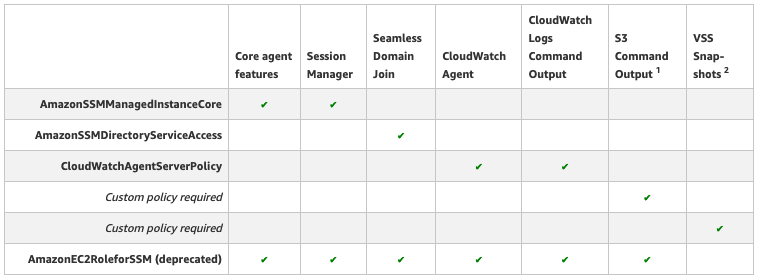
Applying managed instance policy best practices
Since AWS Systems Manager was launched, the service has continued to add new features for customers to use. Many features are enabled by granting your Amazon EC2 instances and on-premises servers access to Systems Manager using an AWS Identity and Access Management (IAM) role with the necessary permissions. To provide customers more flexible, fine-grained permission […]

Creating event-based notifications and remediation in AWS Service Catalog using AWS Config
AWS Service Catalog allows organizations to quickly let their users deploy approved IT services to organize, govern, and provision cloud resources on AWS. However, users launching multiple instances can cause issues because: Some instances are not always active. The lack of limits on the number of active instances can result in an organization’s costs going […]

Automate RDS Aurora Snapshots for disaster recovery
It is important to have a well-defined proactive disaster recovery strategy for efficient and uninterrupted flow of data across an organization. This applies to all components of your application architecture, including the database layer. While Amazon Aurora database clusters are fault-tolerant and highly available by design, for disaster recovery use cases, customers prefer to keep […]

New features of Run Command: Copy to new, rerun, and CloudWatch Metrics
In this blog post, I cover new features of AWS Systems Manger Run Command that make deploying and testing automation at scale easier. AWS Systems Manager is a great platform to simplify the task of managing infrastructure at scale. One of the key features of this platform is Run Command, which enables automation of common […]
Creating Packer images using AWS System Manager Automation
If you run AWS EC2 instances in AWS, then you are probably familiar with the concept of pre-baking Amazon Machine Images (AMIs). That is, preloading all needed software and configuration on an EC2 instance, then creating an image of that. The resulting image can then be used to launch new instances with all software and […]

How to take advantage of AWS Control Tower and CloudEndure to migrate workloads to AWS
June 22, 2021: This blog post describes CloudEndure Migration. AWS Application Migration Service, the next generation of CloudEndure Migration, is now the recommended service for lift-and-shift migrations to AWS. Most of the customers we work with want to migrate their existing workloads to an AWS environment. They prefer to follow documented AWS best practices, especially […]

Providing temporary instance permissions with AWS Systems Manager Automations
Instances might have to call certain API actions or access certain resources during an AWS Systems Manager Automation execution. What if you don’t want to apply the additional permissions to the instance’s existing instance profile? In this post, I show you how to provide temporary permissions to instances when executing an Automation within the document […]